199 Development Workflow and Tooling
199.1 Learning Objectives
By the end of this chapter, you will be able to:
- Configure Development Environments: Set up IDEs, compilers, and debugging tools for IoT development
- Apply Version Control Best Practices: Use Git workflows appropriate for embedded development teams
- Implement CI/CD Pipelines: Automate build, test, and deployment processes for IoT firmware
- Debug Embedded Systems: Use JTAG debugging and other techniques for hard-to-reproduce issues
- Manage OTA Updates: Deploy firmware updates safely to production IoT fleets
- Test IoT Applications: Implement unit testing and simulation for IoT software
199.2 Prerequisites
Before diving into this chapter, you should be familiar with:
- Hardware Platform Selection: Understanding the hardware platforms you’re developing for helps choose appropriate tooling
- Serial Communication Protocols: Knowledge of I2C, SPI, and UART is essential for debugging communication issues
NoteCross-Hub Connections
Enhance your learning by exploring related resources:
- Simulations Hub: Try interactive tools for network simulation and protocol testing
- Videos Hub: Watch development environment setup tutorials and debugging guides
- Hands-On Labs Hub: Practice firmware development with Wokwi ESP32 simulations
TipFor Beginners: IoT Development Workflow
Building IoT software is like building a house - you need the right tools, a good plan, and ways to check your work.
Everyday Analogy: Think of IoT development like cooking: - IDE (Development Environment) = Your kitchen with all tools organized - Version Control (Git) = Recipe book tracking every change you make - CI/CD Pipeline = Kitchen timer and checklist ensuring consistent results - OTA Updates = Delivering meals to customers without them coming to your kitchen
| Term | Simple Explanation |
|---|---|
| IDE | Integrated Development Environment - a program where you write, test, and debug code (like VS Code or Arduino IDE) |
| Git | Version control system that tracks every change to your code, like undo history for your entire project |
| CI/CD | Continuous Integration/Continuous Deployment - automatically tests and deploys your code |
| JTAG | Hardware debugging interface that lets you pause code and inspect what’s happening inside the chip |
| OTA | Over-The-Air updates - sending new firmware to devices remotely without physical access |
Why This Matters for IoT: Your smart light bulb needs reliable firmware. Professional tools ensure your code works correctly, can be debugged when problems occur, and can be updated after deployment without sending a technician to every home.
CautionPitfall: Device Inventory Tracked Only in Spreadsheets or Local Databases
The Mistake: Teams track deployed IoT devices in Excel spreadsheets, local SQLite databases, or wiki pages that quickly become outdated. When a security vulnerability requires identifying all devices running firmware v2.3.x, nobody knows the current state of the 5,000-device fleet because the inventory was last updated 6 months ago.
Why It Happens: Inventory tracking seems like administrative overhead during early deployments. The first 50 devices fit nicely in a spreadsheet. As the fleet grows, manual updates become tedious and are skipped. Field technicians install devices without logging them, devices are moved or replaced without documentation, and the inventory diverges from reality.
The Fix: Implement self-reporting device inventory from day one. Each device must report its identity (serial number, MAC address, hardware revision), installed firmware version, and location metadata on every boot and every 24 hours thereafter. Use cloud-native device registry (AWS IoT Device Registry, Azure IoT Hub Device Twin, or open-source solutions like ThingsBoard). Enforce that devices cannot connect without valid registry entries. Query inventory programmatically: aws iot search-index --query-string "attributes.firmwareVersion:2.3.*" returns all affected devices in seconds. Add QR code scanning for field deployment that auto-registers devices with GPS coordinates. Inventory must be the authoritative source queried by all other systems (OTA, monitoring, billing).
CautionPitfall: No Unique Hardware Identifier Burned at Manufacturing
The Mistake: Devices ship with only software-assigned identifiers (random UUIDs generated at first boot) or MAC addresses as primary identifiers. When a device needs factory reset or reflash, it gets a new identity, breaking fleet tracking, historical data association, and license/warranty records.
Why It Happens: Hardware provisioning at manufacturing adds cost and complexity. Developers assume “each device has a unique MAC address anyway” without realizing that: (1) MAC addresses can be cloned or spoofed; (2) some modules allow MAC changes; (3) replacing a Wi-Fi module changes the MAC but the device is still the same unit; (4) cellular SIM swaps change IMEI associations.
The Fix: Burn a permanent, immutable device identifier during manufacturing that survives all software changes. Options include: (1) Use MCU’s factory-programmed unique ID (ESP32 has 6-byte eFuse ID, STM32 has 96-bit UID at address 0x1FFF7A10); (2) Provision unique serial number in write-once OTP (one-time programmable) memory; (3) Use secure element (ATECC608A, OPTIGA Trust) with factory-provisioned identity. Format: {manufacturer_code}-{product_sku}-{year_week}-{sequence} (e.g., ACME-SENSOR01-2602-00042). Store this ID in device shadow/twin, print on device label, and use as foreign key linking: device registry, telemetry database, OTA history, support tickets, and warranty records. Never use this ID as a security credential - it’s for tracking, not authentication.
NoteKey Takeaway
In one sentence: Professional IoT development requires proper tooling - IDE with debugging, Git for version control, CI/CD for automated testing, and OTA for safe fleet updates.
Remember this: A bug in firmware deployed to 10,000 devices without OTA rollback capability could cost $500,000 in technician visits vs. $50 in cloud bandwidth for a remote fix.
199.3 Development Environments
199.4 Version Control and Build Systems
199.5 OTA Updates and Fleet Management
199.6 Python Implementations
199.6.1 Implementation 1: IoT Gateway Manager with Edge-Fog-Cloud Orchestration
Key Features: 1. Edge-Fog-Cloud Orchestration: Complete data flow management across all tiers 2. Intelligent Filtering: Edge-level outlier detection and alarm handling 3. Bandwidth Optimization: Priority-based batching reduces cloud traffic by up to 90% 4. Protocol Translation: Fog nodes translate between edge and cloud protocols 5. Real-time Analytics: Cloud platform provides trend analysis and insights
Example Output:
=== IoT Gateway Manager Simulation ===

--- Reading 1 ---
Sensor: sensor_node_1_temp, Type: temperature, Value: 22.5 °C
Edge processed: True
Fog transmitted: True
Path: edge:sensor_node_1 → fog:gateway_1

--- Reading 6 ---
Sensor: sensor_node_1_temp, Type: temperature, Value: 150.0 °C
Edge processed: True
FILTERED at edge (outlier detected)

--- Reading 7 ---
Sensor: sensor_node_1_temp, Type: temperature, Value: 35.0 °C
Edge processed: True
Fog transmitted: True
Cloud received: True
Path: edge:sensor_node_1 → fog:gateway_1 → cloud:AWS IoT Core

=== IoT Gateway System Status ===

Edge Processors: 2
  Total readings: 10
  Filtered (outliers): 1
  Alarms triggered: 1

Fog Nodes: 1
  Data received: 9
  Data transmitted to cloud: 2
  Bandwidth reduction: 77.8%

Cloud Platform: AWS IoT Core
  Messages received: 2
  Storage used: 0.45 MB
199.6.2 Implementation 2: Multi-Resolution ADC Simulator with Signal Conditioning
Key Features: 1. Multi-Resolution ADC: Supports 8, 10, 12, 16, and 24-bit ADCs 2. Signal Conditioning: Amplification, offset, and low-pass filtering 3. Realistic Noise: Gaussian, uniform, pink, and shot noise models 4. ADC Non-Idealities: Offset error, gain error, DNL, INL simulation 5. Performance Metrics: SNR and ENOB calculations
Example Output:
=== Multi-Resolution ADC Simulator ===

Temperature Sensor: 0-100°C range

--- 8-bit ADC ---
Quantization levels: 256
LSB voltage: 12.891 mV
Theoretical precision: 0.3906°C
Conversion time: 2.00 μs

Temperature: 25.0°C
  Measured: 25.391°C
  Digital value: 65
  Error: 0.3906°C

--- 16-bit ADC ---
Quantization levels: 65536
LSB voltage: 0.050 mV
Theoretical precision: 0.0015°C
Conversion time: 8.00 μs

Temperature: 25.0°C
  Measured: 25.002°C
  Digital value: 16384
  Error: 0.0015°C

=== SNR and ENOB Analysis ===

Signal amplitude: 50.0°C
Noise amplitude: 0.5°C
SNR: 40.00 dB
ENOB: 6.34 bits (out of 16 bits nominal)
199.6.3 Implementation 3: Seven-Level IoT Reference Model Simulator
Key Features: 1. Complete 7-Level Model: Simulates all layers of Cisco’s IoT Reference Model 2. Data Transformation Tracking: Shows how data evolves through each level 3. Edge Data Reduction: Demonstrates 80% bandwidth reduction through aggregation 4. Quality Assessment: Scores data quality at abstraction layer 5. End-to-End Visibility: Traces data from sensor to application
Example Output:
=== Seven-Level IoT Reference Model Simulation ===

Processing temperature readings through all 7 levels...

--- Reading 1: 22.5°C ---
Level 1 (Physical Device): 145 bytes
Level 2 (Connectivity): 178 bytes
NOTE: Data buffered at edge, not sent to cloud yet

--- Reading 5: 22.9°C ---
Level 1 (Physical Device): 145 bytes
Level 2 (Connectivity): 178 bytes
Level 3 (Edge Computing): 234 bytes
Level 4 (Data Accumulation): Data stored in time-series database
Level 5 (Data Abstraction): 312 bytes
Level 6 (Application): 456 bytes
Level 7 (Collaboration & Processes): Human decision-making, business processes

=== Seven-Level IoT System Statistics ===

Level 1 - Physical Devices: 2
  Total data generated: 5

Level 2 - Connectivity: LoRaWAN
  Packets transmitted: 5
  Success rate: 100.0%

Level 3 - Edge Computing: edge_gateway_001
  Raw data received: 5
  Processed data sent: 1
  Data reduction: 80.0%

Level 4 - Data Accumulation: timeseries_db_001
  Records stored: 1
  Storage used: 0.23 MB

Level 5 - Data Abstraction
  Records abstracted: 1
  Avg quality score: 0.95
199.7 Visual Reference Gallery
NoteVisual: API Gateway Architecture
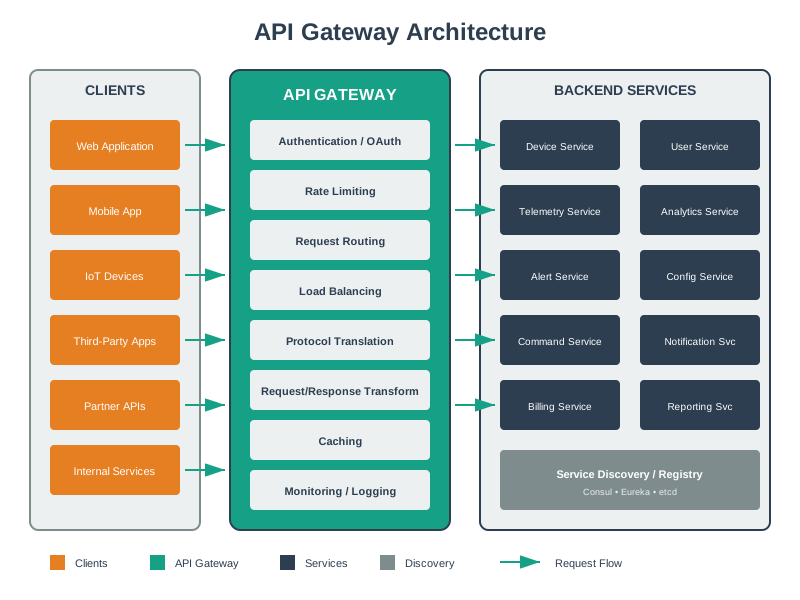
This diagram illustrates the API Gateway pattern essential for connecting IoT devices to cloud services, handling protocol translation and request routing.
NoteVisual: 7-Level IoT Reference Model
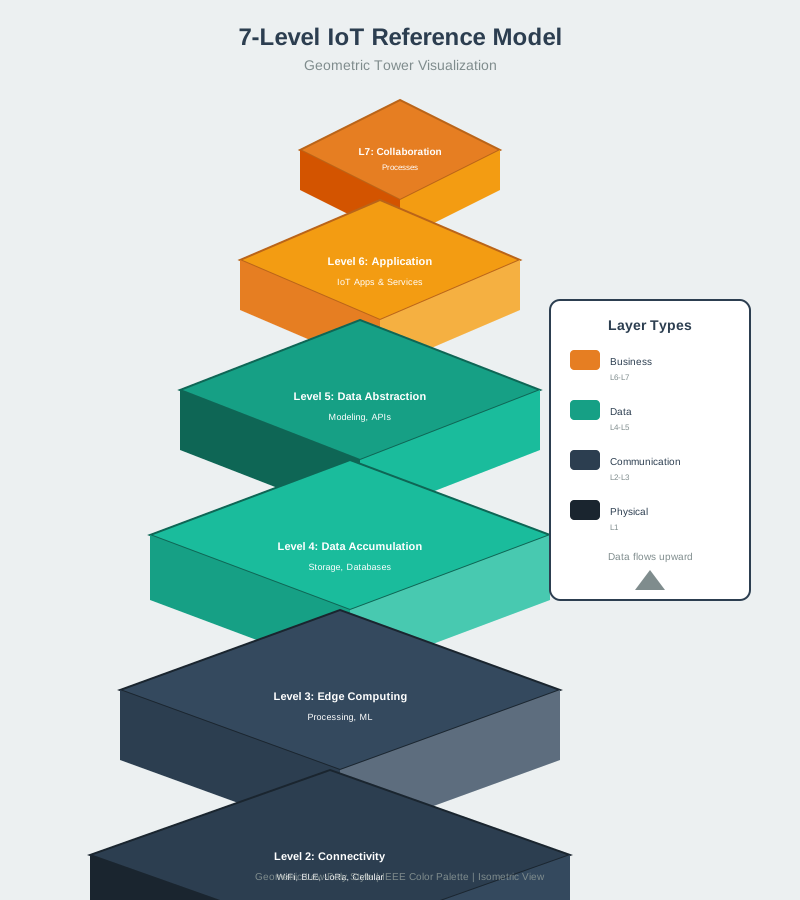
The 7-level reference model provides a comprehensive framework for understanding how data flows from sensors through all layers of an IoT system to applications and business processes.
199.8 Summary
This chapter explored development workflow and tooling for professional IoT development:
- Development Environments: PlatformIO with VS Code provides integrated debugging, library management, and multi-target support essential for complex IoT projects. Move beyond Arduino IDE as projects scale.
- Version Control: Git Flow with protected branches, feature branches, and mandatory PR reviews prevents the merge conflicts and configuration corruption common in team development.
- CI/CD Pipelines: Automated builds with separate debug/release configurations, binary size checks, and static analysis catch issues that manual processes miss.
- Debugging Techniques: JTAG hardware debugging with memory watchpoints solves intermittent crashes that serial print debugging cannot reproduce.
- Testing Strategy: Unit testing with hardware abstraction layers and mock interfaces enables automated testing of embedded code without physical hardware.
- OTA Updates: Staged rollouts with canary deployments, health monitoring, and automatic rollback protect production fleets from bad firmware updates.
- Documentation: Doxygen-generated documentation from source code comments stays synchronized with code changes.
NoteRelated Chapters
Deep Dives: - Hardware Platform Selection - Platform capabilities and toolchain requirements - Serial Communication Protocols - Debugging I2C/SPI issues
Comparisons: - Production Architecture Management - Fleet management at scale - IoT Reference Models - Architectural frameworks
199.9 What’s Next
Having covered development workflow and tooling, the next chapter examines Production Architecture Management, exploring how to manage IoT deployments at scale including monitoring, maintenance, and lifecycle management.