928 IEEE 802.15.4 Advanced Topics and Group Testing
928.1 Advanced Topic: Group Testing for Collision Resolution
TipFor Beginners: The Roll Call Problem
Imagine a teacher taking attendance in a noisy classroom. Everyone shouts “here!” at the same time, creating a jumbled mess. How does the teacher figure out who’s present?
The Naive Approach: Call each name individually and wait for a response. With 30 students, this takes 30 separate calls—slow but always works.
The Smart Approach (Group Testing): Ask “Did anyone from rows 1-2 respond?” If yes, narrow down to row 1. If still yes, ask about seats 1-2 in row 1. By cleverly grouping questions, you can identify all present students much faster.
In IoT networks, group testing solves the same problem: when multiple devices transmit simultaneously (a collision), how do we efficiently identify which devices were transmitting without asking each one individually?
928.1.1 The Collision Identification Problem
When devices in a network transmit simultaneously, their signals collide. Traditional CSMA/CA simply backs off and retries, hoping devices pick different random times. But what if we could directly identify which devices collided?
Problem Setup:
- N = Total number of devices in the network
- d = Number of devices that transmitted (the “active” set we want to find)
- Goal = Identify all d active devices using as few “tests” as possible
A test is a query that receives the Boolean OR of all active device responses in a group.
928.1.2 The Boolean OR Model
NoteHow Boolean OR Tests Work
When we query a group of devices, we receive: - 1 if at least one device in the group was active (transmitted) - 0 if no devices in the group were active
This is exactly what happens in wireless: if any device transmitted, the receiver sees energy on the channel. If none transmitted, the channel is quiet.
%% fig-cap: "Group Testing via Boolean OR"
%% fig-alt: "Diagram showing how group testing works using Boolean OR. A matrix shows 6 devices in columns, with 4 test rows containing 1s and 0s. Two devices are marked as active. The test results show the Boolean OR of active columns, demonstrating how unique column patterns identify active devices."
flowchart TB
    subgraph Matrix["Test Matrix (t tests × N devices)"]
        direction TB
        R1["Test 1: 1 0 1 0 1 0"]
        R2["Test 2: 0 1 1 0 0 1"]
        R3["Test 3: 1 1 0 1 0 0"]
        R4["Test 4: 0 0 1 1 1 0"]
    end

    subgraph Active["Active Devices"]
        D2["Device 2<br/>(active)"]
        D5["Device 5<br/>(active)"]
    end

    subgraph Results["Boolean OR Results"]
        direction TB
        T1["Test 1: 1 (D5=1)"]
        T2["Test 2: 1 (D2=1)"]
        T3["Test 3: 1 (D2=1)"]
        T4["Test 4: 1 (D5=1)"]
    end

    subgraph Decode["Decoding"]
        Check["Find columns matching<br/>result pattern (1,1,1,1)"]
        Found["D2 + D5 = Match!"]
    end

    Matrix --> Active
    Active --> Results
    Results --> Decode

    style Matrix fill:#2C3E50,stroke:#16A085,color:#fff
    style Active fill:#E67E22,stroke:#2C3E50,color:#fff
    style Results fill:#16A085,stroke:#2C3E50,color:#fff
    style Decode fill:#7F8C8D,stroke:#2C3E50,color:#fff
NoteAlternative View: Group Testing Efficiency Comparison
This variant compares naive sequential testing with group testing to illustrate the efficiency gains:
%%{init: {'theme': 'base', 'themeVariables': { 'primaryColor': '#2C3E50', 'primaryTextColor': '#fff', 'primaryBorderColor': '#16A085', 'lineColor': '#16A085', 'secondaryColor': '#E67E22', 'tertiaryColor': '#7F8C8D', 'fontSize': '11px'}}}%%
graph TB
    subgraph NAIVE["Naive Approach: Test Each Device"]
        N1["Device 1?"] --> N2["Device 2?"]
        N2 --> N3["Device 3?"]
        N3 --> N4["..."]
        N4 --> N5["Device N?"]
        NRES["Tests Required: N<br/>(e.g., 10,000 tests)"]
    end

    subgraph GROUP["Group Testing Approach"]
        G1["Test Group A<br/>(Half of devices)"]
        G2["Test Group B<br/>(Half of devices)"]
        G3["Narrow down<br/>to active subsets"]
        G4["Identify d devices<br/>in log N rounds"]
        GRES["Tests Required: d × log N<br/>(e.g., 133 tests for 10 active)"]
    end

    subgraph COMPARE["Efficiency Gain"]
        C1["N = 10,000 devices"]
        C2["d = 10 active"]
        C3["Naive: 10,000 tests"]
        C4["Group: ~133 tests"]
        C5["75× more efficient!"]
    end

    NAIVE --> COMPARE
    GROUP --> COMPARE

    style NAIVE fill:#E67E22,stroke:#2C3E50,color:#fff
    style GROUP fill:#16A085,stroke:#2C3E50,color:#fff
    style COMPARE fill:#2C3E50,stroke:#16A085,color:#fff
    style NRES fill:#fadbd8,stroke:#E67E22,color:#000
    style GRES fill:#d4edda,stroke:#16A085,color:#000
    style C5 fill:#27ae60,stroke:#2C3E50,color:#fff
Group testing achieves logarithmic efficiency: instead of testing each of N devices individually, we identify d active devices using only O(d log N) tests. For sparse activations (d << N), this provides dramatic efficiency gains.
928.1.3 The Key Insight: Unique Column Codes
The magic of group testing is in the test matrix design. Each device is assigned a unique column in the matrix. When devices transmit, the observed result is the Boolean OR of their columns.
If every column is unique, we can identify which devices transmitted by finding which columns, when OR’d together, produce the observed result.
Example: 4 Devices, 3 Tests
| Device | Test 1 | Test 2 | Test 3 |
|---|---|---|---|
| A | 1 | 0 | 0 |
| B | 0 | 1 | 0 |
| C | 0 | 0 | 1 |
| D | 1 | 1 | 1 |
If devices A and C transmitted, the result is: (1,0,0) OR (0,0,1) = (1,0,1)
By inspecting which subset of columns produces (1,0,1), we identify A and C as the active devices.
928.1.4 The Fundamental Limit: t = Θ(d log N)
ImportantThe Information-Theoretic Limit
The minimum number of tests required to identify d active devices out of N total is:
\[t = \Theta(d \cdot \log N)\]
Where: - \(t\) = Number of tests (queries) needed - \(d\) = Number of active (colliding) devices - \(N\) = Total number of devices in the network - \(\Theta\) means “asymptotically equal to” (up to constant factors)
Why log N? Each test provides at most 1 bit of information. To uniquely identify d devices out of N requires \(\log_2 \binom{N}{d} \approx d \log_2 N\) bits of information.
Practical Example:
| Network Size (N) | Active Devices (d) | Tests Needed (t) |
|---|---|---|
| 100 | 2 | ~14 tests |
| 1,000 | 5 | ~50 tests |
| 10,000 | 10 | ~133 tests |
| 1,000,000 | 20 | ~400 tests |
Compare this to the naive approach of testing each device individually: - Naive: N tests always - Group testing: d × log(N) tests
For a network of 10,000 devices with 10 active, group testing is 75× more efficient!
928.1.5 Collision Resolving Codes for IoT
TipFor Beginners: How This Helps IoT Networks
Imagine a warehouse with 10,000 RFID tags on inventory items. When a reader activates, hundreds of tags might respond simultaneously—a massive collision.
Without Group Testing: The reader asks each of 10,000 tags individually: “Tag #1, are you there?” … “Tag #10,000?” This takes 10,000 queries.
With Group Testing: The reader uses 400 carefully designed queries. Each tag has a unique response pattern (its “column” in the test matrix). By analyzing which patterns appear in the collision, the reader identifies all active tags in just 400 queries—25× faster!
This is exactly how modern anti-collision protocols in RFID work, including those specified in ISO 18000 and EPCglobal Gen2.
Application in 802.15.4 Networks:
- Device Identification: When multiple devices collide, identify all transmitters
- Fast Association: Quickly discover new devices joining the network
- Distributed Sensing: Identify which sensors detected an event simultaneously
%% fig-cap: "Group Testing in IoT Collision Resolution"
%% fig-alt: "Flowchart showing collision detection triggering group testing phase, which broadcasts test sequences, collects Boolean OR responses, decodes active device IDs, and then sends targeted unicast to resolve the collision."
flowchart TD
    A["Collision<br/>Detected"] --> B["Group Testing<br/>Phase Begins"]
    B --> C["Broadcast Test<br/>Sequence 1...t"]
    C --> D["Devices Respond<br/>Based on Column"]
    D --> E["Receiver Collects<br/>Boolean OR Results"]
    E --> F{"Decode<br/>Active Set"}
    F -->|"Found d devices"| G["Unicast to Each<br/>Identified Device"]
    F -->|"Ambiguous"| H["Run Additional<br/>Tests"]
    H --> C
    G --> I["Collision<br/>Resolved"]

    style A fill:#E74C3C,stroke:#2C3E50,color:#fff
    style B fill:#E67E22,stroke:#2C3E50,color:#fff
    style C fill:#2C3E50,stroke:#16A085,color:#fff
    style D fill:#2C3E50,stroke:#16A085,color:#fff
    style E fill:#16A085,stroke:#2C3E50,color:#fff
    style F fill:#7F8C8D,stroke:#2C3E50,color:#fff
    style G fill:#16A085,stroke:#2C3E50,color:#fff
    style H fill:#E67E22,stroke:#2C3E50,color:#fff
    style I fill:#16A085,stroke:#2C3E50,color:#fff
928.1.6 Trade-offs and Practical Considerations
| Factor | Group Testing Advantage | Group Testing Challenge |
|---|---|---|
| Scalability | Logarithmic in N | Requires unique codes per device |
| Latency | t tests vs N tests | Each test takes time |
| Power | Fewer transmissions overall | Devices must stay awake for t tests |
| Complexity | Simple decoding algorithms exist | Requires pre-assigned test matrix |
| Error handling | Robust to noise with extra tests | False positives possible |
When to Use Group Testing:
- ✅ Large networks (N > 100) with sparse collisions (d << N)
- ✅ RFID inventory systems with many tags
- ✅ Event-triggered WSN where few sensors activate at once
- ❌ Dense networks where d ≈ N (most devices active)
- ❌ Latency-critical applications (t sequential tests required)
NoteFurther Reading
Group testing theory originated in World War II for efficiently testing soldiers for diseases. The mathematical foundations connect to:
- Coding theory: Column codes are related to error-correcting codes
- Compressed sensing: Sparse signal recovery from few measurements
- Information theory: Entropy and channel capacity bounds
For IoT practitioners, the key takeaway is that collision resolution can be made efficient—you don’t always need to ask each device individually!
NoteSource Reference: Original Stanford IoT Course Figure
The following figure is from the Stanford IoT course materials (© 2017 Stanford University) and shows the original group testing matrix concept.
Group testing literature shows t = O(d log N) tests sufficient to identify d active devices among N total. Each device is assigned a unique column code, and collision results are decoded by finding which columns OR together to match the observed pattern.
Source: Stanford University IoT Course, 2017. This figure is preserved for educational reference and version comparison with modernized diagrams.
TipQuestion: IEEE 802.15.4 PHY/MAC Layer Fundamentals
An IoT developer is designing a sensor network and needs to understand the IEEE 802.15.4 PHY and MAC layer characteristics. The sensor will operate in the 2.4 GHz band.
Think about:
- What data rate and modulation does 802.15.4 use at 2.4 GHz?
- How does CSMA/CA channel access prevent collisions?
- What is the maximum frame size and how does this affect upper layer protocols?
Options:
- 250 kbps, O-QPSK modulation, 127-byte max frame, CSMA/CA with random backoff
- 1 Mbps, BPSK modulation, 256-byte max frame, TDMA time slots
- 54 Mbps, OFDM modulation, 1500-byte max frame, CSMA/CD collision detection
- 100 kbps, FSK modulation, 64-byte max frame, token passing
NoteAnswer
Correct: A) 250 kbps, O-QPSK modulation, 127-byte max frame, CSMA/CA with random backoff
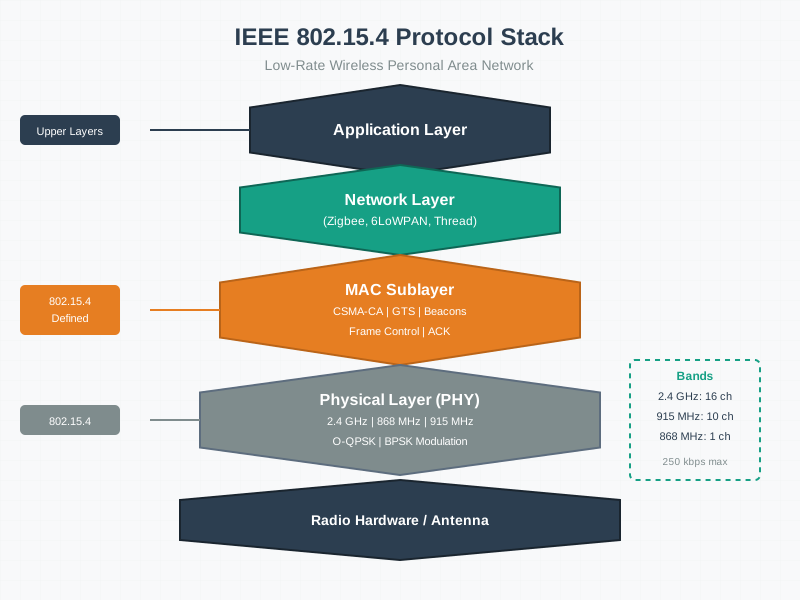
IEEE 802.15.4 PHY Layer (2.4 GHz band):
| Parameter | Value | Reason |
|---|---|---|
| Frequency | 2.4 GHz (16 channels, 11-26) | Global ISM band availability |
| Data Rate | 250 kbps | Optimized for low power, not speed |
| Modulation | O-QPSK | Robust against interference, good for low-SNR |
| Channel Width | 5 MHz | Narrow band allows many parallel networks |
| TX Power | -20 to +5 dBm | Low power for battery operation |
IEEE 802.15.4 MAC Layer:
| Parameter | Value | Purpose |
|---|---|---|
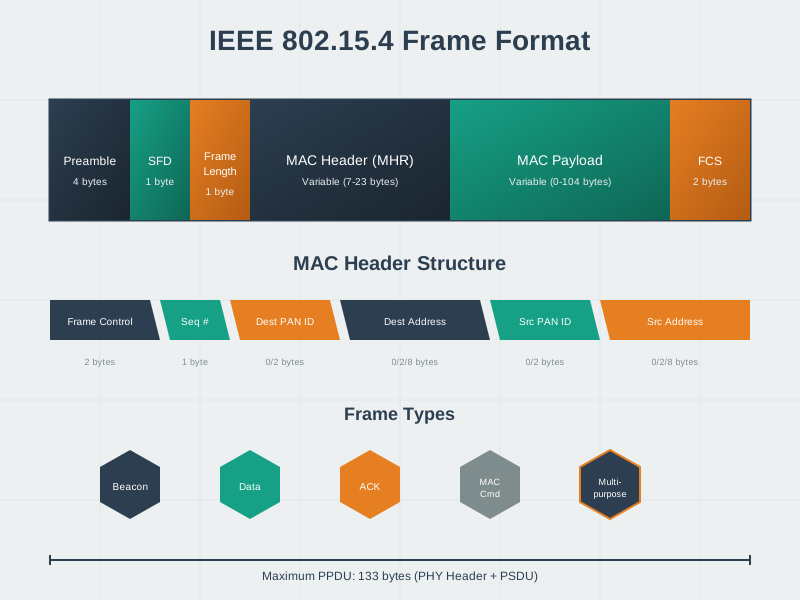
| Frame Size | 127 bytes max | Reduces on-air time, minimizes collisions |
| Addressing | 16-bit short or 64-bit extended | Short for efficiency, extended for unique ID |
| Channel Access | CSMA/CA | Collision avoidance (sense before transmit) |
| Acknowledgment | Optional per-frame | Reliability when needed |
Why CSMA/CA (not CSMA/CD)?
- CSMA/CD (used in Ethernet): Detect collisions DURING transmission, then retransmit
- CSMA/CA (used in 802.15.4): Avoid collisions BEFORE transmission via random backoff
Wireless radios cannot simultaneously transmit and receive, so collision detection is impossible. CSMA/CA uses:
- CCA (Clear Channel Assessment): Listen before transmitting
- Random Backoff: Wait 0-7 slots x 320 µs if channel busy
- Exponential Backoff: Double wait time after each retry
127-byte frame impact on upper layers:
- IPv6 header (40 bytes) + UDP (8 bytes) = 48 bytes of overhead
- Only 79 bytes remain for application data
- Requires 6LoWPAN header compression (40 bytes -> 7 bytes)
- Large payloads need fragmentation
TipQuestion: 802.15.4 Device Types and Power Consumption
A smart building has 100 sensors (temperature, occupancy) and 10 smart light switches. The sensors need 5+ year battery life on coin cells, while the light switches have AC power.
Think about:
- Which device type (FFD vs RFD) should sensors use?
- Why can’t all devices be FFDs if it gives more functionality?
- How does device type affect network topology options?
Options:
- Sensors as RFDs (5+ year battery), switches as FFDs (routers); RFDs sleep 99.9% of time
- All devices as FFDs for maximum flexibility; battery life unchanged
- All devices as RFDs for minimum power; coordinator not needed
- Device type doesn’t affect power consumption; only transmission frequency matters
NoteAnswer
Correct: A) Sensors as RFDs (5+ year battery), switches as FFDs (routers); RFDs sleep 99.9% of time
Device Type Comparison:
| Characteristic | FFD (Full Function Device) | RFD (Reduced Function Device) |
|---|---|---|
| Role | Coordinator, router, or end device | End device only |
| Routing | Can forward packets for others | Cannot route |
| Sleep | Must wake periodically for routing | Can sleep 99.9% of time |
| Power | ~500 µA average | ~5 µA average |
| Battery Life | 1-2 months (coin cell) | 5-10 years (coin cell) |
Why the 100× power difference?
- FFD routers must periodically wake to check if other devices need routing assistance
- Even with no traffic, FFD routers poll every 15-100ms
- RFDs only wake for their OWN transmissions (1-3 times per day for a temperature sensor)
Optimal Design for Smart Building:
| Device | Type | Power Source | Role |
|---|---|---|---|
| Coordinator | FFD | Mains power | Network manager |
| 10 Light switches | FFD | AC power | Mesh routers |
| 100 Sensors | RFD | Coin cell battery | End devices |
Network Topology Impact:
- Star: Only FFD coordinator needed (simplest)
- Mesh: FFD routers form backbone (RFDs attach to nearest FFD)
- Cluster-tree: FFD routers at each level, RFDs as leaves
Key Insight: Always use RFD for battery-powered end devices. Use FFD for mains-powered devices that can serve as mesh backbone. This enables 5+ year sensor battery life while maintaining robust mesh coverage.
928.2 Visual Reference Gallery
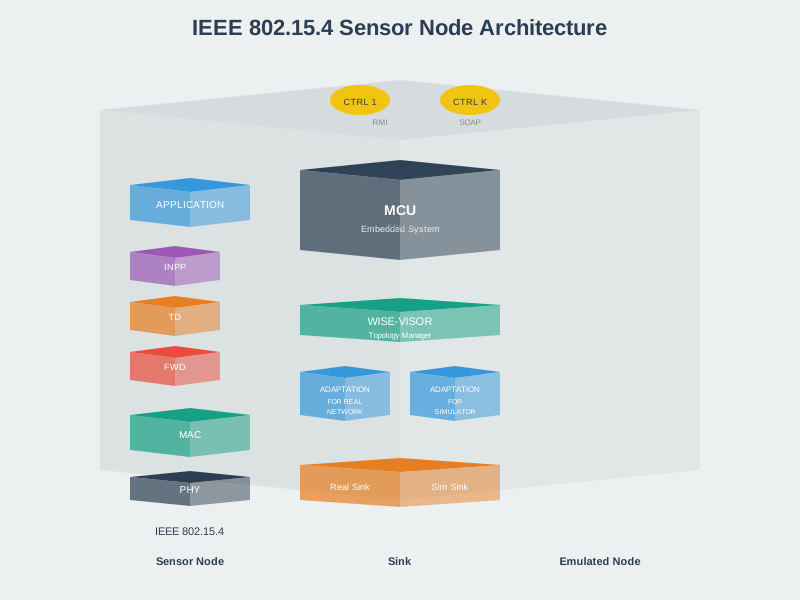
Explore these AI-generated figures that illustrate IEEE 802.15.4 concepts and protocol architecture.
NoteIEEE 802.15.4 Protocol Stack
Note802.15.4 Frame Format
Note802.15.4 Sensor Node Architecture
928.3 Common Pitfalls in IEEE 802.15.4 Deployments
CautionPitfall: Treating 250 kbps as Available Application Bandwidth
The Mistake: Calculating network capacity as “250 kbps / packet_size = packets_per_second” and deploying hundreds of sensors expecting this throughput.
Why It Happens: Datasheets prominently display “250 kbps” without explaining that this is raw PHY rate, not usable application throughput. Engineers apply simple division and assume 30% utilization leaves plenty of headroom.
The Fix: After CSMA/CA overhead, MAC framing, acknowledgments, and safe operating margins, usable application throughput is typically 15-25 kbps (6-10% of raw rate). For a network with 100 sensors each sending 50-byte packets every 10 seconds, you’re using ~4 kbps - which seems safe but ignores burst collisions when devices synchronize. Design for 30% channel utilization maximum, use event-driven reporting instead of periodic polling, and split dense deployments across multiple channels/PANs.
CautionPitfall: Deploying on 802.15.4 Channel 20 Without Wi-Fi Survey
The Mistake: Using default channel settings (often Channel 20 at 2.450 GHz) in an environment with active Wi-Fi, then experiencing intermittent packet loss and battery drain from retries.
Why It Happens: Development kits work perfectly in the lab where Wi-Fi is controlled. Production environments have neighboring Wi-Fi networks, microwave ovens, and Bluetooth devices all competing in 2.4 GHz.
The Fix: Always perform a Wi-Fi site survey before deploying 802.15.4 networks. Wi-Fi channels 1, 6, and 11 are most common (2.412, 2.437, 2.462 GHz). Choose 802.15.4 channels that don’t overlap: Channel 15 (2.425 GHz) or Channel 26 (2.480 GHz) offer best separation from standard Wi-Fi deployments. For critical applications, consider sub-GHz 802.15.4 (868/915 MHz) which has no Wi-Fi interference at all, though with lower data rates.
CautionPitfall: Making All Devices FFDs “For Flexibility”
The Mistake: Configuring every sensor node as a Full Function Device (FFD) with routing capability enabled, assuming this creates a more robust mesh with more routing options.
Why It Happens: FFD seems “better” than RFD (Reduced Function Device). More routers means more paths, which sounds like better reliability. The configuration option exists, so developers enable it everywhere.
The Fix: FFDs must keep their radios active to receive and forward packets, consuming 10-50x more power than sleeping RFDs. A network where every battery-powered sensor is an FFD will drain batteries in weeks instead of years. Design intentionally: use FFDs only for mains-powered or PoE devices that serve as routers/coordinators. Battery-powered sensors should be RFDs that sleep >99% of the time, waking only to transmit their own data. A typical deployment has 1 coordinator + 3-5 FFD routers supporting 50+ RFD end devices.
TipFor Kids: Meet the Sensor Squad! 🌟
IEEE 802.15.4 is like a special language that lets tiny battery-powered devices whisper to each other for YEARS without running out of energy!
928.3.1 The Sensor Squad Adventure: The Secret Alphabet Club
The Sensor Squad wanted to start a club where they could all send secret messages to each other. But there was a big problem: Sammy the Temperature Sensor spoke “Zigbee,” Lila the Light Sensor spoke “Thread,” and Max the Motion Detector spoke “6LoWPAN.” How could they understand each other?
“I know!” said Bella the Button. “What if we all learned the same ALPHABET? Then we can each spell out our own language, but we all know the basic letters!”
That’s exactly what IEEE 802.15.4 is - it’s the alphabet that Zigbee, Thread, and 6LoWPAN all share! It tells devices how to send tiny radio signals (the letters), and then each protocol uses those signals to build their own words and sentences.
The best part? This alphabet was designed to be SUPER energy-efficient. “Regular Wi-Fi is like shouting really loud all day long,” explained Sammy. “But 802.15.4 is like whispering a quick message and then taking a long nap. I can run on a tiny battery for FIVE YEARS!”
Here’s the secret: Sammy sleeps 99% of the time, using almost no power. When he needs to send his temperature reading, he wakes up for just 15 milliseconds (that’s 0.015 seconds - faster than you can snap your fingers!), whispers his message, and goes right back to sleep.
“But what if two of us try to talk at the same time?” asked Max. The alphabet had a rule for that too: CSMA/CA, which stands for “Carrier Sense Multiple Access with Collision Avoidance.” In kid language: “Listen before you talk!”
“It’s like being polite at dinner,” said Lila. “Before you start talking, you listen to make sure nobody else is speaking. If someone is, you wait a random amount of time and try again. That way, we hardly ever talk over each other!”
Thanks to this clever alphabet, thousands of tiny sensors can all share messages without draining their batteries or stepping on each other’s conversations!
928.3.2 Key Words for Kids
| Word | What It Means |
|---|---|
| IEEE 802.15.4 | The shared “alphabet” that lets different IoT languages (Zigbee, Thread, 6LoWPAN) all send radio signals |
| Low Power | Using very little battery - devices sleep most of the time and only wake up to send quick messages |
| CSMA/CA | “Listen before you talk” - make sure no one else is speaking before you start |
| 2.4 GHz | The radio frequency (like a radio station channel) where these devices talk to each other |
928.3.3 Try This at Home! 🏠
The Polite Conversation Game (demonstrates CSMA/CA): 1. Get 4-5 people in a circle. Everyone closes their eyes. 2. Each person wants to say their favorite color, but there’s ONE rule: you can only talk when you DON’T hear anyone else talking! 3. If you start talking and hear someone else, STOP immediately, wait a random time (count 1-5 in your head), then try again. 4. See how long it takes for everyone to say their color without talking over each other! 5. This is exactly how sensors share the radio waves - they listen first, wait if someone’s talking, and try again later!
928.4 Summary
This chapter introduced IEEE 802.15.4 as the foundational standard for low-rate wireless personal area networks (LR-WPANs):
- IEEE 802.15.4 defines PHY and MAC layers for low-power, low-data-rate wireless networking, operating at 2.4 GHz globally (250 kbps) and sub-GHz bands in specific regions (868/915 MHz at 20-40 kbps)
- Ultra-low power design enables multi-year battery life through <1% duty cycles, with devices sleeping at 5 µA and transmitting at 10-30 mA for only milliseconds per communication cycle
- Network topologies include star (simple coordinator-centric), mesh (multi-hop with routing), and cluster-tree (hierarchical routing), each optimized for different deployment scenarios and scalability requirements
- Device types distinguish between Full Function Devices (FFDs) that can route and coordinate versus Reduced Function Devices (RFDs) that sleep most of the time and only transmit their own data
- CSMA/CA channel access prevents collisions through carrier sensing and random backoff, though high-density deployments (200+ devices) may experience congestion requiring beacon-enabled mode with GTS allocation
- Foundation for higher protocols - Zigbee uses proprietary 16-bit addressing while Thread and 6LoWPAN add native IPv6 support, all building on the same 802.15.4 PHY/MAC layers
- Frame structure supports variable addressing modes (16-bit short or 64-bit extended) with maximum 127-byte frames, where overhead vs payload must be carefully balanced
928.5 What’s Next
Continue to 6LoWPAN Fundamentals to explore how IPv6 is optimized for low-power wireless networks built on IEEE 802.15.4, including header compression techniques that reduce IPv6’s 40-byte header to as little as 2 bytes.