%%{init: {'theme': 'base', 'themeVariables': { 'primaryColor': '#2C3E50', 'primaryTextColor': '#fff', 'primaryBorderColor': '#16A085', 'lineColor': '#16A085', 'secondaryColor': '#E67E22', 'tertiaryColor': '#7F8C8D', 'clusterBkg': '#f9f9f9', 'clusterBorder': '#2C3E50'}}}%%
graph TB
    subgraph Devices["End Devices"]
        ClassA[Class A Devices<br/>RX after TX<br/>Lowest Power]
        ClassB[Class B Devices<br/>Scheduled RX<br/>Beacon Sync]
        ClassC[Class C Devices<br/>Continuous RX<br/>Lowest Latency]
    end

    subgraph Physical["Physical Layer"]
        SF[Spreading Factors<br/>SF7-SF12<br/>Range vs Data Rate]
        BW[Bandwidth<br/>125/250/500 kHz]
        CR[Coding Rate<br/>4/5 to 4/8]
    end

    subgraph Network["LoRaWAN Network"]
        GW[Gateways<br/>Multi-SF Reception<br/>8+ Channels]
        NS[Network Server<br/>ADR, Deduplication<br/>Authentication]
        AS[Application Server<br/>Decryption<br/>Processing]
    end

    subgraph Security["Security Layer"]
        OTAA[OTAA<br/>Dynamic Keys<br/>Join Procedure]
        AES[AES-128<br/>Dual Layer<br/>Network + App]
    end

    ClassA & ClassB & ClassC -->|LoRa Modulation| GW
    SF & BW & CR -.->|Parameters| ClassA & ClassB & ClassC
    GW -->|IP Backhaul| NS
    NS -->|MQTT/HTTP| AS
    OTAA & AES -.->|Secure| NS

    style Devices fill:#2C3E50,color:#fff
    style Physical fill:#16A085,color:#fff
    style Network fill:#E67E22,color:#fff
    style Security fill:#7F8C8D,color:#fff
1090 LoRaWAN Review: Architecture and Device Classes
TipFor Beginners: LoRaWAN Architecture Essentials
This review covers the LoRaWAN network architecture and device classes. Here’s what you need to remember:
The Three Device Classes:
| Class | Downlink Capability | Power Usage | Best For |
|---|---|---|---|
| Class A | Only after uplink (RX1/RX2 windows) | Lowest | Sensors, meters |
| Class B | Scheduled ping slots (beacon sync) | Medium | Actuators, alarms |
| Class C | Continuous listening | Highest | Smart plugs, HVAC |
Quick Trade-off Summary:
| Decision | Trade-off |
|---|---|
| Higher Spreading Factor (SF) | Longer range BUT slower data rate and more battery use |
| More Frequent Transmissions | Fresher data BUT shorter battery life |
| Lower TX Power | Longer battery BUT shorter range |
1090.1 Learning Objectives
By the end of this section, you will be able to:
- Understand LoRaWAN Architecture: Describe the star-of-stars network topology and component roles
- Compare Device Classes: Select appropriate device class (A, B, C) based on latency and power requirements
- Identify Protocol Parameters: Reference key LoRaWAN settings for spreading factors, security, and regional bands
1090.2 Prerequisites
Before using this review, ensure you have completed:
Required Chapters: - LoRaWAN Overview - Core concepts and architecture - LoRaWAN Architecture - Network components and topology
Recommended Background: - LPWAN Introduction - Context for low-power wide-area networks
1090.3 LoRaWAN Architecture Overview
This diagram provides a visual summary of the LoRaWAN network architecture and key components.
{fig-alt=“LoRaWAN end-to-end architecture diagram with four colored layers. Navy blue End Devices layer contains three device classes: Class A with RX after TX and lowest power consumption, Class B with scheduled RX and beacon synchronization, Class C with continuous RX and lowest latency. Teal Physical Layer shows three parameter groups: spreading factors SF7 through SF12 trading range versus data rate, bandwidth options of 125, 250, and 500 kilohertz, and coding rates from 4/5 to 4/8. Orange LoRaWAN Network layer shows gateways with multi-SF reception and 8 plus channels connecting via IP backhaul to network server handling ADR, deduplication, and authentication, which connects to application server for decryption and processing. Gray Security layer shows OTAA with dynamic keys and join procedure, plus AES-128 providing dual-layer encryption for network and application data.”}
NoteAlternative View: ADR Algorithm Flow
%%{init: {'theme': 'base', 'themeVariables': { 'primaryColor': '#2C3E50', 'primaryTextColor': '#fff', 'primaryBorderColor': '#16A085', 'lineColor': '#16A085', 'secondaryColor': '#E67E22'}}}%%
flowchart TD
    START(["ADR Check"]) --> Q1{"Link margin<br/>> threshold?"}

    Q1 -->|Yes| INC["Increase Data Rate<br/>Lower SF"]
    Q1 -->|No| Q2{"Packet loss<br/>> acceptable?"}

    Q2 -->|Yes| DEC["Decrease Data Rate<br/>Higher SF"]
    Q2 -->|No| KEEP["Keep Current Settings"]

    INC --> APPLY["Apply ADR Request<br/>to Device"]
    DEC --> APPLY
    KEEP --> WAIT["Wait for<br/>next uplink"]

    style INC fill:#16A085,stroke:#2C3E50,color:#fff
    style DEC fill:#E67E22,stroke:#2C3E50,color:#fff
    style KEEP fill:#7F8C8D,stroke:#2C3E50,color:#fff
This flowchart shows how Adaptive Data Rate (ADR) dynamically optimizes spreading factor based on link quality, balancing range needs against airtime and battery consumption.
1090.4 Device Class Comparison
LoRaWAN defines three device classes (A, B, C) that trade power consumption for downlink latency.
%%{init: {'theme': 'base', 'themeVariables': { 'primaryColor': '#2C3E50', 'primaryTextColor': '#fff', 'primaryBorderColor': '#16A085', 'lineColor': '#16A085', 'secondaryColor': '#E67E22', 'tertiaryColor': '#7F8C8D', 'clusterBkg': '#f9f9f9', 'clusterBorder': '#2C3E50'}}}%%
graph TB
    subgraph ClassA["Class A: Bi-directional (All Devices)"]
        A1[Uplink TX]
        A2[RX1 Window<br/>+1 sec]
        A3[RX2 Window<br/>+2 sec]
        A4[Deep Sleep<br/>0.5 µA]
        A5[Battery Life<br/>2-10 years]
        A1 --> A2 --> A3 --> A4
        A5 -.->|Lowest Power| A1
    end

    subgraph ClassB["Class B: Scheduled (Beacon Sync)"]
        B1[Beacon RX<br/>Every 128 sec]
        B2[Scheduled RX<br/>Ping Slots]
        B3[Uplink TX]
        B4[Deep Sleep<br/>Between Slots]
        B5[Battery Life<br/>6-18 months]
        B1 --> B2
        B3 --> B2
        B2 --> B4
        B5 -.->|Medium Power| B1
    end

    subgraph ClassC["Class C: Continuous (Mains Powered)"]
        C1[Continuous RX<br/>12-15 mA]
        C2[Uplink TX<br/>When Needed]
        C3[Immediate DL<br/><1 sec latency]
        C4[No Sleep<br/>Always On]
        C5[Battery Life<br/>Hours to Days]
        C1 --> C2 --> C3
        C4 -.->|Highest Power| C1
        C5 -.->|Mains Required| C4
    end

    subgraph Comparison["Use Case Selection"]
        UA[Sensors<br/>Meters<br/>Trackers]
        UB[Actuators<br/>Alarms<br/>Controls]
        UC[Smart Plugs<br/>HVAC<br/>Lighting]
    end

    ClassA -.->|Best For| UA
    ClassB -.->|Best For| UB
    ClassC -.->|Best For| UC

    style ClassA fill:#2C3E50,color:#fff
    style ClassB fill:#16A085,color:#fff
    style ClassC fill:#E67E22,color:#fff
    style Comparison fill:#7F8C8D,color:#fff
Key Insights:
| Class | Downlink Latency | Power (mA) | Sleep Mode | Battery Life | Use Cases |
|---|---|---|---|---|---|
| Class A | Seconds to minutes | 0.0005 (sleep) | Yes | 2-10 years | Battery sensors, meters |
| Class B | Sub-second (scheduled) | 0.5 (sleep + beacon) | Partial | 6-18 months | Smart alarms, actuators |
| Class C | <1 second (instant) | 12-15 (continuous) | No | Hours to days | Mains-powered controls |
Trade-off Analysis: - Class A uses 24,000x less power than Class C (0.5 uA vs 12 mA) - Class B adds 5% overhead for beacon synchronization vs Class A - Class C provides instant downlinks but requires mains power for practical operation
1090.5 LoRaWAN Quick Reference Table
NoteProtocol Parameters Summary
| Component | Key Characteristics | Trade-offs |
|---|---|---|
| Device Classes | ||
| Class A | RX after TX only, lowest power | Downlink latency: seconds to minutes |
| Class B | Scheduled RX slots, beacon sync | Medium power, deterministic latency |
| Class C | Continuous RX listening | Lowest latency, highest power (mW range) |
| Spreading Factors | ||
| SF7 | 5.5 kbps, 2-5 km range, 41 ms ToA | Best data rate, shortest range |
| SF9 | 1.8 kbps, 5-10 km range, 206 ms ToA | Balanced performance |
| SF12 | 0.3 kbps, 10-20 km range, 991 ms ToA | Maximum range, 24x power vs SF7 |
| Network Topology | ||
| End Devices | Sensors/actuators with LoRa radio | Battery-powered, <50 mA TX |
| Gateways | Multi-channel (8+), multi-SF receivers | IP backhaul required, <10W power |
| Network Server | ADR, deduplication, routing | Manages 1000s-100,000s devices |
| Application Server | Decryption, processing, APIs | End-to-end payload access |
| Security | ||
| OTAA | Dynamic session keys, scalable | Requires join procedure |
| ABP | Pre-configured keys, simple | Manual key management, less secure |
| Encryption | AES-128, dual-layer (network + app) | End-to-end security |
| Regional Bands | ||
| EU868 | 863-870 MHz, 1% duty cycle | 36 sec/hour TX limit per device |
| US915 | 902-928 MHz, no duty cycle | FCC Part 15, 64 channels + 8 uplink |
| AS923 | 920-923 MHz, regional variants | Country-specific regulations |
| Performance | ||
| Range (Urban) | 2-10 km typical | Depends on SF, obstacles, antenna |
| Range (Rural) | 10-40 km typical | Line-of-sight, SF12 optimal |
| Battery Life | 2-10 years on coin cell | Class A, infrequent TX, ADR enabled |
| Payload | 51-222 bytes (depends on SF/DR) | Smaller at higher SF |
| Latency | 1-10 seconds typical (Class A) | Class B/C for lower latency |
Use This Table For: - Quick parameter lookup during network planning - Comparing device classes for your use case - Understanding SF selection impact on range/battery/throughput - Reference during troubleshooting and optimization
1090.6 Visual Reference Gallery
NoteVisual: LoRaWAN Protocol Stack
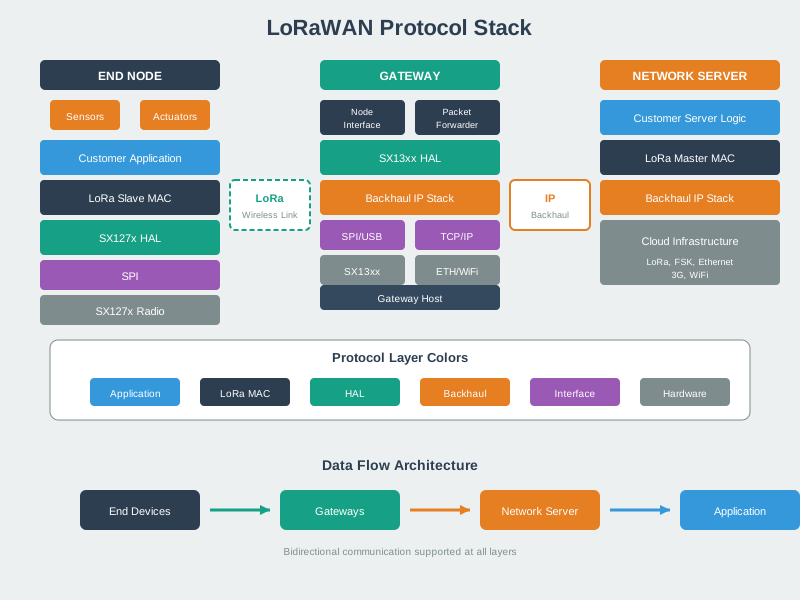
Understanding the LoRaWAN protocol stack helps explain how the physical LoRa modulation, MAC layer protocol, and application layer work together to enable long-range, low-power IoT communication.
NoteVisual: LoRaWAN Class Comparison
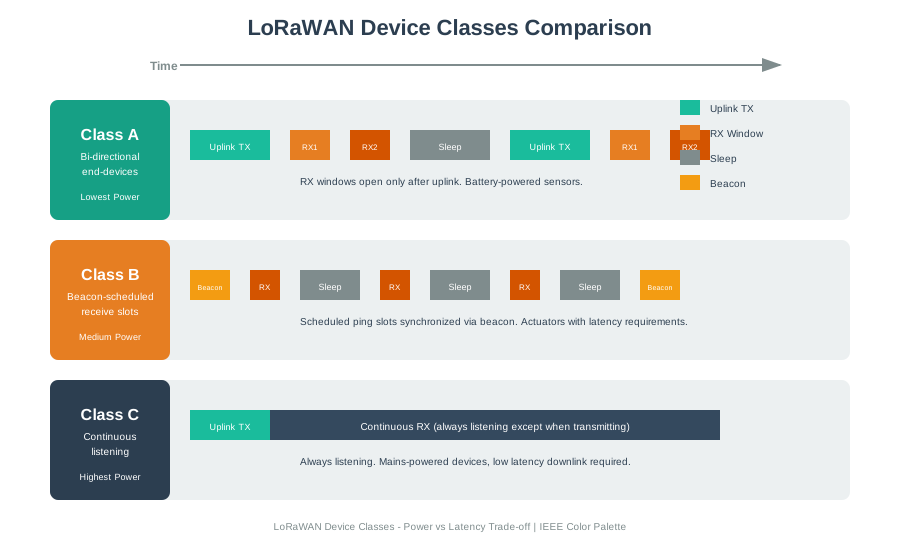
Device class selection directly impacts power consumption and downlink latency - Class A achieves 10+ year battery life while Class C enables near-instant command delivery at the cost of continuous power.
NoteVisual: LoRaWAN Network Architecture
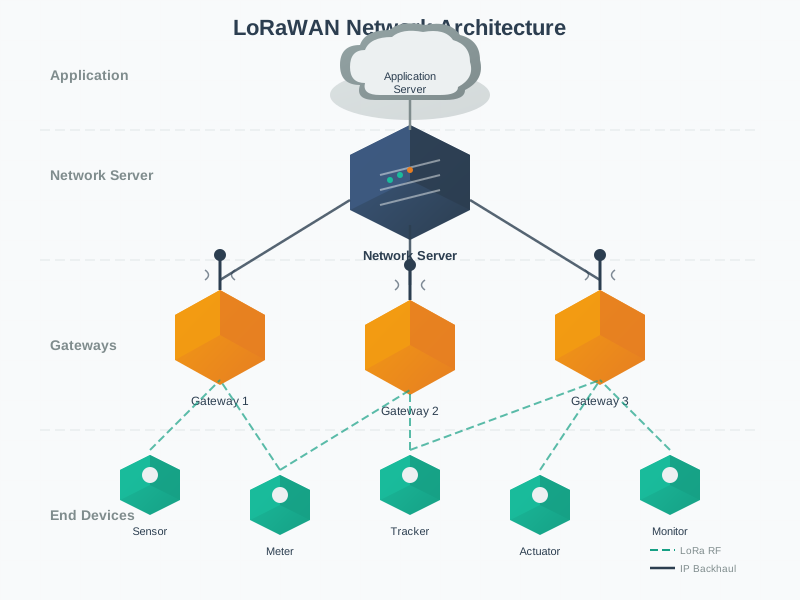
The star-of-stars topology enables redundant reception through multiple gateways while centralizing network intelligence at the server level, simplifying end device complexity.
1090.7 Summary
This section covered the LoRaWAN architecture fundamentals:
- Network Topology: Star-of-stars architecture with end devices, gateways, and servers
- Device Classes: Class A (lowest power), Class B (scheduled), Class C (continuous RX)
- Physical Layer: Spreading factors SF7-SF12 trading range for data rate
- Security: OTAA/ABP activation with AES-128 encryption
1090.8 What’s Next
Continue to the next review section to learn about common configuration pitfalls:
- Next: LoRaWAN Review: Configuration Pitfalls - ADR, RX2 parameters, and common mistakes
- Interactive Tools: LoRaWAN Review: Calculators and Tools - Range, power, and comparison calculators
- Return to Overview: LoRaWAN Comprehensive Review - Main index page