%%{init: {'theme': 'base', 'themeVariables': {'primaryColor': '#E8F4F8', 'primaryTextColor': '#2C3E50', 'primaryBorderColor': '#16A085', 'lineColor': '#16A085', 'secondaryColor': '#FFF5E6', 'tertiaryColor': '#F0F0F0', 'noteTextColor': '#2C3E50', 'noteBkgColor': '#FFF5E6', 'textColor': '#2C3E50', 'fontSize': '16px'}}}%%
graph TB
    RFID["RFID FAMILY"]

    RFID --> LF["LF RFID<br/>125-134 kHz"]
    RFID --> HF["HF RFID<br/>13.56 MHz"]
    RFID --> UHF["UHF RFID<br/>860-960 MHz"]
    RFID --> MW["Microwave<br/>2.4 GHz"]

    HF --> NFC["NFC<br/>13.56 MHz<br/>(Subset of HF)"]

    subgraph NFCFeatures["NFC = HF RFID + Extras"]
        NF1["Peer-to-peer mode"]
        NF2["Card emulation"]
        NF3["Built into phones"]
        NF4["NDEF standard"]
        NF5["Touch-to-connect UX"]
    end

    NFC -.-> NFCFeatures

    style RFID fill:#2C3E50,stroke:#16A085,stroke-width:4px,color:#fff
    style HF fill:#FFF5E6,stroke:#E67E22,stroke-width:3px
    style NFC fill:#E8F4F8,stroke:#16A085,stroke-width:3px
    style NFCFeatures fill:#F8E8E8,stroke:#16A085,stroke-width:2px
884 NFC Modes and Protocols
884.1 Learning Objectives
By the end of this chapter, you will be able to:
- Explain Operating Modes: Describe the technical details of peer-to-peer, read/write, and card emulation modes
- Understand Tag Types: Differentiate between NFC tag types 1-5 and their appropriate use cases
- Parse NDEF Messages: Understand the NFC Data Exchange Format structure and common record types
- Apply Protocol Knowledge: Select the right mode and tag type for specific IoT applications
884.2 Prerequisites
Before diving into this chapter, you should have completed:
- NFC Introduction and Basics: Understanding of what NFC is, its range characteristics, and basic operating modes
884.3 NFC vs RFID: Understanding the Relationship
NoteNFC is Specialized HF RFID
NFC is a subset of HF RFID (13.56 MHz) with added capabilities:
What makes NFC different: - Peer-to-peer mode: Two active devices can exchange data - Card emulation: Phone can act like contactless card - Built into smartphones: Billions of NFC-enabled devices - User-initiated: Intentional touch-to-connect experience - Standardized protocols: NDEF data format for interoperability
| Feature | RFID (General) | NFC |
|---|---|---|
| Frequency | LF, HF, UHF, Microwave | HF only (13.56 MHz) |
| Range | cm to 10m+ | 4-10 cm (intentionally short) |
| Modes | Read-only typically | Peer-to-peer, read/write, emulation |
| Devices | Specialized readers | Smartphones, tablets, wearables |
| Use Cases | Inventory, logistics, access | Payments, pairing, smart marketing |
| Standards | ISO 14443, 15693, 18000 | ISO 14443, ISO 18092, NFC Forum |
884.4 How NFC Works
884.4.1 Basic Operating Principle
%%{init: {'theme': 'base', 'themeVariables': {'primaryColor': '#E8F4F8', 'primaryTextColor': '#2C3E50', 'primaryBorderColor': '#16A085', 'lineColor': '#16A085', 'secondaryColor': '#FFF5E6', 'tertiaryColor': '#F0F0F0', 'noteTextColor': '#2C3E50', 'noteBkgColor': '#FFF5E6', 'textColor': '#2C3E50', 'fontSize': '16px'}}}%%
sequenceDiagram
    participant User as User
    participant Phone as Smartphone<br/>(Active Device)
    participant Tag as NFC Tag<br/>(Passive)

    Note over User,Tag: NFC Communication Flow

    User->>Phone: Bring phone within 4 cm of tag
    activate Phone
    Phone->>Tag: Generate 13.56 MHz field
    activate Tag
    Note over Tag: Tag harvests energy<br/>from RF field
    Tag->>Tag: Power on chip
    Tag-->>Phone: Modulate field with data
    Note over Phone: Decode tag response
    Phone->>Phone: Process NDEF message
    deactivate Tag
    Phone-->>User: Action: Open URL/<br/>Save contact/Trigger event
    deactivate Phone
NFC Communication:
- Proximity detection: Devices come within 4-10 cm
- Field generation: Active device creates 13.56 MHz field
- Power transfer: Passive tag harvests energy from field
- Data exchange: Bi-directional communication via load modulation
- Action: Payment, data transfer, or configuration triggered
884.5 NFC Operating Modes
NFC supports three distinct operating modes, making it more versatile than traditional RFID:
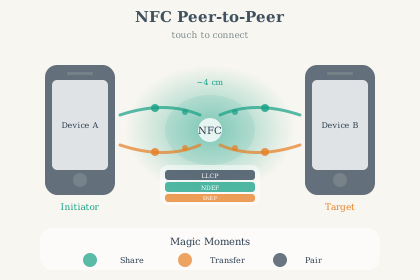
884.5.1 Peer-to-Peer Mode
Two active NFC devices exchange data
%%{init: {'theme': 'base', 'themeVariables': {'primaryColor': '#E8F4F8', 'primaryTextColor': '#2C3E50', 'primaryBorderColor': '#16A085', 'lineColor': '#16A085', 'secondaryColor': '#FFF5E6', 'tertiaryColor': '#F0F0F0', 'noteTextColor': '#2C3E50', 'noteBkgColor': '#FFF5E6', 'textColor': '#2C3E50', 'fontSize': '16px'}}}%%
flowchart LR
    subgraph Device1["DEVICE 1<br/>(Active)"]
        D1A["NFC Controller"]
        D1B["LLCP Protocol"]
        D1C["NDEF Message"]
    end

    subgraph P2P["PEER-TO-PEER<br/>COMMUNICATION"]
        P1["Both generate RF"]
        P2["Alternating fields"]
        P3["Symmetric exchange"]
    end

    subgraph Device2["DEVICE 2<br/>(Active)"]
        D2A["NFC Controller"]
        D2B["LLCP Protocol"]
        D2C["NDEF Message"]
    end

    D1C <-->|Exchange data| P2
    P2 <-->|Exchange data| D2C

    style Device1 fill:#E8F4F8,stroke:#16A085,stroke-width:3px
    style P2P fill:#FFF5E6,stroke:#E67E22,stroke-width:3px
    style Device2 fill:#E8F4F8,stroke:#16A085,stroke-width:3px
Use Cases: - File sharing: Photos, contacts, documents between phones - Bluetooth pairing: Touch phones to pair speakers/headphones - Gaming: Transfer game data between devices - Business cards: Exchange contact info
Protocol: ISO 18092 (NFCIP-1)
Example: Android Beam (deprecated but illustrative)
Android Beam used NFC P2P to share data between devices: - NfcAdapter enables NFC functionality - setNdefPushMessage() configures NDEF data to share - When devices touch, NDEF message is exchanged automatically
884.5.2 Read/Write Mode
Active device reads from or writes to passive NFC tag
%%{init: {'theme': 'base', 'themeVariables': {'primaryColor': '#E8F4F8', 'primaryTextColor': '#2C3E50', 'primaryBorderColor': '#16A085', 'lineColor': '#16A085', 'secondaryColor': '#FFF5E6', 'tertiaryColor': '#F0F0F0', 'noteTextColor': '#2C3E50', 'noteBkgColor': '#FFF5E6', 'textColor': '#2C3E50', 'fontSize': '16px'}}}%%
flowchart TB
    subgraph Reader["ACTIVE READER<br/>(Smartphone/Device)"]
        R1["Generate RF field"]
        R2["Read NDEF"]
        R3["Write NDEF"]
        R4["Process data"]
    end

    subgraph Communication["RF FIELD<br/>(13.56 MHz)"]
        C1["Power transfer"]
        C2["Data modulation"]
    end

    subgraph Tag["PASSIVE TAG<br/>(No battery)"]
        T1["Harvest energy"]
        T2["Store NDEF data:<br/>URL, Text, vCard"]
        T3["Memory:<br/>48B - 888B"]
    end

    R1 -->|RF field| Communication
    Communication -->|Powers| T1
    T2 <-->|Backscatter| Communication
    Communication <-->|Read/Write| R2
    Communication <-->|Read/Write| R3

    style Reader fill:#E8F4F8,stroke:#16A085,stroke-width:3px
    style Communication fill:#FFF5E6,stroke:#E67E22,stroke-width:3px
    style Tag fill:#F8E8E8,stroke:#2C3E50,stroke-width:3px
Use Cases: - Smart posters: Tap tag to open URL, download app - Product information: Get details, reviews, instructions - Home automation: Tap tag to trigger IoT scene - Museum exhibits: Interactive information displays - Inventory: Track and update asset information
Tag Types: - Type 1-5 (different memory sizes and capabilities) - Writable (can update content) - Read-only (locked after writing)
884.5.3 Card Emulation Mode
Active device emulates a contactless smart card
%%{init: {'theme': 'base', 'themeVariables': {'primaryColor': '#E8F4F8', 'primaryTextColor': '#2C3E50', 'primaryBorderColor': '#16A085', 'lineColor': '#16A085', 'secondaryColor': '#FFF5E6', 'tertiaryColor': '#F0F0F0', 'noteTextColor': '#2C3E50', 'noteBkgColor': '#FFF5E6', 'textColor': '#2C3E50', 'fontSize': '16px'}}}%%
flowchart LR
    subgraph Terminal["PAYMENT TERMINAL<br/>(Active Reader)"]
        Term1["Generate RF field"]
        Term2["Request card data"]
        Term3["Process payment"]
    end

    subgraph Emulation["EMULATION LAYER"]
        E1["Acts as passive card"]
        E2["ISO 14443 Type A/B"]
        E3["Secure Element/<br/>HCE"]
    end

    subgraph Phone["SMARTPHONE<br/>(Card Emulator)"]
        P1["NFC chip"]
        P2["Payment app:<br/>Apple Pay,<br/>Google Pay"]
        P3["Encrypted token"]
        P4["No battery needed<br/>for NFC chip"]
    end

    Term1 -->|RF field| Emulation
    Emulation <-->|Card commands| P1
    P1 <--> P2
    P2 <--> P3
    Emulation -->|Card response| Term2

    style Terminal fill:#E8F4F8,stroke:#16A085,stroke-width:3px
    style Emulation fill:#FFF5E6,stroke:#E67E22,stroke-width:3px
    style Phone fill:#F8E8E8,stroke:#2C3E50,stroke-width:3px
Use Cases: - Mobile payments: Apple Pay, Google Pay, Samsung Pay - Transit ticketing: Subway/bus tap-to-pay - Access control: Phone as building/hotel key - Loyalty cards: Digital membership cards
Technologies: - HCE (Host Card Emulation): Software-based, uses phone CPU - SIM-based: Secure element in SIM card - Embedded SE: Dedicated secure chip in phone
884.6 NFC Tag Types
NFC tags come in different types with varying memory and capabilities:
| Type | Memory | Speed | Rewritable | Use Case | Example |
|---|---|---|---|---|---|
| Type 1 | 96 bytes - 2 KB | 106 Kbps | Yes | Simple marketing | Topaz |
| Type 2 | 48 bytes - 2 KB | 106 Kbps | Yes | Smart posters | MIFARE Ultralight |
| Type 3 | Variable | 212 Kbps | Yes/No | Transit, eSIM | Sony FeliCa |
| Type 4 | 4 KB - 32 KB | 424 Kbps | Yes | High-security | MIFARE DESFire |
| Type 5 | 256 bytes - 8 KB | 106 Kbps | Yes | IoT sensors | ISO 15693 |
TipChoosing NFC Tag Type
For simple tasks (URL, text): Type 2 (widely available) For payments, access: Type 4 (secure, encrypted) For IoT sensors: Type 5 (longer range within NFC spec) For read-only: Lock Type 2 after writing
884.7 NDEF (NFC Data Exchange Format)
NDEF is the standard data format for NFC, ensuring interoperability between devices.
884.7.1 NDEF Message Structure
%%{init: {'theme': 'base', 'themeVariables': {'primaryColor': '#E8F4F8', 'primaryTextColor': '#2C3E50', 'primaryBorderColor': '#16A085', 'lineColor': '#16A085', 'secondaryColor': '#FFF5E6', 'tertiaryColor': '#F0F0F0', 'noteTextColor': '#2C3E50', 'noteBkgColor': '#FFF5E6', 'textColor': '#2C3E50', 'fontSize': '16px'}}}%%
graph TB
    Message["NDEF MESSAGE"]

    Message --> Record1["Record 1"]
    Message --> Record2["Record 2"]
    Message --> Record3["Record 3"]

    subgraph RecordStructure["NDEF RECORD STRUCTURE"]
        Header["Header Flags:<br/>MB, ME, CF, SR, IL, TNF"]
        TypeLength["Type Length"]
        PayloadLength["Payload Length"]
        IDLength["ID Length (optional)"]
        Type["Type:<br/>URI, Text, MIME, etc."]
        ID["ID (optional)"]
        Payload["Payload:<br/>Actual data"]
    end

    Record1 -.-> RecordStructure

    subgraph Examples["COMMON TYPES"]
        URI["URI:<br/>https://example.com"]
        Text["Text:<br/>Hello World"]
        vCard["vCard:<br/>Contact info"]
        SmartPoster["Smart Poster:<br/>URI + Title + Icon"]
    end

    style Message fill:#2C3E50,stroke:#16A085,stroke-width:4px,color:#fff
    style RecordStructure fill:#E8F4F8,stroke:#16A085,stroke-width:3px
    style Examples fill:#FFF5E6,stroke:#E67E22,stroke-width:3px
884.7.2 Common NDEF Record Types
URI Record (open URL):
Type: U (URI)
Payload: https://example.com/product/123
Text Record:
Type: T (Text)
Payload: "Tap to connect to Wi-Fi"
Smart Poster:
%%{init: {'theme': 'base', 'themeVariables': {'primaryColor': '#E8F4F8', 'primaryTextColor': '#2C3E50', 'primaryBorderColor': '#16A085', 'lineColor': '#16A085', 'secondaryColor': '#FFF5E6', 'tertiaryColor': '#F0F0F0', 'noteTextColor': '#2C3E50', 'noteBkgColor': '#FFF5E6', 'textColor': '#2C3E50', 'fontSize': '16px'}}}%%
graph TB
    SmartPoster["SMART POSTER<br/>NDEF Message"]

    SmartPoster --> URI["URI Record:<br/>https://movie.com/trailer"]
    SmartPoster --> Title["Title Record:<br/>New Action Movie"]
    SmartPoster --> Action["Action Record:<br/>Open in browser"]
    SmartPoster --> Icon["Icon/Image:<br/>Movie poster thumbnail"]

    URI --> Browser["Action:<br/>Open URL"]
    Title --> Display["Display:<br/>Show title on screen"]
    Action --> Execute["Execute:<br/>Launch browser"]

    style SmartPoster fill:#2C3E50,stroke:#16A085,stroke-width:4px,color:#fff
    style URI fill:#E8F4F8,stroke:#16A085,stroke-width:2px
    style Title fill:#E8F4F8,stroke:#16A085,stroke-width:2px
    style Action fill:#FFF5E6,stroke:#E67E22,stroke-width:2px
    style Icon fill:#FFF5E6,stroke:#E67E22,stroke-width:2px
Wi-Fi Configuration (Android):
Type: application/vnd.wfa.wsc
Payload: [Wi-Fi credentials encrypted]
TipUnderstanding Check: NFC Data Transfer Timing
Scenario: You’re building a smart museum guide where visitors tap NFC tags to get exhibit information. You need to decide what content goes on the NFC tag vs. loaded from the cloud. Assume a typical Type 2 tag budget of ~888 bytes (NTAG216 user memory, plus NDEF overhead).
Think about: 1. At 424 Kbps maximum, how long does ~888 bytes take to transfer? (Hint: ~7,100 bits / 424,000 bps) 2. Users expect “instant” response (< 300 ms). Can you fit rich content on the tag? 3. What’s the trade-off between tag-stored content vs. URL-to-cloud approach?
Key Insight - Transfer Time Calculation (order-of-magnitude): - 888 bytes approximately 7,100 bits at 424 Kbps approximately ~17 ms theoretical - Real-world with overhead: typically tens of milliseconds for ~1 KB
| Data Type | Size | Transfer Time | UX |
|---|---|---|---|
| URL deep link | 200 bytes | a few ms | Instant |
| Payment token | 500 bytes | ~10-30 ms | Instant |
| vCard (basic) | ~700 bytes | tens of ms | Seamless |
| Full exhibit text | several KB | may not fit on typical Type 2 tags | Use URL |
| Photo/audio/video | 100+ KB | does not fit | Use Wi-Fi/BLE |
Museum Design Decision: - Tag-stored: Exhibit ID + short URL (instant lookup) - Cloud-loaded: Rich media, translations, audio guides - Best practice: NFC for small identifiers/URLs, Wi-Fi/Bluetooth for bulk content
Verify Your Understanding: - Why do transit cards (Oyster, Suica) only store ~500 bytes despite using NFC? - For photo sharing between phones, why does “Android Beam” use NFC to initiate but Bluetooth/Wi-Fi for actual transfer?
884.8 NFC Bluetooth Handover
NFC handover combines the strengths of both technologies - NFC’s ease-of-use for connection setup, Bluetooth’s speed for data transfer:
Traditional Bluetooth pairing (without NFC):
Manual pairing steps: 1. Enable Bluetooth on both devices 2. Make device discoverable 3. Scan for nearby devices (10-30 seconds) 4. Select correct device from list 5. Confirm pairing code or PIN 6. Wait for connection (5-10 seconds) 7. Begin data transfer
Total time: 30-60 seconds User actions: 5-8 steps
NFC-assisted Bluetooth pairing:
Simplified flow: 1. Tap NFC devices together (< 1 second) 2. NFC exchanges Bluetooth credentials via NDEF 3. Bluetooth automatically connects (2-5 seconds) 4. Data transfer begins
Total time: 3-6 seconds User actions: 1 step (tap)
What NFC exchanges:
NDEF message structure:
Handover Select Record:
  - Carrier Type: Bluetooth
  - Bluetooth MAC Address: 01:23:45:67:89:AB
  - Bluetooth Class: 0x240404 (audio device)
  - Bluetooth Name: "My Speaker"
  - Bluetooth UUID: 0x110B (audio sink)
  - Optional: Bluetooth passkey/PIN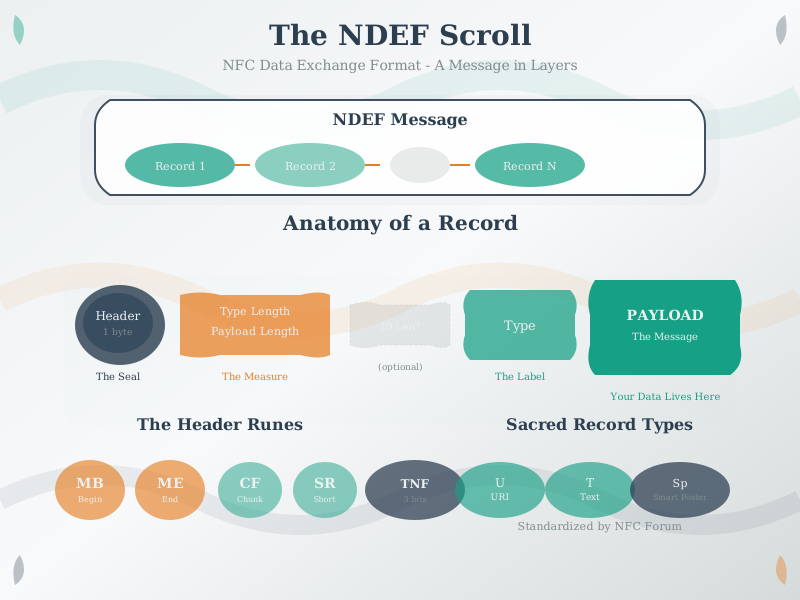
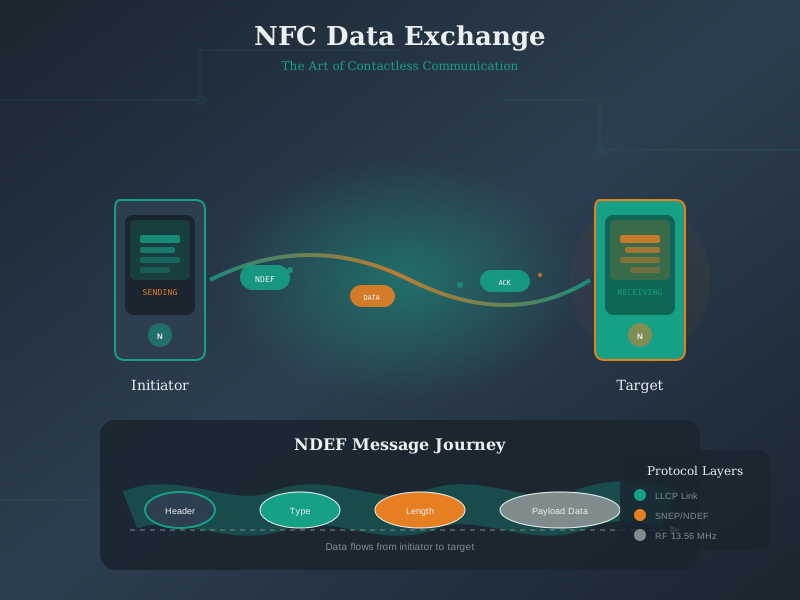
Size: ~50-100 bytes Transfer time: < 100 milliseconds
Complete handover flow:
%%{init: {'theme': 'base', 'themeVariables': {'primaryColor': '#E8F4F8', 'primaryTextColor': '#2C3E50', 'primaryBorderColor': '#16A085', 'lineColor': '#16A085', 'secondaryColor': '#FFF5E6', 'tertiaryColor': '#F0F0F0', 'noteTextColor': '#2C3E50', 'noteBkgColor': '#FFF5E6', 'textColor': '#2C3E50', 'fontSize': '16px'}}}%%
sequenceDiagram
    participant Phone as Smartphone
    participant Speaker as Bluetooth Speaker
    participant NFC as NFC Tag (in speaker)

    Note over Phone,NFC: NFC Bluetooth Handover

    Phone->>NFC: Tap phone to speaker
    activate NFC
    NFC-->>Phone: NDEF: BT MAC + Name + PIN
    deactivate NFC
    Note over Phone: Parse NDEF<br/>Extract BT credentials

    Phone->>Speaker: Bluetooth connection request
    activate Speaker
    Speaker-->>Phone: Accept connection
    deactivate Speaker
    Note over Phone,Speaker: Paired via Bluetooth

    Phone->>Speaker: Stream audio data
    Note over Phone,Speaker: Music playing
Performance comparison:
| Metric | Manual BT | NFC Handover |
|---|---|---|
| Pairing time | 30-60 sec | 3-6 sec |
| User steps | 6-8 steps | 1 tap |
| Discovery | Must scan | Instant |
| Selection | Pick from list | Automatic |
| Confirmation | PIN code | None |
| Error prone | Often fails | Reliable |
Why not use NFC for data transfer?
NFC limitations: - Max speed: 424 Kbps (53 KB/sec) - Practical range: 4-10 cm (must hold close) - Requires proximity throughout transfer
Bluetooth advantages: - Speed: 1-3 Mbps (125-375 KB/sec) = 7x faster - Range: 10-100 meters (can move apart) - Established connection persists
File transfer example:
10 MB photo album: - Via NFC: 10 MB / 53 KB/sec = 189 seconds (3+ minutes, holding phones together!) - Via Bluetooth: 10 MB / 250 KB/sec = 40 seconds (can put phones down!)
Best of both worlds: - NFC: Quick pairing (1 second tap) - Bluetooth: Fast transfer (40 seconds, hands-free)
884.9 Knowledge Check
Test your understanding of NFC modes and protocols with these questions.
Question: Which NFC operating mode allows two smartphones to exchange data without either acting as a tag?
Explanation: NFC has three distinct operating modes:
1. Peer-to-Peer (P2P) Mode: - Both devices are active (generate RF field) - Uses LLCP (Logical Link Control Protocol) - Symmetric communication (neither is “master”) - Alternating field generation (taking turns)
Applications: - File transfer (Android Beam, deprecated) - Bluetooth pairing: Quick handshake to exchange BT MAC addresses - Wi-Fi credentials: Share network password between phones
2. Read/Write Mode: - Active reader (smartphone) generates field - Passive tag powered by reader’s field - Asymmetric: Reader initiates, tag responds
3. Card Emulation (CE) Mode: - Device emulates contactless smart card - External reader (POS terminal) generates field - Device acts as passive tag
Why other options are wrong: - B: Card Emulation requires ONE reader and ONE card - both can’t emulate simultaneously - C: Read/Write is inherently asymmetric - reader is always active, tag is always passive - D: “Active mode” describes RF field generation, not a distinct operating mode
Question: What is NDEF (NFC Data Exchange Format), and why is it important for NFC interoperability?
Explanation: NDEF (NFC Data Exchange Format) is the universal language that enables NFC interoperability across all devices and platforms.
A standardized data format defined by the NFC Forum that specifies how to: - Structure data on NFC tags - Encode different data types (URLs, text, contacts, etc.) - Represent multiple records in a single message - Ensure cross-platform compatibility
Without NDEF: - Apple might encode URLs one way, Android another - NFC tag written on iPhone unreadable on Android - Each manufacturer invents proprietary formats
With NDEF: - Tag written on ANY device readable on ALL NFC devices - Guaranteed interoperability - Predictable behavior across platforms
Why other options are wrong: - A: NDEF is a DATA FORMAT, not encryption - C: NDEF is pure software/data specification, not hardware - D: Modulation is defined by ISO 14443, not NDEF
Question: How does NFC enable fast Bluetooth pairing (“NFC handover”), and what are the performance benefits?
Explanation: NFC handover combines the strengths of both technologies - NFC’s ease-of-use for connection setup, Bluetooth’s speed for data transfer.
Traditional Bluetooth pairing: 30-60 seconds, 6-8 user steps NFC-assisted pairing: 3-6 seconds, 1 tap
What NFC exchanges: Bluetooth MAC address, device name, PIN (50-100 bytes total, < 100ms)
Why NFC doesn’t replace Bluetooth for transfer: - NFC max speed: 424 Kbps - Bluetooth speed: 1-3 Mbps (7x faster) - 10 MB via NFC: 3+ minutes holding phones together - 10 MB via Bluetooth: 40 seconds, hands-free
Best practice: NFC for instant pairing, Bluetooth for data transfer.
884.10 Summary
This chapter covered NFC operating modes and protocols:
- NFC vs RFID: NFC is a specialized subset of HF RFID with peer-to-peer, card emulation, and smartphone integration
- Operating Modes: P2P for device-to-device, Read/Write for tag interaction, Card Emulation for payments
- Tag Types: Type 1-5 with varying memory (48 bytes to 32 KB), speed, and security features
- NDEF Format: Standardized data structure for URLs, text, smart posters, and custom records
- Bluetooth Handover: NFC reduces pairing from 60 seconds to 3 seconds with single tap
884.11 What’s Next
The next chapter, NFC Security and Best Practices, covers common implementation mistakes, security considerations, and a decision framework for choosing between NFC, Bluetooth, RFID, and QR codes.