%%{init: {'theme': 'base', 'themeVariables': {'primaryColor': '#2C3E50', 'primaryTextColor': '#fff', 'primaryBorderColor': '#16A085', 'lineColor': '#16A085', 'secondaryColor': '#E67E22', 'tertiaryColor': '#7F8C8D'}}}%%
graph TB
    subgraph PACKET["Complete Network Packet (Variable Size)"]
        direction TB

        subgraph HEADER["HEADER SECTION (10-40 bytes)"]
            H1["Source Address<br/>4-16 bytes"]
            H2["Destination Address<br/>4-16 bytes"]
            H3["Length Field<br/>2 bytes"]
            H4["Protocol/Type<br/>1-2 bytes"]
            H5["Sequence #<br/>2-4 bytes"]
            H6["Flags/Options<br/>1-4 bytes"]
        end

        subgraph PAYLOAD["PAYLOAD SECTION (0-MTU bytes)"]
            P1["Application Data<br/>Sensor readings, JSON,<br/>commands, or nested packet"]
        end

        subgraph TRAILER["TRAILER SECTION (2-4 bytes)"]
            T1["CRC/Checksum<br/>Error detection"]
            T2["End Marker<br/>Optional delimiter"]
        end
    end

    H1 --> H2 --> H3 --> H4 --> H5 --> H6
    H6 --> P1
    P1 --> T1 --> T2

    style HEADER fill:#2C3E50,stroke:#16A085,stroke-width:3px,color:#fff
    style PAYLOAD fill:#16A085,stroke:#2C3E50,stroke-width:3px,color:#fff
    style TRAILER fill:#E67E22,stroke:#2C3E50,stroke-width:3px,color:#fff
    style H1 fill:#2C3E50,stroke:#16A085,stroke-width:1px,color:#fff
    style H2 fill:#2C3E50,stroke:#16A085,stroke-width:1px,color:#fff
    style H3 fill:#2C3E50,stroke:#16A085,stroke-width:1px,color:#fff
    style H4 fill:#2C3E50,stroke:#16A085,stroke-width:1px,color:#fff
    style H5 fill:#2C3E50,stroke:#16A085,stroke-width:1px,color:#fff
    style H6 fill:#2C3E50,stroke:#16A085,stroke-width:1px,color:#fff
    style P1 fill:#16A085,stroke:#2C3E50,stroke-width:1px,color:#fff
    style T1 fill:#E67E22,stroke:#2C3E50,stroke-width:1px,color:#fff
    style T2 fill:#7F8C8D,stroke:#2C3E50,stroke-width:1px,color:#fff
    style PACKET fill:#ecf0f1,stroke:#2C3E50,stroke-width:2px
50 Packet Anatomy: Headers, Payloads, and Trailers
50.1 Learning Objectives
By the end of this chapter, you will be able to:
- Understand packet anatomy: Identify headers, payloads, and trailers in network packets
- Read protocol specifications: Interpret frame format diagrams in datasheets
- Recognize packet components: Distinguish control information from actual data
NoteRelated Chapters
Prerequisites (Read These First): - Data Representation - Binary, hexadecimal, and bitwise operations for parsing packet fields
Companion Chapters (Packet Structure Series): - Packet Structure Overview - Index of all packet structure topics - Frame Delimiters and Boundaries - How receivers detect packet boundaries - Error Detection - Checksums, CRC, and data integrity - Protocol Overhead - Header comparison and encapsulation
Fundamentals (Core Concepts): - Data Formats for IoT - Payload encoding (JSON, CBOR, Protocol Buffers) - Sensor to Network Pipeline - How sensor data becomes network packets
Protocol-Specific Packet Structures: - MQTT - MQTT fixed/variable headers, QoS, and packet types - CoAP - CoAP 4-byte header and message format - LoRaWAN - LoRa MAC header (MHDR), DevAddr, FCnt, MIC
50.2 Prerequisites
Before this chapter, you should understand:
- Data Representation Fundamentals: Binary, hexadecimal, and bitwise operations for parsing packet fields
50.3 For Beginners: Why Packet Structure Matters
TipFor Beginners: Why Packet Structure Matters
Analogy: Packets are like Postal Letters
Just like a letter has a standard structure, network packets have a predictable format:
- Header (envelope) - return address, destination address, and stamp tell the postal system where to send the letter and who sent it.
- Payload (letter body) - the actual message you write to your friend.
- Trailer (signature) - a final check such as a signature that lets the recipient verify it really came from you.
Network Packet:
The same idea appears in networking:
| Part | What it contains | Typical size |
|---|---|---|
| Header | Source/destination, length, type, sequence number, flags | 10-40 bytes |
| Payload | Sensor reading, command, JSON message, or even another packet | Variable |
| Trailer | Checksum/CRC, end marker, optional padding | 2-4 bytes |
Why does this structure exist?
- Routing: Headers tell devices where to send the packet
- Integrity: Trailers verify data wasn’t corrupted
- Multiplexing: Multiple conversations share the same wire
- Reassembly: Large messages split into smaller packets
Key Terms:
| Term | Definition |
|---|---|
| Packet | Complete unit of data for transmission |
| Frame | Packet at the data link layer (includes physical markers) |
| Header | Metadata at the beginning (addresses, length, type) |
| Payload | Actual data being transmitted |
| Trailer | Metadata at the end (error checking) |
| Checksum | Simple error detection value |
| CRC | Cyclic Redundancy Check - more robust error detection |
| MTU | Maximum Transmission Unit - largest packet size allowed |
NoteReal-World Example: LoRaWAN Temperature Sensor Packet
Let’s dissect a real LoRaWAN packet from a temperature sensor deployed in a smart building. This packet was captured using a LoRaWAN gateway during an actual transmission:
Raw Packet (Hexadecimal):
40 3A 2B 1C 0D 80 02 00 01 C8 49 E2 F4 A3 B7 82 1FBreaking it down:
| Field | Bytes | Hex Value | Decoded Value | Purpose |
|---|---|---|---|---|
| MHDR | 1 | 40 |
Message Type: Unconfirmed Data Up | Indicates packet type and direction |
| DevAddr | 4 | 3A 2B 1C 0D |
Device Address: 0x0D1C2B3A | Unique 32-bit device identifier |
| FCtrl | 1 | 80 |
Frame Control: ADR enabled | Controls adaptive data rate and options |
| FCnt | 2 | 02 00 |
Frame Counter: 2 | Prevents replay attacks (increments each transmission) |
| FPort | 1 | 01 |
Port 1 | Application port number |
| Payload | 2 | C8 49 |
Temperature: 22.5C | Actual sensor data (0x49C8 = 18888 -> 18888/840 = 22.5C) |
| MIC | 4 | E2 F4 A3 B7 |
Message Integrity Code | CRC-like authentication tag |
| Extra | 2 | 82 1F |
Gateway metadata | Added by gateway (RSSI, SNR) |
Total: 17 bytes (13 header + 2 payload + 4 MIC) = 88% overhead for just 2 bytes of temperature data!
Key Insights: - DevAddr routes the packet to the correct application server - FCnt prevents attackers from replaying old packets - MIC uses AES-128-CMAC to verify packet authenticity and integrity - Small payload (2 bytes) means high overhead ratio, but LoRaWAN optimizes for range (10+ km) and battery life (10+ years) - Gateway adds metadata (RSSI, SNR) to help with diagnostics
Why is this structure important? - Parsing this packet requires reading the LoRaWAN specification to understand each field - Frame counter must increment or the network server rejects the packet (anti-replay protection) - Payload encoding (0x49C8 -> 22.5C) is application-specific and not part of the LoRaWAN spec - Understanding packet structure helps debug connectivity issues with tools like Wireshark or TTN Console
50.4 Generic Packet Anatomy
50.4.1 The Three Parts of Every Packet
Every network packet, regardless of protocol, contains these fundamental components:
1. Header (Control Information) - Purpose: Routing, identification, and control - Contains: Source/destination addresses, packet length, protocol type, sequence numbers, flags - Size: Typically 10-40 bytes depending on protocol
2. Payload (The Actual Data) - Purpose: Carry the message or data being transmitted - Contains: Sensor readings, commands, JSON data, or another encapsulated packet - Size: Variable, constrained by Maximum Transmission Unit (MTU)
3. Trailer (Error Detection) - Purpose: Verify data integrity - Contains: Checksum or CRC value, optional end-of-frame marker - Size: Typically 2-4 bytes

Alternative View:
%%{init: {'theme': 'base', 'themeVariables': {'primaryColor': '#2C3E50', 'primaryTextColor': '#fff', 'primaryBorderColor': '#16A085', 'lineColor': '#16A085', 'secondaryColor': '#E67E22', 'tertiaryColor': '#7F8C8D'}}}%%
graph TB
    subgraph POSTAL["Postal Letter Analogy"]
        ENV["<b>Envelope</b><br/>━━━━━━━━<br/>From: Sensor-001<br/>To: Cloud Server<br/>Stamp: Priority<br/>━━━━━━━━<br/>Like: HEADER"]
        LETTER["<b>Letter Content</b><br/>━━━━━━━━<br/>Temperature: 23.5C<br/>Humidity: 65%<br/>Battery: 3.2V<br/>━━━━━━━━<br/>Like: PAYLOAD"]
        SEAL["<b>Wax Seal</b><br/>━━━━━━━━<br/>Signature verifies<br/>letter is authentic<br/>and unchanged<br/>━━━━━━━━<br/>Like: TRAILER/CRC"]
    end

    subgraph NETWORK["Network Packet"]
        HEADER["<b>Header</b><br/>Source IP, Dest IP<br/>Length, Protocol<br/>Sequence number"]
        PAYLOAD["<b>Payload</b><br/>Sensor readings<br/>JSON/CBOR data<br/>Commands"]
        TRAILER["<b>Trailer</b><br/>CRC checksum<br/>Error detection<br/>Authentication"]
    end

    ENV -.->|"Same purpose"| HEADER
    LETTER -.->|"Same purpose"| PAYLOAD
    SEAL -.->|"Same purpose"| TRAILER

    style ENV fill:#2C3E50,stroke:#16A085,stroke-width:2px,color:#fff
    style LETTER fill:#16A085,stroke:#2C3E50,stroke-width:2px,color:#fff
    style SEAL fill:#E67E22,stroke:#2C3E50,stroke-width:2px,color:#fff
    style HEADER fill:#2C3E50,stroke:#16A085,stroke-width:1px,color:#fff
    style PAYLOAD fill:#16A085,stroke:#2C3E50,stroke-width:1px,color:#fff
    style TRAILER fill:#E67E22,stroke:#2C3E50,stroke-width:1px,color:#fff
TipConnect with Learning Hubs
This chapter connects to multiple learning resources across the IoT Class platform:
Interactive Learning: - Simulations Hub: Analyze real packets with Wireshark tutorials, packet dissection tools, and protocol analyzers - Knowledge Map: See how packet structure fits into the networking stack and protocol design - Quizzes Hub: Test your understanding of framing, error detection, and header parsing - Videos Hub: Watch step-by-step packet dissection demonstrations and protocol analysis
Hands-On Activities: - Network Traffic Analysis: Use Wireshark to capture and analyze packets from your own IoT devices - Protocol Simulators: Build your own packet structures and test framing techniques - Error Detection Calculator: Compute checksums and CRC values for practice packets - Header Comparison Tool: Compare overhead across different IoT protocols
Deep Dives: - Explore protocol-specific packet structures in MQTT, CoAP, and LoRaWAN - Learn how packets flow through the network stack in Layered Models - Understand packet encapsulation in Sensor to Network Pipeline
50.5 Visual Reference Gallery
The following figures provide alternative visual perspectives on packet structure concepts covered in this chapter.
NoteData Frame Structure (Original Source Figure)
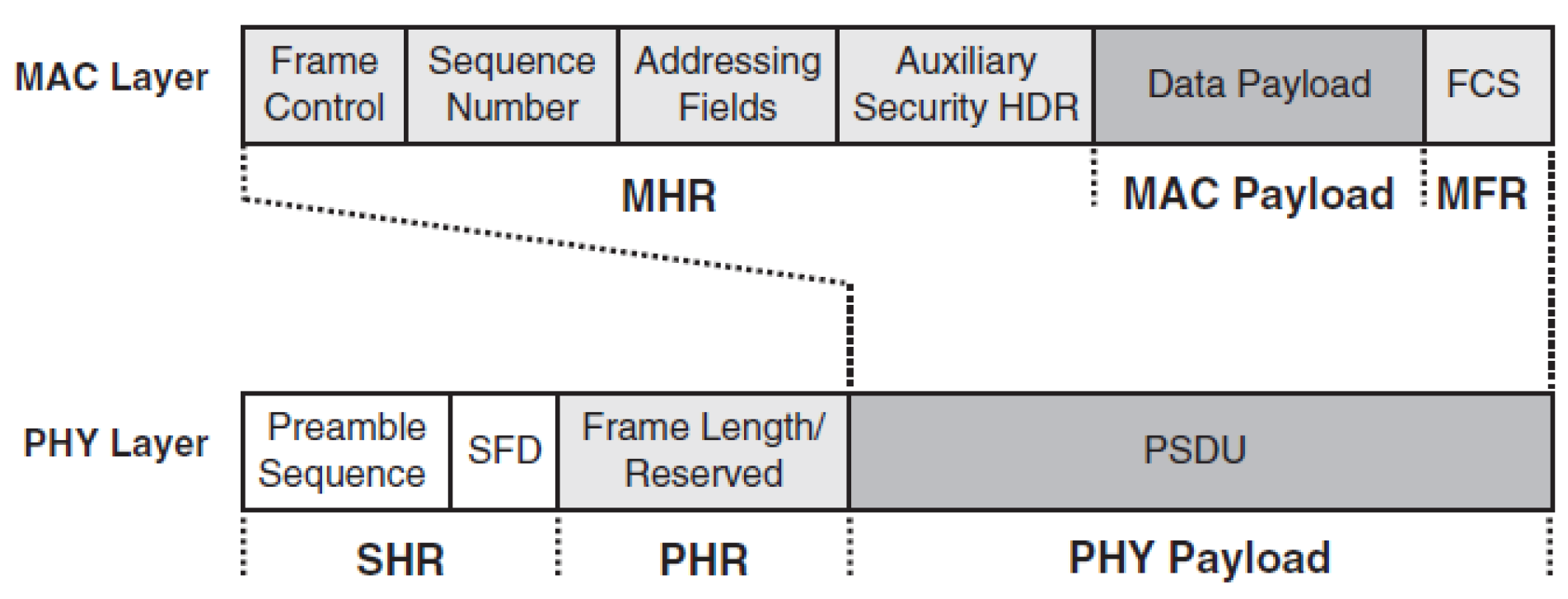
Source: CP IoT System Design Guide, Chapter 4 - Networking Fundamentals
NoteProtocol Data Units (Original Source Figure)
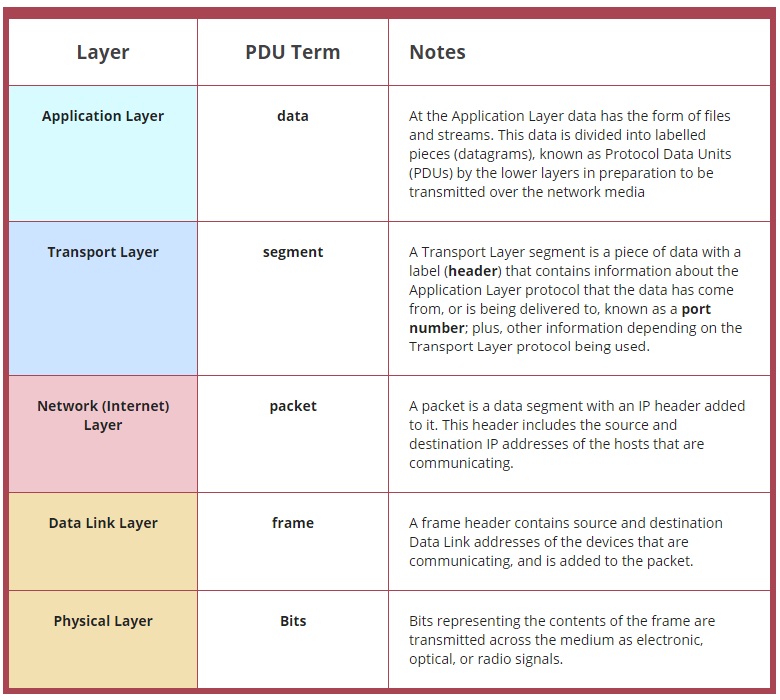
Source: CP IoT System Design Guide, Chapter 4 - Networking Fundamentals
NoteData Frame Structure (Alternative View)
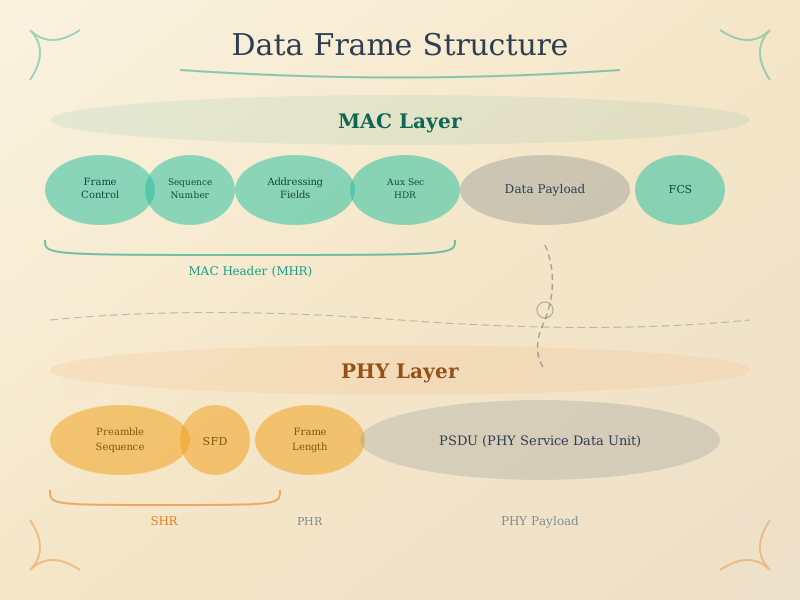
A data frame is the complete package that travels across network links. This visualization breaks down the key components: the preamble for synchronization, header fields containing addressing and control information, the payload carrying actual data, and the trailer with Frame Check Sequence (FCS) for error detection. Understanding frame structure helps engineers calculate overhead ratios and select appropriate protocols for bandwidth-constrained IoT deployments.
50.6 Summary
Packet anatomy is the foundation of all network communication:
- Three Parts: Every packet contains Header (routing/control), Payload (data), and Trailer (error checking)
- Header Fields: Source/destination addresses, length, type, sequence numbers, and flags
- Payload: Variable-size section carrying actual sensor data or application messages
- Trailer: Error detection using checksums or CRC values
Key Takeaways: - Headers provide metadata needed for routing and protocol operation - Payload size is limited by the Maximum Transmission Unit (MTU) - Understanding packet structure is essential for debugging with tools like Wireshark
50.7 What’s Next
Continue exploring packet structure with these related chapters:
- Frame Delimiters and Boundaries - How receivers detect where packets begin and end
- Error Detection - Checksums, CRC, and ensuring data integrity
- Protocol Overhead - Comparing header sizes and encapsulation