925  Bluetooth Review: GATT Pitfalls and Summary

NoteSeries Navigation

This is Part 3 of the Bluetooth Comprehensive Review series:

  1. Overview and Visualizations - Protocol stacks, state machines, initial scenarios
  2. Advanced Scenarios - Medical security, battery drain, smart locks
  3. GATT Pitfalls (this chapter) - Common implementation mistakes
  4. Assessment - Visual gallery and understanding checks

925.1 Common GATT Implementation Pitfalls

CautionPitfall: Not Enabling CCCD Before Expecting Notifications

The Mistake: Creating a BLE peripheral with NOTIFY characteristics, but notifications never arrive at the central device. The central connects, discovers services, but never receives pushed data even though the peripheral is calling notify().

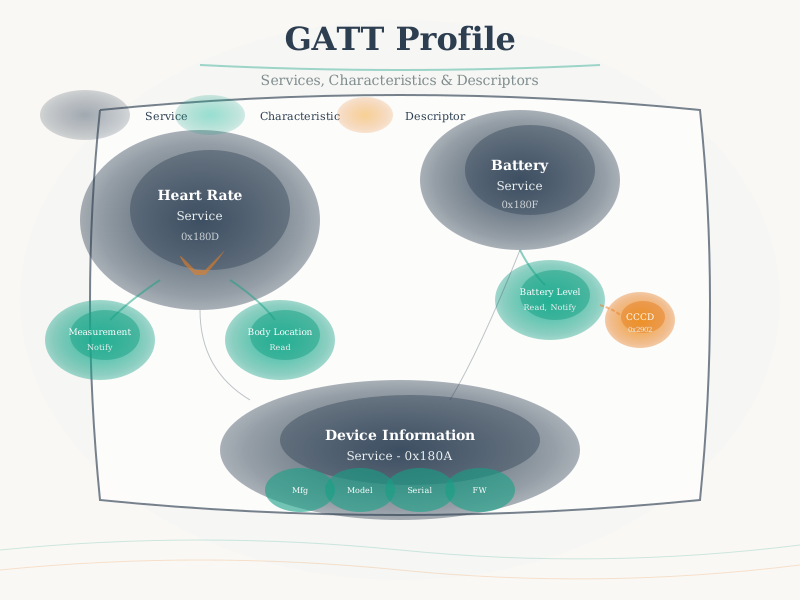
Why It Happens: BLE notifications require the client to explicitly enable them by writing to the Client Characteristic Configuration Descriptor (CCCD). This is a security and power-saving feature - peripherals don’t spam data until the client opts in. Many developers forget this step, especially when transitioning from other protocols.

The Fix: After discovering characteristics, the central must write 0x0001 (notifications) or 0x0002 (indications) to the CCCD descriptor (UUID 0x2902):

// Central/Client side - MUST enable notifications
void on_characteristic_discovered(uint16_t char_handle, uint16_t cccd_handle) {
    // Write 0x0001 to CCCD to enable notifications
    uint8_t enable_notify[2] = {0x01, 0x00};  // Little-endian
    ble_gattc_write(conn_handle, cccd_handle, enable_notify, 2);
}

// Peripheral side - check if notifications are enabled
void send_sensor_reading(float value) {
    if (cccd_enabled) {  // Only notify if client subscribed
        ble_gatts_hvx(conn_handle, &hvx_params);
    }
    // Otherwise, client must poll via READ
}

Common symptoms: Works in nRF Connect (which auto-enables CCCD) but fails in custom apps. Debug by checking CCCD value after connection.

CautionPitfall: Using Custom UUIDs When Standard GATT Services Exist

The Mistake: Creating custom 128-bit UUIDs for common sensor data (temperature, heart rate, battery level) instead of using Bluetooth SIG standard services, breaking interoperability with existing apps and tools.

Why It Happens: Developers either don’t know standard services exist, or want β€œfull control” over data format. Custom UUIDs require custom apps on every platform, while standard services work with generic BLE tools and OS integrations.

The Fix: Check the Bluetooth SIG GATT specifications before creating custom services. Use standard UUIDs with defined data formats:

// WRONG: Custom UUID for temperature
#define TEMP_SERVICE_UUID "12345678-1234-5678-1234-123456789abc"
// Requires custom app, no ecosystem support

// CORRECT: Standard Environmental Sensing Service
#define ENV_SENSING_SERVICE  0x181A  // Bluetooth SIG standard
#define TEMPERATURE_CHAR     0x2A6E  // Standard characteristic

// Standard data format for temperature (per GATT spec):
// sint16: temperature in 0.01 degrees Celsius
int16_t temp_value = (int16_t)(celsius * 100);
ble_gatts_notify(conn_handle, temp_char_handle, &temp_value, 2);

// Benefits of standard services:
// - Works with nRF Connect, LightBlue, and generic BLE apps
// - iOS/Android can display values in system Bluetooth settings
// - Interoperable with fitness apps, health platforms
// - Defined data encoding eliminates ambiguity

When to use custom UUIDs: Only for truly proprietary functionality that has no standard equivalent (e.g., device-specific configuration, firmware update protocol, vendor-specific commands).

CautionPitfall: Setting Supervision Timeout Too Short for High-Latency Peripherals

The Mistake: Using a short supervision timeout (e.g., 1 second) for a BLE connection to a peripheral that uses peripheral latency to skip connection events, resulting in unexpected disconnections during normal operation when no data is being exchanged.

Why It Happens: Developers set aggressive timeouts thinking β€œfaster disconnect detection is better,” without accounting for the interaction between connection interval, peripheral latency, and supervision timeout. If peripheral latency allows skipping 10 events at 400ms intervals, the peripheral may not respond for 4 secondsβ€”triggering a 1-second timeout.

The Fix: The supervision timeout must accommodate the worst-case response time based on your connection parameters. Use this formula:

Minimum supervision timeout = (1 + peripheral_latency) Γ— connection_interval Γ— 2

Example calculations:

Scenario A (fast response, no latency):
- Connection interval: 50ms
- Peripheral latency: 0 (respond every event)
- Minimum timeout: (1 + 0) Γ— 50ms Γ— 2 = 100ms
- Recommended: 500ms-1s (margin for retries)

Scenario B (power-optimized sensor):
- Connection interval: 400ms (maximum for iOS)
- Peripheral latency: 4 (skip up to 4 events when idle)
- Minimum timeout: (1 + 4) Γ— 400ms Γ— 2 = 4000ms
- Recommended: 6-10 seconds

Scenario C (ultra-low-power with max latency):
- Connection interval: 4s (BLE maximum)
- Peripheral latency: 0 (required at max interval)
- Minimum timeout: (1 + 0) Γ— 4s Γ— 2 = 8s
- Recommended: 16-32 seconds (BLE max is 32s)

Common mistake:
- CI: 200ms, Latency: 10, Timeout: 2s
- Worst-case response: (1+10) Γ— 200ms = 2.2s > 2s timeout
- Result: Random disconnections when peripheral is idle!

Always verify: timeout > (1 + latency) Γ— interval Γ— safety_factor where safety_factor >= 2.
CautionPitfall: Ignoring iOS Connection Parameter Restrictions

The Mistake: Designing a BLE peripheral with connection parameters optimized for Android or embedded gateways (e.g., 500ms-4s connection intervals), then discovering that iPhones reject or override these parameters, causing connection failures or poor battery life on iOS.

Why It Happens: Apple enforces stricter connection parameter ranges than the BLE specification allows. Peripherals requesting parameters outside Apple’s limits will have their requests rejected or modified, leading to unexpected behavior that only appears during iOS testing.

The Fix: Design for Apple’s constraints first, then relax for Android/embedded if needed:

Apple's BLE Connection Parameter Requirements (as of iOS 17):

Connection Interval:
- Minimum: 15ms (BLE spec allows 7.5ms)
- Maximum: 2s (was 4s before iOS 11, then 2s)
- Must be multiple of 15ms

Peripheral Latency:
- Maximum: 30 (spec allows 499)
- Constraint: latency Γ— interval ≀ 2 seconds

Supervision Timeout:
- Minimum: 2 seconds
- Maximum: 6 seconds
- Constraint: timeout β‰₯ (1 + latency) Γ— interval Γ— 3

Recommended cross-platform parameters:

For responsive devices (wearables, input devices):
  min_interval: 15ms (12 Γ— 1.25ms)
  max_interval: 30ms (24 Γ— 1.25ms)
  latency: 0
  timeout: 2000ms

For power-optimized sensors:
  min_interval: 100ms (80 Γ— 1.25ms)
  max_interval: 200ms (160 Γ— 1.25ms)
  latency: 4
  timeout: 4000ms

For ultra-low-power (environmental sensors):
  min_interval: 400ms (320 Γ— 1.25ms)
  max_interval: 500ms (400 Γ— 1.25ms)
  latency: 3
  timeout: 6000ms

Common mistake: CI=4s (max BLE spec)
- Android: Works fine
- iOS: Silently reduced to 2s, doubling power consumption
- Embedded: Works fine

Always test on iOS devices early in developmentβ€”parameter negotiation failures are silent!

925.2 Chapter Summary

Bluetooth has evolved from cable replacement to sophisticated IoT protocol. BLE revolutionized wireless sensors by enabling years of battery life.

Key Points: - Classic BT: Continuous connections (audio) - BLE: Intermittent, ultra-low power - Piconets: 7 active slaves max - Mesh: Scalable building automation - Profiles: Application-specific behavior - Security: Modern encryption & authentication

925.3 Original Source Figures (Alternative Views)

The following figures from the CP IoT System Design Guide provide alternative perspectives on Bluetooth concepts for review and comparison.

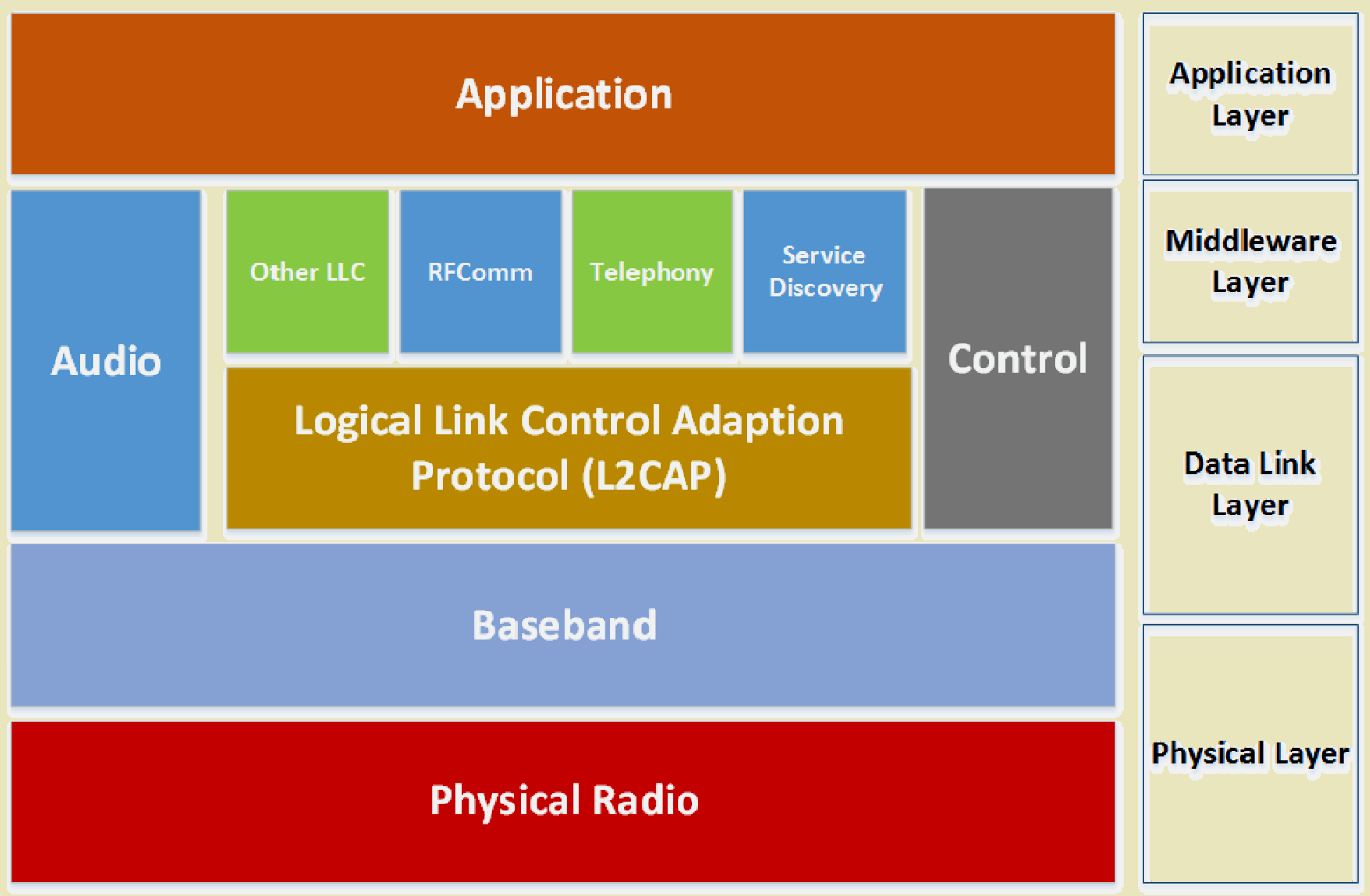
Complete Bluetooth protocol stack showing layered architecture from Radio layer through Baseband, Link Manager Protocol, L2CAP, RFCOMM, and Application Profiles including Serial Port Profile, Human Interface Device, Hands-Free Profile, and Advanced Audio Distribution Profile

Bluetooth protocol stack architecture

Source: CP IoT System Design Guide, Chapter 4 - Networking

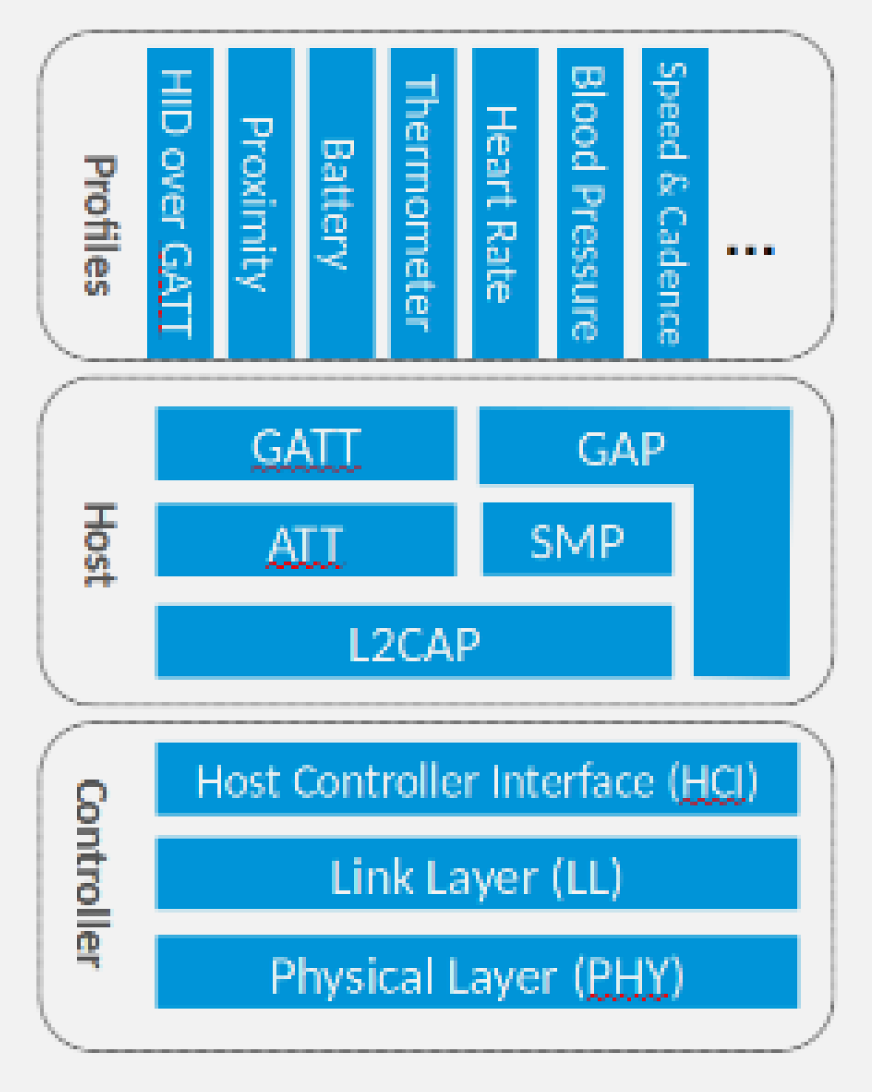
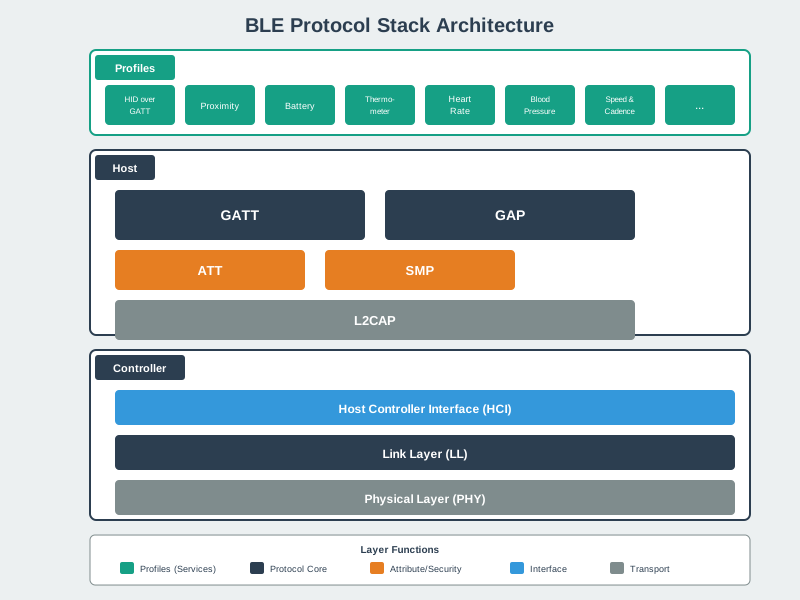
BLE-specific protocol stack showing simplified architecture compared to Classic Bluetooth: Physical Layer, Link Layer, L2CAP, ATT (Attribute Protocol), GATT (Generic Attribute Profile), and GAP (Generic Access Profile) for connection management

BLE protocol stack layers

Source: CP IoT System Design Guide, Chapter 4 - Networking

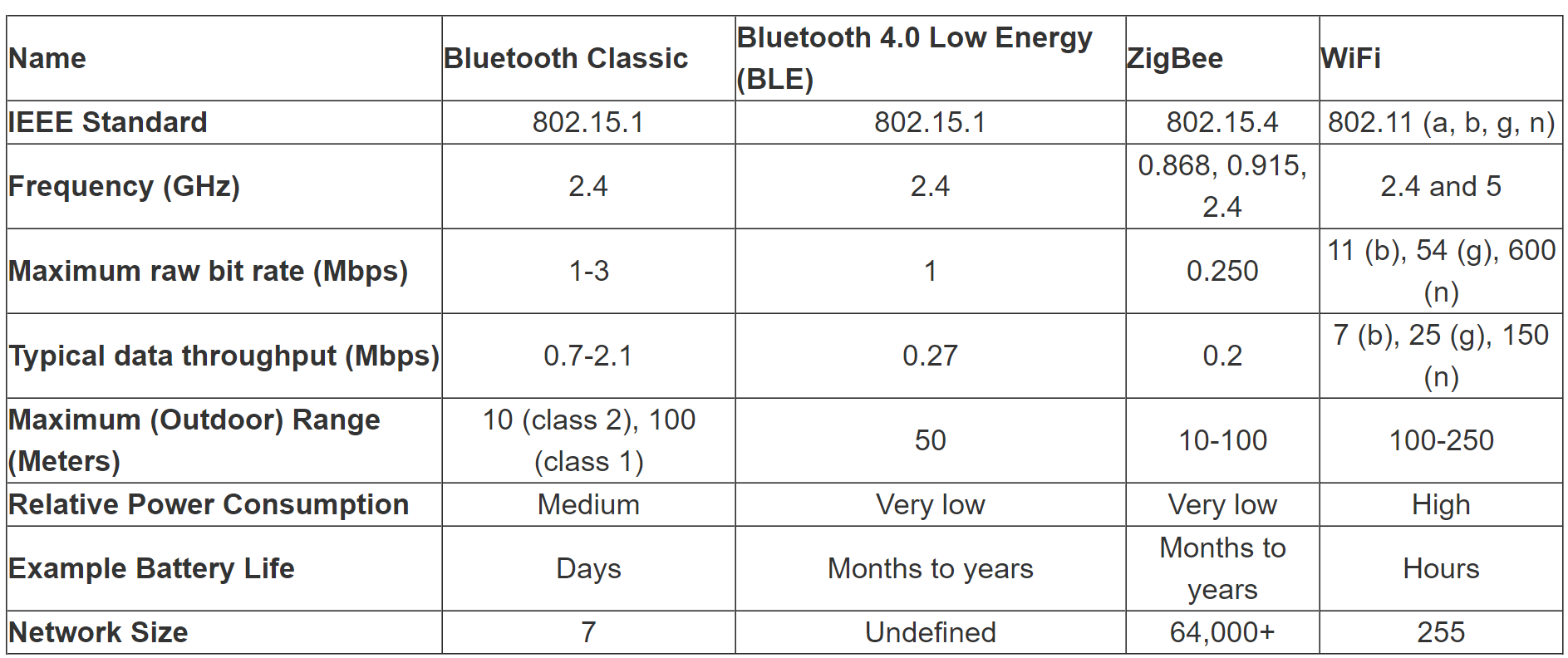
Detailed comparison matrix of Bluetooth Classic, BLE, Zigbee, and Wi-Fi covering IEEE standards, frequency bands, data rates, range, power consumption, network size, and optimal use cases for informed protocol selection in IoT projects

Wireless technology comparison for IoT

Source: CP IoT System Design Guide, Chapter 4 - Networking

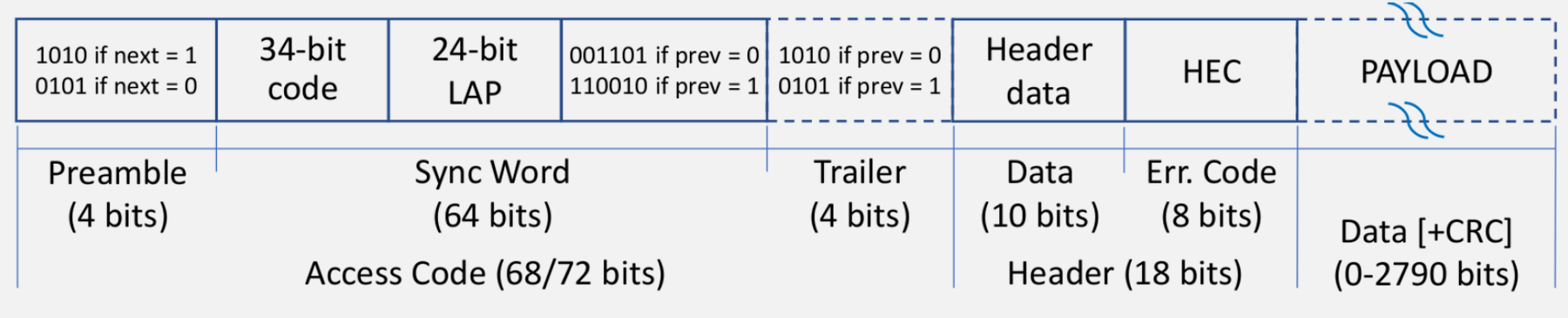
Bluetooth Classic packet format showing 72-bit access code for synchronization and piconet identification, 54-bit header with AM_ADDR, packet type, flow control and error checking fields, and variable-length payload section

Bluetooth packet structure details

Source: CP IoT System Design Guide, Chapter 4 - Networking

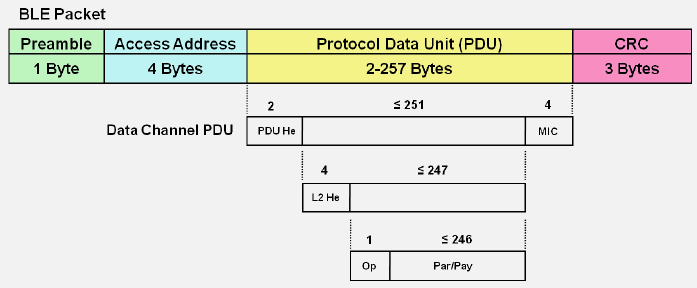
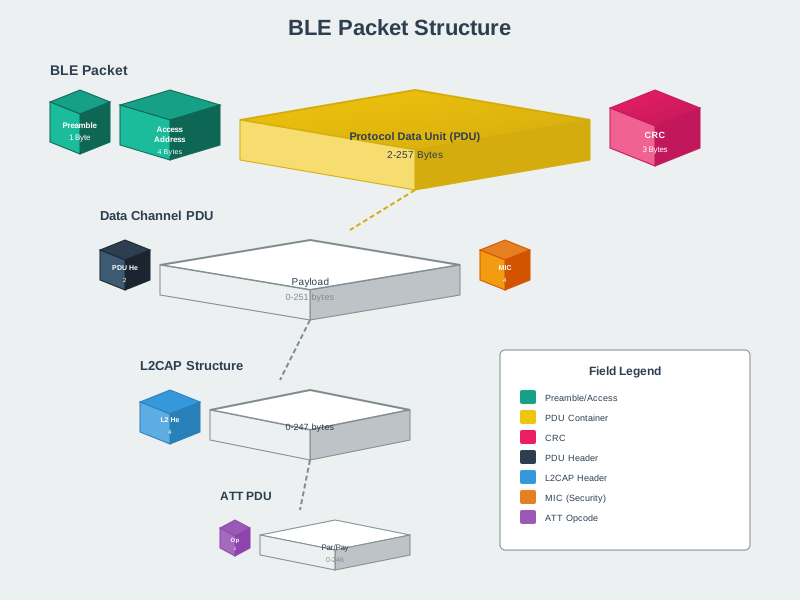
BLE data frame showing 1-byte preamble, 4-byte access address, variable PDU with header and payload, and 3-byte CRC for reliable data transmission in low-power applications

BLE data frame structure

Source: CP IoT System Design Guide, Chapter 4 - Networking

Summary of Bluetooth operational modes comparing Active, Sniff, Hold, and Park states in terms of power consumption, response latency, and appropriate use cases for battery optimization in connected devices

Bluetooth power-saving modes

Source: CP IoT System Design Guide, Chapter 4 - Networking

925.5 Summary

925.6 What’s Next

Continue to Bluetooth Review: Assessment for visual galleries and comprehensive understanding checks.