%%{init: {'theme': 'base', 'themeVariables': {'primaryColor': '#2C3E50', 'primaryTextColor': '#fff', 'primaryBorderColor': '#16A085', 'lineColor': '#E67E22', 'secondaryColor': '#16A085', 'tertiaryColor': '#7F8C8D'}}}%%
graph LR
    subgraph "Thread Network IPv6"
        T1[Thread Device<br/>fd00::1234]
        T2[Thread Device<br/>fd00::5678]
    end

    BR[Border Router<br/>NAT64 + DNS64]

    subgraph "External Network"
        I4[IPv4 Internet<br/>192.0.2.1]
        I6[IPv6 Internet<br/>2001:db8::1]
    end

    T1 <--> BR
    T2 <--> BR
    BR <-->|NAT64| I4
    BR <-->|Native IPv6| I6

    style T1 fill:#2C3E50,stroke:#16A085,color:#fff
    style T2 fill:#2C3E50,stroke:#16A085,color:#fff
    style BR fill:#E67E22,stroke:#2C3E50,color:#fff
    style I4 fill:#16A085,stroke:#2C3E50,color:#fff
    style I6 fill:#16A085,stroke:#2C3E50,color:#fff
1017 Thread Deployment and Troubleshooting Guide
1017.1 Learning Objectives
By the end of this chapter, you will be able to:
- Configure Border Routers: Set up NAT64 and DNS64 for IPv4 internet connectivity
- Design Multi-Network Deployments: Plan Thread networks for buildings with 250+ devices
- Troubleshoot Thread Networks: Diagnose and resolve common connectivity issues
- Apply Decision Frameworks: Choose optimal network sizing, border router placement, and device roles
- Implement Redundancy: Deploy fault-tolerant Thread infrastructure
1017.2 Prerequisites
Before diving into this chapter, you should be familiar with:
- Thread Network Operations: Network formation, self-healing, addressing, and power management
- Thread Development and Integration: OpenThread CLI commands and device configuration
NoteRelated Chapters
Deep Dives: - Thread Operation and Implementation - Chapter index - Thread Network Operations - Formation and power management - Thread Development and Integration - OpenThread SDK and Matter
Architecture: - Wireless Sensor Networks - WSN deployment patterns - Fog Production and Review - Edge computing with Thread
TipFor Beginners: Planning Thread Deployments
Think of it like planning a postal network for a neighborhood:
Single Thread Network (< 250 devices): - Like one post office serving a neighborhood - All mail goes through that one hub - Works great for homes and small offices
Multiple Thread Networks (> 250 devices): - Like having a post office per district - Each district handles its own local mail - Districts connect through a central hub (your cloud/controller)
Border Routers = Post Offices: - Connect the local neighborhood (Thread mesh) to the outside world (internet) - More border routers = more reliability (if one fails, others keep working)
Placement Strategy: - Border router near your internet router (strong backhaul) - Routers (smart bulbs, plugs) spread throughout for mesh coverage - Battery sensors placed where needed (mesh reaches them through routers)
1017.3 Border Router Configuration
Border Routers connect Thread networks to IPv4/IPv6 internet:
{fig-alt=“Border Router architecture showing Thread devices with IPv6 addresses connecting through Border Router with NAT64/DNS64 to both IPv4 and IPv6 internet services”}
1017.3.1 NAT64 for IPv4 Access
Thread devices use IPv6 internally. To communicate with IPv4 services:
- DNS64: Translates IPv4 addresses to synthesized IPv6 (e.g.,
8.8.8.8→64:ff9b::8.8.8.8) - NAT64: Border router translates IPv6 packets to IPv4 for outbound traffic
- Prefix: Border router advertises NAT64 prefix to Thread network
Example: Thread sensor sending to IPv4 cloud:
Thread Sensor         Border Router              Cloud (IPv4)
     |                     |                         |
     |--UDP to 64:ff9b::-->|                         |
     |   8.8.8.8:443       |                         |
     |                     |--UDP to 8.8.8.8:443-->  |
     |                     |   (NAT64 translation)   |
     |                     |<--Response--------------|
     |<--Response----------|                         |
1017.3.2 Border Router Configuration Commands
# OpenThread Border Router (OTBR) setup
# Check NAT64 status
> nat64 state
enabled

# View NAT64 prefix
> nat64 prefix
64:ff9b::/96 (active)

# View advertised prefixes
> netdata show
Prefixes:
64:ff9b::/96 paros med 4000
fd12:3456::/64 paros med 4000

# Configure DNS64 upstream server
> dns64 server 8.8.8.8

# Test connectivity
> ping 64:ff9b::8.8.8.8
16 bytes from 64:ff9b::808:808: icmp_seq=1 hlim=64 time=45ms
1017.4 Network Troubleshooting
1017.4.1 Common Thread Issues and Solutions
| Symptom | Likely Cause | Diagnostic Command | Solution |
|---|---|---|---|
| Device won’t join | Wrong credentials | commissioner state |
Re-commission with correct PSK |
| Intermittent connection | Weak signal | neighbor list (check LQI) |
Add router for coverage |
| High latency | Too many hops | route |
Optimize router placement |
| Battery drains fast | Poll interval too short | Check pollperiod |
Increase poll interval |
| Network partition | Leader failure | state on all devices |
Check leader redundancy |
1017.4.2 Monitoring Thread Network Health
Key metrics to monitor:
- Partition ID: All devices should have same partition ID (network not split)
- Router Count: Should be 16-32 for large networks
- Leader Stability: Leader shouldn’t change frequently
- Child Table Size: Router shouldn’t exceed 511 children
- Link Quality (LQI): Should be > 2 for reliable communication
# Check partition ID (all devices should match)
> leaderdata
Partition ID: 0x12345678
Weighting: 64
Data Version: 12

# Check router count
> routerselectionjitter
120

# Check link quality to neighbors
> neighbor table
| RLOC16 | LQI In | LQI Out | Age |
|--------|--------|---------|-----|
| 0x4c01 |   3    |    3    | 12s |
| 0x6801 |   2    |    2    | 45s |
1017.4.3 Diagnostic Workflow
%%{init: {'theme': 'base', 'themeVariables': {'primaryColor': '#2C3E50', 'primaryTextColor': '#fff', 'primaryBorderColor': '#16A085', 'lineColor': '#E67E22', 'secondaryColor': '#16A085', 'tertiaryColor': '#7F8C8D'}}}%%
flowchart TD
    A[Device Issue Reported] --> B{Can device<br/>see network?}
    B -->|No| C[Check commissioner<br/>and credentials]
    B -->|Yes| D{Is device<br/>attached?}

    D -->|No| E[Check parent<br/>availability]
    D -->|Yes| F{Can reach<br/>destination?}

    F -->|No| G[Check routing<br/>table and hops]
    F -->|Yes| H[Issue at<br/>application layer]

    C --> I[Re-commission<br/>device]
    E --> J[Add routers<br/>for coverage]
    G --> K[Optimize router<br/>placement]

    style A fill:#2C3E50,stroke:#16A085,color:#fff
    style B fill:#E67E22,stroke:#2C3E50,color:#fff
    style D fill:#E67E22,stroke:#2C3E50,color:#fff
    style F fill:#E67E22,stroke:#2C3E50,color:#fff
    style I fill:#16A085,stroke:#2C3E50,color:#fff
    style J fill:#16A085,stroke:#2C3E50,color:#fff
    style K fill:#16A085,stroke:#2C3E50,color:#fff
1017.5 Deployment Decision Frameworks
1017.5.1 Decision Framework: Thread Network Sizing
TipDecision Framework: Thread Network Sizing
When to use a single Thread network (250 device limit): - Small to medium deployments: 1-200 devices (residential, small office) - Single building/floor: All devices within reasonable mesh range (10-30m hops) - Homogeneous use case: Smart home, single-purpose monitoring - Simple management: One Border Router, one network to configure
When to use multiple Thread networks: - Large deployments: 250+ devices (commercial buildings, campuses) - Geographic distribution: Multiple floors, buildings, or zones - Fault isolation needed: Critical vs non-critical systems separated - Scalability planning: Expecting growth beyond 250 devices
Multi-Network Design Patterns:
- Geographic Segmentation (Recommended for buildings)
- Network 1: Floor 1 (200 devices)
- Network 2: Floor 2 (200 devices)
- Network 3: Floor 3 (200 devices)
- Benefit: Physical proximity = better RF, natural fault isolation
- Functional Segmentation (For mixed use cases)
- Network 1: HVAC/environmental (150 devices)
- Network 2: Security/access control (100 devices)
- Network 3: Lighting/comfort (180 devices)
- Benefit: Security zones, different QoS policies
- Hybrid Segmentation (Large complex deployments)
- Network 1A: Building A, Floor 1 (150 devices)
- Network 1B: Building A, Floor 2 (150 devices)
- Network 2A: Building B, Floor 1 (180 devices)
- Benefit: Both geographic and building-level isolation
Coordination Across Networks: - Use Matter fabric to unify multiple Thread networks at application layer - Deploy Border Router per network (minimum 1, recommend 2 for redundancy) - Implement centralized management via cloud or local controller
1017.5.2 Decision Framework: Border Router Placement
TipDecision Framework: Border Router Placement
Optimize for Internet connectivity (Recommended): - Place near Wi-Fi router/Ethernet: Ensures strong backhaul to cloud services - Rely on mesh for device coverage: Routers distributed throughout space handle Thread coverage - Use wired Ethernet if available: More reliable than Wi-Fi backhaul - Example: HomePod Mini in living room near Wi-Fi router, smart bulbs throughout house extend mesh
Optimize for Thread coverage (Less common): - Central location in building: Maximizes direct radio reach to devices - Risk: May have weak Wi-Fi/Ethernet backhaul for cloud services - Mitigation: Use Wi-Fi extender or run Ethernet to central location - Example: Dedicated Thread Border Router in center of building with wired backhaul
Redundancy Strategies: - Dual Border Routers: Deploy 2 Border Routers per network - Active-active: Both handle traffic (load balancing) - <5 second failover if one fails (Thread 1.3) - Place in different locations for physical redundancy - Mixed ecosystems: HomePod Mini + Google Nest Hub on same Thread network - Matter allows devices to work with multiple Border Routers - Provides redundancy and multi-ecosystem support
1017.5.3 Decision Framework: Device Role Assignment
TipDecision Framework: Device Role Assignment
Router (always-on, mesh backbone): - Mains-powered devices: Smart plugs, light bulbs, switches, HVAC controllers - Strategic placement: Distribute throughout deployment area for coverage - Quantity: Aim for 16-24 routers per 250-device network (optimal mesh) - Avoid: Battery-powered devices (can’t route due to sleep requirements)
Sleepy End Device (SED - ultra low power): - Infrequent sensors: Door/window sensors, leak detectors (wake every 30-300 seconds) - Battery priority: Devices needing 5-10 year battery life on coin cell - Latency tolerant: 100-500ms latency acceptable - Avoid: Real-time control (use MED or FED instead)
Minimal End Device (MED - moderate power): - Frequent sensors: Motion sensors, temperature sensors (wake every 5-30 seconds) - Balance: Moderate battery life (1-2 years) with moderate latency (50-200ms) - Interactive devices: Smart buttons, dimmers (wake on press) - Battery: Requires AA/AAA batteries (not coin cell)
Full End Device (FED - always listening): - Low latency required: Security keypads, emergency buttons, real-time sensors - Mains or large battery: Higher power consumption than SED/MED - Always reachable: Can receive messages anytime (no polling delay) - Use sparingly: Higher power = shorter battery life or mains power needed
REED (Router-Eligible End Device - flexible): - Mains-powered non-critical: Devices that can become routers if needed - Automatic promotion: Network promotes to router if <16 routers exist - Plug-and-play: No manual configuration needed - Predictability: Can’t guarantee it will be router vs end device (network decides)
1017.6 Multi-Network Design Lab
1017.7 Visual Reference Gallery
NoteThread Border Router
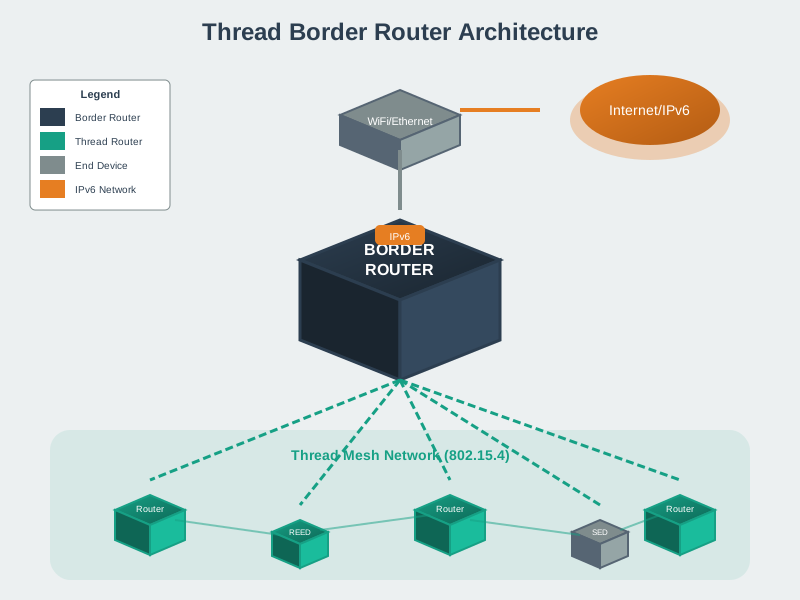
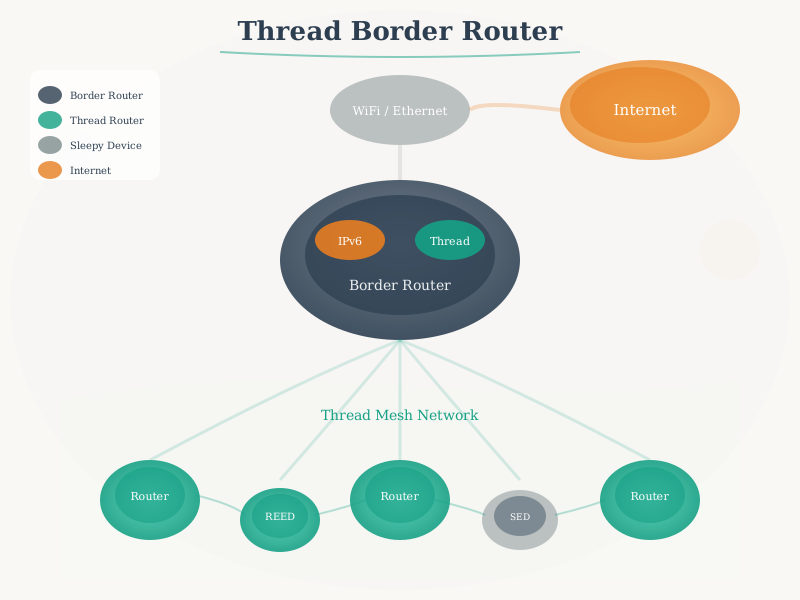
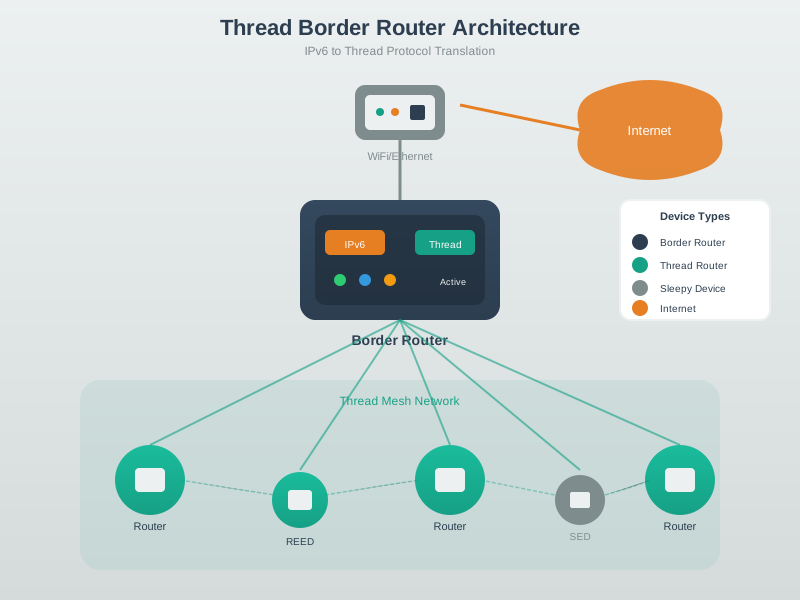
The Thread Border Router enables Thread devices to communicate with the internet and other IP networks, providing IPv6 routing, DNS-SD service discovery, and optional NAT64 for IPv4 compatibility.
NoteThread Mesh Topology
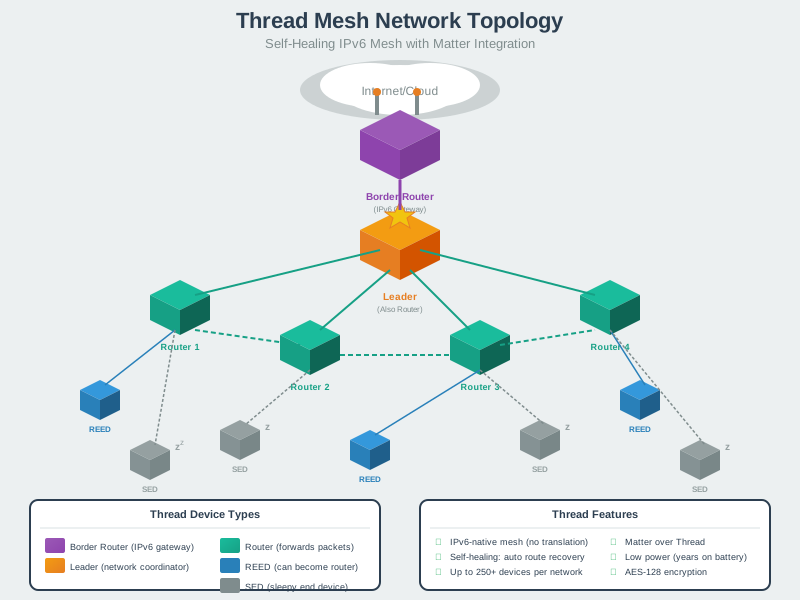
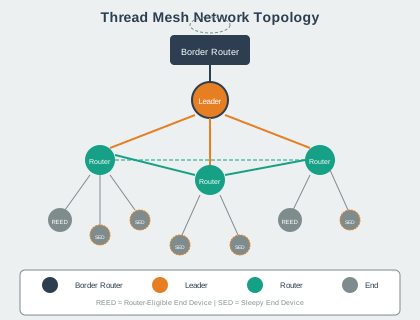
Thread networks automatically organize into self-healing mesh topologies with distributed Leader election and Router promotion ensuring network resilience.
1017.8 Understanding Checks
TipUnderstanding Check: Thread Device Roles in Practice
Scenario: You’re designing a Matter smart home with Thread networking. The home has 12 smart light bulbs (mains-powered), 25 door/window sensors (battery), and 5 motion sensors (battery). You just bought a HomePod Mini as the Border Router.
Think about: 1. Which devices will become routers in the mesh network, and why? 2. How will the battery-powered sensors communicate with the cloud? 3. What happens if one of the light bulbs (acting as a router) burns out?
Key Insight: - Routers = Mains-powered devices only: The 12 light bulbs will become routers (along with HomePod Mini = 13 total routers). Battery sensors cannot be routers because they need to sleep to preserve battery. - Multi-hop mesh routing: Sensors attach to nearest router (parent). Messages route through multiple routers to reach Border Router, then to cloud via Wi-Fi. - Self-healing magic: When a bulb fails, nearby sensors automatically find a new parent router within 1-2 minutes. Other routers recalculate routes around the failed device. No human intervention needed. - No single point of failure: Even if the Leader (elected from the 13 routers) fails, a new Leader is elected automatically. The mesh continues operating.
Matter Context: Matter relies on Thread’s self-healing mesh for reliability. This is why Matter devices “just work” even when you remove or add devices - the network adapts automatically.
TipUnderstanding Check: Thread vs Zigbee Architecture
Scenario: Your colleague argues that Zigbee is better than Thread because “Zigbee supports 65,000 devices per network while Thread only supports 250.” You’re deploying a commercial building with 800 sensors.
Think about: 1. Why did Thread choose a 250-device limit if Zigbee can do 65,000? 2. How would you design the 800-device deployment with Thread? 3. What are the advantages of Thread’s approach versus Zigbee’s single large network?
Key Insight: - Thread 250-device limit is intentional: Keeps routing tables small, reduces overhead, improves reliability. Large Zigbee networks often suffer from coordinator bottlenecks and complex routing issues. - Thread solution: Deploy 4 separate Thread networks (200 devices each), each with its own Border Router. Use Matter fabric to coordinate across networks at application layer. - Advantages of multiple networks: - Fault isolation: Problem in Network 1 doesn’t affect Networks 2-4 - Better performance: Less congestion, simpler routing per network - Easier troubleshooting: Smaller networks are easier to debug - Scalability: Add Network 5, 6, 7 as building expands - Zigbee trade-off: Single network is simpler to manage but creates single point of failure (coordinator) and routing complexity at scale.
Matter Context: Matter was designed specifically to work with Thread’s multi-network model. Matter controllers can manage devices across multiple Thread networks transparently.
TipUnderstanding Check: Thread Security and Commissioning
Scenario: You just bought a new Matter door lock. The box has a QR code. You scan it with your iPhone’s Home app, and within 30 seconds the lock joins your Thread network and appears in HomeKit.
Think about: 1. What information does the QR code contain, and why is it on the physical device? 2. How does Thread ensure a malicious device can’t join your network? 3. What would happen if someone photographed the QR code before you commissioned the lock?
Key Insight: - QR code contains PSKd (Pre-Shared Key for Device): This is a per-device secret used for initial authentication. It’s printed on the physical device so only someone with physical access can commission it. - Commissioning process: 1. iPhone scans QR code (gets PSKd) 2. iPhone becomes Commissioner, establishes DTLS session with lock using PSKd 3. Over encrypted DTLS channel, iPhone sends Network Master Key, PAN ID, network name 4. Lock joins Thread network using Master Key 5. Lock performs MLE (Mesh Link Establishment) to find parent router - Security against rogue devices: Without the PSKd from QR code, attackers can’t establish DTLS session to get network credentials. Physical access required. - Photographed QR code risk: Attacker could commission a malicious device pretending to be your lock. Mitigation: Commission immediately after unboxing, disable commissioning mode after setup, rotate Network Master Key periodically.
Thread security is stronger than Wi-Fi WPA2-PSK because: - Out-of-band authentication (QR code) vs password entry (prone to weak passwords) - Per-device credentials (PSKd) vs network-wide password - DTLS encryption during commissioning vs WPA2 4-way handshake - AES-128-CCM for all traffic (same strength as banking)
1017.9 Summary
This chapter covered Thread deployment and troubleshooting:
- Border Router Configuration: NAT64 enables IPv4 connectivity for Thread’s IPv6-only devices; DNS64 synthesizes IPv6 addresses for IPv4 services; proper prefix advertisement is critical
- Network Troubleshooting: Use CLI commands (
state,neighbor table,leaderdata) to diagnose issues; common problems include credential mismatches, weak signal coverage, and network partitions - Multi-Network Design: Use geographic or functional segmentation for 250+ device deployments; deploy 2 border routers per network for redundancy; Matter fabric coordinates across networks
- Device Role Selection: Mains-powered devices become routers (16-24 optimal); battery devices become SEDs (coin cell, 5-10 year life) or MEDs (AA/AAA, 1-2 year life); FEDs for low-latency requirements
- Decision Frameworks: Network sizing, border router placement, and device role assignment frameworks guide production deployments
1017.10 Knowledge Check
1017.11 What’s Next
Continue to Thread Comprehensive Review for advanced topics including Thread + Matter integration details, Wi-Fi 6 comparisons, and production deployment best practices for smart buildings and industrial IoT.