%%{init: {'theme': 'base', 'themeVariables': { 'primaryColor': '#2C3E50', 'primaryTextColor': '#fff', 'primaryBorderColor': '#16A085', 'lineColor': '#16A085', 'secondaryColor': '#E67E22', 'tertiaryColor': '#ecf0f1', 'fontSize': '16px'}}}%%
graph LR
    ESP[ESP32 DevKit v1]
    LED_S[Green LED<br/>GPIO 4]
    LED_I[Red LED<br/>GPIO 2]
    BTN[Push Button<br/>GPIO 5]
    GND[GND]

    ESP -->|GPIO 4| LED_S
    ESP -->|GPIO 2| LED_I
    ESP -->|GPIO 5| BTN
    ESP -->|Ground| GND
    LED_S -->|to GND| GND
    LED_I -->|to GND| GND
    BTN -->|to GND| GND

    style ESP fill:#2C3E50,stroke:#16A085,stroke-width:3px,color:#fff
    style LED_S fill:#16A085,stroke:#2C3E50,stroke-width:2px
    style LED_I fill:#E67E22,stroke:#2C3E50,stroke-width:2px
    style BTN fill:#7F8C8D,stroke:#2C3E50,stroke-width:2px
    style GND fill:#34495e,stroke:#2C3E50,stroke-width:2px
916 Bluetooth Security: Labs and Defense-in-Depth
916.1 Learning Objectives
By the end of this chapter, you will be able to:
- Implement BLE Security in Code: Build and test secure vs insecure BLE configurations on ESP32
- Apply Defense-in-Depth Principles: Design multi-layer security for BLE IoT deployments
- Understand Attack Timeline: Recognize vulnerability windows throughout device lifecycle
- Validate Security Knowledge: Demonstrate understanding through practical challenges and assessments
916.2 Prerequisites
Before diving into this chapter, you should be familiar with:
- Bluetooth Security: Pairing Methods: Understanding BLE pairing and authentication
- Bluetooth Security: Encryption and Key Management: Key hierarchy and security framework
- Bluetooth Implementations and Labs: Basic ESP32 BLE programming experience
916.3 Interactive Lab: BLE Security Demonstration
916.3.1 Lab Objective
Explore how different BLE security modes affect data transmission and device pairing. This hands-on lab demonstrates:
- Secure pairing with PIN verification
- Encrypted vs unencrypted data transmission
- MAC address randomization (privacy feature)
- Security flags in BLE advertising
916.3.2 What You’ll Build
An ESP32 BLE security demonstration that shows:
- Secure mode: Requires pairing with PIN, encrypts all data
- Insecure mode: Accepts any connection, transmits data in plaintext
- Security indicators: Visual feedback showing security state
916.3.3 Hardware Requirements
For Wokwi Simulator:
- ESP32 DevKit v1
- LED (Red = Insecure, Green = Secure)
- Push button (toggle security modes)
- No physical hardware needed!
For Real Hardware:
- ESP32 DevKit v1
- 2x LEDs (Red + Green)
- 2x 220 Ohm resistors
- Push button
- Breadboard + jumper wires
916.3.4 Circuit Diagram
916.3.5 Lab Code: BLE Security Demo
Complete Code:
#include <BLEDevice.h>
#include <BLEServer.h>
#include <BLEUtils.h>
#include <BLE2902.h>

// Security settings
#define DEVICE_NAME "SecureIoTDevice"
#define SERVICE_UUID        "4fafc201-1fb5-459e-8fcc-c5c9c331914b"
#define CHARACTERISTIC_UUID "beb5483e-36e1-4688-b7f5-ea07361b26a8"

// Pin definitions
#define LED_SECURE   4   // Green LED (secure mode)
#define LED_INSECURE 2   // Red LED (insecure mode)
#define BUTTON_PIN   5   // Mode toggle button

BLEServer* pServer = NULL;
BLECharacteristic* pCharacteristic = NULL;
bool deviceConnected = false;
bool secureMode = true;  // Start in secure mode
uint32_t securityPIN = 123456;  // 6-digit pairing PIN

// Security callback for pairing
class MySecurityCallbacks : public BLESecurityCallbacks {
  uint32_t onPassKeyRequest() {
    Serial.println("Passkey requested");
    return securityPIN;  // Return the PIN
  }

  void onPassKeyNotify(uint32_t pass_key) {
    Serial.printf("Pairing PIN: %06d\n", pass_key);
    Serial.println("Enter this PIN on your phone to pair securely");
  }

  bool onConfirmPIN(uint32_t pass_key) {
    Serial.printf("Confirm PIN: %06d\n", pass_key);
    return true;  // Auto-confirm for demo
  }

  bool onSecurityRequest() {
    Serial.println("Security request received");
    return true;
  }

  void onAuthenticationComplete(esp_ble_auth_cmpl_t auth_cmpl) {
    if (auth_cmpl.success) {
      Serial.println("Authentication SUCCESSFUL - Secure connection");
      digitalWrite(LED_SECURE, HIGH);
      digitalWrite(LED_INSECURE, LOW);
    } else {
      Serial.println("Authentication FAILED");
      digitalWrite(LED_SECURE, LOW);
      digitalWrite(LED_INSECURE, HIGH);
    }
  }
};

// Server callbacks
class MyServerCallbacks : public BLEServerCallbacks {
  void onConnect(BLEServer* pServer) {
    deviceConnected = true;
    Serial.println("Device connected");
    if (secureMode) {
      Serial.println("Secure mode: Waiting for pairing...");
    } else {
      Serial.println("INSECURE mode: No encryption!");
      digitalWrite(LED_INSECURE, HIGH);
    }
  }

  void onDisconnect(BLEServer* pServer) {
    deviceConnected = false;
    Serial.println("Device disconnected");
    digitalWrite(LED_SECURE, LOW);
    digitalWrite(LED_INSECURE, LOW);

    // Restart advertising
    BLEDevice::startAdvertising();
    Serial.println("Advertising restarted");
  }
};

void setup() {
  Serial.begin(115200);
  Serial.println("\n\nBLE Security Demonstration");
  Serial.println("===========================");

  // Setup pins
  pinMode(LED_SECURE, OUTPUT);
  pinMode(LED_INSECURE, OUTPUT);
  pinMode(BUTTON_PIN, INPUT_PULLUP);

  // Initialize BLE
  BLEDevice::init(DEVICE_NAME);

  // Create BLE Server
  pServer = BLEDevice::createServer();
  pServer->setCallbacks(new MyServerCallbacks());

  // Create BLE Service
  BLEService *pService = pServer->createService(SERVICE_UUID);

  // Create BLE Characteristic (readable + writable)
  pCharacteristic = pService->createCharacteristic(
    CHARACTERISTIC_UUID,
    BLECharacteristic::PROPERTY_READ   |
    BLECharacteristic::PROPERTY_WRITE  |
    BLECharacteristic::PROPERTY_NOTIFY
  );

  pCharacteristic->addDescriptor(new BLE2902());
  pCharacteristic->setValue("Hello from ESP32!");

  // Start service
  pService->start();

  // Configure security
  if (secureMode) {
    Serial.println("SECURE MODE ENABLED");
    Serial.println("   - Pairing required");
    Serial.println("   - AES-128 encryption");
    Serial.printf("   - Pairing PIN: %06d\n", securityPIN);

    // Set security parameters
    BLEDevice::setEncryptionLevel(ESP_BLE_SEC_ENCRYPT);
    BLEDevice::setSecurityCallbacks(new MySecurityCallbacks());

    // Require authentication for pairing
    esp_ble_auth_req_t auth_req = ESP_LE_AUTH_REQ_SC_MITM_BOND;
    esp_ble_io_cap_t iocap = ESP_IO_CAP_OUT;  // Display only (shows PIN)
    uint8_t key_size = 16;  // 128-bit key
    uint8_t init_key = ESP_BLE_ENC_KEY_MASK | ESP_BLE_ID_KEY_MASK;
    uint8_t rsp_key = ESP_BLE_ENC_KEY_MASK | ESP_BLE_ID_KEY_MASK;

    esp_ble_gap_set_security_param(ESP_BLE_SM_AUTHEN_REQ_MODE, &auth_req, sizeof(uint8_t));
    esp_ble_gap_set_security_param(ESP_BLE_SM_IOCAP_MODE, &iocap, sizeof(uint8_t));
    esp_ble_gap_set_security_param(ESP_BLE_SM_MAX_KEY_SIZE, &key_size, sizeof(uint8_t));
    esp_ble_gap_set_security_param(ESP_BLE_SM_SET_INIT_KEY, &init_key, sizeof(uint8_t));
    esp_ble_gap_set_security_param(ESP_BLE_SM_SET_RSP_KEY, &rsp_key, sizeof(uint8_t));

    digitalWrite(LED_SECURE, HIGH);
    digitalWrite(LED_INSECURE, LOW);
  } else {
    Serial.println("INSECURE MODE");
    Serial.println("   - No pairing required");
    Serial.println("   - No encryption");
    Serial.println("   - Data sent in PLAINTEXT");

    BLEDevice::setEncryptionLevel(ESP_BLE_SEC_ENCRYPT_NO_MITM);
    digitalWrite(LED_SECURE, LOW);
    digitalWrite(LED_INSECURE, HIGH);
  }

  // Start advertising
  BLEAdvertising *pAdvertising = BLEDevice::getAdvertising();
  pAdvertising->addServiceUUID(SERVICE_UUID);
  pAdvertising->setScanResponse(true);
  pAdvertising->setMinPreferred(0x06);
  pAdvertising->setMinPreferred(0x12);
  BLEDevice::startAdvertising();

  Serial.println("\nBLE Advertising started");
  Serial.println("Device name: " + String(DEVICE_NAME));
  Serial.println("Use nRF Connect app to connect and test");
  Serial.println("\nPress button to toggle security modes\n");
}

void loop() {
  // Check button press (toggle security mode)
  static bool lastButtonState = HIGH;
  bool buttonState = digitalRead(BUTTON_PIN);

  if (lastButtonState == HIGH && buttonState == LOW) {
    delay(50);  // Debounce
    secureMode = !secureMode;
    Serial.println("\nRESTARTING WITH NEW SECURITY MODE...\n");
    ESP.restart();  // Restart to apply new security settings
  }
  lastButtonState = buttonState;

  // If connected, send sensor data periodically
  if (deviceConnected) {
    static unsigned long lastUpdate = 0;
    if (millis() - lastUpdate > 5000) {  // Every 5 seconds
      lastUpdate = millis();

      // Simulate sensor data
      float temperature = 20.0 + (random(0, 100) / 10.0);
      String data = "Temp: " + String(temperature, 1) + " C";

      // Send data
      pCharacteristic->setValue(data.c_str());
      pCharacteristic->notify();

      if (secureMode) {
        Serial.println("Encrypted data sent: " + data);
      } else {
        Serial.println("PLAINTEXT data sent: " + data);
        Serial.println("   (Anyone can intercept this!)");
      }
    }
  }

  delay(100);
}
916.3.6 Lab Challenges
Try these experiments to understand BLE security:
916.3.6.1 Challenge 1: Compare Security Modes
Task: Connect to the device in both secure and insecure modes using nRF Connect app.
Steps:
- Upload code in secure mode (default)
- Open nRF Connect app on phone
- Scan for “SecureIoTDevice”
- Attempt to connect - Prompted for PIN:
123456 - After entering PIN, observe encrypted connection
- Press button to restart in insecure mode
- Connect again - No PIN required
- Compare connection process
Question: Which mode connected faster? Why?
Answer
Insecure mode is faster because it skips authentication. However, this speed comes at a security cost:
Secure mode (slow but safe):
- Connection includes a pairing/authentication step
- Requires a user interaction step (PIN in this demo)
- Uses link-layer encryption after pairing (AES-CCM 128-bit)
- MITM protection depends on the pairing method
Insecure mode (fast but dangerous):
- Connection is typically faster (no pairing step)
- No verification needed
- Data sent in plaintext
- Vulnerable to eavesdropping
Real-world trade-off: For public sensor data, plaintext might be acceptable. For control actions or sensitive data, prefer authenticated pairing and add application-layer authorization.
916.3.6.2 Challenge 2: Intercept Plaintext Data
Task: Use Wireshark or nRF Sniffer to capture BLE packets and view unencrypted data.
Requirements:
- A BLE sniffer (e.g., nRF52840 dongle running nRF Sniffer)
- Wireshark (with the appropriate BLE capture integration)
- nRF Sniffer firmware/tools
Steps:
- Start BLE packet capture with nRF Sniffer
- Connect phone to ESP32 in insecure mode
- Observe data packets in Wireshark
- Find characteristic write/notify packets
- View temperature data in plaintext: “Temp: 24.5 C”
- Repeat in secure mode
- Observe encrypted packets (unreadable hex data)
Question: What information can an attacker learn from plaintext BLE packets?
Answer
Without encryption, an eavesdropper can see the payloads and metadata:
- Device address/identifiers (tracking risk if privacy features aren’t used)
- Sensor data in plaintext (e.g., temperature strings)
- Service/Characteristic UUIDs (can reveal device type/capabilities)
- Connection patterns (timing, frequency, active periods)
- Commands sent to the device (replay may be possible)
With encryption (secure mode), an eavesdropper typically only sees:
- Packet timing/length and protocol metadata
- Addresses that may be randomized (privacy feature)
- Nothing about actual data content
Privacy lesson: Metadata leakage is real! Even encrypted, BLE reveals when devices communicate.
916.3.6.3 Challenge 3: Implement PIN Brute-Force Protection
Task: Modify the code to lock out attackers after 3 failed pairing attempts.
Requirements:
- Track failed pairing attempts
- Lock device for 60 seconds after 3 failures
- Log all pairing attempts with timestamps
Solution Code
// Add to global variables
int failedAttempts = 0;
unsigned long lockoutUntil = 0;

// Modify onAuthenticationComplete in MySecurityCallbacks
void onAuthenticationComplete(esp_ble_auth_cmpl_t auth_cmpl) {
  // Check if device is locked out
  if (millis() < lockoutUntil) {
    Serial.println("Device locked due to failed attempts");
    Serial.printf("   Unlock in: %d seconds\n", (lockoutUntil - millis()) / 1000);
    return;
  }

  if (auth_cmpl.success) {
    Serial.println("Authentication SUCCESSFUL");
    failedAttempts = 0;  // Reset counter
    digitalWrite(LED_SECURE, HIGH);
  } else {
    failedAttempts++;
    Serial.printf("Authentication FAILED (Attempt %d/3)\n", failedAttempts);

    if (failedAttempts >= 3) {
      lockoutUntil = millis() + 60000;  // Lock for 60 seconds
      Serial.println("TOO MANY FAILED ATTEMPTS - LOCKED FOR 60 SECONDS");
      digitalWrite(LED_INSECURE, HIGH);
      failedAttempts = 0;  // Reset for next cycle
    }
  }
}
Security improvement: This prevents PIN brute-force attacks by limiting attempts.
916.3.6.4 Challenge 4: Advanced - Implement Secure Boot
Task: Ensure the ESP32 firmware cannot be tampered with by enabling secure boot.
Why this matters: Even with secure BLE pairing, if an attacker can reflash the ESP32 with malicious firmware (e.g., one that leaks the PIN or disables encryption), all security is lost.
Implementation Guide
Secure Boot prevents:
- Flashing unauthorized firmware
- Booting malicious code
- Firmware tampering
Implementation steps (ESP32-IDF):
# 1. Generate signing key
espsecure.py generate_signing_key secure_boot_signing_key.pem

# 2. Enable secure boot in menuconfig
idf.py menuconfig
# Navigate to: Security features - Enable secure boot in bootloader

# 3. Build and flash once (this burns eFuses - irreversible!)
idf.py build
esptool.py --port /dev/ttyUSB0 write_flash @flash_args

# 4. After first boot, secure boot is enabled
# Future firmware must be signed with your key
WARNING: Secure boot is PERMANENT. If you lose your signing key, the device may become effectively unupdatable.
Production deployment checklist:
- Store signing key in hardware security module (HSM)
- Implement firmware update mechanism with signed images
- Test thoroughly before burning eFuses
- Keep multiple backup copies of signing key (encrypted, offline)
916.3.7 Lab Takeaways
After completing this lab, you should understand:
- Pairing modes matter more than encryption strength
- Even strong link encryption won’t help if pairing is unauthenticated (“Just Works”)
- Prefer authenticated pairing (Numeric Comparison or OOB; Passkey Entry when appropriate)
- Security vs. Convenience trade-off
- Secure mode: Slower connection, better security
- Insecure mode: Faster connection, vulnerable to attacks
- Choose based on data sensitivity and threat model
- Defense in depth
- BLE security (pairing + encryption)
- Application security (authentication/authorization)
- Physical security (tamper-evident casing)
- Firmware security (secure boot)
- Real-world deployment considerations
- For safety- or high-value devices: use authenticated pairing and plan for revocation
- For public sensors (weather, parking): Insecure mode may be acceptable
- For payment systems: Add NFC/QR out-of-band pairing
- Attack surface extends beyond wireless
- Attacker with physical access can reflash firmware
- Use secure boot + tamper detection for critical devices
- Implement rate limiting to prevent brute-force
916.4 Defense-in-Depth Security Layers
Secure BLE deployments require protection at multiple layers:
%%{init: {'theme': 'base', 'themeVariables': {'primaryColor':'#2C3E50','primaryTextColor':'#fff','primaryBorderColor':'#16A085','lineColor':'#16A085','secondaryColor':'#E67E22','tertiaryColor':'#7F8C8D'}}}%%
graph TB
    subgraph L1["Layer 1: Physical Security"]
        P1[Tamper Detection]
        P2[Secure Boot]
        P3[Protected Key Storage]
    end

    subgraph L2["Layer 2: BLE Link Security"]
        B1[LE Secure Connections]
        B2[Authenticated Pairing]
        B3[Privacy Addresses]
    end

    subgraph L3["Layer 3: Application Security"]
        A1[User Authentication]
        A2[Command Authorization]
        A3[Session Management]
    end

    subgraph L4["Layer 4: Data Protection"]
        D1[End-to-End Encryption]
        D2[Integrity Verification]
        D3[Audit Logging]
    end

    L1 --> L2 --> L3 --> L4

    ATTACK1([Attacker<br/>Physical Access]) -.->|Blocked by| L1
    ATTACK2([Attacker<br/>RF Eavesdrop]) -.->|Blocked by| L2
    ATTACK3([Attacker<br/>Stolen Device]) -.->|Blocked by| L3
    ATTACK4([Attacker<br/>Data Tampering]) -.->|Blocked by| L4

    style L1 fill:#2C3E50,stroke:#16A085,stroke-width:2px,color:#fff
    style L2 fill:#16A085,stroke:#2C3E50,stroke-width:2px,color:#fff
    style L3 fill:#E67E22,stroke:#2C3E50,stroke-width:2px,color:#fff
    style L4 fill:#7F8C8D,stroke:#2C3E50,stroke-width:2px,color:#fff
    style ATTACK1 fill:#c0392b,stroke:#2C3E50,stroke-width:1px,color:#fff
    style ATTACK2 fill:#c0392b,stroke:#2C3E50,stroke-width:1px,color:#fff
    style ATTACK3 fill:#c0392b,stroke:#2C3E50,stroke-width:1px,color:#fff
    style ATTACK4 fill:#c0392b,stroke:#2C3E50,stroke-width:1px,color:#fff
916.5 BLE Attack Timeline Visualization
Understanding when attacks can occur helps prioritize defenses:
%%{init: {'theme': 'base', 'themeVariables': {'primaryColor':'#2C3E50','primaryTextColor':'#fff','primaryBorderColor':'#16A085','lineColor':'#16A085','secondaryColor':'#E67E22','tertiaryColor':'#7F8C8D'}}}%%
timeline
    title BLE Security Attack Windows
    section Manufacturing
        Supply Chain : Firmware Tampering
                     : Key Pre-installation
                     : Mitigation - Secure Boot
    section Deployment
        Initial Setup : Pairing Hijack
                      : MITM During Pairing
                      : Mitigation - OOB/Numeric Comparison
    section Operation
        Active Use : Passive Eavesdropping
                   : Replay Attacks
                   : Key Negotiation Attacks
                   : Mitigation - LE Secure Connections
    section Decommissioning
        End of Life : Key Recovery
                    : Data Extraction
                    : Mitigation - Secure Erase
916.6 Visual Reference Gallery
NoteVisual: Bluetooth Pairing Process
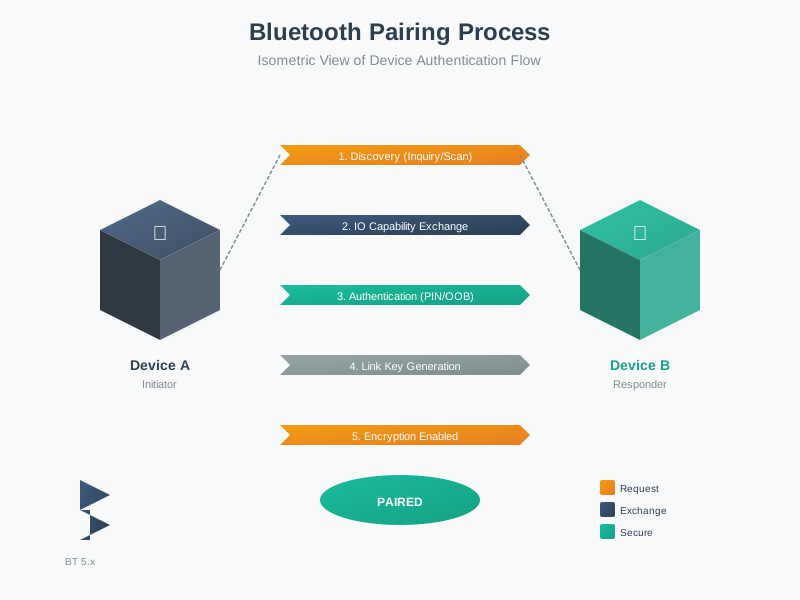
The pairing process establishes shared encryption keys between devices using one of four authentication methods.
NoteVisual: Bluetooth Pairing Modes
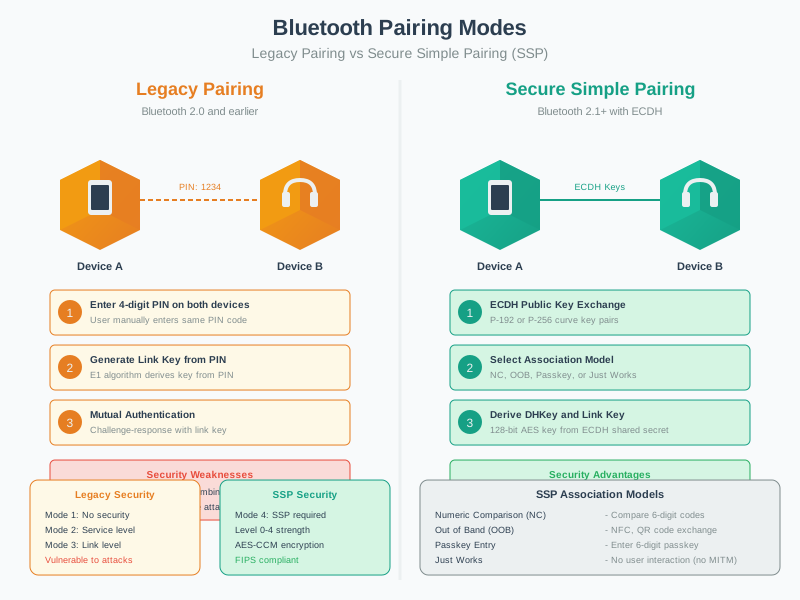
Pairing mode selection should match the security requirements of your application and the device’s I/O capabilities.
NoteVisual: BLE State Machine
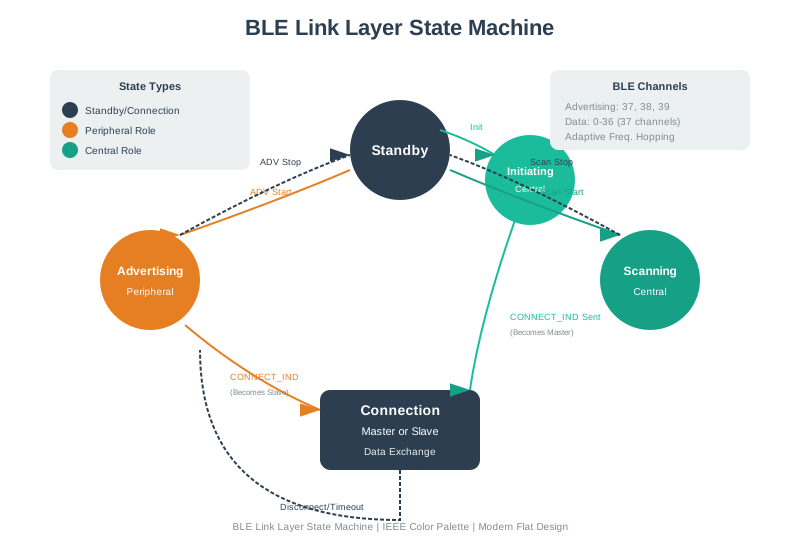
Understanding BLE states helps identify attack surfaces and implement appropriate security controls at each stage.
NoteVisual: Bluetooth Power Classes
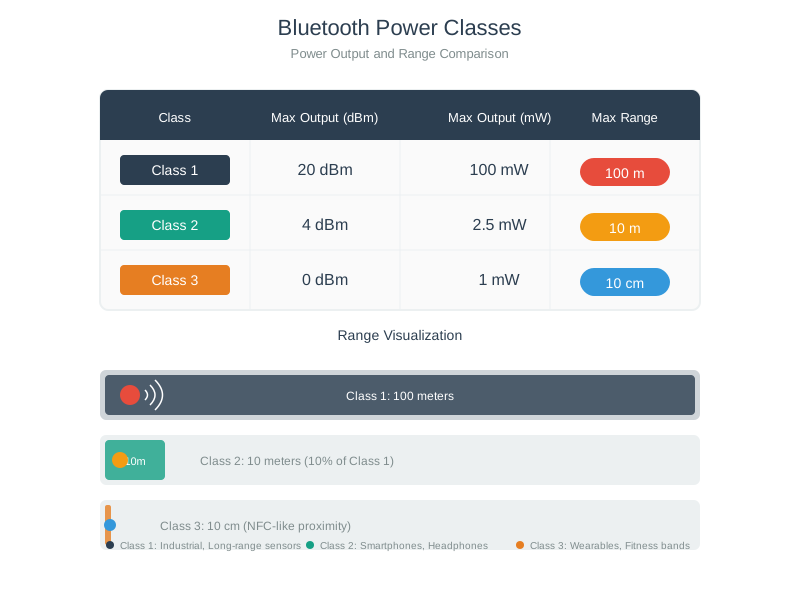
Power class affects not only range but also security perimeter - higher power means larger attack surface area.
NoteVisual: Bluetooth Protocol Stack Security
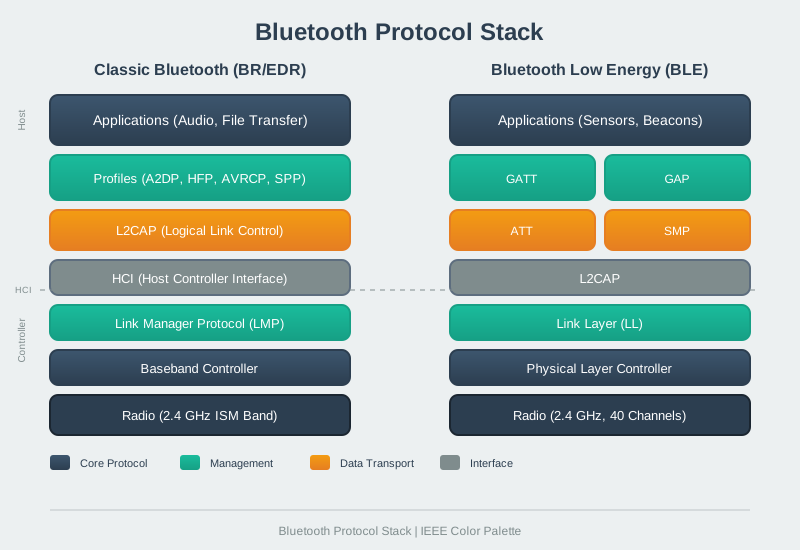
Security must be implemented at multiple stack layers - link encryption alone is insufficient for sensitive applications.
916.7 Knowledge Check
916.8 Summary
This chapter provided hands-on experience with BLE security:
- Interactive Lab: ESP32-based demonstration comparing secure and insecure BLE modes
- Security Challenges: PIN brute-force protection, packet interception analysis, secure boot implementation
- Defense-in-Depth: Multi-layer security architecture from physical to data protection
- Attack Timeline: Vulnerability windows across device lifecycle (manufacturing, deployment, operation, decommissioning)
- Visual Gallery: Reference diagrams for pairing, encryption, and protocol stack security
916.9 What’s Next
The next chapter presents a Bluetooth Comprehensive Review, integrating all concepts with interactive visualizations, advanced case studies, and assessment questions to validate your complete understanding of Bluetooth technology for IoT applications.