%%{init: {'theme': 'base', 'themeVariables': {'primaryColor':'#2C3E50','primaryTextColor':'#fff','primaryBorderColor':'#16A085','lineColor':'#16A085','secondaryColor':'#E67E22','tertiaryColor':'#7F8C8D','clusterBkg':'#ECF0F1','clusterBorder':'#16A085','edgeLabelBackground':'#ECF0F1'}}}%%
flowchart TB
    subgraph nonlinear["Non-Linear Sensor Characteristic"]
        N1["Thermistor: R = R0 e^(B/T)"]
        N2["Curved response"]
        N3["Hard to process directly"]
    end

    subgraph operating["Choose Operating Point"]
        O1["Select x0 (e.g., 25C)"]
        O2["Calculate f(x0)"]
        O3["Calculate df/dx at x0"]
    end

    subgraph taylor["Apply Taylor Expansion"]
        T1["f(x) = f(x0) + f'(x0)*(x-x0)"]
        T2["Linear approximation"]
        T3["Valid near x0 only!"]
    end

    subgraph result["Linearized Model"]
        R1["Output = Offset + Sensitivity x Input"]
        R2["Easy to process"]
        R3["Works for small deviations<br/>from operating point"]
    end

    nonlinear --> operating --> taylor --> result

    style nonlinear fill:#E67E22,stroke:#2C3E50,stroke-width:3px,color:#000
    style operating fill:#7F8C8D,stroke:#2C3E50,stroke-width:2px,color:#fff
    style taylor fill:#16A085,stroke:#2C3E50,stroke-width:2px,color:#fff
    style result fill:#2C3E50,stroke:#16A085,stroke-width:3px,color:#fff
    style N1 fill:#ECF0F1,stroke:#E67E22,stroke-width:1px,color:#000
    style N2 fill:#ECF0F1,stroke:#E67E22,stroke-width:1px,color:#000
    style N3 fill:#ECF0F1,stroke:#E67E22,stroke-width:1px,color:#000
    style O1 fill:#ECF0F1,stroke:#7F8C8D,stroke-width:1px,color:#000
    style O2 fill:#ECF0F1,stroke:#7F8C8D,stroke-width:1px,color:#000
    style O3 fill:#ECF0F1,stroke:#7F8C8D,stroke-width:1px,color:#000
    style T1 fill:#ECF0F1,stroke:#16A085,stroke-width:1px,color:#000
    style T2 fill:#ECF0F1,stroke:#16A085,stroke-width:1px,color:#000
    style T3 fill:#ECF0F1,stroke:#16A085,stroke-width:1px,color:#000
    style R1 fill:#ECF0F1,stroke:#2C3E50,stroke-width:1px,color:#000
    style R2 fill:#ECF0F1,stroke:#2C3E50,stroke-width:1px,color:#000
    style R3 fill:#ECF0F1,stroke:#2C3E50,stroke-width:1px,color:#000
64 Signal Processing Practice and Lab
64.1 Learning Objectives
By the end of this chapter, you will be able to:
- Apply Linearization: Use Taylor series and lookup tables for non-linear sensors
- Test Understanding: Demonstrate signal processing concepts through knowledge checks
- Implement Filters: Configure and run digital filters on ESP32 hardware
- Analyze Signals: Use FFT to identify frequency components in sensor data
64.2 Linearization: Handling Non-Linear Sensors
The Problem: Many sensors have non-linear responses. A thermistor’s resistance doesn’t change linearly with temperature - it follows an exponential curve.
Why Non-Linearity Matters: - Simple linear math (y = mx + b) doesn’t work - Errors compound across the measurement range - Real-time processing becomes complex
64.2.1 Linearization Using Taylor Series
The Solution: For small changes around an operating point, we can approximate non-linear functions as linear using Taylor series expansion.
Taylor Series (first-order approximation):
\[f(x) \approx f(x_0) + \frac{df}{dx}\bigg|_{x_0} \cdot (x - x_0)\]
In plain English: “Near any point, a curve looks like a straight line.”
Linearization Process: Convert non-linear sensor response to linear approximation using Taylor series. Choose an operating point (e.g., 25C for temperature sensing), calculate the slope (sensitivity) at that point, and use linear model valid for small deviations. This enables simple signal processing with standard linear techniques. {fig-alt=“Four-stage flowchart showing linearization process. Stage 1 (orange): Non-linear sensor with curved exponential response (thermistor example). Stage 2 (gray): Choose operating point, calculate function value and derivative at x0. Stage 3 (teal): Apply Taylor expansion f(x) = f(x0) + f’(x0)*(x-x0) for linear approximation. Stage 4 (navy): Linearized model Output = Offset + Sensitivity x Input, valid for small deviations from operating point.”}
64.2.2 Practical Linearization Example: Thermistor
Given: 10K NTC thermistor with B = 3950K, R0 = 10k ohm at T0 = 298K (25C)
Step 1: Write the non-linear equation \[R(T) = 10000 \cdot e^{3950 \left(\frac{1}{T} - \frac{1}{298}\right)}\]
Step 2: Choose operating point (T0 = 298K = 25C) \[R(298) = 10000 \, \Omega\]
Step 3: Calculate sensitivity (derivative) \[\frac{dR}{dT}\bigg|_{T_0} = R_0 \cdot \beta \cdot \left(-\frac{1}{T_0^2}\right) = 10000 \cdot 3950 \cdot \left(-\frac{1}{298^2}\right) \approx -445 \, \Omega/\text{K}\]
Step 4: Write linear approximation \[R(T) \approx 10000 - 445 \cdot (T - 298) \quad \text{(valid near 25C)}\]
Accuracy Check:
| Temperature | Actual R (ohm) | Linear Approx | Error |
|---|---|---|---|
| 20C | 12,488 | 12,225 | 2.1% |
| 25C | 10,000 | 10,000 | 0% |
| 30C | 8,057 | 7,775 | 3.5% |
| 40C | 5,326 | 3,325 | 37.6% |
Key Insight: Linearization works well for +/-5C from the operating point, but fails dramatically for larger deviations. For wider ranges, use: - Multiple linearization zones (piecewise linear) - Lookup tables with interpolation - Full non-linear correction in software
64.2.3 Alternative Linearization Methods
1. Piecewise Linear Approximation
Divide the range into segments, linearize each:
float linearize_thermistor(float resistance) {
    if (resistance > 8000) {
        // 20-28C range: y = mx + b
        return 0.00008 * resistance + 14.5;
    } else if (resistance > 4000) {
        // 28-40C range
        return 0.00015 * resistance + 22.1;
    } else {
        // 40-60C range
        return 0.00025 * resistance + 35.2;
    }
}
2. Lookup Table with Interpolation
Store pre-calculated values and interpolate:
// Lookup table: [resistance, temperature]
const float lut[11][2] = {
    {32650, 0}, {19900, 10}, {12490, 20},
    {10000, 25}, {8057, 30}, {5327, 40},
    {3603, 50}, {2488, 60}, {1752, 70},
    {1258, 80}, {919, 90}
};

float lookup_temperature(float resistance) {
    // Find bracketing entries and linearly interpolate
    for (int i = 0; i < 10; i++) {
        if (resistance >= lut[i+1][0] && resistance <= lut[i][0]) {
            float ratio = (resistance - lut[i+1][0]) / (lut[i][0] - lut[i+1][0]);
            return lut[i+1][1] + ratio * (lut[i][1] - lut[i+1][1]);
        }
    }
    return -999; // Out of range
}
3. Polynomial Fit
Use higher-order polynomial for better accuracy:
\[T = a_0 + a_1 R + a_2 R^2 + a_3 R^3\]
Coefficients determined by curve fitting to calibration data.
64.3 Visual Reference Gallery
The following AI-generated figures provide alternative visual perspectives on signal processing concepts covered in this chapter series.
NoteSignal Conditioning Fundamentals (Alternative View)
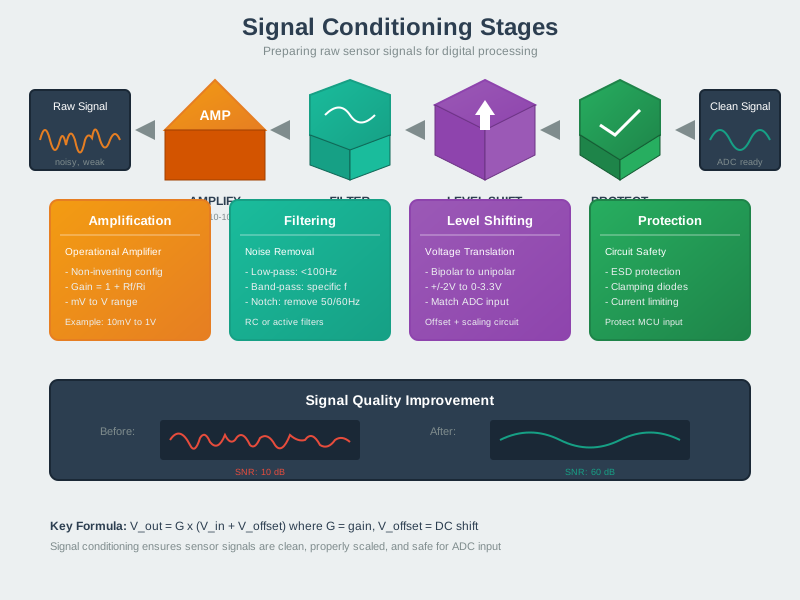
Signal conditioning prepares raw sensor signals for digitization. This visualization shows the three essential stages: amplification boosts weak sensor outputs (mV range) to usable levels (V range), filtering removes unwanted frequencies and noise, and level shifting adjusts voltage ranges to match the ADC’s input requirements. Each stage must be carefully designed to preserve signal integrity while rejecting interference.
NoteFFT Spectrum Analysis (Alternative View)
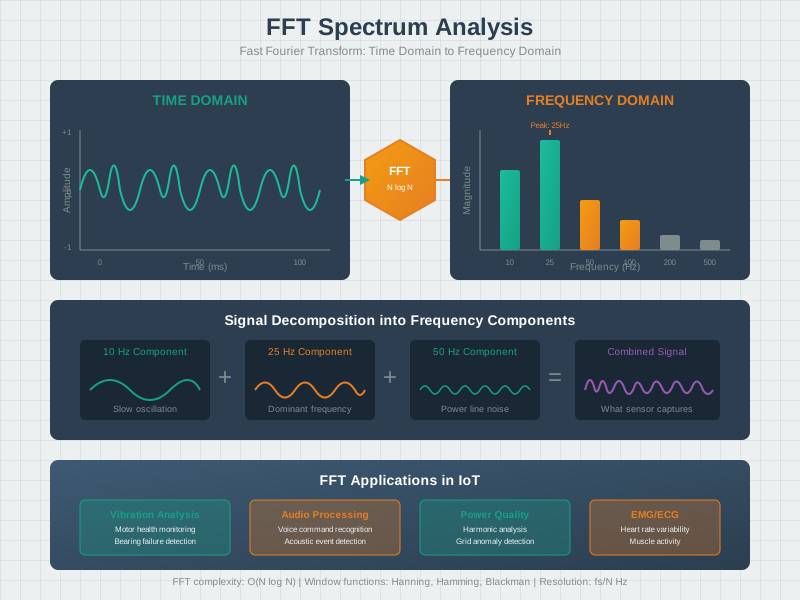
The Fast Fourier Transform (FFT) converts time-domain signals into frequency-domain representations, revealing periodic patterns hidden in raw data. This visualization shows how a complex waveform containing multiple sinusoidal components is decomposed into individual frequency bins, each with magnitude and phase information. FFT is essential for vibration analysis, audio processing, and detecting periodic anomalies in IoT sensor data.
NoteSampling Theorem Visualization (Alternative View)

The Nyquist-Shannon sampling theorem states that to accurately capture a signal, the sampling rate must exceed twice the highest frequency component. This visualization demonstrates the difference between adequate sampling (signal faithfully reconstructed) and undersampling (aliasing creates false low-frequency ghosts). Understanding this fundamental principle prevents data corruption in all digital acquisition systems.
64.4 Knowledge Check
Test your understanding of signal processing concepts with these practical scenarios.
NoteScenario 1: Vibration Monitoring Sampling Rate
You’re designing a predictive maintenance system for an industrial pump. The pump operates at 1800 RPM (30 Hz shaft rotation). Bearing defects typically show up as vibrations at 3-5x the shaft frequency.
Question: What is the minimum acceptable sampling rate for your accelerometer, and what rate would you recommend in practice?
Question: If the maximum frequency of interest is 150 Hz, what is the Nyquist minimum sampling rate?
Explanation: B. Nyquist requires fs > 2 x fmax -> fs > 2 x 150 = 300 Hz.
TipAnswer
Minimum: 300 Hz | Recommended: 750-1500 Hz
Step-by-step analysis:
- Identify signal frequencies:
- Shaft rotation: 1800 RPM = 30 Hz
- Bearing defect harmonics: 3-5x = 90-150 Hz
- Maximum frequency of interest: 150 Hz
- Apply Nyquist theorem:
- Nyquist minimum: fs > 2 x fmax
- fs > 2 x 150 Hz = 300 Hz minimum
- Add practical safety margin:
- Anti-aliasing filter rolloff isn’t perfect
- Want 5-10x headroom for reliable detection
- Recommended: 750-1500 Hz
- Consider available options:
- Most MEMS accelerometers offer: 100, 200, 400, 800, 1600, 3200 Hz
- Choose 800 Hz or 1600 Hz (5.3x or 10.7x Nyquist margin)
Why NOT higher? - 3200 Hz provides no additional information (signal only goes to 150 Hz) - Doubles power consumption vs 1600 Hz - Doubles data storage/transmission - No benefit for this application
NoteScenario 2: ADC Resolution Selection
You’re selecting an ADC for a precision temperature monitoring system. Your thermistor circuit outputs 0-3.3V corresponding to 0-100C. You need +/-0.5C accuracy.
Available ADCs: - 8-bit: $0.50, 10 uA - 10-bit: $0.80, 15 uA - 12-bit: $1.50, 50 uA - 16-bit: $5.00, 200 uA
Question: Which ADC provides sufficient resolution at minimum cost and power?
Question: Which ADC is the best choice to meet +/-0.5C accuracy with minimal cost/power?
Explanation: B. 10-bit gives ~0.098C resolution (comfortable margin) without the cost/power of 12- or 16-bit.
TipAnswer
Recommendation: 10-bit ADC ($0.80, 15 uA)
Resolution calculation for each option:
| ADC | Levels | Voltage Step | Temp Resolution | Meets +/-0.5C? |
|---|---|---|---|---|
| 8-bit | 256 | 12.9 mV | 0.39C | Barely |
| 10-bit | 1024 | 3.2 mV | 0.098C | Comfortable |
| 12-bit | 4096 | 0.8 mV | 0.024C | Overkill |
| 16-bit | 65536 | 0.05 mV | 0.0015C | Extreme |
Analysis:
10-bit (0.098C resolution): - Quantization error: +/-0.05C - Leaves +/-0.45C margin for thermistor tolerance (1%), noise, drift - 5x better than 8-bit at 1.6x price - Power increase acceptable (15 uA vs 10 uA)
Key insight: Match ADC resolution to sensor accuracy. Your thermistor is +/-1% (+/-1C) at best, so any ADC finer than ~0.1C is measuring noise, not real temperature differences.
NoteScenario 3: Anti-Aliasing Filter Design
Your accelerometer-based door sensor samples at 100 Hz to detect door open/close events (< 5 Hz motion). During testing, you notice the sensor sometimes detects “phantom” door events even when the door is stationary.
Investigation reveals: - Building HVAC system creates 60 Hz vibration - This 60 Hz signal is being aliased to appear as 40 Hz
Question: 1. Explain why 60 Hz appears as 40 Hz with 100 Hz sampling 2. What anti-aliasing filter cutoff frequency would you recommend?
Question: If you sample a 60 Hz vibration at 100 Hz, what aliased frequency appears in the sampled data?
Explanation: C. One aliasing case is |fs - fsignal| = |100 - 60| = 40 Hz.
TipAnswer
1. Aliasing explanation:
When you sample a 60 Hz signal at 100 Hz (below the Nyquist rate of 120 Hz), the signal “folds” to a false frequency:
Aliased frequency = |fs - fsignal| = |100 - 60| = 40 Hz
The 60 Hz HVAC vibration appears as a 40 Hz signal in your sampled data, which looks like rapid door motion (8x faster than your 5 Hz door events).
2. Anti-aliasing filter recommendation:
Required specifications: - Passband: 0-5 Hz (door motion you want to detect) - Stopband: > 50 Hz (Nyquist frequency) - Stopband attenuation: At least 40 dB at 60 Hz (100x reduction)
Recommended: 4th-order Bessel filter with 20 Hz cutoff
Why Bessel? - Linear phase response (doesn’t distort door motion waveform) - 20 Hz cutoff gives 4x margin above 5 Hz door events - -36 dB at 60 Hz = 63x attenuation (HVAC vibration reduced from detectable to negligible)
NoteScenario 4: Choosing the Right Digital Filter
Your outdoor air quality sensor measures PM2.5 particulate concentration. The sensor has significant noise due to airflow turbulence. You’ve collected sample data:
Readings (ug/m3): 23, 25, 24, 98, 26, 24, 25, 23, 27, 24The 98 ug/m3 reading is clearly an outlier (perhaps a bug flew past the sensor).
Question: Compare using a 5-sample moving average vs. a 5-sample median filter. Which would you recommend and why?
Question: Which filter best rejects the single outlier (98) while keeping the output near the true value (~24-25 ug/m3)?
Explanation: B. The median ignores single-sample spikes, while the moving average is pulled upward by the outlier.
TipAnswer
Recommendation: Median filter for this application
Moving Average Analysis:
Window: [23, 25, 24, 98, 26]
Average: (23 + 25 + 24 + 98 + 26) / 5 = 196 / 5 = 39.2 ug/m3
The spike of 98 significantly pulls up the average, reporting 39.2 when the true value is ~24-25.
Median Filter Analysis:
Window: [23, 25, 24, 98, 26]
Sorted: [23, 24, 25, 26, 98]
Median: 25 ug/m3
The median completely ignores the outlier, reporting 25 ug/m3 (the correct value).
Key insight: Choose the filter that matches your noise characteristics. Impulsive noise (spikes, dropouts) -> median. Gaussian noise (thermal, quantization) -> moving average.
64.5 Additional Knowledge Check
Knowledge Check: Signal Processing Concepts Quick Check
Concept: Core signal processing principles for IoT applications.
Question: A sensor produces a signal with frequency components up to 500 Hz. What happens if you sample at 600 Hz?
Explanation: C is correct. Nyquist requires sampling at >2x the highest frequency. At 600 Hz sampling, you can only accurately represent frequencies up to 300 Hz. The 300-500 Hz components “fold back” and appear as false signals in the 100-300 Hz range. This is aliasing - the signal masquerades as a different frequency.
Question: A 12-bit ADC with 3.3V reference measures a voltage of 1.65V. What is the approximate digital output value?
Explanation: A is correct. 12-bit ADC has 4096 levels (0-4095). 1.65V is exactly half of 3.3V reference, so the output is 4096 / 2 = 2048. Formula: Digital = (Vin / Vref) x (2^bits - 1) = (1.65 / 3.3) x 4095 = 2047.5 -> 2048.
Question: Which filter type removes 50/60 Hz power line interference while preserving other frequencies?
Explanation: D is correct. A notch (band-stop) filter removes a narrow frequency range while passing everything else. It’s ideal for eliminating specific interference like 50/60 Hz power line hum from biomedical sensors or audio systems.
Question: A temperature sensor has slow-changing readings but occasional spike errors from electrical interference. Which filter is most appropriate?
Explanation: B is correct. Median filters excel at rejecting impulsive noise (spikes, outliers) because the median of [20, 21, 500, 22, 21] is 21, completely ignoring the spike. A moving average of the same values would be 116.8 - badly corrupted by the single outlier.
64.6 Signal Processing Lab: ESP32 Wokwi Simulation
NoteInteractive Lab Overview
This hands-on lab demonstrates key signal processing concepts using an ESP32 microcontroller simulation. You will explore:
- Analog-to-Digital Conversion (ADC): Reading analog signals and understanding resolution
- Low-Pass and High-Pass Filtering: Removing noise and isolating signal components
- Moving Average and Exponential Smoothing: Practical noise reduction techniques
- FFT Basics: Frequency domain analysis using the ESP32
- Noise Reduction Techniques: Combining multiple methods for clean signals
Prerequisites: Basic understanding of analog signals, sampling, and digital filtering concepts from earlier sections of this chapter.
Time Required: 30-45 minutes
64.6.1 What You Will Learn
By completing this lab, you will:
- Configure ESP32 ADC parameters (resolution, attenuation, sampling rate)
- Implement digital filters in C/C++ for real-time signal processing
- Compare filter performance on noisy signals with different characteristics
- Understand trade-offs between filtering strength and response time
- Apply FFT analysis to identify frequency components in sensor data
- Design multi-stage filter pipelines for robust noise rejection
64.6.2 Lab Setup
TipGetting Started with Wokwi
- Click the simulator below to open the ESP32 environment
- Replace the default code with the complete signal processing code provided
- Click the green “Play” button to start the simulation
- Open the Serial Monitor (click the terminal icon) to see output
- Experiment by modifying parameters and observing the results
TipSimulator Tips
- Click on the ESP32 to see available pins and their functions
- Use the Serial Monitor to view processed signal data and statistics
- The built-in potentiometer (GPIO 34) simulates an analog sensor input
- Add components using the + button (search for “Potentiometer”, “LED”, etc.)
- Adjust simulation speed using the clock icon if needed
64.6.3 Lab Exercises
NoteExercise 1: Understanding ADC Resolution
Objective: Observe how ADC resolution affects measurement precision.
Steps: 1. Run the simulation and observe the raw ADC values 2. Note the step size in the “ADC Configuration” output (~0.8 mV for 12-bit) 3. Calculate the quantization noise: V_rms = LSB / sqrt(12)
Questions: 1. What is the theoretical quantization noise for a 12-bit ADC with 3.3V reference? 2. If you only need 0.1C temperature resolution with a 10mV/C sensor, how many bits are truly needed?
Expected Results: - Step size = 3.3V / 4096 = 0.8 mV - Quantization noise = 0.8 mV / sqrt(12) = 0.23 mV rms - For 0.1C with 10mV/C sensor: need 1mV resolution = 12 bits is adequate
NoteExercise 2: Comparing Filter Types
Objective: Understand the trade-offs between different filter approaches.
Steps: 1. Start the simulation and let it run for 30 seconds to collect data 2. Press ‘s’ to see detailed statistics 3. Switch between filter modes (press 0-6) and observe the output 4. Compare the noise reduction percentages for each filter
Questions: 1. Which filter provides the best noise reduction? 2. Which filter responds fastest to signal changes? 3. When would you choose median filter over moving average?
Expected Results: - Moving average: ~65% noise reduction (8-point window) - EMA (alpha=0.1): ~70% noise reduction but slower response - Median: Excellent spike rejection, minimal smoothing - Pipeline: Best overall ~80% noise reduction
NoteExercise 3: FFT Frequency Analysis
Objective: Identify frequency components in a noisy signal.
Steps: 1. Let the simulation run for at least 10 seconds 2. Press ‘f’ to perform FFT analysis 3. Identify the peaks in the frequency spectrum 4. Relate the peaks to the synthetic signal components
Questions: 1. What are the main frequency components in the test signal? 2. How does the Nyquist frequency limit what you can detect? 3. Why is the DC component (0 Hz) typically excluded from analysis?
Expected Results: - 5 Hz: Main signal component (largest peak) - 50 Hz: Power line interference - 120 Hz: Second harmonic - Broadband: Random noise floor
64.6.4 Expected Outcomes
After completing this lab, you should be able to:
TipLearning Outcomes Checklist
64.6.5 Real-World Applications
The techniques demonstrated in this lab apply directly to many IoT applications:
| Application | Key Signal Processing | Filter Choice |
|---|---|---|
| Temperature monitoring | Slow changes, occasional spikes | Median + EMA |
| Vibration analysis | High-frequency components | Band-pass + FFT |
| Heart rate monitoring | 0.5-3 Hz signal, 50 Hz interference | Band-pass + Notch |
| Air quality sensors | Gradual trends, turbulence spikes | Median + Low-pass |
| Accelerometer data | Motion detection, gravity removal | High-pass + Low-pass |
| Power monitoring | 50/60 Hz fundamental, harmonics | Notch + Moving avg |
ImportantKey Takeaways from the Lab
- No single filter is best - Match your filter to your noise characteristics
- Pipeline multiple stages - Median for spikes, low-pass for high-frequency, EMA for smoothing
- Trade-offs matter - More smoothing = slower response to real changes
- FFT reveals hidden signals - Frequency analysis helps identify interference sources
- Resolution vs. noise - High ADC resolution is pointless if noise exceeds quantization
64.7 Summary
Signal processing bridges the analog and digital worlds:
- Analog vs Digital: Continuous phenomena must be discretized for computers
- Nyquist Theorem: Sample at >2x the highest frequency you care about
- Aliasing: Sampling too slowly makes fast signals appear slow (avoid with filters)
- ADC Resolution: 8-bit (simple), 10-12-bit (typical IoT), 16-bit (high precision)
- Quantization: Limited resolution introduces unavoidable error
- Digital Filtering: Moving average, median, and low-pass filters reduce noise
- Voice Compression: Toll quality = 64 kbps (8 bits x 8 kHz); companding (mu-law/A-law) improves quality; LPC achieves 8-27x compression using source-filter speech model
- Sensor Dynamics: Sensors follow mass-spring-damper models with natural frequency and damping ratio
- Linearization: Use Taylor series, lookup tables, or piecewise approximation to handle non-linear sensors like thermistors
%%{init: {'theme': 'base', 'themeVariables': {'primaryColor':'#2C3E50','primaryTextColor':'#fff','primaryBorderColor':'#16A085','lineColor':'#16A085','secondaryColor':'#E67E22','tertiaryColor':'#7F8C8D','clusterBkg':'#ECF0F1','clusterBorder':'#16A085','edgeLabelBackground':'#ECF0F1'}}}%%
flowchart TD
    A["Physical World<br/>(Continuous Analog Signal)"] --> B["Anti-Aliasing Filter<br/>Remove freq > fs/2"]

    B --> C{"Sampling Rate<br/>Decision"}

    C -->|"Apply Nyquist<br/>fs > 2xfmax"| D["Sample & Hold<br/>Capture instant voltage"]

    D --> E{"ADC Resolution<br/>Decision"}

    E -->|"8-bit: Simple<br/>12-bit: Typical<br/>16-bit: Precision"| F["Quantization<br/>Round to nearest<br/>digital level"]

    F --> G["Digital Value<br/>(n-bit integer)"]

    G --> H{"Digital Filtering?"}

    H -->|"Noisy signal"| I["Apply Filter:<br/>Moving Average<br/>Median (spikes)<br/>Low-Pass (smooth)"]

    H -->|"Clean signal"| J["Processed Data<br/>Ready for use"]

    I --> J

    J --> K["Transmit, Store,<br/>or Process Further"]

    C -.->|"Too slow<br/>fs < 2xfmax"| L["ALIASING<br/>False low-freq<br/>signal!"]

    E -.->|"Too few bits"| M["QUANTIZATION<br/>ERROR<br/>Low precision"]

    style A fill:#E67E22,stroke:#2C3E50,stroke-width:3px,color:#fff
    style B fill:#16A085,stroke:#2C3E50,stroke-width:2px,color:#fff
    style C fill:#7F8C8D,stroke:#2C3E50,stroke-width:2px,color:#fff
    style D fill:#16A085,stroke:#2C3E50,stroke-width:2px,color:#fff
    style E fill:#7F8C8D,stroke:#2C3E50,stroke-width:2px,color:#fff
    style F fill:#2C3E50,stroke:#16A085,stroke-width:2px,color:#fff
    style G fill:#2C3E50,stroke:#16A085,stroke-width:2px,color:#fff
    style H fill:#7F8C8D,stroke:#2C3E50,stroke-width:2px,color:#fff
    style I fill:#16A085,stroke:#2C3E50,stroke-width:2px,color:#fff
    style J fill:#16A085,stroke:#2C3E50,stroke-width:2px,color:#fff
    style K fill:#2C3E50,stroke:#16A085,stroke-width:3px,color:#fff
    style L fill:#ECF0F1,stroke:#E67E22,stroke-width:2px,color:#000
    style M fill:#ECF0F1,stroke:#E67E22,stroke-width:2px,color:#000
{fig-alt=“End-to-end signal processing pipeline flowchart from physical world to transmitted data. Main flow: continuous analog signal through anti-aliasing filter (removes frequencies above Nyquist fs/2), sampling rate decision applying Nyquist theorem (fs > 2xfmax), sample-and-hold captures voltage, ADC resolution decision (8/12/16-bit), quantization rounds to digital levels, digital filtering stage (moving average for smoothing, median for spike removal, low-pass for gradual changes), processed data ready for transmission/storage. Two danger paths shown with dashed lines: undersampling (fs < 2xfmax) leads to aliasing artifacts, insufficient bit depth causes quantization error and low precision. Color coding: orange for physical world input, teal for preprocessing and filtering, navy for ADC quantization, gray for decision points, red warnings for error conditions.”}
Complete Signal Processing Flow: End-to-end journey from continuous analog signals to clean digital data. Key decision points: sampling rate (avoid aliasing), ADC resolution (balance precision vs cost), and filtering strategy (remove noise). Errors occur when sampling too slowly (aliasing) or using too few bits (quantization error).
Key Takeaways: - Match sampling rate to signal bandwidth, not arbitrarily high - Choose ADC resolution based on sensor precision and application needs - Use digital filters to smooth noisy data - Higher resolution costs more power and money - don’t over-specify
64.8 What’s Next
You have completed the Signal Processing Essentials series. Consider exploring:
- Data Formats for IoT - Learn how sensor values get encoded for network transmission
- Sensor Fundamentals - Deep dive into sensor types and characteristics
- Networking Protocols - How processed data travels across networks