%%{init: {'theme': 'base', 'themeVariables': {'primaryColor': '#2C3E50', 'primaryTextColor': '#fff', 'primaryBorderColor': '#16A085', 'lineColor': '#E67E22', 'secondaryColor': '#16A085', 'tertiaryColor': '#7F8C8D'}}}%%
graph LR
    subgraph Thread["Thread (Low Power)"]
        T1[Door Sensor]
        T2[Light Switch]
        T3[Motion Sensor]
        T4[Smart Plug]
    end

    subgraph Wi-Fi["Wi-Fi (High Bandwidth)"]
        W1[Thermostat]
        W2[Smart Display]
        W3[Robot Vacuum]
        W4[Air Purifier]
    end

    subgraph Ethernet["Ethernet (Always On)"]
        E1[Smart TV]
        E2[Hub/Bridge]
        E3[NAS Storage]
    end

    BR[Thread Border Router<br/>HomePod / Echo / Nest] <--> T1
    BR <--> T2
    BR <--> T3
    BR <--> T4

    Router[Wi-Fi Router] <--> W1
    Router <--> W2
    Router <--> W3
    Router <--> W4
    Router <--> BR

    Router <--> E1
    Router <--> E2
    Router <--> E3

    style Thread fill:#16A085,stroke:#2C3E50
    style Wi-Fi fill:#E67E22,stroke:#2C3E50
    style Ethernet fill:#2C3E50,stroke:#16A085
    style BR fill:#16A085,stroke:#E67E22,color:#fff
    style Router fill:#2C3E50,stroke:#16A085,color:#fff
1024 Matter Transport Options and Platform Support
1024.1 Matter Transport Options and Ecosystem Support
NoteLearning Objectives
By the end of this section, you will be able to:
- Compare Thread, Wi-Fi, and Ethernet as Matter transport options
- Apply transport selection guidelines based on device requirements
- Identify which major platforms support Matter and their Thread Border Router devices
- Explain how multi-admin enables one device to work with multiple ecosystems
- Evaluate Matter device categories and their typical transport choices
- Compare Matter against legacy protocols (Zigbee, Z-Wave, proprietary Wi-Fi)
1024.2 Prerequisites
Before diving into this chapter, you should be familiar with:
- Matter Protocol Overview: Understanding what Matter is and its application layer role
- Matter: Solving Smart Home Fragmentation: The problems Matter was designed to solve
- Thread Fundamentals and Roles: Thread mesh networking architecture
- Wi-Fi Fundamentals and Standards: Wi-Fi networking basics
NoteKey Takeaway
In one sentence: Matter supports three transports - Thread for battery-powered mesh devices, Wi-Fi for high-bandwidth mains-powered devices, and Ethernet for fixed infrastructure - all using the same Matter application layer and working seamlessly on the same fabric.
Remember this rule: Choose Thread for sensors and switches (years of battery life), Wi-Fi for cameras and displays (high bandwidth), Ethernet for hubs and bridges (maximum reliability); mains-powered Thread devices like smart plugs serve double duty as mesh routers.
1024.3 Matter Transport Options
1024.3.1 Thread vs Wi-Fi vs Ethernet
Matter can operate over three transports, each suited for different device types:
| Transport | Best For | Power | Range | Bandwidth | Latency |
|---|---|---|---|---|---|
| Thread | Battery devices, sensors, switches | uA-mA | Mesh (indoor) | 250 kbps | 10-50ms |
| Wi-Fi | Video, audio, high-bandwidth | 100mW-5W | 30-100m | 100+ Mbps | 2-10ms |
| Ethernet | Fixed appliances, hubs, bridges | N/A | Wired | 1+ Gbps | <1ms |
{fig-alt=“Network topology showing Matter transport options: Thread devices (door sensor, light switch, motion sensor, smart plug in teal) connect through Thread Border Router, Wi-Fi devices (thermostat, smart display, robot vacuum, air purifier in orange) connect directly to Wi-Fi router, Ethernet devices (smart TV, hub, NAS in navy) connect via cable. Border Router bridges Thread mesh to Wi-Fi network.”}
1024.3.2 Transport Selection Guidelines
Use Thread when: - Device is battery-powered (door sensors, buttons, motion detectors) - Low bandwidth is acceptable (<250 kbps) - Mesh networking benefits reliability (large homes, obstacles) - Ultra-low power is critical (10-year battery life targets)
Use Wi-Fi when: - Device is mains-powered with high bandwidth needs - Audio/video streaming is required - Existing Wi-Fi infrastructure is sufficient - Device needs internet access directly (firmware updates)
Use Ethernet when: - Device is fixed-location with power - Maximum reliability is required - Latency must be minimized - Device acts as a hub or gateway
1024.3.3 Matter Transport Selection Decision Tree
NoteInteractive Transport Selection Guide
This decision tree helps you choose the right Matter transport for different device types:
%%{init: {'theme': 'base', 'themeVariables': {'primaryColor': '#2C3E50', 'primaryTextColor': '#fff', 'primaryBorderColor': '#16A085', 'lineColor': '#E67E22', 'secondaryColor': '#16A085', 'tertiaryColor': '#7F8C8D', 'fontSize': '11px'}}}%%
flowchart TD
    START["Matter Device<br/>Transport Selection"] --> Q1{"Power<br/>source?"}

    Q1 -->|"Battery"| THREAD["Use Thread<br/>Mesh, years on battery"]
    Q1 -->|"Mains/USB"| Q2{"Bandwidth<br/>needs?"}

    Q2 -->|"< 250 kbps<br/>(sensors, switches)"| Q3{"Fixed<br/>location?"}
    Q2 -->|"> 1 Mbps<br/>(video, audio)"| Wi-Fi["Use Wi-Fi<br/>High throughput"]

    Q3 -->|"Yes, near router"| ETH["Use Ethernet<br/>Most reliable"]
    Q3 -->|"Mobile/varies"| THREAD2["Use Thread<br/>Mesh benefits"]

    THREAD --> EX1["Door sensors<br/>Motion detectors<br/>Smart buttons"]
    Wi-Fi --> EX2["Thermostats<br/>Robot vacuums<br/>Smart displays"]
    ETH --> EX3["Smart TVs<br/>Bridges/hubs<br/>Media centers"]
    THREAD2 --> EX4["Smart plugs<br/>Light bulbs<br/>(also act as routers)"]

    style START fill:#2C3E50,stroke:#16A085,color:#fff
    style Q1 fill:#E67E22,stroke:#2C3E50,color:#fff
    style Q2 fill:#E67E22,stroke:#2C3E50,color:#fff
    style Q3 fill:#E67E22,stroke:#2C3E50,color:#fff
    style THREAD fill:#16A085,stroke:#2C3E50,color:#fff
    style THREAD2 fill:#16A085,stroke:#2C3E50,color:#fff
    style Wi-Fi fill:#E67E22,stroke:#2C3E50,color:#fff
    style ETH fill:#7F8C8D,stroke:#2C3E50,color:#fff
Thread is the default choice for low-power, low-bandwidth Matter devices. Wi-Fi handles bandwidth-intensive devices. Ethernet provides maximum reliability for fixed infrastructure. Mains-powered Thread devices (smart plugs, bulbs) provide dual benefits: they work as devices AND extend mesh coverage as routers.
1024.3.4 Matter Transport Selection Flowchart
%%{init: {'theme': 'base', 'themeVariables': { 'primaryColor': '#2C3E50', 'primaryTextColor': '#fff', 'primaryBorderColor': '#16A085', 'lineColor': '#16A085', 'secondaryColor': '#E67E22', 'tertiaryColor': '#7F8C8D', 'fontSize': '11px'}}}%%
flowchart TD
    Start["Select Matter<br/>Transport"]

    Q1{"Power<br/>Source?"}
    Q2{"Bandwidth<br/>Needs?"}
    Q3{"Wired<br/>Possible?"}
    Q4{"Existing<br/>Thread<br/>Network?"}
    Q5{"Latency<br/>Critical?"}

    THREAD["Thread<br/>Low power mesh<br/>Battery devices OK<br/>250 kbps<br/>Self-healing mesh"]
    Wi-Fi["Wi-Fi<br/>High bandwidth<br/>Cameras, displays<br/>Existing infra<br/>No mesh"]
    ETHERNET["Ethernet<br/>Most reliable<br/>Bridges, hubs<br/>Critical devices<br/>No battery option"]
    THREAD_WIFI["Consider Both<br/>Thread for sensors<br/>Wi-Fi for cameras<br/>Same Matter fabric"]

    Start --> Q1

    Q1 -->|"Battery"| THREAD
    Q1 -->|"Mains Power"| Q2

    Q2 -->|"High<br/>(video, audio)"| Q3
    Q2 -->|"Low<br/>(sensors, lights)"| Q4

    Q3 -->|"Yes"| Q5
    Q3 -->|"No"| Wi-Fi

    Q5 -->|"Yes<br/>(critical)"| ETHERNET
    Q5 -->|"No"| Wi-Fi

    Q4 -->|"Yes"| THREAD
    Q4 -->|"No"| THREAD_WIFI

    style Start fill:#2C3E50,stroke:#16A085,color:#fff
    style Q1 fill:#E67E22,stroke:#2C3E50,color:#fff
    style Q2 fill:#E67E22,stroke:#2C3E50,color:#fff
    style Q3 fill:#E67E22,stroke:#2C3E50,color:#fff
    style Q4 fill:#E67E22,stroke:#2C3E50,color:#fff
    style Q5 fill:#E67E22,stroke:#2C3E50,color:#fff
    style THREAD fill:#16A085,stroke:#2C3E50,color:#fff
    style Wi-Fi fill:#16A085,stroke:#2C3E50,color:#fff
    style ETHERNET fill:#16A085,stroke:#2C3E50,color:#fff
    style THREAD_WIFI fill:#16A085,stroke:#2C3E50,color:#fff
Transport Comparison:
| Transport | Best For | Bandwidth | Battery | Mesh |
|---|---|---|---|---|
| Thread | Sensors, lights, locks | 250 kbps | Years | Yes |
| Wi-Fi | Cameras, displays, speakers | 100+ Mbps | Hours | No |
| Ethernet | Bridges, hubs, critical | 1 Gbps | N/A | No |
1024.4 Major Platform Support
1024.4.1 Ecosystem Integration Status (2024-2025)
| Platform | Matter Support | Thread Border Router | Native Integration |
|---|---|---|---|
| Apple HomeKit | Full (iOS 16.1+) | HomePod Mini, Apple TV 4K | Home app |
| Google Home | Full (2022+) | Nest Hub, Nest Wi-Fi Pro | Google Home app |
| Amazon Alexa | Full (2022+) | Echo 4th Gen+, eero | Alexa app |
| Samsung SmartThings | Full | SmartThings Station | SmartThings app |
| Home Assistant | Full | SkyConnect, Yellow | HA Companion |
1024.4.2 Multi-Admin: The Game Changer
One of Matter’s most powerful features is multi-admin support–a single device can be controlled by multiple ecosystems simultaneously:
%%{init: {'theme': 'base', 'themeVariables': {'primaryColor': '#2C3E50', 'primaryTextColor': '#fff', 'primaryBorderColor': '#16A085', 'lineColor': '#E67E22', 'secondaryColor': '#16A085', 'tertiaryColor': '#7F8C8D'}}}%%
graph TB
    Device[Matter Smart Light<br/>Single Device]

    F1[Apple Home Fabric]
    F2[Google Home Fabric]
    F3[Amazon Alexa Fabric]

    U1[iPhone User]
    U2[Android User]
    U3[Echo User]

    Device <--> F1
    Device <--> F2
    Device <--> F3

    F1 <--> U1
    F2 <--> U2
    F3 <--> U3

    style Device fill:#E67E22,stroke:#2C3E50,color:#fff
    style F1 fill:#2C3E50,stroke:#16A085,color:#fff
    style F2 fill:#16A085,stroke:#2C3E50,color:#fff
    style F3 fill:#7F8C8D,stroke:#2C3E50,color:#fff
{fig-alt=“Multi-admin diagram showing single Matter Smart Light in center connected to three separate fabrics (Apple Home, Google Home, Amazon Alexa), each fabric connected to its respective user (iPhone User, Android User, Echo User). Demonstrates how one device can be controlled by multiple ecosystems simultaneously without conflict.”}
Multi-Admin Benefits: - Household members can use their preferred ecosystem - No need to agree on a single platform - Each ecosystem maintains its own automations - Device appears natively in each app
1024.5 Matter Device Categories
1024.5.1 Currently Supported (Matter 1.3, 2024)
| Category | Example Devices | Transport |
|---|---|---|
| Lighting | Bulbs, switches, dimmers, LED strips | Thread/Wi-Fi |
| HVAC | Thermostats, AC units, fans, air purifiers | Wi-Fi |
| Locks | Smart locks, access control | Thread |
| Sensors | Motion, door/window, temperature, humidity | Thread |
| Blinds/Shades | Motorized blinds, curtains | Thread/Wi-Fi |
| Plugs/Outlets | Smart plugs, power strips | Thread/Wi-Fi |
| Appliances | Refrigerators, washers, dishwashers | Wi-Fi/Ethernet |
| Robot Vacuums | Cleaning robots | Wi-Fi |
| Energy | EV chargers, solar inverters, batteries | Wi-Fi/Ethernet |
1024.5.2 Coming in Future Versions
- Cameras (Matter 1.4+): Security cameras, video doorbells
- Access Control: Advanced locks, garage doors
- Health Devices: Air quality monitors, health sensors
- Audio: Speakers, soundbars (integration with existing protocols)
1024.6 Matter vs Legacy Protocols
1024.6.1 Comparison Matrix
| Feature | Matter | Zigbee 3.0 | Z-Wave | Wi-Fi (Proprietary) |
|---|---|---|---|---|
| IP-Based | IPv6 | (needs bridge) | (needs bridge) | IPv4/6 |
| Mesh Networking | (Thread) | Yes | Yes | No |
| Multi-Admin | Yes | No | No | Varies |
| Local Control | Mandatory | Varies | Varies | Often cloud |
| Open Standard | Royalty-free | Yes | License fee | Proprietary |
| Battery Life | Excellent (Thread) | Excellent | Good | Poor |
| Ecosystem Support | All major | Limited | Limited | Single vendor |
| Future Investment | Active | Maintenance | Limited | Uncertain |
1024.6.2 Migration Path from Zigbee/Z-Wave
%%{init: {'theme': 'base', 'themeVariables': {'primaryColor': '#2C3E50', 'primaryTextColor': '#fff', 'primaryBorderColor': '#16A085', 'lineColor': '#E67E22', 'secondaryColor': '#16A085', 'tertiaryColor': '#7F8C8D'}}}%%
flowchart TB
    subgraph Legacy["Existing Devices"]
        Z1[Zigbee Devices]
        ZW1[Z-Wave Devices]
        P1[Proprietary Wi-Fi]
    end

    subgraph Bridge["Bridge Strategy"]
        B1[Matter Bridge<br/>Hue, SmartThings]
    end

    subgraph Native["New Purchases"]
        M1[Matter Native Devices]
    end

    subgraph Control["Unified Control"]
        C1[Any Matter Controller]
    end

    Z1 --> B1
    ZW1 --> B1
    P1 --> B1
    B1 --> C1
    M1 --> C1

    style Legacy fill:#7F8C8D,stroke:#2C3E50
    style Bridge fill:#E67E22,stroke:#2C3E50
    style Native fill:#16A085,stroke:#2C3E50
    style Control fill:#2C3E50,stroke:#16A085
{fig-alt=“Migration flowchart showing path from legacy devices to Matter: Zigbee, Z-Wave, and proprietary Wi-Fi devices in gray connect through orange Matter Bridge (Hue or SmartThings), while new Matter Native devices in teal connect directly. Both paths lead to unified control through any Matter Controller in navy.”}
1024.7 Real-World Deployment Examples
1024.7.1 Case Study 1: New Smart Home Setup (2024)
Scenario: Family moving into new home, starting fresh with smart home
Recommended Setup: 1. Border Routers: HomePod Mini (Apple users) + Nest Hub (Google backup) 2. Lighting: Eve or Nanoleaf Thread bulbs (no hub needed) 3. Sensors: Aqara P2 motion sensors (Thread native) 4. Locks: Yale Assure Lock 2 (Matter via Thread) 5. Thermostat: Ecobee with Matter (Wi-Fi)
Result: - Zero proprietary hubs purchased - Full control from Apple Home, Google Home, and Alexa simultaneously - Local control works even if internet goes down - 5-year battery life on sensors
1024.7.2 Case Study 2: Existing Home Migration
Scenario: Homeowner with existing Hue, SmartThings, and Wi-Fi devices
Migration Strategy: 1. Keep Hue Bridge -> Enable Matter bridge mode 2. Keep SmartThings -> Enable Matter bridge mode 3. New devices -> Buy Matter native 4. Add Thread Border Router -> HomePod Mini or Echo
Result: - All devices accessible through Matter - Gradual migration as devices are replaced - No “rip and replace” required
1024.8 Understanding Check
WarningKnowledge Check
Scenario: You’re advising a client on their smart home platform choice. They have: - An iPhone and an Android tablet - Existing Philips Hue lights (Zigbee) - Want to add door sensors and smart locks - Prefer local control without cloud dependencies
Questions:
- Should they use Matter? Why or why not?
- What transport would you recommend for the door sensors?
- How can they keep their existing Hue lights?
- What device would serve as their Thread Border Router?
NoteSolution
1. Should they use Matter? Yes, Matter is ideal for this scenario because: - Multi-admin allows both iPhone (Apple Home) and Android (Google Home) control - Local control is mandatory in Matter spec - Cross-platform compatibility meets their mixed-device household
2. Transport for door sensors: Thread is the best choice because: - Door sensors are battery-powered (Thread enables years of battery life) - Low bandwidth requirements (state changes only) - Mesh networking improves reliability across the home
3. Keeping existing Hue lights: Enable Matter bridge mode on the Hue Bridge: - Hue Bridge v2 supports Matter bridge functionality - Exposes all Hue lights as Matter devices - Original Hue app and automations continue working
4. Thread Border Router: Either HomePod Mini (for Apple ecosystem) or Nest Hub/Echo 4th Gen: - These devices include Thread radios - They bridge Thread mesh to Wi-Fi/IP network - Multiple Border Routers provide redundancy
1024.9 Visual Reference Gallery
NoteVisual: Matter Protocol Overview
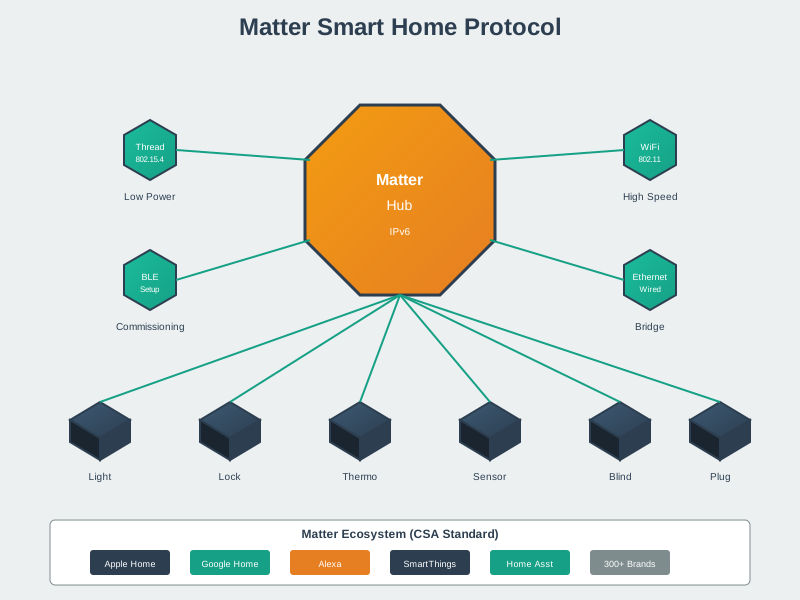
Matter serves as the universal translation layer that enables devices from any manufacturer to work with any smart home ecosystem. This protocol-level interoperability eliminates vendor lock-in and simplifies the smart home experience.
NoteVisual: Matter Fabric Multi-Admin Architecture
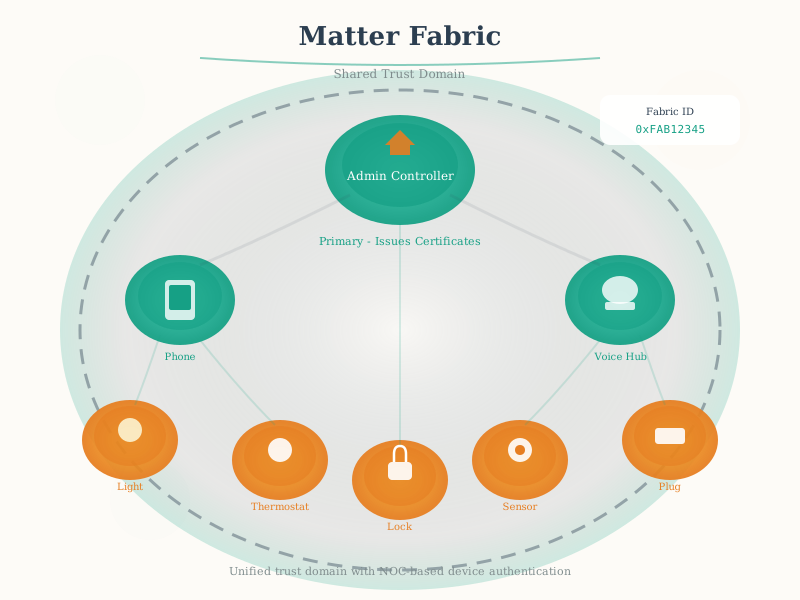
The fabric model is Matter’s key innovation - one device, multiple controllers. A Matter light bulb can be controlled by iPhone, Google Assistant, and Alexa simultaneously without conflicts, because all share the same secure fabric.
NoteVisual: Matter Device Categories
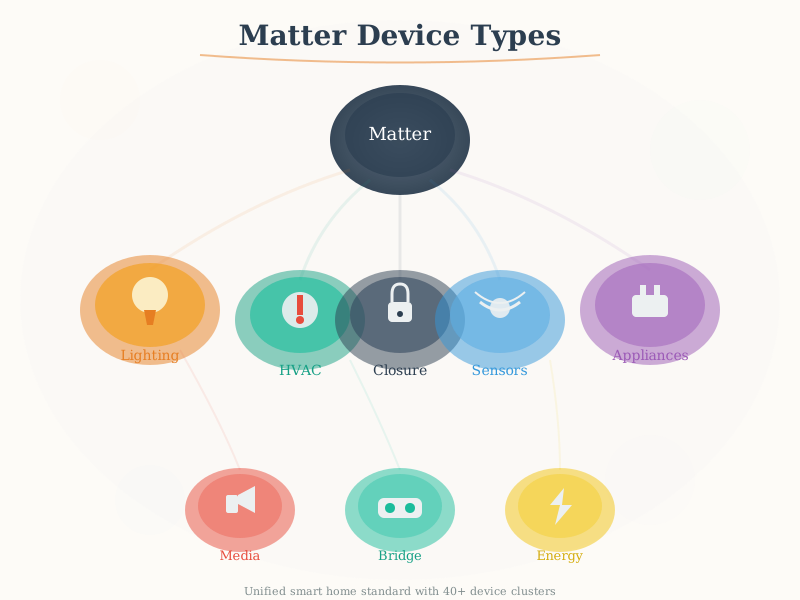
Matter standardizes device types across categories to ensure consistent behavior. Whether you buy a light from Philips, IKEA, or any other manufacturer, Matter guarantees it works the same way with all controllers.
1024.10 Summary
TipKey Takeaways
Three transport options serve different needs: Thread for battery devices (years of life), Wi-Fi for high bandwidth (cameras, displays), Ethernet for fixed infrastructure (hubs, bridges)
All major platforms now support Matter: Apple, Google, Amazon, Samsung, and Home Assistant provide full integration
Multi-admin is the killer feature: One device controlled by multiple ecosystems simultaneously without conflict
Thread Border Routers are built into smart speakers: HomePod Mini, Echo 4th Gen, Nest Hub all include Thread radios
Migration paths preserve existing investments: Hue and SmartThings bridges expose legacy devices as Matter devices
Matter outperforms legacy protocols: IP-based, royalty-free, with mandatory local control and active ecosystem investment
1024.11 What’s Next
Now that you understand Matter’s transport options and platform support, continue to:
- Matter Protocol Simulation Lab - Hands-on experience with Matter protocol concepts using ESP32 simulation
- Matter Architecture and Fabric - Deep dive into Matter’s protocol stack and fabric management
- Matter Device Types and Clusters - Understanding device types, clusters, and the Matter data model
- Thread Fundamentals and Roles - Understand Thread as Matter’s primary mesh transport