%%{init: {'theme': 'base', 'themeVariables': {'primaryColor':'#2C3E50','primaryTextColor':'#fff','primaryBorderColor':'#16A085','lineColor':'#16A085','secondaryColor':'#E67E22','tertiaryColor':'#ecf0f1','textColor':'#2C3E50','fontSize':'14px'}}}%%
graph TB
    subgraph "Star Topology"
        S_HUB["Central Hub"]
        S_D1["Device 1"]
        S_D2["Device 2"]
        S_D3["Device 3"]
        S_D4["Device 4"]

        S_HUB --- S_D1
        S_HUB --- S_D2
        S_HUB --- S_D3
        S_HUB --- S_D4
    end

    subgraph "Mesh Topology"
        M_D1["Device 1"]
        M_D2["Device 2"]
        M_D3["Device 3"]
        M_D4["Device 4"]
        M_D5["Device 5"]

        M_D1 --- M_D2
        M_D1 --- M_D3
        M_D2 --- M_D3
        M_D2 --- M_D4
        M_D3 --- M_D4
        M_D3 --- M_D5
        M_D4 --- M_D5
    end

    subgraph "Tree Topology"
        T_ROOT["Root"]
        T_L1A["Router A"]
        T_L1B["Router B"]
        T_D1["Device 1"]
        T_D2["Device 2"]
        T_D3["Device 3"]
        T_D4["Device 4"]

        T_ROOT --- T_L1A
        T_ROOT --- T_L1B
        T_L1A --- T_D1
        T_L1A --- T_D2
        T_L1B --- T_D3
        T_L1B --- T_D4
    end

    subgraph "Ring Topology"
        R_D1["Device 1"]
        R_D2["Device 2"]
        R_D3["Device 3"]
        R_D4["Device 4"]
        R_D5["Device 5"]

        R_D1 --- R_D2
        R_D2 --- R_D3
        R_D3 --- R_D4
        R_D4 --- R_D5
        R_D5 --- R_D1
    end

    style S_HUB fill:#2C3E50,stroke:#16A085,color:#fff,stroke-width:3px
    style S_D1 fill:#E67E22,stroke:#2C3E50,color:#fff
    style S_D2 fill:#E67E22,stroke:#2C3E50,color:#fff
    style S_D3 fill:#E67E22,stroke:#2C3E50,color:#fff
    style S_D4 fill:#E67E22,stroke:#2C3E50,color:#fff

    style M_D1 fill:#16A085,stroke:#2C3E50,color:#fff
    style M_D2 fill:#16A085,stroke:#2C3E50,color:#fff
    style M_D3 fill:#16A085,stroke:#2C3E50,color:#fff
    style M_D4 fill:#16A085,stroke:#2C3E50,color:#fff
    style M_D5 fill:#16A085,stroke:#2C3E50,color:#fff

    style T_ROOT fill:#2C3E50,stroke:#16A085,color:#fff,stroke-width:3px
    style T_L1A fill:#16A085,stroke:#2C3E50,color:#fff
    style T_L1B fill:#16A085,stroke:#2C3E50,color:#fff
    style T_D1 fill:#E67E22,stroke:#2C3E50,color:#fff
    style T_D2 fill:#E67E22,stroke:#2C3E50,color:#fff
    style T_D3 fill:#E67E22,stroke:#2C3E50,color:#fff
    style T_D4 fill:#E67E22,stroke:#2C3E50,color:#fff

    style R_D1 fill:#7F8C8D,stroke:#2C3E50,color:#fff
    style R_D2 fill:#7F8C8D,stroke:#2C3E50,color:#fff
    style R_D3 fill:#7F8C8D,stroke:#2C3E50,color:#fff
    style R_D4 fill:#7F8C8D,stroke:#2C3E50,color:#fff
    style R_D5 fill:#7F8C8D,stroke:#2C3E50,color:#fff
782 Network Topologies: Comparison and Trade-offs
TipFor Beginners: Topology Comparison Guide
This chapter compares different network topologies to help you make informed design decisions:
- We analyze star, mesh, tree, and ring topologies side by side.
- You will learn to compute link counts, redundancy, and diameter for different designs.
- We connect these concepts to IoT performance (latency, reliability, cost).
If you need to review basic topology concepts first, see Topologies Fundamentals.
782.1 Learning Objectives
By the end of this chapter, you will be able to:
- Compare Topologies: Assess star, tree, mesh, and hybrid topologies for specific requirements
- Analyze Trade-offs: Evaluate fault tolerance, scalability, and cost for each topology type
- Identify Misconceptions: Understand why more mesh links do not always improve performance
- Select Appropriate Topology: Match topology choice to IoT application requirements
782.2 Prerequisites
Required Chapters: - Topologies Fundamentals - Core topology concepts - Networking Fundamentals - Network basics
Technical Background: - Basic understanding of nodes and links - Network redundancy concepts
Estimated Time: 20 minutes
782.3 Topology Comparison Overview
Understanding how different topologies compare is essential for IoT network design. Here’s a visual comparison:
{fig-alt=“Comparison of four network topologies showing structural differences. Star topology has navy central hub with four orange devices connected radially, demonstrating single point of failure. Mesh topology shows five teal devices interconnected with seven links providing multiple redundant paths. Tree topology displays hierarchical structure with navy root connecting to two teal routers, each supporting two orange end devices, showing layered organization. Ring topology presents five gray devices connected in circular pattern where each device connects to exactly two neighbors, forming closed loop. IEEE color palette emphasizes role differences: navy for critical nodes, teal for routing capable devices, orange for end devices, gray for equal-role nodes.”}
TipAlternative View: Topology Selection by IoT Application
This variant presents topology selection as a decision process based on application requirements:
%%{init: {'theme': 'base', 'themeVariables': { 'primaryColor': '#2C3E50', 'primaryTextColor': '#fff', 'primaryBorderColor': '#16A085', 'lineColor': '#E67E22', 'secondaryColor': '#16A085'}}}%%
flowchart TD
    START["IoT Application"] --> Q1{"High reliability<br/>needed?"}

    Q1 -->|Yes| Q2{"Battery<br/>constrained?"}
    Q1 -->|No| Q3{"Simple<br/>deployment?"}

    Q2 -->|Yes| PARTIAL["Partial Mesh<br/>40-60% connectivity<br/>Zigbee, Thread"]
    Q2 -->|No| FULL["Full Mesh<br/>Maximum redundancy<br/>Industrial safety"]

    Q3 -->|Yes| STAR["Star<br/>Centralized control<br/>Wi-Fi, LoRaWAN"]
    Q3 -->|No| TREE["Tree/Hierarchical<br/>Scalable zones<br/>Building automation"]

    style START fill:#E67E22,stroke:#2C3E50,color:#fff
    style Q1 fill:#2C3E50,stroke:#16A085,color:#fff
    style Q2 fill:#2C3E50,stroke:#16A085,color:#fff
    style Q3 fill:#2C3E50,stroke:#16A085,color:#fff
    style PARTIAL fill:#16A085,stroke:#2C3E50,color:#fff
    style FULL fill:#2C3E50,stroke:#E67E22,color:#fff
    style STAR fill:#16A085,stroke:#2C3E50,color:#fff
    style TREE fill:#16A085,stroke:#2C3E50,color:#fff
This decision tree helps you select the right topology by prioritizing reliability requirements first, then optimizing for power or simplicity.
TipAlternative View: Topology Metrics Comparison
This variant compares topologies using quantitative metrics for n=10 nodes:
%%{init: {'theme': 'base', 'themeVariables': { 'primaryColor': '#2C3E50', 'primaryTextColor': '#fff', 'primaryBorderColor': '#16A085', 'lineColor': '#E67E22', 'secondaryColor': '#16A085'}}}%%
graph TB
    subgraph STAR["Star (n=10)"]
        S1["Links: 9"]
        S2["Diameter: 2"]
        S3["SPOF: Hub"]
        S4["Max hops: 2"]
    end

    subgraph MESH["Full Mesh (n=10)"]
        M1["Links: 45"]
        M2["Diameter: 1"]
        M3["SPOF: None"]
        M4["Max hops: 1"]
    end

    subgraph TREE["Tree (3 levels)"]
        T1["Links: 9"]
        T2["Diameter: 4"]
        T3["SPOF: Root"]
        T4["Max hops: 4"]
    end

    subgraph RING["Ring (n=10)"]
        R1["Links: 10"]
        R2["Diameter: 5"]
        R3["SPOF: None"]
        R4["Max hops: 5"]
    end

    style S1 fill:#16A085,stroke:#2C3E50,color:#fff
    style S2 fill:#16A085,stroke:#2C3E50,color:#fff
    style S3 fill:#E67E22,stroke:#2C3E50,color:#fff
    style S4 fill:#16A085,stroke:#2C3E50,color:#fff
    style M1 fill:#E67E22,stroke:#2C3E50,color:#fff
    style M2 fill:#16A085,stroke:#2C3E50,color:#fff
    style M3 fill:#16A085,stroke:#2C3E50,color:#fff
    style M4 fill:#16A085,stroke:#2C3E50,color:#fff
    style T1 fill:#16A085,stroke:#2C3E50,color:#fff
    style T2 fill:#E67E22,stroke:#2C3E50,color:#fff
    style T3 fill:#E67E22,stroke:#2C3E50,color:#fff
    style T4 fill:#E67E22,stroke:#2C3E50,color:#fff
    style R1 fill:#16A085,stroke:#2C3E50,color:#fff
    style R2 fill:#E67E22,stroke:#2C3E50,color:#fff
    style R3 fill:#16A085,stroke:#2C3E50,color:#fff
    style R4 fill:#E67E22,stroke:#2C3E50,color:#fff
Green indicates favorable metrics, orange indicates trade-offs. Notice how each topology excels in some areas but compromises in others.
Key Trade-offs:
| Aspect | Star | Mesh | Tree | Ring |
|---|---|---|---|---|
| Fault Tolerance | Low (hub SPOF) | High (self-healing) | Medium (subtree isolation) | Medium (single break OK) |
| Scalability | Good (hub limited) | Excellent (distributed) | Excellent (hierarchical) | Limited (sequential) |
| Latency | Low (max 2 hops) | Variable (multi-hop) | Low (few levels) | High (sequential) |
| Installation | Easy (to hub) | Complex (routing) | Medium (hierarchy) | Medium (ring closure) |
| Cost | Low (minimal links) | High (many links) | Medium (backbone) | Low (simple loop) |
| IoT Use | Smart home | Smart city | Building automation | Industrial control |
ImportantCross-Hub Connections: Test Your Topology Knowledge
Ready to validate your understanding? Connect with these learning resources:
Interactive Learning: - Network Topology Visualizer - Explore star, mesh, tree, and ring topologies interactively - Simulations Hub - Try network topology design tools and calculators - Quizzes Hub - Test topology concepts with self-assessment quizzes
Video Resources: - Videos Hub - Watch topology visualization animations and real-world deployment examples - Search for “IoT Network Topologies” and “Mesh vs Star Comparison”
Knowledge Gaps: - Knowledge Gaps Hub - Common topology misconceptions and troubleshooting patterns - Learn why physical and logical topologies differ - Understand when mesh overhead outweighs benefits
Knowledge Map: - Knowledge Map - See how topology concepts connect to protocols, routing, and architecture
Pro Tip: Before diving into the review questions, try the Topology Visualizer to see how diameter, redundancy, and connectivity ratios change as you add/remove links!
782.4 Common Misconceptions
WarningCommon Misconception: “More Mesh Links Always Improve Network Performance”
The Misconception: Many engineers assume that increasing mesh connectivity (adding more links between nodes) automatically improves network performance and reliability.
The Reality: Beyond 60% connectivity ratio, additional mesh links provide diminishing returns and can actually degrade performance due to routing overhead.
Real-World Data:
A 2019 study of Zigbee mesh networks in smart buildings revealed:
- 30% connectivity (partial mesh): 3.2 neighbor connections per node, 98.5% packet delivery, 85ms average latency, 12-month battery life
- 60% connectivity (dense mesh): 5.4 neighbors per node, 99.1% packet delivery, 92ms latency, 9-month battery life (25% reduction)
- 90% connectivity (near-full mesh): 8.1 neighbors per node, 98.8% packet delivery, 127ms latency, 6-month battery life (50% reduction)
- 100% connectivity (full mesh): 9.0 neighbors per node, 98.2% packet delivery, 156ms latency, 5-month battery life (58% reduction)
Why This Happens:
Routing Protocol Overhead: Each node must maintain and update routing tables for all neighbors. 9 neighbors requires 3x memory and 3x control message traffic compared to 3 neighbors.
Path Selection Complexity: With 8 alternate paths between nodes, routing algorithm takes longer to compute optimal path (50-150ms vs 10-30ms).
Broadcast Amplification: Network-wide announcements flood through all links. 90% mesh creates 3x broadcast traffic vs 30% mesh.
Hidden Terminal Problem: Dense mesh increases radio interference. More neighbors transmitting simultaneously = more collisions = retransmissions.
The Sweet Spot:
Industry best practice: 40-60% connectivity ratio balances redundancy against overhead:
- Formula: For n nodes with full mesh having n(n-1)/2 links, deploy 0.4 to 0.6 x n(n-1)/2 links
- Example: 20 nodes, full mesh = 190 links, optimal = 76-114 links (each node connects to 4-6 neighbors)
- Result: Multiple redundant paths without excessive routing overhead
Design Rule: Start with 40% connectivity. Only increase to 60% for mission-critical networks where 99.5%+ reliability justifies battery life trade-off. Never deploy full mesh (100%) for battery-powered IoT.
Case Study: Smart factory with 50 vibration sensors. Initial design used 90% mesh (1102 links) achieving 98.9% uptime but requiring battery replacement every 4 months ($15,000/year labor cost). Redesign to 50% mesh (612 links) achieved 99.2% uptime with 10-month battery life ($6,000/year labor cost). Savings: $9,000/year + 0.3% uptime improvement.
782.6 Understanding Check
TipUnderstanding Check: Mesh Network Design Trade-offs
Scenario: You’re designing a smart building network with 10 critical environmental control nodes. Full mesh would require 45 links (n(n-1)/2 formula), but you’ve deployed 18 links strategically.
Think about: 1. How does 40% connectivity (18/45 links) balance redundancy against deployment cost? 2. What failure scenarios can your partial mesh handle versus full mesh?
Key Insight: Partial mesh with 40% connectivity provides multiple paths between most nodes while saving 60% in cabling/configuration costs. For IoT deployments, 30-60% connectivity typically delivers adequate fault tolerance - each node has 3-4 neighbors for redundancy without full mesh complexity.
Verify Your Understanding: - How would you determine the minimum connectivity ratio for your application’s reliability needs? - What happens to network resilience if connectivity drops below 30%?
Show Answer
Answer: B) 40%
Calculation:
num_nodes = 10
num_links = 18

# Full mesh formula: n(n-1)/2
max_links = num_nodes * (num_nodes - 1) // 2
max_links = 10 * 9 // 2 = 45

# Connectivity ratio
connectivity = num_links / max_links
connectivity = 18 / 45 = 0.4 = 40%
Interpretation: - 40% connectivity = Partial mesh with moderate redundancy - < 30% = Sparse mesh - 30-60% = Good balance (typical for IoT) - > 80% = Near full mesh - 100% = Full mesh
Practical implications: - 18 links provide multiple paths between nodes - Much cheaper than 45-link full mesh (60% cost savings) - Adequate redundancy for most IoT applications782.7 Visual Reference Gallery
Explore these AI-generated visualizations that illustrate network topology concepts.
NoteVisual: Mesh Network Topology
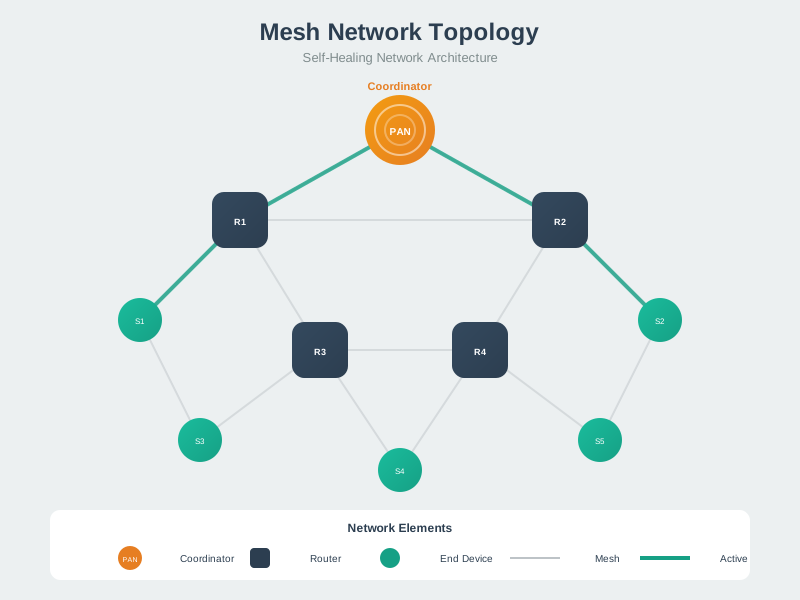
Mesh topologies provide high redundancy but require careful planning to balance connectivity with cost and complexity.
NoteVisual: Hybrid Topology Architecture
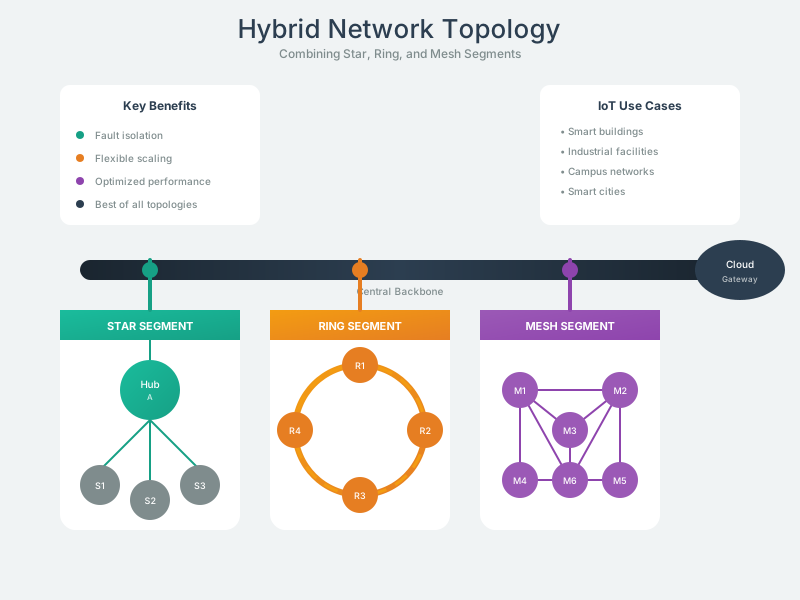
Hybrid topologies combine the strengths of multiple topology types to meet complex IoT deployment requirements.
782.8 Summary
- Network topology selection requires balancing fault tolerance, scalability, latency, and cost
- Star topology offers simplicity and low latency but has a single point of failure at the hub
- Mesh topology provides self-healing and range extension but adds routing overhead and complexity
- Tree topology scales well hierarchically and enables traffic aggregation at intermediate nodes
- Ring topology offers deterministic access but has limited scalability and higher latency
- Connectivity ratio of 40-60% is optimal for mesh networks, balancing redundancy against overhead
- Hybrid topologies often provide the best cost-performance balance for large deployments
782.9 What’s Next
Continue your topology review with:
- Network Topologies: Design Analysis: Questions on diameter, latency, and protocol-topology matching
- Network Topologies: Scenario-Based Review: Comprehensive scenario-based assessment questions
Continue to: Network Topologies: Design Analysis