1124 Sigfox: Use Case Analysis and Suitability Assessment
1124.1 Learning Objectives
By the end of this chapter, you will be able to:
- Evaluate Sigfox Suitability: Match application requirements to Sigfox capabilities
- Calculate Message Budgets: Design within 140 message/day constraints
- Analyze Battery Life: Estimate multi-year battery performance
- Compare Costs: Calculate total cost of ownership vs alternatives
- Avoid Common Pitfalls: Recognize unsuitable use cases before deployment
1124.2 Prerequisites
Required Chapters: - Sigfox Fundamentals - Core Sigfox concepts - Sigfox Architecture - Network structure - Sigfox Review - Overview and quizzes
Sigfox Key Parameters:
| Parameter | Uplink | Downlink |
|---|---|---|
| Messages/day | 140 | 4 |
| Payload | 12 bytes | 8 bytes |
| Data Rate | 100 bps | 600 bps |
| TX Duration | ~6 seconds | ~1 second |
Estimated Time: 25 minutes
1124.3 Sigfox Architecture Overview
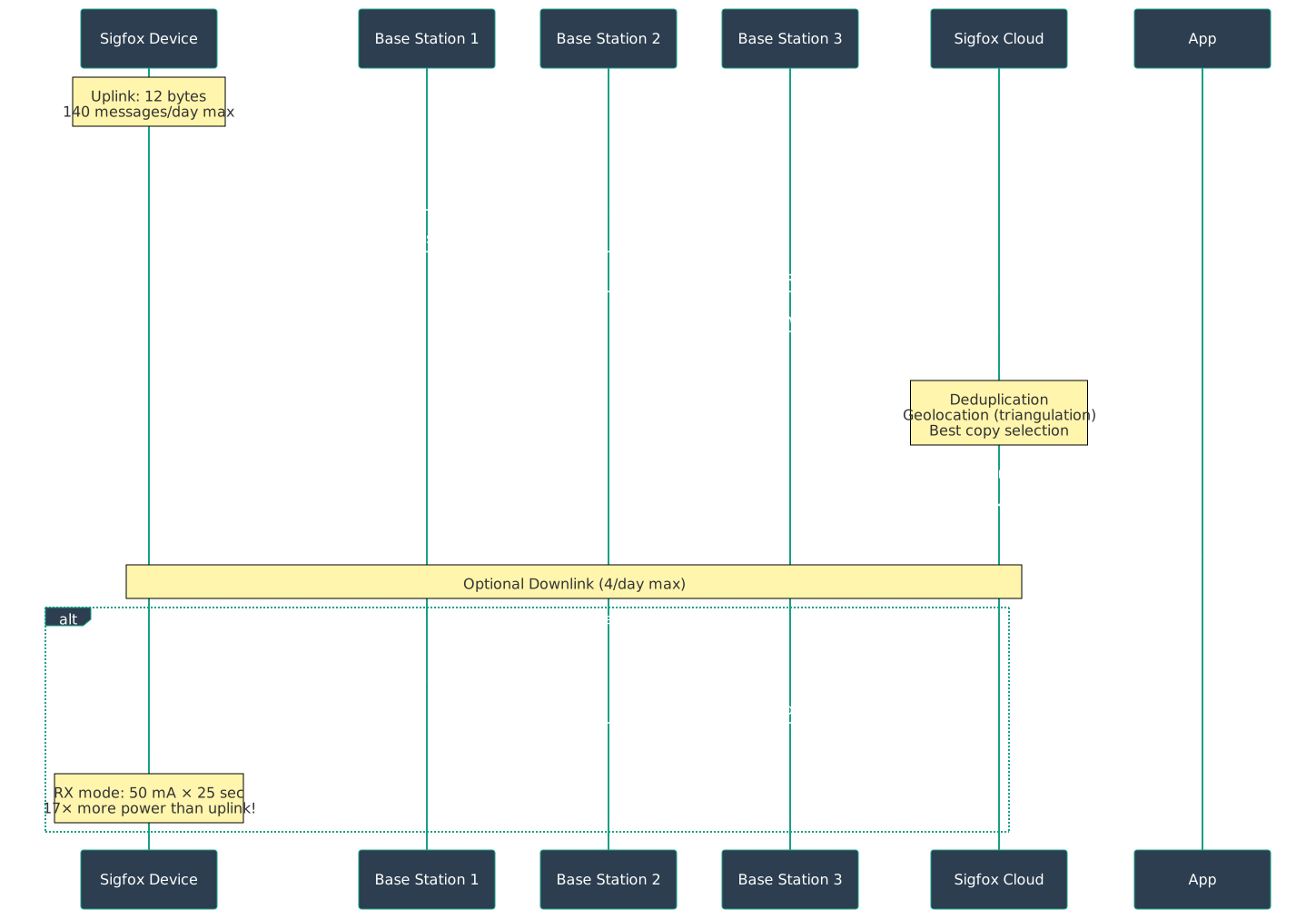
This chart shows a typical daily message budget allocation: with 140 uplinks/day, devices can send 24 hourly readings, 4 status updates, reserve 12 for alerts, and still have 100 messages as buffer.


1124.4 Common Pitfalls
The Mistake: Designing applications that consume exactly 140 messages per day, leaving no buffer for alerts, retransmissions, or edge cases.
Why It Happens: Developers calculate message requirements mathematically without accounting for real-world variability:
Flawed calculation:
- 140 messages/day / 24 hours = 5.83 messages/hour
- "I'll send a reading every 10 minutes = 144 messages/day"
- "Close enough to 140, it should work!"

What actually happens:
- Day 1: 144 messages attempted, 4 rejected after hitting daily limit
- Missing readings: 4 PM, 4:10 PM, 4:20 PM, 4:30 PM (end of day)
- Critical alert at 4:15 PM -> CANNOT SEND (quota exhausted)
- System blind during most important monitoring period
The Fix: Design for 70-80% quota utilization, reserving capacity for exceptions:
Robust message budget (140 total):
- Scheduled readings: 100 messages (71% of quota)
  -> Every 15 minutes = 96/day, leaving 44 spare
- Alert reserve: 20 messages (14% of quota)
  -> For threshold violations, status changes
- Buffer: 20 messages (14% of quota)
  -> For clock drift, edge cases, debugging

Practical implementation:
1. Track message count in firmware (reset at midnight UTC)
2. If count > 100: Switch to hourly readings (non-critical)
3. If count > 120: Only send critical alerts
4. If count > 135: Emergency-only modeThe Mistake: Designing control logic that expects downlink responses within seconds, like HTTP request/response patterns.
Why It Happens: Developers familiar with REST APIs or WebSockets expect synchronous communication:
Incorrect mental model:
Device: "Send sensor data + request downlink"
Cloud: "Receive data -> process -> send command"
Device: "Receive command -> execute"
Expected latency: 1-2 seconds (like HTTP)

Sigfox reality:
Device: "Send uplink at T=0"
Device: "Stay in RX mode for 20-25 seconds"
Cloud: "Process -> queue downlink -> schedule transmission"
Base Station: "Transmit downlink at T=20 seconds"
Device: "Receive downlink at T=20-25 seconds"
Actual latency: 20-25 seconds minimum!

Worse case:
- Device sends uplink without downlink flag
- Cloud decides it needs to send command
- Must wait for NEXT uplink with downlink flag
- Latency: Hours or days depending on uplink frequency!
The Fix: Design for asynchronous, high-latency downlink communication: 1. Downlink flag strategy: Only set downlink flag when device specifically needs configuration (e.g., after reboot, daily config check) 2. Command queuing: Backend queues commands until device requests downlink 3. Polling interval: Include “check for commands” uplink once per day with downlink flag 4. Timeout design: Application must tolerate 24+ hour command latency 5. Use case validation: If you need sub-minute control latency, Sigfox is the wrong technology–use LoRaWAN Class C or NB-IoT instead 6. Downlink budget: Remember only 4 downlinks/day–schedule wisely (e.g., at midnight for next day’s configuration)
1124.5 Smart Agriculture Case Study
Scenario: AgriTech startup wants to monitor soil conditions across 1,000 fields (average 5 hectares each, spread 40 km radius from town center).
Sensor Requirements: - Transmit every 4 hours (6 messages/day) - Payload: Soil moisture (2 bytes) + temperature (2 bytes) + battery (2 bytes) + field ID (2 bytes) + timestamp (2 bytes) = 10 bytes total - Battery life target: 10+ years (no solar, buried sensors) - Cost target: Under $10k/year operating costs
Evaluating Sigfox Fit:
Payload analysis: 10 bytes needed, Sigfox allows 12 bytes uplink. Fits perfectly with 2 bytes spare for future sensors.
Message frequency: 6 messages/day needed, Sigfox allows 140 messages/day. Using only 4.3% of daily quota (spare capacity: 134 messages for alerts).
Range: Fields span 40 km radius. Sigfox rural range: 30-50 km. Single base station covers entire deployment (pi x 40^2 = 5,027 km^2 coverage).
Battery life calculation:
Sigfox TX: 40 mA x 6 sec = 0.067 mAh per message
Daily energy: 6 msg x 0.067 mAh = 0.4 mAh/day
Sleep: 1 uA x 24h = 0.024 mAh/day
Total: 0.424 mAh/day

With 2000 mAh battery: 2000 / 0.424 = 4,717 days = 12.9 years
Cost: 1,000 devices x $6/year subscription = $6,000/year (under $10k budget).
Sigfox is ideal for this use case!
Detailed Suitability Analysis:
| Requirement | Sigfox Capability | Match? |
|---|---|---|
| Payload size | 10 bytes (limit: 12) | YES |
| Message frequency | 6/day (limit: 140) | YES |
| Range | 30-50 km rural | YES |
| Battery life | 12+ years | YES |
| Cost | $6/device/year | YES |
| Deployment | No infrastructure | YES |
| Coverage | Operator network | YES |
7/7 requirements met perfectly!
When Sigfox Would NOT Work:
| Scenario | Reason | Alternative |
|---|---|---|
| 15-byte payloads | Exceeds 12-byte limit | LoRaWAN (243 bytes) |
| 200 messages/day | Exceeds 140 limit | LoRaWAN |
| Frequent commands | Limited to 4 downlinks/day | LoRaWAN or NB-IoT |
| Real-time critical | Fire-and-forget, no ACK | NB-IoT or LTE-M |
| No coverage | Remote regions | Private LoRaWAN |
1124.6 Comprehensive Suitability Quiz
Question: A smart agriculture company wants to monitor soil moisture in 1000 fields, sending readings every 4 hours (6 messages/day). Each message contains: soil moisture (2 bytes), temperature (2 bytes), battery voltage (2 bytes), field ID (2 bytes), and timestamp (2 bytes) = 10 bytes total. They’re choosing between Sigfox and LoRaWAN. What is the PRIMARY technical limitation if they choose Sigfox?
Option B is CORRECT - Sigfox is perfectly suited for this application:
Payload Check:
Required: 10 bytes
Sigfox uplink limit: 12 bytes
10 bytes < 12 bytes - Fits!
Message Check:
Required: 6 messages/day
Sigfox limit: 140 messages/day
6 < 140 - Only 4.3% utilization!
Why Other Options Are Wrong:
A: 10-byte payload exceeds Sigfox’s 8-byte limit - INCORRECT - Confuses uplink and downlink limits! - Uplink (device to network): 12 bytes - Downlink (network to device): 8 bytes - This scenario uses uplink only
C: 6 messages/day exceeds Sigfox’s 4 message limit - INCORRECT - Confuses uplink and downlink limits! - Uplink: 140 messages/day - Downlink: 4 messages/day - The 4-message limit applies to downlink only
D: Sigfox cannot reach agricultural fields - INCORRECT - Sigfox has EXCELLENT rural range! - Urban: 3-10 km - Rural: 30-50 km (ideal for agriculture) - Clear line-of-sight in fields improves coverage
1124.7 Cost Analysis: 5-Year TCO
Scenario: 1,000 Soil Sensors
Sigfox Deployment:
Hardware: 1000 x $10 = $10,000
Subscription: 1000 x $6/year x 5 = $30,000
Total: $40,000
LoRaWAN Alternative:
Hardware: 1000 x $15 = $15,000
Gateways: 20 x $1,500 = $30,000 (rural coverage)
Network server: $300/month x 60 = $18,000
Gateway connectivity: 20 x $30/month x 60 = $36,000
Total: $99,000
Result: Sigfox saves $59,000 (60% less expensive) for this application profile.
1124.8 Python Example Outputs
1124.8.1 Message Capacity and Battery Life Calculator
Example Output:
### Scenario 1: Environmental Sensor (Hourly Reports) ###

================================================================================
Sigfox Deployment Analysis
================================================================================

Device Configuration:
  Payload Size: 10 bytes
  Messages per Day: 24
  TX Current: 40 mA
  Sleep Current: 1 uA
  Battery: 2000 mAh

Constraint Validation:
  Payload valid (10 <= 12 bytes)
  Messages valid (24 <= 140/day)

Battery Life Analysis:
  Estimated Life: 11.6 years
  Daily Energy: 472.0 uAh
    - TX Energy: 448.0 uAh (94.9%)
    - Sleep Energy: 24.0 uAh (5.1%)
  TX Time: 0.167% of time
  Feasible (>1 year battery life)

Optimization:
  For 10-year battery life: 27 messages/day maximum
  Optimal interval: 53.3 minutes
================================================================================
1124.8.2 Payload Optimization Example
Example Output:
================================================================================
Sigfox Payload Optimization Examples
================================================================================

### Example 1: Naive Approach (Wasteful) ###
Using float32 (4 bytes each) for all sensors:
  Total: 3 sensors x 4 bytes = 12 bytes (100% utilization)
  Can only fit 3 sensors!

### Example 2: Optimized Approach ###
Using scaled integers with appropriate precision:

Payload Analysis:
  Readings: 5
  Payload Size: 8 bytes
  Max Size: 12 bytes
  Utilization: 66.7%
  Remaining: 4 bytes
  Hex: 00e14186031701c2

Breakdown:
  temp: 22.5 -> 2 bytes (int16, offset 0)
  humidity: 65.0 -> 1 byte (uint8, offset 2)
  pressure: 1013.25 -> 2 bytes (uint16, offset 3)
  battery: 3.7 -> 1 byte (uint8, offset 5)
  light: 450 -> 2 bytes (uint16, offset 6)

  Fit 5 sensors in 8 bytes!
  4 bytes remaining for flags or additional sensors

### Example 3: Adding Flags with Bitfield ###
  Flags: motion_detected=True, door_open=False, tamper_alert=False,
         low_battery=True, maintenance_needed=False
  Packed: 0x09 (binary: 00001001)
  Size: 1 byte (5 boolean values!)

  Total: 5 sensors + 5 flags = 9 bytes
  Still 3 bytes remaining!
================================================================================
1124.9 Knowledge Check: Message Constraints
1124.10 Ideal Sigfox Applications
Best Applications for Sigfox:
| Application | Why Ideal |
|---|---|
| Smart metering (water, gas) | Infrequent readings, small data |
| Infrequent asset tracking | Daily/hourly location updates |
| Environmental sensors | Agriculture, weather stations |
| Smart city infrastructure | Waste bins, parking, lighting |
| Utility monitoring | < 100 messages/day, small payloads |
When to Choose Sigfox: - Small-scale deployments (< 5,000 devices) - Maximum battery life required - Simplest possible device design - No technical team to manage infrastructure - Acceptable coverage exists in deployment area - No data privacy concerns with operator network
1124.11 Summary
Sigfox suitability depends on matching application requirements to protocol constraints:
- Payload limit: 12 bytes uplink, 8 bytes downlink (optimize data encoding)
- Message limit: 140 uplink/day, 4 downlink/day (design for 70-80% utilization)
- Design for buffer: Reserve 20-30% capacity for alerts and edge cases
- Downlink latency: Expect 20-25 seconds minimum, often 24+ hours
- Battery optimization: Uplink-only mode achieves 10-20 year battery life
- Cost advantage: 60% savings vs private LoRaWAN for suitable applications
- Ideal use cases: Infrequent telemetry with small payloads in covered areas
1124.12 What’s Next
Continue your Sigfox learning:
- Next Chapter: Sigfox Device Management - Firmware updates and downlink challenges
- Then: Sigfox Operator Risks - Infrastructure dependency analysis
- Compare: LoRaWAN Overview - Alternative LPWAN technology