%% fig-alt: "Secure boot process flowchart showing chain of trust verification from hardware root through bootloader to firmware execution, preventing execution of tampered or malicious code. Process begins with Power On triggering device startup. Boot ROM (immutable factory code) verifies Bootloader Signature. If invalid, device HALTs. If valid, bootloader loads and verifies Firmware Signature. If invalid, device HALTs or loads recovery. If valid, firmware executes normally."
%%{init: {'theme': 'base', 'themeVariables': { 'primaryColor': '#2C3E50', 'primaryTextColor': '#fff', 'primaryBorderColor': '#16A085', 'lineColor': '#E67E22', 'secondaryColor': '#16A085', 'tertiaryColor': '#E67E22', 'fontSize': '13px'}}}%%
flowchart TD
A[Power On] --> B[Boot ROM<br/>Immutable factory code]
B --> C{Verify Bootloader<br/>Signature}
C -->|Invalid| D[HALT<br/>Security Violation]
C -->|Valid| E[Load Bootloader]
E --> F{Verify Firmware<br/>Signature}
F -->|Invalid| G[HALT or<br/>Load Recovery]
F -->|Valid| H[Execute Firmware<br/>System boots normally]
style A fill:#2C3E50,stroke:#16A085,color:#fff
style B fill:#16A085,stroke:#0e6655,color:#fff
style C fill:#E67E22,stroke:#d35400,color:#fff
style D fill:#e74c3c,stroke:#c0392b,color:#fff
style E fill:#2C3E50,stroke:#16A085,color:#fff
style F fill:#E67E22,stroke:#d35400,color:#fff
style G fill:#e74c3c,stroke:#c0392b,color:#fff
style H fill:#16A085,stroke:#0e6655,color:#fff
1384 Secure Communications and Firmware Integrity
1384.1 Learning Objectives
By the end of this chapter, you should be able to:
- Implement TLS/SSL for secure MQTT communications
- Configure DTLS for CoAP over UDP
- Deploy WireGuard VPN for IoT remote access
- Implement secure boot with firmware signature verification
- Design secure over-the-air (OTA) update systems
TipFor Beginners: Understanding Secure Communications
What is Secure Communication? Secure communication ensures that data traveling between devices cannot be intercepted (confidentiality), modified (integrity), or sent by impostors (authentication). It’s like sending a letter in a locked box that only the recipient can open.
Why does it matter for IoT? IoT devices transmit sensitive data (health readings, location, commands) over networks that attackers can monitor. Without encryption, anyone on the network can read your data or inject malicious commands.
Key terms: | Term | Definition | |——|————| | TLS | Transport Layer Security - encrypts TCP connections (HTTPS, MQTTS) | | DTLS | Datagram TLS - encrypts UDP connections (CoAP) | | VPN | Virtual Private Network - encrypted tunnel for all traffic | | Secure Boot | Verifying firmware integrity before execution | | OTA Update | Over-the-Air firmware update (wireless) |
1384.2 Prerequisites
Before diving into this chapter, you should be familiar with:
- Cryptography for IoT: Understanding of TLS/DTLS cryptographic foundations
- Authentication Methods: Certificate-based authentication for mTLS
1384.3 TLS/SSL for MQTT
MQTT is the most common IoT messaging protocol. Securing it with TLS prevents eavesdropping and ensures only authorized devices connect.
WarningWhy MQTT Security Matters: Attack Scenario
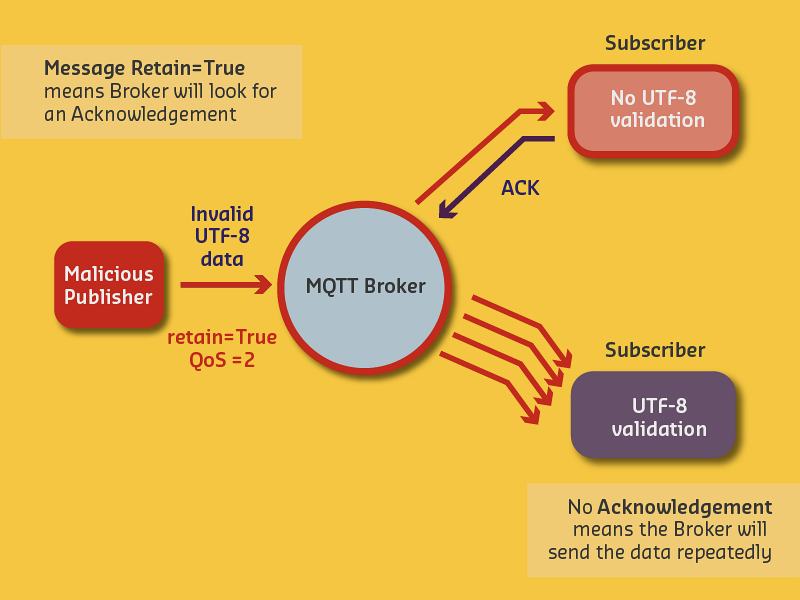
Without TLS encryption and proper input validation, attackers can:
- Inject malformed messages that crash subscribers
- Exploit QoS 2 retry mechanisms to amplify attacks
- Eavesdrop on sensitive sensor data transmitted in cleartext
- Spoof device identities without certificate authentication
1384.3.1 MQTT over TLS Implementation (ESP32)
// MQTT over TLS (MQTTS)
#include <WiFiClientSecure.h>
#include <PubSubClient.h>

WiFiClientSecure espClient;
PubSubClient mqtt(espClient);

const char* mqtt_server = "broker.example.com";
const int mqtt_port = 8883;  // MQTTS port

// CA certificate
const char* ca_cert = "-----BEGIN CERTIFICATE-----\n...";

void setup() {
  WiFi.begin(ssid, password);

  // Configure TLS
  espClient.setCACert(ca_cert);

  // Optional: Client certificates for mutual TLS
  espClient.setCertificate(client_cert);
  espClient.setPrivateKey(client_key);

  // Connect to MQTT broker
  mqtt.setServer(mqtt_server, mqtt_port);
  mqtt.setCallback(messageCallback);

  reconnect();
}

void reconnect() {
  while (!mqtt.connected()) {
    Serial.print("Connecting to MQTT...");

    if (mqtt.connect("ESP32Client", mqtt_user, mqtt_pass)) {
      Serial.println("connected");
      mqtt.subscribe("sensors/#");
    } else {
      Serial.print("failed, rc=");
      Serial.println(mqtt.state());
      delay(5000);
    }
  }
}
1384.3.2 MQTT Security Levels
| Level | Configuration | Security | Use Case |
|---|---|---|---|
| None | Port 1883, no auth | None | Development only |
| Password | Port 1883, username/password | Low | Internal networks |
| TLS | Port 8883, server cert | Medium | General production |
| mTLS | Port 8883, server + client certs | High | Enterprise, critical systems |
1384.4 DTLS for CoAP
CoAP uses UDP, so TLS cannot be used directly. DTLS (Datagram TLS) provides equivalent security for UDP-based protocols.
1384.4.1 DTLS Implementation
// CoAP over DTLS
#include <coap-simple.h>
#include <mbedtls/ssl.h>

mbedtls_ssl_context ssl;
mbedtls_ssl_config conf;

void setup_dtls() {
  mbedtls_ssl_init(&ssl);
  mbedtls_ssl_config_init(&conf);

  // Configure DTLS (datagram mode)
  mbedtls_ssl_config_defaults(&conf,
                               MBEDTLS_SSL_IS_CLIENT,
                               MBEDTLS_SSL_TRANSPORT_DATAGRAM,
                               MBEDTLS_SSL_PRESET_DEFAULT);

  // Set certificates
  mbedtls_ssl_conf_ca_chain(&conf, &cacert, NULL);
  mbedtls_ssl_conf_own_cert(&conf, &clicert, &pkey);

  mbedtls_ssl_setup(&ssl, &conf);
}

void sendCoapMessage(String payload) {
  // Encrypt with DTLS
  uint8_t encrypted[256];
  size_t len;

  mbedtls_ssl_write(&ssl, (uint8_t*)payload.c_str(),
                    payload.length());

  // Send encrypted CoAP message
}
1384.4.2 TLS vs DTLS Comparison
| Feature | TLS (TCP) | DTLS (UDP) |
|---|---|---|
| Transport | TCP (reliable) | UDP (unreliable) |
| Connection | Stateful | Connectionless |
| Handshake | Simpler | Handles packet loss, reordering |
| Protocols | HTTPS, MQTTS | CoAP, VoIP, gaming |
| IoT Suitability | Good | Excellent for constrained |
1384.5 VPN for Remote Access
VPNs create encrypted tunnels for all traffic, enabling secure remote access to IoT networks.
1384.5.1 WireGuard VPN Configuration
# WireGuard VPN configuration for IoT gateway
import subprocess

def setup_wireguard():
    config = """
[Interface]
PrivateKey = <device_private_key>
Address = 10.0.0.2/24
DNS = 10.0.0.1

[Peer]
PublicKey = <server_public_key>
Endpoint = vpn.example.com:51820
AllowedIPs = 10.0.0.0/24
PersistentKeepalive = 25
"""

    with open('/etc/wireguard/wg0.conf', 'w') as f:
        f.write(config)

    # Start VPN
    subprocess.run(['wg-quick', 'up', 'wg0'])

# All IoT traffic now encrypted through VPN
1384.5.2 Worked Example: WireGuard for Distributed Agriculture
Scenario: A precision agriculture company operates 20 remote farms with IoT sensors. Each farm has intermittent 4G connectivity. Implement secure VPN using WireGuard.
Solution:
Architecture: Hub-and-spoke topology with central server
- Central VPN server: 10.200.0.1
- Farm 1 subnet: 10.200.1.0/24
- Farm 2 subnet: 10.200.2.0/24
- Technician pool: 10.200.100.0/24
Central server configuration:
[Interface]
PrivateKey = <server_private_key>
Address = 10.200.0.1/16
ListenPort = 51820

# Farm 1 gateway (entire farm subnet behind gateway)
[Peer]
PublicKey = <farm1_public_key>
AllowedIPs = 10.200.1.0/24
PersistentKeepalive = 25

# Technician 1 (single IP)
[Peer]
PublicKey = <tech1_public_key>
AllowedIPs = 10.200.100.101/32
Access control rules:
# Technicians can reach farm gateways
iptables -A FORWARD -s 10.200.100.0/24 -p tcp --dport 22 -j ACCEPT

# Farms can only reach central MQTT broker
iptables -A FORWARD -s 10.200.1.0/20 -d 10.200.0.1 -p tcp --dport 8883 -j ACCEPT

# Block inter-farm traffic
iptables -A FORWARD -s 10.200.1.0/24 -d 10.200.2.0/24 -j DROP
Result: - Encryption: Curve25519 (256-bit ECDH) - Latency overhead: 2-5ms - Isolation: Farms cannot communicate directly - Scalability: 200+ concurrent peers
1384.6 Secure Boot and Firmware Verification
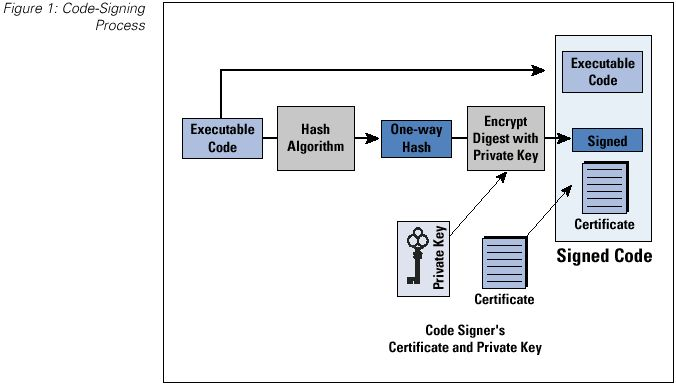
Secure boot ensures that only authenticated firmware runs on a device, preventing attackers from installing malware.
1384.6.1 Secure Boot Implementation (ESP32)
// ESP32 Secure Boot
#include "esp_secure_boot.h"
#include "esp_flash_encrypt.h"

void setup() {
  Serial.begin(115200);

  // Check if secure boot is enabled
  if (esp_secure_boot_enabled()) {
    Serial.println("Secure boot ENABLED");
    Serial.println("  Firmware signature verified at boot");
  } else {
    Serial.println("WARNING: Secure boot DISABLED");
    Serial.println("  Device vulnerable to firmware attacks");
  }

  // Check flash encryption
  if (esp_flash_encryption_enabled()) {
    Serial.println("Flash encryption ENABLED");
    Serial.println("  Firmware encrypted in flash");
  } else {
    Serial.println("WARNING: Flash encryption DISABLED");
  }
}
1384.6.2 Secure Boot Chain of Trust
Key Insight: The chain of trust starts with immutable Boot ROM (hardware). Each stage verifies the next before execution. If ANY verification fails, the device refuses to boot.
1384.6.3 Hardware Trojan Countermeasures
Hardware trojans are malicious modifications to integrated circuits that bypass software security.
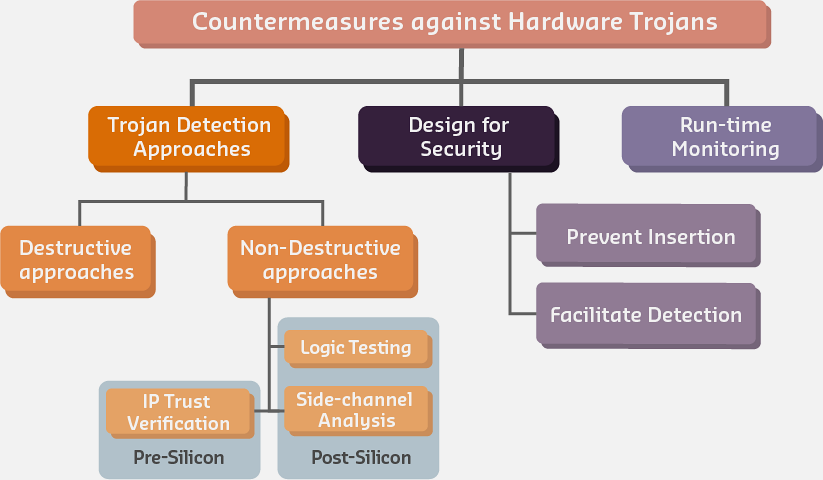
| Strategy | Description | IoT Application |
|---|---|---|
| Side-Channel Analysis | Monitor power/EM emissions for anomalies | Detecting trojans in deployed sensors |
| Logic Testing | Exhaustive testing of rare input combinations | Pre-deployment validation |
| Design Obfuscation | Hide circuit design intent | Chip manufacturing security |
| Run-time Monitoring | Continuous behavioral analysis | Detecting activated trojans |
1384.7 Secure OTA Updates
Over-the-air updates must verify authenticity before installation to prevent malicious firmware injection.
1384.7.1 OTA with Signature Verification
// Secure OTA with signature verification
#include <Update.h>
#include <HTTPClient.h>
#include "mbedtls/md.h"
#include "mbedtls/pk.h"

// Manufacturer's public key (embedded at build time)
const char* manufacturer_public_key = \
"-----BEGIN PUBLIC KEY-----\n" \
"MIIBIjANBgkqhkiG9w0BAQEFAAOCAQ8AMIIBCgKCAQEA...\n" \
"-----END PUBLIC KEY-----\n";

bool performSecureOTA(String firmwareUrl, String signatureUrl) {
  HTTPClient http;

  // Download signature first
  http.begin(signatureUrl);
  String signature = http.getString();
  http.end();

  // Download firmware and compute hash
  http.begin(firmwareUrl);
  int contentLength = http.getSize();
  WiFiClient *stream = http.getStreamPtr();

  // Compute SHA-256 hash while downloading
  mbedtls_md_context_t ctx;
  mbedtls_md_init(&ctx);
  mbedtls_md_setup(&ctx, mbedtls_md_info_from_type(MBEDTLS_MD_SHA256), 0);
  mbedtls_md_starts(&ctx);

  uint8_t buffer[1024];
  while (contentLength > 0) {
    int c = stream->readBytes(buffer, min((size_t)contentLength, sizeof(buffer)));
    mbedtls_md_update(&ctx, buffer, c);
    contentLength -= c;
  }

  uint8_t hash[32];
  mbedtls_md_finish(&ctx, hash);

  // Verify RSA signature
  mbedtls_pk_context pk;
  mbedtls_pk_init(&pk);
  mbedtls_pk_parse_public_key(&pk, (const uint8_t*)manufacturer_public_key,
                               strlen(manufacturer_public_key) + 1);

  int ret = mbedtls_pk_verify(&pk, MBEDTLS_MD_SHA256, hash, 32,
                               signature_bytes, signature_len);

  if (ret != 0) {
    Serial.println("SIGNATURE VERIFICATION FAILED! Firmware rejected.");
    return false;
  }

  Serial.println("Signature verified! Installing firmware...");
  // Proceed with installation...
  return true;
}
1384.7.2 OTA Security Checklist
| Security Measure | Purpose | Implementation |
|---|---|---|
| Digital signature | Verify firmware authenticity | RSA-2048 or ECDSA P-256 |
| HTTPS download | Protect during transit | TLS 1.2+ with certificate pinning |
| Version check | Prevent downgrade attacks | Reject older versions |
| Rollback partition | Recovery from failed update | Dual-partition A/B scheme |
| Staged rollout | Limit blast radius | Update 1% of devices first |
NoteKnowledge Check: Secure Boot
Question: An IoT gateway needs to securely boot and load firmware. An attacker replaces the application firmware with malware. What prevents the malware from running?
A. Boot ROM loads bootloader without verification B. Bootloader checks firmware file size before loading C. Bootloader verifies firmware RSA signature against manufacturer’s public key D. Firmware runs in sandbox that limits malware damage
Click to reveal answer
Answer: C - Bootloader verifies firmware RSA signature against manufacturer’s public key
Why? - The chain of trust: Boot ROM (immutable) verifies bootloader signature → Bootloader verifies firmware signature - Attackers cannot forge signatures without the manufacturer’s private key - Even if they replace firmware, signature verification fails and device refuses to boot - File size checks are easily spoofed; sandboxing helps but doesn’t prevent execution
1384.8 Chapter Summary
Secure communications protect IoT data in transit using TLS for TCP-based protocols (MQTT) and DTLS for UDP-based protocols (CoAP). VPNs like WireGuard provide encrypted tunnels for remote access with low latency overhead suitable for constrained IoT networks.
Secure boot establishes a chain of trust from immutable hardware (Boot ROM) through bootloader to application firmware, with each stage cryptographically verifying the next before execution. OTA updates must verify digital signatures before installation to prevent malicious firmware injection, with rollback capabilities for recovery from failed updates.
1384.9 What’s Next
With secure communications and firmware integrity in place, the next chapter examines Monitoring and Detection where you’ll learn to implement intrusion detection systems, anomaly detection for IoT networks, and comprehensive security exercises.
Continue to Monitoring and Detection →