%%{init: {'theme': 'base', 'themeVariables': {'primaryColor': '#2C3E50', 'primaryTextColor': '#fff', 'primaryBorderColor': '#16A085', 'lineColor': '#E67E22', 'secondaryColor': '#16A085', 'tertiaryColor': '#7F8C8D'}}}%%
graph TB
    subgraph Wi-Fi6["Wi-Fi 6 (802.11ax)"]
        W6_1[OFDMA]
        W6_2[MU-MIMO 8×8]
        W6_3[BSS Coloring]
        W6_4[Target Wake Time]
        W6_5[1024-QAM]
    end

    subgraph Wi-Fi6E["Wi-Fi 6E"]
        W6E_1[All Wi-Fi 6 features]
        W6E_2[+ 6 GHz band<br/>Up to 1,200 MHz]
        W6E_3[+ 160 MHz channels<br/>Up to 7× (region)]
        W6E_4[+ No legacy Wi-Fi clients]
    end

    subgraph Wi-Fi7["Wi-Fi 7 (802.11be)"]
        W7_1[All Wi-Fi 6E features]
        W7_2[+ 320 MHz channels]
        W7_3[+ Multi-Link Operation]
        W7_4[+ 4096-QAM]
        W7_5[+ Punctured channels]
    end

    Wi-Fi6 --> Wi-Fi6E --> Wi-Fi7

    style Wi-Fi6 fill:#7F8C8D,stroke:#2C3E50
    style Wi-Fi6E fill:#E67E22,stroke:#2C3E50
    style Wi-Fi7 fill:#16A085,stroke:#2C3E50
854 Wi-Fi 6E and Wi-Fi 7 for IoT
854.1 Wi-Fi 6E and Wi-Fi 7: Next-Generation Wireless for IoT
NoteLearning Objectives
By the end of this section, you will be able to:
- Understand Wi-Fi 6E (6 GHz band) capabilities and benefits for IoT
- Evaluate Wi-Fi 7 (802.11be) features including MLO and 320 MHz channels
- Compare Wi-Fi 6E/7 with Wi-Fi 6 and private 5G for IoT deployments
- Design enterprise IoT networks using the 6 GHz spectrum
- Select appropriate Wi-Fi generation for different IoT use cases
- Understand regulatory considerations for 6 GHz deployment
854.2 Prerequisites
Before diving into this chapter, you should be familiar with:
- Wi-Fi Fundamentals and Standards: Wi-Fi basics and evolution
- Wi-Fi Architecture and Mesh: Wi-Fi network design
- Networking Basics: IP networking fundamentals
NoteRelated Chapters
Wi-Fi: - Wi-Fi Fundamentals and Standards - Wi-Fi basics - Wi-Fi Architecture and Mesh - Network design - Wi-Fi IoT Implementations - IoT deployment
Comparisons: - Wi-Fi HaLow - Long-range Wi-Fi for IoT - 5G Advanced and 6G for IoT - Cellular comparison
854.3 For Beginners: Understanding Wi-Fi Evolution
TipWhat’s New in Wi-Fi 6E and Wi-Fi 7?
The Wi-Fi Spectrum Problem: Wi-Fi has been crowded into the 2.4 GHz and 5 GHz bands since 1999. As more devices connect, performance suffers—like too many cars on a two-lane highway.
Wi-Fi 6E (2020+): Opens the 6 GHz band—a brand new highway with: - Up to 1,200 MHz of new spectrum (region-dependent; ~480 MHz in much of Europe) - No legacy Wi-Fi clients in 6 GHz (6E/7-class devices only in that band) - More room for wide channels (e.g., 160 MHz) with less legacy interference (still subject to local regulations and other 6 GHz deployments)
Wi-Fi 7 (2024+): Adds even more improvements: - 320 MHz channels (double Wi-Fi 6E’s maximum) - Multi-Link Operation (MLO): Use multiple bands simultaneously - 4K-QAM: Pack more data into each transmission - Target: 46 Gbps peak speed (4.5× Wi-Fi 6)
For IoT, This Means: - More bandwidth: HD cameras, AR/VR headsets work better - Lower latency: Real-time control applications improve - Less interference: Dense sensor deployments more reliable - Better coexistence: IoT traffic doesn’t fight with laptops
TipFor Kids: Meet the Sensor Squad! 🌟
Wi-Fi 6E and Wi-Fi 7 are like building brand new super-highways for your internet that have way less traffic than the old roads!
854.3.1 The Sensor Squad Adventure: The Great Data Race
The Sensor Squad was having a problem! Sammy the Temperature Sensor, Lila the Light Sensor, Max the Motion Detector, and Bella the Button all needed to send their messages to the Smart Home Hub at the same time. But the old Wi-Fi highway was SO crowded!
“There are too many cars on this road!” complained Sammy, watching phones, tablets, laptops, and smart TVs all fighting for space on the same crowded 2.4 GHz and 5 GHz highways. Every time Sammy tried to send a temperature reading, he had to wait and wait for a gap in traffic.
Then their friend Wendy the Wi-Fi 6E Router had an idea. “I just got access to a brand NEW highway called 6 GHz! It’s super wide with lots of lanes, and best of all - none of those old slow devices can even get on it!” The Sensor Squad was excited. The new 6 GHz highway had room for EVERYONE to drive side by side.
Max the Motion Detector was especially happy. “Now when I detect someone at the door, I can tell the hub INSTANTLY without waiting!” And Lila discovered she could send beautiful HD video from the security camera without any buffering. The new highway was like having their own private road while everyone else was stuck in traffic on the old ones!
854.3.2 Key Words for Kids
| Word | What It Means |
|---|---|
| Spectrum | Like different radio channels or highway lanes - more spectrum means more room for devices |
| 6 GHz Band | A brand new “highway” for Wi-Fi that only newer devices can use |
| Multi-Link | Using multiple highways at once - like driving on three roads simultaneously! |
| Latency | The delay before something happens - like waiting in line at a store |
854.3.3 Try This at Home! 🏠
The Crowded Highway Experiment!
You can see how traffic congestion works with a simple experiment:
- Get 5 toy cars and a piece of paper with one line drawn on it (the “highway”)
- Try to move all 5 cars from one end to the other at the same time - they bump into each other!
- Now draw THREE lines on the paper (three lanes)
- Move the cars again - much easier when everyone has their own lane!
This is exactly what Wi-Fi 6E does! Instead of all devices fighting for space on the crowded 2.4 GHz and 5 GHz “roads,” Wi-Fi 6E adds the huge new 6 GHz road where new devices can zoom along without traffic jams. Your smart home devices can send their messages faster because they’re not waiting behind your brother’s video game or your sister’s TikTok videos!
854.4 Wi-Fi Generation Comparison
854.4.1 Standards Overview
Note: The speeds below are theoretical peak PHY rates and depend on channel width, spatial streams, and modulation/coding.
| Standard | Name | Year | Max Speed | Bands | Key Features |
|---|---|---|---|---|---|
| 802.11n | Wi-Fi 4 | 2009 | 600 Mbps | 2.4/5 GHz | MIMO, 40 MHz |
| 802.11ac | Wi-Fi 5 | 2013 | up to ~6.9 Gbps | 5 GHz | MU-MIMO, 160 MHz |
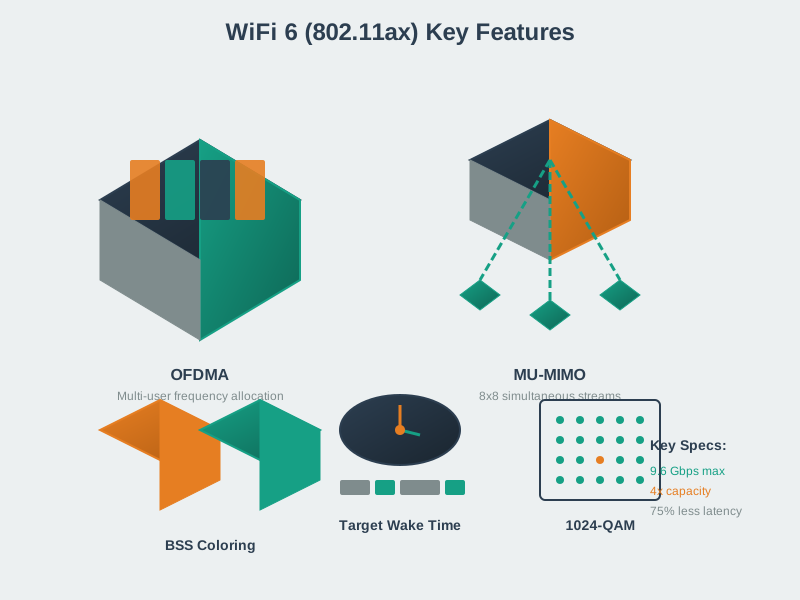
| 802.11ax | Wi-Fi 6 | 2019 | 9.6 Gbps | 2.4/5 GHz | OFDMA, BSS Color |
| 802.11ax | Wi-Fi 6E | 2020 | 9.6 Gbps | 2.4/5/6 GHz | 6 GHz band |
| 802.11be | Wi-Fi 7 | 2024 | 46 Gbps | 2.4/5/6 GHz | MLO, 320 MHz |
854.4.2 Feature Comparison
TipAlternative View: Wi-Fi Evolution as Timeline
This variant shows the same Wi-Fi generation progression as a timeline emphasizing when each technology became available and its key differentiator.
%% fig-alt: "Wi-Fi evolution timeline from 2019 to 2024+: Wi-Fi 6 (2019) introduces OFDMA and TWT for IoT efficiency, Wi-Fi 6E (2020) adds 6 GHz band for spectrum expansion, Wi-Fi 7 (2024) adds MLO and 320 MHz channels for maximum performance. Timeline shows progression toward higher bandwidth and lower latency."
%%{init: {'theme': 'base', 'themeVariables': { 'primaryColor': '#2C3E50', 'primaryTextColor': '#fff', 'primaryBorderColor': '#16A085', 'lineColor': '#E67E22', 'secondaryColor': '#16A085', 'tertiaryColor': '#7F8C8D', 'fontSize': '11px'}}}%%
flowchart LR
    subgraph Y2019["2019"]
        W6["Wi-Fi 6<br/>802.11ax<br/>━━━━━━━<br/>OFDMA<br/>TWT<br/>9.6 Gbps"]
    end

    subgraph Y2020["2020"]
        W6E["Wi-Fi 6E<br/>802.11ax<br/>━━━━━━━<br/>+6 GHz Band<br/>1,200 MHz<br/>Clean Spectrum"]
    end

    subgraph Y2024["2024+"]
        W7["Wi-Fi 7<br/>802.11be<br/>━━━━━━━<br/>MLO<br/>320 MHz<br/>46 Gbps"]
    end

    W6 -->|"+Spectrum"| W6E
    W6E -->|"+Speed"| W7

    style W6 fill:#7F8C8D,stroke:#2C3E50,color:#fff
    style W6E fill:#E67E22,stroke:#2C3E50,color:#fff
    style W7 fill:#16A085,stroke:#2C3E50,color:#fff
Key Insight: Each Wi-Fi generation addresses a different bottleneck - Wi-Fi 6 focused on efficiency (OFDMA, TWT), Wi-Fi 6E on spectrum (6 GHz), and Wi-Fi 7 on raw performance (MLO, wider channels). For IoT, Wi-Fi 6/6E’s TWT and OFDMA often matter more than Wi-Fi 7’s speed gains.
854.5 Wi-Fi 6E: The 6 GHz Revolution
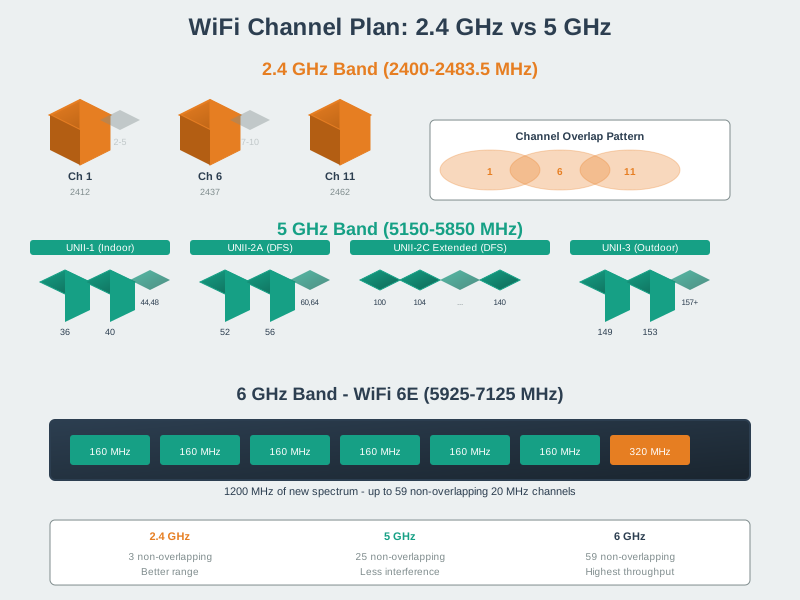
854.5.1 6 GHz Spectrum Allocation
%%{init: {'theme': 'base', 'themeVariables': {'primaryColor': '#2C3E50', 'primaryTextColor': '#fff', 'primaryBorderColor': '#16A085', 'lineColor': '#E67E22', 'secondaryColor': '#16A085', 'tertiaryColor': '#7F8C8D'}}}%%
graph LR
    subgraph Bands["Wi-Fi Spectrum Allocation"]
        B24[2.4 GHz<br/>83 MHz<br/>3× 20 MHz]
        B5[5 GHz<br/>~500 MHz*<br/>~25× 20 MHz*]
        B6[6 GHz<br/>Up to 1,200 MHz*<br/>Up to 59× 20 MHz*]
    end

    B24 --> B5 --> B6

    style B24 fill:#7F8C8D,stroke:#2C3E50,color:#fff
    style B5 fill:#E67E22,stroke:#2C3E50,color:#fff
    style B6 fill:#16A085,stroke:#2C3E50,color:#fff
Approximate values; exact usable spectrum and channel counts vary by region and regulatory constraints (including DFS in 5 GHz).
854.5.2 Regional Availability
| Region | Available Spectrum | Channels (20 MHz) | Status |
|---|---|---|---|
| USA | 5.925-7.125 GHz | 59 | Available |
| Europe | 5.945-6.425 GHz | 24 | Available |
| UK | 5.925-6.425 GHz | 24 | Available |
| Canada | 5.925-7.125 GHz | 59 | Available |
| Brazil | 5.925-7.125 GHz | 59 | Available |
| Japan | Evolving / partial allocation | Varies | Evolving |
| China | Evolving / limited allocation | Varies | Evolving |
Regulations change over time; always verify current rules with your local regulator before deploying 6 GHz products.
854.5.3 6 GHz Channel Widths
Note: Channel counts depend on how much of 6 GHz is available in your region (e.g., 59×20 MHz in US/Canada vs 24×20 MHz in much of Europe).
| Width | US/Canada (1200 MHz) | Europe/UK (480 MHz) | Use Case |
|---|---|---|---|
| 20 MHz | 59 | 24 | High-density IoT |
| 40 MHz | 29 | 12 | General IoT |
| 80 MHz | 14 | 6 | Video streaming |
| 160 MHz | 7 | 3 | Ultra-high bandwidth |
| 320 MHz (Wi-Fi 7) | 3 | 1 | Maximum throughput |
854.5.4 Wi-Fi 6E Benefits for IoT
| Benefit | Impact on IoT |
|---|---|
| No legacy Wi-Fi clients (in 6 GHz) | No legacy compatibility overhead in the 6 GHz band (clients are 6E/7-class) |
| More room for wide channels | More contiguous spectrum for 80/160 MHz channels (region-dependent) |
| Lower interference | Cleaner spectrum for dense deployments |
| Better latency | Less contention = faster access |
| Power efficiency | Same Wi-Fi 6 feature set applies (including optional TWT support, device-dependent) |
854.6 Wi-Fi 7: The Next Leap
854.6.1 Key Wi-Fi 7 Technologies
854.6.1.1 Multi-Link Operation (MLO)
Wi-Fi 7’s breakthrough feature—use multiple bands simultaneously:
%%{init: {'theme': 'base', 'themeVariables': {'primaryColor': '#2C3E50', 'primaryTextColor': '#fff', 'primaryBorderColor': '#16A085', 'lineColor': '#E67E22', 'secondaryColor': '#16A085', 'tertiaryColor': '#7F8C8D'}}}%%
graph TB
    subgraph Traditional["Traditional Wi-Fi"]
        T_Dev[Device] --> T_AP[AP<br/>Single Link]
        T_AP --> T_Band[One Band<br/>at a time]
    end

    subgraph MLO["Wi-Fi 7 MLO"]
        M_Dev[Device] --> M_AP[AP<br/>Multi-Link]
        M_AP --> M_B1[2.4 GHz Link]
        M_AP --> M_B2[5 GHz Link]
        M_AP --> M_B3[6 GHz Link]
    end

    style Traditional fill:#7F8C8D,stroke:#2C3E50
    style MLO fill:#16A085,stroke:#2C3E50
MLO Modes:
| Mode | Description | Benefit |
|---|---|---|
| Aggregation | Combine bandwidth across links | Maximum throughput |
| Low-Latency | Send on fastest available link | Minimal delay |
| High Reliability | Duplicate on multiple links | Improved delivery probability |
| Seamless Switching | Shift traffic between links | More stable performance |
854.6.1.2 320 MHz Channels
Wi-Fi 7 doubles maximum channel width:
| Channel Width | Throughput | 6 GHz Availability |
|---|---|---|
| 160 MHz (Wi-Fi 6E) | ~2.4 Gbps (illustrative) | up to 7 channels (region-dependent) |
| 320 MHz (Wi-Fi 7) | ~5.8 Gbps (illustrative) | up to 3 channels (region-dependent) |
854.6.1.3 4096-QAM (4K-QAM)
| QAM Level | Bits/Symbol | Improvement |
|---|---|---|
| 256-QAM (Wi-Fi 5) | 8 | Baseline |
| 1024-QAM (Wi-Fi 6) | 10 | +25% |
| 4096-QAM (Wi-Fi 7) | 12 | +50% over Wi-Fi 5 |
854.6.2 Wi-Fi 7 for IoT Applications
%%{init: {'theme': 'base', 'themeVariables': {'primaryColor': '#2C3E50', 'primaryTextColor': '#fff', 'primaryBorderColor': '#16A085', 'lineColor': '#E67E22', 'secondaryColor': '#16A085', 'tertiaryColor': '#7F8C8D'}}}%%
mindmap
    root((Wi-Fi 7<br/>IoT Use Cases))
        High-Bandwidth
            4K/8K cameras
            AR/VR headsets
            Industrial vision
        Low-Latency
            Robot control
            Real-time gaming
            Remote operation
        High-Reliability
            Medical devices
            Safety systems
            Process control
        Dense Deployment
            Smart buildings
            Retail analytics
            Warehouses
854.7 Comparison: Wi-Fi 6E/7 vs Private 5G
854.7.1 Feature Comparison
| Feature | Wi-Fi 6E/7 | Private 5G |
|---|---|---|
| Spectrum | Unlicensed/shared (6 GHz availability varies by region) | Licensed/shared/unlicensed (deployment and regulation dependent) |
| Throughput | Up to 9.6–46 Gbps (peak PHY) | 100s Mbps–Gbps (spectrum-dependent) |
| Latency | Low ms possible on a local LAN | Low ms typical; URLLC targets sub‑ms in controlled conditions |
| Range | Tens of meters indoor (band/environment-dependent) | 100-500m (deployment-dependent) |
| Mobility | Limited handoff | Seamless |
| QoS | Best-effort (can be engineered with QoS, but not absolute guarantees) | More controllable QoS; can be engineered for deterministic behavior (SLA depends on operator/ownership) |
| Deployment Cost/Complexity | Often lower | Often higher (spectrum + core + planning), but varies |
| Interference | Possible (mitigate with design and spectrum planning) | More controllable, but still RF/environment dependent |
854.7.2 When to Choose Each
%%{init: {'theme': 'base', 'themeVariables': {'primaryColor': '#2C3E50', 'primaryTextColor': '#fff', 'primaryBorderColor': '#16A085', 'lineColor': '#E67E22', 'secondaryColor': '#16A085', 'tertiaryColor': '#7F8C8D'}}}%%
flowchart TB
    Start[Select Technology] --> Q1{Latency Requirement?}

    Q1 -->|Ultra-low| 5G[Private 5G<br/>URLLC profile]
    Q1 -->|1-20 ms| Q2{Mobility?}
    Q1 -->|>20 ms| Wi-Fi6E[Wi-Fi 6E/7]

    Q2 -->|High-speed<br/>Handoff critical| 5G2[Private 5G]
    Q2 -->|Stationary/<br/>Limited| Q3{Budget?}

    Q3 -->|High| 5G3[Private 5G]
    Q3 -->|Medium/Low| Wi-Fi7[Wi-Fi 6E/7]

    style Start fill:#16A085,stroke:#2C3E50,color:#fff
    style 5G fill:#E67E22,stroke:#2C3E50,color:#fff
    style 5G2 fill:#E67E22,stroke:#2C3E50,color:#fff
    style 5G3 fill:#E67E22,stroke:#2C3E50,color:#fff
    style Wi-Fi6E fill:#2C3E50,stroke:#16A085,color:#fff
    style Wi-Fi7 fill:#2C3E50,stroke:#16A085,color:#fff
854.8 Deployment Considerations
854.8.1 6 GHz Propagation
| Characteristic | 6 GHz vs 5 GHz |
|---|---|
| Wall penetration | Often worse through walls (material dependent) |
| Free-space loss | ~1.6 dB higher (same distance) |
| Range (same power) | Often somewhat shorter at the same target RSSI/SNR |
| Dense deployment | May require more APs to hit the same coverage targets |
| Interference | Often cleaner initially; still depends on deployment density |
854.8.2 AP Density Planning
Practical planning note: - 6 GHz has ~1.6 dB higher free-space loss than 5 GHz at the same distance and often poorer penetration, so you may need a denser AP layout to hit the same RSSI/SNR targets. - The payoff is more usable spectrum and fewer legacy clients, which can improve capacity in dense deployments—when devices support 6E/7.
854.8.3 Power Considerations
| Regulation | Indoor | Outdoor |
|---|---|---|
| USA (6 GHz) | LPI allowed; Standard Power requires AFC | Standard Power requires AFC; VLP rules vary |
| Europe (6 GHz) | LPI widely available; VLP varies | Standard power generally not permitted |
| UK (6 GHz) | LPI widely available; VLP varies | Standard power generally not permitted |
AFC (Automated Frequency Coordination): - Database-driven interference avoidance - Required for outdoor and high-power indoor - Protects incumbent users (satellites, fixed links)
854.9 IoT-Specific Features
854.9.1 Target Wake Time (TWT)
TWT allows scheduled wake periods for battery-powered IoT:
%%{init: {'theme': 'base', 'themeVariables': {'primaryColor': '#2C3E50', 'primaryTextColor': '#fff', 'primaryBorderColor': '#16A085', 'lineColor': '#E67E22', 'secondaryColor': '#16A085', 'tertiaryColor': '#7F8C8D'}}}%%
sequenceDiagram
    participant S as IoT Sensor
    participant AP as Wi-Fi AP

    Note over S,AP: TWT Agreement Established

    S->>AP: TWT Request (every 10 min)
    AP->>S: TWT Response (SP: 10ms)

    Note over S: Sleep for 10 minutes

    S->>AP: Wake at scheduled time
    S->>AP: Send sensor data
    AP->>S: Acknowledge

    Note over S: Sleep again
TWT Benefits for IoT: - Predictable battery consumption - Reduced channel contention - Scheduled traffic patterns - Compatible with Wi-Fi 6/6E/7
854.9.2 BSS Coloring
Improves performance in dense deployments:
| Color | Description | Benefit |
|---|---|---|
| 0-63 | Unique identifier per BSS | Identify overlapping networks |
| Same color | Defer transmission | Avoid collision |
| Different color | May transmit (if OBSS signal is weak) | Spatial reuse |
854.10 Knowledge Check: MCQ Questions
Test your understanding of Wi-Fi 6E and Wi-Fi 7 concepts:
854.11 Understanding Check: Design Scenario
WarningDesign Challenge
Scenario: You’re designing Wi-Fi for a smart warehouse with: - 50 autonomous robots (low latency required) - 100 HD cameras (high bandwidth) - 500 inventory sensors (battery-powered) - Existing Wi-Fi 6 infrastructure
Questions:
- Would you upgrade to Wi-Fi 6E, Wi-Fi 7, or stay with Wi-Fi 6?
- How would you handle the autonomous robots’ latency needs?
- What band would you use for the cameras?
- How would you optimize for the battery-powered sensors?
NoteSolution
1. Upgrade Recommendation: Wi-Fi 6E (with Wi-Fi 7 readiness) - Wi-Fi 6E provides dedicated 6 GHz for cameras (high bandwidth) - Wi-Fi 7 MLO would help robots (low latency) but not widely available in 2024 - Keep existing Wi-Fi 6 for sensors (TWT support already present) - Plan for Wi-Fi 7 upgrade in 2025-2026
2. Autonomous Robots (Low Latency): - Dedicate 6 GHz 80 MHz channel for robots - Use priority queuing (802.11e/WMM) - Consider: - Wi-Fi 7 MLO when available (redundant links) - Or private 5G if <5 ms end-to-end latency and more deterministic QoS are critical - Current: prioritize coverage, reduce contention, and use QoS/WMM; OFDMA can help when APs and clients support it
3. HD Cameras (High Bandwidth): - Prefer 6 GHz where supported to reduce legacy interference and increase available spectrum - Validate camera bitrates with real codec settings (resolution, frame rate, scene complexity) and plan headroom for retries/overhead - Use channel widths that balance throughput vs reuse (wider is not always better in dense deployments)
4. Battery-Powered Sensors: - Use 2.4 GHz or 5 GHz (6 GHz is usually unnecessary for low-rate sensors) - If supported, use TWT to align wake windows and reduce idle listening (workload/device dependent) - Group sensors by reporting schedule and keep payloads small
Network Architecture:
6 GHz (Wi-Fi 6E):
- Cameras and other high-bandwidth devices (where supported)
- Potentially robots if you need cleaner spectrum and can ensure coverage

5 GHz (Wi-Fi 6):
- High-bandwidth devices when 6 GHz isn’t available
- HMI / operator devices

2.4 GHz (Wi-Fi 6):
- Low-rate sensors (TWT if supported)
- Legacy/longer-range devices
854.12 Visual Reference Gallery
Explore these AI-generated figures that illustrate Wi-Fi 6E and Wi-Fi 7 concepts.
NoteWi-Fi 6 Features Overview
NoteWi-Fi Channel Planning
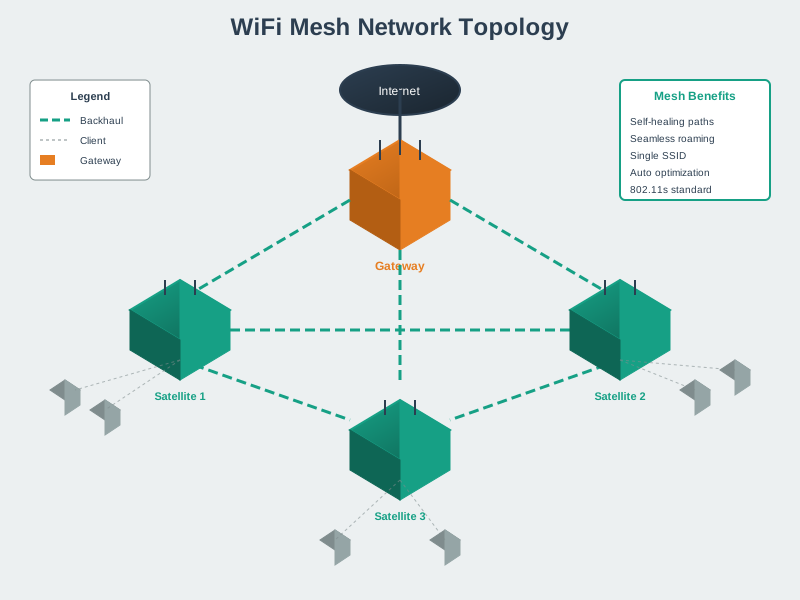
NoteWi-Fi Mesh Network Architecture
854.12.1 Wi-Fi Generation Selection Guide
Use this decision tree to select the appropriate Wi-Fi generation for your IoT deployment:
%%{init: {'theme': 'base', 'themeVariables': {'primaryColor':'#2C3E50','primaryTextColor':'#fff','primaryBorderColor':'#16A085','lineColor':'#16A085','secondaryColor':'#E67E22','tertiaryColor':'#7F8C8D'}}}%%
flowchart TB
    START([Wi-Fi Generation<br/>Selection]) --> Q1{Bandwidth<br/>Requirement?}

    Q1 -->|Low: <10 Mbps| Q2{Range<br/>Priority?}
    Q1 -->|Moderate: 10-500 Mbps| Q3{Dense<br/>Deployment?}
    Q1 -->|High: 500+ Mbps| Q4{6 GHz<br/>Available?}

    Q2 -->|Standard| WIFI4[Wi-Fi 4/5<br/>Legacy Compatible]
    Q2 -->|Extended| HALOW[Wi-Fi HaLow<br/>Sub-1 GHz]

    Q3 -->|No - Few Devices| WIFI5[Wi-Fi 5/6<br/>5 GHz Band]
    Q3 -->|Yes - Many Devices| Q5{TWT<br/>Power Saving?}

    Q5 -->|Yes| WIFI6[Wi-Fi 6<br/>OFDMA + TWT]
    Q5 -->|No| WIFI5

    Q4 -->|Yes| Q6{MLO<br/>Needed?}
    Q4 -->|No| WIFI6

    Q6 -->|Yes| WIFI7[Wi-Fi 7<br/>MLO + 320 MHz]
    Q6 -->|No| WIFI6E[Wi-Fi 6E<br/>6 GHz Band]

    WIFI4 --> USE1[Basic Sensors<br/>Legacy Devices]
    HALOW --> USE2[Agriculture<br/>Industrial Campus]
    WIFI5 --> USE3[Standard IoT<br/>Home Devices]
    WIFI6 --> USE4[Dense Sensors<br/>Battery Devices]
    WIFI6E --> USE5[HD Cameras<br/>AR/VR, Video]
    WIFI7 --> USE6[Industrial 4.0<br/>Real-Time Control]

    style START fill:#2C3E50,stroke:#16A085,stroke-width:3px,color:#fff
    style WIFI7 fill:#16A085,stroke:#2C3E50,stroke-width:3px,color:#fff
    style WIFI6E fill:#16A085,stroke:#2C3E50,stroke-width:2px,color:#fff
    style WIFI6 fill:#E67E22,stroke:#2C3E50,stroke-width:2px,color:#fff
    style WIFI5 fill:#7F8C8D,stroke:#2C3E50,stroke-width:2px,color:#fff
    style WIFI4 fill:#7F8C8D,stroke:#2C3E50,stroke-width:2px,color:#fff
    style HALOW fill:#E67E22,stroke:#2C3E50,stroke-width:2px,color:#fff
854.12.2 Wi-Fi Technology Evolution Timeline
Understanding Wi-Fi evolution helps contextualize Wi-Fi 6E and 7:
%%{init: {'theme': 'base', 'themeVariables': {'primaryColor':'#2C3E50','primaryTextColor':'#fff','primaryBorderColor':'#16A085','lineColor':'#16A085','secondaryColor':'#E67E22','tertiaryColor':'#7F8C8D'}}}%%
timeline
    title Wi-Fi Evolution Timeline
    section Legacy
        802.11b (1999) : 11 Mbps
                       : 2.4 GHz only
        802.11a/g (2003) : 54 Mbps
                         : OFDM
    section Wi-Fi 4-5
        Wi-Fi 4 (2009) : 600 Mbps
                      : MIMO
                      : 40 MHz channels
        Wi-Fi 5 (2013) : 3.5 Gbps
                      : MU-MIMO
                      : 5 GHz focus
    section Wi-Fi 6
        Wi-Fi 6 (2019) : 9.6 Gbps
                      : OFDMA
                      : TWT power save
        Wi-Fi 6E (2020) : +6 GHz band
                       : Up to 1200 MHz
                       : No legacy devices
    section Next Gen
        Wi-Fi 7 (2024) : 46 Gbps
                      : MLO
                      : 320 MHz channels
                      : 4K-QAM
854.13 Key Takeaways
TipSummary
Wi-Fi 6E adds 6 GHz spectrum—up to ~1,200 MHz depending on region
6 GHz is “greenfield” for Wi-Fi—no legacy Wi-Fi clients in that band, enabling cleaner planning
Wi-Fi 7 introduces MLO (Multi-Link Operation) for simultaneous multi-band use
320 MHz channels (Wi-Fi 7) can significantly increase peak throughput versus 160 MHz (where permitted)
6 GHz often has shorter range than 5 GHz—plan for more APs in many buildings
TWT (Target Wake Time) enables efficient battery-powered IoT
Wi-Fi 6E/7 is often a strong choice for high bandwidth and lower cost when mobility/QoS needs are modest
854.14 What’s Next
Continue exploring Wi-Fi for IoT:
- Wi-Fi HaLow - Long-range Wi-Fi for IoT
- Wi-Fi Fundamentals and Standards - Wi-Fi basics
- 5G Advanced and 6G for IoT - Cellular comparison