%%{init: {'theme': 'base', 'themeVariables': {'primaryColor': '#E8F4F8', 'primaryTextColor': '#2C3E50', 'primaryBorderColor': '#16A085', 'lineColor': '#16A085', 'secondaryColor': '#FFF5E6', 'tertiaryColor': '#F0F0F0', 'noteTextColor': '#2C3E50', 'noteBkgColor': '#FFF5E6', 'textColor': '#2C3E50', 'fontSize': '16px'}}}%%
graph TB
    subgraph Passive["PASSIVE TAGS"]
        P1["No Battery"]
        P2["Powered by Reader"]
        P3["Range: cm-meters<br/>(band + setup dependent)"]
        P4["Cost: Low<br/>(volume dependent)"]
        P5["Lifetime: No battery<br/>(packaging dependent)"]
    end

    subgraph SemiPassive["SEMI-PASSIVE (BATTERY-ASSISTED)"]
        SP1["Battery powers sensors/logic"]
        SP2["Backscatter communication"]
        SP3["Range: Similar to passive<br/>(design dependent)"]
        SP4["Cost: Medium"]
        SP5["Lifetime: Battery-limited"]
    end

    subgraph Active["ACTIVE TAGS"]
        A1["Internal Battery"]
        A2["Transmits Signal"]
        A3["Range: Longer (tens-100+ m)<br/>(deployment dependent)"]
        A4["Cost: High"]
        A5["Lifetime: Battery-limited"]
    end

    style Passive fill:#E8F4F8,stroke:#16A085,stroke-width:3px
    style SemiPassive fill:#FFF5E6,stroke:#E67E22,stroke-width:3px
    style Active fill:#F8E8E8,stroke:#2C3E50,stroke-width:3px
866 RFID Getting Started Guide
866.1 Learning Objectives
By the end of this chapter, you will be able to:
- Explain RFID basics: Describe how RFID technology works in simple terms
- Identify everyday RFID: Recognize RFID applications in daily life
- Compare tag types: Understand passive, active, and semi-passive RFID tags
- Select frequency bands: Know when to use LF, HF, UHF, and microwave RFID
- Distinguish technologies: Understand how RFID differs from barcodes and NFC
866.2 Prerequisites
Before diving into this chapter, you should be familiar with:
- Basic understanding of wireless communication concepts
- General knowledge of how radio waves work
NoteRelated Chapters
This chapter is part of the RFID series:
- RFID Overview and Introduction - Index and overview
- RFID Getting Started Guide (this chapter)
- RFID Real-World Applications - Worked examples and case studies
- RFID Troubleshooting Guide - Common mistakes and interference solutions
866.3 What is RFID?
RFID = Radio Frequency IDentification
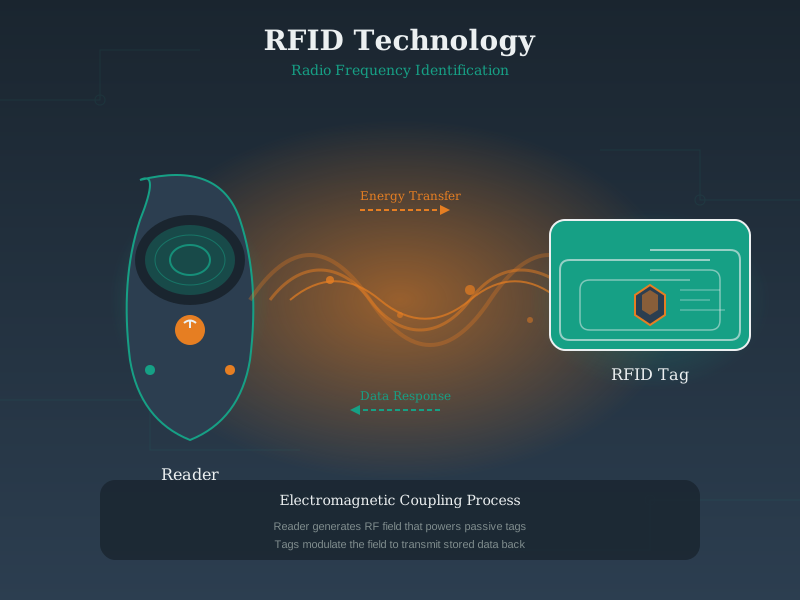
It’s a technology that uses radio waves to automatically identify and track objects. A reader sends a signal, and a tag responds with its unique ID.
You use RFID for: - Library books (self-checkout, anti-theft) - Pet microchips (identifying lost pets) - Retail inventory (tracking products in stores) - Ski lift passes (hands-free access) - Toll collection (E-ZPass, SunPass) - Passports (ePassports with chip)
866.4 How RFID Works: A Simple Analogy
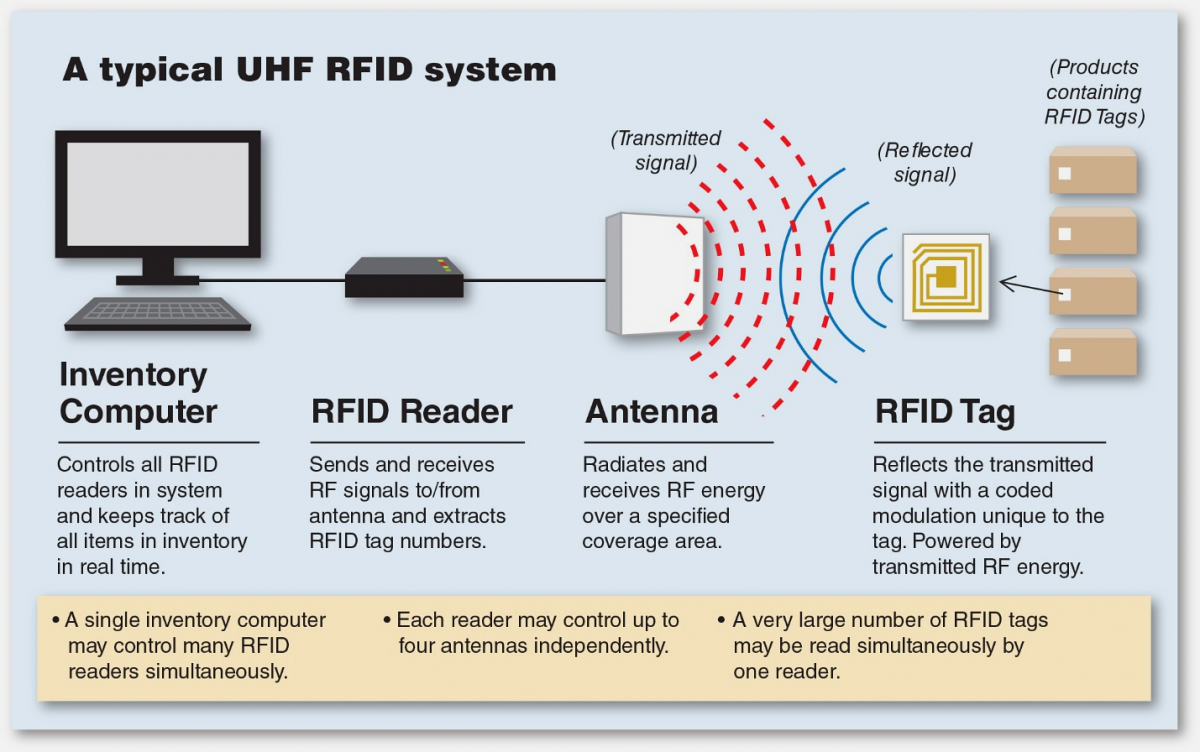
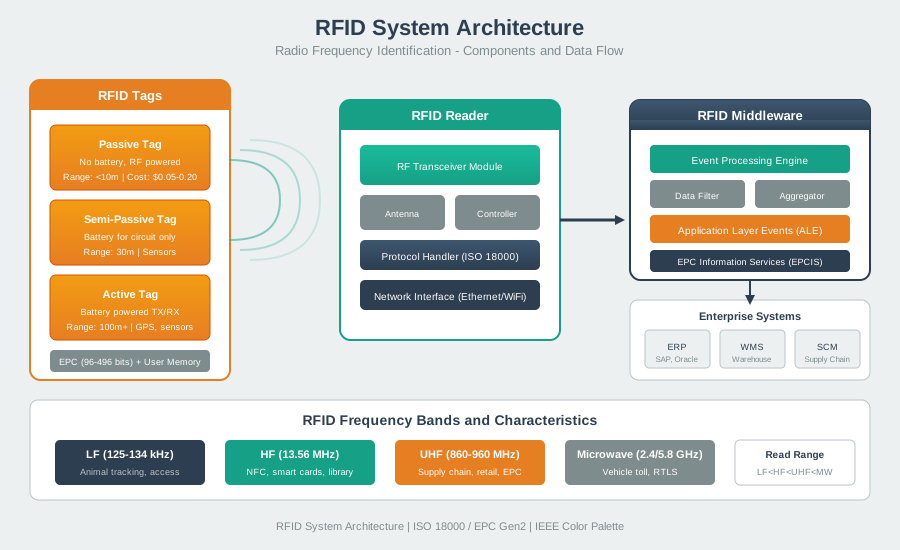
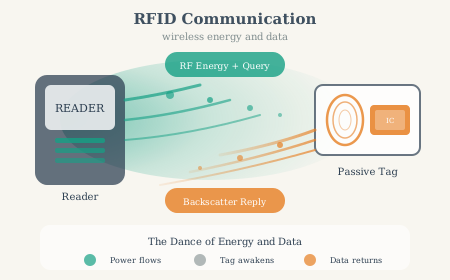
RFID visual overview: working principle, system architecture, and reader-tag communication.
Analogy: Marco Polo in a Swimming Pool
NoteAlternative View: Interactive Sequence Diagram

The reader “calls out” and the tag “responds” with its unique identity number!
TipFor Kids: Meet the Sensor Squad!
RFID is like having a magical name tag that can talk through walls!
866.4.1 The Sensor Squad Adventure: The Library Mystery
Sammy the Sensor was worried! The school library had 10,000 books, and some kept going missing. “How can we keep track of all these books?” asked Lila the LED, blinking nervously.
Max the Microcontroller had an idea: “What if every book could tell us who it is, just by walking through a special doorway?” They put tiny RFID stickers inside each book - stickers so small you couldn’t even feel them! The stickers didn’t need batteries because the magic doorway powered them with invisible radio waves.
Now whenever a book passed through the door, it would whisper its secret name - like “I’m ‘Charlotte’s Web’ - Book #7,492!” The Sensor Squad’s reader heard every whisper and knew exactly which books were coming and going. When little Tommy tried to sneak out with a book he forgot to check out, the doorway went BEEP! “Don’t worry Tommy,” said Bella the Battery, “the RFID tag just wants to make sure the librarian knows you’re borrowing that book!”
866.4.2 Key Words for Kids
| Word | What It Means |
|---|---|
| RFID | Radio Frequency IDentification - invisible name tags that talk using radio waves |
| Tag | A tiny sticker or chip with a secret number, like a superhero’s ID card |
| Reader | The special machine that asks “Who are you?” and hears the answer |
| Passive Tag | A tag with no battery - it gets power from the reader’s radio waves (like magic!) |
| Antenna | The part that sends and receives invisible radio waves |
866.4.3 Try This at Home!
The “Marco Polo” Game with a Twist:
- One person is the “RFID Reader” and covers their eyes
- Everyone else is an “RFID Tag” - each person picks a secret number (1-10)
- The Reader calls out “Who’s there?” (like sending radio waves)
- Each Tag responds with ONLY their number: “Three!” “Seven!” “One!”
- The Reader tries to identify where each number came from
This is exactly how RFID works - the reader can’t see the tags, but it hears their unique IDs! Try playing in the dark to really feel like invisible radio waves are talking.
866.5 Types of RFID Tags
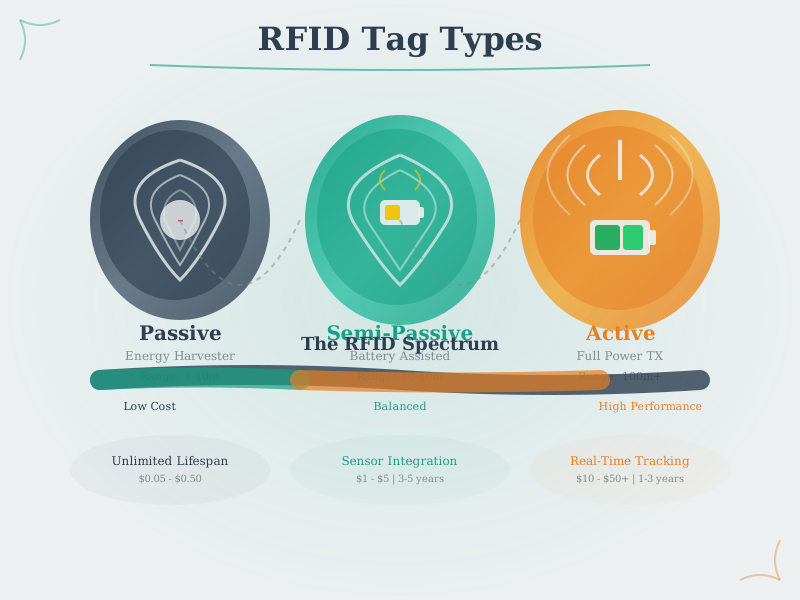
There are three main types:
TipAlternative View: RFID Tag Selection Decision Tree
This variant helps you choose the right RFID tag type for your application:
%%{init: {'theme': 'base', 'themeVariables': {'primaryColor': '#2C3E50', 'primaryTextColor': '#fff', 'primaryBorderColor': '#16A085', 'lineColor': '#16A085', 'secondaryColor': '#E67E22', 'tertiaryColor': '#7F8C8D'}}}%%
flowchart TD
    START["RFID Application"] --> Q1{"Range<br/>needed?"}

    Q1 -->|"< 10 meters"| Q2{"Budget per<br/>tag?"}
    Q1 -->|"> 10 meters"| ACTIVE["Active Tags<br/>Long range<br/>$10-50 each"]

    Q2 -->|"< $1"| Q3{"Need<br/>sensors?"}
    Q2 -->|"$1-10"| SEMI["Semi-Passive<br/>Sensor capable<br/>Battery assist"]

    Q3 -->|"No"| PASSIVE["Passive Tags<br/>Cheapest<br/>No maintenance"]
    Q3 -->|"Yes"| SEMI

    style START fill:#2C3E50,stroke:#16A085,color:#fff
    style Q1 fill:#E67E22,stroke:#2C3E50,color:#fff
    style Q2 fill:#E67E22,stroke:#2C3E50,color:#fff
    style Q3 fill:#E67E22,stroke:#2C3E50,color:#fff
    style PASSIVE fill:#16A085,stroke:#2C3E50,color:#fff
    style SEMI fill:#16A085,stroke:#2C3E50,color:#fff
    style ACTIVE fill:#16A085,stroke:#2C3E50,color:#fff
Most IoT applications use passive tags due to their low cost and maintenance-free operation.
866.6 RFID Frequency Bands
Different frequencies = different capabilities:
| Frequency | Range | Speed | Best For |
|---|---|---|---|
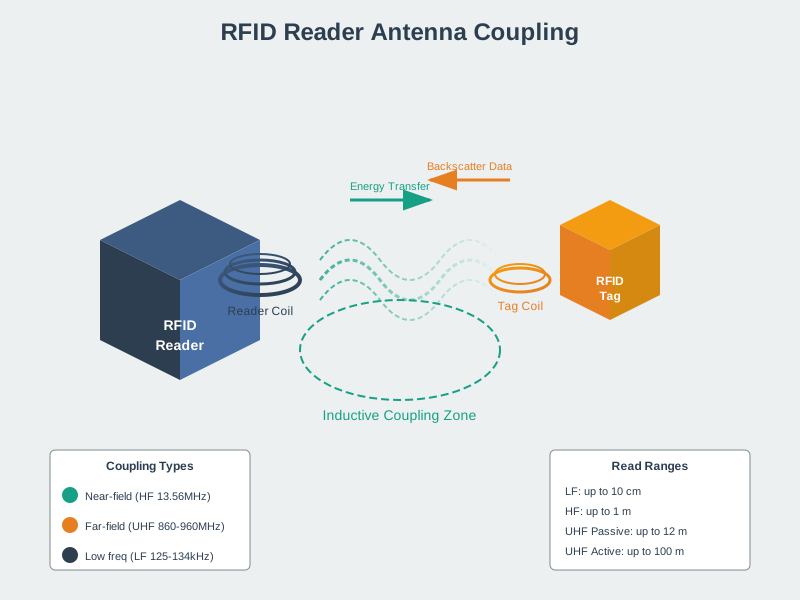
| LF (125 kHz) | ~10 cm | Slow | Access cards, animal tracking |
| HF (13.56 MHz) | ~1 m | Medium | Library books, payments (NFC is HF!) |
| UHF (860-960 MHz) | ~12 m | Fast | Inventory, supply chain |
| Microwave (2.45/5.8 GHz) | ~1-20 m (often active) | Very fast | Some toll systems, RTLS |

TipAlternative View: RFID Frequency Selection Decision Tree
This variant helps you choose the right RFID frequency band based on your application requirements:
%%{init: {'theme': 'base', 'themeVariables': {'primaryColor': '#2C3E50', 'primaryTextColor': '#fff', 'primaryBorderColor': '#16A085', 'lineColor': '#16A085', 'secondaryColor': '#E67E22', 'tertiaryColor': '#7F8C8D', 'fontSize': '11px'}}}%%
flowchart TD
    START["RFID Application"] --> Q1{"Required<br/>range?"}

    Q1 -->|"< 10 cm"| Q2{"Smartphone<br/>interaction?"}
    Q1 -->|"10 cm - 1 m"| HF["HF 13.56 MHz<br/>Library, access cards"]
    Q1 -->|"> 1 meter"| Q3{"Environment?"}

    Q2 -->|"Yes"| NFC["NFC (HF)<br/>13.56 MHz<br/>Payments, pairing"]
    Q2 -->|"No"| LF["LF 125 kHz<br/>Animal tags, access"]

    Q3 -->|"Metal/Liquid"| Q4{"Budget for<br/>special tags?"}
    Q3 -->|"Open/Cardboard"| UHF["UHF 860-960 MHz<br/>Inventory, supply chain"]

    Q4 -->|"Yes"| UHF_METAL["UHF + Metal-mount tags<br/>Industrial tracking"]
    Q4 -->|"No"| HF2["HF 13.56 MHz<br/>More tolerant"]

    style START fill:#2C3E50,stroke:#16A085,color:#fff
    style NFC fill:#16A085,stroke:#2C3E50,color:#fff
    style LF fill:#E67E22,stroke:#2C3E50,color:#fff
    style HF fill:#16A085,stroke:#2C3E50,color:#fff
    style HF2 fill:#16A085,stroke:#2C3E50,color:#fff
    style UHF fill:#2C3E50,stroke:#E67E22,color:#fff
    style UHF_METAL fill:#2C3E50,stroke:#E67E22,color:#fff
LF for close-range through tissue (pets, implants). HF/NFC for smartphones and medium range. UHF for long-range bulk inventory. Special metal-mount UHF tags for industrial environments.
NoteAlternative View: RFID Tag Types Comparison
This variant compares passive, semi-passive, and active RFID tags across key dimensions:
%%{init: {'theme': 'base', 'themeVariables': {'primaryColor': '#2C3E50', 'primaryTextColor': '#fff', 'primaryBorderColor': '#16A085', 'lineColor': '#16A085', 'secondaryColor': '#E67E22', 'tertiaryColor': '#7F8C8D', 'fontSize': '11px'}}}%%
graph TB
    subgraph PASSIVE["Passive RFID Tags"]
        P1["Power: Reader RF field"]
        P2["Range: cm to ~12m"]
        P3["Cost: $0.05 - $2"]
        P4["Life: Unlimited"]
        P5["Use: Inventory, access"]
    end

    subgraph SEMI["Semi-Passive (BAP) Tags"]
        S1["Power: Battery + RF"]
        S2["Range: 10-30m"]
        S3["Cost: $5 - $25"]
        S4["Life: 3-5 years"]
        S5["Use: Cold chain, sensors"]
    end

    subgraph ACTIVE["Active RFID Tags"]
        A1["Power: Battery only"]
        A2["Range: 30-100m+"]
        A3["Cost: $15 - $100"]
        A4["Life: 2-7 years"]
        A5["Use: RTLS, containers"]
    end

    DECISION["Selection Guide"] --> PASSIVE
    DECISION --> SEMI
    DECISION --> ACTIVE

    PASSIVE --> |"Add sensors"| SEMI
    SEMI --> |"Need long range"| ACTIVE

    style PASSIVE fill:#16A085,stroke:#2C3E50,color:#fff
    style SEMI fill:#E67E22,stroke:#2C3E50,color:#fff
    style ACTIVE fill:#2C3E50,stroke:#16A085,color:#fff
Passive tags are cheapest and last forever but have limited range. Semi-passive add sensors with moderate battery life. Active tags provide longest range but highest cost and limited lifetime.
TipAlternative View: RFID System Architecture
This variant shows the complete RFID system from tag to enterprise software:
%%{init: {'theme': 'base', 'themeVariables': {'primaryColor': '#2C3E50', 'primaryTextColor': '#fff', 'primaryBorderColor': '#16A085', 'lineColor': '#16A085', 'secondaryColor': '#E67E22', 'tertiaryColor': '#7F8C8D', 'fontSize': '11px'}}}%%
graph LR
    subgraph TAGS["Tags (Edge)"]
        T1["Passive Tag<br/>$0.10"]
        T2["Semi-Passive<br/>$10"]
        T3["Active Tag<br/>$50"]
    end

    subgraph READERS["Readers"]
        R1["Fixed Reader<br/>Dock doors"]
        R2["Mobile Reader<br/>Handheld"]
        R3["Portal Reader<br/>Conveyor"]
    end

    subgraph MIDDLEWARE["RFID Middleware"]
        M1["Edge Processing"]
        M2["Anti-collision"]
        M3["Event Filtering"]
        M4["Data Aggregation"]
    end

    subgraph ENTERPRISE["Enterprise Systems"]
        E1["WMS<br/>Warehouse Mgmt"]
        E2["ERP<br/>Enterprise Resource"]
        E3["TMS<br/>Transport Mgmt"]
        E4["Analytics"]
    end

    TAGS --> |"RF Signal"| READERS
    READERS --> |"Raw Reads"| MIDDLEWARE
    MIDDLEWARE --> |"Events"| ENTERPRISE

    style TAGS fill:#16A085,stroke:#2C3E50,color:#fff
    style READERS fill:#E67E22,stroke:#2C3E50,color:#fff
    style MIDDLEWARE fill:#2C3E50,stroke:#16A085,color:#fff
    style ENTERPRISE fill:#7F8C8D,stroke:#2C3E50,color:#fff
RFID systems consist of four layers: Tags (data carriers), Readers (RF interfaces), Middleware (processing and filtering), and Enterprise systems (business logic). Middleware is critical for reducing data volume and generating meaningful events.
Analogy: Different radio stations - LF = AM radio (more tolerant to obstacles, slow data) - UHF = FM radio (faster, but more sensitive to obstacles)
866.7 RFID vs. Barcode vs. NFC
| Feature | Barcode | RFID | NFC |
|---|---|---|---|
| Line of sight needed? | Yes | No | No |
| Read through boxes? | No | Yes | No |
| Read multiple at once? | No | Yes (anti-collision; depends on setup) | Limited |
| Range | cm-scale (line of sight) | cm-meters (passive); longer with active tags | cm-scale (a few cm) |
| Cost per tag | Very low | Low (passive) to high (active) | Low to medium (depends on chip/security) |
| Write data? | No | Yes | Yes |
Key insight: NFC is actually a type of RFID! It’s HF RFID (13.56 MHz) with standardized protocols for phones.
866.8 Real-World RFID Example: Library System
When you borrow a book:
%%{init: {'theme': 'base', 'themeVariables': {'primaryColor': '#E8F4F8', 'primaryTextColor': '#2C3E50', 'primaryBorderColor': '#16A085', 'lineColor': '#16A085', 'secondaryColor': '#FFF5E6', 'tertiaryColor': '#F0F0F0', 'noteTextColor': '#2C3E50', 'noteBkgColor': '#FFF5E6', 'textColor': '#2C3E50', 'fontSize': '16px'}}}%%
sequenceDiagram
    participant Book as Book<br/>(HF RFID tag)
    participant Desk as Checkout Desk<br/>(Reader)
    participant System as Library System

    Note over Book,System: Library Book Checkout Process

    Book->>Desk: Place book on counter
    Desk->>Book: RF field activates tag
    activate Book
    Book-->>Desk: Send book ID (13.56 MHz)
    deactivate Book
    Desk->>System: Check out book ID
    System-->>Desk: Book linked to your account
    Note over Book,System: Book checked out<br/>Due in 14 days
866.9 In Plain English: What RFID Really Is
866.10 Self-Check: Understanding the Basics
Before continuing, try these quick checks:
866.11 Summary
In this chapter, you learned:
- RFID basics: Radio Frequency IDentification uses radio waves to automatically identify objects without line-of-sight
- Tag types: Passive tags (no battery, reader-powered), semi-passive (battery for sensors), and active (battery-powered transmitter)
- Frequency bands: LF (close-range, tissue-tolerant), HF/NFC (medium range, smartphones), UHF (long range, inventory), microwave (specialized)
- Technology comparison: RFID vs barcodes vs NFC - each has distinct use cases
- Real-world applications: Library systems, pet microchips, toll collection, retail inventory
866.12 What’s Next
Now that you understand RFID basics, explore:
- RFID Real-World Applications - Detailed worked examples including warehouse inventory systems
- RFID Troubleshooting Guide - Common mistakes and how to handle material interference
- RFID Fundamentals and Standards - Deep dive into technical standards and protocols