%% fig-cap: "Mobile Phone Gateway Architecture"
%% fig-alt: "Diagram showing mobile phone gateway architecture with IoT edge devices on the left connected via BLE, NFC, and Zigbee to the smartphone gateway layer, which performs protocol translation, data aggregation, and edge processing before transmitting to cloud via Wi-Fi or cellular"
%%{init: {'theme': 'base', 'themeVariables': {'primaryColor': '#2C3E50', 'primaryTextColor': '#fff', 'primaryBorderColor': '#16A085', 'lineColor': '#E67E22', 'secondaryColor': '#16A085', 'tertiaryColor': '#ECF0F1'}}}%%
flowchart LR
    subgraph Edge["IoT Edge Devices"]
        S1["🌡️ Temp Sensor"]
        S2["❤️ Heart Rate"]
        S3["🚪 Door Lock"]
        S4["💡 Smart Light"]
    end

    subgraph Gateway["📱 Mobile Gateway"]
        subgraph Radio["Radio Interfaces"]
            BLE["Bluetooth LE"]
            NFC["NFC"]
            ZB["Zigbee Adapter"]
        end

        subgraph Process["Gateway Functions"]
            PT["Protocol<br/>Translation"]
            DA["Data<br/>Aggregation"]
            EP["Edge<br/>Processing"]
            Auth["Authentication<br/>& Security"]
        end

        subgraph Net["Network Tx"]
            Wi-Fi["Wi-Fi"]
            Cell["4G/5G"]
        end
    end

    subgraph Cloud["☁️ Cloud Infrastructure"]
        API["Cloud API"]
        DB["Database"]
        Analytics["Analytics"]
    end

    S1 --> BLE
    S2 --> BLE
    S3 --> NFC
    S4 --> ZB

    BLE --> PT
    NFC --> PT
    ZB --> PT

    PT --> DA
    DA --> EP
    EP --> Auth
    Auth --> Wi-Fi
    Auth --> Cell

    Wi-Fi --> API
    Cell --> API
    API --> DB
    API --> Analytics

    style Gateway fill:#E67E22,stroke:#2C3E50
    style Edge fill:#16A085,stroke:#2C3E50
    style Cloud fill:#3498DB,stroke:#2C3E50
267 Mobile Phone Gateway Fundamentals
267.1 Learning Objectives
By the end of this chapter, you will be able to:
- Understand the roles of mobile phones in IoT: Recognize how smartphones serve as gateways, edge devices, and fog nodes
- Design Gateway Architectures: Plan mobile phone-based gateway solutions for IoT device connectivity
- Implement Protocol Translation: Convert between short-range protocols (Bluetooth, Zigbee) and internet protocols
- Evaluate Gateway Trade-offs: Compare mobile gateway solutions against dedicated hardware gateways
267.2 Prerequisites
Before diving into this chapter, you should be familiar with:
- M2M Communication: Fundamentals: Understanding M2M gateways and protocol translation provides context for how mobile phones can bridge legacy devices with cloud platforms
- IoT Reference Models: Knowledge of the layered IoT architecture helps position mobile phones at the gateway/fog layer, between edge devices and cloud services
- Networking Basics for IoT: Familiarity with communication protocols (Bluetooth, Wi-Fi, cellular) and network layers is essential for understanding protocol translation functions
NoteKey Concepts
- Mobile Gateway: Smartphones acting as bridges between IoT devices and cloud infrastructure, performing protocol translation and data aggregation
- Edge Node Role: Mobile phones functioning as sensors themselves, collecting environmental, motion, and biometric data through built-in sensors
- Fog Computing: Mobile devices performing intermediate processing between edge sensors and cloud, enabling real-time local analytics
- Protocol Translation: Converting between short-range protocols (Bluetooth, Zigbee) and internet protocols (Wi-Fi, cellular) for cloud connectivity
- Energy Management: Balancing gateway functionality with battery constraints through duty cycling and adaptive power strategies
267.3 Mobile Phones in IoT Architecture
TipFor Beginners: Mobile Phones as IoT Gateways
Your smartphone is a walking IoT powerhouse. It’s not just for calls and apps - it can act as the bridge between simple IoT devices and the internet.
What’s a gateway? Think of it as a translator. Your Bluetooth fitness tracker speaks “Bluetooth language,” but the internet speaks “Wi-Fi/cellular language.” Your phone translates between them, collecting heart rate data via Bluetooth and uploading summaries to the cloud via Wi-Fi.
Why use phones as gateways? Because 6+ billion people already carry them! Instead of buying separate gateway hardware, leverage the phone you already own. It has everything needed: multiple radios (Bluetooth, Wi-Fi, NFC, cellular), computing power, and internet connectivity.
Three roles phones play in IoT:
- Gateway: Bridge between sensors and cloud (Bluetooth smartwatch → Phone → Cloud fitness platform)
- Edge device: The phone itself is a sensor (GPS tracking your running route, accelerometer counting steps)
- Fog node: Processes data locally before uploading (detecting irregular heartbeats on-device, only sending alerts)
| Term | Simple Explanation |
|---|---|
| Gateway | Device that bridges different networks, like a translator between languages |
| Protocol Translation | Converting data formats between systems (Bluetooth sensor data → Wi-Fi cloud upload) |
| Data Aggregation | Combining multiple sensor readings into one summary message (saves bandwidth/battery) |
| Edge Processing | Analyzing data on the phone before uploading (privacy + speed) |
| Duty Cycling | Turning radios on/off strategically to save battery (scan for Bluetooth every 10 seconds, not continuously) |
Real example: Smart home hub app on your phone connects to 10 Bluetooth sensors (temperature, door locks, motion). Instead of each sensor needing Wi-Fi (expensive, power-hungry), they use cheap Bluetooth to talk to your phone. Your phone aggregates their data and uploads to cloud every 5 minutes - one message instead of 10.
Limitations: Phones aren’t always available (turned off, out of range, airplane mode). For critical infrastructure (security systems), use dedicated gateways. But for personal IoT (fitness, smart home), phones work great.
TipFor Kids: Meet the Sensor Squad!
An IoT gateway is like a translator who helps friends who speak different languages talk to each other!
267.3.1 The Sensor Squad Adventure: The Great Translation Mission
The Sensor Squad had a problem. Sunny the Light Sensor, Thermo the Temperature Sensor, and Motion Mo all spoke different “languages” - Sunny spoke Bluetooth, Thermo whispered in Zigbee, and Motion Mo only knew a secret code called NFC. They all wanted to send their discoveries to the Cloud, but the Cloud only understood Wi-Fi and cellular!
“How will we ever share our information?” worried Thermo. “The Cloud is so far away, and it doesn’t understand what we’re saying!”
Just then, Signal Sam the Communication Expert pulled out something amazing - a smartphone! “Don’t worry, friends! This phone is like a super-translator. It understands ALL of your languages AND knows how to talk to the Cloud!”
So every day, Sunny tells the phone about the sunshine in Bluetooth, Thermo reports the temperature in Zigbee, and Motion Mo shares movement alerts through NFC. The smartphone listens to everyone, bundles up all their messages like a helpful mail carrier, and sends one big package to the Cloud using Wi-Fi. The Cloud finally understands everything!
“You’re our gateway to the world!” cheered the Sensor Squad. And that’s exactly what smartphones are - gateways that connect our sensor friends to the internet!
267.3.2 Key Words for Kids
| Word | What It Means |
|---|---|
| Gateway | A device that translates between different languages so everyone can communicate |
| Bluetooth | An invisible way devices talk to each other over short distances, like whispering |
| Wi-Fi | A stronger signal that lets devices talk to the internet from further away |
267.3.3 Try This at Home!
Be a Human Gateway: Play a game with friends where one person only speaks in hand signals, another only whispers, and a third only writes notes. YOU be the “gateway” - listen to all three and translate their messages to each other! This is exactly what your phone does when it connects your fitness tracker (Bluetooth), smart speaker (Wi-Fi), and door lock (Zigbee) all together!
NoteKey Takeaway
In one sentence: Mobile phones are powerful multi-role IoT platforms (gateway, edge node, fog processor), but their intermittent availability makes them unsuitable for always-on critical infrastructure.
Remember this rule: Use mobile gateways for personal, mobile IoT ecosystems (wearables, health trackers, personal devices). Use dedicated hardware gateways for stationary, always-on infrastructure (home security, HVAC, industrial sensors). Never trust device data without gateway validation.
Mobile phones hold a unique and pivotal position in the architecture of the Internet of Things (IoT). Their versatility, advanced capabilities, and widespread usage make them integral components in various IoT frameworks. This chapter explores the multifaceted roles mobile phones can play in IoT ecosystems, including their function as gateways, edge devices, fog nodes, and sensor nodes.
267.3.4 The Role of Mobile Phones in IoT
Mobile phones are ubiquitous devices equipped with a plethora of sensors and communication interfaces, making them ideal for several IoT applications. They can bridge different components within an IoT system, facilitating seamless data flow and processing.
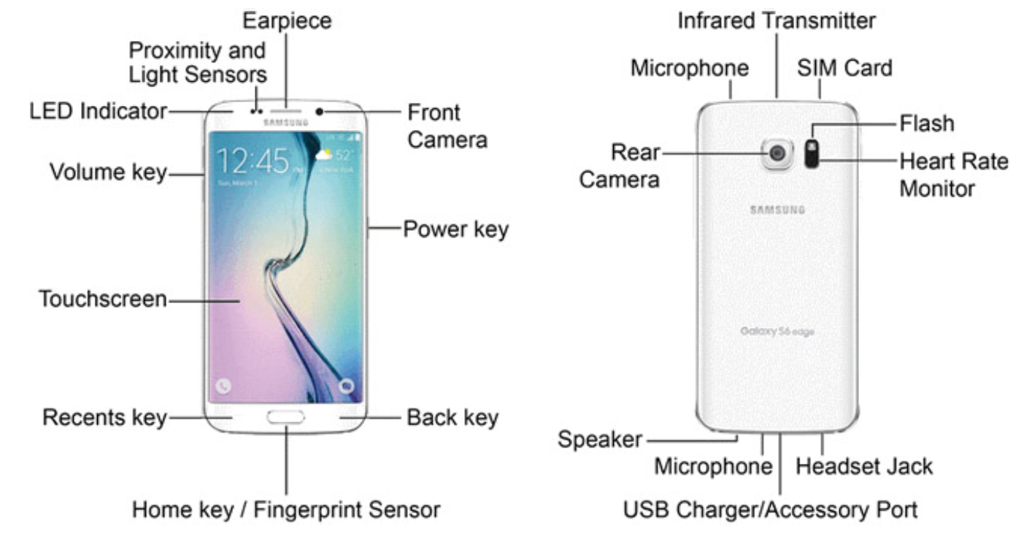
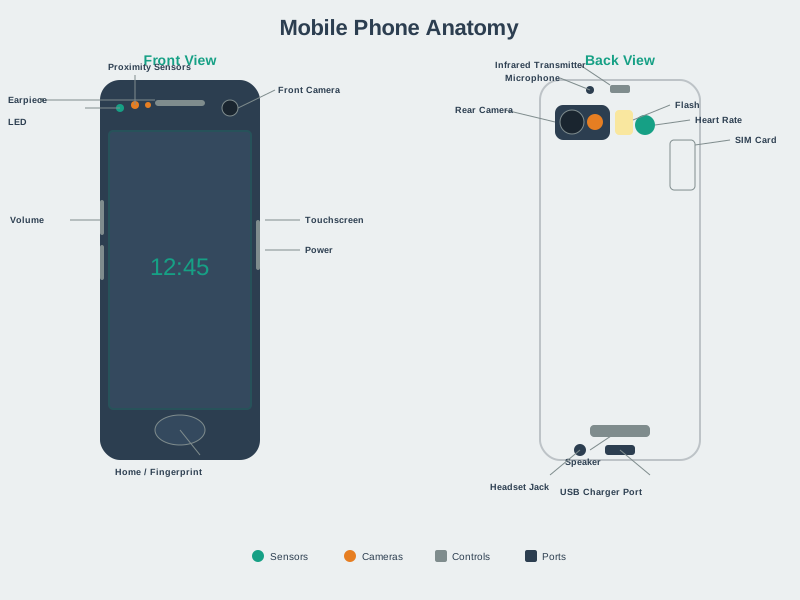
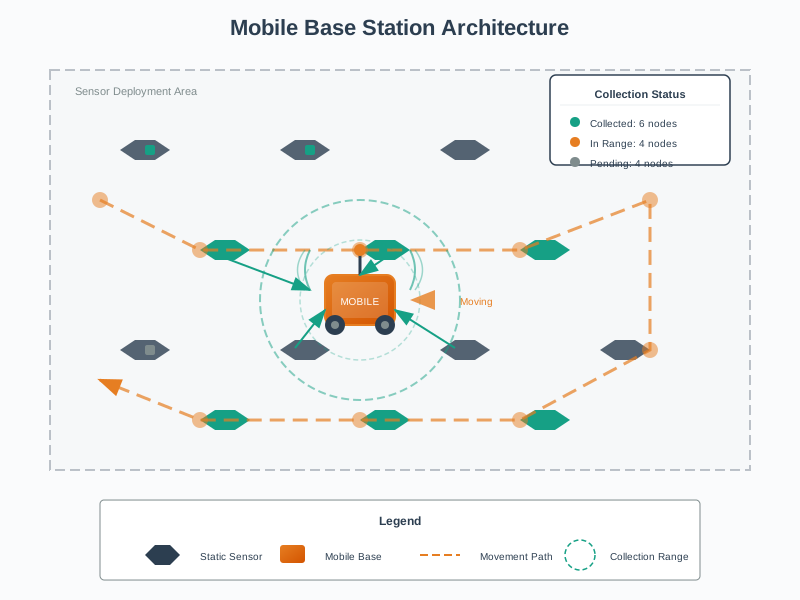
Modern smartphones contain: - Sensors: Accelerometer, gyroscope, magnetometer, GPS, proximity sensor, ambient light sensor, barometer, fingerprint scanner, camera - Communication Interfaces: Wi-Fi, Bluetooth, NFC, cellular (4G/5G), USB - Processing Power: Multi-core processors, GPU, dedicated AI/ML chips - Storage: Significant local storage capacity (64GB-1TB) - User Interface: Touch screen, voice input/output, haptic feedback - Power Management: Rechargeable battery with power-saving modes
267.4 Mobile Phones as Gateways
NoteVideo: What is an IoT Gateway
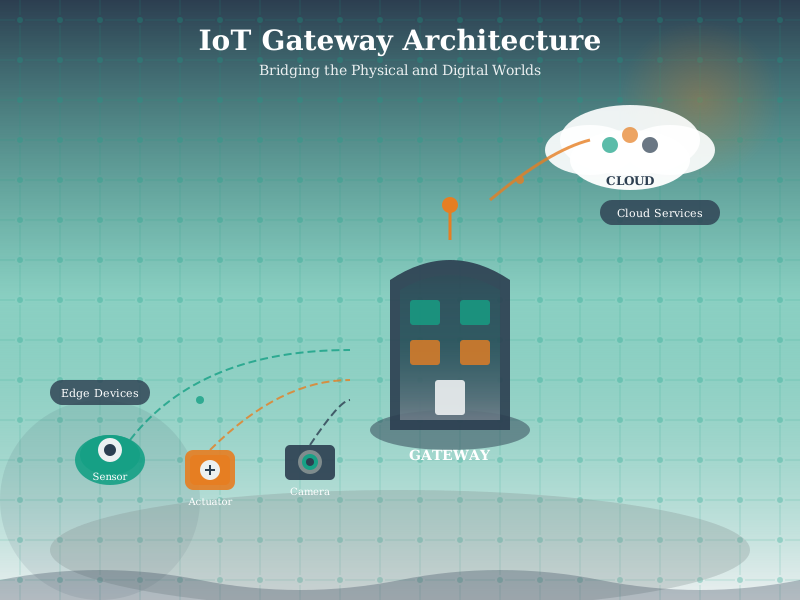
A gateway in IoT serves as a bridge between edge devices (sensors, actuators) and the cloud or backend systems. Mobile phones excel in this role due to their computational capabilities, multiple communication protocols, and internet connectivity.
%%{init: {'theme': 'base', 'themeVariables': {'primaryColor': '#2C3E50', 'primaryTextColor': '#fff', 'primaryBorderColor': '#16A085', 'lineColor': '#E67E22', 'secondaryColor': '#16A085'}}}%%
graph TB
    subgraph App["Application Layer"]
        direction LR
        HEALTH[Health App<br/>Heart rate alerts]
        HOME[Home App<br/>Device control]
        TRACK[Tracking App<br/>GPS logging]
    end

    subgraph Fog["Fog Computing Layer"]
        direction LR
        ML[Local ML<br/>Fall detection]
        ANOMALY[Anomaly Detection<br/>Threshold alerts]
        AGGR[Aggregation<br/>Hourly summaries]
    end

    subgraph Gateway["Gateway Layer"]
        direction LR
        PROTO[Protocol Translation<br/>BLE to MQTT]
        BUFFER[Data Buffering<br/>Store and forward]
        AUTH[Authentication<br/>Device pairing]
    end

    subgraph Edge["Edge Sensing Layer"]
        direction LR
        ACCEL[Accelerometer<br/>Motion sensing]
        GPS[GPS<br/>Location]
        MIC[Microphone<br/>Audio]
        CAM[Camera<br/>Vision]
    end

    subgraph Radio["Radio Interface Layer"]
        direction LR
        BLE[Bluetooth LE<br/>Sensor connectivity]
        Wi-Fi[Wi-Fi<br/>Local network]
        CELL[Cellular<br/>Wide-area]
        NFC[NFC<br/>Proximity]
    end

    App --> Fog
    Fog --> Gateway
    Gateway --> Edge
    Gateway --> Radio

    style App fill:#2C3E50,color:#fff
    style Fog fill:#E67E22,color:#fff
    style Gateway fill:#16A085,color:#fff
    style Edge fill:#7F8C8D,color:#fff
    style Radio fill:#2C3E50,color:#fff
NoteAlternative View: Mobile Gateway Decision Framework
This variant helps architects decide when to use mobile phones vs dedicated gateways based on use case requirements.
%%{init: {'theme': 'base', 'themeVariables': { 'primaryColor': '#2C3E50', 'primaryTextColor': '#fff', 'primaryBorderColor': '#16A085', 'lineColor': '#16A085', 'secondaryColor': '#E67E22', 'tertiaryColor': '#7F8C8D', 'fontSize': '11px'}}}%%
graph TB
    Start{{"Gateway<br/>Selection"}}

    Start --> Q1{"24/7<br/>Availability<br/>Required?"}

    Q1 -->|"Yes"| Dedicated["DEDICATED GATEWAY<br/>✓ Always-on power<br/>✓ Stationary coverage<br/>✓ No user dependency"]

    Q1 -->|"No"| Q2{"User<br/>Carries<br/>Gateway?"}

    Q2 -->|"Yes"| Mobile["MOBILE GATEWAY<br/>✓ Personal IoT (wearables)<br/>✓ Mobile sensing<br/>✓ No extra hardware cost"]

    Q2 -->|"No"| Q3{"Budget<br/>Constraint?"}

    Q3 -->|"Tight"| Mobile
    Q3 -->|"Adequate"| Dedicated

    subgraph UseCases["USE CASE MAPPING"]
        UC1["Smart Home HVAC<br/>→ Dedicated"]
        UC2["Fitness Tracker<br/>→ Mobile"]
        UC3["Industrial Sensors<br/>→ Dedicated"]
        UC4["Pet Tracker<br/>→ Mobile"]
    end

    style Dedicated fill:#2C3E50,color:#fff
    style Mobile fill:#16A085,color:#fff
    style UseCases fill:#7F8C8D,color:#fff
WarningCommon Pitfall: Gateway Bottleneck
The mistake: Routing all IoT traffic through a single gateway without capacity planning, creating a chokepoint that limits system scalability and creates a single point of failure.
Symptoms: - Message queues growing unboundedly during peak sensor activity - Increased latency as gateway CPU saturates processing protocol translations - Complete system blackout when gateway device fails or loses connectivity - Gateway mobile phone battery draining in hours instead of lasting all day
Why it happens: Proof-of-concept designs with 5-10 sensors scale directly to production with 100+ sensors. Teams underestimate the cumulative processing overhead of protocol translation, data validation, and cloud transmission for high-frequency sensor data.
The fix: 1. Capacity planning: Calculate gateway throughput requirements (sensors × readings/sec × processing overhead) 2. Horizontal scaling: Deploy multiple gateways with sensor affinity or load balancing 3. Edge preprocessing: Push filtering and aggregation to sensor nodes to reduce gateway load 4. Failover design: Implement warm standby gateway or mesh gateway architecture for redundancy
Prevention: Stress test with 10x expected sensor load before production deployment. For mobile phone gateways, limit to 20-30 BLE connections maximum. Design for gateway failure from day one with graceful degradation (local buffering on sensors, automatic failover).
WarningCommon Pitfall: Protocol Translation Loss
The mistake: Assuming protocol translation is lossless, when converting between constrained IoT protocols and IP-based cloud protocols often discards critical metadata, timing information, or semantic context.
Symptoms: - Sensor timestamps replaced with gateway receive time, causing temporal analysis errors - Quality indicators and confidence scores from sensors lost in translation - Multi-value sensor readings collapsed into single values (e.g., min/max/avg → avg only) - Device-specific error codes converted to generic “error” status
Why it happens: Gateway developers focus on “does the data arrive?” rather than “does ALL the data arrive?” Protocol translation libraries provide basic value extraction without preserving full message semantics. Different protocols have incompatible metadata models.
The fix: 1. Define explicit translation schemas: Document exactly which source fields map to which destination fields 2. Preserve original timestamps: Always forward sensor-generated timestamps, not gateway receive times 3. Include metadata envelope: Wrap translated data in container that preserves source protocol, device ID, signal quality, and translation timestamp 4. Log untranslatable fields: Alert when source messages contain fields that cannot be mapped to destination format
Prevention: Create end-to-end data lineage tests that verify every source field arrives at the cloud correctly. Compare raw protocol captures against cloud-stored data. Treat metadata (timestamps, quality indicators, device state) as equally important as sensor values.
TipUnderstanding Gateway Security
Core Concept: Gateway security encompasses authentication of connected devices, encryption of data in transit and at rest, access control for IoT network resources, and secure firmware update mechanisms.
Why It Matters: Gateways are the critical security boundary between constrained IoT devices (which often lack strong cryptography) and the internet. A compromised gateway exposes every connected sensor and actuator to attack. In enterprise deployments, a single vulnerable gateway can provide attackers lateral access to thousands of devices across the network, making gateway hardening essential for IoT security posture.
Key Takeaway: Never trust device data without gateway validation - implement device authentication (certificates or pre-shared keys), encrypt all gateway-to-cloud traffic with TLS 1.3, and design for secure boot and signed firmware updates from day one.
267.4.1 Gateway Functions
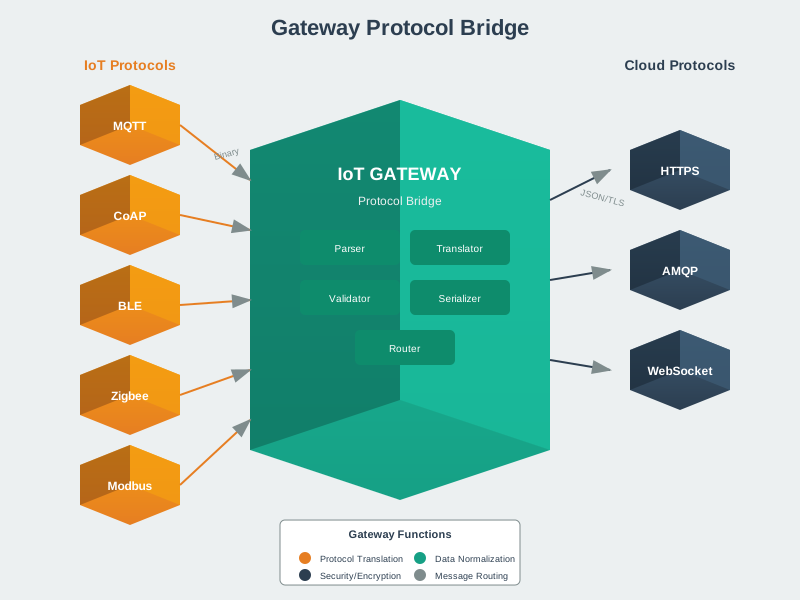
Protocol Translation: Mobile phones can communicate with IoT devices using various protocols (Bluetooth, Zigbee via adapters, NFC) and translate data into formats suitable for cloud transmission over Wi-Fi or cellular networks.
%% fig-cap: "Protocol Bridging: BLE to MQTT over Wi-Fi"
%% fig-alt: "Sequence diagram showing protocol translation in mobile gateway - BLE sensor sends raw binary heart rate data, phone decodes GATT services, validates and formats as JSON, publishes via MQTT over Wi-Fi to cloud broker"
%%{init: {'theme': 'base', 'themeVariables': {'primaryColor': '#2C3E50', 'primaryTextColor': '#fff', 'primaryBorderColor': '#16A085', 'lineColor': '#E67E22', 'secondaryColor': '#16A085', 'tertiaryColor': '#ECF0F1'}}}%%
sequenceDiagram
    participant Sensor as 💓 BLE Sensor
    participant BLE as BLE Stack
    participant App as 📱 Gateway App
    participant MQTT as MQTT Client
    participant Cloud as ☁️ Cloud Broker

    Note over Sensor,Cloud: Protocol Translation Flow

    Sensor->>BLE: Raw Binary<br/>0x00 0x48 (72 bpm)

    BLE->>App: GATT Notify<br/>Heart Rate Service

    Note over App: 1. Decode binary<br/>2. Validate range<br/>3. Add timestamp

    App->>App: Format JSON<br/>{"hr": 72, "ts": 1702...}

    App->>MQTT: Publish Request

    Note over MQTT: Encode MQTT packet<br/>Topic: health/user1/hr

    MQTT->>Cloud: MQTT PUBLISH<br/>over Wi-Fi/TCP

    Cloud-->>MQTT: PUBACK (QoS 1)
    MQTT-->>App: Delivery confirmed

    Note over Sensor,Cloud: BLE → JSON → MQTT → Cloud
Example: A smartphone connects to a Bluetooth-enabled heart rate monitor during exercise. The phone receives heart rate data via Bluetooth and forwards it to a cloud fitness platform via Wi-Fi or 4G for long-term storage and analysis.
Data Aggregation: Mobile phones can collect data from multiple IoT sensors simultaneously, aggregate this information, and send consolidated reports to reduce network traffic and cloud processing overhead.
Example: In a smart home, a smartphone gateway collects temperature readings from multiple room sensors, aggregates the data, and sends a single summary message to the home automation cloud service every 10 minutes.
Edge Processing: Smartphones possess sufficient computational power to perform preliminary data processing, filtering, and analysis before transmission, reducing bandwidth usage and enabling faster local responses.
Example: A mobile phone running a health monitoring app processes ECG data locally to detect irregularities in real-time, only sending alerts and relevant excerpts to healthcare providers rather than continuous raw data streams.
Authentication and Security: Mobile phones can serve as secure gateways, authenticating IoT devices, encrypting data transmissions, and managing access control to IoT networks.
Example: A smartphone authenticates a new smart lock installation using NFC, establishes encrypted communication channels, and manages which users have access permissions to the lock.
267.4.2 Advantages of Mobile Phones as Gateways
Ubiquity and Availability: With billions of smartphones worldwide, mobile phones provide readily available gateway infrastructure without requiring dedicated hardware deployment.
Multi-Protocol Support: Modern smartphones support multiple communication protocols simultaneously, enabling connectivity with diverse IoT devices.
Mobility: Unlike fixed gateways, mobile phones move with users, enabling personal IoT ecosystems that adapt to user location and context.
User Interface: Built-in displays and input methods enable easy configuration, monitoring, and control of connected IoT devices.
Regular Updates: Smartphones receive regular software and security updates, ensuring gateway functionality remains current and secure.
Cost-Effectiveness: Leveraging existing smartphones eliminates the need for purchasing separate gateway hardware for many consumer IoT applications.
267.4.3 Limitations of Mobile Phones as Gateways
WarningTradeoff: Mobile Phone Gateway vs Dedicated Hardware Gateway
Option A: Mobile Phone Gateway - Leverage existing smartphones users already carry, eliminating additional hardware costs and enabling personal IoT ecosystems.
Option B: Dedicated Hardware Gateway - Purpose-built always-on device (Raspberry Pi, industrial gateway) providing 24/7 reliable connectivity.
Decision Factors:
Choose Mobile Phone Gateway when: The user is always present with their device (wearables, fitness trackers, personal health monitors), intermittent connectivity is acceptable, budget is constrained, or the application benefits from phone sensors (GPS, camera, accelerometer).
Choose Dedicated Gateway when: 24/7 availability is required (home security, industrial monitoring), devices are stationary in a fixed location (smart home, factory floor), critical alerts cannot be missed, or the user cannot be relied upon to keep their phone nearby and powered on.
Consider Hybrid when: Dedicated gateway handles critical infrastructure while mobile phones extend coverage for personal devices or provide backup connectivity during gateway maintenance.
Battery Constraints: Continuous gateway operation drains battery quickly, limiting sustained use without frequent charging.
Intermittent Availability: Users may turn off phones, enable airplane mode, or move out of range, disrupting gateway services.
Resource Competition: Gateway functions compete with other phone applications for processing, memory, and network resources.
Limited Range: Bluetooth and NFC have limited range compared to dedicated long-range IoT protocols like LoRaWAN.
Security Risks: Personal devices may have varying security configurations, potentially creating vulnerabilities in IoT networks.
TipTradeoff: Thin Gateway vs Thick Gateway
Decision context: When designing an IoT gateway architecture, you must decide how much processing logic resides on the gateway versus the cloud.
| Factor | Thin Gateway | Thick Gateway |
|---|---|---|
| Power | Low (protocol bridging only) | High (local processing, ML inference) |
| Cost | Lower hardware requirements | Higher compute/memory needed |
| Complexity | Simple to deploy and maintain | Requires edge application management |
| Latency | High (cloud round-trip for decisions) | Low (local decisions in milliseconds) |
Choose Thin Gateway when: - Devices have reliable, low-latency cloud connectivity - All analytics and business logic already exists in cloud - Minimizing gateway hardware cost is critical - Firmware updates and edge management are impractical
Choose Thick Gateway when: - Real-time local decisions are required (safety systems, alarms) - Network connectivity is intermittent or expensive (cellular data costs) - Privacy requires data to stay on-premises before aggregation - Bandwidth constraints prevent sending all raw sensor data
Default recommendation: Start with a Thin Gateway for simpler deployment, then migrate processing to edge only when latency, bandwidth, or privacy requirements demand it.
267.5 Knowledge Check
267.6 Summary
This chapter introduced the fundamental concepts of mobile phones as IoT gateways:
- Gateway Role: Mobile phones bridge IoT devices and cloud through protocol translation (Bluetooth to Wi-Fi/cellular), data aggregation from multiple sensors, and edge processing before cloud transmission
- Protocol Translation: Converting between short-range protocols (BLE, NFC, Zigbee) and internet protocols (MQTT over Wi-Fi/cellular) enables constrained devices to reach cloud platforms
- Advantages: Ubiquity (billions deployed), multi-protocol support, mobility for personal IoT, built-in user interfaces, and cost-effectiveness
- Limitations: Battery constraints, intermittent availability, resource competition, and security risks on personal devices
- Gateway Design: Choose between thin gateways (simple protocol bridging) and thick gateways (local processing) based on latency, bandwidth, and privacy requirements
267.7 What’s Next?
The next chapter explores mobile phones as edge nodes and fog computing platforms, examining how smartphones can perform local sensing and processing before cloud transmission.