%%{init: {'theme': 'base', 'themeVariables': {'primaryColor':'#E8F4F8','primaryTextColor':'#2C3E50','primaryBorderColor':'#16A085','lineColor':'#16A085','secondaryColor':'#FEF5E7','tertiaryColor':'#F4ECF7','edgeLabelBackground':'#ffffff','textColor':'#2C3E50','fontSize':'14px'}}}%%
flowchart TD
    A[Sensor Reading<br/>32 bytes] --> B[Insert Statement]
    B --> C{Traditional DB}

    C --> D1[Update B-Tree Index<br/>Write 1: 4KB page]
    C --> D2[Update Secondary Index<br/>Write 2: 4KB page]
    C --> D3[Update Table<br/>Write 3: 4KB page]
    C --> D4[Write Transaction Log<br/>Write 4: Variable]
    C --> D5[Update Statistics<br/>Write 5: 4KB page]

    D1 --> E[Total: ~20KB written<br/>600x amplification!]
    D2 --> E
    D3 --> E
    D4 --> E
    D5 --> E

    style A fill:#E8F4F8
    style C fill:#E67E22,color:#fff
    style E fill:#E74C3C,color:#fff
1289 Time-Series Database Fundamentals
1289.1 Learning Objectives
By the end of this chapter, you will be able to:
- Explain why traditional databases fail for high-velocity IoT time-series data
- Describe the core design principles of time-series database architecture
- Understand LSM trees, columnar storage, and time-based partitioning
- Calculate write amplification and compression ratios for different storage approaches
- Identify the key characteristics that make time-series workloads unique
TipMVU: Minimum Viable Understanding
Core concept: Time-series databases are purpose-built storage systems optimized for timestamped data with high write throughput, time-based queries, and efficient compression. Why it matters: IoT sensors generate millions of readings per hour; traditional databases collapse under this load while TSDBs handle it with 10-100x better performance and 90%+ storage savings. Key takeaway: Time-series databases use fundamentally different architectures (LSM trees, columnar storage) that eliminate the write amplification problem plaguing traditional databases with IoT workloads.
1289.2 Introduction
Your smart factory generates about 18 million sensor readings per hour (5,000 sensors x 3,600 s/hour at 1 Hz) from temperature, vibration, and pressure sensors across production lines. Traditional relational databases struggle: sustained writes and time-range queries slow to a crawl, and your operations team misses critical anomalies because dashboards can’t refresh fast enough.
This is the time-series data challenge: extremely high write volumes, time-based queries, and the need for real-time analytics. Standard databases like MySQL or PostgreSQL weren’t designed for this workload. They optimize for transactional consistency and complex relationships, not the append-only, time-stamped nature of sensor data.
Time-series databases (TSDBs) solve this problem with specialized architectures: write-optimized storage engines, time-based indexing, built-in downsampling, and query languages designed for temporal analysis. Compared to a generic time-series schema in a traditional database, they often sustain much higher ingest rates and reduce long-term storage via compression and tiered retention.
This chapter explores the fundamental architecture of time-series databases and why traditional databases fail for IoT workloads.
TipFor Beginners: What is Time-Series Data?
Time-series data is a sequence of data points indexed by time. Think of your fitness tracker: it records your heart rate every second throughout your run. Each measurement has two parts:
- Timestamp: When the measurement was taken (2025-12-15 09:30:15)
- Value: What was measured (heart rate = 145 bpm)
Your tracker might collect 3,600 heart rate readings during a 1-hour run. If it records continuously at 1 Hz, that’s 86,400 readings per day and about 31.5 million readings per year for heart rate alone–and modern trackers measure dozens of metrics simultaneously.
IoT systems face this same challenge at massive scale: smart buildings with thousands of sensors, industrial facilities with hundreds of thousands of measurement points, or connected vehicles transmitting hundreds of parameters every second.
Why regular databases struggle: - They’re designed for data that gets updated frequently (like your account balance) - IoT data is almost never updated–only inserted (append-only pattern) - Queries like “show me the average temperature over the last hour” are inefficient in row-based databases - Storage explodes because general-purpose databases don’t compress time-series data well
Time-series databases are specifically engineered for this pattern: massive write volumes, rare updates, time-based queries, and excellent compression.
TipFor Kids: Meet the Sensor Squad!
Time-series databases are like magical diaries that remember everything sensors see, hear, and feel - and can flip back through thousands of pages in the blink of an eye!
1289.2.2 Key Words for Kids
| Word | What It Means |
|---|---|
| Time-series | A list of measurements with timestamps, like a diary that writes the time for every entry |
| Timestamp | The exact date and time when something was measured - like writing “Tuesday, 3:15 PM” in your diary |
| Query | Asking the database a question, like “What happened at 11:43 PM?” |
| Compression | Squishing data to take up less space, like writing “same as before” instead of repeating the same thing 1000 times |
| Retention | How long to keep old diary entries before throwing them away to make room for new ones |
1289.2.3 Try This at Home!
Make Your Own Time-Series Diary!
- Get a notebook and pick something to measure - like the temperature outside, how bright it is, or how many cars pass by your window
- Every 15 minutes for one afternoon, write down the time and your measurement (example: “2:00 PM - 68 degrees, sunny”)
- At the end of the day, look for patterns! Did it get warmer or cooler? Was there more traffic at certain times?
- Try to answer questions from your data: “What time was the warmest?” or “When did the most cars go by?”
You just created time-series data - the same kind of information that sensors collect millions of times per day! Real time-series databases can search through billions of these entries faster than you can say “Sensor Squad!”
WarningCommon Misconception: “We Can Just Use PostgreSQL with Time Indexes”
The Myth: Many teams assume adding time-based indexes to PostgreSQL will solve IoT data problems.
The Reality: A production smart factory learned this the hard way:
- Initial approach: PostgreSQL with time indexes on 2,000 sensors at 1 Hz
- Result after 3 months:
- Database size: 487 GB (should have been ~50 GB with proper compression)
- Query time for 24-hour dashboard: 45 seconds (users expect <2 seconds)
- Write queue backlog during peak hours: 12-minute lag
- SSD replacement after 8 months due to write amplification (expected 5-year lifespan)
After migrating to TimescaleDB: - Database size: 52 GB (89% reduction) - Query time: 1.2 seconds (97% faster) - Zero write backlog - SSD write load reduced by 85%
Key lesson: Generic databases lack critical time-series optimizations–columnar storage, adaptive compression, automatic time-based partitioning, and specialized query engines. Adding indexes doesn’t compensate for fundamental architectural differences.
TipCross-Hub Connections
Learning Resources:
- Knowledge Gaps Hub - Addresses common time-series database misunderstandings and when to use which platform
- Simulations Hub - Interactive storage calculator and retention policy simulator
- Videos Hub - Video tutorials on InfluxDB, TimescaleDB, and Prometheus setup
Practice Your Skills:
- Quizzes Hub - Test your understanding of compression ratios, query optimization, and platform selection
1289.3 Why Traditional Databases Fail
To understand why time-series databases exist, let’s examine concrete performance numbers from real-world IoT deployments.
1289.3.1 Write Performance Comparison
| Database Type | Writes/Second | Notes |
|---|---|---|
| MySQL (InnoDB) | 5,000 - 8,000 | With tuning, single instance |
| PostgreSQL | 8,000 - 12,000 | With tuning, single instance |
| MongoDB | 15,000 - 25,000 | Document model, single instance |
| InfluxDB | 500,000+ | Optimized for time-series |
| TimescaleDB | 200,000 - 300,000 | PostgreSQL with time-series extension |
| Prometheus | 1,000,000+ | Pull-based, with sample batching |
The Problem: A medium-sized smart building with 2,000 sensors reporting every 5 seconds generates 24,000 writes per second. This completely saturates a traditional database, causing:
- Write queue backups (data loss during network hiccups)
- Slow query performance (indexes can’t keep up)
- Database crashes under load spikes
- Expensive scaling (vertical scaling hits limits quickly)
1289.3.2 Write Amplification Problem
Traditional databases suffer from write amplification: writing one sensor reading triggers multiple disk operations.
NoteAlternative View: TSDB vs Traditional DB Write Comparison
This side-by-side comparison shows how time-series databases minimize write amplification:
%% fig-alt: "Side-by-side comparison of write paths for traditional database versus time-series database. Traditional path shows 32-byte sensor reading expanding through multiple index updates, page writes, and transaction logs to 20KB total disk writes - 600x amplification. Time-series path shows 32-byte reading appended to memory buffer, periodically flushed as sequential SST file write of approximately 40 bytes per record including compression - only 1.25x amplification. Shows why TSDB achieves 100x better write throughput."
%%{init: {'theme': 'base', 'themeVariables': { 'primaryColor': '#2C3E50', 'primaryTextColor': '#fff', 'primaryBorderColor': '#16A085', 'lineColor': '#16A085', 'secondaryColor': '#E67E22', 'tertiaryColor': '#ecf0f1'}}}%%
flowchart TB
    subgraph Traditional["Traditional DB Write Path"]
        T1[32 bytes<br/>Sensor Data] --> T2[Index Update 4KB]
        T1 --> T3[Secondary Index 4KB]
        T1 --> T4[Table Page 4KB]
        T1 --> T5[WAL Entry 4KB]
        T2 & T3 & T4 & T5 --> T6[Total: ~20KB<br/>600x amplification]
    end

    subgraph TSDB["Time-Series DB Write Path"]
        S1[32 bytes<br/>Sensor Data] --> S2[Memory Buffer<br/>Append Only]
        S2 --> S3[Batch Flush<br/>Sequential Write]
        S3 --> S4[~40 bytes with<br/>compression overhead]
        S4 --> S5[Total: ~40 bytes<br/>1.25x amplification]
    end

    style T6 fill:#E74C3C,stroke:#2C3E50,color:#fff
    style S5 fill:#27AE60,stroke:#2C3E50,color:#fff
    style T1 fill:#E67E22,stroke:#2C3E50,color:#fff
    style S1 fill:#16A085,stroke:#2C3E50,color:#fff
Time-series databases eliminate random I/O by batching writes in memory and flushing sequentially, reducing write amplification from 600x to ~1.25x.
Result: Writing 32 bytes of sensor data triggers ~20KB of actual disk writes due to index maintenance, transaction logging, and page updates. This 600x write amplification destroys SSD endurance and limits throughput.
1289.3.3 Storage Efficiency
Traditional databases also waste storage on time-series data:
| Database | Compression Ratio | 1 Year for 1,000 Sensors (1 reading/sec, 32 bytes) |
|---|---|---|
| PostgreSQL (uncompressed) | 1:1 | 1,008 GB (1 TB) |
| PostgreSQL (with compression) | 3:1 | 336 GB |
| TimescaleDB | 10:1 to 15:1 | 67-100 GB |
| InfluxDB | 20:1 to 30:1 | 33-50 GB |
Time-series databases achieve 10x to 30x better compression through:
- Columnar storage: Group same-type values together (all timestamps, then all temperature values)
- Delta encoding: Store differences between consecutive values (temperature changes by 0.1C, not absolute 23.7C each time)
- Run-length encoding: Compress repeated values (sensor offline = same value for hours)
- Dictionary encoding: Replace repeated strings with integer references
1289.3.4 Query Performance
Scenario: Retrieve average sensor values over the last 24 hours for 100 sensors.
- PostgreSQL: Scans entire table if no time-based partitioning, 30-60 seconds
- PostgreSQL (with partitioning): 5-10 seconds
- TimescaleDB: 0.5-2 seconds (automatic time-based chunking)
- InfluxDB: 0.2-1 second (optimized columnar scans)
The difference comes from data organization: time-series databases automatically partition data by time, so queries only scan relevant chunks. Traditional databases require manual partitioning strategies that are hard to maintain.
1289.4 Time-Series Database Architecture
Time-series databases use fundamentally different architectures optimized for append-only, time-indexed data.
1289.4.1 Core Design Principles
- Write-Optimized Storage: LSM (Log-Structured Merge) trees instead of B-trees
- Time-Based Partitioning: Automatic chunking by time intervals
- Columnar Storage: Group data by column, not row
- Built-in Downsampling: Automatic aggregation and retention policies
- Specialized Query Languages: Time-aware functions and operators
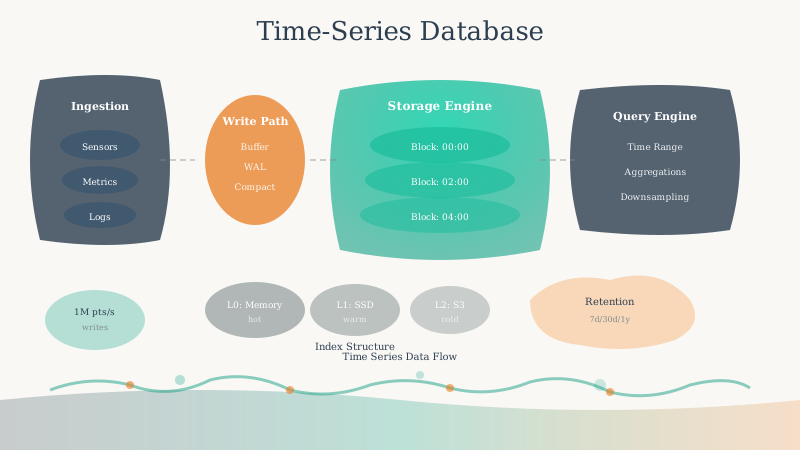
1289.4.2 High-Level Data Flow
%%{init: {'theme': 'base', 'themeVariables': {'primaryColor':'#E8F4F8','primaryTextColor':'#2C3E50','primaryBorderColor':'#16A085','lineColor':'#16A085','secondaryColor':'#FEF5E7','tertiaryColor':'#F4ECF7','edgeLabelBackground':'#ffffff','textColor':'#2C3E50','fontSize':'14px'}}}%%
flowchart LR
    A[IoT Sensors<br/>1000s/sec] --> B[Write Buffer<br/>In-Memory]
    B --> C[WAL<br/>Write-Ahead Log]
    B --> D{Flush Threshold}

    D -->|Full| E[Memtable<br/>Sorted In-Memory]
    E --> F[SST File L0<br/>Disk]

    F --> G[Compaction Process]
    G --> H[SST File L1<br/>Compressed]
    H --> I[SST File L2<br/>Highly Compressed]

    J[Query Engine] --> B
    J --> E
    J --> H
    J --> I

    style A fill:#E8F4F8
    style B fill:#16A085,color:#fff
    style F fill:#2C3E50,color:#fff
    style H fill:#2C3E50,color:#fff
    style I fill:#2C3E50,color:#fff
NoteAlternative View: LSM Tree Time-Based Organization
This view emphasizes how time-series data naturally fits the LSM tree model with time-based organization:
%% fig-alt: "Time-based organization of LSM tree for IoT data showing how data progresses through time windows. Recent data (last hour) lives in fast memory for immediate queries. Recent history (last day) occupies Level 0 SST files with minimal compression. Older data (last week) in Level 1 with moderate compression. Historical data (last month plus) in Level 2 with maximum compression and downsampled to hourly aggregates. Arrows show automatic data migration as time passes. Query router directs time-range queries to appropriate level."
%%{init: {'theme': 'base', 'themeVariables': { 'primaryColor': '#2C3E50', 'primaryTextColor': '#fff', 'primaryBorderColor': '#16A085', 'lineColor': '#16A085', 'secondaryColor': '#E67E22', 'tertiaryColor': '#ecf0f1'}}}%%
flowchart TB
    subgraph Now["Recent (Last Hour)"]
        M[Memory Buffer<br/>Full Resolution<br/>Sub-ms Query]
    end

    subgraph Today["Recent History (Last Day)"]
        L0[Level 0 SST<br/>Full Resolution<br/>10-50ms Query]
    end

    subgraph Week["Older (Last Week)"]
        L1[Level 1 SST<br/>Full Resolution<br/>3:1 Compression<br/>50-200ms Query]
    end

    subgraph Month["Historical (30+ Days)"]
        L2[Level 2 SST<br/>Hourly Aggregates<br/>20:1 Compression<br/>200-500ms Query]
    end

    Query[Query Router] --> M
    Query --> L0
    Query --> L1
    Query --> L2

    M -->|Time passes| L0
    L0 -->|Compact| L1
    L1 -->|Downsample| L2

    style M fill:#E74C3C,stroke:#2C3E50,color:#fff
    style L0 fill:#E67E22,stroke:#2C3E50,color:#fff
    style L1 fill:#16A085,stroke:#2C3E50,color:#fff
    style L2 fill:#2C3E50,stroke:#16A085,color:#fff
Data automatically flows through time-based tiers: recent data stays hot for fast queries while older data gets compressed and downsampled for cost-efficient storage.
How It Works:
- Write Buffer: Incoming data accumulates in memory (extremely fast)
- Write-Ahead Log (WAL): Durability guarantee without immediate disk writes
- Memtable: When buffer fills, data is sorted and prepared for disk
- SST Files (Sorted String Tables): Immutable files written to disk in levels
- Compaction: Background process merges and compresses files, removing old data
This architecture enables:
- Fast writes: Only sequential I/O, no random seeks
- Efficient reads: Data sorted by time, only scan relevant files
- Automatic compression: Each compaction level applies stronger compression
1289.4.3 Internal Storage Architecture
%%{init: {'theme': 'base', 'themeVariables': {'primaryColor':'#E8F4F8','primaryTextColor':'#2C3E50','primaryBorderColor':'#16A085','lineColor':'#16A085','secondaryColor':'#FEF5E7','tertiaryColor':'#F4ECF7','edgeLabelBackground':'#ffffff','textColor':'#2C3E50','fontSize':'14px'}}}%%
flowchart TD
    subgraph Memory["Memory Layer (Fast)"]
        A[Write Buffer<br/>Recent Data]
        B[Memtable<br/>Sorted Index]
    end

    subgraph Disk["Disk Layer (Persistent)"]
        C[Level 0<br/>Recent Files<br/>1:1 Compression]
        D[Level 1<br/>Merged Files<br/>3:1 Compression]
        E[Level 2<br/>Compacted Files<br/>10:1 Compression]
        F[Level 3<br/>Archive Files<br/>20:1 Compression]
    end

    A --> B
    B -->|Flush| C
    C -->|Compact| D
    D -->|Compact| E
    E -->|Compact| F

    style Memory fill:#16A085,color:#fff
    style Disk fill:#2C3E50,color:#fff
    style C fill:#E67E22
    style F fill:#27AE60
Key Concepts:
- Immutable Files: Once written, never modified (enables safe concurrent reads)
- Tiered Compression: Older data compressed more aggressively
- Bloom Filters: Quickly determine if a file might contain queried data
- Time-Based Indexing: Find relevant files in microseconds
1289.4.4 Columnar Storage Benefits
Traditional row-based storage:
Row 1: [timestamp=2025-12-15 10:00:00, sensor=temp_001, value=23.5, unit=C]
Row 2: [timestamp=2025-12-15 10:00:01, sensor=temp_001, value=23.5, unit=C]
Row 3: [timestamp=2025-12-15 10:00:02, sensor=temp_001, value=23.6, unit=C]
Time-series columnar storage:
timestamps: [2025-12-15 10:00:00, 10:00:01, 10:00:02] -> Delta encoded
sensors:    [temp_001, temp_001, temp_001]            -> Dictionary encoded
values:     [23.5, 23.5, 23.6]                        -> Delta encoded
units:      [C, C, C]                                 -> Run-length encoded
Compression Results: - Timestamps: 8 bytes each -> 2 bytes (delta from previous) - Sensors: 12 bytes string -> 2 bytes (dictionary ID) - Values: 8 bytes float -> 1-2 bytes (delta encoding) - Units: 1 byte -> 0.1 bytes (run-length encoding)
Total: 32 bytes/row -> ~3 bytes/row = 10x compression before general compression algorithms.
WarningTradeoff: Lossless vs Lossy Compression for Time-Series Data
Option A: Lossless Compression (Gorilla, Delta-of-Delta, LZ4) - Compression ratio: 8:1 to 15:1 typical for IoT sensor data - Storage for 10K sensors at 1Hz/year: 80-150 GB compressed - CPU overhead: 5-15% of write throughput for encoding/decoding - Query latency impact: +2-5ms for decompression on cold reads - Data fidelity: 100% - exact original values recoverable - Use cases: Regulatory compliance, ML training, anomaly detection requiring precise values
Option B: Lossy Compression (Quantization, Precision Reduction) - Compression ratio: 20:1 to 50:1 (precision reduced from float64 to float16) - Storage for 10K sensors at 1Hz/year: 25-60 GB compressed - CPU overhead: 2-5% of write throughput - Query latency impact: +1-2ms for decompression - Data fidelity: 95-99% - values within 0.1-1% of original - Use cases: Dashboards, trending, capacity planning where precision is not critical
Decision Factors: - Choose Lossless when: Regulatory requirements mandate exact data retention, ML models are sensitive to precision, post-incident forensics requires original sensor values, compliance audits verify data integrity - Choose Lossy when: Storage cost is primary concern, data is used for visualization and trending only, sensor accuracy is already lower than storage precision (e.g., 0.5C sensor stored as float64), long-term archives where trends matter more than exact values - Hybrid approach: Lossless for hot tier (last 7 days), lossy for cold tier archival - achieves 30:1+ effective compression while preserving recent precision
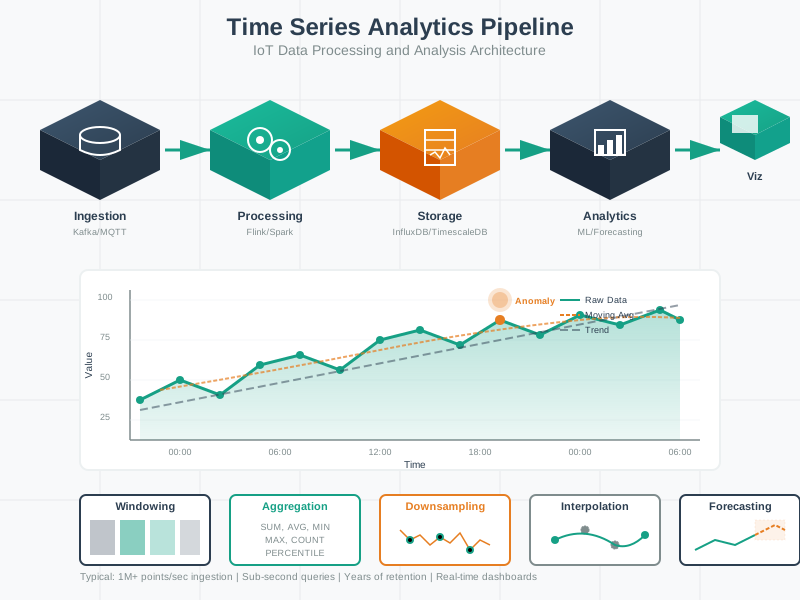
The time-series storage architecture is fundamentally different from traditional databases, optimized for the append-heavy, time-indexed nature of IoT sensor data.
1289.5 Summary
Time-series databases address the fundamental mismatch between IoT workloads and traditional database architectures.
Key Takeaways:
Traditional databases fail for IoT: Write amplification (600x) and poor compression make them unsuitable for high-velocity time-series data.
LSM trees enable high write throughput: By batching writes in memory and flushing sequentially, TSDBs achieve 100x better write performance.
Columnar storage enables compression: Grouping similar data types together and applying delta/dictionary/RLE encoding achieves 10-30x compression.
Time-based partitioning accelerates queries: Automatic chunking by time means queries only scan relevant data.
Architecture determines performance: The fundamental design choices (LSM vs B-tree, columnar vs row-based) create 10-100x differences in IoT workload performance.
1289.6 What’s Next
In the next chapter on Time-Series Platforms, we’ll compare the three dominant time-series database platforms–InfluxDB, TimescaleDB, and Prometheus–and learn how to select the right one for your IoT use case based on write throughput, query capabilities, and ecosystem requirements.