%% fig-alt: "Diagram comparing Security versus Privacy. Security branch shows system protection through firewalls/encryption/authentication, attack prevention through intrusion blocking and threat detection, and CIA Triad with confidentiality/integrity/availability. Privacy branch shows data protection through minimization/anonymization/consent, user control with access rights and erasure rights, and compliance with GDPR/CCPA/HIPAA regulations. Dotted arrow indicates security enables privacy."
%%{init: {'theme': 'base', 'themeVariables': { 'primaryColor': '#2C3E50', 'primaryTextColor': '#fff', 'primaryBorderColor': '#16A085', 'lineColor': '#E67E22', 'secondaryColor': '#16A085', 'tertiaryColor': '#E67E22', 'fontSize': '14px'}}}%%
graph TB
    SEC[🔒 Security] --> SECP1[System Protection]
    SEC --> SECP2[Prevent Attacks]
    SEC --> SECP3[CIA Triad]

    PRIV[🛡️ Privacy] --> PRIVP1[Data Protection]
    PRIV --> PRIVP2[User Control]
    PRIV --> PRIVP3[Compliance]

    SECP1 --> EX1[Firewalls<br/>Encryption<br/>Authentication]
    SECP2 --> EX2[Block Intrusions<br/>Detect Threats<br/>Secure Access]
    SECP3 --> EX3[Confidentiality<br/>Integrity<br/>Availability]

    PRIVP1 --> EX4[Data Minimization<br/>Anonymization<br/>Consent]
    PRIVP2 --> EX5[Access Rights<br/>Right to Erasure<br/>Transparency]
    PRIVP3 --> EX6[GDPR<br/>CCPA<br/>HIPAA]

    SEC -.Security enables Privacy.-> PRIV

    style SEC fill:#2C3E50,stroke:#16A085,color:#fff
    style PRIV fill:#16A085,stroke:#2C3E50,color:#fff
    style EX1 fill:#E67E22,stroke:#2C3E50,color:#fff
    style EX2 fill:#E67E22,stroke:#2C3E50,color:#fff
    style EX3 fill:#E67E22,stroke:#2C3E50,color:#fff
    style EX4 fill:#E67E22,stroke:#16A085,color:#fff
    style EX5 fill:#E67E22,stroke:#16A085,color:#fff
    style EX6 fill:#E67E22,stroke:#16A085,color:#fff
1360 Security and Privacy Foundations
1360.1 Learning Objectives
By the end of this chapter, you should be able to:
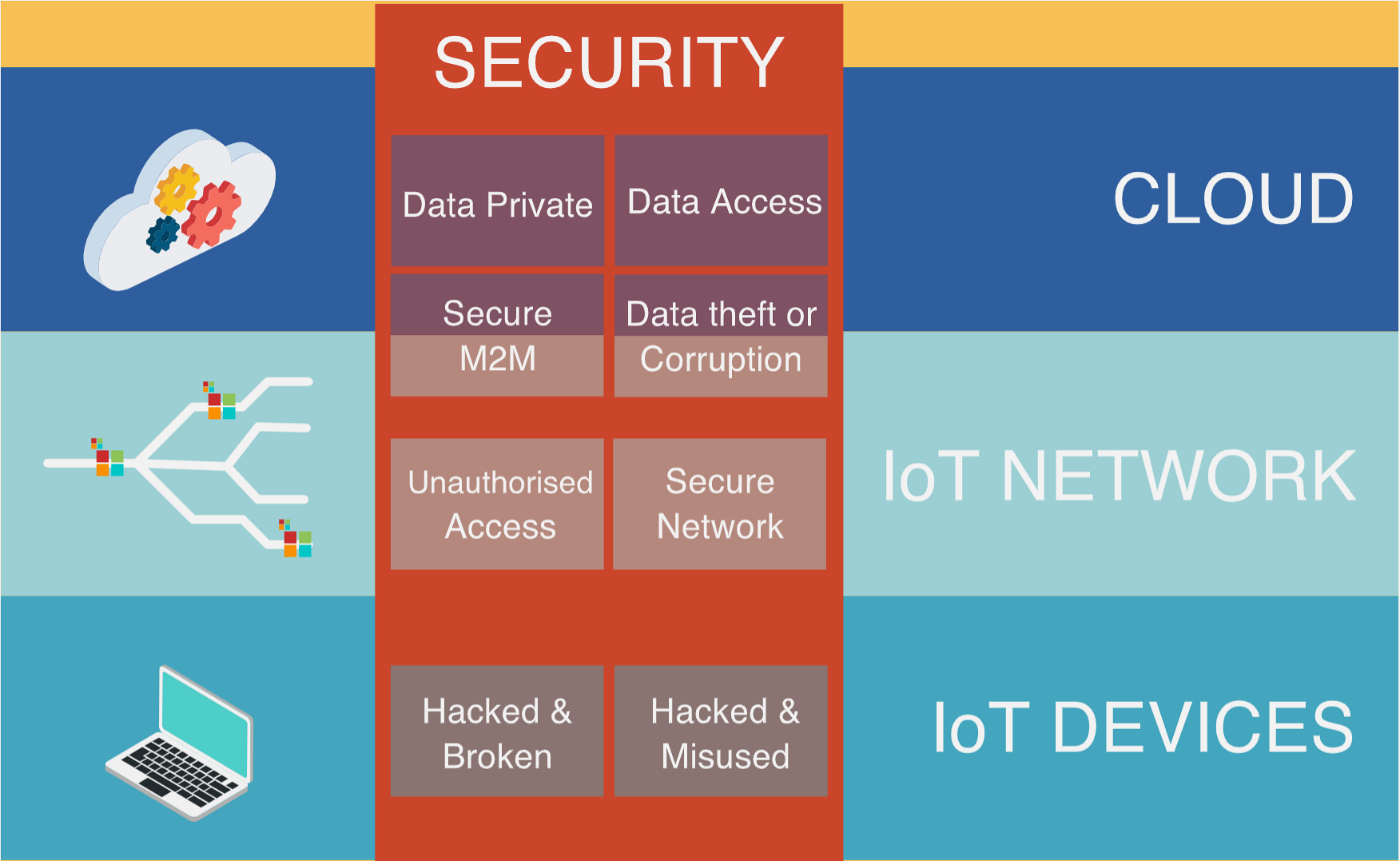
- Explain why security and privacy are critical for IoT systems
- Understand the CIA triad and its application to IoT
- Identify IoT-specific security challenges and attack surfaces
- Distinguish between security and privacy concerns
- Describe security architecture layers in IoT systems
- Recognize common IoT security frameworks and standards
- Analyze real-world IoT security breaches and their implications
- Apply security-by-design principles to IoT development
NoteKey Takeaway
IoT security is fundamentally about protecting systems that directly interact with the physical world, making security failures potentially life-threatening rather than merely inconvenient. The CIA triad (Confidentiality, Integrity, Availability) forms the foundation, but IoT amplifies each challenge: billions of resource-constrained devices with 10-20 year lifespans create massive attack surfaces, while physical accessibility enables attacks impossible against traditional IT systems. Security must be designed in from the start, not bolted on later, because IoT devices often cannot be patched and compromises can cascade across networks to cause real-world harm.
TipRelated Chapters, Products, and Tools
- Threats & Mitigations – For deeper coverage of concrete attacks and defenses, continue with Threats, Attacks, and Vulnerabilities and Threat Modelling and Mitigation.
- Privacy Foundations – To separate security from privacy and understand data‑handling obligations, read Introduction to Privacy and Privacy by Design Schemes.
- Applied Security – When you’re ready to see implementation patterns, move on to Encryption Principles and Crypto Basics and Secure Data and Software.
- Learning Hubs & Tools – Use the Quiz Navigator for the CIA Triad and threat‑modelling quizzes, and the Knowledge Gaps Tracker to plan follow-up study after this overview.
ImportantExecutive Summary: IoT Security Risk & Investment
For CISOs, CTOs, and business leaders: Security investment decisions for IoT.
1360.1.1 The Business Case for IoT Security
| Risk Metric | Industry Average | With Strong Security |
|---|---|---|
| Cost of IoT Breach | $3.86 Million | N/A (prevention) |
| Mean Time to Detect | 280 days | 50-90 days |
| Regulatory Fines | Up to 4% revenue (GDPR) | Compliant |
| Brand Damage | 25-40% customer loss | Protected |
1360.1.2 Security Investment ROI
| Security Control | Implementation Cost | Risk Reduction | Payback |
|---|---|---|---|
| Device Authentication | $2-5/device | 60-70% | 3-6 months |
| Encrypted Communications | $0.50-2/device | 40-50% | Immediate |
| Secure Boot/Firmware | $1-3/device | 50-60% | 6-12 months |
| Network Segmentation | $10K-50K | 30-40% | 6-12 months |
| Security Monitoring | $50K-200K/year | 70-80% | 12-18 months |
1360.1.3 Compliance Requirements by Region
| Regulation | Region | IoT Requirements | Penalty |
|---|---|---|---|
| GDPR | EU | Data protection, consent | 4% revenue |
| CCPA/CPRA | California | Consumer data rights | $7,500/violation |
| ETSI EN 303 645 | EU | IoT baseline security | Market access |
| NIST 8259 | US Fed | Device cybersecurity | Contract loss |
| UK PSTI Act | UK | No default passwords | £10M or 4% revenue |
1360.1.4 Decision Framework: Security Investment Priorities
Tier 1 - Non-Negotiable (Implement Immediately): - No default passwords (regulatory requirement) - Transport encryption (TLS 1.3) - Vulnerability disclosure policy - Security update mechanism
Tier 2 - High Priority (Within 6 months): - Secure boot and code signing - Device identity and authentication - Network segmentation - Security monitoring and logging
Tier 3 - Best Practice (Within 12 months): - Penetration testing program - Bug bounty program - Hardware security modules - Zero-trust architecture
1360.1.5 Key Risk Indicators
⚠️ Red Flags in Your IoT Deployment: - Devices with default credentials in production - Unencrypted data transmission - No firmware update capability - Flat network with no segmentation - No inventory of connected devices
✅ Security Maturity Indicators: - Security requirements in procurement - Regular security assessments - Incident response plan for IoT - Security training for IoT teams - Third-party security certifications
1360.1.6 Bottom Line for Executives
Security is not a cost center—it’s risk management.
- Average IoT breach costs $3.86M; prevention costs <5% of that
- Regulatory requirements are tightening globally (2024-2025 major enforcement)
- Cyber insurance increasingly requires IoT security controls
- Customer trust depends on demonstrated security practices
Recommended Actions: 1. Conduct IoT security assessment (baseline current state) 2. Prioritize quick wins: default passwords, encryption, updates 3. Build security requirements into vendor contracts 4. Allocate 8-12% of IoT budget to security
TipFor Kids: Meet the Sensor Squad!
Security and Privacy are like being a superhero guardian for your smart devices!
1360.1.7 The Sensor Squad Adventure: The Great Password Rescue
Temperature Terry, Light Lucy, Motion Marley, Pressure Pete, and Signal Sam were happily working in their smart house when something strange happened. A shadowy figure called “Sneaky Hacker Harry” was trying to break into their home network!
“Oh no!” cried Light Lucy. “He’s trying to guess our secret password!”
Signal Sam gathered the team for an emergency meeting. “Don’t worry, Squad! We have THREE magical shields to protect us. I call them the CIA Shields!”
Temperature Terry looked confused. “CIA? Like spies?”
“No, no!” laughed Sam. “It stands for Confidentiality, Integrity, and Availability - the three superpowers of security!”
Sam explained each shield:
Shield 1 - Confidentiality (The Secret Keeper): “This is like having a diary with an unbreakable lock. Only people with the right key can read our messages. When I send data to the cloud, I scramble it up like a secret code!”
Shield 2 - Integrity (The Truth Protector): “This makes sure nobody can change our data. Imagine if Sneaky Harry changed Terry’s temperature reading from 70 degrees to 700 degrees - the house might think it’s on fire!” Motion Marley nodded. “So this shield makes sure our information stays TRUE!”
Shield 3 - Availability (The Always-Ready Guard): “This keeps us working even when bad guys attack. If Harry tries to flood us with fake messages to make us crash, this shield bounces them away!”
The Squad put up all three shields. They used a super-strong password (not “1234”!), encrypted all their messages, and set up backup power just in case. Sneaky Hacker Harry tried and tried, but he couldn’t get through!
“Hooray!” cheered Pressure Pete. “We’re security superheroes!”
1360.1.8 Key Words for Kids
| Word | What It Means |
|---|---|
| Security | Protecting your stuff from sneaky people - like locking your treehouse |
| Privacy | Keeping your secrets safe - like not letting others read your diary |
| Password | A secret code that only you and trusted friends know |
| Encryption | Scrambling messages into secret code that only the right person can unscramble |
| Hacker | Someone who tries to break into computers without permission (not nice!) |
| CIA Triad | The three security superpowers: Confidentiality, Integrity, and Availability |
1360.1.9 Try This at Home!
The Secret Message Game:
- Write a message to a friend using a simple code (like A=1, B=2, C=3)
- Send them the coded message AND give them the “key” separately
- Can they decode it? Now imagine if someone stole the message but not the key - they couldn’t read it! That’s encryption!
The Strong Password Challenge:
Ask your parents to help you make up a silly but strong password. Combine: - A favorite animal (Purple Penguin) - A favorite food (Eats Tacos) - A number (42) - A symbol ($)
Put them together: “PurplePenguin$EatsTacos42” - now THAT’S a password Sneaky Harry could never guess!
Remember: Just like the Sensor Squad, YOU can be a security superhero. Never share passwords with strangers, and always tell a grown-up if something seems fishy online!
TipFor Beginners: Understanding Security and Privacy in IoT
What is IoT Security? IoT security protects connected devices and networks from cyber attacks that could steal data, disrupt operations, or cause physical harm. Unlike traditional computer security, IoT devices are often resource-constrained, physically accessible to attackers, and deployed for years without updates—making security particularly challenging.
Why does it matter? The 2016 Mirai botnet compromised 300,000+ IoT devices with default passwords, launching massive DDoS attacks that took down major websites. Poor IoT security enables criminals to spy through cameras, unlock smart doors, or even manipulate medical devices. Security isn’t optional—it’s literally life or death for connected cars, medical implants, and industrial systems.
Key terms (with real numbers): | Term | Simple Meaning | Real-World Example with Numbers | |——|—————-|———————————-| | CIA Triad | The three pillars: Confidentiality (data secrecy), Integrity (data accuracy), Availability (system uptime) | A: Hospital system must have 99.9% uptime (max 8.76 hours downtime/year) | | Attack Surface | All points where attackers could break in | Smart home: 4 entry points (Wi-Fi, cloud API, mobile app, physical USB port) vs 40+ for complex system | | Zero Trust | Never trust, always verify - even inside your network | Requires authentication every time: 2FA login takes 5-10 seconds but prevents 90%+ of breaches | | Defense in Depth | Multiple security layers (if one fails, others protect) | 3-layer example: Firewall (blocks 95% attacks) + Encryption (protects if firewall bypassed) + Access control (final barrier) | | Encryption Strength | How long it takes to crack | AES-256: Would take a supercomputer billions of years to crack by brute force | | Patch Time | How fast vulnerabilities get fixed | Critical IoT bugs take average 6 months to patch vs 1-2 weeks for enterprise software |
TipMinimum Viable Understanding: The CIA Triad
Core Concept: The CIA triad (Confidentiality, Integrity, Availability) defines the three fundamental security objectives: keeping data secret from unauthorized access, ensuring data remains accurate and unmodified, and guaranteeing systems work when needed. Why It Matters: Every IoT security decision involves tradeoffs between these three goals; a smart lock prioritizes availability (must open when needed) while a medical device prioritizes integrity (readings must be accurate) and a camera prioritizes confidentiality (footage must stay private). Key Takeaway: When designing IoT security, explicitly rank C, I, and A for your use case because you cannot maximize all three simultaneously; understand which attacks threaten each property (eavesdropping threatens C, tampering threatens I, DoS threatens A) to prioritize defenses.
1360.2 Prerequisites
Before diving into this chapter, you should be familiar with:
- Networking Basics: Understanding fundamental networking concepts (IP addresses, ports, protocols) helps grasp network-based attack vectors and security controls for IoT devices
- Layered Network Models: Knowledge of the OSI and TCP/IP models provides context for understanding security threats and protections at each layer of the IoT stack
Note: This chapter serves as a foundational overview for all subsequent security and privacy topics. The prerequisites listed above are helpful but not strictly required, as this chapter introduces core security concepts from the ground up.
TipCross-Hub Connections
This chapter connects to multiple learning resources across the book:
Interactive Learning: - Quizzes Hub: Test your understanding of CIA triad principles, OWASP IoT Top 10 vulnerabilities, and threat modeling with interactive quizzes designed to reinforce security fundamentals - Simulations Hub: Experiment with security monitoring tools, encryption demonstrations, and attack surface analysis simulations to visualize security concepts in action - Videos Hub: Watch expert explanations of IoT security incidents like Mirai and real-world case studies demonstrating security-by-design principles
Knowledge Management: - Knowledge Gaps Hub: Address common misconceptions about IoT security (see “Default Passwords Are Safe If Changed Monthly” misconception tracked with 300,000+ device impact data from Mirai) - Knowledge Map: Visualize how security concepts (encryption, authentication, secure boot) connect to protocols (MQTT, CoAP), architectures (edge, fog, cloud), and design strategies (prototyping, testing)
Practical Application: After mastering this overview, use the Simulations Hub to run security assessment tools on virtual IoT devices, then consult the Knowledge Gaps Hub to verify you’ve avoided the top 10 common security misconceptions that led to breaches like Ring cameras and Verkada.
NoteHow This Chapter Fits Into Privacy and Security
The Privacy and Security part builds from high‑level concepts to practical mechanisms and then to platform‑specific considerations:
- Begin with this Security and Privacy Overview to understand motivation, core terminology, and high‑level threats.
- Then study the building blocks in:
- Next, move into privacy‑focused chapters and cryptography:
- Finally, explore applied topics such as safeguards, device/network security, mobile privacy, and secure data/software handling.
If you are new to this area, a gentle route is: 1. Security and Privacy Overview → Cyber Security Methods → Threats/Attacks → Threat Modelling 2. Introduction to Privacy → Encryption chapters → Safeguards and IoT device/network security You can return to this roadmap whenever you need to see where a security or privacy chapter fits in the bigger picture.
1360.3 🌱 Getting Started (For Beginners)
1360.3.1 What is IoT Security? (Simple Explanation)
Analogy: Think of IoT security as “digital home security for your smart devices”.
Just like you lock your front door to prevent burglars from entering your home, IoT security protects your smart devices from hackers who want to:
- Spy on you through cameras and microphones
- Steal your data (passwords, credit cards, personal information)
- Take control of your devices (smart locks, thermostats, cars)
- Use your devices as weapons in cyberattacks
1360.3.2 Why Should You Care? (Real-World Stories)
1360.3.2.1 💔 The Baby Monitor Nightmare (2018)
A couple in Houston heard a stranger’s voice coming from their 3-year-old daughter’s room at night. The hacker had accessed their internet-connected baby monitor and was talking to their child, telling her to wake up and be his “best friend.” The camera could pan and tilt, following the child around the room.
What went wrong? The parents never changed the default password (“admin”) that came with the camera.
Lesson: Change default passwords immediately, even if it seems tedious.
1360.3.2.2 🚗 The Jeep That Drove Itself (2015)
Security researchers Charlie Miller and Chris Valasek remotely hacked a Jeep Cherokee while journalist Andy Greenberg was driving it on the highway. From 10 miles away, they:
- Turned the air conditioning to maximum
- Changed the radio station
- Activated the windshield wipers
- Cut the transmission, leaving the Jeep stuck on a busy highway
- Demonstrated they could take complete control of steering and brakes
What went wrong? The car’s entertainment system (Uconnect) had no authentication for firmware updates. Anyone on the internet could send malicious commands.
Lesson: IoT devices that control physical systems (cars, medical devices, industrial equipment) need military-grade security.
1360.3.2.3 🏥 The Hospital Held Hostage (2020)
A German woman died when a ransomware attack on Düsseldorf University Hospital forced her ambulance to be redirected to a hospital 32 km away. The hospital’s IoT systems were locked, preventing emergency treatment.
What went wrong? The hospital’s networked medical devices and IT systems had vulnerabilities that allowed ransomware to spread across the entire infrastructure.
Lesson: IoT security isn’t just about privacy—it’s literally life or death.
1360.3.3 The Three Pillars of Security (Simple Version)
Security professionals use the CIA triad (not the spy agency!):
| Pillar | What It Means | Real-World Example | If Compromised |
|---|---|---|---|
| 🔒 Confidentiality | Only authorized people can see the data | Your smart doorbell footage should only be visible to you, not neighbors or hackers | Breach: Someone watches your camera feed without permission |
| ✅ Integrity | Data hasn’t been tampered with | Your smart thermostat temperature readings are accurate and unmodified | Breach: Hacker changes your thermostat to 90°F without your knowledge |
| ⚡ Availability | The system works when you need it | Your smart lock opens when you arrive home | Breach: Attacker blocks your smart lock, locking you out |
1360.3.4 Quick Self-Check Quiz
1360.3.5 What You’ll Learn in This Chapter
By the end of this chapter, you’ll understand:
- ✅ Why IoT security is harder than traditional computer security
- ✅ The difference between security and privacy (and why both matter)
- ✅ Common attack methods hackers use against IoT devices
- ✅ How to think like a security professional when designing or using IoT systems
- ✅ Real frameworks and standards used by professionals
Time to complete: 45-60 minutes
Prerequisites: None (this is designed for beginners!)
1360.4 Why Security and Privacy Matter in IoT
The Internet of Things creates unprecedented security and privacy challenges due to:
WarningIoT Security Challenges
- Scale: Billions of connected devices, each a potential entry point
- Resource Constraints: Limited CPU, memory, battery for security operations
- Physical Access: Devices deployed in uncontrolled environments
- Long Lifespan: Devices may operate 10+ years without updates
- Diverse Technologies: Fragmented protocols, platforms, vendors
- Sensitive Data: Personal, health, location, behavioral information
- Safety Impact: Security failures can cause physical harm (medical, automotive, industrial)
- Update Challenges: Difficult or impossible to patch millions of deployed devices
1360.4.1 Real-World Impact Examples (With Detailed Numbers)
| Incident | Year | Impact (Quantified) | Financial/Human Cost | Root Cause | Time to Detection |
|---|---|---|---|---|---|
| Mirai Botnet | 2016 | 300,000+ IoT devices, 1.2 Tbps DDoS attack (largest at the time) | $110M damages, entire US East Coast internet down | Default passwords (“admin/admin”) | Weeks before full scope known |
| Target Breach | 2013 | 40M credit cards + 70M customer records stolen | $202M settlement + CEO resignation | Compromised HVAC vendor (network segmentation failure) | 17 days to detect, 2 months to public disclosure |
| Jeep Cherokee Hack | 2015 | 1.4M vehicles recalled, remote control of steering/brakes | $1.4B recall cost + reputational damage | Unauthenticated firmware update channel (Sprint cellular network) | Discovered by researchers (not Chrysler) |
| Ring Camera Breach | 2019 | 3,600+ cameras hacked, families harassed in homes | Multiple lawsuits, $5.8M FTC settlement (2023) | No 2FA enforcement + credential stuffing attacks | Real-time intrusions (families heard attackers) |
| Stuxnet | 2010 | 1,000 Iranian centrifuges destroyed (20% of Iran’s enrichment capacity) | Delayed Iran nuclear program by 2-5 years (nation-state level impact) | 4 zero-days + supply chain attack on Siemens PLCs | 1-2 years before discovery, origin still classified |
| Verkada Cameras | 2021 | 150,000 cameras (hospitals, prisons, schools) accessed | Company valuation dropped, $2.95M FTC fine | Super admin credentials publicly exposed in support system | <24 hours after hackers posted proof online |
| Colonial Pipeline | 2021 | 45% of US East Coast fuel supply shut down for 6 days | $4.4M ransom paid (later recovered), $100M remediation | VPN with no MFA, legacy system compromised | Pipeline operations shut down <12 hours into attack |
| Medtronic Insulin Pumps | 2019 | 4,000 patients at risk of unauthorized insulin delivery (potential fatalities) | Recall of multiple models, unknown litigation costs | No authentication on wireless commands | Discovered by security researchers, not manufacturer |
NoteAcademic Resource: NPTEL IoT Course (IIT Kharagpur) - Layered Security Architecture
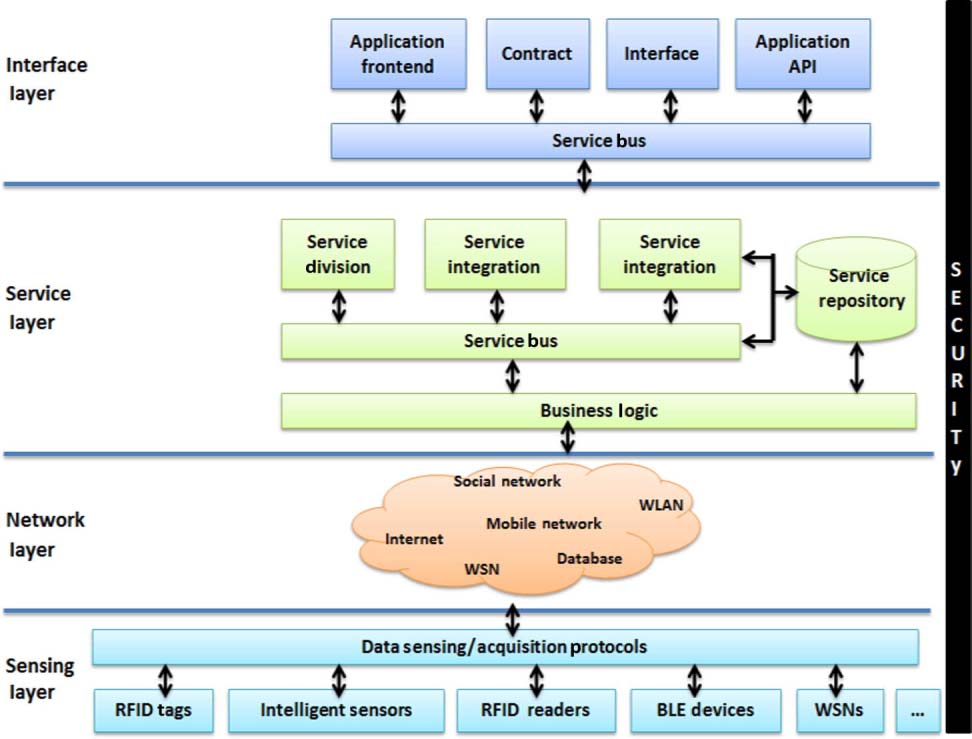
Source: NPTEL Internet of Things Course, IIT Kharagpur - This architecture demonstrates the critical security principle that protection must span all IoT layers simultaneously. Security cannot be an afterthought at a single layer - it must be designed into sensing, networking, services, and interfaces from the start.
1360.5 Why Traditional IT Security Doesn’t Work for IoT
Enterprise IT security practices were designed for servers and workstations behind corporate firewalls—not battery-powered sensors deployed in harsh environments for decades. Understanding these fundamental differences is critical for IoT security professionals.
1360.5.1 Comprehensive IT vs IoT Security Comparison
| Aspect | Traditional IT | IoT Systems | Implication |
|---|---|---|---|
| Software Updates | Regular patches, automatic | Often impossible, no OTA | Design for security upfront – You may never patch the device. Example: IP cameras from 2015 still deployed with unpatched OpenSSL vulnerabilities in 2025 |
| Computational Resources | Abundant CPU, GB RAM | µA budgets, KB RAM | Lightweight crypto required (AES-CCM, not TLS) – 8-bit MCU can’t afford RSA-4096. Example: Full TLS handshake uses 40KB+ RAM, exceeding entire device memory |
| Expected Lifetime | 3-5 years | 10-20 years | Long-term key management – Crypto standards obsolete before retirement. Example: Smart meters deployed in 2010 with SHA-1 now deprecated but still running |
| Physical Access | Datacenter security | Deployed in field | Assume physical tampering – Attackers extract firmware, probe circuits. Example: Parking meters physically removed to clone payment systems |
| Network Position | Behind firewalls | Edge of network | Defense in depth essential – No perimeter protection. Example: IoT devices 3× more likely to be infected than PCs (Unit 42 2019 IoT Threat Report) |
| Authentication | User credentials | Device credentials | PKI, device identity – No human to detect phishing. Example: Mirai infected 300,000+ devices using 60 default credential pairs (no humans to warn) |
| Encryption | TLS everywhere | Often too expensive | Protocol-specific security – Battery life constraints. Example: Zigbee AES encryption reduces sensor battery life 15-30%, forcing plaintext in some deployments |
| Attack Surface | Software, network | Hardware, side-channels | Physical security matters – Power analysis, EM leaks. Example: Researchers extracted AES keys from smart cards using $200 oscilloscope and power traces |
ImportantThe IoT Security Mindset
Traditional IT security assumes you can patch vulnerabilities after deployment.
IoT security must assume devices will be:
- Physically accessible to attackers (deployed in public spaces, customer homes)
- Unpatched for their entire lifetime (no OTA updates, manual updates impractical)
- Resource-constrained in security operations (can’t run enterprise-grade crypto)
- Deployed for decades beyond any threat model (protocols obsolete before retirement)
Critical principle: Design as if you cannot update the device after deployment. Security must be baked in from day one, not bolted on through patches.
1360.5.2 Real-World Examples: When IT Thinking Fails in IoT
1. Mirai Botnet (2016): Default Credentials Assumption
- IT Assumption: Users will change default passwords (standard IT onboarding practice)
- IoT Reality: 300,000+ devices infected using just 60 default username/password pairs
- Why It Failed: No enforcement mechanism, no password change prompt, users unaware cameras even had login credentials
- Attack Impact: 1.2 Tbps DDoS attack (largest recorded at the time), took down Dyn DNS, affecting Netflix, Twitter, Reddit, PayPal for millions of users
- Lesson: Cannot assume user configuration – Must force unique credentials at manufacturing or first boot
2. Jeep Cherokee Hack (2015): Network Perimeter Assumption
- IT Assumption: Firewalls protect internal systems from external threats
- IoT Reality: Uconnect entertainment system directly accessible via Sprint cellular network with no authentication
- Why It Failed: No network segmentation between entertainment (low-risk) and CAN bus (controls steering/brakes). IT mindset: “It’s on a separate network” without validating isolation
- Attack Impact: Researchers remotely disabled transmission on highway, demonstrated full steering/brake control, forced recall of 1.4 million vehicles costing $1.4 billion
- Lesson: Insufficient network segmentation – Assume IoT devices are on hostile networks, enforce zero-trust between subsystems
3. Smart Lock Attacks (2010s): Physical Proximity Ignored
- IT Assumption: Network-based threats are primary concern (focus on Wi-Fi/Bluetooth security)
- IoT Reality: Attackers use $50 SDR (Software Defined Radio) to replay unlock commands captured from 100 feet away
- Why It Failed: IT security focuses on authentication (correct key?) but ignores replay attacks possible with physical proximity. Encryption doesn’t prevent recording and replaying valid commands
- Attack Impact: Multiple smart lock brands (Kwikset Kevo, August, others) vulnerable to relay/replay attacks bypassing all authentication
- Lesson: Physical proximity creates attack vectors – Must implement anti-replay (nonces, challenge-response) and proximity verification (UWB ranging, time-of-flight)
1360.5.3 Why This Matters: The Paradigm Shift
Traditional IT security advice becomes actively harmful when applied to IoT without adaptation:
| Traditional Advice | Why It Fails in IoT | IoT-Appropriate Alternative |
|---|---|---|
| “Patch regularly” | No update mechanism, or users ignore updates | Secure by design – Assume no patches, use hardware root of trust |
| “Use strong passwords” | No keyboard, users can’t change embedded credentials | Unique device certificates – Burn keys at manufacturing |
| “Install antivirus” | 4KB RAM can’t run signature-based detection | Whitelisting – Only allow known-good code, secure boot |
| “Encrypt everything with TLS” | TLS handshake uses more RAM than entire device has | Lightweight DTLS or AES-CCM – Purpose-built for constraints |
| “Air-gap critical systems” | IoT value proposition requires connectivity | Zero-trust networking – Authenticate every transaction, assume breach |
The bottom line: IoT security requires fundamentally rethinking security architecture, not just applying enterprise IT playbooks with minor tweaks. The constraints—computational, physical, operational—demand purpose-built security models that accept these limitations as design constraints, not obstacles to overcome.
1360.6 Security vs Privacy
While related, security and privacy are distinct concepts:
1360.7 Alternative View: Security and Privacy Relationship with Real-World Examples
%%{init: {'theme': 'base', 'themeVariables': { 'primaryColor': '#2C3E50', 'primaryTextColor': '#fff', 'primaryBorderColor': '#16A085', 'lineColor': '#E67E22', 'secondaryColor': '#7F8C8D', 'fontSize': '12px'}}}%%
flowchart TB
    subgraph Outer["IoT System"]
        direction TB

        subgraph Security["Security Domain"]
            S1["Prevent unauthorized access"]
            S2["Protect system integrity"]
            S3["Ensure availability"]
        end

        subgraph Privacy["Privacy Domain"]
            P1["Control data collection"]
            P2["User consent & rights"]
            P3["Data minimization"]
        end

        subgraph Overlap["Security Enables Privacy"]
            O1["Encrypted storage<br/>protects personal data"]
            O2["Access control<br/>limits who sees data"]
            O3["Audit logs<br/>track data access"]
        end

        Security --> Overlap
        Overlap --> Privacy
    end

    subgraph Examples["Real-World Examples"]
        Ex1["Secure but NOT Private<br/>Ring doorbell with strong encryption<br/>but shares video with police"]
        Ex2["Private Intent, NOT Secure<br/>Fitness app promises no sharing<br/>but uses HTTP (unencrypted)"]
        Ex3["Both Secure AND Private<br/>End-to-end encrypted<br/>minimal data collection<br/>user-controlled sharing"]
    end

    style S1 fill:#2C3E50,stroke:#16A085,stroke-width:2px,color:#fff
    style S2 fill:#2C3E50,stroke:#16A085,stroke-width:2px,color:#fff
    style S3 fill:#2C3E50,stroke:#16A085,stroke-width:2px,color:#fff
    style P1 fill:#16A085,stroke:#2C3E50,stroke-width:2px,color:#fff
    style P2 fill:#16A085,stroke:#2C3E50,stroke-width:2px,color:#fff
    style P3 fill:#16A085,stroke:#2C3E50,stroke-width:2px,color:#fff
    style O1 fill:#E67E22,stroke:#2C3E50,stroke-width:2px,color:#fff
    style O2 fill:#E67E22,stroke:#2C3E50,stroke-width:2px,color:#fff
    style O3 fill:#E67E22,stroke:#2C3E50,stroke-width:2px,color:#fff
    style Ex1 fill:#E74C3C,stroke:#2C3E50,stroke-width:1px,color:#fff
    style Ex2 fill:#E74C3C,stroke:#2C3E50,stroke-width:1px,color:#fff
    style Ex3 fill:#27AE60,stroke:#2C3E50,stroke-width:1px,color:#fff
| Aspect | Security | Privacy |
|---|---|---|
| Focus | System protection | Data protection |
| Goal | Prevent attacks, ensure availability | Protect personal information |
| Questions | “Is the system secure?” | “Is personal data protected?” |
| Measures | Firewalls, encryption, authentication | Data minimization, consent, anonymization |
| Violation | System breach, data theft | Unauthorized data collection, misuse |
| Example | Preventing device takeover | Limiting location tracking |
NoteKey Distinction
Security is necessary but not sufficient for privacy.
You can have: - Secure but not private: Encrypted system that collects excessive personal data - Private but not secure: Minimal data collection but weak authentication - Secure and private: Strong protection with minimal data collection and user control
TipTradeoff: Security vs Usability
Decision context: When balancing protection strength against user experience friction
| Factor | High Security | High Usability |
|---|---|---|
| Latency | Higher (auth checks, encryption) | Lower (minimal overhead) |
| Cost | Higher (hardware security modules) | Lower (software-only) |
| Complexity | Higher (MFA, certificates, rotation) | Lower (simple passwords) |
| Scalability | Harder (key management overhead) | Easier (stateless) |
| User adoption | Lower (friction causes abandonment) | Higher (easy onboarding) |
| Attack surface | Smaller | Larger |
Choose Higher Security when: - Device controls physical safety (locks, vehicles, medical devices) - Regulatory compliance mandates strong authentication (HIPAA, PCI-DSS) - Data breach would cause significant harm (financial, reputational) - Enterprise or industrial deployment (managed environments)
Choose Higher Usability when: - Consumer devices with low-risk data (ambient temperature) - First-time setup must be simple (consumer adoption) - Target users are non-technical (elderly, children) - Device operates in supervised environment
Default recommendation: Default passwords must never ship in production. Use risk-based authentication: strong for sensitive operations, lighter for routine reads.
TipTradeoff: On-Device Authentication vs Cloud Authentication
Decision context: When deciding where to verify device/user identity
| Factor | On-Device Auth | Cloud Auth |
|---|---|---|
| Latency | Low (local verification) | Higher (network round-trip) |
| Cost | Higher per device (secure element) | Centralized infrastructure |
| Complexity | Higher (key storage on device) | Lower (managed service) |
| Scalability | Independent per device | Central bottleneck risk |
| Offline operation | Works without connectivity | Fails when offline |
| Key revocation | Difficult (device update needed) | Immediate (central control) |
Choose On-Device Auth when: - Device must operate during network outages - Latency for authentication must be <100ms - Privacy requires credentials never leave device - Device-to-device communication without cloud
Choose Cloud Auth when: - Centralized user management required (enterprise) - Credential revocation must be immediate - Multi-device access with single identity - Compliance requires audit trails in one place
Default recommendation: Hybrid approach - on-device authentication for local operations (unlocking), cloud verification for sensitive actions (firmware updates, data export).
1360.8 What’s Next
Now that you understand the foundational security concepts and the CIA triad, continue your learning journey:
- Security Architecture - Learn about defense-in-depth, attack surfaces, and layered security models for IoT systems
- Security Frameworks - Explore OWASP IoT Top 10, NIST standards, and industry compliance requirements
- Design Principles - Apply security-by-design principles to IoT development
- Case Studies - Study the Mirai botnet attack and other real-world security incidents
- Security Practice - Hands-on labs, Python implementations, and exam preparation
Recommended next step: Security Architecture →