%%{init: {'theme': 'base', 'themeVariables': {'primaryColor': '#2C3E50', 'primaryTextColor': '#fff', 'primaryBorderColor': '#16A085', 'lineColor': '#16A085', 'secondaryColor': '#E67E22', 'tertiaryColor': '#7F8C8D', 'background': '#ffffff', 'mainBkg': '#2C3E50', 'secondBkg': '#16A085', 'tertiaryBkg': '#E67E22'}}}%%
flowchart LR
    Customer[Customer Phone] -->|Tap NFC| Terminal[Payment Terminal]
    Terminal -->|Encrypted Data| Bank[Bank Server]
    Bank -->|Authorize| Terminal
    Terminal -->|Receipt| Customer

    style Customer fill:#2C3E50,stroke:#16A085,color:#fff
    style Terminal fill:#16A085,stroke:#2C3E50,color:#fff
    style Bank fill:#E67E22,stroke:#2C3E50,color:#fff
890 NFC Real-World Applications
890.1 Learning Objectives
By the end of this chapter, you will be able to:
- Implement Mobile Payments: Understand tokenization, EMV standards, and secure element usage in Apple Pay/Google Pay
- Design Smart Home Automation: Create NFC-triggered IoT scenes using MQTT and Home Assistant
- Build Product Authentication: Implement anti-counterfeiting solutions with encrypted NFC tags
- Create Smart Posters: Design interactive marketing campaigns with dynamic URL tags
- Analyze Security Profiles: Evaluate NFC application security and identify vulnerabilities
TipFor Beginners: NFC in the Real World
What is this chapter? Practical applications of NFC technology in payments, smart home, marketing, and security.
Key Applications:
| Application | How NFC is Used |
|---|---|
| Mobile Payments | Secure contactless transactions |
| Access Control | Badge/card entry systems |
| Device Pairing | Quick Bluetooth/Wi-Fi setup |
| Smart Posters | Information transfer via tags |
Prerequisites: - NFC Fundamentals - NFC Tag Programming - Basic understanding of Python
890.2 Prerequisites
Before diving into this chapter, you should be familiar with:
- NFC Fundamentals: Understanding NFC operating modes and NDEF message structure
- NFC Tag Programming: Hands-on experience writing and reading NFC tags
- NFC Simulation Lab: Understanding of NDEF parsing and tag types
NoteRelated Chapters
Deep Dives: - NFC Architecture - NDEF format and tag types - NFC Security and Comparisons - Security best practices
Comparisons: - Bluetooth Applications - Alternative pairing methods - RFID Applications - Related contactless technology
Practice: - Simulations Hub - NFC simulators - Quizzes Hub - Test your knowledge
890.3 Mobile Payments
How It Works:
- Customer taps phone to terminal
- Phone emulates credit card via NFC
- Terminal sends encrypted transaction to bank
- Bank authorizes payment
- Transaction complete (< 1 second)
Security Features: - Tokenization: Real card number never shared - Biometric auth: Fingerprint/face required - Secure element: Encrypted storage of payment credentials - Device-specific: Token tied to specific phone
Market Leaders: - Apple Pay (iPhone, Apple Watch) - Google Pay (Android) - Samsung Pay (Samsung devices)
890.4 Smart Home Automation
NFC Tags for IoT Control:
%%{init: {'theme': 'base', 'themeVariables': {'primaryColor': '#2C3E50', 'primaryTextColor': '#fff', 'primaryBorderColor': '#16A085', 'lineColor': '#16A085', 'secondaryColor': '#E67E22', 'tertiaryColor': '#7F8C8D', 'background': '#ffffff', 'mainBkg': '#2C3E50', 'secondBkg': '#16A085', 'tertiaryBkg': '#E67E22'}}}%%
flowchart TD
    Phone[Smartphone] -->|Tap| Tag1[Bedside Tag]
    Phone -->|Tap| Tag2[Door Tag]

    Tag1 -->|Trigger Scene| Hub[Smart Home Hub]
    Tag2 -->|Trigger Scene| Hub

    Hub -->|Turn Off Lights| Lights[Smart Lights]
    Hub -->|Set Temp| Thermostat[Thermostat]
    Hub -->|Arm System| Security[Security System]

    style Phone fill:#2C3E50,stroke:#16A085,color:#fff
    style Tag1 fill:#16A085,stroke:#2C3E50,color:#fff
    style Tag2 fill:#16A085,stroke:#2C3E50,color:#fff
    style Hub fill:#E67E22,stroke:#2C3E50,color:#fff
Example Scenarios:
“Goodnight” Tag (bedside table): - Tap -> Turn off all lights - Set thermostat to 68 degrees F - Arm security system - Set phone to Do Not Disturb
“Welcome Home” Tag (front door): - Disarm security - Turn on entry lights - Adjust temperature - Start favorite playlist
Implementation with Home Assistant:
# automations.yaml
- id: nfc_bedtime_routine
  alias: "NFC: Bedtime Routine"
  trigger:
    platform: tag
    tag_id: "04:A3:B2:C1:D4:5E:80"  # NFC tag UID
  action:
    - service: light.turn_off
      entity_id: all
    - service: climate.set_temperature
      data:
        temperature: 68
    - service: alarm_control_panel.alarm_arm_night
890.5 Product Authentication
Anti-Counterfeiting:
- Luxury goods: Verify authentic Louis Vuitton, Rolex
- Pharmaceuticals: Ensure medicine is genuine
- Electronics: Confirm legitimate Apple, Samsung products
- Wine/Spirits: Authenticate bottles, track provenance
How It Works: 1. Manufacturer embeds NFC tag with unique encrypted ID 2. Tag registered in blockchain or secure database 3. Customer taps tag with phone 4. App verifies authenticity via cloud lookup 5. Displays product history, warranty info
890.6 Smart Posters and Marketing
Interactive Advertising:
%%{init: {'theme': 'base', 'themeVariables': {'primaryColor': '#2C3E50', 'primaryTextColor': '#fff', 'primaryBorderColor': '#16A085', 'lineColor': '#16A085', 'secondaryColor': '#E67E22', 'tertiaryColor': '#7F8C8D', 'background': '#ffffff', 'mainBkg': '#2C3E50', 'secondBkg': '#16A085', 'tertiaryBkg': '#E67E22'}}}%%
flowchart LR
    Poster[Smart Poster] -->|NFC Tag| Phone[User's Phone]
    Phone -->|Open URL| Content[Web Content]

    Content -->|Movie Trailer| Video[Video Player]
    Content -->|Buy Tickets| Ticketing[Ticketing App]
    Content -->|More Info| Details[Product Details]

    style Poster fill:#2C3E50,stroke:#16A085,color:#fff
    style Phone fill:#16A085,stroke:#2C3E50,color:#fff
    style Content fill:#E67E22,stroke:#2C3E50,color:#fff
Use Cases: - Movie posters: Tap to watch trailer, buy tickets - Restaurant menus: Nutrition info, allergens, reviews - Museum exhibits: Audio guides, detailed information - Real estate: Virtual tours, floor plans, contact agent - Bus stops: Tap for real-time arrival information
890.7 Access Control
Physical Security:
- Hotel room keys: Smartphone as room key (Hilton, Marriott)
- Office buildings: NFC badges or phone-based access
- Parking garages: Tap to enter/exit
- Gym membership: NFC wristband or phone check-in
Advantages: - No physical key cards to lose - Remote access granting/revocation - Audit trail of entry/exit - Integration with mobile apps
890.8 Knowledge Check
Test your understanding of NFC applications.
890.9 Python Implementations
890.9.1 Implementation 1: NFC Tag and Reader Simulator
This Python implementation simulates NFC tag reading and writing operations.
Expected Output:
=== NFC Tag & Reader Simulation ===

Writing to tag 04:A3:B2:C1:D4:5E:80
Record written to tag 04:A3:B2:C1:D4:5E:80
Writing to tag 04:A3:B2:C1:D4:5E:80
Record written to tag 04:A3:B2:C1:D4:5E:80
Writing to tag 08:F7:E2:9A:3B:1C:4D
Incorrect password for tag 08:F7:E2:9A:3B:1C:4D
Writing to tag 08:F7:E2:9A:3B:1C:4D
Record written to tag 08:F7:E2:9A:3B:1C:4D

--- Reading Tags ---
Reading tag 04:A3:B2:C1:D4:5E:80 at 2.8cm
  Record 1: U = https://iotclass.example.com
  Record 2: T = Welcome to IoT Class!
Tag out of range: 15.8cm (max: 10.0cm)

Tag 04:A3:B2:C1:D4:5E:80 is now permanently read-only
Writing to tag 04:A3:B2:C1:D4:5E:80
Tag 04:A3:B2:C1:D4:5E:80 is locked (read-only)

--- Reader Statistics ---
Total reads: 2
Unique tags: 1
Average distance: 9.3cm

--- Tag Memory ---
Poster tag: 62/48 bytes
Payment tag: 30/4096 bytes
890.9.2 Implementation 2: NFC Payment System
This simulation demonstrates NFC mobile payment processing with tokenization.
Expected Output:
=== NFC Mobile Payment Simulation ===

Card ending in 4532 added to iPhone-12-ABC123
Card ending in 8765 added to iPhone-12-ABC123

--- Transaction 1: Coffee Purchase ---
Terminal ready: $4.75 at Coffee Shop
Tap your device to pay...
Biometric verified (fingerprint)
Payment successful: $4.75
   Card: ****4532
   Transaction ID: a3f7c2e1d9b4

--- Transaction 2: Grocery Purchase ---
Terminal ready: $47.82 at Coffee Shop
Tap your device to pay...
Biometric verified (fingerprint)
Payment successful: $47.82
   Card: ****4532
   Transaction ID: f8e2a7c3b1d6

--- Transaction 3: Large Purchase (Exceeds Limit) ---
Amount $150.00 exceeds contactless limit $100.00

--- Transaction 4: Without Biometric ---
Terminal ready: $12.50 at Coffee Shop
Tap your device to pay...
Biometric not enabled - payment may require PIN
Biometric authentication required

--- Terminal Summary ---
Total transactions: 3
Successful: 2
Today's total: $52.57
890.9.3 Implementation 3: NFC Security Validator
This tool analyzes NFC application security profiles and identifies vulnerabilities.
Expected Output:
=== NFC Security Analysis ===


--- Smart Poster Tag ---
Security Score: 15/100
Security Level: MINIMAL

Vulnerabilities Found: 5
  HIGH: No encryption - communication can be intercepted
  HIGH: No mutual authentication - susceptible to relay attacks
  MEDIUM: Keys stored in software - vulnerable to extraction
  CRITICAL: No user authentication - unauthorized payments possible
  MEDIUM: Writable tags can be modified by attackers

Recommendations:
  Implement AES-128 or AES-256 encryption
  Enable mutual authentication between reader and tag
  Use hardware secure element for key storage
  Require biometric or PIN authentication

--- Mobile Payment System ---
Security Score: 100/100
Security Level: CRITICAL

--- Access Control Badge ---
Security Score: 60/100
Security Level: HIGH

Vulnerabilities Found: 2
  MEDIUM: Keys stored in software - vulnerable to extraction
  CRITICAL: No user authentication - unauthorized payments possible

Recommendations:
  Use hardware secure element for key storage
  Require biometric or PIN authentication

======================================================================
NFC SECURITY COMPARISON
======================================================================

Profile                   Score    Level        Vulnerabilities
----------------------------------------------------------------------
Smart Poster Tag          15       MINIMAL      5
Mobile Payment System     100      CRITICAL     0
Access Control Badge      60       HIGH         2

======================================================================
890.10 Visual Reference Gallery
NoteVisual: NFC Operating Modes for Applications
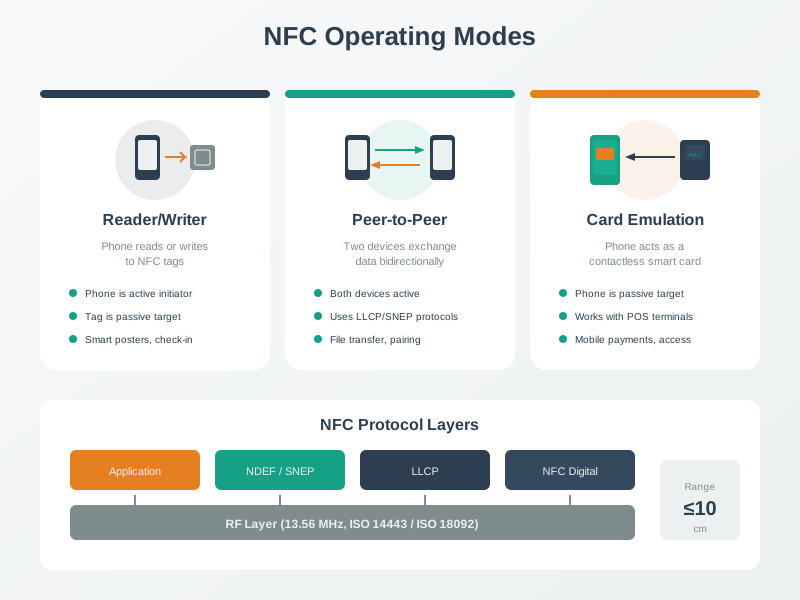
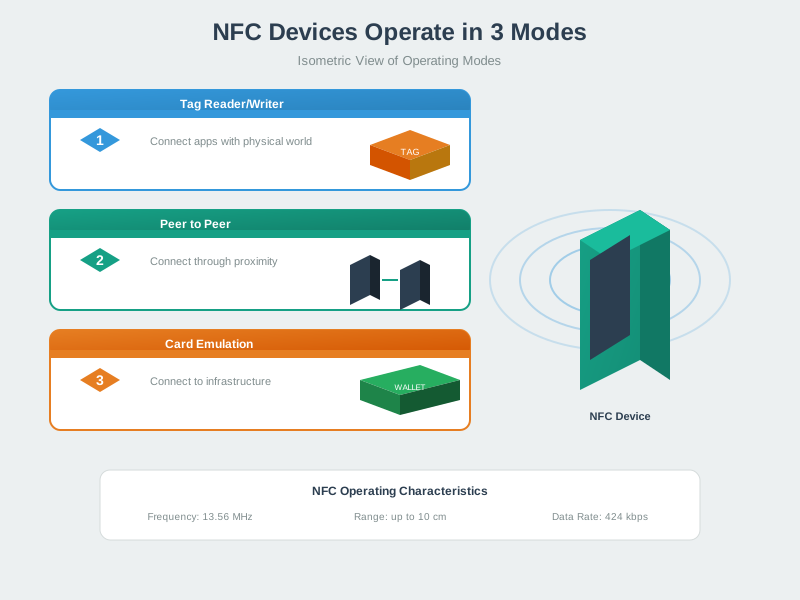
Different NFC applications leverage specific operating modes. Understanding mode selection helps optimize implementations for smart posters, payments, or device-to-device scenarios.
NoteVisual: NFC Peer-to-Peer Communication
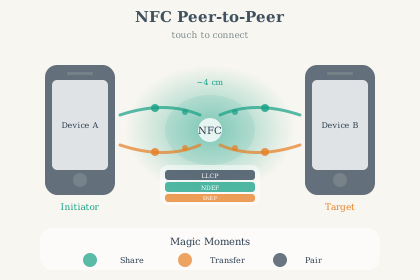
NFC Peer-to-Peer mode enables smartphones to exchange data by touching. This mode powers features like Android Beam for sharing contacts, photos, and pairing information with Bluetooth devices.
NoteVisual: NFC Tag Reading and Writing
NFC tag operations follow a defined sequence from RF field activation through anti-collision to data access. Understanding this flow helps debug tag reading issues and optimize response times.
890.11 Summary
This chapter covered real-world NFC applications and implementations:
- Mobile Payments: Tokenization workflow, EMV contactless standards, secure element usage, and biometric authentication for Apple Pay/Google Pay
- Smart Home Automation: NFC tag triggers for IoT scenes, Home Assistant YAML configuration, and MQTT integration
- Product Authentication: Anti-counterfeiting with encrypted tags, blockchain verification, and tamper-evident implementations
- Smart Posters: Dynamic vs static tag strategies, URL shortening, analytics integration, and personalized content delivery
- Access Control: Hotel key systems, office badge replacement, audit logging, and remote credential management
- Security Analysis: Python-based vulnerability assessment, security scoring, and recommendations for different NFC application profiles
890.12 What’s Next
The next chapter, NFC Security and Comparisons, provides an in-depth look at NFC security mechanisms including EMV payment security, relay attack countermeasures, privacy implications, and detailed comparisons between NFC, RFID, Bluetooth LE, and QR codes for various IoT applications.