%% fig-alt: "NB-IoT key characteristics diagram showing technical specifications and applications including bandwidth, data rate, coverage, battery life, and target applications like smart metering and agriculture"
%%{init: {'theme': 'base', 'themeVariables': { 'primaryColor': '#2C3E50', 'primaryTextColor': '#fff', 'primaryBorderColor': '#16A085', 'lineColor': '#16A085', 'secondaryColor': '#E67E22', 'tertiaryColor': '#7F8C8D'}}}%%
graph TB
subgraph "NB-IoT Key Characteristics"
BW["Bandwidth: 180 kHz<br/>(Single PRB)"]
RATE["Data Rate:<br/>~250 kbps peak"]
COVERAGE["Coverage: 164 dB MCL<br/>(20 dB > GPRS)"]
POWER["Battery Life:<br/>10-20 years"]
COST["Device Cost:<br/>$2-5 (target)"]
end
subgraph "Technical Features"
DEPLOY["3 Deployment Modes:<br/>• In-band LTE<br/>• Guard-band<br/>• Standalone"]
PSM["Power Saving:<br/>• PSM (< 5 µA)<br/>• eDRX (15 µA)"]
CE["Coverage Enhancement:<br/>Up to 2048 repetitions"]
end
subgraph "Target Applications"
METER["Smart Metering<br/>(Water, Gas, Electric)"]
CITY["Smart Cities<br/>(Lighting, Parking, Waste)"]
TRACK["Asset Tracking<br/>(Logistics)"]
AG["Agriculture<br/>(Soil, Weather)"]
IND["Industrial IoT<br/>(Condition Monitoring)"]
HEALTH["eHealth<br/>(Wearables)"]
end
BW --> DEPLOY
COVERAGE --> CE
POWER --> PSM
PSM --> METER
COVERAGE --> CITY
COST --> TRACK
POWER --> AG
DEPLOY --> IND
CE --> HEALTH
style BW fill:#2C3E50,color:#fff
style COVERAGE fill:#27AE60,color:#fff
style POWER fill:#27AE60,color:#fff
style COST fill:#16A085,color:#fff
style PSM fill:#E67E22,color:#fff
style CE fill:#E67E22,color:#fff
1138 NB-IoT Labs and Implementation
1138.1 Learning Objectives
By the end of this chapter, you will be able to:
- Configure NB-IoT Modules: Set up SIM7020, BC66, and other NB-IoT modules using AT commands
- Establish Network Connectivity: Connect to carrier networks and troubleshoot registration issues
- Implement Power Modes: Configure PSM and eDRX for optimal battery life in deployed sensors
- Transmit Sensor Data: Send UDP/CoAP messages to cloud platforms from NB-IoT devices
- Debug Connectivity Issues: Use diagnostic commands to analyze signal strength and network status
- Deploy Field Sensors: Apply practical considerations for real-world NB-IoT deployments
1138.2 Prerequisites
Before diving into this chapter, you should be familiar with:
- NB-IoT Fundamentals: Understanding NB-IoT technology basics, deployment modes, and architectural components is essential before implementing practical solutions
- NB-IoT Power and Channel: Knowledge of PSM, eDRX, and channel access mechanisms is required to properly configure power-saving modes in lab exercises
- Cellular IoT Fundamentals: Familiarity with cellular network concepts helps you understand SIM card activation, network registration, and carrier requirements
- Networking Basics: Basic networking knowledge including IP addressing and data transmission concepts is needed for cloud integration exercises
NoteRelated Chapters
Deep Dives: - NB-IoT Power and Channel - PSM/eDRX theory and battery calculations - Cellular IoT Implementations - SIM7000/SIM7600 module programming
Comparisons: - NB-IoT Comprehensive Review - Test your implementation knowledge - Cellular IoT Comprehensive Review - Technology selection scenarios
Application Protocols: - CoAP Fundamentals - Lightweight protocol for NB-IoT - MQTT Fundamentals - Publish-subscribe over cellular
Related Labs: - Cellular IoT Applications - Real-world deployment scenarios - Mobile Wireless Labs - Spectrum analysis and link budget
Design: - Prototyping Hardware - Development boards and modules - Network Design and Simulation - Coverage planning
Learning: - Quizzes Hub - Hands-on implementation challenges
1138.3 🌱 Getting Started (For Beginners)
If you’re ready to get hands-on with NB-IoT development, this section will guide you through practical implementation using common development boards and modules.
1138.3.1 What Will You Learn?
Practical skills: - Configure NB-IoT modules using AT commands - Connect to carrier networks (Vodafone, T-Mobile, AT&T, etc.) - Send/receive data to cloud platforms - Implement PSM and eDRX power modes - Debug connectivity issues
Analogy: Think of this chapter as moving from “reading about driving” (previous chapters) to “getting behind the wheel” – you’ll write real code and see data flowing to the cloud.
1138.3.2 Hardware You’ll Need
Option 1: Low-cost starter (< $30) - ESP32 DevKit ($8-12) - SIM7020E NB-IoT module ($15-20) - Breadboard + jumper wires - USB cable - NB-IoT SIM card (from carrier)
Option 2: All-in-one board ($40-60) - LilyGO T-SIM7000G (ESP32 + SIM7000G NB-IoT + GPS) - USB cable - NB-IoT SIM card
Recommended for beginners: LilyGO T-SIM7000G – everything integrated, no wiring needed.
1138.3.3 Getting an NB-IoT SIM Card
Carrier options (United States): - T-Mobile: IoT SIM cards (1 MB/month free tier available) - AT&T: IoT Data plans (starting $2/month) - Hologram.io: Global IoT SIM (pay-as-you-go, works in 200+ countries)
Carrier options (Europe): - Vodafone: IoT SIM cards (various plans) - Deutsche Telekom: NB-IoT connectivity - 1NCE: €10 for 10 years (500 MB total, popular for testing!)
Important: Make sure your SIM card supports NB-IoT specifically (not just LTE-M or regular LTE).
1138.3.4 Quick Start: Send Your First NB-IoT Message (30 minutes)
Step 1: Connect hardware
ESP32 → SIM7020E Module
TX (GPIO17) → RX
RX (GPIO16) → TX
3.3V → VCC
GND → GND
Step 2: Test AT commands (Arduino Serial Monitor)
AT              → OK (basic connectivity test)
AT+CPIN?        → +CPIN: READY (SIM card detected)
AT+CGATT=1      → OK (attach to network - may take 30-60 seconds)
AT+CGATT?       → +CGATT: 1 (attached successfully!)
Step 3: Send data to cloud (UDP example)
// Simple sketch to send "Hello NB-IoT!" every 60 seconds
#include <HardwareSerial.h>

HardwareSerial nb(1);  // Use UART1

void setup() {
  Serial.begin(115200);
  nb.begin(9600, SERIAL_8N1, 16, 17);  // RX=16, TX=17

  delay(3000);
  sendAT("AT");
  sendAT("AT+CGATT=1");  // Attach to network
  delay(30000);  // Wait for attachment
}

void loop() {
  // Send UDP packet to test server
  sendAT("AT+CSOC=1,2,1");  // Create UDP socket
  sendAT("AT+CSOSEND=0,12,\"Hello NB-IoT!\"");  // Send data

  Serial.println("Data sent!");
  delay(60000);  // Wait 60 seconds
}

void sendAT(String cmd) {
  nb.println(cmd);
  delay(1000);
  while (nb.available()) {
    Serial.write(nb.read());
  }
}
Expected result: After ~60 seconds (network attachment), you’ll see messages sent every minute. Battery life in this basic example: ~2-3 days (no PSM enabled yet).
1138.3.5 Common Beginner Mistakes
1. “AT commands not responding” - ✅ Check baud rate (usually 9600 or 115200) - ✅ Verify TX/RX not swapped - ✅ Ensure 3.3V power (NOT 5V - will damage module!) - ✅ Add delay after power-on (3-5 seconds for module boot)
2. “Can’t attach to network” (AT+CGATT? returns 0) - ✅ SIM card inserted correctly (chip facing down usually) - ✅ SIM activated with carrier (check online portal) - ✅ NB-IoT coverage exists in your area (check carrier coverage map) - ✅ Wait longer (first attach can take 2-3 minutes in poor coverage)
3. “Battery drains in hours, not years!” - ✅ You haven’t enabled PSM mode yet (radio stays on) - ✅ Solution: Configure AT+CPSMS=1 (see labs below)
1138.4 Videos
NoteCellular IoT Fundamentals
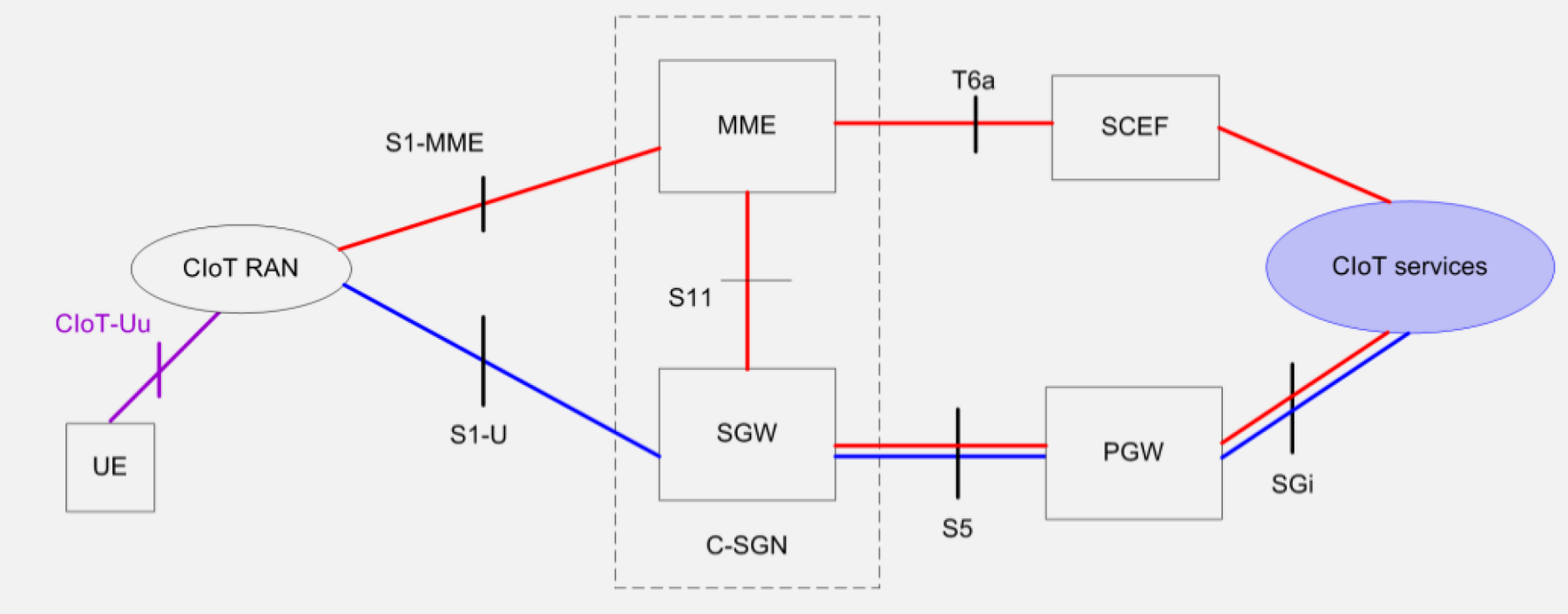
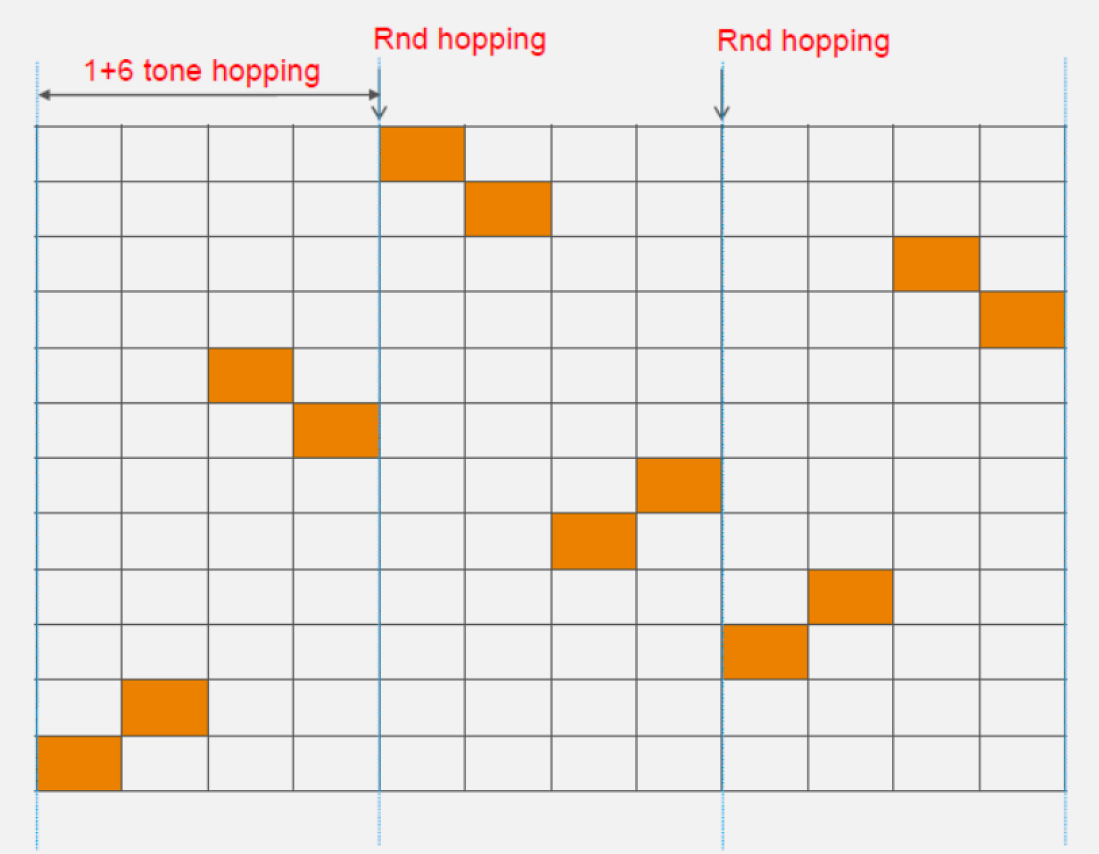
Key drivers for NB-IoT: - Existing 2G/3G networks being sunset - Need for low-cost, low-power IoT connectivity - Leverage existing cellular infrastructure - Provide carrier-grade reliability - Support massive device deployments
1138.4.1 NB-IoT Characteristics
NoteAlternative View: Coverage Enhancement Modes
%%{init: {'theme': 'base', 'themeVariables': { 'primaryColor': '#2C3E50', 'primaryTextColor': '#fff', 'primaryBorderColor': '#16A085', 'lineColor': '#16A085', 'secondaryColor': '#E67E22'}}}%%
graph LR
    subgraph Normal["CE Level 0 (Normal)"]
        N1["MCL: 144 dB"]
        N2["Repetitions: 1"]
        N3["Max throughput"]
    end

    subgraph Robust["CE Level 1 (Extended)"]
        R1["MCL: 154 dB"]
        R2["Repetitions: 2-8"]
        R3["Reduced rate"]
    end

    subgraph Extreme["CE Level 2 (Extreme)"]
        E1["MCL: 164 dB"]
        E2["Repetitions: 128-2048"]
        E3["Basement/rural"]
    end

    Normal -->|"Better coverage"| Robust
    Robust -->|"Maximum range"| Extreme

    style Normal fill:#16A085,stroke:#2C3E50
    style Robust fill:#E67E22,stroke:#2C3E50
    style Extreme fill:#2C3E50,stroke:#16A085
NB-IoT key characteristics diagram
Target applications: - Smart metering (electricity, water, gas) - Smart cities (lighting, parking, waste) - Asset tracking and logistics - Agricultural monitoring - Industrial IoT - eHealth devices
1138.5 Knowledge Check
Test your understanding of these networking concepts.
1138.6 Hands-On Exercise: NB-IoT Power Budget Analysis
1138.6.1 Exercise Objective
Calculate the battery life for an NB-IoT smart meter application.
1138.6.2 Scenario
Smart electricity meter with the following requirements: - Reporting frequency: 4 readings per day (every 6 hours) - Payload size: 100 bytes (meter reading, power quality, diagnostics) - Power configuration: PSM enabled, T3412 = 6 hours - Battery: 3.6V, 5000 mAh (18 Wh) - Coverage: Normal (no extended repetitions needed)
1138.6.3 Task 1: Current Consumption Profile
Typical NB-IoT module current consumption:
| State | Current | Duration per Cycle |
|---|---|---|
| PSM (deep sleep) | 5 µA | 6 hours - (active time) |
| Wake-up | 50 mA | 3 seconds |
| Network attach | 200 mA | 5 seconds |
| Data transmission | 220 mA | 10 seconds (100 bytes) |
| RRC Idle (after TX) | 15 mA | 20 seconds (T3324) |
1138.6.4 Task 2: Energy Calculation per Day
Energy per transmission cycle:
Wake-up: \[E_{wake} = 0.050 \text{ A} \times 3 \text{ s} \times 3.6 \text{ V} = 0.54 \text{ Ws}\]
Network attach: \[E_{attach} = 0.200 \times 5 \times 3.6 = 3.6 \text{ Ws}\]
Transmission: \[E_{tx} = 0.220 \times 10 \times 3.6 = 7.92 \text{ Ws}\]
RRC Idle: \[E_{idle} = 0.015 \times 20 \times 3.6 = 1.08 \text{ Ws}\]
Active time per cycle: 3 + 5 + 10 + 20 = 38 seconds PSM time per cycle: 6 hours - 38s = 21,562 seconds
PSM energy: \[E_{psm} = 0.000005 \times 21,562 \times 3.6 = 0.388 \text{ Ws}\]
Total energy per cycle: \[E_{cycle} = 0.54 + 3.6 + 7.92 + 1.08 + 0.388 = 13.528 \text{ Ws}\]
Daily energy (4 cycles): \[E_{day} = 13.528 \times 4 = 54.112 \text{ Ws} = 0.015 \text{ Wh/day}\]
1138.6.5 Task 3: Battery Life Calculation
\[\text{Battery life} = \frac{18 \text{ Wh}}{0.015 \text{ Wh/day}} = 1,200 \text{ days} \approx 3.3 \text{ years}\]
With battery aging and self-discharge (assume 80% efficiency): \[\text{Practical battery life} = 1,200 \times 0.8 = 960 \text{ days} \approx 2.6 \text{ years}\]
1138.6.6 Task 4: Optimization for 10-Year Life
To achieve 10-year battery life (3,650 days), we need:
\[E_{day\_required} = \frac{18 \text{ Wh} \times 0.8}{3,650 \text{ days}} = 0.00395 \text{ Wh/day}\]
Options:
- Reduce reporting frequency to 1/day:
- \(E_{day} = 13.528 \text{ Ws} = 0.00376 \text{ Wh/day}\) ✓ Achieves 10 years!
- Increase battery size to 19 Ah (3.6V × 19 Ah = 68.4 Wh):
- With 4 readings/day: \(\frac{68.4 \times 0.8}{0.015} = 3,648 \text{ days} \approx 10 \text{ years}\) ✓
- Use external power (e.g., current transformer on power line):
- Harvest energy from measured circuit
- No battery limitations
Recommendation: For 10-year battery life, either reduce reporting to once daily OR use larger battery (19 Ah D-cell).
1138.7 Python Implementations
1138.7.1 Implementation 1: NB-IoT Power Budget Calculator
This implementation calculates battery life for NB-IoT devices based on power consumption profiles, transmission patterns, and power-saving modes (PSM and eDRX).
1138.7.2 Implementation 2: NB-IoT Coverage and Link Budget Analyzer
This implementation calculates Maximum Coupling Loss (MCL), determines required repetitions for coverage enhancement, and analyzes link budgets for NB-IoT deployments.
1138.7.3 Implementation 3: NB-IoT Deployment Mode Comparator
This implementation compares the three NB-IoT deployment modes (standalone, guard-band, in-band) and helps operators choose the optimal mode based on their infrastructure and requirements.
1138.8 Visual Reference Gallery
NoteAI-Generated Diagrams: NB-IoT Labs and Implementation
These AI-generated SVG diagrams provide alternative visual representations of NB-IoT implementation concepts covered in this chapter.
1138.8.1 NB-IoT Labs Implementation Overview

AI-generated diagram showing complete NB-IoT implementation workflow including hardware setup, AT command sequences, and cloud connectivity.
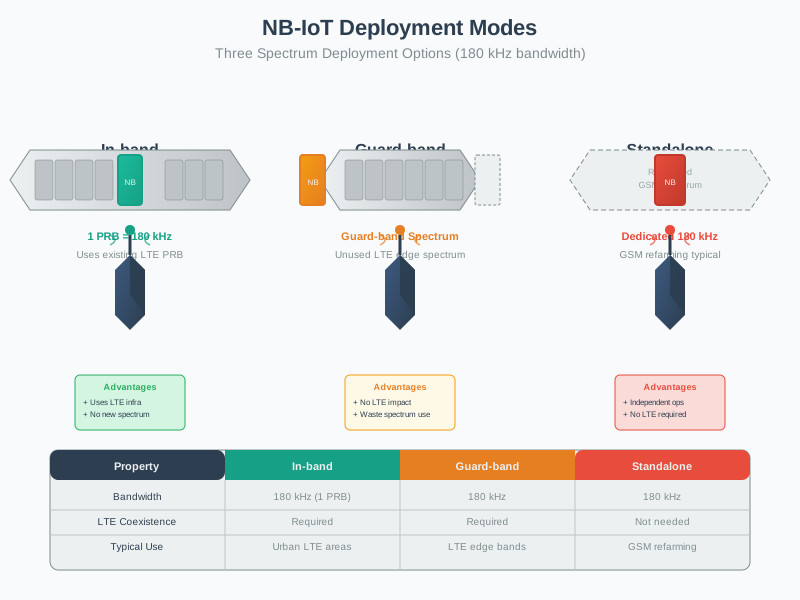
1138.8.2 NB-IoT Technical Specifications

Technical specifications overview for NB-IoT implementation planning.
1138.8.3 NB-IoT Data Rates

Data rate characteristics across different NB-IoT operation modes.
1138.8.4 NB-IoT Coverage Reality

Real-world coverage scenarios for NB-IoT deployment planning.
1138.9 Visual Reference Gallery
Explore these AI-generated diagrams that visualize NB-IoT implementation concepts:
NoteVisual: NB-IoT Network Architecture
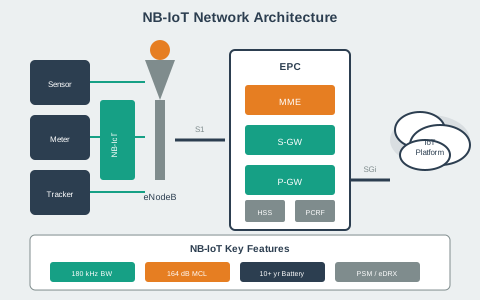
NB-IoT leverages existing cellular infrastructure while optimizing for IoT use cases with deep indoor coverage and multi-year battery life.
NoteVisual: AT Command Workflow
AT commands provide low-level control of NB-IoT modules, enabling configuration of network parameters, power modes, and data transmission through a standardized interface.
NoteVisual: NB-IoT Module Integration
Successful NB-IoT implementation requires proper hardware integration including antenna matching, power supply design, and UART communication with the host microcontroller.
1138.10 Summary
- AT command configuration provides low-level control of NB-IoT modules (SIM7020, BC66, SIM7000) for network attachment, power mode configuration, and data transmission
- Network attachment process involves SIM card detection (AT+CPIN), network registration (AT+COPS), and GPRS attach (AT+CGATT) with typical connection times of 30-90 seconds
- PSM and eDRX configuration uses T3412 and T3324 timers to balance battery life and reachability, with proper settings enabling 10-15 year device lifetime on 5-10 Ah batteries
- UDP and CoAP protocols are preferred for NB-IoT due to low overhead compared to TCP, with CoAP providing RESTful semantics optimized for constrained devices
- Signal diagnostics (AT+CSQ, AT+COPS, AT+CEREG) are essential for troubleshooting connectivity issues, with RSSI > -100 dBm generally required for reliable operation
- Coverage enhancement modes (CE0, CE1, CE2) automatically adapt based on signal conditions, trading latency for deep coverage penetration in challenging RF environments
- Real-world deployment requires consideration of carrier selection, SIM provisioning, power budget analysis, coverage mapping, and field testing before large-scale rollout
1138.11 What’s Next
Apply your NB-IoT implementation skills to broader topics:
- NB-IoT Comprehensive Review - Test your hands-on knowledge with comprehensive quiz questions covering deployment scenarios
- Cellular IoT Fundamentals - Expand to LTE-M, 5G, and other cellular IoT technologies for mobile and high-bandwidth applications
- Application protocols: Implement MQTT Fundamentals over NB-IoT for publish-subscribe messaging patterns
- Alternative protocols: Compare with CoAP Fundamentals for lightweight request-response communication
- Full system design: Review NB-IoT Fundamentals and NB-IoT Power and Channel for complete system architecture understanding