%% fig-alt: "Timeline view of smart factory fog processing: at T=0ms sensor detects vibration spike, T=2ms fog gateway receives data, T=5ms anomaly algorithm triggers alert, T=8ms emergency stop signal sent, T=15ms machine halted safely. Compares to cloud path where T=0ms sensor detects, T=100ms data reaches cloud, T=150ms cloud processes, T=200ms response returns - by which time bearing has failed causing $50K damage."
%%{init: {'theme': 'base', 'themeVariables': { 'primaryColor': '#2C3E50', 'primaryTextColor': '#fff', 'primaryBorderColor': '#16A085', 'lineColor': '#16A085', 'secondaryColor': '#E67E22', 'tertiaryColor': '#7F8C8D', 'fontSize': '14px'}}}%%
timeline
    title Smart Factory Anomaly Response: Fog vs Cloud
    section Fog Path (Success)
        T=0ms : Vibration spike detected : Sensor triggers
        T=2ms : Data reaches fog gateway : Local network
        T=5ms : Anomaly algorithm fires : ML inference
        T=8ms : Emergency stop signal : Actuator command
        T=15ms : Machine safely halted : Damage prevented
    section Cloud Path (Failure)
        T=0ms : Same vibration spike : Sensor triggers
        T=100ms : Data reaches cloud : Internet latency
        T=150ms : Cloud processes alert : Queue delay
        T=200ms : Response returns : Too late
        T=200ms+ : Bearing fails : $50K damage
347 Fog Architecture: Three-Tier Design and Hardware
347.1 Learning Objectives
By the end of this chapter, you will be able to:
- Design Three-Tier Architectures: Plan fog computing deployments across edge, fog, and cloud layers
- Identify Fog Node Characteristics: Describe capabilities and constraints at each architectural tier
- Select Fog Hardware: Choose appropriate gateways, cloudlets, and edge servers for applications
- Understand Fog Node Capabilities: Apply computation, storage, networking, and security functions at the fog layer
347.2 Prerequisites
Before diving into this chapter, you should be familiar with:
- Fog Fundamentals: Understanding the basic concepts of fog/edge computing, latency reduction, and bandwidth optimization provides essential context for the architectural patterns covered in this chapter
- Edge, Fog, and Cloud Overview: Knowledge of the three-tier architecture and how edge nodes, fog nodes, and cloud data centers interact clarifies where fog processing fits in the complete IoT system design
347.3 🌱 Getting Started (For Beginners)
347.3.1 Why Can’t Everything Just Go to the Cloud?
Scenario: You have a self-driving car with 20 cameras, LIDAR, and radar sensors generating 1 GB of data per second. The car needs to make split-second decisions to avoid obstacles.

The Solution: Process data closer to where it’s generated!
347.3.2 What is Fog Computing?
Analogy: A Company with Regional Offices
Think of a large company’s organization:

347.3.3 The Three Tiers Explained
| Tier | Name | Location | Speed | Resources | What It Does |
|---|---|---|---|---|---|
| 1 | Edge | Your devices | Instant | Tiny | Collect data, simple actions |
| 2 | Fog | Local gateway | Fast (ms) | Moderate | Filter, aggregate, decide locally |
| 3 | Cloud | Data center | Slow (100ms+) | Unlimited | Big analytics, long-term storage |
Real Example: Smart Factory

NoteAlternative View: Smart Factory Data Flow Timeline
This variant shows the temporal sequence of fog processing, illustrating how latency improvements translate to real-world safety benefits.
Key Insight: The 185ms difference (200ms cloud vs 15ms fog) is the difference between a safe shutdown and catastrophic failure. Fog processing buys critical reaction time for safety-critical industrial applications.
Benefits: - Alert happens in 5ms (not 100ms cloud round-trip) - Only 1 message/minute to cloud (not 1000/second) - Factory keeps running if internet fails
TipSensor Squad - The Foggy Factory Mystery
Meet the Sensor Squad:
- Sammy (Temperature Sensor) - Measures how hot or cold things are
- Lila (Light Sensor) - Detects brightness levels
- Max (Motion Sensor) - Spots when things move
- Bella (Smart Gateway) - The team’s coordinator who makes decisions
The Mission: Keeping the Smart Factory Safe
The Sensor Squad works at a toy factory. Their job? Make sure the machines don’t overheat and the assembly line runs smoothly. But there’s a problem: the factory’s main computer (the cloud) is far away, and sometimes the internet connection is slow!
What Happened:
One day, Sammy noticed Machine #5 getting dangerously hot—102°C when it should be 80°C!
“Bella, Machine #5 is overheating!” Sammy shouted.
Bella faced a tough choice: 1. Send the alert to the faraway cloud computer (takes 200 milliseconds—that’s like counting to 2 very slowly) 2. Make a decision right there in the factory using her fog computing brain (takes only 10 milliseconds)
The Cloud-Only Problem:
If Bella sent the alert to the cloud: - 0ms: Sammy detects 102°C - 100ms: Alert reaches cloud (internet travel time) - 120ms: Cloud processes and decides to stop machine - 220ms: Stop command returns to factory - TOTAL: 220ms - By then, the machine could catch fire!
The Fog Computing Solution:
Bella thinks locally (that’s fog computing!): - 0ms: Sammy detects 102°C - 5ms: Bella (the fog gateway) receives alert - 10ms: Bella immediately sends emergency stop - TOTAL: 10ms - Machine stops safely!
What Bella Did:
- Immediate Action: Stopped Machine #5 locally (no need to ask the cloud)
- Filter Data: Only told the cloud “Machine #5 had emergency stop” instead of sending every temperature reading
- Save Bandwidth: Reduced data sent to cloud by 95% (from 1000 readings/second to just 1 summary/minute)
The Sensor Squad Learns About Fog Computing:
- Edge (Sensors): Sammy, Lila, Max collect data right where things happen
- Fog (Bella’s Gateway): Bella makes quick decisions without waiting for the cloud
- Cloud (Main Computer): Gets summaries and handles long-term planning (like ordering new machine parts)
Real Numbers:
- Before Fog Computing: 1000 sensors × 10 messages/sec = 10,000 messages/sec to cloud = Internet overload!
- After Fog Computing: Bella filters and sends only 1 message/minute = 99.8% reduction!
Why This Matters:
Just like Bella doesn’t need to ask the principal every time a student needs a bathroom pass, fog gateways don’t need to ask the cloud for simple decisions. This makes everything faster and safer!
Question for You:
If your home’s smoke detector noticed a fire, would you want it to: A) Send alert to a faraway server, wait for response, then sound alarm (200ms delay) B) Sound alarm immediately, then notify your phone (10ms delay)
Answer: B! That’s fog computing—local decisions for urgent situations, cloud notifications for records.
347.3.4 When to Use Each Tier
| Decision | Edge | Fog | Cloud |
|---|---|---|---|
| Real-time safety | ✅ | ✅ | ❌ |
| Local analytics | ❌ | ✅ | ✅ |
| Store 10 years of data | ❌ | ❌ | ✅ |
| Work without internet | ✅ | ✅ | ❌ |
| Complex AI training | ❌ | ❌ | ✅ |
| Reduce bandwidth costs | ❌ | ✅ | ❌ |
347.3.5 Self-Check: Understanding the Basics
Before continuing, make sure you can answer:
- Why not send all IoT data directly to the cloud? → Latency (too slow for real-time), bandwidth (too expensive), reliability (what if internet fails?)
- What is fog computing? → A middle layer between edge devices and cloud that processes data locally for faster decisions
- What are the three tiers? → Edge (sensors), Fog (local gateways), Cloud (data centers)
- When should processing happen at the fog vs. cloud? → Fog: real-time decisions, filtering, aggregation. Cloud: long-term storage, complex analytics, ML training
WarningAvoid Single Points of Failure
A common mistake is creating fog gateway bottlenecks where all edge devices depend on a single fog node for critical functions. If that node fails, the entire local system goes offline. Real-world consequences include industrial process halts costing thousands per minute, or security systems becoming non-functional. Always design fog architectures with redundancy - deploy multiple fog nodes with failover capabilities, enable peer-to-peer communication between edge devices for critical functions, and implement graceful degradation where edge devices can operate in limited-functionality mode if the fog layer fails.
347.4 Architecture of Fog
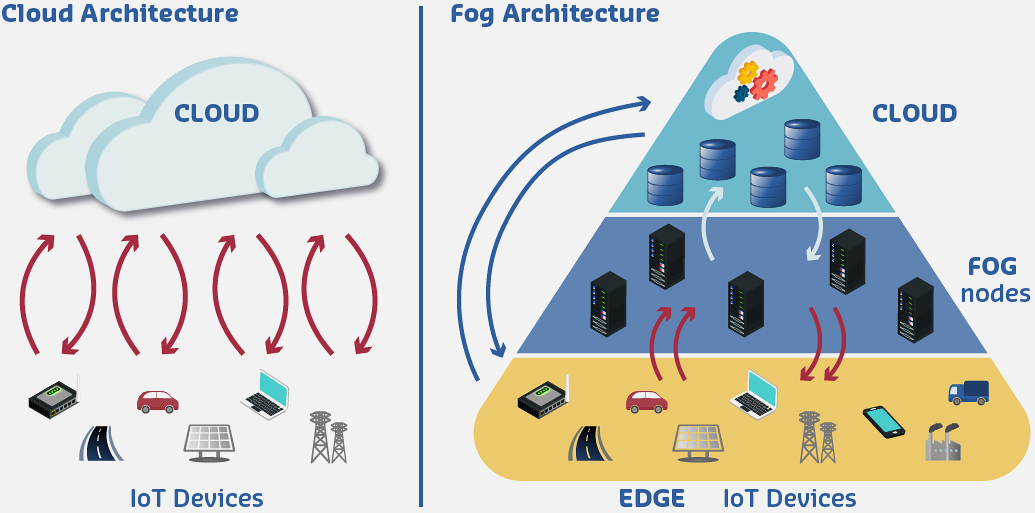
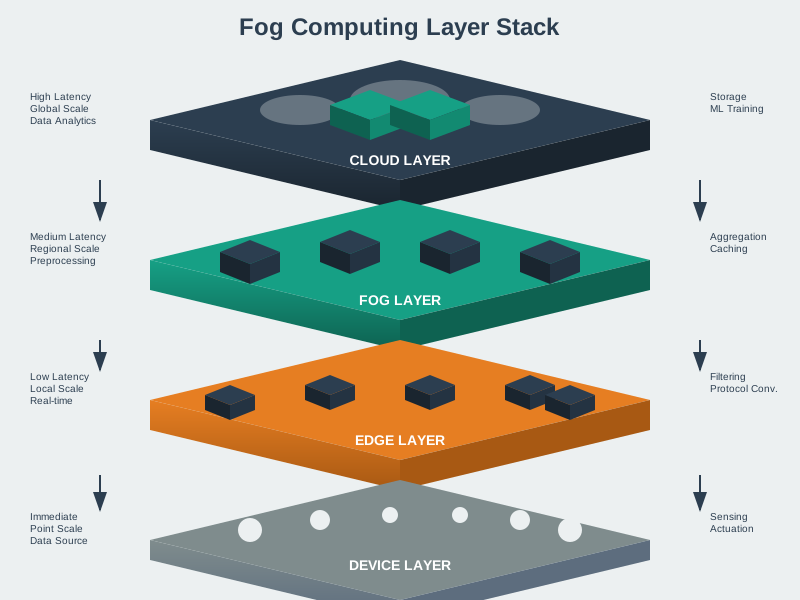
Fog computing architectures organize computing resources across multiple tiers, each optimized for specific functions and constraints.

NoteAcademic Resource: Cloudlet vs Cloud Architecture
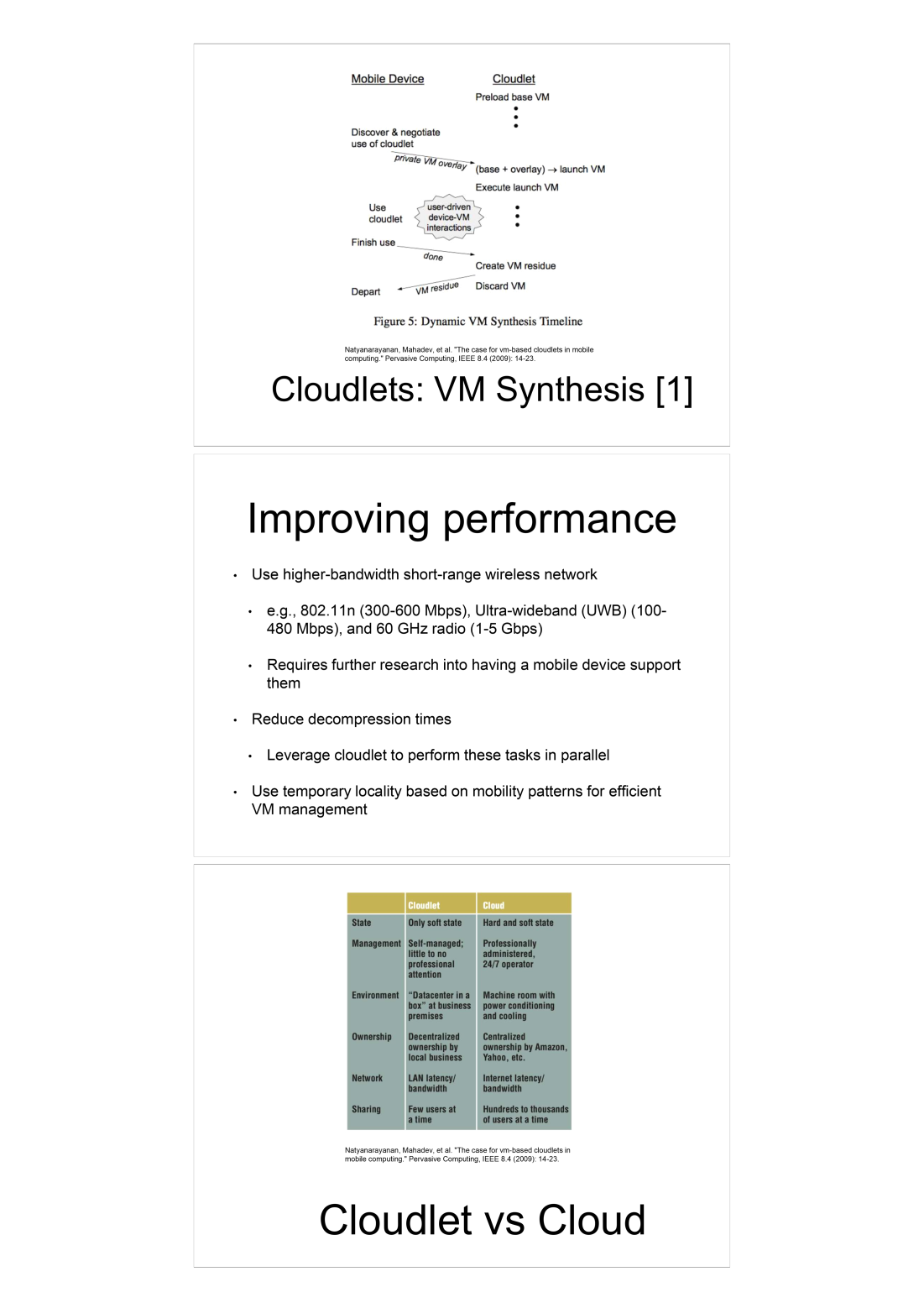
Source: Princeton University, Coursera Fog Networks for IoT - based on Satyanarayanan et al. “The case for VM-based cloudlets in mobile computing” (Pervasive Computing, IEEE 2009)
347.4.1 Three-Tier Fog Architecture
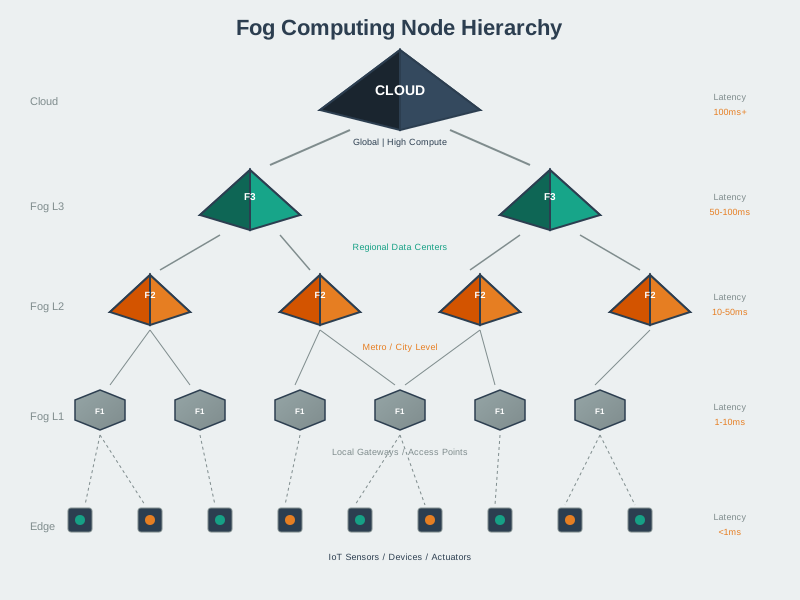
Tier 1: Edge Devices (Things Layer) - IoT sensors and actuators - Smart devices and appliances - Wearables and mobile devices - Embedded systems
Characteristics: - Severely resource-constrained - Battery-powered typically - Focused on sensing/actuation - Minimal local processing
Tier 2: Fog Nodes (Fog Layer) - Gateways and routers - Base stations and access points - Micro data centers - Cloudlets and edge servers
Characteristics: - Moderate computational resources - Networking and storage capabilities - Proximity to edge devices - Protocol translation and aggregation
Tier 3: Cloud Data Centers (Cloud Layer) - Large-scale data centers - Virtually unlimited resources - Global reach and availability - Advanced analytics and storage
Characteristics: - Massive computational power
- Scalable storage
- Rich software ecosystems
- Higher latency from edge
347.4.2 Fog Node Capabilities
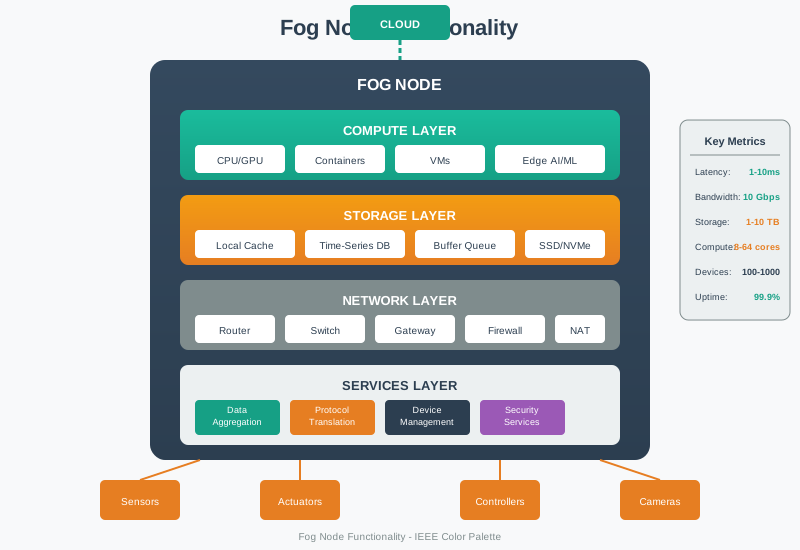
Computation: - Data preprocessing and filtering - Local analytics and decision-making - Machine learning inference - Event detection and correlation
Storage: - Temporary data buffering - Caching frequently accessed data - Local databases for recent history - Offline operation support
Networking: - Protocol translation (e.g., Zigbee to IP) - Data aggregation from multiple sensors - Load balancing and traffic management - Quality of Service (QoS) enforcement
Security: - Local authentication and authorization - Data encryption/decryption - Intrusion detection - Privacy-preserving processing
347.4.3 Fog Node Hardware Selection Guide
Choosing appropriate fog hardware depends on deployment requirements:
| Node Type | Hardware | CPU | RAM | Storage | Network | Power | Cost | Use Case |
|---|---|---|---|---|---|---|---|---|
| Entry-Level | Raspberry Pi 4B | Quad-core 1.5GHz | 4 GB | 32 GB SD | Wi-Fi/Ethernet/BLE | 5V/3A USB-C | $55 | Home automation, 10-20 sensors |
| Mid-Range | Intel NUC | i3/i5 | 8-16 GB | 256 GB SSD | Gigabit/Wi-Fi | 65W AC | $400-800 | Small factory, 100-500 sensors |
| Industrial | Dell Edge Gateway 5000 | Atom x5 | 8 GB | 128 GB eMMC | Wi-Fi/LTE/Ethernet | 12V DC | $1,200 | Ruggedized environments, -40°C to 70°C |
| High-Performance | NVIDIA Jetson AGX Xavier | 8-core ARM + GPU | 32 GB | 32 GB eMMC | Gigabit/Wi-Fi | 30W | $1,000 | Video analytics, AI inference |
Selection Criteria:
- Sensor Count: 1 fog node per 50-100 sensors (Wi-Fi/Zigbee range limits)
- Processing Load: Video analytics needs GPU; sensor aggregation needs CPU
- Environment: Industrial = ruggedized (-40°C to 85°C, IP67), Office = commercial-grade
- Uptime Requirements: Critical systems = redundant nodes with failover
- Network Connectivity: Rural = LTE/satellite, Urban = Wi-Fi/Ethernet
347.5 Summary
This chapter covered the fundamental architecture of fog computing:
- Three-Tier Architecture: Edge devices collect data, fog nodes perform local processing and aggregation, cloud handles global analytics and long-term storage
- Fog Node Capabilities: Intermediate processing at gateways, routers, and edge servers enables computation, storage, networking, and security functions near data sources
- Hardware Selection: Choose fog hardware based on sensor count, processing requirements, environmental conditions, uptime needs, and network connectivity
NoteRelated Chapters
Deep Dives: - Edge-Fog Computing - Three-tier architecture fundamentals - Fog Fundamentals - Core fog computing concepts - Edge, Fog, and Cloud Overview - Complete architectural perspective
Data Processing: - Edge Data Acquisition - Data collection at the edge - Edge Compute Patterns - Processing strategies - Data in the Cloud - Cloud analytics integration
Protocols: - MQTT - Lightweight messaging for fog nodes - CoAP - Constrained device communication
347.6 What’s Next
The next chapter explores Fog Applications and Use Cases, covering real-world deployment patterns, case studies from smart cities and industrial IoT, and hierarchical processing strategies.