%% fig-alt: "Kitchen analogy comparing cloud-only, fog, and edge computing to restaurant ordering models"
%%{init: {'theme': 'base', 'themeVariables': { 'primaryColor': '#2C3E50', 'primaryTextColor': '#fff', 'primaryBorderColor': '#16A085', 'lineColor': '#16A085', 'secondaryColor': '#E67E22', 'tertiaryColor': '#7F8C8D', 'fontSize': '12px'}}}%%
graph TB
    subgraph CLOUD_ONLY["Cloud-Only: Order from Restaurant 10 Miles Away"]
        CO_ORDER[You Place Order]
        CO_DRIVE1[Driver picks up]
        CO_COOK[Kitchen cooks<br/>30 min]
        CO_DRIVE2[Driver delivers]
        CO_EAT[You finally eat!]
        CO_ORDER --> CO_DRIVE1 --> CO_COOK --> CO_DRIVE2 --> CO_EAT
        CO_TIME["Total: 45-60 minutes<br/>= Cloud latency (100-500ms)"]
    end

    subgraph FOG["Fog: Neighborhood Kitchen Prepares Partially"]
        F_ORDER[You Place Order]
        F_LOCAL[Local kitchen<br/>preps ingredients]
        F_FINISH[Finishes cooking<br/>10 min]
        F_SHORT[Short delivery<br/>5 min]
        F_EAT[You eat!]
        F_ORDER --> F_LOCAL --> F_FINISH --> F_SHORT --> F_EAT
        F_TIME["Total: 15-20 minutes<br/>= Fog latency (10-100ms)"]
    end

    subgraph EDGE["Edge: Your Own Kitchen"]
        E_DECIDE[You decide to cook]
        E_COOK[Cook in your kitchen]
        E_EAT[You eat immediately!]
        E_DECIDE --> E_COOK --> E_EAT
        E_TIME["Total: 5 minutes<br/>= Edge latency (1-10ms)"]
    end

    style CLOUD_ONLY fill:#7F8C8D,stroke:#2C3E50,color:#fff
    style FOG fill:#E67E22,stroke:#2C3E50,color:#fff
    style EDGE fill:#16A085,stroke:#2C3E50,color:#fff
    style CO_TIME fill:#7F8C8D,color:#fff
    style F_TIME fill:#E67E22,color:#fff
    style E_TIME fill:#16A085,color:#fff
342 Fog/Edge Computing: Introduction and Fundamentals
342.1 Learning Objectives
By the end of this section, you will be able to:
- Distinguish Edge and Fog Computing: Explain the differences between edge, fog, and cloud computing paradigms
- Understand Core Benefits: Identify the key advantages of fog computing for latency, bandwidth, and reliability
- Recognize Use Cases: Determine when fog/edge computing is necessary vs when cloud-only is sufficient
- Comprehend Data Flow: Trace how data moves through edge-fog-cloud architectures
TipFor Kids: Meet the Sensor Squad!
Fog computing is like having helper stations between your home and a faraway castle!
342.1.1 The Sensor Squad Adventure: The Speedy Message Relay
Imagine Sunny the Light Sensor lives in a small village and needs to send an important message to the King’s castle far, far away. But there’s a problem! The castle is SO far that messages take forever to get there, and sometimes the road gets jammed with too many messages from all the villages.
That’s when Signal Sam the Communication Expert has a brilliant idea! “Let’s build helper stations along the road!” he says. These helper stations are like mini-castles called fog nodes. Now, when Sunny has an urgent message like “The barn is on fire!”, she doesn’t have to wait for the faraway castle. The nearby helper station can immediately ring the alarm bells! But for less urgent messages like “Today’s weather report,” the helper station collects messages from many villages and sends them together to save room on the road.
Thermo the Temperature Sensor loves this system too! He sends temperature readings every minute, but the helper station is smart enough to notice patterns. Instead of sending 1,000 separate messages saying “it’s 72 degrees,” the helper station sends just one summary: “It stayed around 72 degrees all day.” This saves SO much space on the message road! Motion Mo the Motion Detector especially loves that the helper station can make quick decisions - when he spots something important, the local helper station can turn on the lights immediately without waiting for permission from the faraway castle!
342.1.2 Key Words for Kids
| Word | What It Means |
|---|---|
| Fog Computing | Helper stations between your devices and the faraway cloud that can do quick jobs nearby |
| Edge Device | A smart gadget (like a sensor) that collects information right where things happen |
| Latency | How long you have to wait for a message to travel somewhere and come back |
| Bandwidth | How much room there is on the “message road” - like how many cars can fit on a highway |
342.1.3 Try This at Home!
The Message Relay Game: Play this with friends or family to understand fog computing!
- Stand in a line: one person is the “Sensor” (you!), one is the “Fog Helper Station” (middle), and one is the “Cloud Castle” (far away)
- The Sensor whispers messages to the Fog Helper. For URGENT messages (like “EMERGENCY!”), the Fog Helper immediately shouts “ALERT!” For regular messages (like colors or numbers), the Helper writes them down
- After collecting 5 regular messages, the Fog Helper runs them ALL AT ONCE to the Cloud Castle
- Time how fast urgent vs. regular messages get handled - see why local helpers are faster for important stuff!
ImportantThe Challenge: Edge is Limited, Cloud is Far
The Problem: Neither pure edge nor pure cloud architectures fully meet IoT requirements:
- Edge devices: Physically close to sensors but severely limited in compute power, memory, and storage
- Cloud data centers: Virtually unlimited resources but 100-500ms away, creating unacceptable latency for real-time applications
- The gap: Many IoT tasks need more processing than edge devices can provide, yet less latency than cloud can deliver
- Data aggregation: Raw sensor streams must be filtered and consolidated before transmission to reduce bandwidth costs
Why This Is Hard:
- Workload varies dramatically over time (rush hour traffic vs midnight)
- Different applications have conflicting requirements (video analytics vs temperature monitoring)
- Resource allocation across tiers requires dynamic optimization
- State migration between edge, fog, and cloud adds complexity and overhead
What We Need:
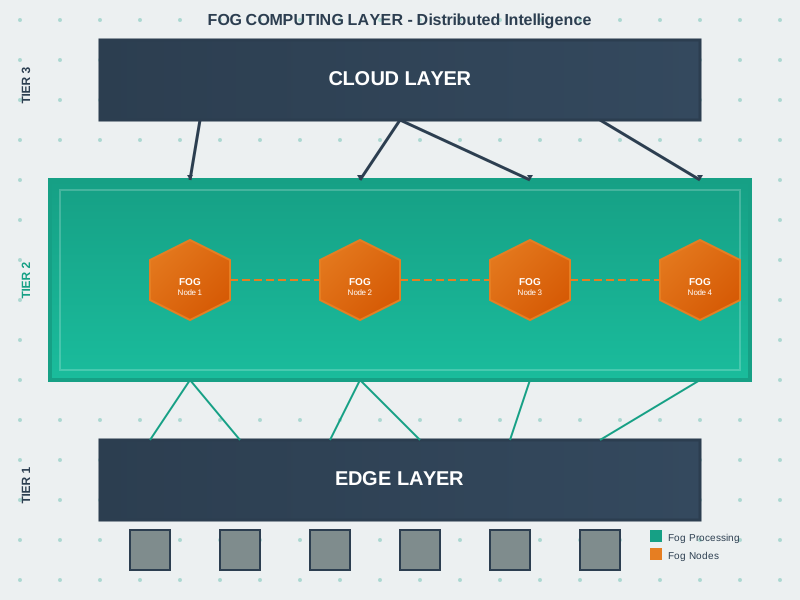
- An intermediate compute tier positioned between edge devices and cloud data centers
- Dynamic workload distribution based on latency requirements and resource availability
- Hierarchical data aggregation to reduce raw data volume by 90-99%
- Graceful degradation that maintains critical functions when cloud connectivity fails
The Solution: Fog computing creates a hierarchical continuum—local fog nodes process time-sensitive data in 10-100ms while aggregating and filtering streams before cloud transmission, achieving the best of both worlds.
NoteKey Takeaway
In one sentence: Fog computing bridges the gap between resource-limited edge devices and latency-distant cloud data centers, providing an intermediate processing tier for time-sensitive IoT applications.
Remember this rule: Process locally what must be fast (real-time control, safety), aggregate at fog what generates too much data (video, high-frequency sensors), and send to cloud what benefits from scale (analytics, long-term storage).
342.2 Edge and Fog Computing
NoteKey Concepts
- Edge Computing: Processing data at or near the source (sensors, gateways) rather than transmitting raw data to distant cloud data centers
- Fog Computing: Distributed computing paradigm extending cloud capabilities to the network edge, providing intermediate processing between edge and cloud
- Fog Nodes: Intermediate devices (gateways, routers, switches) with computational capabilities performing local processing and data aggregation
- Latency Reduction: Edge/fog processing enables real-time or near-real-time responses by avoiding round-trip delays to cloud data centers
- Bandwidth Optimization: Processing data locally reduces data volume transmitted to cloud, saving bandwidth costs and reducing network congestion
- Hierarchical Processing: Tiered architecture distributing computation across edge devices, fog nodes, and cloud based on latency, bandwidth, and computational requirements
342.3 Knowledge Check
Test your understanding of fundamental concepts with these questions.
342.4 Prerequisites
Before diving into this chapter, you should be familiar with:
- Wireless Sensor Networks (WSN): Understanding how distributed sensor nodes communicate and organize provides foundation for comprehending edge computing data collection and processing patterns
- IoT Architecture Components: Familiarity with the traditional cloud-centric IoT architecture helps appreciate why edge/fog computing emerged and where it fits in the overall system design
- Data Analytics Basics: Knowledge of data processing, filtering, and aggregation techniques is essential since edge/fog computing moves these operations closer to data sources
- Networking Fundamentals: Understanding latency, bandwidth, network topologies, and communication protocols contextualizes the performance benefits of edge/fog architectures
342.5 🌱 Getting Started (For Beginners)
TipWhat is Edge and Fog Computing? (Simple Explanation)
Analogy: Think about ordering food at a restaurant vs. cooking at home:
- ☁️ Cloud Computing = Ordering from a restaurant 10 miles away (takes time to deliver)
- 🌫️ Fog Computing = A neighborhood kitchen that prepares some dishes locally
- ⚡ Edge Computing = Cooking in your own kitchen (fastest, right where you need it)
342.5.1 Why Not Send Everything to the Cloud?

Cloud-Only Problem: Sending all raw data to distant cloud centers creates latency and bandwidth costs.
342.5.2 The Solution: Process Data Closer

Alternative View:
Edge/Fog Solution: Processing data closer to the source reduces latency to real-time and cuts bandwidth by 99%.
342.5.3 Edge vs Fog vs Cloud: Quick Comparison
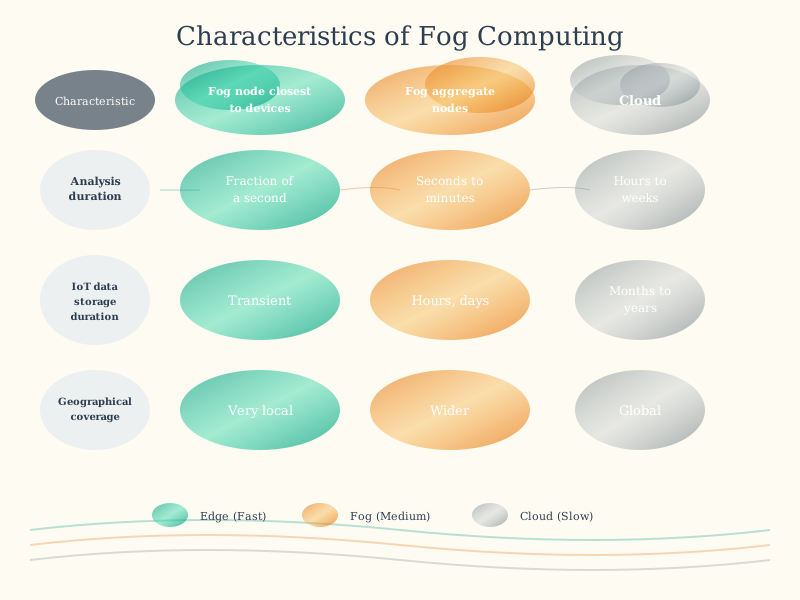
| Layer | Location | Latency | Use Case |
|---|---|---|---|
| Edge | On the sensor/device | 1-10 ms | Emergency shutoffs, instant responses |
| Fog | Local gateway/server | 10-100 ms | Real-time dashboards, local decisions |
| Cloud | Remote data center | 100-500 ms | Big data analytics, long-term storage |
342.5.4 Real-World Example: Self-Driving Car
Situation: Pedestrian steps into road
| Approach | Step 1 | Step 2 | Step 3 | Total Time | Result at 60 mph |
|---|---|---|---|---|---|
| Cloud | Send video to cloud (100 ms) | Cloud analyzes (200 ms) | Response returns (100 ms) | 400 ms | Car travels 35 feet! |
| Edge | Local AI detects pedestrian (10 ms) | Car brakes immediately (5 ms) | - | 15 ms | Car travels 1.3 feet ✓ |
342.5.5 🧪 Quick Self-Check
Before continuing, make sure you understand:
- What is the main benefit of edge computing? → Low latency (fast responses)
- What is fog computing? → An intermediate layer between edge and cloud
- When must you use edge computing? → When responses need to be real-time (ms)
- Why still use the cloud? → For big data analytics and long-term storage
342.6 📖 In Plain English: What Is Fog Computing?
NoteThink of Fog Computing Like a City’s Infrastructure
Imagine you’re running a massive city with millions of people (IoT devices):
Without Fog Computing (Cloud-Only): - Every decision must go to City Hall (cloud data center) downtown - A traffic light needs permission? Call City Hall. (200ms delay = traffic accident!) - A water pipe bursts? Call City Hall. (By the time they respond, your street is flooded!) - If phone lines to City Hall go down? The entire city freezes. Nothing works.
With Fog Computing: - Edge: Traffic lights have local sensors that detect cars and change immediately (1-5ms) - Fog: Neighborhood substations coordinate local traffic lights, water systems, power grids (10-100ms) - Cloud: City Hall analyzes citywide patterns, plans long-term improvements, stores historical data (100-500ms)
342.6.1 The Key Insight
Fog computing = Having mini data centers close to where data is generated
Instead of sending everything to a distant cloud server: - Process data locally when speed matters - Filter out noise before sending data (99% reduction!) - Keep working even if the internet goes down - Send only insights to the cloud, not raw data
342.6.2 Real Numbers That Matter
| Scenario | Cloud-Only | With Fog Computing |
|---|---|---|
| Latency | 200ms (too slow for safety) | 5ms (safe and responsive) |
| Bandwidth | 1 GB/second ($$$ expensive!) | 1 MB/second (99% cheaper!) |
| Reliability | Fails if internet is down | Keeps working offline |
| Privacy | All data leaves your building | Sensitive data stays local |
Bottom line: Fog computing makes IoT faster, cheaper, more reliable, and more private by processing data close to where it’s created.
342.7 What’s Next
Now that you understand the fundamentals of fog/edge computing, continue to:
- Real-World Scenarios: Learn about overload scenarios and common deployment mistakes
- Core Concepts: Dive deeper into fog computing theory and academic foundations
- Requirements Analysis: Determine when fog computing is the right choice