839 Wi-Fi MAC Layer and Protocols
839.1 Learning Objectives
By the end of this chapter, you will be able to:
- Understand CSMA/CA: Explain carrier sense multiple access and collision avoidance mechanisms
- Analyze Frame Structure: Decode 802.11 MAC headers and understand frame types
- Solve Hidden Terminal: Apply RTS/CTS handshake to prevent collisions
- Configure QoS: Implement traffic differentiation for IoT applications
839.2 Prerequisites
Before diving into this chapter, you should be familiar with:
- Wi-Fi Architecture Modes: Understanding infrastructure mode, Wi-Fi Direct, and mesh networking provides context for MAC layer operation
- Networking Basics: Knowledge of MAC layer concepts and wireless communication fundamentals
In one sentence: Wi-Fi uses CSMA/CA (Carrier Sense Multiple Access with Collision Avoidance) to share the wireless medium, with RTS/CTS handshakes solving hidden terminal problems and QoS providing priority-based channel access.
Remember this rule: CSMA/CA listens before transmitting, RTS/CTS reserves the channel, and QoS ensures time-sensitive traffic (voice, video) gets priority over bulk data transfers.
Deep Dives: - Wi-Fi Architecture Modes - Infrastructure, Direct, Mesh - Wi-Fi Mesh Applications - Real-world deployments - Wi-Fi Security and Provisioning - WPA2/WPA3
Architecture Context: - Wireless Sensor Networks - WSN MAC protocols - Network Topologies - Understanding topology impact on MAC
Learning Resources: - Quizzes Hub - Test CSMA/CA knowledge - Videos Hub - MAC layer tutorials
839.3 MAC Layer and Channel Access (Summary)
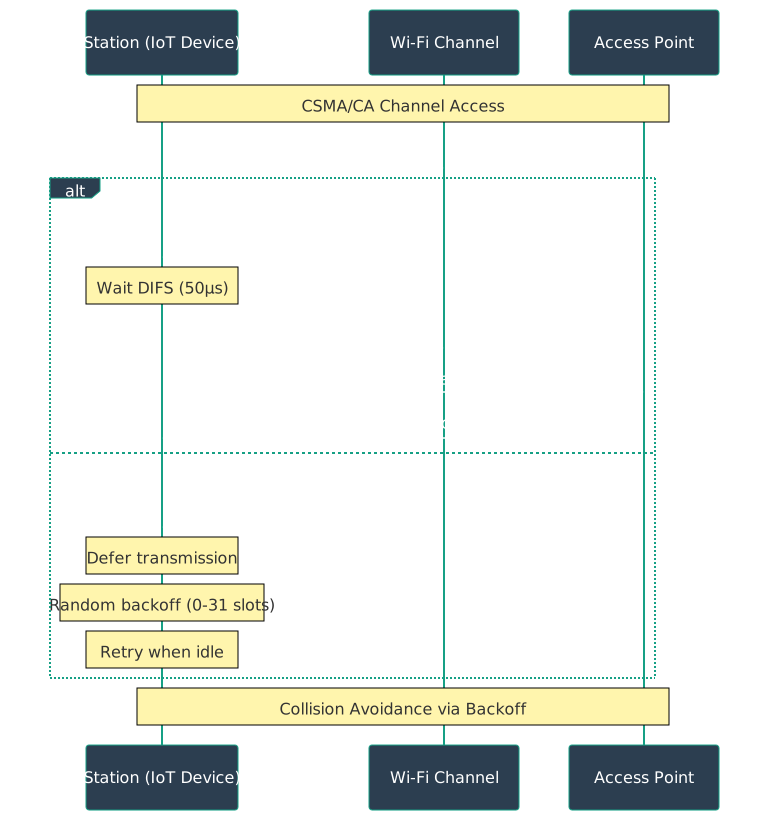
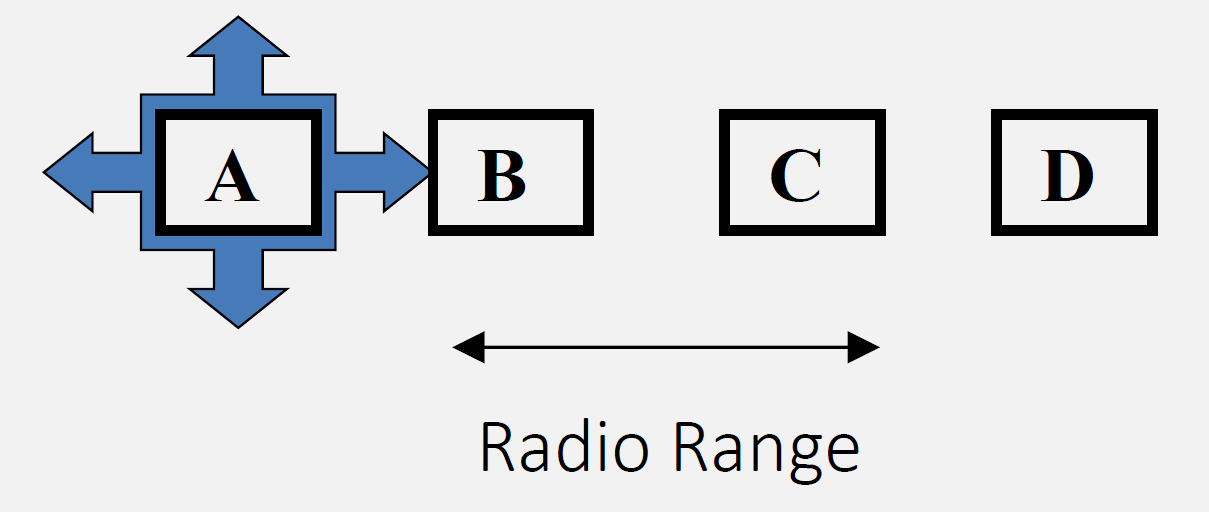
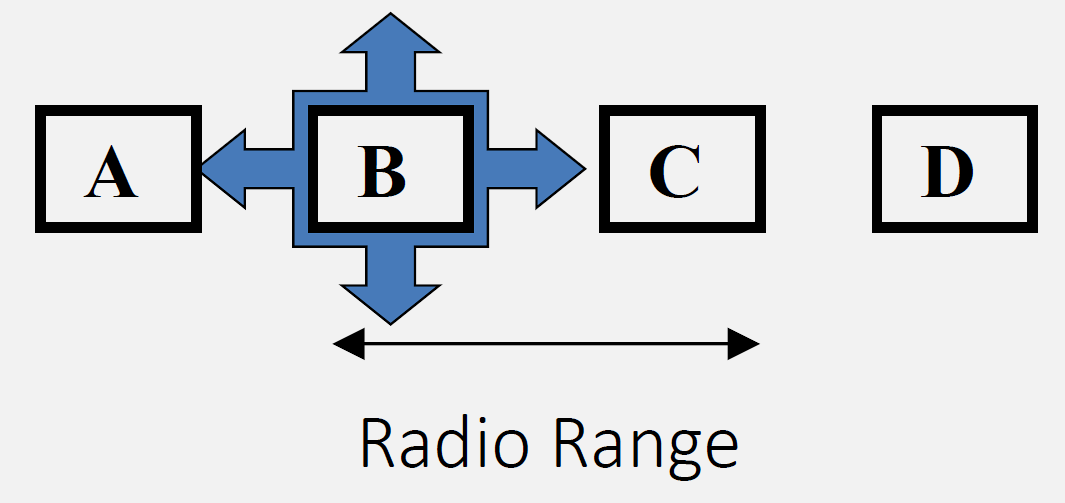
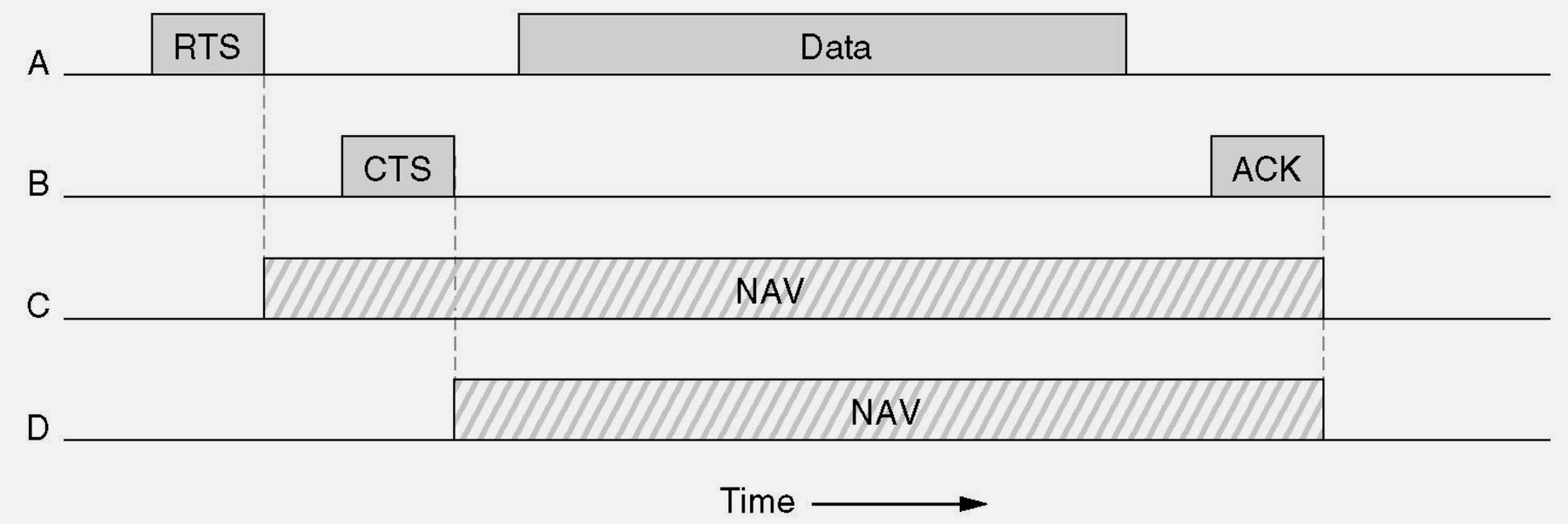
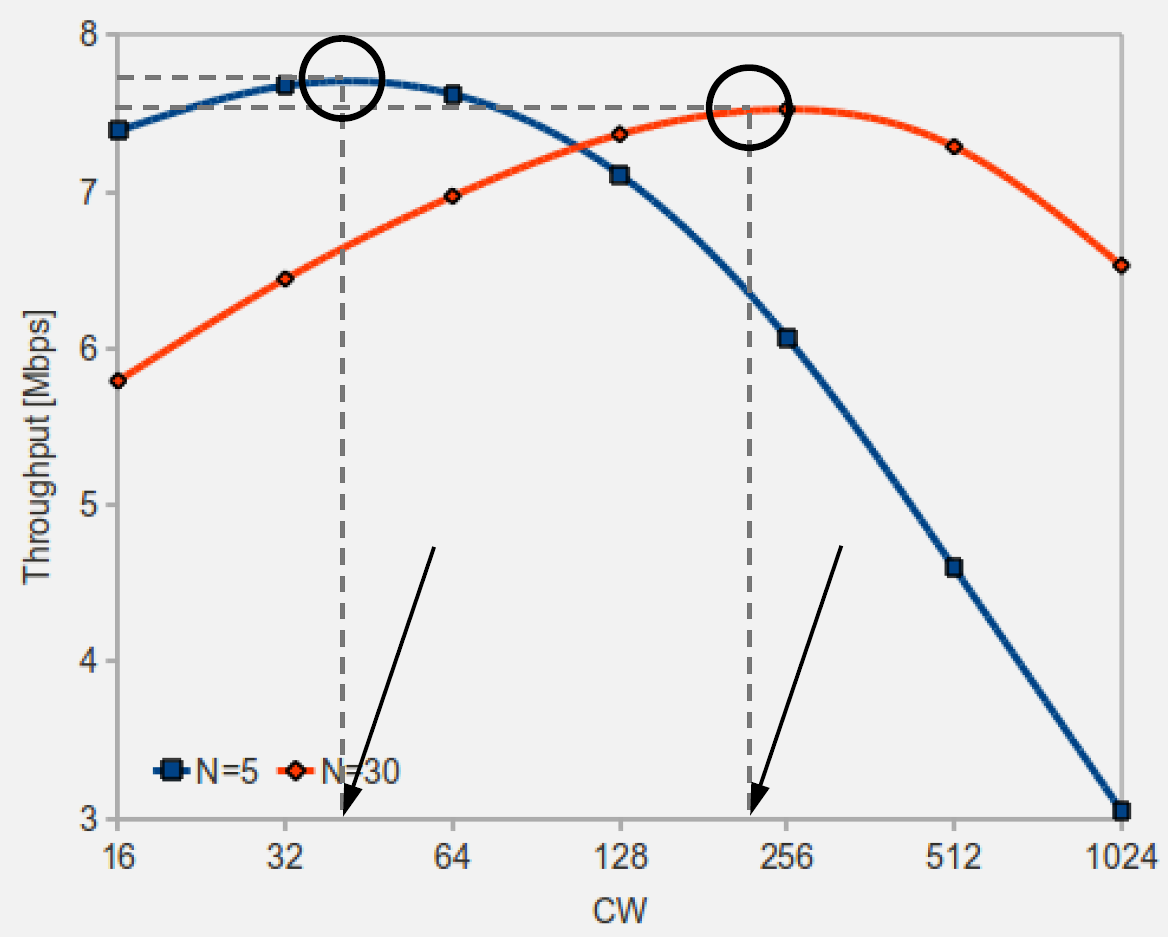
Wi-Fi uses CSMA/CA to share the medium. Hidden and exposed terminal problems can cause collisions or unnecessary backoff; RTS/CTS can mitigate hidden terminals. QoS and MAC performance depend on contention, interference, and client mix.

Source: CP IoT System Design Guide, Chapter 4 - Networking
Source: CP IoT System Design Guide, Chapter 4 - Networking
839.4 Wi-Fi Architecture for IoT
839.4.1 Infrastructure Mode (Most Common)

This variant shows the same three Wi-Fi architectures from a spatial coverage perspective - emphasizing how each mode extends or limits coverage area.

Key Insight: Choose architecture based on coverage needs: Infrastructure for single room with good AP placement, Wi-Fi Direct for temporary device-to-device links, Mesh for large areas with multiple rooms or floors. Mesh eliminates dead zones through overlapping coverage.
Characteristics:
Source: CP IoT System Design Guide, Chapter 4 - Networking
- Centralized access point (AP) or router
- All devices connect to AP
- AP provides DHCP, routing, internet access
- Most common for home/office IoT
839.4.2 Wi-Fi Direct (Peer-to-Peer)

Characteristics: - Direct device-to-device connection - No router required - One device acts as soft AP - Use cases: Camera to phone, phone to printer
839.4.3 Wi-Fi Mesh Networks

839.5 Videos
Characteristics: - Multiple access points form a mesh - Self-healing, automatic routing - Extended coverage for large areas - Standards/implementations: IEEE 802.11s, vendor mesh systems, ESP32 frameworks (ESP-IDF ESP-Wi-Fi-MESH, Arduino painlessMesh)
839.6 Summary
This chapter covered Wi-Fi MAC layer and protocol fundamentals:
- CSMA/CA Channel Access: Carrier Sense Multiple Access with Collision Avoidance prevents simultaneous transmissions through listen-before-talk, but hidden terminals cause collisions without RTS/CTS
- RTS/CTS Handshake: Request To Send / Clear To Send mitigates hidden terminal collisions by reserving airtime (other nodes defer), improving reliability at the cost of additional overhead
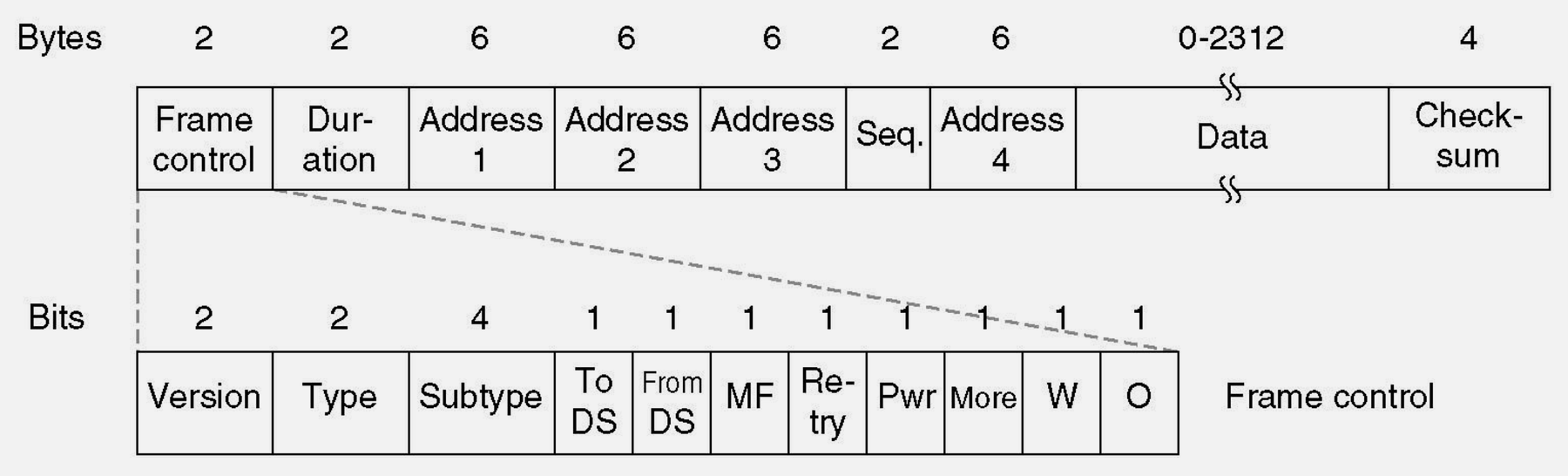
- 802.11 Frame Structure: MAC header contains frame control, addresses, sequence control; frame body carries payload; FCS provides error detection
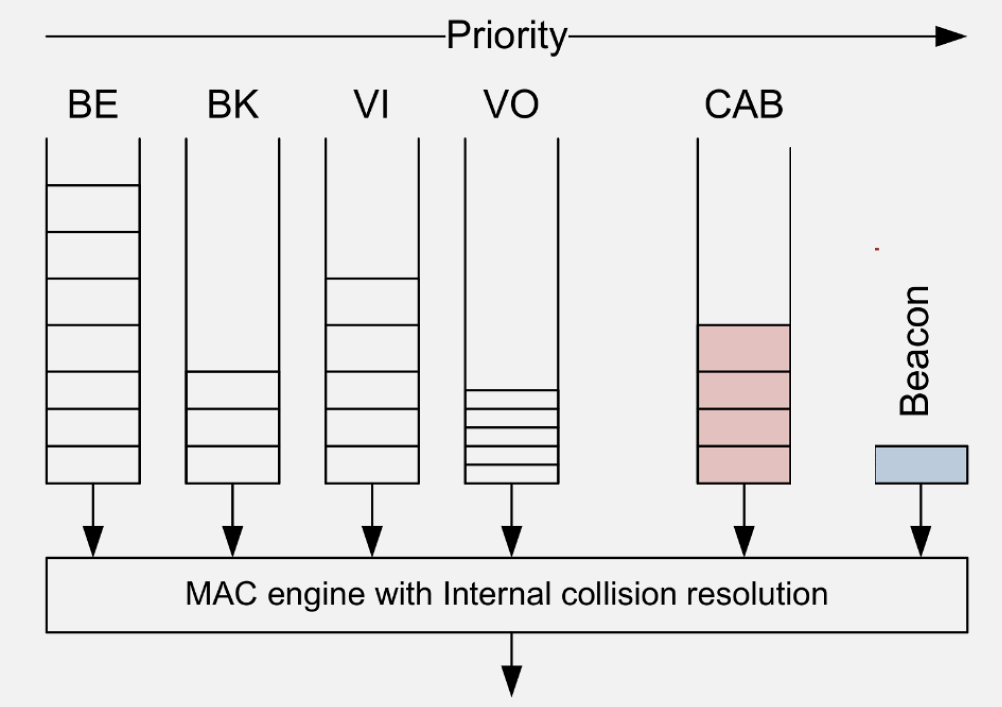
- QoS Traffic Differentiation: 802.11e provides four access categories (Voice, Video, Best Effort, Background) with different AIFS and contention windows for priority-based channel access
- Hidden vs Exposed Terminals: Hidden terminals cause collisions (need RTS/CTS); exposed terminals cause unnecessary backoff (reduce efficiency)
839.7 What’s Next
The next chapter explores Wi-Fi Mesh Applications, covering real-world mesh deployments, ESP32 mesh examples, IoT applications, and common pitfalls in mesh network design.