%%{init: {'theme': 'base', 'themeVariables': { 'primaryColor': '#2C3E50', 'primaryTextColor': '#fff', 'primaryBorderColor': '#16A085', 'lineColor': '#16A085', 'secondaryColor': '#E67E22', 'tertiaryColor': '#7F8C8D', 'fontSize': '14px'}}}%%
flowchart TB
    subgraph PUB["Publishers (Sensors)"]
        T1["Temperature Sensor"]
        H1["Humidity Sensor"]
        L1["Light Sensor"]
    end

    BROKER["MQTT Broker<br/>(Central Router)"]

    subgraph SUB["Subscribers (Applications)"]
        M1["Mobile App<br/>home/#"]
        D1["Dashboard<br/>home/+/temp"]
        A1["Automation<br/>home/living/+"]
    end

    T1 -->|"home/living/temp"| BROKER
    H1 -->|"home/living/humidity"| BROKER
    L1 -->|"home/kitchen/light"| BROKER

    BROKER -->|"All home topics"| M1
    BROKER -->|"All temp topics"| D1
    BROKER -->|"All living room"| A1

    style PUB fill:#2C3E50,stroke:#16A085,stroke-width:2px,color:#fff
    style BROKER fill:#16A085,stroke:#2C3E50,stroke-width:3px,color:#fff
    style SUB fill:#E67E22,stroke:#2C3E50,stroke-width:2px,color:#fff
    style T1 fill:#d4edda,stroke:#16A085,stroke-width:1px,color:#000
    style H1 fill:#d4edda,stroke:#16A085,stroke-width:1px,color:#000
    style L1 fill:#d4edda,stroke:#16A085,stroke-width:1px,color:#000
    style M1 fill:#fff3cd,stroke:#E67E22,stroke-width:1px,color:#000
    style D1 fill:#fff3cd,stroke:#E67E22,stroke-width:1px,color:#000
    style A1 fill:#fff3cd,stroke:#E67E22,stroke-width:1px,color:#000
1207 MQTT Architecture Patterns
1207.1 Learning Objectives
By the end of this chapter, you will be able to:
- Understand Pub/Sub Architecture: Explain how MQTT decouples publishers from subscribers through a central broker
- Design Topic Hierarchies: Create effective topic naming schemes that enable efficient wildcard subscriptions
- Apply Wildcard Rules: Use single-level (+) and multi-level (#) wildcards correctly in subscription patterns
- Map Components to Roles: Identify publishers, subscribers, brokers, and their interactions in MQTT systems
1207.2 Prerequisites
Required Chapters:
- MQTT Fundamentals - Core pub/sub concepts
- MQTT QoS - Quality of Service levels
Technical Background:
- TCP/IP networking basics
- Client-server vs pub/sub patterns
Estimated Time: 15 minutes
1207.3 MQTT Publish/Subscribe Architecture
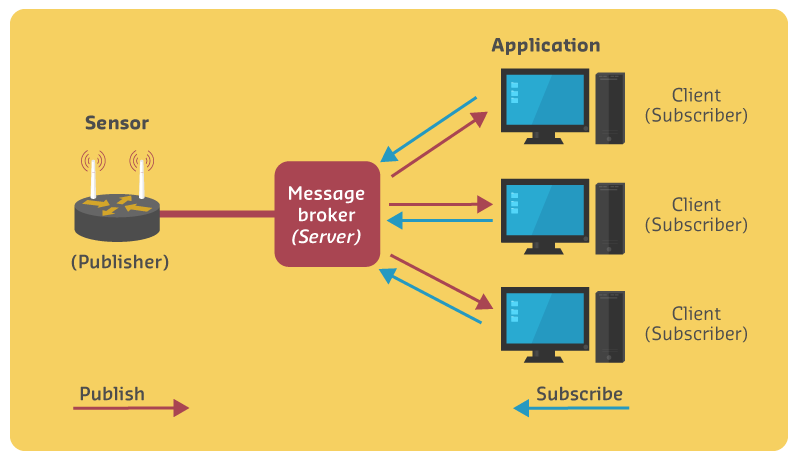
MQTT’s publish/subscribe pattern decouples message producers from consumers through a central broker:
MQTT publish/subscribe architecture showing decoupled communication: Publishers (temperature, humidity, light sensors) send messages to specific topics without knowing subscribers. Central MQTT broker routes messages based on topic patterns. Subscribers use wildcards (+ for single-level, # for multi-level) to receive relevant messages. Example: Mobile app subscribes to home/# receiving all home messages; dashboard subscribes to home/+/temp receiving only temperature readings from all rooms.
1207.3.1 Publish/Subscribe Pattern Components
The fundamental MQTT architecture separates message producers from consumers through a central broker:
MQTT Publish/Subscribe Architecture
| Component | Role | Example |
|---|---|---|
| Publishers (Sensors) | Send messages to topics | Temperature sensors, humidity sensors |
| MQTT Broker | Central message router | Routes based on topic subscriptions |
| Subscribers (Consumers) | Receive messages from topics | Mobile apps, dashboards, analytics |
Publishers:
| Device | Location | Publishes To | QoS |
|---|---|---|---|
| Temperature Sensor 1 | Living Room | home/living_room/temp | QoS 1 |
| Temperature Sensor 2 | Bedroom | home/bedroom/temp | QoS 0 |
| Humidity Sensor | Kitchen | home/kitchen/humidity | QoS 1 |
Subscribers:
| Consumer | Subscription | Receives |
|---|---|---|
| Mobile App | home/# | All home messages (temp + humidity) |
| Web Dashboard | home/+/temp | All room temperatures |
| Analytics Service | home/+/humidity | All room humidity readings |
Message Flow: Publishers –> MQTT Broker –> Subscribers (based on topic matching)
Key Architectural Benefits:
- Decoupling: Publishers and subscribers don’t need to know about each other
- Many-to-Many: Multiple publishers can send to same topic, multiple subscribers can receive
- Dynamic Discovery: New subscribers automatically receive messages from existing publishers
- Location Transparency: Clients only need broker address, not peer addresses
1207.4 Topic Hierarchy and Wildcards
MQTT topics use hierarchical structure with powerful wildcard subscriptions:
NoteAlternative View: Topic Naming Best Practices
%%{init: {'theme': 'base', 'themeVariables': { 'primaryColor': '#2C3E50', 'primaryTextColor': '#fff', 'primaryBorderColor': '#16A085', 'lineColor': '#16A085', 'secondaryColor': '#E67E22'}}}%%
graph TB
    subgraph Good["Good Topic Design"]
        G1["company/building/floor/room/sensor"]
        G2["home/floor1/bedroom/temperature"]
        G3["factory/line1/machine5/status"]
    end

    subgraph Bad["Avoid These Patterns"]
        B1["temperatureSensor1 (flat)"]
        B2["data (too generic)"]
        B3["temp/1/2/3/4/5 (cryptic)"]
    end

    style Good fill:#16A085,stroke:#2C3E50
    style Bad fill:#E74C3C,stroke:#2C3E50
This diagram shows topic naming patterns: hierarchical, descriptive topics enable efficient wildcard subscriptions, while flat or cryptic topics make filtering difficult.
MQTT Topic Hierarchy Example: Smart Home
| Level | Path | Topics |
|---|---|---|
| Root | home/ | Base namespace |
| Rooms | home/{room}/ | living_room, bedroom, kitchen |
| Devices | home/{room}/{device} | temp, humidity, light |
Topic Tree:
| Room | Topic | Value |
|---|---|---|
| Living Room | home/living_room/temp | 24.5C |
| home/living_room/humidity | 45% | |
| home/living_room/light | on | |
| Bedroom | home/bedroom/temp | 22.0C |
| home/bedroom/humidity | 50% | |
| home/bedroom/light/main | off | |
| home/bedroom/light/bedside | on | |
| Kitchen | home/kitchen/temp | 26.0C |
| home/kitchen/humidity | 60% |
1207.4.1 Wildcard Subscription Rules
Wildcard Subscription Examples:
| Wildcard | Pattern | Matches | Count |
|---|---|---|---|
| Single-level (+) | home/+/temp | All room temperatures | 3 topics |
| Multi-level (#) | home/bedroom/# | All bedroom sensors | 4 topics |
| Two single-level | home/+/+ | 2-level topics only | 7 topics (not light/main) |
| Full multi-level | home/# | Everything under home | 11 topics |
Wildcard Subscription Rules:
+(Single-level): Matches exactly one topic level (e.g.,home/+/tempmatcheshome/bedroom/temp, nothome/bedroom/closet/temp)#(Multi-level): Matches zero or more levels, must be last character (e.g.,home/#matches all topics under home)- Best Practice: Design topic hierarchy to enable efficient wildcard patterns (
{location}/{device_type}/{metric})
WarningImportant: Wildcards are Subscribe-Only
MQTT wildcards are subscribe-only, not publish:
- Subscribe:
client.subscribe("home/+/temp")- receives all room temperatures - Publish:
client.publish("home/+/temp", "25")- this does NOT work! Must publish to specific topic.
You CANNOT publish to a wildcard topic. The broker will treat home/+/temp as a literal topic string, and since no subscribers listen to that exact string, the message goes nowhere.
1207.5 Worked Example: Design MQTT Topic Hierarchy
NoteWorked Example: Design MQTT Topic Hierarchy for Smart Building
Scenario: You are architecting the MQTT topic structure for a 10-floor commercial building with multiple sensor types per floor. The system needs to support dashboards filtering by floor, by sensor type, and by specific rooms.
Given:
- Building: 10 floors, 20 rooms per floor
- Sensors per room: temperature, humidity, occupancy, air quality (CO2)
- Actuators per room: HVAC, lights, blinds
- Requirements: Floor-level dashboards, building-wide analytics, room-specific control
- Expected message volume: ~200,000 messages/day
Solution:
Step 1: Define Topic Hierarchy Structure
Use a hierarchical pattern that enables efficient wildcard subscriptions:
{building}/{floor}/{room}/{device_type}/{metric}Step 2: Design Topic Examples
# Sensor data (published by devices)
building1/floor03/room12/sensor/temperature
building1/floor03/room12/sensor/humidity
building1/floor03/room12/sensor/occupancy
building1/floor03/room12/sensor/co2

# Actuator commands (subscribed by devices)
building1/floor03/room12/hvac/setpoint
building1/floor03/room12/lights/state
building1/floor03/room12/blinds/position

# Device status (published by devices)
building1/floor03/room12/hvac/status
building1/floor03/room12/lights/status
Step 3: Map Subscription Patterns to Use Cases
| Use Case | Subscription Pattern | Messages Received |
|---|---|---|
| Building analytics (all data) | building1/# |
All 200K/day |
| Floor 3 dashboard | building1/floor03/# |
20K/day |
| All temperatures | building1/+/+/sensor/temperature |
20K/day |
| Room 12 control panel | building1/floor03/room12/# |
1K/day |
| All HVAC status | building1/+/+/hvac/status |
10K/day |
Step 4: Calculate Topic Count
Rooms: 10 floors x 20 rooms = 200 rooms
Sensor topics: 200 rooms x 4 sensors = 800 topics
Actuator topics: 200 rooms x 3 actuators x 2 (command + status) = 1,200 topics
Total: ~2,000 unique topicsResult: The topic hierarchy building1/floor03/room12/sensor/temperature enables:
- 5 subscription levels: Building, floor, room, device type, metric
- Efficient filtering: Floor dashboard uses 1 subscription (
building1/floor03/#) instead of 400 - Scalable: Adding floor 11 requires no subscription changes for building-wide dashboards
- Clear organization: Topic path is self-documenting
Key Insight: Invest time in topic hierarchy design before deployment. A well-designed hierarchy reduces subscription count by 10-100x and makes the system self-documenting. The pattern {location}/{sublocation}/.../{device}/{metric} works for most IoT applications. Avoid flat topics like sensor_floor3_room12_temp which cannot be filtered with wildcards.
TipFor Beginners: MQTT Topics Explained Simply
Think of MQTT topics like a postal address system:
| Postal System | MQTT Topics |
|---|---|
| Country/State/City/Street | home/floor1/bedroom/temperature |
| Send letter to address | Publish message to topic |
| Forward all mail from ZIP code | Subscribe with wildcard home/floor1/# |
The + wildcard is like saying “any single word here” - home/+/temp means “any room’s temperature”
The # wildcard is like saying “everything from here down” - home/# means “all home data”
Golden Rule: You can only use wildcards when RECEIVING mail (subscribing), not when SENDING mail (publishing). You must send to a specific address!
1207.6 Summary
This chapter covered MQTT’s fundamental architecture patterns:
- Publish/Subscribe Pattern: MQTT decouples publishers from subscribers through a central broker, enabling many-to-many communication without direct connections between clients
- Component Roles: Publishers send to topics, the broker routes based on subscriptions, subscribers receive matching messages
- Topic Hierarchies: Use hierarchical naming (
home/bedroom/temperature) to organize messages and enable efficient filtering - Wildcard Subscriptions: Single-level (+) matches one level, multi-level (#) matches zero or more levels - both are subscribe-only
- Topic Design Best Practices: Use pattern
{location}/{device_type}/{metric}for scalable systems that support efficient wildcard filtering
1207.7 What’s Next
Continue exploring MQTT with these related chapters:
- Next: MQTT QoS and Reliability - Understand delivery guarantees and session management
- Then: MQTT Production Deployment - Learn clustering, security, and scalability
- Practice: MQTT Knowledge Check - Test your understanding with scenario-based questions