%%{init: {'theme': 'base', 'themeVariables': { 'primaryColor': '#2C3E50', 'primaryTextColor': '#fff', 'primaryBorderColor': '#16A085', 'lineColor': '#16A085', 'secondaryColor': '#E67E22', 'tertiaryColor': '#ECF0F1'}}}%%
flowchart LR
    A[Sensor<br/>Analog Signal<br/>0-3.3V] -->|Weak Signal| B[Amplifier<br/>Boost 10x]
    B -->|Noisy Signal| C[Filter<br/>Remove Noise]
    C -->|Clean Analog| D[ADC<br/>Analog to Digital]
    D -->|Digital Value<br/>0-4095| E[Microcontroller<br/>Process Data]

    style A fill:#E67E22,stroke:#2C3E50,color:#fff
    style B fill:#16A085,stroke:#2C3E50,color:#fff
    style C fill:#16A085,stroke:#2C3E50,color:#fff
    style D fill:#2C3E50,stroke:#16A085,color:#fff
    style E fill:#2C3E50,stroke:#16A085,color:#fff
525 Sensor Circuit Fundamentals
525.1 Learning Objectives
By the end of this chapter, you will be able to:
- Design Voltage Dividers: Calculate resistor values for interfacing resistive sensors with ADCs
- Build RC Filters: Create low-pass filters to remove noise from sensor signals
- Implement Transistor Switches: Use transistors to control high-power loads from GPIO pins
- Calculate LED Resistors: Properly size current-limiting resistors for LED indicators
- Debug Basic Circuits: Use multimeters to diagnose common sensor circuit issues
525.2 Introduction
Sensor circuits form the foundation of IoT systems, converting physical measurements into electrical signals that microcontrollers can process. This chapter covers the essential circuit building blocks you need to interface sensors with microcontrollers like the ESP32.
TipWhat Are Sensor Circuits? (Simple Explanation)
Analogy: Think of sensor circuits like translating between languages.
Imagine you speak English, but your friend only speaks French. You need: 1. A translator (to convert the language) 2. Volume adjustment (if they whisper too quietly) 3. Noise filtering (to ignore background chatter)
Sensor circuits work the same way—they convert sensor “language” (analog voltages) into “microcontroller language” (digital numbers)!
{fig-alt=“Sensor signal processing pipeline flowchart showing five stages: sensor generating analog signal (0-3.3V), amplifier boosting weak signal by 10x, filter removing noise to produce clean analog signal, ADC converting analog to digital values (0-4095), and microcontroller processing the digital data for IoT applications.”}
NoteThe Three Main Challenges
When connecting a sensor to a microcontroller, you face three problems:
| Challenge | Real-World Example | Solution |
|---|---|---|
| Signal too weak | Thermistor outputs only 0.01V change | Amplification - Boost the signal |
| Signal too noisy | Electrical interference from motors | Filtering - Remove the noise |
| Wrong format | Sensor speaks analog, MCU needs digital | ADC Conversion - Translate it |
%%{init: {'theme': 'base', 'themeVariables': { 'primaryColor': '#2C3E50', 'primaryTextColor': '#fff', 'primaryBorderColor': '#16A085', 'lineColor': '#16A085', 'secondaryColor': '#E67E22', 'tertiaryColor': '#ECF0F1'}}}%%
flowchart TB
    subgraph Problem1[Problem 1: Weak Signal]
        P1A[Thermistor: 0.01V change] --> P1B[Too small for ADC]
    end

    subgraph Solution1[Solution: Amplification]
        S1A[Op-Amp Gain = 100x] --> S1B[0.01V → 1.0V]
    end

    subgraph Problem2[Problem 2: Noisy Signal]
        P2A[Motor interference] --> P2B[Random voltage spikes]
    end

    subgraph Solution2[Solution: Filtering]
        S2A[RC Low-Pass Filter] --> S2B[Smooth clean signal]
    end

    subgraph Problem3[Problem 3: Wrong Format]
        P3A[Analog continuous] --> P3B[MCU needs digital]
    end

    subgraph Solution3[Solution: ADC Conversion]
        S3A[12-bit ADC] --> S3B[Digital 0-4095]
    end

    Problem1 --> Solution1
    Problem2 --> Solution2
    Problem3 --> Solution3

    style Problem1 fill:#E67E22,stroke:#2C3E50,color:#fff
    style Problem2 fill:#E67E22,stroke:#2C3E50,color:#fff
    style Problem3 fill:#E67E22,stroke:#2C3E50,color:#fff
    style Solution1 fill:#16A085,stroke:#2C3E50,color:#fff
    style Solution2 fill:#16A085,stroke:#2C3E50,color:#fff
    style Solution3 fill:#16A085,stroke:#2C3E50,color:#fff
{fig-alt=“Problem-solution diagram showing three sensor circuit challenges and their fixes: (1) weak thermistor signal (0.01V change) solved by op-amp amplification with 100x gain to produce 1V output, (2) noisy signal with motor interference causing random voltage spikes solved by RC low-pass filter for smooth clean signal, (3) wrong format with analog continuous signal solved by 12-bit ADC conversion to digital values 0-4095.”}
525.3 Voltage Divider Circuit
Theory: A voltage divider is the most fundamental circuit for interfacing resistive sensors (LDR, thermistors, potentiometers) with microcontrollers. It converts resistance changes into voltage changes that ADCs can measure.
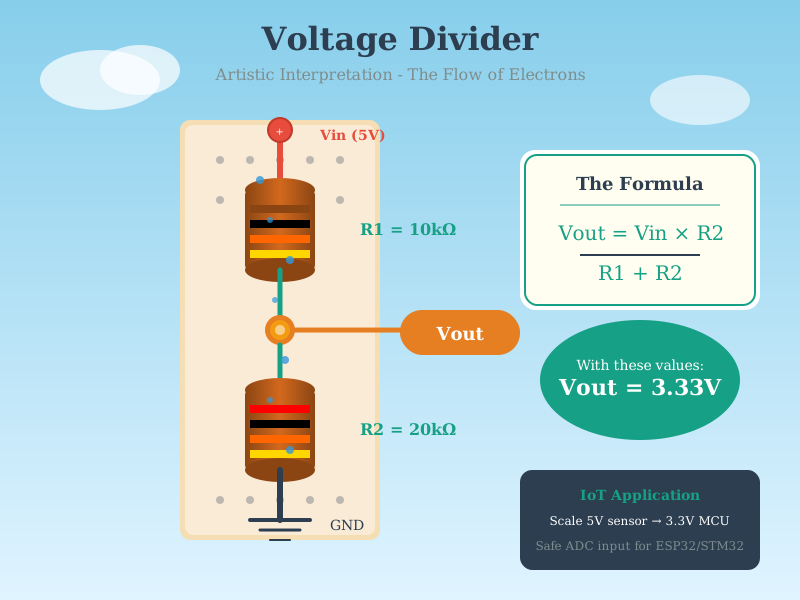
Formula: V_out = V_in × (R2 / (R1 + R2))
TipInteractive Circuit: Voltage Divider
Try it yourself! See how voltage dividers work with variable resistances.
What This Simulates: A voltage divider circuit with adjustable resistor values, showing how output voltage changes.
How to Use: 1. Click RUN/Stop button (top right) to start the simulation 2. Right-click on resistors to change their values 3. Watch the voltmeter show output voltage 4. Observe the current flow (animated dots) 5. Hover over components to see voltage/current values
525.3.1 LDR Voltage Divider Example
%%{init: {'theme': 'base', 'themeVariables': { 'primaryColor': '#2C3E50', 'primaryTextColor': '#fff', 'primaryBorderColor': '#16A085', 'lineColor': '#16A085', 'secondaryColor': '#E67E22', 'tertiaryColor': '#ECF0F1'}}}%%
flowchart TB
    VCC["+3.3V VCC"] --> LDR["LDR<br/>(200Ω bright<br/>10kΩ dark)"]
    LDR --> VOUT["V_out to ADC<br/>(1.65V-3.24V)"]
    VOUT --> R["10kΩ Fixed<br/>Resistor"]
    R --> GND["Ground (0V)"]

    style VCC fill:#E67E22,stroke:#2C3E50,color:#fff
    style LDR fill:#16A085,stroke:#2C3E50,color:#fff
    style VOUT fill:#2C3E50,stroke:#16A085,color:#fff
    style R fill:#16A085,stroke:#2C3E50,color:#fff
    style GND fill:#7F8C8D,stroke:#2C3E50,color:#fff
{fig-alt=“Voltage divider circuit diagram showing +3.3V VCC powering a light-dependent resistor (LDR) with variable resistance from 200Ω in bright light to 10kΩ in darkness, connected in series with a 10kΩ fixed resistor to ground. The midpoint voltage (V_out) ranges from 1.65V to 3.24V depending on light level and feeds into an ADC input for converting light intensity into digital values.”}
Real-World Applications: - Automatic Street Lights: Turn on when ambient light falls below threshold - Display Brightness: Adjust screen based on room lighting (phones, tablets) - Solar Panel Tracking: Detect sun position for maximum efficiency - Camera Exposure: Measure ambient light for automatic settings - Smart Blinds: Open/close based on sunlight intensity
525.4 RC (Resistor-Capacitor) Filter Circuit
Theory: RC circuits create time delays and filter signals. Essential for debouncing switches, filtering sensor noise, and creating timing circuits.
Time Constant: τ = R × C (tau, in seconds)
Cutoff Frequency: f_c = 1 / (2πRC)
CautionPitfall: Missing Pull-Up Resistors on I2C Lines
The Mistake: Connecting I2C sensors directly to microcontroller GPIO pins without external pull-up resistors, relying solely on internal weak pull-ups (40-100kohm typical).
Why It Happens: Many tutorials skip pull-up resistors because simple single-sensor setups “work” with internal pull-ups. Developers assume if it works on the bench, it will work in production.
The Fix: Always install external pull-up resistors on SDA and SCL lines:
- Standard I2C (100kHz): Use 4.7kohm pull-ups to 3.3V
- Fast I2C (400kHz): Use 2.2kohm pull-ups to 3.3V
- Multiple sensors or long wires (>30cm): Use 1kohm pull-ups
Calculation: Pull-up value = Rise Time / (0.8473 x Bus Capacitance). For 400kHz with 100pF total capacitance: R = 300ns / (0.8473 x 100pF) = 3.5kohm (use 2.2kohm standard value).
Symptoms of weak pull-ups: Intermittent communication failures, sensors work individually but not together, communication fails in humid/hot environments, NACK errors at higher clock speeds.
TipInteractive Circuit: RC Low-Pass Filter
Try it yourself! See how RC circuits filter high-frequency noise from sensor signals.
What This Simulates: An RC low-pass filter that smooths noisy sensor readings.
How to Use: 1. Click RUN/Stop button to start 2. Observe the input square wave (top oscilloscope trace) 3. See the filtered output (bottom trace) - sharp edges smoothed 4. Right-click resistor/capacitor to change values 5. Watch how time constant affects filtering
WarningTradeoff: Hardware Filtering vs Software Filtering
Option A (Hardware RC Filter): Cutoff frequency fixed at design time (f_c = 1/2piRC), no CPU overhead, power consumption adds 0.01-0.1mW, cost $0.05-0.50 for resistor/capacitor. Provides true anti-aliasing before ADC, removes high-frequency noise physically. Cannot be adjusted after deployment, requires PCB space, component tolerance affects cutoff (±10-20%). Option B (Software Digital Filter): Cutoff frequency adjustable in code, CPU overhead 0.1-2% per filter, no additional power for passive filtering but adds MCU active time. No BOM cost increase. Allows adaptive filtering based on conditions, can implement complex filters (Kalman, median). Cannot remove aliased frequencies (must sample fast enough), adds latency of N/2 samples for N-tap filter. Decision Factors: Choose hardware filtering when noise frequencies exceed half your sampling rate (prevents aliasing that software cannot fix), when CPU resources are constrained, or when EMI/RFI is severe (motor noise, switching power supplies). Choose software filtering when filter characteristics need runtime adjustment, when implementing complex filters like Kalman or adaptive algorithms, when PCB space is limited, or when different filtering is needed for different operating modes.
525.5 Transistor Switch Circuit
Theory: Transistors act as electronic switches, allowing low-power microcontroller pins to control high-power loads (LEDs, motors, relays). Essential for driving actuators.
NPN Transistor Operation: - Base voltage > 0.7V → Transistor ON (collector-emitter conducts) - Base voltage < 0.7V → Transistor OFF (no conduction)
TipInteractive Circuit: NPN Transistor LED Switch
Try it yourself! See how transistors amplify signals to control loads.
What This Simulates: An NPN transistor switching an LED on/off, controlled by a small base current.
How to Use: 1. Click RUN/Stop button 2. Click the switch (bottom left) to toggle base current 3. Watch the LED turn on/off 4. Observe current flow through the transistor 5. Right-click transistor to see β (current gain)
525.6 Basic LED Circuit
Theory: LEDs (Light Emitting Diodes) require current limiting resistors to prevent burnout. Understanding LED circuits is fundamental to building indicator lights and displays.
LED Characteristics: - Forward Voltage (V_f): ~2V (red), ~3V (blue/white) - Forward Current (I_f): 20mA typical - Polarity: Anode (+) to cathode (-)
TipInteractive Circuit: LED with Current Limiting Resistor
Try it yourself! Learn how to properly drive LEDs with current limiting.
What This Simulates: An LED circuit with adjustable current-limiting resistor.
How to Use: 1. Click RUN/Stop button 2. Right-click the resistor to change resistance 3. Watch LED brightness change 4. Observe current through LED (should be ~20mA) 5. Try removing resistor (right-click → Edit → 0Ω) - LED burns out!
525.7 Knowledge Check: Circuit Fundamentals
Knowledge Check: Circuit Fundamentals Test Your Understanding
Question 1: You connect an LDR (200Ω in bright light, 10kΩ in dark) in series with a 10kΩ resistor to 3.3V. If the LDR is on top, what happens to the voltage at the midpoint when it gets darker?
Click to see answer
Answer: The voltage decreases when it gets darker. Using voltage divider formula: V_out = 3.3V × (10kΩ / (LDR + 10kΩ)). When bright (LDR = 200Ω): V_out = 3.3V × (10k / 10.2k) = 3.24V. When dark (LDR = 10kΩ): V_out = 3.3V × (10k / 20k) = 1.65V. The output voltage drops as darkness increases LDR resistance.Question 2: An RC low-pass filter has R = 10kΩ and C = 100nF. What is the cutoff frequency, and what type of noise does it remove?
Click to see answer
Answer: Cutoff frequency = 159 Hz. Calculation: f_c = 1 / (2π × R × C) = 1 / (2π × 10kΩ × 100nF) = 1 / (6.28 × 0.001) ≈ 159 Hz. This filter removes high-frequency noise above 159 Hz (like electrical noise, switching transients) while allowing slow sensor changes to pass through. It’s ideal for smoothing noisy temperature or light sensor readings.Question 3: You need to control a 500mA DC motor with an ESP32 GPIO pin (max 20mA). Why do you need a transistor, and how does it help?
Click to see answer
Answer: A transistor acts as a current amplifier and electronic switch. The ESP32 can only source 20mA, but the motor needs 500mA—25× more current! An NPN transistor allows a small base current (~2mA from GPIO) to control a much larger collector current (500mA from external power supply). This protects the microcontroller from damage while enabling control of high-power loads. The transistor also provides voltage isolation between the 3.3V logic and potentially higher motor voltages.Question 4: Calculate the current-limiting resistor needed for a red LED (V_f = 2V, I_f = 20mA) powered by a 5V supply.
Click to see answer
Answer: 150Ω resistor is needed. Using Ohm’s Law: R = (V_supply - V_LED) / I_desired = (5V - 2V) / 0.02A = 3V / 0.02A = 150Ω. Use a standard 150Ω or 220Ω resistor. The resistor drops the excess voltage (3V) and limits current to safe 20mA. Without this resistor, the LED would draw excessive current and burn out within seconds.525.8 Quick Reference Card
TipReference Card: Component Values for Basic Sensor Circuits
| Circuit Type | Component | Value | Purpose | Calculation |
|---|---|---|---|---|
| Voltage Divider (LDR) | R1 (Fixed) | 10kΩ | Reference | Match LDR mid-range |
| Voltage Divider (Thermistor) | R1 (Fixed) | 10kΩ | Reference | Match thermistor @ 25°C |
| RC Low-Pass Filter | Resistor | 10kΩ | Filter | f_c = 1/(2πRC) |
| RC Low-Pass Filter | Capacitor | 100nF | Filter | Example: 159 Hz cutoff |
| LED Current Limit (5V) | Resistor | 220Ω | Protect LED | R = (5V-2V)/20mA |
| LED Current Limit (3.3V) | Resistor | 100Ω | Protect LED | R = (3.3V-2V)/20mA |
| 1-Wire Pull-up | Resistor | 4.7kΩ | Signal level | DHT, DS18B20 |
| I²C Pull-up | Resistor | 4.7kΩ | Signal level | SCL, SDA lines |
| Button Pull-down | Resistor | 10kΩ | Default state | Prevent floating input |
| Transistor Base | Resistor | 1kΩ | Current limit | I_base = V_GPIO/R |
Common Calculations:
Voltage Divider:
V_out = V_in × (R2 / (R1 + R2))RC Filter Cutoff Frequency:
f_c (Hz) = 1 / (2π × R × C)
Example: 10kΩ × 100nF = 159 Hz
LED Resistor:
R = (V_supply - V_LED) / I_LED
Example: (5V - 2V) / 0.02A = 150Ω → use 220Ω
Transistor Base Resistor (NPN):
R_base = (V_GPIO - 0.7V) / (I_collector / β)
Example: (3.3V - 0.7V) / (100mA / 100) = 2.6kΩ → use 1kΩ
525.9 Summary
This chapter covered the essential circuit building blocks for sensor interfacing:
- Voltage Dividers: Convert resistance changes (from LDRs, thermistors) into voltage changes readable by ADCs
- RC Filters: Remove high-frequency noise from sensor signals with simple passive components
- Transistor Switches: Allow low-power GPIO pins to control high-power loads like motors and relays
- LED Circuits: Properly calculate current-limiting resistors to protect LEDs and indicate sensor states
These fundamental circuits form the building blocks for more complex signal conditioning chains covered in the next chapter.
525.10 What’s Next
The next chapter, Signal Conditioning, covers advanced topics including the complete signal conditioning chain, Wheatstone bridges for precision measurement, instrumentation amplifiers, and worked examples for real-world sensor interfacing challenges.
NoteRelated Chapters
Circuit Fundamentals: - Electricity Fundamentals - Voltage, current, resistance basics - Electronics Fundamentals - Semiconductors and components
Next Steps: - Signal Conditioning - Advanced signal processing - ADC and Noise Reduction - Digital conversion challenges - Sensor Types - Temperature, motion, environmental sensors