%%{init: {'theme':'base', 'themeVariables': {'primaryColor':'#2C3E50','primaryTextColor':'#fff','primaryBorderColor':'#16A085','lineColor':'#16A085','secondaryColor':'#E67E22','tertiaryColor':'#ECF0F1','fontSize':'13px'}}}%%
sequenceDiagram
    participant M as ESP32 Master<br/>Wire.begin()
    participant B as I2C Bus<br/>SDA + SCL
    participant S as BMP280 Sensor<br/>Address 0x76

    Note over M,S: Reading Temperature Register (0xFA)

    M->>B: START condition<br/>(SDA falls while SCL high)
    M->>B: Device Address: 0x76<br/>(7 bits + Write bit)
    B->>S: Address match detected
    S->>B: ACK (acknowledge)

    M->>B: Register Address: 0xFA<br/>(temperature MSB)
    S->>B: ACK

    M->>B: REPEATED START<br/>(restart without STOP)
    M->>B: Device Address: 0x76<br/>(7 bits + Read bit)
    S->>B: ACK

    S->>B: Data Byte 1: 0x80<br/>(temp MSB)
    M->>B: ACK (more data expected)

    S->>B: Data Byte 2: 0x3A<br/>(temp LSB)
    M->>B: NACK (no more data)

    M->>B: STOP condition<br/>(SDA rises while SCL high)

    Note over M,S: Transaction Complete<br/>Raw temp = 0x803A<br/>Time: ~0.34ms at 400kHz
550 Sensor Communication Protocols
I2C, SPI, and Serial Interfaces for IoT Sensors
sensing
protocols
i2c
spi
interfaces
Keywords
I2C, SPI, UART, serial communication, sensor interface, ESP32, Arduino, bus protocol
550.1 Learning Objectives
By the end of this chapter, you will be able to:
- Explain the differences between I2C, SPI, and UART communication protocols
- Configure and use I2C bus for multi-sensor applications
- Implement SPI communication for high-speed sensor data transfer
- Debug common protocol issues including address conflicts and timing problems
- Select the appropriate protocol for different sensor requirements
550.2 Introduction
Sensor communication protocols are the foundation of IoT data acquisition. Every sensor reading must travel from the physical sensor to your microcontroller through a defined communication interface. Understanding these protocols enables you to design reliable, efficient sensor networks.
TipFor Beginners: What Are Communication Protocols?
Think of communication protocols like different languages. Just as people need to speak the same language to understand each other, sensors and microcontrollers need to “speak” the same protocol to exchange data. The most common “languages” are I2C (pronounced “eye-squared-see” or “eye-two-see”), SPI (“spy”), and UART (“you-art”). Each has different rules about how many wires to use, how fast to talk, and how to address specific devices.
550.3 I2C Communication Protocol
I2C (Inter-Integrated Circuit) is a two-wire synchronous protocol perfect for connecting multiple sensors using minimal GPIO pins. It uses:
- SDA (Serial Data): Bidirectional data line
- SCL (Serial Clock): Clock signal from master
- 7-bit addressing: Up to 128 devices on one bus
- Pull-up resistors: Required on both lines
550.3.1 I2C Protocol Sequence
{fig-alt=“Sensor interfacing diagram showing key components and relationships illustrating communication protocols (I2C, SPI, UART), signal conditioning circuits, data processing pipelines, or multi-sensor integration for IoT sensor networks.”}
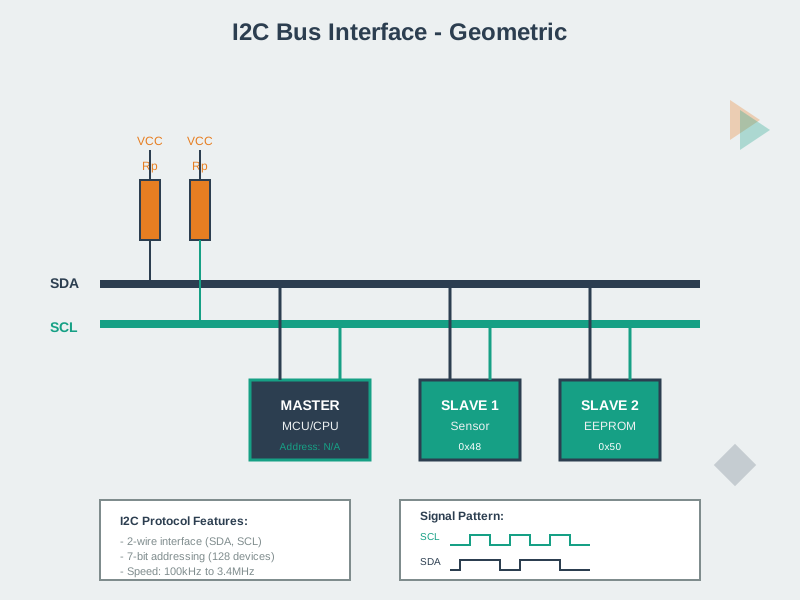
550.3.2 Key I2C Protocol Elements
- START Condition: SDA goes LOW while SCL is HIGH (signals transaction start)
- STOP Condition: SDA goes HIGH while SCL is HIGH (signals transaction end)
- ACK (Acknowledge): Receiver pulls SDA LOW during 9th clock pulse (data received successfully)
- NACK (Not Acknowledge): Receiver leaves SDA HIGH (last byte or error)
- Repeated START: START without preceding STOP (direction change from write to read)
550.3.3 I2C Implementation Example
#include <Wire.h>

#define I2C_SDA 21
#define I2C_SCL 22
#define SENSOR_ADDR 0x76

void setup() {
  Serial.begin(115200);
  Wire.begin(I2C_SDA, I2C_SCL);

  // Scan I2C bus
  scanI2C();
}

void scanI2C() {
  Serial.println("Scanning I2C bus...");
  int devices = 0;

  for(byte address = 1; address < 127; address++) {
    Wire.beginTransmission(address);
    byte error = Wire.endTransmission();

    if (error == 0) {
      Serial.print("I2C device found at 0x");
      if (address < 16) Serial.print("0");
      Serial.println(address, HEX);
      devices++;
    }
  }

  Serial.print("Found ");
  Serial.print(devices);
  Serial.println(" devices");
}

void readI2CRegister(uint8_t addr, uint8_t reg, uint8_t* data, uint8_t len) {
  Wire.beginTransmission(addr);
  Wire.write(reg);
  Wire.endTransmission(false);

  Wire.requestFrom(addr, len);
  for(int i = 0; i < len; i++) {
    if(Wire.available()) {
      data[i] = Wire.read();
    }
  }
}
NoteInteractive: I2C Bus Scanner
This simulation demonstrates how I2C bus scanning works. Add devices to the bus, then click “Scan Bus” to see the master controller query each address and detect ACK/NACK responses.
Show I2C Bus Scanner Code
i2cSensorDatabase = [
  { name: "BMP280 (Pressure)", addr: 0x76, altAddr: 0x77, category: "Environmental" },
  { name: "BME280 (Pressure/Humidity)", addr: 0x76, altAddr: 0x77, category: "Environmental" },
  { name: "MPU6050 (IMU)", addr: 0x68, altAddr: 0x69, category: "Motion" },
  { name: "ADXL345 (Accelerometer)", addr: 0x53, altAddr: 0x1D, category: "Motion" },
  { name: "BH1750 (Light)", addr: 0x23, altAddr: 0x5C, category: "Light" },
  { name: "SSD1306 (OLED Display)", addr: 0x3C, altAddr: 0x3D, category: "Display" },
  { name: "DS3231 (RTC)", addr: 0x68, altAddr: null, category: "Time" },
  { name: "PCF8574 (GPIO Expander)", addr: 0x20, altAddr: 0x27, category: "I/O" },
  { name: "ADS1115 (ADC)", addr: 0x48, altAddr: 0x49, category: "ADC" },
  { name: "INA219 (Current Sensor)", addr: 0x40, altAddr: 0x41, category: "Power" },
  { name: "SHT31 (Humidity)", addr: 0x44, altAddr: 0x45, category: "Environmental" },
  { name: "VL53L0X (Distance)", addr: 0x29, altAddr: null, category: "Distance" },
  { name: "MCP4725 (DAC)", addr: 0x60, altAddr: 0x61, category: "DAC" },
  { name: "PCA9685 (PWM Driver)", addr: 0x40, altAddr: 0x7F, category: "Motor" }
]

// State management
viewof selectedSensor = Inputs.select(
  i2cSensorDatabase.map(s => s.name),
  { label: "Add Sensor to Bus:", value: "BMP280 (Pressure)" }
)

viewof useAltAddress = Inputs.toggle({ label: "Use alternate address", value: false })

viewof addSensorBtn = Inputs.button("Add to Bus")

viewof clearBusBtn = Inputs.button("Clear Bus")

viewof scanBusBtn = Inputs.button("Scan I2C Bus", { style: "background: #16A085; color: white; font-weight: bold; padding: 8px 16px;" })

// Mutable state for devices on bus
mutable busDevices = []

// Handle adding sensor
{
  addSensorBtn;
  const sensor = i2cSensorDatabase.find(s => s.name === selectedSensor);
  if (sensor) {
    const addr = useAltAddress && sensor.altAddr ? sensor.altAddr : sensor.addr;
    // Check if address already exists
    const existing = mutable busDevices.find(d => d.addr === addr);
    if (!existing) {
      mutable busDevices = [...mutable busDevices, {
        name: sensor.name,
        addr: addr,
        category: sensor.category
      }];
    }
  }
}
Show I2C Bus Scanner Code
{
  clearBusBtn;
  mutable busDevices = [];
  mutable scanResults = null;
  mutable scanInProgress = false;
  mutable currentScanAddr = 0;
}
Show I2C Bus Scanner Code
mutable scanResults = null
mutable scanInProgress = false
mutable currentScanAddr = 0
mutable scanLog = []

// Handle scan
{
  scanBusBtn;
  if (mutable busDevices.length > 0) {
    mutable scanInProgress = true;
    mutable scanResults = null;
    mutable scanLog = [];
    mutable currentScanAddr = 0;
  }
}
Show I2C Bus Scanner Code
scanAnimation = {
  if (mutable scanInProgress) {
    const addresses = [0x20, 0x23, 0x27, 0x29, 0x3C, 0x3D, 0x40, 0x41, 0x44, 0x45, 0x48, 0x49, 0x53, 0x60, 0x68, 0x69, 0x76, 0x77];
    let found = [];
    let log = [];

    for (let addr of addresses) {
      const device = mutable busDevices.find(d => d.addr === addr);
      if (device) {
        found.push({ addr, name: device.name, ack: true });
        log.push({ addr, ack: true, name: device.name });
      } else {
        log.push({ addr, ack: false, name: null });
      }
    }

    mutable scanResults = found;
    mutable scanLog = log;
    mutable scanInProgress = false;
    return found;
  }
  return null;
}

// Visual I2C Bus Display
html`
<div style="background: linear-gradient(135deg, #1a1a2e 0%, #16213e 100%); border-radius: 12px; padding: 20px; margin: 15px 0; font-family: 'Courier New', monospace;">

  <!-- Bus Lines Header -->
  <div style="display: flex; justify-content: space-between; align-items: center; margin-bottom: 20px;">
    <div style="color: #16A085; font-weight: bold; font-size: 16px;">I2C Bus</div>
    <div style="display: flex; gap: 20px;">
      <div style="display: flex; align-items: center; gap: 5px;">
        <div style="width: 40px; height: 4px; background: #E67E22; border-radius: 2px;"></div>
        <span style="color: #E67E22; font-size: 12px;">SDA (Data)</span>
      </div>
      <div style="display: flex; align-items: center; gap: 5px;">
        <div style="width: 40px; height: 4px; background: #3498DB; border-radius: 2px;"></div>
        <span style="color: #3498DB; font-size: 12px;">SCL (Clock)</span>
      </div>
    </div>
  </div>

  <!-- Bus Lines -->
  <div style="position: relative; height: 60px; margin: 20px 0;">
    <div style="position: absolute; left: 0; right: 0; top: 15px; height: 4px; background: #E67E22; border-radius: 2px;"></div>
    <div style="position: absolute; left: 0; right: 0; top: 40px; height: 4px; background: #3498DB; border-radius: 2px;"></div>

    <!-- Master Controller -->
    <div style="position: absolute; left: 10px; top: -20px; background: #2C3E50; border: 2px solid #16A085; border-radius: 8px; padding: 8px 12px; color: white; font-size: 11px; text-align: center;">
      <div style="font-weight: bold;">ESP32</div>
      <div style="color: #16A085; font-size: 10px;">Master</div>
    </div>

    <!-- Connected Devices -->
    ${mutable busDevices.map((device, i) => html`
      <div style="position: absolute; left: ${120 + i * 100}px; top: -25px; background: #2C3E50; border: 2px solid #E67E22; border-radius: 8px; padding: 6px 10px; color: white; font-size: 10px; text-align: center; min-width: 80px;">
        <div style="font-weight: bold; white-space: nowrap; overflow: hidden; text-overflow: ellipsis; max-width: 75px;">${device.name.split(' ')[0]}</div>
        <div style="color: #E67E22; font-family: monospace;">0x${device.addr.toString(16).toUpperCase().padStart(2, '0')}</div>
      </div>
    `)}
  </div>

  <!-- Pull-up Resistors -->
  <div style="display: flex; justify-content: flex-end; gap: 30px; margin: 30px 20px 10px 0; color: #7F8C8D; font-size: 11px;">
    <div style="text-align: center;">
      <div style="width: 20px; height: 30px; background: repeating-linear-gradient(0deg, transparent, transparent 2px, #7F8C8D 2px, #7F8C8D 4px); margin: 0 auto;"></div>
      <div>4.7k</div>
      <div style="color: #E67E22;">to VCC</div>
    </div>
    <div style="text-align: center;">
      <div style="width: 20px; height: 30px; background: repeating-linear-gradient(0deg, transparent, transparent 2px, #7F8C8D 2px, #7F8C8D 4px); margin: 0 auto;"></div>
      <div>4.7k</div>
      <div style="color: #3498DB;">to VCC</div>
    </div>
  </div>

  ${mutable busDevices.length === 0 ? html`
    <div style="text-align: center; color: #7F8C8D; padding: 20px; font-style: italic;">
      No devices on bus. Add sensors using the dropdown above.
    </div>
  ` : ''}
</div>
`
Show I2C Bus Scanner Code
html`
<div style="background: #f8f9fa; border-radius: 8px; padding: 15px; margin: 15px 0; border-left: 4px solid #16A085;">
  <div style="font-weight: bold; color: #2C3E50; margin-bottom: 10px;">Scan Results</div>

  ${mutable scanResults === null ? html`
    <div style="color: #7F8C8D; font-style: italic;">Click "Scan I2C Bus" to detect devices...</div>
  ` : html`
    <div style="font-family: 'Courier New', monospace; font-size: 13px;">
      <div style="color: #2C3E50; margin-bottom: 10px;">Scanning I2C bus...</div>

      ${mutable scanLog.slice(0, 8).map(entry => html`
        <div style="display: flex; align-items: center; gap: 10px; padding: 3px 0; ${entry.ack ? 'color: #16A085; font-weight: bold;' : 'color: #BDC3C7;'}">
          <span style="width: 60px;">0x${entry.addr.toString(16).toUpperCase().padStart(2, '0')}</span>
          <span style="width: 50px;">${entry.ack ? 'ACK' : '-- NACK'}</span>
          <span>${entry.ack ? entry.name : ''}</span>
        </div>
      `)}

      ${mutable scanLog.length > 8 ? html`<div style="color: #7F8C8D;">... (${mutable scanLog.length - 8} more addresses checked)</div>` : ''}

      <div style="margin-top: 15px; padding-top: 10px; border-top: 1px solid #dee2e6;">
        <strong style="color: #16A085;">Found ${mutable scanResults.length} device(s):</strong>
        ${mutable scanResults.map(d => html`
          <div style="margin-left: 10px; color: #2C3E50;">
            - <code style="background: #e9ecef; padding: 2px 6px; border-radius: 3px;">0x${d.addr.toString(16).toUpperCase().padStart(2, '0')}</code> - ${d.name}
          </div>
        `)}
      </div>
    </div>
  `}
</div>
`
Show I2C Bus Scanner Code
html`
<div style="background: #fff; border: 1px solid #dee2e6; border-radius: 8px; padding: 15px; margin: 15px 0;">
  <div style="font-weight: bold; color: #2C3E50; margin-bottom: 10px;">Common I2C Sensor Addresses</div>

  <div style="display: grid; grid-template-columns: repeat(auto-fit, minmax(200px, 1fr)); gap: 10px;">
    ${i2cSensorDatabase.slice(0, 12).map(sensor => html`
      <div style="display: flex; align-items: center; gap: 8px; padding: 8px; background: #f8f9fa; border-radius: 6px; font-size: 12px;">
        <code style="background: #2C3E50; color: white; padding: 3px 6px; border-radius: 4px; font-weight: bold;">
          0x${sensor.addr.toString(16).toUpperCase().padStart(2, '0')}
        </code>
        <div>
          <div style="font-weight: 500; color: #2C3E50;">${sensor.name.split('(')[0].trim()}</div>
          <div style="color: #7F8C8D; font-size: 10px;">${sensor.category}</div>
        </div>
      </div>
    `)}
  </div>

  <div style="margin-top: 15px; padding: 10px; background: #fff3cd; border-radius: 6px; font-size: 12px; color: #856404;">
    <strong>Address Conflicts:</strong> Some sensors share addresses (e.g., MPU6050 and DS3231 both use 0x68).
    Use alternate addresses or I2C multiplexers (TCA9548A) to resolve conflicts.
  </div>
</div>
`
550.4 SPI Communication Protocol
SPI (Serial Peripheral Interface) is a synchronous, full-duplex communication protocol using four lines: MISO (Master In Slave Out), MOSI (Master Out Slave In), SCK (Serial Clock), and CS (Chip Select). Unlike I2C, SPI supports simultaneous bidirectional data transfer.
%%{init: {'theme':'base', 'themeVariables': {'primaryColor':'#2C3E50','primaryTextColor':'#fff','primaryBorderColor':'#16A085','lineColor':'#16A085','secondaryColor':'#E67E22','tertiaryColor':'#ECF0F1','fontSize':'13px'}}}%%
sequenceDiagram
    participant M as ESP32 Master<br/>SPI.begin()
    participant MOSI as MOSI Line<br/>(Master to Slave)
    participant MISO as MISO Line<br/>(Slave to Master)
    participant SCK as Clock (SCK)
    participant S as SD Card<br/>CS Pin

    Note over M,S: Reading Block from SD Card

    M->>S: CS LOW (select device)
    Note over S: Device activated

    M->>SCK: Generate clock pulses<br/>(1-10 MHz)

    M->>MOSI: CMD17 (READ_BLOCK)<br/>Byte 1: 0x51
    S->>MISO: (Simultaneous) Response<br/>Byte 1: 0xFF (busy)

    M->>MOSI: Block Address<br/>Bytes 2-5: Address
    S->>MISO: (Simultaneous) Dummy<br/>Bytes 2-5: 0xFF

    M->>MOSI: CRC<br/>Byte 6: Checksum
    S->>MISO: Response: 0x00<br/>(command accepted)

    loop 512 bytes
        S->>MISO: Data Byte N
        M->>MOSI: Dummy 0xFF<br/>(clocking in data)
    end

    M->>S: CS HIGH (deselect)
    Note over S: Device released

    Note over M,S: Full-Duplex Transfer<br/>Time: ~0.5ms at 10MHz<br/>Both lines active simultaneously
550.4.1 SPI vs I2C Comparison
| Feature | I2C | SPI |
|---|---|---|
| Wires | 2 (SDA, SCL) | 4+ (MISO, MOSI, SCK, CS per device) |
| Speed | 100-400 kHz (standard/fast) | 1-100 MHz |
| Topology | Multi-master, multi-slave | Single master, multi-slave |
| Addressing | 7-bit addresses (128 devices) | Hardware CS pins (limited by GPIO) |
| Data Transfer | Half-duplex (sequential) | Full-duplex (simultaneous) |
| Protocol Overhead | START, STOP, ACK/NACK | Minimal (just CS selection) |
| Typical Use | Multiple sensors, displays | High-speed: SD cards, displays, ADCs |
| GPIO Efficiency | High (2 pins for 100+ devices) | Low (4 pins + 1 per device) |
550.4.2 When to Choose Each Protocol
Choose I2C when:
- Multiple sensors needed (temperature, pressure, IMU, light)
- Limited GPIO pins available
- Moderate data rates sufficient (<100 kB/s)
- Long cable runs acceptable (up to 3 meters)
Choose SPI when:
- High-speed data transfer required (>1 MB/s)
- Large data blocks (SD cards, displays)
- Real-time requirements (<1 ms latency)
- Plenty of GPIO pins available
WarningTradeoff: I2C vs. SPI for Multi-Sensor IoT Nodes
Option A: I2C bus (BME280 + BH1750 + MPU6050): Wire count 2 (SDA, SCL shared), GPIO usage 2 pins total for 3+ sensors, max speed 400kHz (50kB/s), read latency ~500us per sensor (address + register overhead), power during transfer ~1mA, cable length up to 1-3 meters with 4.7k pull-ups
Option B: SPI bus (BME280 + SD card + TFT display): Wire count 3 shared + 1 CS per device = 6 pins for 3 devices, max speed 10-40MHz (1-5MB/s), read latency ~10us per sensor (direct register access), power during transfer ~5-10mA (higher clock), cable length 10-30cm max at high speeds
Decision Factors: For battery-powered environmental monitoring nodes with 3-5 slow sensors, I2C saves pins and power while 400kHz is adequate for 100Hz sensor reads. For data logging to SD card (500kB/s sustained), displays (30fps video), or high-speed ADCs (1MSPS), SPI is mandatory. Hybrid approach: use I2C for slow sensors, SPI for SD/display. Watch for I2C address conflicts - BME280 has only 2 addresses (0x76, 0x77), limiting you to 2 per bus without multiplexer.
550.5 Common Protocol Pitfalls
CautionPitfall: Missing or Wrong I2C Pull-Up Resistors
The Mistake: Connecting I2C sensors directly to GPIO pins without external pull-up resistors, assuming the microcontroller’s internal pull-ups are sufficient, or using incorrect resistor values that cause unreliable communication.
Why It Happens: Many tutorials skip pull-up resistors because they work in short-range prototyping. Internal pull-ups on ESP32 are weak (45-65 kohm), only suitable for very short wires (<10 cm) at low speeds. Beginners also confuse I2C (open-drain, requires pull-ups) with SPI (push-pull, no pull-ups needed).
The Fix: Always use external 4.7 kohm pull-ups for standard 100 kHz I2C and 2.2 kohm for fast mode 400 kHz. Calculate based on bus capacitance: R = tr / (0.8473 x Cbus) where tr is rise time (1000 ns standard, 300 ns fast). For 50 pF bus capacitance at 400 kHz: R = 300ns / (0.8473 x 50pF) = 7.1 kohm maximum, so 4.7 kohm provides margin. Place resistors near the master (ESP32/Arduino), not at each sensor:
// Check I2C communication health
Wire.beginTransmission(0x76);
byte error = Wire.endTransmission();
// error = 0: Success
// error = 2: NACK on address (wrong address or missing pull-ups!)
// error = 4: Other error (bus stuck, SDA/SCL shorted)
Symptom of missing pull-ups: I2C scanner finds no devices, or communication works intermittently.
CautionPitfall: SPI Mode Mismatch Causing Corrupted Data
The Mistake: Using the default SPI mode (Mode 0) when the sensor datasheet specifies a different mode, resulting in consistently wrong readings, all-zeros, or all-ones from the sensor even though communication appears to work.
Why It Happens: SPI has four modes defined by CPOL (clock polarity) and CPHA (clock phase), and unlike I2C addresses which cause obvious failures, wrong SPI mode still clocks data - it just samples at the wrong edge. The MAX31855 thermocouple ADC requires Mode 0, while the ADXL345 accelerometer uses Mode 3. Many developers copy-paste SPI initialization code without checking the specific sensor’s timing requirements.
The Fix: Check the sensor datasheet for CPOL and CPHA, then configure SPI explicitly. Mode 0: CPOL=0, CPHA=0 (clock idle low, sample on rising edge). Mode 1: CPOL=0, CPHA=1. Mode 2: CPOL=1, CPHA=0. Mode 3: CPOL=1, CPHA=1 (clock idle high, sample on falling edge):
// WRONG: Default mode may not match sensor
SPI.begin();
SPI.transfer(0x00);

// CORRECT: Explicit mode configuration
SPI.begin();
SPI.beginTransaction(SPISettings(1000000, MSBFIRST, SPI_MODE0));  // 1 MHz, MSB first, Mode 0

// For ADXL345 accelerometer (Mode 3):
SPI.beginTransaction(SPISettings(5000000, MSBFIRST, SPI_MODE3));  // 5 MHz, Mode 3

// Always end transaction when done
SPI.endTransaction();
Debug tip: If sensor returns 0x00 or 0xFF consistently, try all four SPI modes - one should produce valid register values.
550.6 Knowledge Check
Knowledge Check: Communication Protocols Test Your Understanding
Question 1: An industrial monitoring system uses an ESP32 with three I2C sensors on the same bus: BMP280 (pressure, address 0x76), BH1750 (light, address 0x23), and SHT31 (temperature/humidity, address 0x44). After adding a second BMP280 for redundancy, both pressure readings return identical values. What is the most likely cause?
Click to see answer
Answer: Both BMP280 sensors have the same I2C address (0x76). This is an I2C address collision. When ESP32 sends Wire.beginTransmission(0x76), BOTH BMP280s respond simultaneously, causing corrupted or duplicated data.
Solution: Use the BMP280’s SDO pin for address selection (SDO to GND = 0x76, SDO to VCC = 0x77), or use an I2C multiplexer (TCA9548A).Question 2: You need to read data from an SD card at 2 MB/s and also connect a BME280 environmental sensor. Which protocol combination is most appropriate?
Click to see answer
Answer: SPI for SD card, I2C for BME280. SPI can achieve 10+ MHz clock speeds needed for 2 MB/s SD card throughput. BME280 only needs occasional reads (1-10 Hz) where I2C’s 400 kHz is adequate. This hybrid approach uses the strength of each protocol.Question 3: What are the four SPI modes and what do CPOL and CPHA control?
Click to see answer
Answer: SPI modes are defined by: - CPOL (Clock Polarity): Idle state of clock (0=LOW, 1=HIGH) - CPHA (Clock Phase): Which edge samples data (0=leading, 1=trailing)
| Mode | CPOL | CPHA | Description |
|---|---|---|---|
| 0 | 0 | 0 | Clock idle LOW, sample on rising edge |
| 1 | 0 | 1 | Clock idle LOW, sample on falling edge |
| 2 | 1 | 0 | Clock idle HIGH, sample on falling edge |
| 3 | 1 | 1 | Clock idle HIGH, sample on rising edge |
550.7 Summary
This chapter covered the essential communication protocols for sensor interfacing:
- I2C Protocol: Two-wire bus with 7-bit addressing, ideal for multiple slow sensors with minimal GPIO usage
- SPI Protocol: Four-wire full-duplex interface for high-speed data transfer (SD cards, displays, high-resolution ADCs)
- Protocol Selection: Choose I2C for multi-sensor setups with limited pins; choose SPI when speed is critical
- Common Pitfalls: Pull-up resistors for I2C, SPI mode configuration, address conflict resolution
550.8 What’s Next
The next chapter covers Sensor Data Processing, including filtering techniques, calibration procedures, and data validation pipelines for reliable sensor measurements.
NoteRelated Chapters
- Sensor Fundamentals - Sensor types and characteristics
- Sensor Circuits - Analog circuit design
- Multi-Sensor Fusion - Combining sensor data