%%{init: {'theme': 'base', 'themeVariables': { 'primaryColor': '#2C3E50', 'primaryTextColor': '#fff', 'primaryBorderColor': '#16A085', 'lineColor': '#16A085', 'secondaryColor': '#E67E22', 'tertiaryColor': '#ECF0F1'}}}%%
flowchart LR
subgraph PHONE[Smartphone as IoT Sensor Node]
SENSORS[10+ Sensors<br/>GPS, Accel, Gyro<br/>Camera, Mic, Light]
COMPUTE[Powerful CPU<br/>Edge Processing<br/>ML Inference]
CONNECT[Connectivity<br/>Wi-Fi, 4G/5G<br/>Bluetooth, NFC]
UI[User Interface<br/>Display, Touch<br/>Voice Input]
end
PHONE -->|Sensing| DATA[Sensor Data<br/>Location, Motion<br/>Audio, Visual]
DATA -->|Upload| CLOUD[IoT Cloud<br/>Analytics<br/>Storage]
CLOUD -->|Commands| PHONE
style PHONE fill:#2C3E50,stroke:#16A085,color:#fff
style SENSORS fill:#E67E22,stroke:#2C3E50,color:#fff
style COMPUTE fill:#16A085,stroke:#2C3E50,color:#fff
style CONNECT fill:#E67E22,stroke:#2C3E50,color:#fff
style UI fill:#16A085,stroke:#2C3E50,color:#fff
style DATA fill:#ECF0F1,stroke:#2C3E50,color:#2C3E50
style CLOUD fill:#2C3E50,stroke:#16A085,color:#fff
580 Mobile Phone Sensors: Introduction and Architecture
NoteVideo: Smartphone Sensors
Learning Objectives
After completing this chapter, you will be able to:
- Understand the rich sensor capabilities of modern smartphones
- Access smartphone sensors using web and native APIs
- Implement mobile sensing applications for IoT systems
- Design participatory sensing and crowdsourcing systems
- Handle privacy and battery considerations in mobile sensing
- Integrate mobile sensor data with IoT platforms
- Build cross-platform mobile sensing applications
580.1 Prerequisites
Before diving into this chapter, you should be familiar with:
- Sensor Fundamentals and Types: Understanding sensor characteristics, accuracy, precision, and measurement principles is essential for interpreting mobile sensor data and choosing appropriate sampling rates.
- Sensor Interfacing and Processing: Knowledge of how sensors communicate data, filtering techniques, and calibration methods will help you effectively process mobile sensor readings and handle noise.
- Analog and Digital Electronics: Understanding ADC resolution, sampling rates, and digital signal processing provides the foundation for working with digitized sensor data from smartphones.
580.2 🌱 Getting Started (For Beginners)
TipWhy Use a Phone as a Sensor? (Simple Explanation)
Analogy: Your smartphone is like a Swiss Army knife of sensors—it has dozens of built-in tools (sensors) that IoT developers can access without buying any extra hardware.
Simple explanation: - Your phone already has 10+ sensors: GPS, accelerometer, camera, microphone, light sensor, etc. - These sensors are often better quality than cheap IoT sensors - Billions of phones already exist—instant global sensor network! - Apps can access these sensors through simple APIs
580.2.1 What Sensors Are in Your Phone?
NoteAcademic Resource: CMU Sensing Systems - Evolution of Mobile Sensing
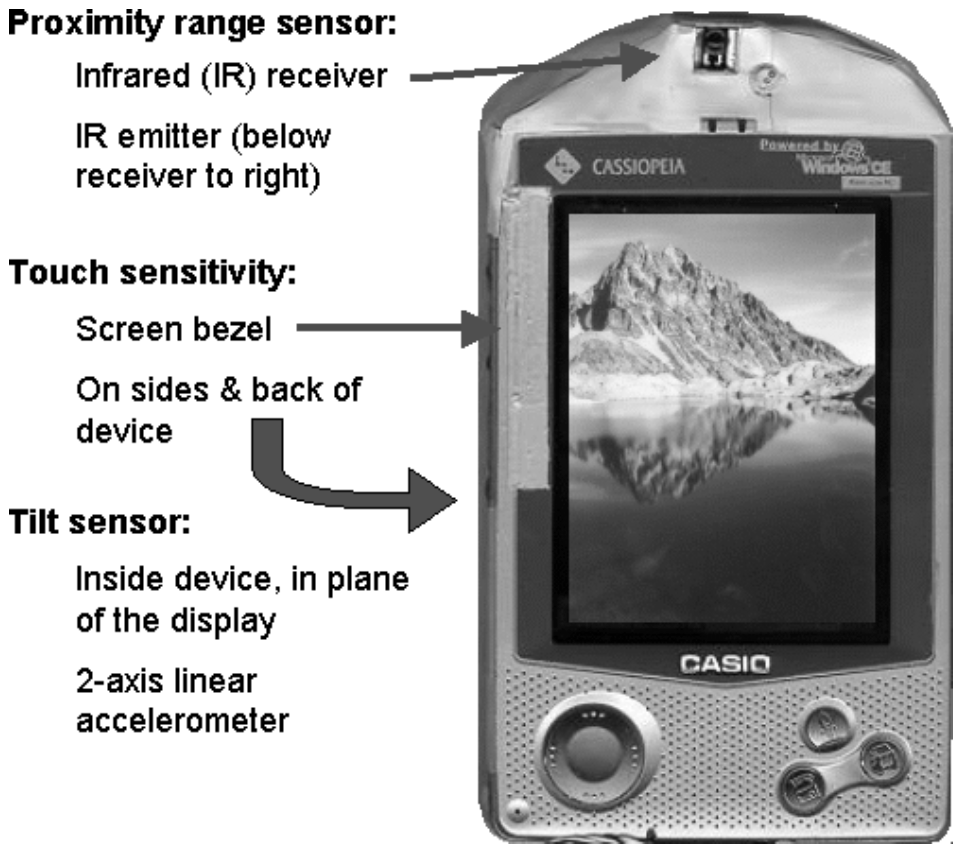
Even before smartphones, PDAs included multiple sensors for context-aware computing. This early 2000s Casio device featured:
- Proximity sensor: Infrared receiver/emitter to detect nearby objects
- Touch sensitivity: Bezel-mounted touch sensors on sides and back
- Tilt sensor: 2-axis accelerometer for orientation detection
Today’s smartphones have evolved from 3-4 sensors to 20+ sensors, enabling rich context awareness that early ubicomp researchers could only dream of.
Source: Carnegie Mellon University - Building User-Focused Sensing Systems
NoteYour Pocket Sensor Lab
Your smartphone quietly combines many different sensors:
- Cameras (2–4): photos, video, QR codes, face recognition, visual inspection.
- Microphone: sound level, voice commands, ambient audio for noise monitoring.
- GPS + GNSS: location, speed, altitude, basic outdoor navigation.
- Magnetometer: compass heading, indoor positioning aids, metal detection.
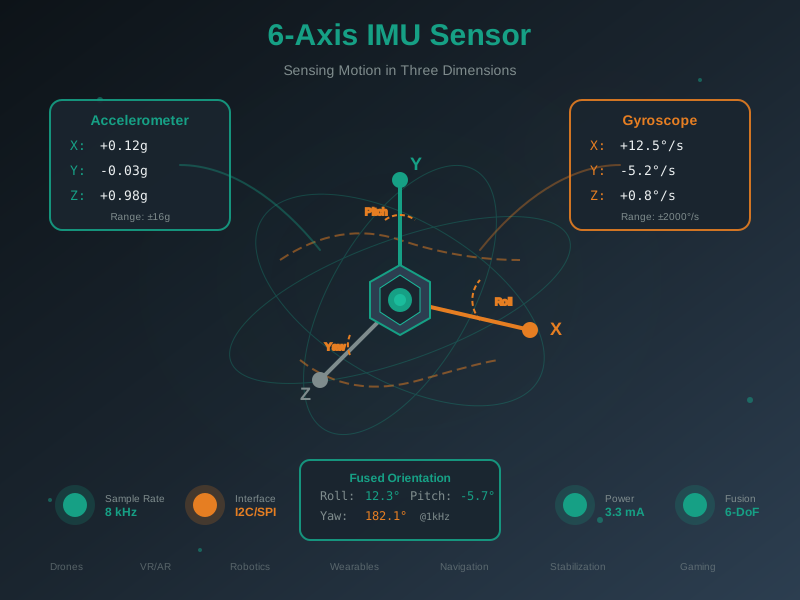
- Accelerometer + gyroscope: movement, step counting, drop detection, orientation, gaming controls.
- Light sensor: auto‑brightness, day/night detection, circadian‑aware apps.
- Proximity sensor: screen off near your ear, simple gesture detection.
- Barometer: air pressure, weather hints, floor‑level estimation.
- Battery telemetry: charge level, charging state, sometimes device temperature.
In total, most modern phones expose 10–15 sensors—a complete pocket‑sized lab.
580.2.2 Comparison: Phone vs. Dedicated IoT Sensor
| Feature | Phone Sensor | Dedicated IoT Sensor |
|---|---|---|
| Cost | Free (you already have it!) | $5-$500 per sensor |
| Quality | Often excellent (billions spent on R&D) | Varies widely |
| Battery | 1-2 days (needs daily charging) | Months to years |
| Connectivity | Wi-Fi, 4G/5G, Bluetooth | Often just one option |
| Processing | Powerful (can run ML on-device) | Usually limited |
| Maintenance | User responsible | Can be remote |
| Deployment | Need users to install app | Install once, forget |
When to use phone sensors: - Crowdsourcing data from many people - Quick prototypes (test idea before buying hardware) - Human-in-the-loop applications (need user interaction) - Short-term data collection campaigns
TipTradeoff: Phone Sensors vs Dedicated IoT Sensors
Decision context: When designing a sensing application, deciding whether to leverage users’ smartphones or deploy purpose-built IoT sensor hardware.
| Factor | Phone Sensors | Dedicated IoT Sensors |
|---|---|---|
| Power | 1-2 day battery; needs daily charging | Months to years on batteries; optimized sleep modes |
| Cost | Zero hardware cost (users own phones) | $5-$500 per sensor node; deployment costs |
| Accuracy | Consumer-grade; varies by phone model | Industrial-grade options available; consistent specs |
| Coverage | Where users go; urban bias; temporal gaps | Fixed locations; 24/7 coverage; strategic placement |
| Maintenance | User-dependent (app updates, permissions) | Remote OTA updates; predictable lifecycle |
| Data Control | Privacy concerns; users can opt out anytime | Full control; no consent friction |
| Scalability | Potentially millions of contributors | Linear cost scaling; infrastructure needed |
Choose Phone Sensors when:
- You need broad geographic coverage quickly (city-wide, crowdsourced)
- Human presence or activity is inherently part of what you are sensing
- The application benefits from user interaction (feedback, annotations)
- Budget prohibits dedicated hardware deployment
- Data gaps are acceptable (opportunistic rather than continuous)
Choose Dedicated IoT Sensors when:
- Continuous, unattended monitoring is required (24/7/365)
- Precise sensor placement matters (specific locations, heights, orientations)
- Industrial-grade accuracy or specific sensor types are needed
- Long-term deployment without user involvement (infrastructure monitoring)
- Regulatory or compliance requirements demand controlled data collection
Default recommendation: Start with phone-based prototyping to validate the application concept and identify coverage gaps, then deploy dedicated sensors only where continuous, high-reliability data is essential.
580.2.3 Real-World Examples
Example 1: Pothole Detection
Many cities now detect potholes using accelerometers and GPS in drivers’ phones instead of sending inspection trucks:
- A phone mounted in a car continuously samples acceleration.
- A sharp vertical jolt that exceeds a threshold is tagged as a potential pothole.
- At the same moment, the app records GPS latitude/longitude and time.
- The event is uploaded to a city server whenever connectivity is available.
- The server aggregates reports from thousands of vehicles and marks locations with repeated hits as confirmed potholes.
This crowdsourced approach is almost free and keeps maps of road damage up to date in near real time.
Example 2: Earthquake Early Warning
In some deployments, millions of phones act as a distributed vibration sensor:
- Each phone runs a background app that watches for characteristic shaking patterns using the accelerometer.
- When enough nearby phones report strong shaking within a short time window, a central server infers that an earthquake is in progress.
- The server estimates the epicentre and wave propagation speed.
- Alert messages are pushed to phones and public warning systems in regions that have not yet felt the shaking.
Because seismic waves travel more slowly than radio signals, people tens or hundreds of kilometres away can receive several seconds of warning, enough to take protective action.
580.2.4 Accessing Phone Sensors (Quick Overview)
NoteTwo Ways to Access Sensors
1. Web API (Browser-based)
// Works in any web browser!
if ('Geolocation' in navigator) {
    navigator.geolocation.getCurrentPosition(pos => {
        console.log(`Lat: ${pos.coords.latitude}`);
        console.log(`Lon: ${pos.coords.longitude}`);
    });
}
Pro: No app install needed. Con: Limited sensor access.
2. Native App (iOS/Android)
// Android example
SensorManager sm = getSystemService(SENSOR_SERVICE);
Sensor accel = sm.getDefaultSensor(Sensor.TYPE_ACCELEROMETER);
sm.registerListener(this, accel, SensorManager.SENSOR_DELAY_NORMAL);
Pro: Full sensor access. Con: Users must install app.
580.2.5 Self-Check Questions
Before diving into the technical details, test your understanding:
- Sensor Count: How many sensors are typically in a modern smartphone?
- Answer: 10-15 sensors including accelerometer, gyroscope, GPS, magnetometer, barometer, cameras, microphones, proximity sensor, light sensor, and more.
- Trade-off: Why not always use phone sensors instead of dedicated IoT sensors?
- Answer: Phones need daily charging, require users to install apps, and aren’t suited for unattended/remote deployments. Dedicated sensors can run for years without maintenance.
- Crowdsourcing: What is “participatory sensing”?
- Answer: Using data from many volunteer smartphone users to collect information about the environment—like traffic, air quality, or road conditions.
580.3 Introduction
Modern smartphones are sophisticated sensor platforms that carry more sensors than most dedicated IoT devices. With accelerometers, gyroscopes, GPS, cameras, microphones, proximity sensors, and more—all connected to powerful processors and ubiquitous network connectivity—smartphones have become essential components of IoT ecosystems.
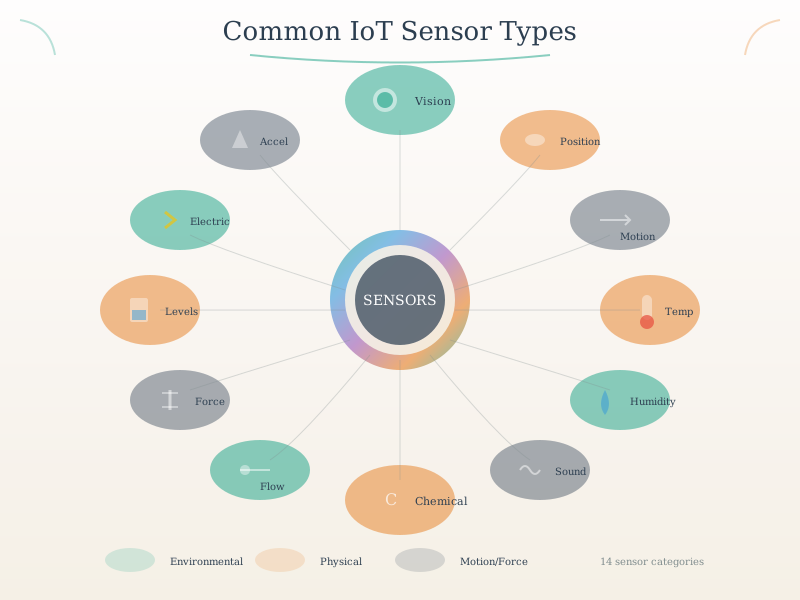
The smartphone represents the most sensor-rich consumer device ever created. Each sensor provides a different view of the user’s context, and when combined through sensor fusion algorithms, they enable applications that would be impossible with any single sensor alone.
NoteKey Concepts
- Participatory Sensing: Crowdsourcing data collection from volunteer smartphone users for environmental monitoring
- Generic Sensor API: Web standard enabling browser-based access to smartphone sensors without native apps
- Sensor Fusion: Combining data from multiple smartphone sensors (accelerometer + gyroscope + magnetometer) for accuracy
- Differential Privacy: Adding controlled noise to sensor data to protect individual user privacy while preserving aggregate patterns
- Geofencing: Creating virtual boundaries that trigger actions when a device enters or leaves a geographic area
- Battery-Aware Sampling: Adapting sensor sampling rates based on battery level and charging status to optimize energy use
NoteMobile Phone Advantages
- Multi-sensor platform: 10+ sensors in a single device
- Always connected: Wi-Fi, cellular, Bluetooth
- High computational power: Capable of edge processing
- User interface: Built-in display, touch, voice
- Ubiquitous: Billions of devices worldwide
- Cost-effective: No additional hardware needed
NoteKey Takeaway
In one sentence: Smartphones pack 15+ sensors into a pocket-sized package, enabling participatory sensing at scale–but with trade-offs in battery life and data consistency.
Remember this rule: Phone sensors are opportunistic–design for inconsistent availability, varying accuracy across devices, and always implement graceful degradation when sensors become unavailable.
WarningCommon Misconception: “Smartphone Sensors Are Always Accurate”
The Myth: Many developers assume smartphone sensors (especially GPS) provide consistent, high-accuracy measurements regardless of environment.
The Reality: Sensor accuracy degrades dramatically in real-world conditions:
- GPS accuracy: 5-10m outdoors → 20-50m indoors → completely unavailable in buildings
- Accelerometer drift: Uncalibrated sensors can accumulate 10-20% error over 100 steps in step counting
- Magnetometer interference: Metal structures cause 30-90° compass errors in urban environments
- Battery drain: Continuous GPS polling drains 40-50% battery in 4 hours vs. 5% with adaptive sampling
Quantified Example - Traffic Monitoring Study:
A 2019 MIT study of smartphone-based traffic monitoring across Boston revealed:
- Outdoor highways: 92% accuracy with 5-10m GPS precision → successful congestion detection
- Urban canyons: Accuracy dropped to 67% due to GPS multipath errors (signals bouncing off buildings)
- Tunnels/parking garages: 0% accuracy → GPS completely unavailable, required sensor fusion with accelerometer
- Battery impact: Naive continuous polling drained phones in 3-4 hours; adaptive sampling extended to 12+ hours
Best Practice: Always implement sensor fusion (combine GPS + accelerometer + Wi-Fi positioning), calibration routines, and adaptive sampling strategies. Test in real deployment environments—lab accuracy rarely matches field conditions.
NoteAlternative View: Smartphone Sensing Data Pipeline Timeline
This timeline variant shows the temporal journey of sensor data from physical event detection through processing to cloud delivery, helping understand latency budgets and processing stages.
%%{init: {'theme': 'base', 'themeVariables': { 'primaryColor': '#2C3E50', 'primaryTextColor': '#fff', 'primaryBorderColor': '#16A085', 'lineColor': '#16A085', 'secondaryColor': '#E67E22', 'tertiaryColor': '#ECF0F1', 'fontSize': '11px'}}}%%
flowchart LR
    subgraph T0["0ms: Physical Event"]
        E1["User starts<br/>walking"]
    end

    subgraph T1["1-10ms: Sensor Detection"]
        S1["Accelerometer<br/>detects motion"]
        S2["Gyroscope<br/>detects rotation"]
    end

    subgraph T2["10-50ms: Local Processing"]
        P1["Sensor fusion<br/>algorithm"]
        P2["Activity<br/>classification"]
    end

    subgraph T3["50-200ms: Edge ML"]
        M1["On-device ML<br/>inference"]
        M2["Step count<br/>++1"]
    end

    subgraph T4["200-2000ms: Cloud Upload"]
        C1["Batch data<br/>via Wi-Fi/4G"]
        C2["Analytics<br/>dashboard update"]
    end

    E1 --> S1
    E1 --> S2
    S1 --> P1
    S2 --> P1
    P1 --> P2
    P2 --> M1
    M1 --> M2
    M2 --> C1
    C1 --> C2

    style T0 fill:#E67E22,stroke:#2C3E50
    style T1 fill:#16A085,stroke:#2C3E50
    style T2 fill:#2C3E50,stroke:#16A085
    style T3 fill:#16A085,stroke:#2C3E50
    style T4 fill:#7F8C8D,stroke:#2C3E50
%%{init: {'theme': 'base', 'themeVariables': { 'primaryColor': '#2C3E50', 'primaryTextColor': '#fff', 'primaryBorderColor': '#16A085', 'lineColor': '#16A085', 'secondaryColor': '#E67E22', 'tertiaryColor': '#ECF0F1', 'fontSize': '10px'}}}%%
flowchart TB
    subgraph phone["SMARTPHONE SENSOR"]
        P1["Cost: $0<br/>(user-owned)"]
        P2["Deployment: Instant<br/>(app download)"]
        P3["Coverage: Millions<br/>(existing phones)"]
        P4["Battery: 4-12 hours<br/>(shared with apps)"]
        P5["Accuracy: Variable<br/>(phone quality)"]
    end

    subgraph dedicated["DEDICATED IoT SENSOR"]
        D1["Cost: $10-100<br/>(per node)"]
        D2["Deployment: Days/Weeks<br/>(install hardware)"]
        D3["Coverage: Limited<br/>(where installed)"]
        D4["Battery: 1-10 years<br/>(optimized)"]
        D5["Accuracy: Controlled<br/>(calibrated)"]
    end

    subgraph choice["WHEN TO USE WHICH?"]
        C1["Smartphone: Traffic, crowds,<br/>citizen science, health tracking"]
        C2["Dedicated: Industrial, agriculture,<br/>remote, continuous monitoring"]
    end

    phone --> C1
    dedicated --> C2

    style phone fill:#E8F5E9,stroke:#16A085
    style dedicated fill:#FFF3E0,stroke:#E67E22
    style choice fill:#E3F2FD,stroke:#2C3E50
{fig-alt=“Smartphone as IoT sensor node architecture flowchart showing four core subsystems within the phone: Sensors subsystem (10+ sensors including GPS, accelerometer, gyroscope, camera, microphone, and light sensor), Compute subsystem (powerful CPU enabling edge processing and machine learning inference on-device), Connectivity subsystem (Wi-Fi, 4G/5G cellular, Bluetooth, and NFC radios for multi-protocol communication), and User Interface subsystem (display, touchscreen, and voice input for human interaction). The system generates sensor data (location, motion, audio, visual) that uploads to IoT cloud for analytics and storage, with bidirectional communication allowing cloud to send commands back to smartphone for actuator control or notifications.”}
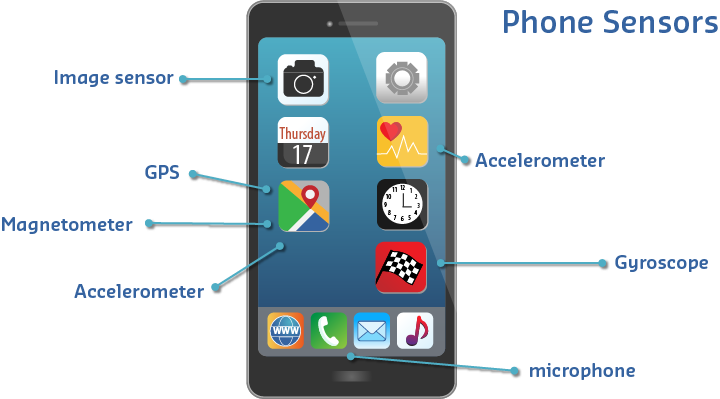
Sensors available in modern mobile phones
580.3.1 Comprehensive Sensor Ecosystem
Modern smartphones integrate multiple sensor categories that work together to enable sophisticated IoT applications:
%%{init: {'theme': 'base', 'themeVariables': { 'primaryColor': '#2C3E50', 'primaryTextColor': '#fff', 'primaryBorderColor': '#16A085', 'lineColor': '#16A085', 'secondaryColor': '#E67E22', 'tertiaryColor': '#ECF0F1'}}}%%
mindmap
  root((24 Smartphone<br/>Sensors))
    Motion Sensors
      Accelerometer
        3-axis linear acceleration
        ±2g to ±16g range
        50-200 Hz sampling
        Activity recognition
        Fall detection
      Gyroscope
        3-axis angular velocity
        ±250 to ±2000°/s
        Rotation tracking
        AR/VR orientation
      Magnetometer
        3-axis magnetic field
        Compass heading
        Indoor navigation
      Step Counter
        Pedometer
        Calories burned
    Position Sensors
      GPS/GNSS
        5-10m outdoor accuracy
        Lat/Lon/Alt
        Navigation
      Wi-Fi Positioning
        10-100m indoor
        Triangulation
      Bluetooth Beacons
        1-50m proximity
        Indoor wayfinding
      Barometer
        ±1 hPa pressure
        Altitude/Floor level
    Environmental
      Ambient Light
        0-100,000 lux
        Auto brightness
        Circadian tracking
      Proximity
        0-10 cm detection
        Call handling
        Gesture control
      Temperature
        Device thermal
        Limited accuracy
    Multimedia
      Camera Array
        2-4 cameras
        4K+ video
        QR codes
        Face recognition
        Object detection
      Microphone
        Audio capture
        Noise cancellation
        Voice commands
        Sound monitoring
    Biometric
      Fingerprint
        Authentication
        Secure payments
      Face Recognition
        3D facial mapping
        Unlock device
      Heart Rate
        PPG sensor
        Health monitoring
    Connectivity
      Wi-Fi Signal
        RSSI strength
        Network quality
      Cellular Signal
        4G/5G strength
        Network monitoring
      Bluetooth RSSI
        Proximity detection
        Contact tracing
      NFC
        Close-range comms
        Payments
{fig-alt=“Mobile sensor architecture diagram showing key components and relationships illustrating smartphone sensor types (accelerometer, gyroscope, GPS, camera), sensor fusion algorithms, data collection methods, or mobile sensing applications in IoT ecosystems.”}
Comprehensive smartphone sensor ecosystem showing six major sensor categories: Motion (accelerometer, gyroscope, magnetometer, step counter), Position (GPS/GNSS, barometer, Wi-Fi triangulation, Bluetooth beacons), Environmental (ambient light, proximity, temperature, humidity), Multimedia (camera array, microphone, speaker), Biometric (fingerprint, face recognition, heart rate), and Connectivity (Wi-Fi signal, cellular signal, Bluetooth RSSI, NFC). Each sensor category includes specifications such as measurement ranges, accuracy levels, and typical sampling rates.
TipAI-Generated Figure: Smartphone Sensor Ecosystem (Artistic Rendering)
Modern smartphones integrate more than 20 sensors, making them powerful mobile sensing platforms for IoT applications.
580.4 Smartphone Sensor Inventory
580.4.1 Motion Sensors
| Sensor | Measurement | Typical Range | Sampling Rate | Use Cases |
|---|---|---|---|---|
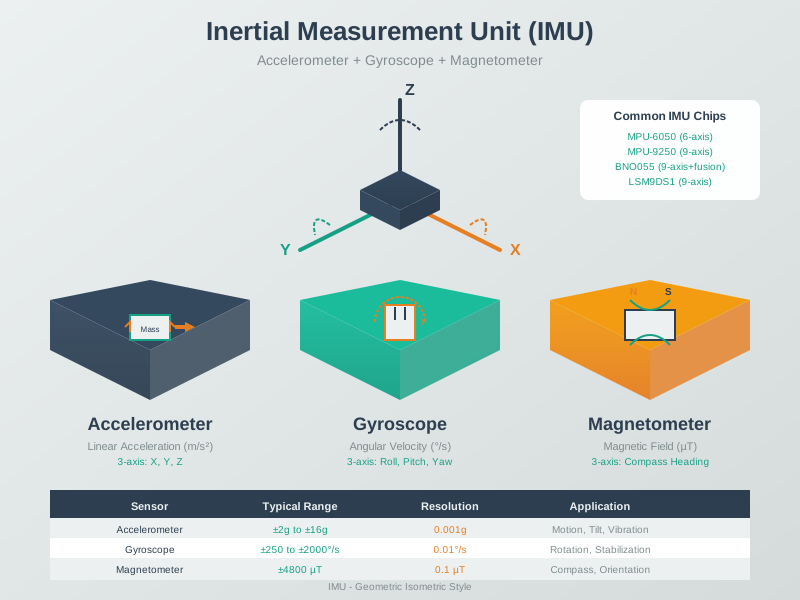
| Accelerometer | Linear acceleration (3-axis) | ±2g to ±16g | 50-200 Hz | Activity recognition, fall detection, gestures |
| Gyroscope | Angular velocity (3-axis) | ±250 to ±2000°/s | 50-200 Hz | Rotation, orientation, navigation |
| Magnetometer | Magnetic field (3-axis) | ±50µT to ±1300µT | 10-100 Hz | Compass, indoor navigation |
580.4.2 Position Sensors
| Sensor | Measurement | Accuracy | Update Rate | Use Cases |
|---|---|---|---|---|
| GPS/GNSS | Latitude/longitude | 5-10m (outdoor) | 1-10 Hz | Location tracking, geofencing, navigation |
| Wi-Fi Positioning | Location via Wi-Fi triangulation | 10-100m | Variable | Indoor positioning |
| Bluetooth Beacons | Proximity to known beacons | 1-50m | Variable | Indoor navigation, proximity marketing |
| Barometer | Atmospheric pressure | ±1 hPa | 1-10 Hz | Altitude, floor level detection |
580.4.3 Environmental Sensors
| Sensor | Measurement | Range | Use Cases |
|---|---|---|---|
| Ambient Light | Illuminance | 0-100,000 lux | Display brightness, circadian rhythm tracking |
| Proximity | Object distance | 0-10 cm | Call handling, gesture control |
| Temperature | Device temperature | -40 to 85°C | Environmental monitoring (limited) |
580.4.4 Multimedia Sensors
| Sensor | Capabilities | Use Cases |
|---|---|---|
| Camera | Image/video capture, 4K+, multiple lenses | Visual recognition, AR, QR codes, object detection |
| Microphone | Audio capture, noise cancellation | Voice commands, sound monitoring, acoustic sensing |
| Fingerprint | Biometric authentication | Secure access, payments |
| Face Recognition | 3D facial mapping | Authentication, emotion detection |
580.5 Mobile Sensing Architecture
580.5.1 End-to-End Data Flow
Mobile sensing applications follow a multi-tier architecture from sensor hardware to cloud analytics:
%%{init: {'theme': 'base', 'themeVariables': { 'primaryColor': '#2C3E50', 'primaryTextColor': '#fff', 'primaryBorderColor': '#16A085', 'lineColor': '#16A085', 'secondaryColor': '#E67E22', 'tertiaryColor': '#ECF0F1'}}}%%
flowchart TB
    subgraph DEVICE[Device Layer - Smartphone Hardware]
        SENSORS[Physical Sensors<br/>Accelerometer, GPS<br/>Camera, Microphone<br/>Light, Proximity]
        HAL[Hardware Abstraction<br/>Sensor Drivers<br/>Calibration]
        OS[OS Sensor Framework<br/>Android SensorManager<br/>iOS CoreMotion]
    end

    subgraph APP[Application Layer - Software]
        WEBAPI[Web APIs<br/>Generic Sensor API<br/>Geolocation API<br/>getUserMedia]
        NATIVE[Native APIs<br/>Android SensorManager<br/>iOS CoreMotion<br/>React Native]
        PROCESS[Local Processing<br/>Filtering<br/>Privacy Protection<br/>Feature Extraction]
        STORAGE[Local Storage<br/>Offline Caching<br/>IndexedDB/SQLite]
    end

    subgraph NETWORK[Network Layer - Communication]
        PROTO[Protocols<br/>HTTP/HTTPS<br/>WebSocket<br/>MQTT, CoAP]
        SECURE[Security<br/>TLS/SSL Encryption<br/>Authentication<br/>Data Anonymization]
    end

    subgraph CLOUD[Cloud/Edge Layer - Backend]
        GATEWAY[API Gateway<br/>Load Balancing<br/>Rate Limiting]
        ANALYTICS[Data Analytics<br/>Machine Learning<br/>Pattern Recognition]
        DATABASE[Time-Series DB<br/>InfluxDB, TimescaleDB<br/>Historical Data]
        VIZ[Visualization<br/>Dashboards<br/>Alerts]
    end

    SENSORS --> HAL
    HAL --> OS
    OS --> WEBAPI
    OS --> NATIVE
    WEBAPI --> PROCESS
    NATIVE --> PROCESS
    PROCESS --> STORAGE
    PROCESS --> PROTO
    PROTO --> SECURE
    SECURE --> GATEWAY
    GATEWAY --> ANALYTICS
    ANALYTICS --> DATABASE
    DATABASE --> VIZ
    VIZ -.->|Feedback| APP

    style DEVICE fill:#E67E22,stroke:#2C3E50,color:#fff
    style APP fill:#16A085,stroke:#2C3E50,color:#fff
    style NETWORK fill:#2C3E50,stroke:#16A085,color:#fff
    style CLOUD fill:#E67E22,stroke:#2C3E50,color:#fff
{fig-alt=“Mobile sensor architecture diagram showing Device Layer - Smartphone Hardware, Physical Sensors Accelerometer, GPS Camera, Microphone Light, Proximity, Hardware Abstraction Sensor Drivers Calibration illustrating smartphone sensor types (accelerometer, gyroscope, GPS, camera), sensor fusion algorithms, data collection methods, or mobile sensing applications in IoT ecosystems.”}
Mobile sensing architecture showing the complete data flow from physical sensors to cloud analytics. The Device Layer includes physical sensors (accelerometer, GPS, camera, microphone, light sensors), hardware abstraction layer with sensor drivers, and the operating system sensor framework. The Application Layer contains Web APIs (Generic Sensor API, Geolocation API, getUserMedia), Native APIs (Android SensorManager, iOS CoreMotion, React Native), local processing for filtering and privacy protection, and local storage for offline caching. The Network Layer handles communication protocols (HTTP/HTTPS, WebSocket, MQTT, CoAP) and security (TLS/SSL encryption, authentication, data anonymization). The Cloud/Edge Layer includes API gateway for load balancing, data analytics with machine learning, time-series databases, and visualization dashboards with feedback loops to the application layer.
This architecture enables mobile phones to function as sophisticated IoT sensor nodes, collecting data locally, processing it for privacy and efficiency, transmitting securely over networks, and feeding into cloud-based analytics systems for large-scale insights.
580.6 What’s Next
Now that you understand smartphone sensor capabilities and architecture, continue to:
- Mobile Phone APIs: Learn how to access smartphone sensors using Web APIs and native mobile frameworks
- Participatory Sensing: Explore crowdsourcing applications, privacy considerations, and battery optimization strategies
- Mobile Phone Labs: Practice with hands-on labs building mobile sensing applications
Return to: Mobile Phone as a Sensor Overview