%% fig-alt: "Attack vector diagram for smart home system showing four main entry points: Network attacks including Wi-Fi cracking, man-in-the-middle, and default credentials; Mobile app attacks including phishing, app vulnerabilities, and stolen phone; Cloud service attacks including account takeover, cloud breach, and API exploits; Physical access attacks including USB debug port, reset button, and device theft."
%%{init: {'theme': 'base', 'themeVariables': {'primaryColor':'#2C3E50','primaryTextColor':'#fff','primaryBorderColor':'#16A085','lineColor':'#16A085','secondaryColor':'#E67E22','tertiaryColor':'#7F8C8D'}}}%%
graph TD
    A["Smart Home System"] --> B["Attack Vectors"]

    B --> C1["Network Attacks"]
    B --> C2["Mobile App"]
    B --> C3["Cloud Service"]
    B --> C4["Physical Access"]

    C1 --> D1["Wi-Fi password cracking"]
    C1 --> D2["Man-in-the-middle"]
    C1 --> D3["Default credentials"]

    C2 --> D4["Phishing"]
    C2 --> D5["App vulnerabilities"]
    C2 --> D6["Stolen phone"]

    C3 --> D7["Account takeover"]
    C3 --> D8["Cloud breach"]
    C3 --> D9["API exploits"]

    C4 --> D10["USB debug port"]
    C4 --> D11["Reset button"]
    C4 --> D12["Device theft"]

    style A fill:#2C3E50,stroke:#16A085,stroke-width:2px,color:#fff
    style B fill:#E67E22,stroke:#2C3E50,stroke-width:2px,color:#fff
    style C1 fill:#E67E22,stroke:#2C3E50,stroke-width:2px,color:#fff
    style C2 fill:#E67E22,stroke:#2C3E50,stroke-width:2px,color:#fff
    style C3 fill:#E67E22,stroke:#2C3E50,stroke-width:2px,color:#fff
    style C4 fill:#E67E22,stroke:#2C3E50,stroke-width:2px,color:#fff
1397 Threat Modeling Introduction and Fundamentals
1397.1 Learning Objectives
By the end of this chapter, you will be able to:
- Apply Threat Modeling Frameworks: Use STRIDE, DREAD, and attack trees to systematically identify IoT vulnerabilities
- Identify Attack Surfaces: Map device, network, and cloud attack vectors in IoT architectures
- Prioritize Security Risks: Assess threat severity based on likelihood, impact, and exploitability
- Design Mitigations: Develop countermeasures for identified threats including authentication, encryption, and monitoring
- Create Threat Models: Document comprehensive threat models for IoT system designs
- Implement Defense in Depth: Apply layered security controls across the IoT stack
NoteRelated Chapters & Resources
Security Fundamentals: - Security Overview - Security landscape - Cyber Security Methods - Defense techniques - Encryption Fundamentals - Cryptographic protection
Privacy Context: - Privacy Introduction - Privacy principles - Privacy by Design - Built-in privacy - Mobile Privacy - Mobile-specific concerns
Implementation: - Device Security - Device hardening - Secure Data - Data protection
Product Security Analysis:
Learning Hubs: - Quiz Navigator - Security quizzes
TipFor Beginners: Threat Modelling and Mitigation
What is Threat Modelling? Threat modelling is a structured process for identifying potential security threats to an IoT system before attackers exploit them. Like planning home security based on what you own and your neighborhood’s crime rate, threat modelling systematically identifies: what you’re protecting (assets like devices and data), who might attack (threat actors from script kiddies to nation states), how they’d attack (attack vectors like network exploits or physical tampering), and how to defend (mitigations like encryption and access control).
Why does it matter? Fixing security vulnerabilities after deployment is 100x more expensive than designing security from the start. Threat modelling identifies weaknesses during the design phase when changes are easy and cheap. The STRIDE framework systematically uncovers threats: Spoofing (fake identity), Tampering (data modification), Repudiation (denying actions), Information Disclosure (data leaks), Denial of Service (making systems unavailable), and Elevation of Privilege (gaining unauthorized access). DREAD scoring then prioritizes which threats to fix first based on Damage potential, Reproducibility, Exploitability, Affected users, and Discoverability.
Key terms: | Term | Definition | |——|————| | STRIDE | Microsoft threat model framework: Spoofing, Tampering, Repudiation, Information disclosure, Denial of service, Elevation of privilege | | DREAD | Risk assessment scoring: Damage, Reproducibility, Exploitability, Affected users, Discoverability (0-10 scale) | | Attack Surface | All possible entry points attackers can exploit (network ports, APIs, physical interfaces, user inputs) | | Attack Tree | Hierarchical diagram showing step-by-step paths attackers take to compromise systems | | Defense in Depth | Layering multiple independent security controls so breaching one doesn’t compromise entire system | | Residual Risk | Remaining risk after implementing mitigations that must be accepted or transferred through insurance |
TipMVU: Threat Modeling Fundamentals
Core Concept: Threat modeling systematically identifies security vulnerabilities before attackers exploit them by asking: what are we protecting, who might attack, how would they attack, and how do we stop them. Why It Matters: Fixing security flaws after deployment costs 100x more than designing security from the start; threat modeling catches weaknesses when changes are cheap. Key Takeaway: Use STRIDE (Spoofing, Tampering, Repudiation, Information disclosure, Denial of service, Elevation of privilege) to systematically identify threats, then DREAD scoring to prioritize which to fix first.
1397.2 Prerequisites
Before diving into this chapter, you should be familiar with:
- Security and Privacy Overview: Understanding of the CIA triad, basic security principles, and IoT-specific attack surfaces provides essential context for identifying and modeling threats
- Networking Basics: Knowledge of network protocols, communication layers, and data flow helps map attack vectors and entry points in IoT systems
- Introduction to Privacy: Understanding privacy threats and regulatory requirements ensures threat models address both security and privacy risks
1397.3 🌱 Getting Started (For Beginners)
1397.3.1 What is Threat Modeling? (Simple Explanation)
Analogy: Think of threat modeling as “planning your home security based on what you own and where you live”.
Just like you wouldn’t install the same security for every home:
| Home Type | What’s Inside | Neighborhood | Security Level |
|---|---|---|---|
| College dorm | Laptop, clothes | Campus police | Basic lock, don’t share key 🔒 |
| Suburban house | Electronics, jewelry | Low crime | Deadbolt, alarm system, Ring doorbell 🏠 |
| Jewelry store | $500K inventory | High foot traffic | Security cameras, motion sensors, armed guards, vault 💎 |
| Military base | Classified documents | Hostile threats | Armed guards, biometrics, surveillance, restricted access 🛡️ |
You assess:
- What you’re protecting (assets)
- Who might attack you (threats)
- How they might break in (attack vectors)
- How to stop them (mitigations)
This is threat modeling for IoT! You figure out what attackers want, how they’d get it, and how to stop them.
1397.3.2 Real-World Example: Smart Home Threat Model
Let’s build a simple threat model for a smart home:
1397.3.2.1 Step 1: Identify Your Assets (What Are You Protecting?)
| Asset | Value | Why Attackers Care |
|---|---|---|
| Smart door lock | Physical security | Break in, steal belongings |
| Security camera footage | Privacy | Spy on you, blackmail |
| Wi-Fi password | Network access | Pivot to other devices, bandwidth theft |
| Amazon Alexa | Voice recordings | Privacy invasion, identity theft |
| Smart thermostat schedule | Occupancy data | Know when you’re away (burglary planning) |
1397.3.2.2 Step 2: Identify Threats (Who Wants to Attack You?)
| Threat Actor | Motivation | Skill Level | Likelihood |
|---|---|---|---|
| Opportunistic hacker (script kiddie) | Botnet recruitment, pranks | Low | High (automated scans) |
| Neighbor | Curiosity, grudge | Low-Medium | Medium |
| Burglar | Physical theft | Low | Medium |
| Stalker/Ex-partner | Harassment, control | Medium | Low (but high impact) |
| State-level actor | Espionage | Very High | Very Low (unless you’re high-profile) |
Key insight: Most threats are low-skill opportunistic attacks (like Mirai botnet scanning for default passwords), not sophisticated hackers.
1397.3.2.3 Step 3: Identify Attack Vectors (How Can They Attack?)
NoteAlternative View: Risk-Prioritized Attack Matrix
This view prioritizes attack vectors by likelihood and impact to guide security investments:
%% fig-alt: "Risk matrix showing attack vectors prioritized by likelihood and impact: High likelihood high impact attacks like default credentials and cloud breach are critical priority; High likelihood low impact attacks like Wi-Fi cracking are medium priority; Low likelihood high impact attacks like targeted physical theft are conditional priority; Low likelihood low impact attacks are low priority."
%%{init: {'theme': 'base', 'themeVariables': {'primaryColor':'#2C3E50','primaryTextColor':'#fff','primaryBorderColor':'#16A085','lineColor':'#16A085','secondaryColor':'#E67E22','tertiaryColor':'#7F8C8D'}}}%%
graph TB
    subgraph HighHigh["CRITICAL: High Likelihood + High Impact"]
        HH1["Default credentials<br/>Automated scans 24/7"]
        HH2["Cloud account takeover<br/>Password reuse epidemic"]
        HH3["API exploits<br/>Mass vulnerability scans"]
    end

    subgraph HighLow["MEDIUM: High Likelihood + Low Impact"]
        HL1["Wi-Fi cracking<br/>Slow attacks, limited gain"]
        HL2["App phishing<br/>User awareness helps"]
    end

    subgraph LowHigh["CONDITIONAL: Low Likelihood + High Impact"]
        LH1["Targeted physical theft<br/>Requires presence"]
        LH2["Sophisticated MITM<br/>Requires skill"]
    end

    subgraph LowLow["LOW: Low Likelihood + Low Impact"]
        LL1["Neighbor curiosity<br/>Limited motivation"]
        LL2["Reset button abuse<br/>Requires access"]
    end

    HighHigh --> Priority1["Priority 1: Fix these FIRST"]
    HighLow --> Priority2["Priority 2: Address when resources allow"]
    LowHigh --> Priority3["Priority 3: Monitor and prepare"]
    LowLow --> Priority4["Priority 4: Accept residual risk"]

    style HH1 fill:#E67E22,stroke:#2C3E50,stroke-width:2px,color:#fff
    style HH2 fill:#E67E22,stroke:#2C3E50,stroke-width:2px,color:#fff
    style HH3 fill:#E67E22,stroke:#2C3E50,stroke-width:2px,color:#fff
    style HL1 fill:#7F8C8D,stroke:#2C3E50,stroke-width:2px,color:#fff
    style HL2 fill:#7F8C8D,stroke:#2C3E50,stroke-width:2px,color:#fff
    style LH1 fill:#2C3E50,stroke:#16A085,stroke-width:2px,color:#fff
    style LH2 fill:#2C3E50,stroke:#16A085,stroke-width:2px,color:#fff
    style LL1 fill:#16A085,stroke:#2C3E50,stroke-width:2px,color:#fff
    style LL2 fill:#16A085,stroke:#2C3E50,stroke-width:2px,color:#fff
    style Priority1 fill:#E67E22,stroke:#2C3E50,stroke-width:2px,color:#fff
    style Priority2 fill:#7F8C8D,stroke:#2C3E50,stroke-width:2px,color:#fff
    style Priority3 fill:#2C3E50,stroke:#16A085,stroke-width:2px,color:#fff
    style Priority4 fill:#16A085,stroke:#2C3E50,stroke-width:2px,color:#fff
This risk-based view helps allocate security resources to the most impactful threats first.
NoteAlternative View: Attack-to-Defense Mapping
This view shows which defenses address which attack vectors, helping identify security gaps:

This mapping helps identify which controls address which threats, and reveals gaps where attacks have no corresponding defense.
The diagram above shows attack vectors organized by entry point: Network, Mobile App, Cloud, and Physical access.

{fig-alt=“Defense-in-depth security model for IoT showing five concentric protection layers. Layer 1 Perimeter includes firewall, DDoS protection, and rate limiting. Layer 2 Network covers TLS/HTTPS, VPN segmentation, and IDS/IPS. Layer 3 Application handles authentication, input validation, and API security. Layer 4 Data provides encryption at rest, access control, and data masking. Layer 5 Device ensures secure boot, firmware signing, and tamper detection. Attackers must breach all layers to reach protected assets.”}
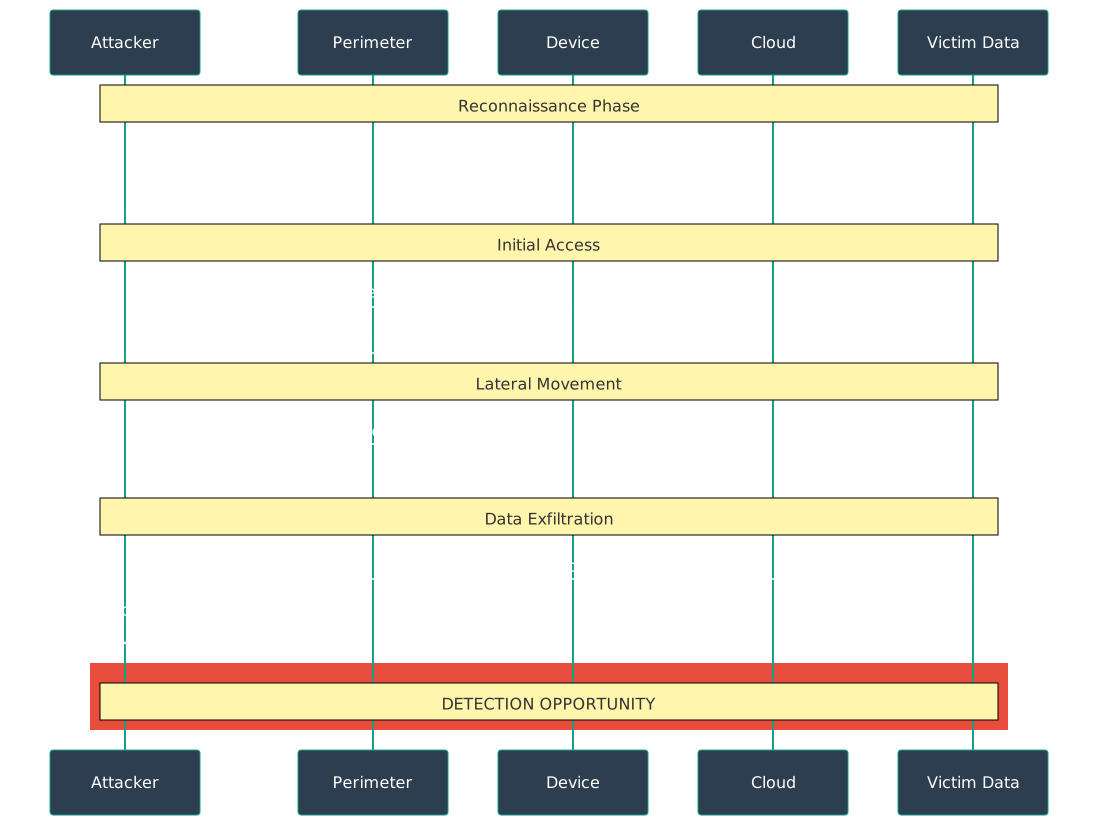
{fig-alt=“Attack chain timeline for IoT breach showing four phases: Reconnaissance (port scanning discovers open MQTT), Initial Access (default credentials admin:admin succeed), Lateral Movement (network enumeration, pivot to cloud API), and Data Exfiltration (extract sensor data to C2 server). Highlights detection opportunity windows at each phase where defenders can interrupt the attack.”}
1397.3.2.4 Step 4: Mitigate Threats (How to Stop Them?)
| Attack Vector | Mitigation Strategy | Cost | Effectiveness |
|---|---|---|---|
| Default credentials | Change all passwords to strong unique ones | $0 (5 min) | ⭐⭐⭐⭐⭐ Very High |
| Wi-Fi password cracking | Use WPA3, strong 20+ char password | $0 (if router supports WPA3) | ⭐⭐⭐⭐ High |
| Phishing | Enable 2FA on all accounts | $0 (5 min) | ⭐⭐⭐⭐ High |
| Physical access | Lock device in secure location, disable debug ports | $20 (lockbox) | ⭐⭐⭐ Medium |
| Man-in-the-middle | Ensure devices use HTTPS/TLS | $0 (verify in settings) | ⭐⭐⭐⭐ High |
| Account takeover | Strong password + 2FA + password manager | $0 (free tools available) | ⭐⭐⭐⭐⭐ Very High |
80/20 Rule: These 3 simple actions stop 80% of attacks:
- ✅ Change all default passwords (5 minutes)
- ✅ Enable two-factor authentication (5 minutes)
- ✅ Update firmware regularly (10 minutes/month)
1397.3.3 Real-World Threat Modeling Failure
1397.3.3.1 🏥 The Insulin Pump That Could Kill (2011)
Device: Medtronic insulin pumps (used by diabetic patients)
What security researcher Jay Radcliffe discovered:
- The pump communicated wirelessly with a glucose monitor
- No encryption on wireless commands
- No authentication (any device could send commands)
- Commands could be sent from 300 feet away
Threat Model Failure:
| What They Should’ve Asked | What They Assumed | Reality |
|---|---|---|
| “Who might attack this?” | “No one would attack a medical device” | Researchers proved it’s possible; criminals follow researchers |
| “How could they attack?” | “You need physical access” | Wireless commands work from 300 feet (parking lot, next room) |
| “What’s the impact?” | “Minor inconvenience” | Death (overdose or underdose of insulin) |
| “What’s the cost to secure it?” | “Too expensive” | Encryption: negligible cost, massive benefit |
Lesson: “No one would attack this” is not a valid threat model. If it CAN be attacked, eventually someone WILL attack it.
1397.3.4 The Four Key Questions
Every threat model answers these questions:
1397.3.5 Quick Self-Check Quiz
1397.3.6 What You’ll Learn in This Chapter
By the end of this chapter, you’ll understand:
- ✅ How to build a threat model from scratch (step-by-step process)
- ✅ Security decision trees for different risk levels
- ✅ Industry-specific requirements (HIPAA, GDPR, PCI-DSS, automotive, industrial)
- ✅ Risk assessment frameworks (qualitative and quantitative)
- ✅ Common IoT attack patterns and how to defend against them
Time to complete: 60-90 minutes
Prerequisites: Basic understanding of security concepts helpful (but not required)
Threat modelling provides a structured approach to identifying, analyzing, and mitigating security vulnerabilities in IoT systems. By understanding attack vectors and implementing systematic defenses, organizations can significantly reduce their risk exposure and build more resilient IoT deployments.
WarningCommon Misconception: “Security Through Obscurity Works”
The Misconception: Keeping the system design secret makes it secure.
Why It’s Wrong: - Kerckhoffs’s principle: Security should depend only on keys, not secrecy - Attackers will reverse-engineer (it’s just a matter of time) - Obscurity prevents security review by experts - False confidence leads to weaker actual security - Once discovered, no fallback protection
Real-World Example: - IoT device manufacturer uses proprietary “encrypted” protocol - Security researcher buys device, extracts firmware - Discovers: XOR with fixed key (not real encryption) - Publishes finding: All devices now vulnerable - If they’d used TLS: Would still be secure after review
The Correct Understanding: | Approach | Security Source | Result | |———-|—————–|——–| | Obscurity only | Secret algorithm | Fails when discovered | | Standards + secrets | Published algorithm + secret key | Remains secure | | Defense in depth | Multiple layers | Resilient to partial breach |
Use proven standards (TLS, AES). Assume attackers know everything except keys.
1397.4 Security Requirements Decision Tree
Determining the appropriate security level for your IoT deployment is critical for balancing protection, cost, and usability. This decision tree guides you through security requirement selection based on deployment context and risk tolerance.

1397.4.1 Decision Criteria Explained
1. Data Sensitivity Classification
The type of data your IoT system handles fundamentally determines security requirements:
Public data: Environmental sensors, traffic counts, air quality. No privacy concerns. Integrity and availability matter. Examples: Public weather stations, city traffic monitoring.
Internal/Business data: Operational metrics, equipment telemetry, building occupancy. Confidentiality matters for competitive reasons. Examples: Manufacturing line efficiency, energy usage patterns.
Personal data: User behavior, location, health metrics, identifiable information. Privacy regulations apply. Examples: Smart home devices, wearables, connected vehicles.
Critical/Regulated data: Financial transactions, healthcare records, safety systems, government information. Strict compliance mandatory. Examples: Medical devices, payment terminals, critical infrastructure.
2. Physical Security Context
Device accessibility impacts attack surface:
Exposed deployment: Public spaces, outdoor installations, unattended locations. High risk of physical tampering. Requires: Tamper detection, secure boot, encrypted storage. Examples: Smart city sensors, vending machines.
Controlled access: Buildings with security, restricted areas, supervised environments. Lower physical threat. Can reduce: Some hardware security measures. Examples: Office IoT, factory sensors behind fences.
3. Network Exposure
Connectivity model determines attack vectors:
Internet-facing: Direct cloud connectivity, public APIs. Maximum attack surface. Requires: Strong authentication, DDoS protection, API security. Examples: Consumer IoT, mobile apps.
Internal network only: Private networks, VPNs, air-gapped. Reduced external threat but insider risk remains. Can simplify: Some network security measures. Examples: Industrial OT networks, hospital internal systems.
4. Regulatory Compliance Requirements
Regulations mandate specific security controls:
GDPR (EU General Data Protection Regulation): - Applies to: EU citizens’ data, regardless of company location - Key requirements: Consent, data minimization, right to erasure, breach notification (72 hours) - Security mandates: Encryption, pseudonymization, privacy by design - Penalties: Up to 4% global revenue or 20M EUR - IoT implications: Smart home data, wearable health data, location tracking
HIPAA (Health Insurance Portability and Accountability Act): - Applies to: US healthcare data (Protected Health Information - PHI) - Key requirements: Access controls, audit logs, encryption, Business Associate Agreements - Security mandates: Technical, administrative, and physical safeguards - Penalties: Up to $1.5M per violation category per year - IoT implications: Remote patient monitoring, medical devices, health apps
PCI-DSS (Payment Card Industry Data Security Standard): - Applies to: Systems storing, processing, or transmitting cardholder data - Key requirements: Network segmentation, encryption, access control, vulnerability management - Security mandates: 12 comprehensive requirements across 6 categories - Penalties: Fines from card brands, potential loss of processing rights - IoT implications: Connected payment terminals, vending machines, parking meters
IEC 62443 (Industrial Automation and Control Systems Security): - Applies to: Industrial control systems, SCADA, factory automation - Key requirements: Defense in depth, network segmentation, secure development lifecycle - Security mandates: Security levels (SL 1-4) based on risk assessment - Penalties: Operational shutdowns, safety incidents, regulatory fines - IoT implications: Factory sensors, process control, energy management
5. Certification Requirements
Industry-specific certifications validate security posture:
FIPS 140-2/3 (Federal Information Processing Standards): - Purpose: Cryptographic module validation for US government - Levels: 1 (basic) to 4 (physical tamper protection) - Cost: $50-150K per module, 6-12 months - When required: Government contracts, sensitive data - IoT impact: Requires certified crypto chips (higher cost)
Common Criteria EAL (Evaluation Assurance Level): - Purpose: International security certification (ISO/IEC 15408) - Levels: EAL1 (basic) to EAL7 (formal verification) - Cost: $100K-500K, 12-24 months - When required: Government, defense, high-security applications - IoT impact: Rigorous development process, extensive documentation
ISO/SAE 21434 (Automotive Cybersecurity): - Purpose: Automotive cybersecurity engineering standard - Scope: Full vehicle lifecycle from concept to decommissioning - Cost: $50-200K for compliance, ongoing - When required: New vehicle systems (UN R155 regulation) - IoT impact: Secure development, threat analysis, continuous monitoring
1397.4.2 Security Level Definitions
Basic Security Level (Public data, low risk): - TLS 1.2+ for data in transit - API key or basic authentication - Rate limiting and input validation - Regular software updates - Cost: Low ($1-5/device) - Implementation time: 1-2 weeks - Examples: Weather stations, public displays
Standard Security Level (Internal data, moderate risk): - TLS 1.2+ with certificate validation - Token-based authentication (JWT) - Encrypted storage for sensitive data - Logging and monitoring - Security update mechanism - Cost: Moderate ($5-15/device) - Implementation time: 1-2 months - Examples: Building automation, asset tracking
Enhanced Security Level (Personal data, business-critical): - TLS 1.3 with perfect forward secrecy - Certificate pinning - OAuth 2.0 or JWT with refresh tokens - Full disk encryption - Multi-factor authentication (MFA) - Security audit (annual) - Intrusion detection - Cost: Moderate-High ($15-40/device) - Implementation time: 2-4 months - Examples: Smart home, wearables, fleet management
High Security Level (Regulated, high-value targets): - Mutual TLS (mTLS) authentication - Hardware Security Module (HSM) for key storage - End-to-end encryption - Multi-factor authentication mandatory - Hardware-backed secure boot - Tamper detection and response - Security Operations Center (SOC) monitoring - Regular penetration testing - Compliance certifications (SOC 2, ISO 27001) - Cost: High ($40-100+/device) - Implementation time: 4-12 months - Examples: Financial services, critical infrastructure
Critical Security Level (Safety-critical, government, healthcare): - FIPS 140-2 Level 3+ cryptography - Formal verification of security properties - Hardware root of trust (secure element) - Secure enclave for sensitive operations - Zero trust architecture - Air-gapped or highly segmented networks - Continuous threat monitoring - Incident response team - Compliance: HIPAA, PCI-DSS, IEC 62443, Common Criteria - Cost: Very high ($100-500+/device) - Implementation time: 12-36 months - Examples: Medical implants, autonomous vehicles, defense systems
1397.4.3 Real-World Application Examples
Example 1: Smart Home Thermostat (Personal Data → Enhanced Security)
Requirements: - Data: Temperature settings, occupancy patterns, user schedules - Sensitivity: Personal data (behavioral patterns) - Exposure: Internet-facing (mobile app control) - Regulation: GDPR (if EU users), CCPA (if California)
Security Implementation: - Transport: TLS 1.3 for cloud communication - Authentication: OAuth 2.0 with Google/Apple Sign-In - Data storage: Encrypted local storage (AES-256) - Updates: Automatic OTA with signature verification - Privacy: Data minimization, user consent, opt-out options - Monitoring: Anomaly detection for unusual access patterns - Cost: $20/device security overhead - Compliance: GDPR-compliant data processing agreement
Example 2: Industrial Vibration Sensor (Critical → Safety-Critical Security)
Requirements: - Data: Machine vibration, temperature, operational status - Sensitivity: Critical (safety-related, predict failures) - Exposure: Internal network (OT segment) - Regulation: IEC 62443 (industrial cybersecurity)
Security Implementation: - Network: Isolated OT network, no direct Internet - Authentication: mTLS for sensor-to-gateway - Segmentation: VLAN separation from IT network - Monitoring: Industrial IDS/IPS (Nozomi, Claroty) - Hardware: Tamper-evident enclosures - Updates: Offline update process with manual validation - Redundancy: Dual sensors for critical machines - Cost: $150/device security overhead - Compliance: IEC 62443 Security Level 3
Example 3: Medical Patient Monitor (Critical → HIPAA Compliance)
Requirements: - Data: Vital signs (PHI - Protected Health Information) - Sensitivity: Critical (life safety, regulated) - Exposure: Hospital network (controlled but networked) - Regulation: HIPAA, FDA 510(k), IEC 60601-1
Security Implementation: - Encryption: End-to-end encryption (PHI never in clear) - Authentication: Role-based access control + MFA for clinicians - Audit: Comprehensive audit logs (all access to PHI) - Physical: Locked mounting, tamper alerts - Updates: Validated OTA with fallback - Backup: Redundant data transmission (patient safety) - Certification: FDA cybersecurity guidance compliance - Cost: $300/device security overhead - Compliance: HIPAA Security Rule, FDA premarket cybersecurity
Example 4: City Traffic Sensor (Public Data → Basic Security)
Requirements: - Data: Vehicle counts, average speeds (aggregated, anonymous) - Sensitivity: Public (no privacy concerns) - Exposure: Exposed outdoor installation - Regulation: None (public data)
Security Implementation: - Transport: HTTPS for data upload - Authentication: API key (rotated quarterly) - Integrity: Message signing to prevent tampering - Availability: Rate limiting, DDoS protection - Physical: Tamper-resistant housing (reduce vandalism) - Updates: Scheduled OTA updates - Cost: $5/device security overhead - Focus: Data integrity and availability over confidentiality
1397.4.4 Edge Cases and Special Considerations
Warning: Over-Engineering Security
Not all IoT systems need maximum security:
- Public environmental sensors: TLS + API key sufficient. Don’t need HSM.
- Home automation: Enhanced security adequate. Government-grade overkill.
- Cost-benefit: Security costs compound. $50/device × 10,000 = $500K. Ensure threat justifies cost.
Under-Engineering Is Worse
Security breaches have catastrophic consequences:
- Mirai botnet: Default credentials compromised 600K devices. Simple fix: Force password change.
- Medical device recalls: FDA recalled cardiac devices for cybersecurity vulnerabilities. Cost: $100M+.
- Industrial sabotage: Stuxnet demonstrated ICS vulnerability. National security implications.
Multi-Tier Security Strategies
Large IoT deployments often use defense in depth:
- Device tier: Secure boot, encrypted storage, tamper detection
- Network tier: Segmentation, firewalls, VPN, IDS/IPS
- Cloud tier: Authentication, authorization, DDoS protection, WAF
- Data tier: Encryption at rest/in transit, key management, backup
- Operational tier: Monitoring, incident response, security updates
WarningTradeoff: Hardware Security Module (HSM) vs Software Cryptographic Libraries
Option A (HSM/Secure Element): Dedicated tamper-resistant chip stores keys in hardware (ATECC608A: $0.50-2/unit), provides 100,000+ ECDSA signatures/second, keys never leave silicon (immune to software exploits), FIPS 140-2 Level 3 certification available, adds 2-4ms latency per cryptographic operation, requires I2C/SPI bus integration.
Option B (Software Crypto Libraries): Keys stored in flash/RAM (vulnerable to cold boot attacks, firmware extraction), mbedTLS/wolfSSL run on main MCU, 50-500ms per RSA-2048 operation on Cortex-M4, zero additional BOM cost, flexible algorithm support, keys exposed during memory dumps or debug access.
Decision Factors: Choose HSM when: physical access is possible (outdoor sensors, public kiosks), regulatory compliance requires hardware key protection (PCI-DSS, HIPAA), device lifetime exceeds 5 years, attack surface includes sophisticated adversaries. Choose software crypto when: cost-sensitive high-volume deployments (>100K units), devices are in physically secure environments, rapid prototyping/iteration needed, key compromise impact is low (replaceable API keys).
WarningTradeoff: Edge Authentication vs Cloud Authentication
Option A (Edge/Gateway Authentication): Device authenticates to local gateway using pre-shared keys or certificates, gateway validates credentials in <5ms (local lookup), works offline when internet unavailable, gateway stores credential database (attack surface: ~100-1000 devices), firmware update required for credential changes, latency: 5-20ms.
Option B (Cloud Authentication): Device authenticates directly to cloud identity provider (AWS IoT Core, Azure IoT Hub), OAuth 2.0/JWT tokens with 1-24hr expiry, centralized policy enforcement across global fleet, requires internet connectivity for every authentication, latency: 100-500ms depending on region, scales to millions of devices with managed infrastructure.
Decision Factors: Choose edge authentication when: operations must continue during internet outages (industrial control, safety systems), latency-critical applications (<50ms response required), bandwidth costs prohibitive (cellular IoT at $0.01/KB), privacy regulations restrict cloud data transmission. Choose cloud authentication when: centralized audit logging required for compliance, fleet spans multiple sites/gateways, rapid credential revocation needed (employee termination), zero-trust architecture mandates continuous verification.
1397.4.5 Further Reading
For comprehensive security guidance:
- Threat Modeling: See remaining sections in this chapter
- Encryption: See Encryption chapter
- IoT Security: See IoT Devices and Network Security chapter
- Privacy: See Introduction to Privacy chapter
- Standards: NIST Cybersecurity Framework, OWASP IoT Top 10
1397.5 What’s Next
Now that you understand threat modeling fundamentals and security decision trees, continue to:
- STRIDE Framework: Learn systematic threat identification using Microsoft’s STRIDE methodology
- Attack Scenarios: Explore real-world IoT attack patterns and risk assessment
- Assessments: Test your knowledge with quizzes
- Hands-On Lab: Practice with an interactive threat detection simulator
Or explore related security topics:
- Encryption Fundamentals: Cryptographic protection
- Device Security: Device hardening techniques
- Security Overview: Broader security landscape