%%{init: {'theme': 'base', 'themeVariables': {'primaryColor': '#2C3E50', 'primaryTextColor': '#fff', 'primaryBorderColor': '#16A085', 'lineColor': '#16A085', 'secondaryColor': '#E67E22'}}}%%
flowchart LR
    subgraph Device["IoT Device"]
        Sensor[Sensor Data]
        CloudKey[Device-Cloud Key<br/>AES-256<br/>Stored in MCU]
        E3Enc[E3 Encrypt]
    end

    subgraph UntrustedGW["Untrusted Gateway"]
        Forward[Transparent<br/>Packet Forwarding<br/>No cloud key]
        NoDecrypt[Cannot decrypt<br/>E3 payload]
    end

    subgraph Cloud["Cloud Platform"]
        CloudKeyStore[(Device-Cloud<br/>Key Store)]
        E3Dec[E3 Decrypt]
        Process[Process Data]
    end

    Sensor --> E3Enc
    CloudKey -.-> E3Enc
    E3Enc -->|E3 encrypted| Forward
    Forward -.->|Still encrypted| NoDecrypt
    Forward -->|E3 encrypted| E3Dec
    CloudKeyStore -.->|Device key| E3Dec
    E3Dec --> Process

    style Device fill:#2C3E50,stroke:#16A085,stroke-width:2px,color:#fff
    style UntrustedGW fill:#E67E22,stroke:#2C3E50,stroke-width:2px,color:#fff
    style Cloud fill:#16A085,stroke:#2C3E50,stroke-width:2px,color:#fff
1428 E3-E4: Transport and End-to-End Encryption
1428.1 Learning Objectives
By the end of this chapter, you will be able to:
- Implement E3 Device-to-Cloud Encryption: Design end-to-end security that bypasses untrusted gateways
- Configure TLS 1.3 for IoT: Deploy industry-standard transport security with appropriate cipher suites
- Optimize TLS for Constrained Devices: Use session resumption and efficient cipher selection
- Avoid Common Pitfalls: Recognize and prevent unencrypted communications, certificate validation failures, and hardcoded credentials
1428.2 E3: Device-to-Cloud Direct Encryption
E3 (Device-to-Cloud) encryption allows use of untrusted gateways by encrypting directly to cloud.
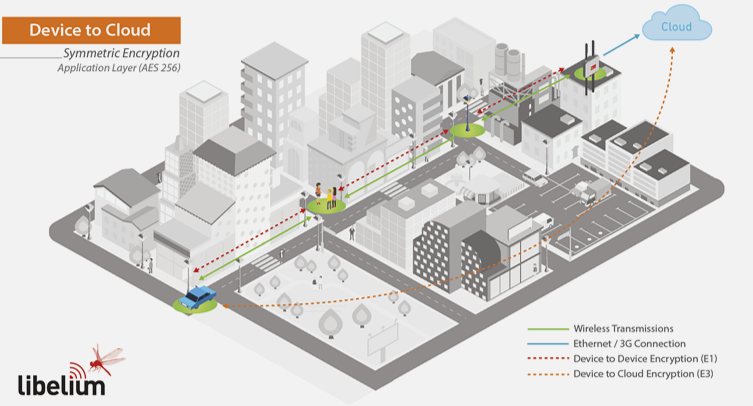
Purpose: Allow use of untrusted gateways by encrypting directly to cloud.
Characteristics:
- Keys stored in cloud, not gateway
- Gateway acts as transparent forwarder
- AES-256 encryption
- Combined with E1
- MCU runs encryption libraries
1428.3 E4: Gateway-to-Cloud TLS
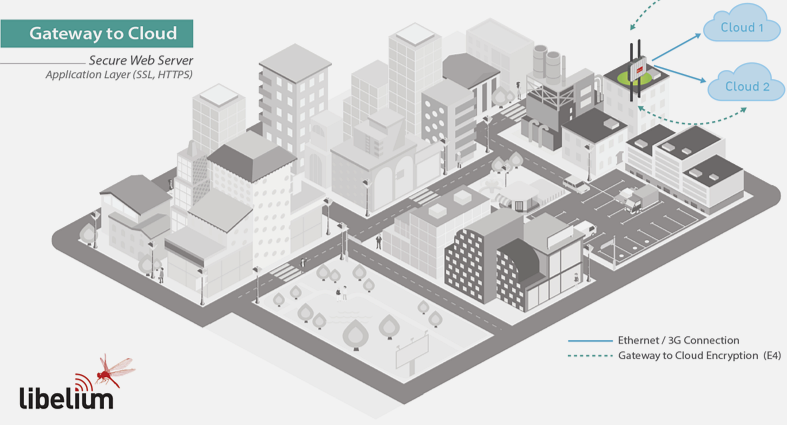
Purpose: Secure gateway-to-cloud communication using industry-standard protocols.
Characteristics:
- SSL/TLS certificates
- HTTPS/SSH protocols
- Same security as online banking
- Typical combinations: E1+E2+E4 or E1+E3+E4
%%{init: {'theme': 'base', 'themeVariables': {'primaryColor': '#2C3E50', 'primaryTextColor': '#fff', 'primaryBorderColor': '#16A085', 'lineColor': '#16A085', 'secondaryColor': '#E67E22'}}}%%
sequenceDiagram
    participant GW as Gateway
    participant Cloud as Cloud Server

    Note over GW,Cloud: E4: TLS 1.3 Handshake

    GW->>Cloud: ClientHello<br/>(Supported ciphers)
    Cloud->>GW: ServerHello<br/>(Selected cipher)
    Cloud->>GW: Certificate<br/>(X.509 cert)
    GW->>GW: Verify Certificate<br/>(CA chain)
    GW->>Cloud: Key Exchange<br/>(ECDHE/RSA)

    Note over GW,Cloud: Session Key Established

    GW->>Cloud: Encrypted Data<br/>(AES-256-GCM)
    Cloud->>GW: Encrypted Response<br/>(AES-256-GCM)

    Note over GW,Cloud: All data protected<br/>Same security as HTTPS
1428.3.1 E4 Implementation Details
Protocol: TLS 1.3 (or TLS 1.2 minimum) with X.509 certificates
TLS Cipher Suites for IoT:
| Cipher Suite | Security | Performance | IoT Suitability |
|---|---|---|---|
| TLS_ECDHE_ECDSA_AES_128_GCM_SHA256 | High | Excellent | Recommended |
| TLS_ECDHE_RSA_AES_128_GCM_SHA256 | High | Good | Compatible |
| TLS_AES_256_GCM_SHA384 | Very High | Good | TLS 1.3 only |
| TLS_CHACHA20_POLY1305_SHA256 | High | Excellent | Low-power devices |
| TLS_RSA_AES_128_CBC_SHA | Moderate | Fair | Legacy only |
Key Characteristics:
| Aspect | Details |
|---|---|
| Authentication | X.509 certificates with PKI (Public Key Infrastructure) |
| Key Exchange | ECDHE (Elliptic Curve Diffie-Hellman Ephemeral) for forward secrecy |
| Encryption | AES-128-GCM or ChaCha20-Poly1305 for bulk data |
| Integrity | SHA-256 or SHA-384 for message authentication |
| Certificate Validation | CA chain verification against trusted root certificates |
E4 Configuration Example:
# OpenSSL-based TLS configuration for IoT gateway
openssl s_client -connect cloud.iot-platform.com:8883 \
  -CAfile /etc/ssl/certs/ca-certificates.crt \
  -cert gateway-cert.pem \
  -key gateway-key.pem \
  -tls1_3 \
  -cipher 'ECDHE+AESGCM:ECDHE+CHACHA20'
Security Properties:
- Industry Standard: Same security as HTTPS banking
- Forward Secrecy: Past sessions safe even if private key compromised
- Certificate Authentication: Verifies cloud server identity
- Widely Supported: Available in all IoT platforms (AWS IoT, Azure IoT Hub, Google Cloud IoT)
- Requires PKI: Devices need certificate provisioning and management
1428.4 Deep Dive: TLS 1.3 for IoT Gateways
NoteTLS 1.3 Configuration for Constrained IoT Gateways
TLS 1.3 provides significant improvements over TLS 1.2 for IoT, but requires careful configuration on resource-constrained gateways.
TLS 1.3 Advantages for IoT:
| Feature | TLS 1.2 | TLS 1.3 | IoT Benefit |
|---|---|---|---|
| Round trips | 2 RTT | 1 RTT | 50% faster connection |
| 0-RTT resumption | No | Yes | Instant reconnection |
| Cipher suites | 37 options | 5 options | Simpler configuration |
| Forward secrecy | Optional | Mandatory | Future-proof security |
| Handshake encryption | Partial | Full | Metadata protection |
Minimal cipher suite configuration:
import ssl
import paho.mqtt.client as mqtt

def create_tls_context():
    """Configure TLS 1.3 for IoT gateway with optimal settings."""
    context = ssl.SSLContext(ssl.PROTOCOL_TLS_CLIENT)

    # TLS 1.3 only (most secure)
    context.minimum_version = ssl.TLSVersion.TLSv1_3
    context.maximum_version = ssl.TLSVersion.TLSv1_3

    # Prioritize efficient ciphers for constrained devices
    # ChaCha20 is faster on devices without AES-NI
    context.set_ciphers(
        'TLS_CHACHA20_POLY1305_SHA256:'  # Fast on ARM without AES-NI
        'TLS_AES_128_GCM_SHA256:'         # Standard, hardware accelerated
        'TLS_AES_256_GCM_SHA384'          # Maximum security
    )

    # Load CA certificates for server verification
    context.load_verify_locations(cafile='/etc/ssl/certs/ca-certificates.crt')

    # Mutual TLS: Load gateway certificate and private key
    context.load_cert_chain(
        certfile='/etc/gateway/certs/gateway.crt',
        keyfile='/etc/gateway/certs/gateway.key'
    )

    # Enable certificate verification
    context.verify_mode = ssl.CERT_REQUIRED
    context.check_hostname = True

    return context

# Apply to MQTT client
client = mqtt.Client()
client._ssl_context = create_tls_context()
client.connect('iot.cloud-provider.com', port=8883)
Session resumption for battery efficiency:
class TLSSessionCache:
    """
    Cache TLS session tickets for 0-RTT resumption.
    Reduces handshake from 2 RTT to 0 RTT on reconnection.
    """
    def __init__(self, cache_file='/var/cache/tls_sessions.db'):
        self.cache_file = cache_file
        self.sessions = {}

    def store_session(self, server_name, session_data):
        """Store session ticket after successful handshake."""
        self.sessions[server_name] = {
            'ticket': session_data,
            'timestamp': time.time(),
            'max_age': 7200  # 2 hour validity
        }
        self._persist_to_disk()

    def get_session(self, server_name):
        """Retrieve session for 0-RTT resumption."""
        if server_name in self.sessions:
            session = self.sessions[server_name]
            if time.time() - session['timestamp'] < session['max_age']:
                return session['ticket']
        return None
Memory footprint comparison:
| TLS Library | Code Size | RAM Usage | Platforms |
|---|---|---|---|
| mbedTLS | 60-100 KB | 10-40 KB | ARM Cortex-M |
| wolfSSL | 20-100 KB | 1-36 KB | All |
| BearSSL | 25-50 KB | 25 KB | ARM, RISC-V |
| OpenSSL | 500+ KB | 100+ KB | Linux gateways |
Recommendation: Use mbedTLS or wolfSSL for constrained gateways. Reserve OpenSSL for Linux-based edge devices with ample resources.
1428.5 Common Pitfalls in Secure Communication
Even with encryption architecture knowledge, these common implementation mistakes undermine IoT security:
WarningCommon Pitfall: Unencrypted Communication (No TLS/DTLS)
The mistake: Transmitting data over unencrypted connections, often during development or due to misconfiguration.
Symptoms:
- Credentials visible in network packet captures
- Data interception possible with simple tools like Wireshark
- Man-in-the-middle attacks succeed without detection
- Compliance audit failures (GDPR, HIPAA, PCI-DSS)
Why it happens: Developers disable TLS during testing and forget to re-enable it. Some assume internal networks are “safe.” MQTT defaults to port 1883 (unencrypted) rather than 8883 (TLS).
How to diagnose:
- Check connection port numbers (1883 = unencrypted MQTT, 8883 = TLS)
- Use Wireshark to capture traffic and check for plaintext
- Review connection code for
tls_set()or equivalent calls - Check server logs for TLS handshake vs plain connections
The fix:
# WRONG: Unencrypted MQTT connection
client.connect("broker.example.com", port=1883)
client.username_pw_set("user", "password")  # Sent in clear text!

# CORRECT: TLS-encrypted MQTT
client.tls_set(
    ca_certs="ca.crt",
    certfile="device.crt",
    keyfile="device.key"
)
client.connect("broker.example.com", port=8883)

# CORRECT: HTTPS for REST APIs
import requests
requests.post("https://api.example.com/data", data=sensor_data)
# NOT: http://api.example.com/dataPrevention: Always use TLS/DTLS for transport. Verify server certificates (don’t disable verification). Use mutual TLS (mTLS) for device authentication. Block unencrypted ports at the firewall level.
WarningCommon Pitfall: Hardcoded Credentials in Firmware
The mistake: Embedding passwords, API keys, or certificates directly in source code or firmware binaries.
Symptoms:
- Mass device compromise from a single firmware leak
- Unable to rotate credentials without firmware update
- Firmware reverse engineering exposes all secrets
- All devices share identical credentials
Why it happens: It’s the simplest approach during prototyping. Developers underestimate how easy firmware extraction is. Production deadlines push security corners.
How to diagnose:
- Search source code for string literals like “password”, “api_key”, “secret”
- Use
stringscommand on firmware binaries to find embedded credentials - Check if all devices use identical credentials
- Review provisioning process documentation
The fix:
# WRONG: Credentials in source code
MQTT_USER = "admin"
MQTT_PASS = "secretpassword123"
API_KEY = "sk_live_abc123xyz"

# CORRECT: Read from secure storage provisioned at manufacturing
credentials = secure_element.get_credentials()

# CORRECT: Use device-specific certificates
client.tls_set(
    certfile=f"/secure/certs/{device_id}.crt",
    keyfile=f"/secure/certs/{device_id}.key"
)

# CORRECT: Provision unique credentials per device
def provision_device(device_id):
    unique_key = generate_device_key(device_id)
    secure_storage.store("api_key", unique_key)
# Credentials never appear in source codePrevention: Use secure element or TPM for credential storage. Implement secure provisioning during manufacturing. Use per-device unique credentials. Never store credentials in source code or configuration files.
WarningCommon Pitfall: Missing Input Validation on Device Commands
The mistake: Executing received commands or using input data without validation.
Symptoms:
- Command injection attacks succeed
- Device crashes from malformed or out-of-range input
- Unauthorized actions executed via crafted messages
- Security breaches through parameter manipulation
Why it happens: Developers trust the message source (especially if using TLS). Input validation is tedious and often skipped. Edge cases aren’t considered during development.
The fix:
# WRONG: Direct execution of received command
def handle_message(msg):
    exec(msg['command'])  # NEVER do this!

# WRONG: No validation of parameters
def set_temperature(msg):
    thermostat.set(msg['temp'])  # What if temp = 1000?

# CORRECT: Validate and sanitize all input
ALLOWED_COMMANDS = {'get_status', 'set_temp', 'reset', 'reboot'}
TEMP_MIN, TEMP_MAX = 10, 35  # Valid temperature range

def handle_message(msg):
    cmd = msg.get('command')

    # Whitelist check
    if cmd not in ALLOWED_COMMANDS:
        log.warning(f"Rejected invalid command: {cmd}")
        return error_response("Invalid command")

    if cmd == 'set_temp':
        temp = msg.get('temp')

        # Type check
        if not isinstance(temp, (int, float)):
            return error_response("Temperature must be a number")

        # Range check
        if not TEMP_MIN <= temp <= TEMP_MAX:
            return error_response(f"Temperature must be {TEMP_MIN}-{TEMP_MAX}")

        thermostat.set(temp)
return success_response()Prevention: Use allowlists for commands (not blocklists). Validate data types and ranges for all parameters. Sanitize string inputs before use. Implement rate limiting to prevent brute force. Never use eval() or exec() on external input.
WarningTradeoff: End-to-End Encryption vs Transport Encryption
Decision context: When designing IoT data protection, you must decide whether to encrypt data only during transport (hop-by-hop TLS) or maintain encryption from device to final destination (end-to-end).
| Factor | Transport Encryption (E4 only) | End-to-End Encryption (E3) |
|---|---|---|
| Gateway Access | Gateway decrypts and re-encrypts | Gateway forwards opaque ciphertext |
| Trust Model | Must trust all intermediaries | Only trust endpoints |
| Processing at Edge | Gateway can filter, aggregate, transform | No edge processing possible |
| Complexity | Simpler (standard TLS termination) | More complex (key distribution to cloud) |
| Debugging | Easier (can inspect at gateway) | Harder (encrypted everywhere) |
| Compliance | Data exposed at multiple points | Stronger audit posture |
Choose Transport Encryption (E4) when: Gateway performs value-add processing (aggregation, filtering), all infrastructure is under your control, debugging at intermediate points is required.
Choose End-to-End Encryption (E3) when: Data transits untrusted networks or third-party gateways, regulatory compliance requires data remain encrypted (HIPAA, GDPR), zero-trust architecture principles apply, high-value data (medical, financial, personal) is being transmitted.
Default recommendation: Implement both E3 and E4 as defense in depth.
1428.6 Summary
This chapter covered E3 device-to-cloud and E4 gateway-to-cloud encryption:
- E3 Purpose: Enables use of untrusted gateways by encrypting directly to cloud with keys stored only in device and cloud
- E4 Purpose: Industry-standard TLS/DTLS protects gateway-to-cloud communication with certificate-based authentication
- TLS 1.3 Benefits: 1-RTT handshake, mandatory forward secrecy, 0-RTT resumption for battery efficiency
- Cipher Selection: ChaCha20-Poly1305 for devices without AES-NI hardware, AES-128-GCM for hardware-accelerated platforms
- Common Pitfalls: Unencrypted communications, hardcoded credentials, missing certificate validation, lack of input validation
1428.7 What’s Next
Continue to E5: Key Renewal and Asymmetric Cryptography to learn how periodic key refresh using RSA/ECC provides long-term security and forward secrecy.
NoteRelated Chapters
- E2: Device-to-Gateway - Per-device keys and replay protection
- E5: Key Renewal - Long-term key management
- Security Properties - Defense-in-depth strategies
- DTLS and Security Protocols - Transport-layer security for constrained devices