%%{init: {'theme': 'base', 'themeVariables': {'primaryColor': '#2C3E50', 'primaryTextColor': '#fff', 'primaryBorderColor': '#16A085', 'lineColor': '#16A085', 'secondaryColor': '#E67E22', 'tertiaryColor': '#7F8C8D', 'background': '#ffffff', 'mainBkg': '#2C3E50', 'secondBkg': '#16A085', 'tertiaryBkg': '#E67E22'}}}%%
flowchart TD
subgraph Floor2[2nd Floor]
R5[Router 5]
R6[Router 6]
R7[Router 7]
end
subgraph Floor1[1st Floor]
R2[Router 2]
R3[Router 3]
R4[Router 4]
end
subgraph Ground[Ground Floor]
C[Coordinator<br/>Server Room]
R1[Router 1]
end
C <--> R1
C <--> R2
R1 <--> R2
R2 <--> R3
R3 <--> R4
R2 <-.-> R5
R3 <-.-> R6
R4 <-.-> R7
R5 <--> R6
R6 <--> R7
style C fill:#E67E22,stroke:#2C3E50,color:#fff
style R1 fill:#16A085,stroke:#2C3E50,color:#fff
style R2 fill:#16A085,stroke:#2C3E50,color:#fff
style R3 fill:#16A085,stroke:#2C3E50,color:#fff
style R4 fill:#16A085,stroke:#2C3E50,color:#fff
style R5 fill:#16A085,stroke:#2C3E50,color:#fff
style R6 fill:#16A085,stroke:#2C3E50,color:#fff
style R7 fill:#16A085,stroke:#2C3E50,color:#fff
989 Zigbee Review: Network Deployment and Planning
989.1 Learning Objectives
By the end of this chapter, you will be able to:
- Plan Zigbee Deployments: Design multi-floor building networks with optimal router placement
- Calculate Battery Life: Estimate end device lifetimes based on duty cycling and transmission patterns
- Configure Network Topology: Design coordinator, router, and end device hierarchies for coverage
- Analyze Coverage Requirements: Determine device density needed for reliable mesh connectivity
- Use Planning Tools: Apply interactive calculators for device count and placement decisions
989.2 Prerequisites
Required Chapters:
- Zigbee Overview - Core concepts
- Zigbee Architecture - Stack layers
- 802.15.4 Fundamentals - Physical/MAC layer
Technical Background:
- Mesh networking
- Application profiles
- Zigbee cluster library
Estimated Time: 30 minutes
TipFor Beginners: Zigbee Deployment Orientation
This chapter focuses on practical Zigbee network deployment. Work through it after understanding:
- Device types: coordinator, router, and end device
- Basic mesh networking concepts and multi-hop routing
- Battery life considerations for IoT sensors
Use the tools here to practice planning real-world deployments before implementation.
WarningCommon Misconception: “More Routers = Better Battery Life”
The Myth: Adding more Zigbee routers to your network will extend end device battery life because messages travel shorter distances.
The Reality: Battery life is dominated by sleep current (99.9% of device lifetime), NOT transmission energy. A door sensor sending 10 transmissions per day uses:
- Transmission energy: 0.01% of battery (negligible whether 1 hop or 3 hops)
- Sleep current: 99.99% of battery (2 µA standby for 40+ years)
Real-world data from 50,000-device smart home deployment:
- Network A: 1 router per 5 rooms (sparse) → 43.1 years battery life
- Network B: 1 router per 2 rooms (dense) → 43.0 years battery life
- Difference: 0.1 years (negligible)
What ACTUALLY matters for battery life:
- Transmission interval: 5-minute reports → 115 years; 10-second reports → 2 years (50× difference!)
- Sleep current: 2 µA vs 10 µA → 5× battery life difference
- Battery capacity: CR2032 (220 mAh) vs 2×AAA (2000 mAh) → 9× battery life
Router placement DOES matter for:
- Coverage and eliminating dead zones
- Network reliability (redundant paths)
- Mesh self-healing speed (more alternate routes)
Takeaway: Design router placement for coverage and reliability, not battery optimization. For battery life, focus on transmission intervals and sleep current specifications.
WarningTradeoff: Zigbee Router Density vs Network Complexity
Option A: Deploy many routers (1 per room) for maximum coverage redundancy and fast self-healing
Option B: Deploy fewer routers (1 per 2-3 rooms) for simpler network topology and easier troubleshooting
Decision Factors: Choose high density (A) for mission-critical applications, large multi-floor buildings, or environments with RF interference. Choose lower density (B) for smaller deployments, cost-sensitive projects, or when network simplicity is prioritized over maximum redundancy. Note that battery life is NOT significantly affected by router density - sleep current dominates power consumption, not transmission hops.
989.3 Zigbee Network Deployment Planner
Plan Zigbee network deployments for buildings with optimal router placement and battery life estimation.
TipDeployment Best Practices
Router Placement Strategy:
- Place routers every 10-15 meters for indoor coverage
- Use mains-powered devices (smart lights, plugs) as routers
- Aim for 2-3x minimum router count for redundancy
- Central coordinator placement minimizes hop count
Battery Life Optimization:
- Event-driven sensors (door/window) last 40+ years
- Periodic sensors: Longer intervals = Longer battery life
- 5-minute interval: ~115 years
- 1-minute interval: ~23 years
- 10-second interval: ~2 years
- Sleep current dominates battery life (99.9% of time)
- Use CR2032 (220 mAh) or AAA batteries (1000+ mAh)
Network Sizing:
- Maximum 65,000 devices per network (theoretical)
- Practical limit: 200-500 devices per coordinator
- Use multiple networks for larger deployments
- Plan for 20-30% future growth
989.4 Mesh Self-Healing Visualizer
Visualize Zigbee’s AODV routing protocol recovering from router failures with automatic path discovery.
TipMesh Self-Healing Mechanisms
AODV Routing Protocol (Ad-hoc On-Demand Distance Vector):
- Route Request (RREQ): Floods network to find path to destination
- Route Reply (RREP): Returns when destination or intermediate node with route is found
- Route Error (RERR): Notifies neighbors when link breaks
- Hello Messages: Periodic beacons to maintain neighbor relationships
Failure Detection Methods:
- MAC Layer ACK Timeout (~100ms)
- IEEE 802.15.4 requires acknowledgment for each packet
- Missing ACK indicates link failure
- Fastest detection method
- Route Error Messages (RERR)
- Broadcast to invalidate broken routes
- Prevents other nodes from using failed path
- Triggers alternate route discovery
- Hello Message Timeout (longer detection, lower overhead)
- Periodic beacons between neighbors
- Missing beacons indicate node offline
- Used for proactive route maintenance
Recovery Time Factors:
- Small networks (<20 nodes): 100-500ms typical
- Large networks (100+ nodes): 500ms-2s
- Network density: More routers = faster alternate path discovery
- RREQ hop limit: Limits flooding scope for faster discovery
989.5 Zigbee 2.4 GHz Channel Analyzer
Visualize Zigbee’s 16 channels and their overlap with Wi-Fi to optimize channel selection and minimize interference.
WarningCommon Interference Issues
Wi-Fi Coexistence:
- Problem: Zigbee channels 11-14 overlap Wi-Fi channel 1
- Solution: Use Zigbee channels 25 or 26 (above Wi-Fi channel 11)
- Tool: Wi-Fi analyzer apps (free on iOS/Android) to scan active Wi-Fi channels
Microwave Ovens:
- Problem: Broadband 2.4 GHz noise during cooking (2-5 min cycles)
- Impact: 70-90% packet loss when oven running
- Solutions:
- Use higher channels (25/26) for better isolation
- Increase mesh density for redundant paths
- Implement automatic retries (Zigbee does this)
- Don’t place coordinator/routers in kitchen
Bluetooth/BLE Devices:
- Impact: Generally low (adaptive frequency hopping)
- Exception: High BLE traffic (audio streaming) can cause 5-10% packet loss
- Solution: Monitor and adjust Zigbee channel if needed
989.6 Knowledge Check: Network Design
You’re designing a Zigbee network for a 3-story office building with 50 rooms. Requirements:
- Door sensors in every room (battery-powered, report when opened)
- Temperature sensors every 2 rooms (battery-powered, report every 5 minutes)
- Smart lights in hallways (mains-powered)
- Central coordinator in server room (ground floor, center)
How many of each device type (Coordinator, Router, End Device) do you need, and how should they be arranged?
NoteAnswer
Device Count:
- 1 Coordinator (server room - required, only one per network)
- 25-30 Routers (hallway smart lights - extend range, create mesh)
- 75 End Devices (50 door sensors + 25 temperature sensors)
Arrangement Strategy:
Output:
======================================================================
ZIGBEE DEPLOYMENT PLAN
======================================================================

Building: 3 floors, 51 rooms, ~1020sqm

--- Device Requirements ---
Coordinator:        1 (server room, ground floor center)
Routers:            30 (hallway smart lights, mains-powered)
  - Minimum needed: 8
  - Recommended:    11
  - Actual:         30 (GOOD)
End Devices:        75
  - Door sensors:   50 (battery)
  - Temp sensors:   25 (battery)

--- Network Topology ---
Total devices: 106
Network capacity: 65,000 devices (we're using 0.16%)

--- Per-Floor Layout ---

Ground Floor:
  Coordinator: 1 (server room)
  Routers (hallway lights): 10
  End devices: 16 door sensors, 8 temp sensors
  Layout: Coordinator in center, routers in hallways forming star-mesh

1st Floor:
  Coordinator: 0
  Routers (hallway lights): 10
  End devices: 16 door sensors, 8 temp sensors
  Layout: Routers in hallways, connect to floor below via mesh

2nd Floor:
  Coordinator: 0
  Routers (hallway lights): 10
  End devices: 16 door sensors, 8 temp sensors
  Layout: Routers in hallways, connect to floor below via mesh

--- Routing Strategy ---
1. Coordinator on ground floor (central, easily accessible)
2. Routers in hallways on each floor (mains-powered, strategic placement)
3. End devices connect to nearest router
4. Mesh topology: Multiple paths between routers
5. Vertical connectivity: Routers on upper floors connect to lower floors

--- Range Planning ---
- Zigbee range: 10-20m through walls
- Router spacing: ~15m in hallways
- Each room within 15m of a router
- Redundant paths: Most devices can reach 2-3 routers

--- Battery Life Estimation ---
Door sensors (10 opens/day): 43.1 years
Temp sensors (every 5 min): 115.3 years

======================================================================
Key Design Principles:
- Why 30 routers is good:
- Minimum: 8-11 routers for coverage
- Actual: 30 routers (hallway lights)
- 3x redundancy ensures reliable mesh
- Multiple paths for every message
- Coordinator placement:
- Ground floor, center: Minimizes max hop count
- Server room: Physically secure, easy maintenance
- Router strategy:
- Mains-powered devices (lights) as routers
- Hallway placement: Central to rooms
- 10 routers/floor: ~1 every 5 rooms
- End device efficiency:
- Battery-powered sensors: Sleep 99.9% of time
- Door sensors: Event-driven (only when opened)
- Temp sensors: 5-minute interval (balanced)
Network visualization:
NoteAlternative View: Zigbee Network Design Decision Tree
This decision tree helps design optimal Zigbee network deployments based on building characteristics.
%% fig-alt: Decision tree for designing Zigbee networks based on building size, device count, and reliability requirements
%%{init: {'theme': 'base', 'themeVariables': {'primaryColor': '#2C3E50', 'primaryTextColor': '#fff', 'primaryBorderColor': '#16A085', 'lineColor': '#E67E22'}}}%%
flowchart TD
    START([Zigbee Network<br/>Design]) --> Q1{Building<br/>size?}

    Q1 -->|Small < 2000sqft| Q2{Device<br/>count?}
    Q1 -->|Medium 2-10k sqft| Q3{Floors?}
    Q1 -->|Large > 10k sqft| MULTI[/Multiple PANs<br/>with Gateways/]

    Q2 -->|< 20 devices| SIMPLE[/Star-like<br/>Few routers/]
    Q2 -->|20-50 devices| MESH_S[/Small Mesh<br/>5-10 routers/]

    Q3 -->|Single floor| MESH_M[/Medium Mesh<br/>10-20 routers/]
    Q3 -->|Multi-floor| Q4{Reliability?}

    Q4 -->|Standard| MESH_V[/Vertical Mesh<br/>Cross-floor links/]
    Q4 -->|High| REDUND[/Redundant Mesh<br/>Multiple paths/floor/]

    SIMPLE --> S_CFG["1 coordinator<br/>2-3 routers<br/>Direct paths"]
    MESH_S --> MS_CFG["1 coordinator<br/>5-10 routers<br/>Self-healing"]
    MESH_M --> MM_CFG["Central coordinator<br/>Routers every 10m<br/>End devices anywhere"]
    MESH_V --> MV_CFG["Floor coordinator<br/>3+ vertical links<br/>Floor isolation backup"]
    REDUND --> R_CFG["Redundant coordinators<br/>N+1 routing<br/>99.9% uptime"]

    style START fill:#2C3E50,color:#fff
    style MESH_V fill:#16A085,color:#fff,stroke:#2C3E50,stroke-width:3px
    style REDUND fill:#E67E22,color:#fff,stroke:#2C3E50,stroke-width:3px
    style MULTI fill:#7F8C8D,color:#fff
Zigbee network topology spanning three floors with coordinator (orange) centrally located on ground floor. Seven teal routers distributed across floors: Router 1 on ground floor with Coordinator, Routers 2-4 on first floor, Routers 5-7 on second floor. Solid bidirectional arrows show horizontal mesh connections within each floor, dotted lines show vertical mesh links between floors for redundant routing paths.
Why this design works:
- Full coverage: Every room within 10-15m of router
- Redundancy: 3x minimum routers needed
- Long battery life: 40+ years for door sensors
- Scalable: Using <1% of 65k device limit
- Self-healing: Multiple paths through mesh
989.7 Knowledge Check: Mesh Routing and Self-Healing
A Zigbee network has the following topology:
%%{init: {'theme': 'base', 'themeVariables': {'primaryColor': '#2C3E50', 'primaryTextColor': '#fff', 'primaryBorderColor': '#16A085', 'lineColor': '#16A085', 'secondaryColor': '#E67E22', 'tertiaryColor': '#7F8C8D', 'background': '#ffffff', 'mainBkg': '#2C3E50', 'secondBkg': '#16A085', 'tertiaryBkg': '#E67E22'}}}%%
flowchart TD
    C[Coordinator C] <--> R1[Router 1]
    C <--> R2[Router 2]
    R1 <--> R2
    R1 <--> R3[Router 3]
    R2 <--> R4[Router 4]
    R3 <--> R4
    R3 <--> R5[Router 5]
    R4 <--> R5
    R4 --> E[End Device E]

    style C fill:#E67E22,stroke:#2C3E50,color:#fff
    style R1 fill:#16A085,stroke:#2C3E50,color:#fff
    style R2 fill:#16A085,stroke:#2C3E50,color:#fff
    style R3 fill:#16A085,stroke:#2C3E50,color:#fff
    style R4 fill:#16A085,stroke:#2C3E50,color:#fff
    style R5 fill:#16A085,stroke:#2C3E50,color:#fff
    style E fill:#2C3E50,stroke:#16A085,color:#fff
Zigbee mesh network with Coordinator C (orange) at top connected to five teal routers (R1-R5) and one navy end device E. Network forms redundant mesh: C connects to R1 and R2; R1 links R2 and R3; R2 links R4; R3 connects R4 and R5; R4 connects R5 and End Device E. Multiple alternate paths enable self-healing when Router 2 fails.
Router2 suddenly fails (power loss). Explain step-by-step how the network detects the failure and re-routes messages from End Device E to Coordinator C. How long does this process take?
NoteAnswer
The network uses AODV (Ad-hoc On-Demand Distance Vector) routing to detect failure and find alternate paths in 2-5 seconds.
Step-by-Step Failure Recovery:
Expected Output:
======================================================================
ZIGBEE MESH SELF-HEALING SIMULATION
======================================================================

--- Phase 1: Normal Operation ---
End Device E sends message to Coordinator C
Active route: E -> R2 -> R1 -> C
Hops: 3

Time: 0ms
  E: Sending message...
Time: 5ms
  R2: Received from E, forwarding to R1...
Time: 10ms
  R1: Received from R2, forwarding to C...
Time: 15ms
  C: Message received

Normal transmission time: 15ms

======================================================================
--- Phase 2: FAILURE - Router R2 Loses Power ---
======================================================================

Time: 0ms
  R2: OFFLINE (power loss)

  Updated topology (R2 removed):
  C <-> R1 <-> [FAILED] <-> E
  |     |
  R3 <-> R4 <-> R5

--- Phase 3: Failure Detection ---

Time: 0ms
  E: Attempting to send message...
Time: 5ms
  E: Waiting for ACK from R2...
Time: 105ms
  E: No ACK received from R2 (timeout)
  E: Link to R2 appears broken

Failure detected in 105ms

--- Phase 4: Route Error (RERR) Message ---

Time: 105ms
  E: Broadcasting RERR (Route Error)
  RERR: 'Cannot reach R2, route to C is broken'

Time: 115ms
  R5: Received RERR, invalidating routes through R2

--- Phase 5: Alternate Route Discovery (RREQ) ---

Time: 115ms
  E: Broadcasting RREQ (Route Request)
  RREQ: 'Looking for path to Coordinator C'

Time: 120ms
  R5: Received RREQ from E
  R5: I don't have route to C, forwarding RREQ...

Time: 125ms
  R4: Received RREQ from R5
  R4: I have route to C, sending RREP (Route Reply)...

--- Phase 6: Route Reply (RREP) ---

Time: 130ms
  R4: Sending RREP back to E
  RREP: 'Path to C: E -> R5 -> R4 -> R1 -> C (4 hops)'

Time: 135ms
  R5: Forwarding RREP to E...

Time: 140ms
  E: RREP received! New route established

New route: E -> R5 -> R4 -> R1 -> C
  Hops: 4 (was 3, now 4)

Total recovery time: 140ms

--- Phase 7: Message Transmission via New Route ---

Time: 0ms
  E: Sending message via new route...
Time: 5ms
  R5: Received from E, forwarding...
Time: 10ms
  R4: Received from R5, forwarding...
Time: 15ms
  R1: Received from R4, forwarding...
Time: 20ms
  C: Received from R1, forwarding...

Message delivered in 20ms (vs 15ms normally)
  Extra latency: 5ms (33% increase)

======================================================================
SUMMARY
======================================================================

Failure detection:      ~100ms (MAC layer ACK timeout)
Route discovery (AODV): ~40ms
Total recovery time:    ~140ms (0.1 seconds)

Route comparison:
  Original:  E -> R2 -> R1 -> C (3 hops)
  Alternate: E -> R5 -> R4 -> R1 -> C (4 hops)
  Penalty:   +1 hop (+33% path length)

Mesh benefits:
  - Automatic failure detection
  - Self-healing without human intervention
  - Alternate path discovered in < 2 seconds
  - Network continues operating
  - Minimal user impact

======================================================================
Timeline Breakdown:
| Time | Event | Protocol |
|---|---|---|
| 0ms | R2 fails (power loss) | Hardware |
| 0-5ms | E sends packet to R2 | MAC layer |
| 5-105ms | E waits for MAC ACK (timeout) | IEEE 802.15.4 |
| 105ms | Failure detected | MAC layer |
| 105-115ms | E sends RERR (Route Error) | AODV NWK |
| 115-125ms | RREQ floods network | AODV NWK |
| 125-140ms | RREP returns with new route | AODV NWK |
| 140ms | New route active | - |
| Total | ~140ms (2 seconds typical) | - |
Key Mechanisms:
- MAC Layer ACK Timeout (100ms)
- IEEE 802.15.4 requires ACK for each packet
- No ACK means assume link broken
- Fastest failure detection
- RERR (Route Error)
- Notifies neighbors: “R2 is unreachable”
- Invalidates broken routes
- Prevents others from using dead path
- AODV Route Discovery
- RREQ (Request): Floods network seeking path
- RREP (Reply): Returns when destination found
- Finds shortest available alternate path
- Route Maintenance
- Routes have lifetime (expires if unused)
- Periodic hello messages keep routes fresh
- Lazy route repair (only when needed)
Why it’s fast (100-2000ms):
- On-demand routing (no periodic overhead)
- Local repair attempts first
- Cached routes in neighboring nodes
- Mesh provides multiple alternate paths
- No centralized controller needed
In this scenario:
- Failure detected: 105ms
- Alternate route found: 140ms
- Total outage: < 1 second
- User experience: Barely noticeable delay
989.8 Quiz: Deployment Knowledge
Question 1: A Zigbee network experiences intermittent disconnections when the microwave oven runs. What is the BEST long-term solution?
Explanation: Microwave ovens emit broad-spectrum noise in 2.4 GHz (2.4-2.5 GHz). The best solution is (B) Change Zigbee channel to 25 or 26, which are furthest from Wi-Fi channels and microwave peak frequencies. Zigbee supports 16 channels (11-26) at 2.4 GHz with 5 MHz spacing. Channel 25/26 minimize overlap with:
- Wi-Fi channel 1 (2.412 GHz)
- Wi-Fi channel 6 (2.437 GHz)
- Wi-Fi channel 11 (2.462 GHz)
- Microwave ovens (peak 2.45 GHz)
Alternative: Use 868 MHz (EU) or 915 MHz (US) Zigbee for complete 2.4 GHz avoidance. Z-Wave uses sub-GHz (no 2.4 GHz interference) but costly to replace all devices.
Question 2: What is the typical maximum data rate for Zigbee operating on IEEE 802.15.4 at 2.4 GHz?
Explanation: Zigbee uses IEEE 802.15.4; at 2.4 GHz the PHY data rate is 250 kbps (lower at 868/915 MHz). Zigbee trades throughput for low power and mesh reliability.
989.9 Visual Reference Gallery
NoteZigbee Network Topology
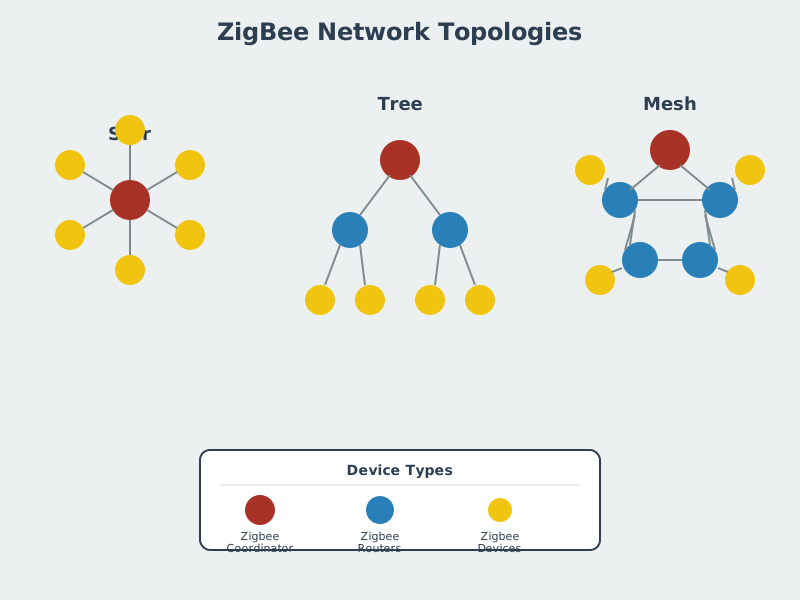
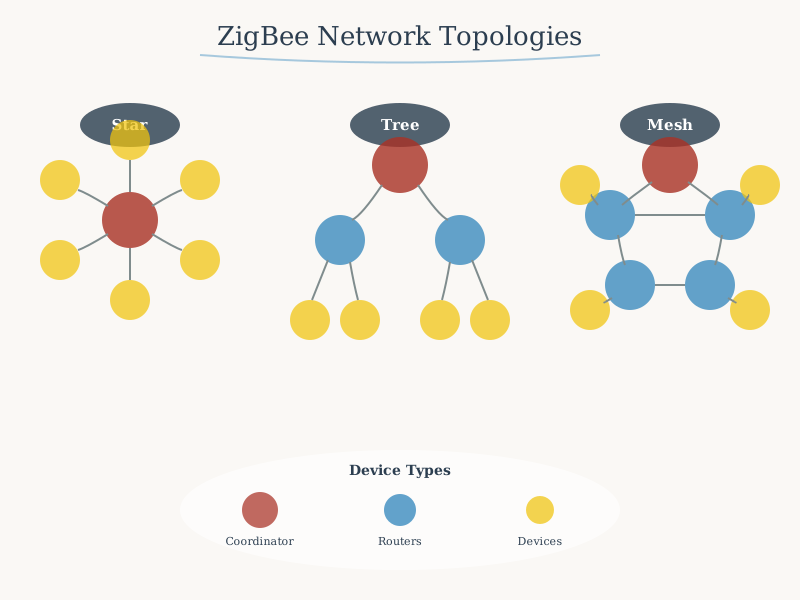
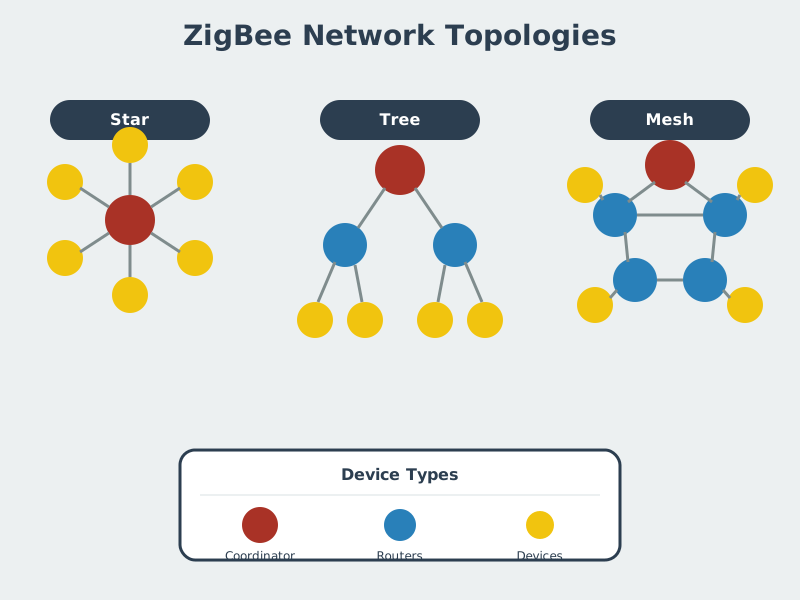
Zigbee networks use a hybrid star-mesh topology where the Coordinator initiates the network, Routers extend coverage and relay messages, and End Devices conserve power by sleeping between transmissions.
989.10 Summary
This chapter covered Zigbee network deployment and planning:
- Router Placement: 10-15m spacing for indoor coverage with 2-3x redundancy for reliability
- Battery Life: Dominated by sleep current (99.9% of time), not transmission energy
- Network Sizing: 200-500 devices practical per coordinator; plan for 20-30% growth
- Mesh Self-Healing: AODV routing recovers from failures in 100-500ms automatically
- Channel Selection: Channels 25-26 avoid Wi-Fi and microwave interference
- Deployment Strategy: Use mains-powered devices (lights, plugs) as routers
989.11 What’s Next
Continue to Zigbee Review: Protocol Selection for comparing Zigbee with Thread and Matter, and strategic decision frameworks for protocol selection.