980  Zigbee Hands-On Labs

980.1 Learning Objectives

By the end of this chapter, you will be able to:

  • Implement Zigbee Security: Configure network keys, link keys, and Trust Center authentication
  • Build Zigbee Networks: Set up coordinator, router, and end device configurations
  • Develop Zigbee Applications: Use XBee modules, Zigbee2MQTT, and Python for prototyping
  • Troubleshoot Zigbee Networks: Diagnose and resolve common deployment issues
  • Deploy Real-World Applications: Apply Zigbee in smart lighting, security, and industrial IoT

What is this chapter? Hands-on exercises for building and deploying Zigbee networks with real hardware and software tools.

When to use: - When implementing Zigbee-based IoT projects - To learn practical Zigbee development workflows - For troubleshooting network deployment issues

Key Topics:

Topic Focus
XBee Modules Arduino-based Zigbee prototyping
Zigbee2MQTT Bridge Zigbee to MQTT ecosystems
Real-World Apps Smart lighting, security, industrial
Troubleshooting Common issues and solutions

Prerequisites: - Zigbee Fundamentals - Basic understanding of mesh networking - Familiarity with IEEE 802.15.4

980.2 Prerequisites

Before diving into this chapter, you should be familiar with:

  • Zigbee Fundamentals and Architecture: This chapter builds directly on Zigbee fundamentals, requiring understanding of device roles (Coordinator, Router, End Device), network formation, mesh routing with AODV, and the Zigbee protocol stack layers
  • IEEE 802.15.4 Fundamentals: Hands-on Zigbee development requires knowledge of the underlying 802.15.4 PHY/MAC layer including channel selection, power modes, and frame structure for effective troubleshooting and optimization
  • Network Topologies Fundamentals: Deploying and troubleshooting Zigbee networks requires understanding mesh topology behavior, self-healing mechanisms, and how to plan node placement for optimal coverage and reliability

980.3 Security Overview (Summary)

Security is mandatory in Zigbee and is provided at both the network and application layers.

980.3.1 Security Layers

  • Network Layer: 128-bit AES network key encrypts all network-level traffic
  • Application Layer: Link keys provide end-to-end encryption for sensitive data

980.3.2 Trust Center

The coordinator (Trust Center) distributes network keys, manages link keys, and authenticates devices during joining.

980.3.3 Security Features and Practices

  • AES-128 encryption, sequence numbers (anti-replay), MIC integrity, device whitelisting, key refresh
  • Use unique network keys, enable link keys for high-security devices, keep firmware updated, disable permit-join when not pairing, monitor for unknown devices

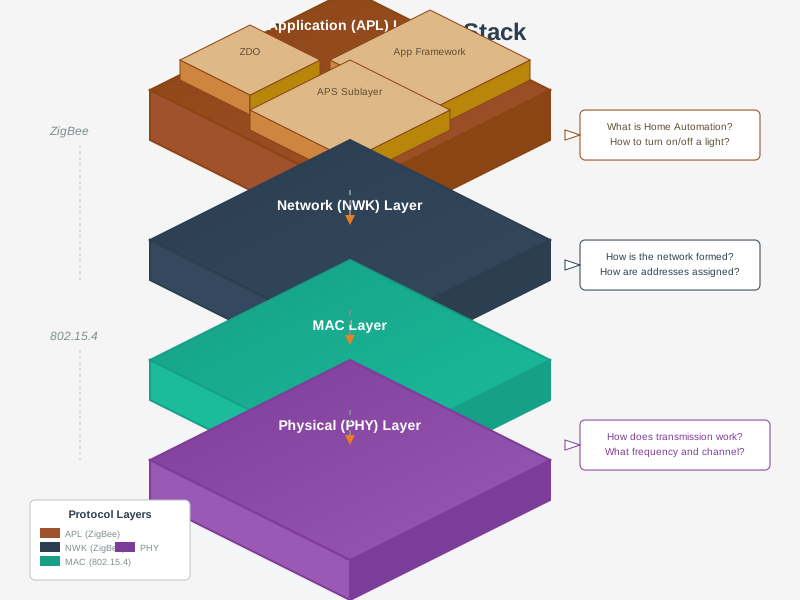
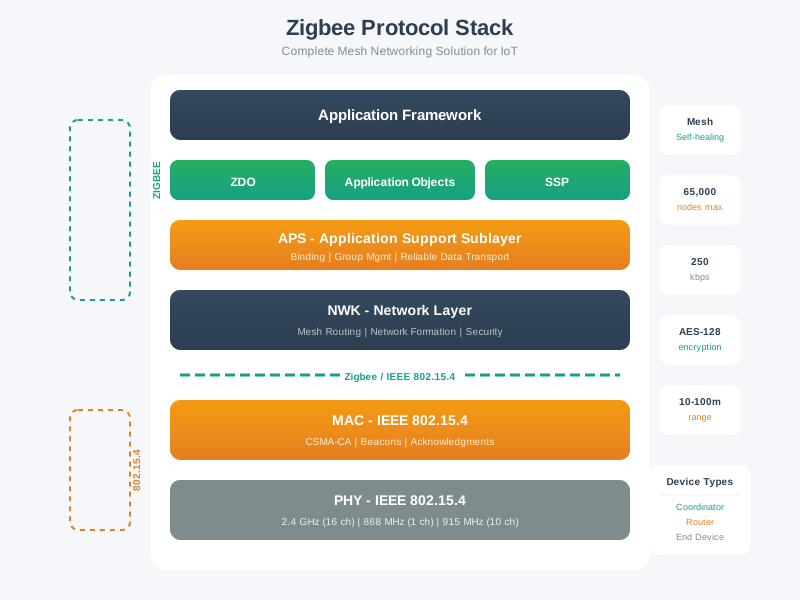
980.3.4 Zigbee Protocol Stack Architecture

%%{init: {'theme': 'base', 'themeVariables': {'primaryColor': '#2C3E50', 'primaryTextColor': '#fff', 'primaryBorderColor': '#16A085', 'lineColor': '#16A085', 'secondaryColor': '#E67E22', 'tertiaryColor': '#7F8C8D', 'background': '#ffffff', 'mainBkg': '#2C3E50', 'secondBkg': '#16A085', 'tertiaryBkg': '#E67E22'}}}%%
flowchart TD
    APL[Application Layer<br/>ZCL Clusters & Profiles] --> APS[APS Sublayer<br/>Endpoint Addressing]
    APS --> ZDO[ZDO<br/>Device & Service Discovery]
    ZDO --> NWK[Network Layer<br/>Mesh Routing + Security]

    NWK --> MAC[MAC Layer<br/>802.15.4 CSMA/CA]
    MAC --> PHY[Physical Layer<br/>2.4 GHz, 250 kbps]

    SEC[Security] --> NWKSEC[Network Key<br/>AES-128]
    SEC --> LINKSEC[Link Keys<br/>Per-Device]

    style APL fill:#E67E22,stroke:#2C3E50,color:#fff
    style NWK fill:#2C3E50,stroke:#16A085,color:#fff
    style MAC fill:#16A085,stroke:#2C3E50,color:#fff
    style PHY fill:#7F8C8D,stroke:#333,color:#fff
    style SEC fill:#2C3E50,stroke:#16A085,color:#fff

Figure 980.1: Zigbee protocol stack showing four main layers: Application Layer (APL) with device profiles and clusters, Network Layer (NWK) providing mesh routing and security, IEEE 802.15.4 MAC layer for medium access control, and Physical Layer operating on 2.4 GHz with 250 kbps data rate. Application Support Sublayer (APS) handles endpoint addressing and binding, while Zigbee Device Object (ZDO) manages network operations and device discovery. Network layer implements AODV routing and AES-128 encryption for secure multi-hop communication.

980.4 Videos

NoteZigbee in the IoT Landscape
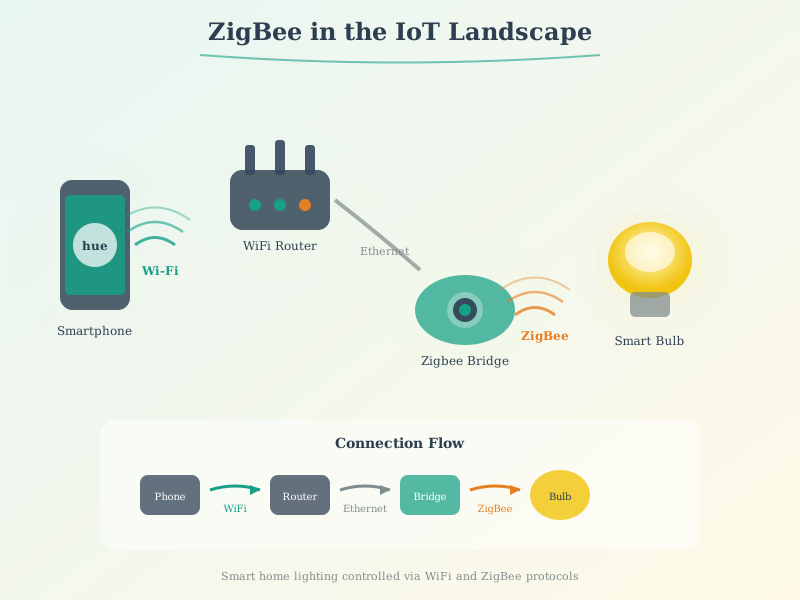
Zigbee in the IoT Landscape
From Lesson 4 โ€” hubs, coordinators, and Zigbee application domains.

980.4.1 Device Types

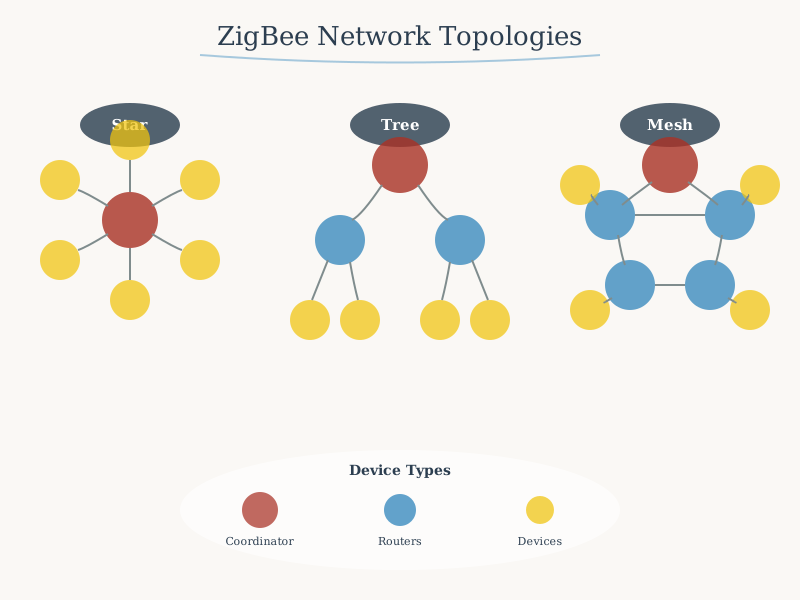
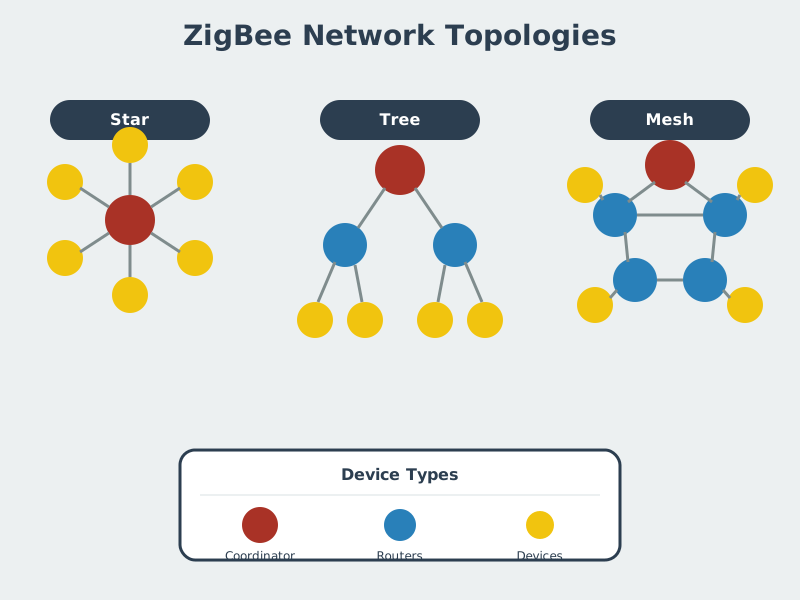
Zigbee networks consist of three device roles:
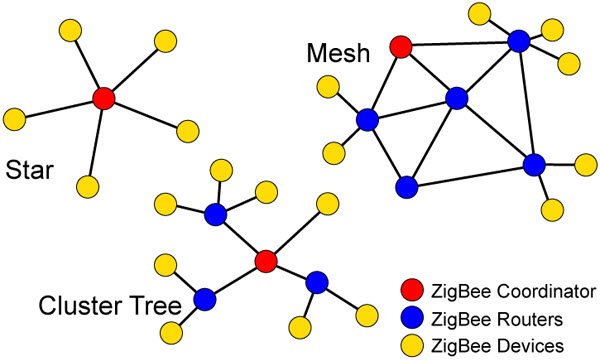
Photograph or diagram showing real-world Zigbee network deployment with coordinator, routers, and end devices forming star, tree, and mesh topologies in home or commercial environment
Figure 980.2: Zigbee network topologies in practice

%%{init: {'theme': 'base', 'themeVariables': {'primaryColor': '#2C3E50', 'primaryTextColor': '#fff', 'primaryBorderColor': '#16A085', 'lineColor': '#16A085', 'secondaryColor': '#E67E22', 'tertiaryColor': '#7F8C8D', 'background': '#ffffff', 'mainBkg': '#2C3E50', 'secondBkg': '#16A085', 'tertiaryBkg': '#E67E22'}}}%%
flowchart TD
    C[Coordinator 0x0000<br/>PAN ID: 0x1234<br/>Always On] --> R1[Router 0x0001<br/>Smart Light<br/>Mains Powered]
    C --> R2[Router 0x0002<br/>Smart Plug<br/>Mains Powered]
    C --> E1[End Device 0x0003<br/>Door Sensor<br/>Battery: 95%]

    R1 --> R3[Router 0x0004<br/>Light Switch<br/>Mains Powered]
    R1 --> E2[End Device 0x0005<br/>Temp Sensor<br/>Battery: 80%]

    R2 --> E3[End Device 0x0006<br/>Motion Sensor<br/>Battery: 90%]
    R3 --> E4[End Device 0x0007<br/>Window Sensor<br/>Battery: 85%]

    R1 <--> R2
    R2 <--> R3

    style C fill:#E67E22,stroke:#2C3E50,color:#fff
    style R1 fill:#16A085,stroke:#2C3E50,color:#fff
    style R2 fill:#16A085,stroke:#2C3E50,color:#fff
    style R3 fill:#16A085,stroke:#2C3E50,color:#fff
    style E1 fill:#2C3E50,stroke:#16A085,color:#fff
    style E2 fill:#2C3E50,stroke:#16A085,color:#fff
    style E3 fill:#2C3E50,stroke:#16A085,color:#fff
    style E4 fill:#2C3E50,stroke:#16A085,color:#fff

Figure 980.3: Zigbee mesh network topology showing three device types: one Coordinator (green, forms network and acts as Trust Center), three Routers (orange, mains-powered devices like smart bulbs and plugs that extend network range and route messages), and four End Devices (navy, battery-powered sensors that sleep when idle and cannot route). Solid lines represent direct mesh links between coordinator and routers or router-to-router connections enabling multi-path routing. Dotted lines show parent-child relationships where end devices associate with routers or coordinator for network access. Each device has a unique 16-bit network address (0x0000-0x0007) within PAN ID 0x1234, and battery-powered end devices display remaining battery percentage for monitoring.

980.4.1.1 Coordinator (ZC)

Role: Network formation, security key distribution, routing

Characteristics: - One per network (required) - Always mains-powered (never sleeps) - Initiates network, assigns addresses - Stores security keys - Example: Smart home hub, gateway

980.5 Hands-On: Building Zigbee Networks

โฑ๏ธ ~20 min | โญโญโญ Advanced | ๐Ÿ“‹ P08.C42.U01

This image from IIT Kharagpurโ€™s NPTEL IoT course shows a Zigbee development board with labeled components for hands-on prototyping and wireless sensor network development.
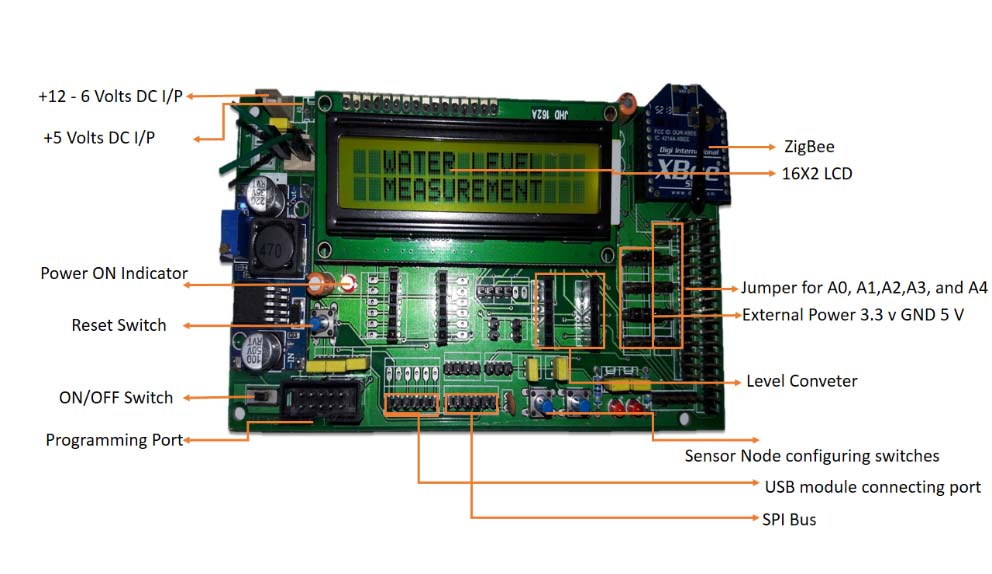
Zigbee sensor node development board with labeled components including 12-6V DC and 5V DC power inputs, Zigbee wireless module, 16x2 LCD display with green backlight showing WATER and FUEL measurements, analog input jumpers A0-A4, external power and GND connections, level converter, reset switch, ON/OFF switch, programming port, USB module connecting port, SPI bus interface, and sensor node configuring DIP switches

Zigbee Development Board - Complete prototyping platform showing power inputs (12V, 5V DC), XBee/Zigbee module slot, 16x2 LCD display, jumpers for analog inputs, level converter, programming port, USB module connection, SPI bus, and sensor node configuration switches

Source: NPTEL Internet of Things Course, IIT Kharagpur - Demonstrates typical Zigbee development board architecture for IoT prototyping

Hardware: - Arduino Uno - 2x XBee S2C modules (Zigbee) - 2x XBee Explorer USB adapters

Coordinator Setup:

// Configure XBee as Coordinator
// Use XCTU software or AT commands

AT Commands:
AT ID 1234        // PAN ID (network identifier)
AT CE 1           // Coordinator Enable
AT AP 2           // API mode (structured packets)
AT WR             // Write to memory

End Device (Arduino):

#include <SoftwareSerial.h>

SoftwareSerial xbee(2, 3);  // RX, TX

void setup() {
    Serial.begin(9600);
    xbee.begin(9600);

    // Join network
    delay(5000);  // Wait for association

    Serial.println("Zigbee End Device Ready");
}

void loop() {
    // Read temperature sensor
    int temp = analogRead(A0);
    float tempC = (temp * 5.0 / 1024.0 - 0.5) * 100.0;

    // Send to coordinator
    xbee.print("TEMP:");
    xbee.println(tempC);

    Serial.print("Sent: ");
    Serial.print(tempC);
    Serial.println("ยฐC");

    delay(10000);  // Send every 10 seconds
}

Coordinator (Receiving Data):

#include <SoftwareSerial.h>

SoftwareSerial xbee(2, 3);

void setup() {
    Serial.begin(9600);
    xbee.begin(9600);
    Serial.println("Zigbee Coordinator - Receiving Data");
}

void loop() {
    if (xbee.available()) {
        String data = xbee.readStringUntil('\n');
        Serial.print("Received: ");
        Serial.println(data);

        // Parse and process
        if (data.startsWith("TEMP:")) {
            float temp = data.substring(5).toFloat();
            Serial.print("Temperature: ");
            Serial.print(temp);
            Serial.println("ยฐC");
        }
    }
}

980.5.1 Example 2: Zigbee2MQTT (Advanced)

Zigbee2MQTT bridges Zigbee devices to MQTT, enabling integration with Home Assistant, Node-RED, etc.

Hardware: - Raspberry Pi - CC2531 USB Zigbee sniffer (coordinator) - Zigbee devices (sensors, bulbs, etc.)

Installation:

# Install Zigbee2MQTT
sudo apt-get update
sudo apt-get install -y git npm mosquitto

# Clone repository
git clone https://github.com/Koenkk/zigbee2mqtt.git
cd zigbee2mqtt
npm install

Configuration (data/configuration.yaml):

homeassistant: true

mqtt:
  base_topic: zigbee2mqtt
  server: 'mqtt://localhost'

serial:
  port: /dev/ttyACM0  # CC2531 USB stick

advanced:
  network_key: GENERATE  # Auto-generate security key
  pan_id: GENERATE

devices:
  '0x00158d0001a2b3c4':  # Device IEEE address
    friendly_name: 'living_room/temperature'
  '0x00158d0001d5e6f7':
    friendly_name: 'bedroom/motion_sensor'

Start Zigbee2MQTT:

npm start

Pair Devices:

  1. Enable pairing: mosquitto_pub -t 'zigbee2mqtt/bridge/config/permit_join' -m 'true'
  2. Put Zigbee device in pairing mode (hold button, power cycle, etc.)
  3. Device appears in log and MQTT topics

Read Sensor Data (MQTT):

# Subscribe to all Zigbee devices
mosquitto_sub -t 'zigbee2mqtt/#'

# Output:
# zigbee2mqtt/living_room/temperature {"temperature":22.5,"humidity":45}
# zigbee2mqtt/bedroom/motion_sensor {"occupancy":true}

980.5.2 Example 3: Python Zigbee Control

# Requires paho-mqtt 2.0+
import paho.mqtt.client as mqtt
import json

# MQTT setup
client = mqtt.Client(mqtt.CallbackAPIVersion.VERSION2)
client.connect("localhost", 1883)

def control_light(friendly_name, state, brightness=None):
    """Control Zigbee light via Zigbee2MQTT"""
    topic = f"zigbee2mqtt/{friendly_name}/set"

    payload = {"state": state}
    if brightness:
        payload["brightness"] = brightness  # 0-255

    client.publish(topic, json.dumps(payload))
    print(f"Sent: {payload} to {friendly_name}")

# Turn on bedroom light at 50% brightness
control_light("bedroom/light", "ON", brightness=128)

# Turn off living room light
control_light("living_room/light", "OFF")

980.6 Real-World Zigbee Applications

980.6.1 Smart Lighting (Philips Hue)

graph TD
    B[Hue Bridge<br/>Coordinator]
    L1[Bulb 1<br/>Router]
    L2[Bulb 2<br/>Router]
    L3[Bulb 3<br/>Router]
    S1[Motion Sensor<br/>End Device]
    S2[Dimmer Switch<br/>End Device]

    B --- L1
    B --- L2
    L1 --- L3
    L1 --- S1
    L2 --- S2

    style B fill:#4CAF50
    style L1 fill:#FF9800
    style L2 fill:#FF9800
    style L3 fill:#FF9800
    style S1 fill:#2196F3
    style S2 fill:#2196F3

How It Works:

  • Bulbs are routers: Extend network, always powered
  • Sensors are end devices: Battery-powered, sleep when inactive
  • Mesh network: Bulbs relay commands, self-healing if one fails
  • Zigbee Light Link initially, now Zigbee 3.0

Benefits: - Instant response (<100ms latency) - Works without internet (local control) - Scales to 50+ bulbs per bridge - Interoperable with other Zigbee hubs

980.6.2 Smart Home Security (SimpliSafe, Ring Alarm)

Components: - Base station (coordinator) - Door/window sensors (end devices) - Motion detectors (end devices) - Keypad (router or end device) - Cameras (may use Wi-Fi for video, Zigbee for control)

Advantages: - Low power: Sensors run 3-5 years on batteries - Reliable: Mesh ensures critical signals get through - Secure: AES-128 encryption prevents tampering - No subscription for local alerts

980.6.3 Industrial IoT (Factory Monitoring)

Use Case: Manufacturing plant temperature and vibration monitoring

graph LR
    G[Gateway/Coordinator<br/>Factory Network] --- R1[Router<br/>Zone A]
    G --- R2[Router<br/>Zone B]
    R1 --- T1[Temp Sensor 1]
    R1 --- T2[Temp Sensor 2]
    R1 --- V1[Vibration Sensor]
    R2 --- T3[Temp Sensor 3]
    R2 --- T4[Temp Sensor 4]

    style G fill:#4CAF50
    style R1 fill:#FF9800
    style R2 fill:#FF9800

Benefits: - No wiring: Retrofit existing factories - Self-healing: Production continues even if nodes fail - Low cost: Hundreds of sensors economically feasible - Coexistence: Operates alongside Wi-Fi without interference

980.7 Zigbee Troubleshooting

%%{init: {'theme': 'base', 'themeVariables': {'primaryColor': '#2C3E50', 'primaryTextColor': '#fff', 'primaryBorderColor': '#16A085', 'lineColor': '#16A085', 'secondaryColor': '#E67E22', 'tertiaryColor': '#7F8C8D'}}}%%
flowchart TD
    START([Zigbee Issue]) --> Q1{Device<br/>joining?}

    Q1 -->|No| J1{Permit-join<br/>enabled?}
    Q1 -->|Yes| Q2{Good<br/>response time?}

    J1 -->|No| FIX1[Enable permit-join<br/>60 sec window]
    J1 -->|Yes| J2{Correct<br/>PAN ID?}

    J2 -->|No| FIX2[Match PAN ID<br/>on device]
    J2 -->|Yes| J3{Within<br/>range?}

    J3 -->|No| FIX3[Add router<br/>closer to device]
    J3 -->|Yes| FIX4[Factory reset<br/>and retry]

    Q2 -->|No - Slow| S1{Many<br/>hops?}
    Q2 -->|Yes| Q3{Stable<br/>connection?}

    S1 -->|Yes| FIX5[Add routers<br/>shorten paths]
    S1 -->|No| S2{Wi-Fi<br/>interference?}

    S2 -->|Yes| FIX6[Change to<br/>channel 25]
    S2 -->|No| FIX7[Check coordinator<br/>resources]

    Q3 -->|No - Drops| D1{Battery<br/>device?}
    Q3 -->|Yes| SUCCESS([Network OK])

    D1 -->|Yes| FIX8[Replace battery<br/>or check parent]
    D1 -->|No| FIX9[Check power<br/>supply/router]

    style START fill:#E67E22,stroke:#2C3E50,stroke-width:3px,color:#fff
    style SUCCESS fill:#16A085,stroke:#2C3E50,stroke-width:3px,color:#fff
    style FIX1 fill:#2C3E50,stroke:#16A085,color:#fff
    style FIX2 fill:#2C3E50,stroke:#16A085,color:#fff
    style FIX3 fill:#2C3E50,stroke:#16A085,color:#fff
    style FIX4 fill:#2C3E50,stroke:#16A085,color:#fff
    style FIX5 fill:#2C3E50,stroke:#16A085,color:#fff
    style FIX6 fill:#2C3E50,stroke:#16A085,color:#fff
    style FIX7 fill:#2C3E50,stroke:#16A085,color:#fff
    style FIX8 fill:#2C3E50,stroke:#16A085,color:#fff
    style FIX9 fill:#2C3E50,stroke:#16A085,color:#fff

Figure 980.4: Systematic troubleshooting flowchart for Zigbee network issues covering device joining problems, slow response times, and connection stability with targeted fixes at each decision point.

980.7.1 Common Issues

1. Devices Wonโ€™t Join Network

Causes: - Permit-join disabled - Network at capacity (65,000 device limit) - Wrong PAN ID or channel - Interference

Solutions: - Enable permit-join: mosquitto_pub -t 'zigbee2mqtt/bridge/config/permit_join' -m 'true' - Check coordinator logs - Try different channel (less interference) - Reset device and retry pairing

2. Poor Range or Connectivity

Causes: - Too few routers - Metal/concrete barriers - Interference (Wi-Fi, microwave)

Solutions: - Add more mains-powered devices (routers) - Reposition coordinator - Change Zigbee channel away from Wi-Fi - Use Zigbee channel 25 (least overlap with Wi-Fi)

3. Slow Response Times

Causes: - Network congestion - Many hops between devices - Weak signal strength

Solutions: - Optimize network layout (minimize hops) - Add routers to create shorter paths - Check for interference

4. Devices Dropping Offline

Causes: - Battery low (end devices) - Router power loss - Network key mismatch

Solutions: - Replace batteries - Ensure routers stay powered - Rejoin device to refresh keys

980.10 Summary

This chapter covered practical Zigbee implementation and future trends:

  • Development Tools: Explored hardware platforms (XBee, Texas Instruments, Silicon Labs) and software frameworks (Z-Stack, EmberZNet, zigpy)
  • Hands-On Labs: Built coordinator setup, sensor networks, custom clusters, OTA firmware updates, and network health monitoring systems
  • Production Deployment: Analyzed real-world considerations including network planning, interference mitigation, and battery life optimization
  • Home Automation Integration: Integrated Zigbee with Home Assistant, MQTT brokers, and cloud platforms for complete smart home solutions
  • Matter and Zigbee Coexistence: Examined how Zigbee 3.0 devices can transition to Matter through firmware updates using dual-protocol chips
  • Future Directions: Explored emerging trends including Green Power energy harvesting, improved commissioning, and multi-protocol ecosystems
  • Troubleshooting Techniques: Applied diagnostic tools, channel analyzers, and network visualizations to identify and resolve mesh connectivity issues

980.11 Whatโ€™s Next

The next chapter provides a Zigbee Comprehensive Review with interactive visualizations, deployment calculators, protocol comparison matrices, and knowledge check questions to reinforce your understanding of Zigbee concepts covered in previous chapters.