978 Zigbee Future and Standards
978.1 Learning Objectives
By the end of this chapter, you will be able to:
- Understand Zigbee 3.0: Explain the unified standard and interoperability improvements
- Analyze Zigbee vs Matter: Compare legacy Zigbee with emerging Matter/Thread standards
- Plan Migration Strategies: Evaluate transition paths from Zigbee to Matter ecosystems
- Apply Best Practices: Implement network planning, security, and optimization guidelines
- Use Python Tools: Analyze and simulate Zigbee network behavior
What is this chapter? Overview of Zigbee’s future, including Zigbee 3.0 unification, Matter integration, and best practices.
When to use: - To understand Zigbee’s position in the smart home ecosystem - When planning long-term IoT product strategy - For evaluating Zigbee vs newer standards like Matter
Key Topics:
| Topic | Focus |
|---|---|
| Zigbee 3.0 | Unified application layer standard |
| Matter | Future interoperability with Thread |
| Best Practices | Network planning and optimization |
| Python Tools | Network simulation and analysis |
Prerequisites: - Zigbee Fundamentals - Zigbee Hands-On Labs
978.2 Prerequisites
Before diving into this chapter, you should be familiar with:
- Zigbee Fundamentals and Architecture: Understanding Zigbee’s core architecture is essential for evaluating its evolution to Zigbee 3.0 and comparing it with Matter/Thread
- Zigbee Hands-On Labs: Practical experience with Zigbee deployment helps contextualize migration strategies and best practices
- Thread Protocol Overview (if available): Understanding Thread is helpful for comparing Zigbee with Matter’s underlying network layer
978.3 Zigbee vs Matter
Matter (formerly Project CHIP) is the new smart home standard backed by Apple, Google, Amazon, Samsung.
| Feature | Zigbee | Matter |
|---|---|---|
| Protocol | Zigbee (proprietary) | IP-based (Thread, Wi-Fi, Ethernet) |
| Ecosystem | Mature, wide adoption | New, growing fast |
| Interoperability | Profile-dependent | Universal (key selling point) |
| Power | Ultra-low | Low (Thread), Med-High (Wi-Fi) |
| Range | Good (mesh) | Good (Thread mesh) |
| Future | Coexist with Matter | Successor technology |
Zigbee won’t disappear. Many manufacturers support both: - Zigbee for existing products and industrial applications - Matter for new consumer products requiring cross-ecosystem compatibility
Zigbee hubs can bridge to Matter networks.
978.4 Best Practices
✅ Plan Network Layout: Place routers strategically to extend range ✅ Use Channel 25: Minimal overlap with Wi-Fi (channels 1, 6, 11) ✅ Secure Your Network: Unique keys, disable permit-join when not pairing ✅ Test Coverage: Walk network with portable end device to check signal ✅ Monitor Health: Track device battery levels, signal strength, packet loss ✅ Update Firmware: Both coordinator and devices for security and features ✅ Document Your Network: Keep list of devices, addresses, and purposes
978.5 Python Implementations
978.5.1 Implementation 1: Zigbee Network Simulator
Expected Output:
=== Zigbee Network Simulation ===

✓ Zigbee network formed: PAN ID 0x1234, Channel 25
✓ Permit join enabled for 60 seconds
✓ Device 0x0001 joined as router (parent: 0x0000)
✓ Device 0x0002 joined as router (parent: 0x0000)
✓ Device 0x0003 joined as router (parent: 0x0001)
✓ Device 0x0004 joined as end_device (parent: 0x0001)
✓ Device 0x0005 joined as end_device (parent: 0x0002)
✓ Device 0x0006 joined as end_device (parent: 0x0003)
✓ Device 0x0007 joined as end_device (parent: 0x0000)
✓ Permit join disabled

============================================================
ZIGBEE NETWORK TOPOLOGY
============================================================
🌐 0x0000 [coordinator]
  📡 0x0001 [router]
    📡 0x0003 [router]
      📱 0x0006 [end_device] (100% battery)
    📱 0x0004 [end_device] (100% battery)
  📡 0x0002 [router]
    📱 0x0005 [end_device] (100% battery)
  📱 0x0007 [end_device] (100% battery)
============================================================

📡 Routing message from 0x0004 to 0x0000
   Path: 0x0004 → 0x0001 → 0x0000
   Payload: TEMP: 22.5°C

📡 Routing message from 0x0005 to 0x0000
   Path: 0x0005 → 0x0002 → 0x0000
   Payload: MOTION: detected

📡 Routing message from 0x0006 to 0x0000
   Path: 0x0006 → 0x0003 → 0x0001 → 0x0000
   Payload: DOOR: open

Device 0x0004 sleeping
Device 0x0004 awake

📡 Routing message from 0x0004 to 0x0000
   Path: 0x0004 → 0x0001 → 0x0000
   Payload: TEMP: 22.7°C

--- Network Statistics ---
Total Devices: 8
Coordinators: 1
Routers: 3
End Devices: 4
Average Battery: 100.0
Total Messages: 4
978.5.2 Implementation 2: Zigbee Mesh Routing with AODV
Expected Output:
=== Zigbee AODV Routing Simulation ===

Building network topology...
Node 0x0000: Added neighbor 0x0001
Node 0x0000: Added neighbor 0x0002
Node 0x0001: Added neighbor 0x0000
Node 0x0001: Added neighbor 0x0003
Node 0x0001: Added neighbor 0x0004
Node 0x0002: Added neighbor 0x0000
Node 0x0003: Added neighbor 0x0001
Node 0x0003: Added neighbor 0x0004
Node 0x0004: Added neighbor 0x0001
Node 0x0004: Added neighbor 0x0003

============================================================
SCENARIO: End Device 0x0004 discovers route to Coordinator 0x0000
============================================================

Node 0x0004: Initiating route discovery to 0x0000
   RREQ: ID=1, SeqNum=1

Node 0x0001: Received RREQ from 0x0004
   Source: 0x0004, Dest: 0x0000, Hops: 1
   ✓ Updated route to 0x0004 via 0x0004 (2 hops)
   → Forwarding RREQ to neighbors

Node 0x0000: Received RREQ from 0x0001
   Source: 0x0004, Dest: 0x0000, Hops: 2
   ✓ Updated route to 0x0004 via 0x0001 (3 hops)
   ✓ I am the destination - sending RREP

Node 0x0001: Received RREP from 0x0000
   Destination: 0x0000, Hops: 0
   ✓ Route established to 0x0000 via 0x0000 (1 hops)

Node 0x0004: Received RREP from 0x0001
   Destination: 0x0000, Hops: 1
   ✓ Route established to 0x0000 via 0x0001 (2 hops)

============================================================
ROUTING TABLE - Node 0x0004
============================================================
Destination     Next Hop        Hops     Status
------------------------------------------------------------
0x0000          0x0001          2        active
============================================================

============================================================
ROUTING TABLE - Node 0x0001
============================================================
Destination     Next Hop        Hops     Status
------------------------------------------------------------
0x0000          0x0000          1        active
0x0004          0x0004          2        active
============================================================

============================================================
ROUTING TABLE - Node 0x0000
============================================================
Destination     Next Hop        Hops     Status
------------------------------------------------------------
0x0004          0x0001          3        active
============================================================

============================================================
SENDING MESSAGE
============================================================
End Device 0x0004 → Coordinator 0x0000
✓ Route found: 0x0004 → 0x0001 → 0x0000
  Message: 'TEMP: 22.5°C'
978.5.3 Implementation 3: Zigbee Power Consumption Calculator
Expected Output:
=== Zigbee Power Consumption Analysis ===


--- Scenario 1: Chip Comparison (CR2032 battery, 12 msg/hour) ---

CC2530:
  Average current: 0.014mA
  Battery life: 15716.7 days (43.06 years)
  Power breakdown:
    tx_percent: 0.18%
    rx_percent: 0.15%
    idle_percent: 0.00%
    sleep_percent: 99.67%

CC2652:
  Average current: 0.005mA
  Battery life: 42090.9 days (115.32 years)
  Power breakdown:
    tx_percent: 0.13%
    rx_percent: 0.10%
    idle_percent: 0.12%
    sleep_percent: 99.65%

EFR32:
  Average current: 0.008mA
  Battery life: 27111.1 days (74.28 years)
  Power breakdown:
    tx_percent: 0.16%
    rx_percent: 0.18%
    idle_percent: 0.08%
    sleep_percent: 99.58%

================================================================================
BATTERY LIFE COMPARISON - CC2652 with 220.0mAh Battery
================================================================================
Scenario                       Avg Current     Battery Life         Years
--------------------------------------------------------------------------------
Infrequent (1 msg/hour)        0.004mA         50508.5days          138.38
Normal (12 msg/hour)           0.005mA         42090.9days          115.32
Frequent (60 msg/hour)         0.025mA         8761.9days           24.00
High-frequency (360 msg/hour)  0.147mA         1501.4days           4.11
================================================================================


--- Scenario 3: Optimize for 5-Year Battery Life ---
Maximum transmission rate:
  327 messages/hour
  7848 messages/day
  130.8 messages/minute
Achieved battery life: 5.01 years
Average current: 0.142mA978.7 Visual Reference Gallery
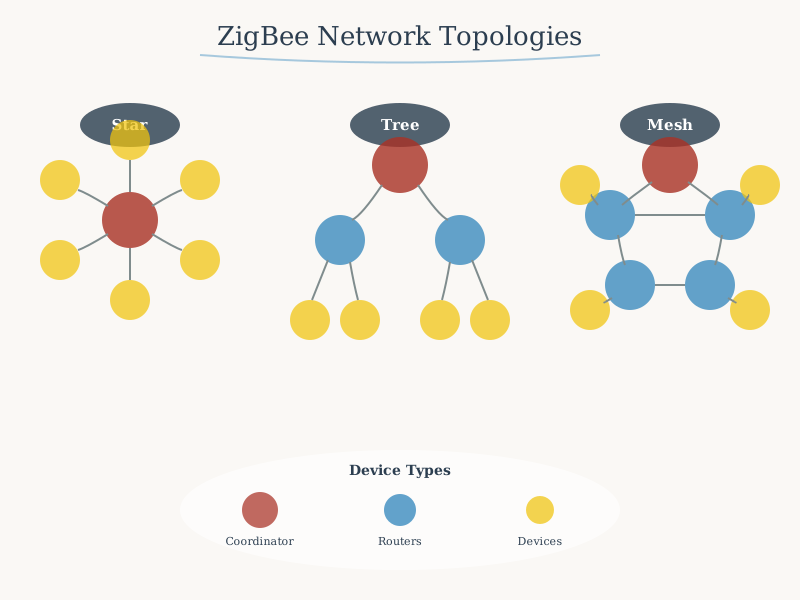
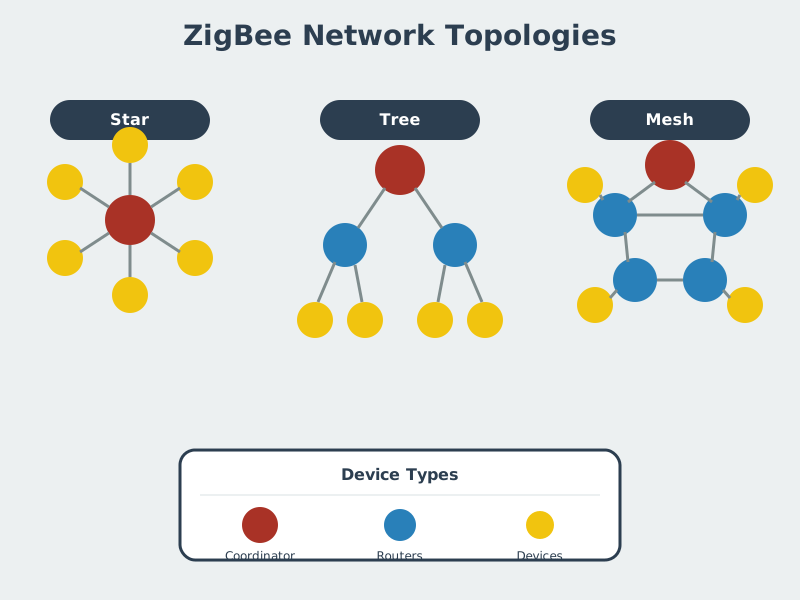
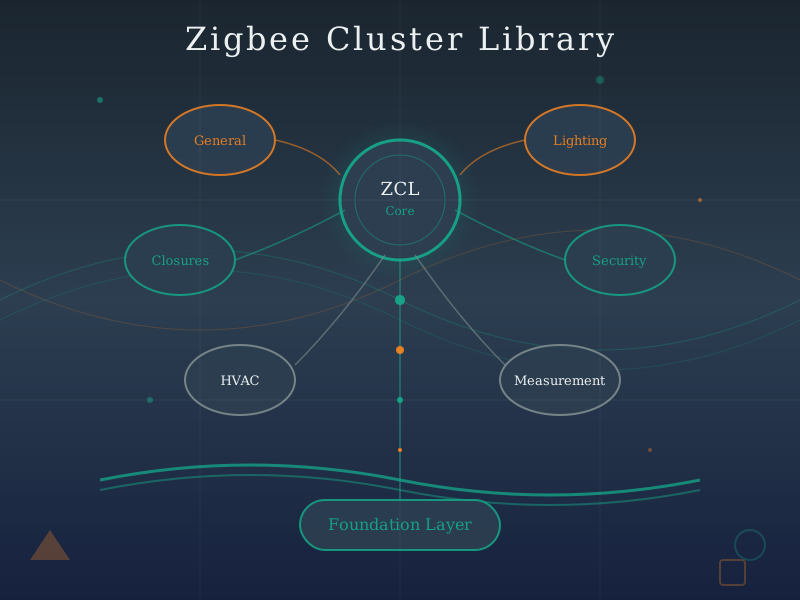
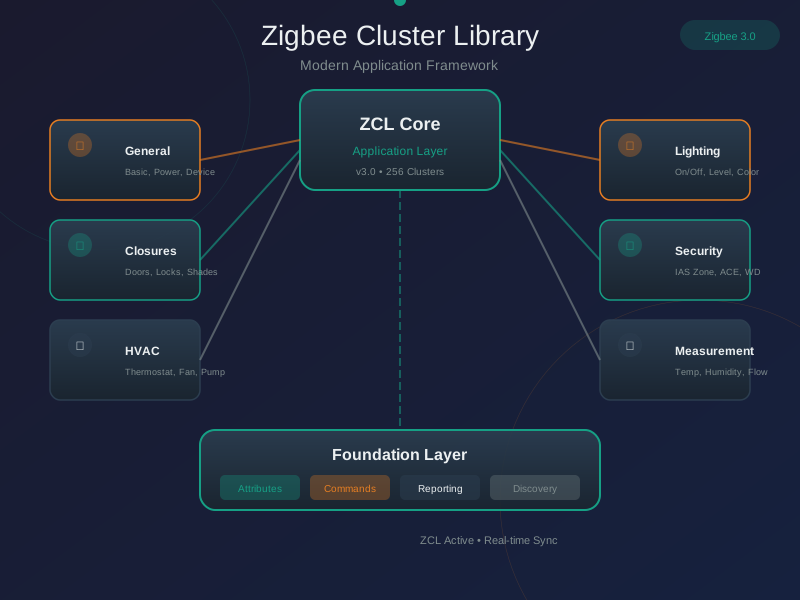
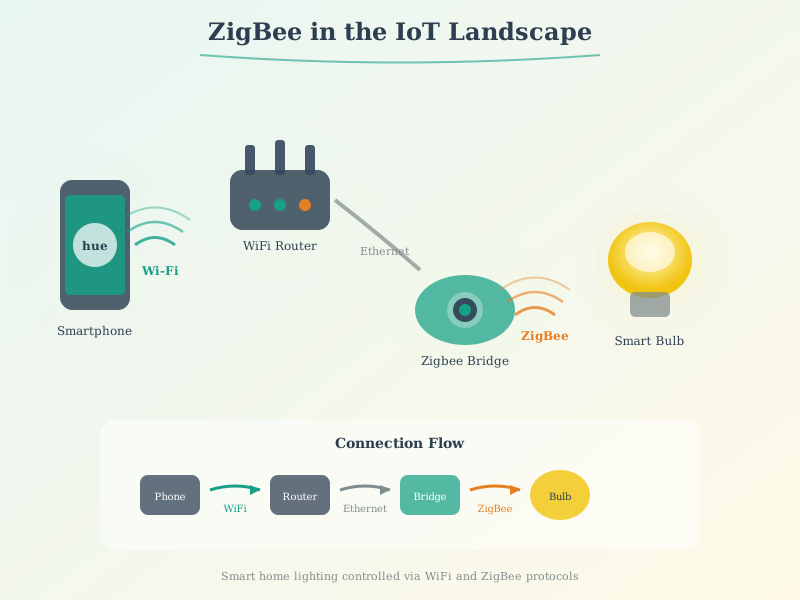
These AI-generated figures provide alternative visual perspectives on Zigbee concepts.
Zigbee Network Topology:
Zigbee Cluster Library:
Zigbee Protocol Stack:
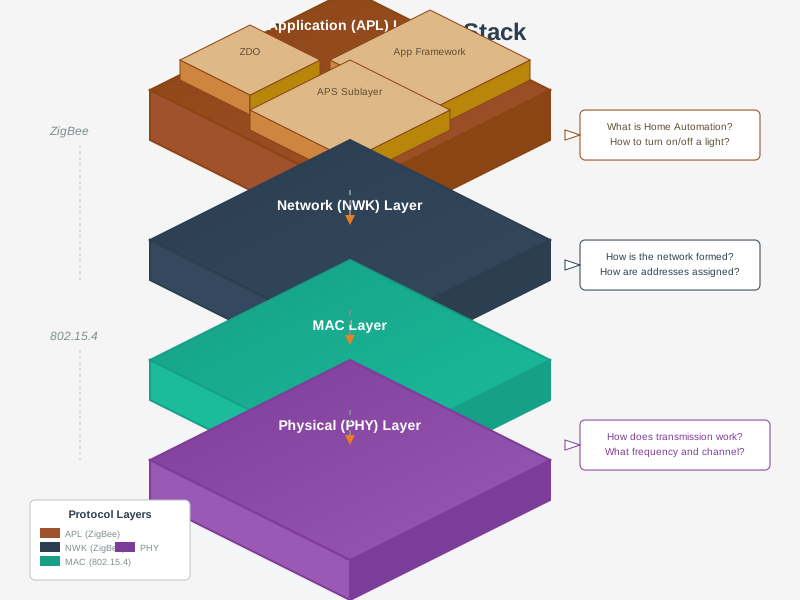
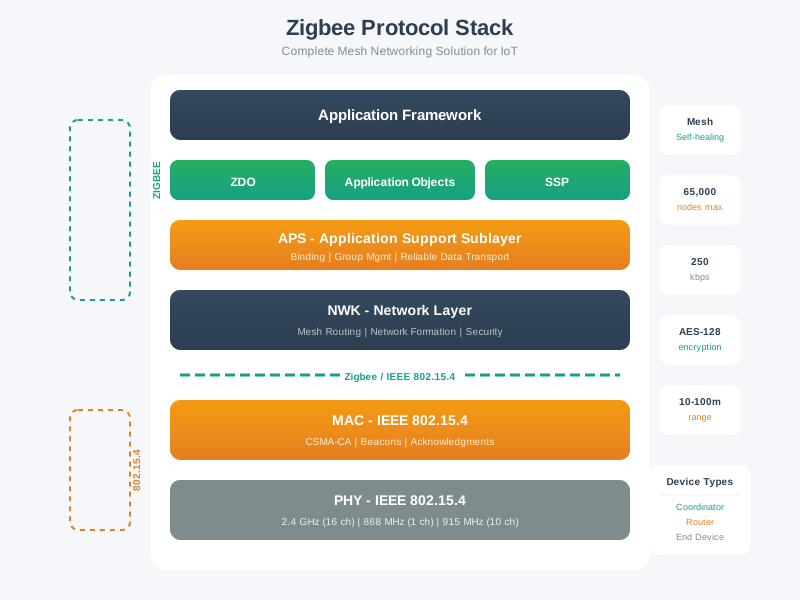
Zigbee in IoT Landscape:
978.8 Summary
This chapter covered practical Zigbee implementation and future trends:
- Development Tools: Explored hardware platforms (XBee, Texas Instruments, Silicon Labs) and software frameworks (Z-Stack, EmberZNet, zigpy)
- Hands-On Labs: Built coordinator setup, sensor networks, custom clusters, OTA firmware updates, and network health monitoring systems
- Production Deployment: Analyzed real-world considerations including network planning, interference mitigation, and battery life optimization
- Home Automation Integration: Integrated Zigbee with Home Assistant, MQTT brokers, and cloud platforms for complete smart home solutions
- Matter and Zigbee Coexistence: Examined how Zigbee 3.0 devices can transition to Matter through firmware updates using dual-protocol chips
- Future Directions: Explored emerging trends including Green Power energy harvesting, improved commissioning, and multi-protocol ecosystems
- Troubleshooting Techniques: Applied diagnostic tools, channel analyzers, and network visualizations to identify and resolve mesh connectivity issues
978.9 What’s Next
The next chapter provides a Zigbee Comprehensive Review with interactive visualizations, deployment calculators, protocol comparison matrices, and knowledge check questions to reinforce your understanding of Zigbee concepts covered in previous chapters.