%%{init: {'theme': 'base', 'themeVariables': {'primaryColor': '#2C3E50', 'primaryTextColor': '#fff', 'primaryBorderColor': '#16A085', 'lineColor': '#E67E22', 'secondaryColor': '#16A085', 'tertiaryColor': '#7F8C8D'}}}%%
graph LR
    A[Smart Home Hub<br/>Z-Wave Controller] -->|Z-Wave RF| B[Living Room Light]
    A -->|Mesh hop| C[Bedroom Dimmer]
    C -->|Mesh hop| D[Front Door Lock]
    B -->|Status| A

    style A fill:#E67E22,stroke:#2C3E50,color:#fff
    style B fill:#16A085,stroke:#2C3E50,color:#fff
    style C fill:#16A085,stroke:#2C3E50,color:#fff
    style D fill:#2C3E50,stroke:#16A085,color:#fff
1037 Z-Wave Overview and Fundamentals
NoteLearning Objectives
By the end of this section, you will be able to:
- Understand Z-Wave as a proprietary mesh networking protocol for home automation
- Compare Z-Wave with Zigbee, Thread, and other IoT protocols
- Understand Z-Wave’s frequency bands and global operation
- Explain GFSK modulation and Manchester encoding
- Understand Z-Wave network topology and source routing
- Evaluate Z-Wave device types and roles
- Understand Z-Wave security framework (S0, S2)
- Design Z-Wave networks for smart home applications
NoteKey Takeaway
In one sentence: Z-Wave is a proprietary sub-GHz mesh protocol optimized for smart home automation with guaranteed interoperability through mandatory certification.
Remember this rule: Choose Z-Wave when you need bulletproof device compatibility and better wall penetration than 2.4 GHz protocols; choose Zigbee or Thread when you need larger networks or lower per-device cost.
1037.1 🌱 Getting Started (For Beginners)
TipWhat is Z-Wave? (Simple Explanation)
Analogy: Z-Wave is like walkie-talkies for your home devices - but smarter because messages can hop from device to device to reach their destination.
Imagine your smart home devices are neighbors in a community: - Each device has a walkie-talkie tuned to the same frequency - If Device A can’t reach Device D directly, the message hops through Device B and C - One device (the controller) is the “neighborhood organizer” that knows everyone’s address
{fig-alt=“Z-Wave mesh network showing smart home hub communicating with devices via direct RF and multi-hop mesh routing”}
1037.1.1 Z-Wave vs Zigbee: The Home Automation Showdown
Both are popular for smart homes, but have key differences:
| Feature | Z-Wave | Zigbee |
|---|---|---|
| Frequency | Sub-GHz (908/868 MHz) | 2.4 GHz |
| Interference | Less (avoids Wi-Fi/Bluetooth) | More (same band as Wi-Fi) |
| Max devices | 232 per network | 65,000+ |
| Range | 30-100m (better wall penetration) | 10-30m |
| Interoperability | Guaranteed (certification required) | Varies by manufacturer |
| Cost | Slightly higher (licensing) | Lower (open standard) |
Simple rule: - Z-Wave = Premium, guaranteed compatibility, fewer devices - Zigbee = More options, more devices, may need same-brand ecosystem
1037.1.2 Why Sub-GHz Frequency Matters
%%{init: {'theme': 'base', 'themeVariables': {'primaryColor': '#2C3E50', 'primaryTextColor': '#fff', 'primaryBorderColor': '#16A085', 'lineColor': '#E67E22', 'secondaryColor': '#16A085', 'tertiaryColor': '#7F8C8D'}}}%%
graph TD
    A[Sub-GHz vs 2.4 GHz Comparison] --> B[Sub-GHz 868/908 MHz]
    A --> C[2.4 GHz Wi-Fi/Zigbee]

    B --> B1[Better Wall Penetration<br/>-3 to -6 dB per wall]
    B --> B2[Longer Range<br/>100-150m outdoor]
    B --> B3[Less Interference<br/>Avoids crowded Wi-Fi band]

    C --> C1[Worse Penetration<br/>-6 to -12 dB per wall]
    C --> C2[Shorter Range<br/>30-75m outdoor]
    C --> C3[More Interference<br/>Wi-Fi, Bluetooth, microwaves]

    style A fill:#E67E22,stroke:#2C3E50,color:#fff
    style B fill:#16A085,stroke:#2C3E50,color:#fff
    style C fill:#2C3E50,stroke:#16A085,color:#fff
    style B1 fill:#16A085,stroke:#2C3E50,color:#fff
    style B2 fill:#16A085,stroke:#2C3E50,color:#fff
    style B3 fill:#16A085,stroke:#2C3E50,color:#fff
{fig-alt=“Comparison diagram showing Sub-GHz frequencies (868/908 MHz) providing better wall penetration, longer range, and less interference compared to 2.4 GHz Wi-Fi and Zigbee frequencies that suffer from worse penetration and more crowded spectrum”}
1037.1.3 Z-Wave Device Types
%%{init: {'theme': 'base', 'themeVariables': {'primaryColor': '#2C3E50', 'primaryTextColor': '#fff', 'primaryBorderColor': '#16A085', 'lineColor': '#E67E22', 'secondaryColor': '#16A085', 'tertiaryColor': '#7F8C8D'}}}%%
graph TD
    A[Z-Wave Device Types] --> B[Primary Controller]
    A --> C[Secondary Controller]
    A --> D[Routing Slave]
    A --> E[Slave]

    B --> B1[Network manager<br/>Include/exclude devices<br/>Always listening<br/>Mains powered]

    C --> C1[Control devices<br/>No include/exclude<br/>Always listening<br/>Mains powered]

    D --> D1[End device + router<br/>Forward messages<br/>Always listening<br/>Mains powered<br/>e.g., light switches]

    E --> E1[End device only<br/>No routing<br/>Sleeps 99% of time<br/>Battery powered<br/>e.g., sensors]

    style A fill:#E67E22,stroke:#2C3E50,color:#fff
    style B fill:#2C3E50,stroke:#16A085,color:#fff
    style C fill:#16A085,stroke:#2C3E50,color:#fff
    style D fill:#16A085,stroke:#2C3E50,color:#fff
    style E fill:#7F8C8D,stroke:#2C3E50,color:#fff
{fig-alt=“Z-Wave device type hierarchy showing Primary Controller (network manager), Secondary Controller (control only), Routing Slave (forwards messages, mains powered), and Slave (battery powered end device that sleeps)”}
More mains-powered devices = stronger mesh network! They act as repeaters, extending your network’s reach.
1037.1.4 Real-World Example: Smart Home Setup
%%{init: {'theme': 'base', 'themeVariables': {'primaryColor': '#2C3E50', 'primaryTextColor': '#fff', 'primaryBorderColor': '#16A085', 'lineColor': '#E67E22', 'secondaryColor': '#16A085', 'tertiaryColor': '#7F8C8D'}}}%%
graph LR
    Hub[Smart Hub<br/>Controller] -->|Direct RF| Light[Living Room Light<br/>Routing Slave]
    Light -->|Mesh hop| Dimmer[Bedroom Dimmer<br/>Routing Slave]
    Dimmer -->|Mesh hop| Lock[Front Door Lock<br/>Slave]

    Hub -.->|Status report| Sensor1[Door Sensor<br/>Slave]
    Light -.->|Status report| Sensor2[Motion Sensor<br/>Slave]

    style Hub fill:#E67E22,stroke:#2C3E50,color:#fff
    style Light fill:#16A085,stroke:#2C3E50,color:#fff
    style Dimmer fill:#16A085,stroke:#2C3E50,color:#fff
    style Lock fill:#2C3E50,stroke:#16A085,color:#fff
    style Sensor1 fill:#7F8C8D,stroke:#2C3E50,color:#fff
    style Sensor2 fill:#7F8C8D,stroke:#2C3E50,color:#fff
{fig-alt=“Smart home Z-Wave network showing hub controlling devices via multi-hop mesh routing through mains-powered light switches and dimmers, with battery-powered sensors as leaf nodes”}
Message path: Hub → Living Room Light → Bedroom Dimmer → Lock (Messages hop through mains-powered devices to reach destination)
1037.1.5 🧪 Quick Self-Check
- Why does Z-Wave use sub-GHz frequency instead of 2.4 GHz?
- Less interference (avoids Wi-Fi/Bluetooth), better wall penetration, longer range ✓
- Can a battery-powered Z-Wave sensor relay messages?
- No, only mains-powered devices act as repeaters (to save battery) ✓
- What’s the advantage of Z-Wave’s certification program?
- Guaranteed interoperability - any Z-Wave device works with any Z-Wave hub ✓
TipFor Kids: Meet the Sensor Squad! 🌟
Z-Wave is like a special walkie-talkie channel just for your smart home - where messages can hop from friend to friend to reach faraway places!
1037.1.6 The Sensor Squad Adventure: The Message Relay Race
One sunny day, Bella the Button had an urgent message for the Front Door Lock who lived all the way across the house. “Someone’s at the door! Please unlock!” But the Front Door Lock was too far away to hear Bella’s radio signal directly.
“Don’t worry!” said Sammy the Temperature Sensor, who lived in the living room. “I can help pass the message along!” So Bella told Sammy, and Sammy told Lila the Light Sensor in the hallway, and Lila told Max the Motion Detector near the door, and finally Max told the Front Door Lock. Click! The door unlocked!
“That was amazing!” cheered Bella. “It’s like playing telephone, but with radio waves!” The Sensor Squad discovered that their Z-Wave network was like a team of friends holding hands across the whole house. Even if one friend couldn’t reach another directly, they could always find a path by asking other friends to help pass messages along.
The best part? Z-Wave uses a special radio frequency that’s different from Wi-Fi and Bluetooth, so their messages never get mixed up with video calls or music streaming. It’s like having their own private radio channel just for the smart home team!
1037.1.7 Key Words for Kids
| Word | What It Means |
|---|---|
| Mesh Network | Friends passing messages to each other like a game of telephone |
| Hopping | When a message bounces from one device to another to reach its destination |
| Controller | The “team captain” device that knows where everyone lives and how to reach them |
| Sub-GHz | A special radio channel that’s lower and slower than Wi-Fi, but goes through walls better |
| Routing | Figuring out the best path for a message to travel through the friend network |
1037.1.8 Try This at Home! 🏠
The Whisper Chain Experiment!
Try this with your family to understand how Z-Wave mesh networking works:
- Stand in different rooms of your house with family members
- Try whispering a message directly to someone far away - they probably can’t hear you!
- Now create a “mesh”: Person A whispers to Person B, who whispers to Person C, who whispers to the final person
- The message gets through even though you couldn’t reach the last person directly!
- Try different paths - if Person B is busy, can Person A go through Person D instead?
This is exactly how Z-Wave works! Your smart light switch in the living room might pass messages to your bedroom dimmer, which passes them to your front door lock. The message always finds a way, even if some devices are far apart. And just like your whisper chain, each helper must be “awake” (plugged in) to pass messages - battery devices like sensors are usually “sleeping” to save power!
1037.2 Prerequisites
Before diving into this chapter, you should be familiar with:
- Networking Basics: Understanding mesh network topologies, routing concepts, and basic protocol architecture is essential for comprehending Z-Wave’s source routing mechanism
- Zigbee Protocol: Knowledge of Zigbee provides an important comparison point, as both are mesh protocols for home automation with different trade-offs (open vs proprietary, 2.4GHz vs sub-GHz)
- Wireless Communication Fundamentals: Understanding radio frequency basics, ISM bands, modulation techniques (FSK/GFSK), and wireless network topologies helps grasp Z-Wave’s sub-GHz operation
- Bluetooth: Familiarity with another widely-used smart home protocol helps understand Z-Wave’s positioning and when to choose mesh networking over point-to-point communication
NoteRelated Chapters
Deep Dives: - Zigbee Fundamentals - Open-standard mesh alternative - Thread Fundamentals - IPv6-based mesh protocol - Bluetooth Mesh - BLE mesh networking
Comparisons: - Zigbee Hands-On - Zigbee vs Z-Wave comparison - Thread Security - Matter vs Z-Wave ecosystems - IoT Protocols Review - Smart home protocol comparison
Hands-On: - Simulations Hub - Z-Wave network design tools - Zigbee Comprehensive Review - Alternative mesh quiz
Learning: - Quizzes Hub - Test Z-Wave knowledge - Videos Hub - Smart home automation tutorials
WarningTradeoff: Z-Wave Proprietary Certification vs Open Ecosystem Flexibility
Option A: Use Z-Wave for guaranteed device interoperability through mandatory certification Option B: Use open protocols (Zigbee, Thread) for lower cost and broader vendor selection
Decision Factors: Choose Z-Wave (A) when bulletproof compatibility is essential (no “works with most hubs” uncertainty), you’re deploying in professional/commercial contexts where support calls are costly, or your network will have fewer than 232 devices. Choose open protocols (B) when cost per device matters, you need large-scale deployments (1000+ devices), or you want to avoid single-vendor chip dependency (Silicon Labs).
WarningTradeoff: Sub-GHz Range vs 2.4 GHz Ecosystem Size
Option A: Use Z-Wave’s sub-GHz frequencies (868/908 MHz) for better wall penetration and less Wi-Fi interference Option B: Use 2.4 GHz protocols (Zigbee, Thread) for global frequency uniformity and larger device ecosystem
Decision Factors: Choose sub-GHz/Z-Wave (A) for homes with thick walls, concrete construction, or severe Wi-Fi congestion. Choose 2.4 GHz protocols (B) when you need the same hardware worldwide, want access to the largest device selection, or when Matter compatibility is important for future-proofing. In typical wood-frame homes, the range difference is often negligible for mesh networks.
1037.3 Introduction to Z-Wave
Z-Wave (also written as ZWave, Z wave, or Z‐wave) is a wireless communication protocol designed specifically for home automation. Developed by Zensys (now owned by Silicon Labs), Z-Wave uses radio frequency (RF) for signaling and control.
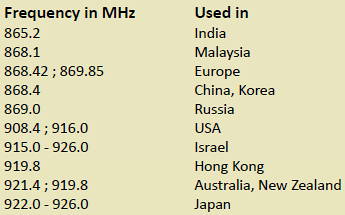
Key Characteristics: - Frequency: Sub-GHz (868-928 MHz depending on region) - US: 908.42 MHz - Europe: 868.42 MHz - Topology: Mesh network with source routing - Capacity: Up to 232 nodes per network - Modulation: GFSK (Gaussian Frequency Shift Keying) - Encoding: Manchester channel encoding - Proprietary: Owned by Silicon Labs, requires licensing
NoteAlternative View: Z-Wave Network Architecture
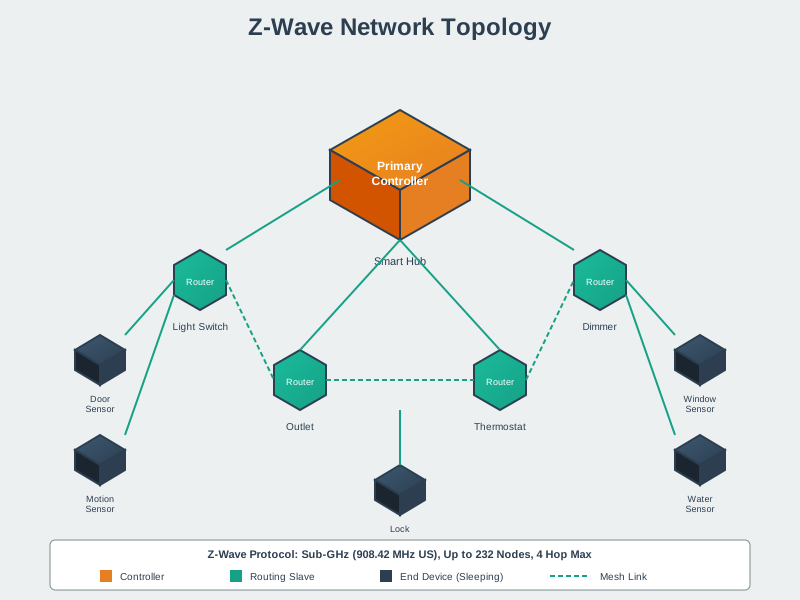
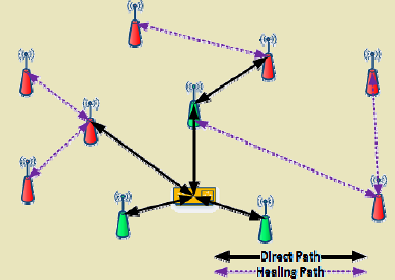
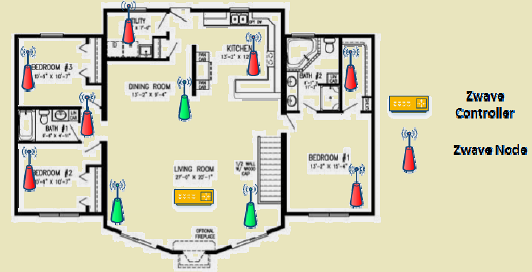
The Z-Wave network forms a self-organizing mesh where mains-powered devices act as repeaters, enabling signals to reach distant battery-powered sensors through multiple hops. This architecture provides both extended range and redundancy - if one routing path fails, messages automatically find alternative routes through neighboring devices.
NoteAlternative View: Z-Wave Source Routing
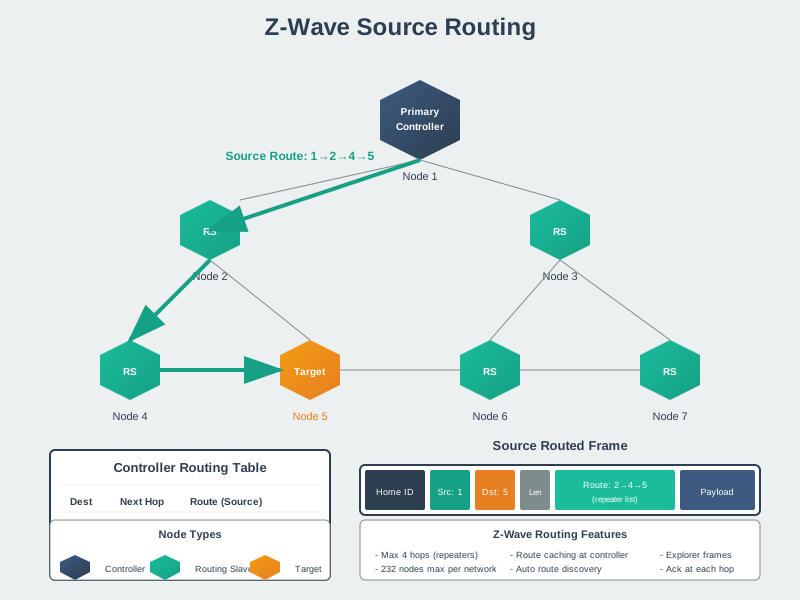
Unlike reactive routing protocols that discover paths on-demand, Z-Wave uses source routing where the controller maintains a complete routing table. When sending a command, the controller embeds the full route (e.g., Controller -> Node 5 -> Node 12 -> Node 25) in the message header. Each intermediate node simply reads the next hop and forwards accordingly, requiring minimal intelligence at routing slaves while ensuring deterministic, predictable message delivery.
NoteAlternative View: Z-Wave Mesh Routing Visualization
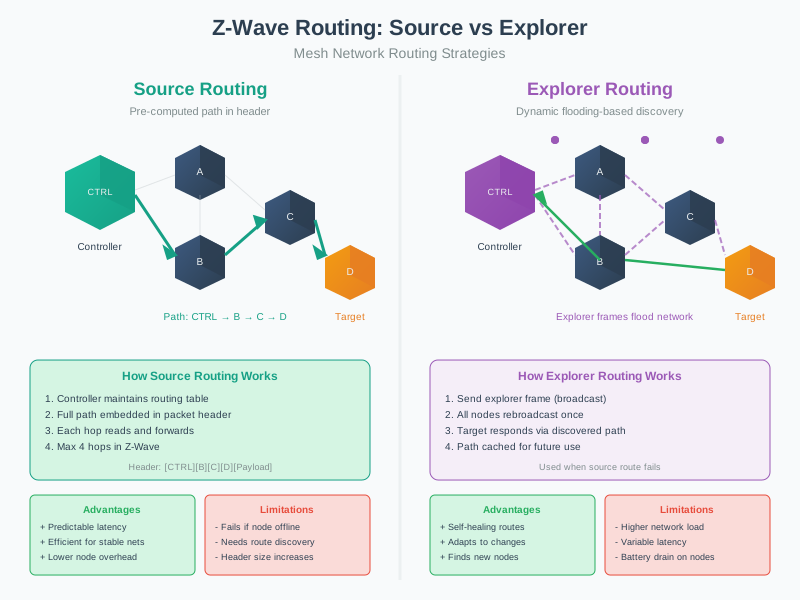
The mesh routing visualization demonstrates how Z-Wave networks achieve resilience through path redundancy. Each mains-powered routing slave maintains neighbor relationships with multiple nearby devices, creating a web of potential forwarding paths. When the network healer runs (typically scheduled nightly), it discovers all neighbors, tests link quality, and calculates optimal routes using metrics like hop count and signal strength. This ensures that even if individual devices fail or RF conditions change, the network can self-heal by discovering alternative paths.
%%{init: {'theme': 'base', 'themeVariables': {'primaryColor': '#2C3E50', 'primaryTextColor': '#fff', 'primaryBorderColor': '#16A085', 'lineColor': '#E67E22', 'secondaryColor': '#16A085', 'tertiaryColor': '#7F8C8D'}}}%%
graph TD
    A[Z-Wave Network<br/>Home ID: 0x12345678] --> B[Node 1: Controller<br/>Primary]
    A --> C[Node 2-50: Routing Slaves<br/>Switches, Plugs]
    A --> D[Node 51-232: Slaves<br/>Sensors, Remotes]

    B --> B1[Always listening<br/>Network manager<br/>Source routing]
    C --> C1[Always listening<br/>Forward messages<br/>Mains powered]
    D --> D1[Sleep 99%+ time<br/>Battery powered<br/>Wake on event]

    style A fill:#E67E22,stroke:#2C3E50,color:#fff
    style B fill:#2C3E50,stroke:#16A085,color:#fff
    style C fill:#16A085,stroke:#2C3E50,color:#fff
    style D fill:#7F8C8D,stroke:#2C3E50,color:#fff
{fig-alt=“Z-Wave network architecture showing Home ID network containing one primary controller, multiple routing slaves (mains-powered devices), and battery-powered slave end devices”}
NoteAlternative View: Z-Wave vs Zigbee Protocol Comparison
This variant presents the Z-Wave ecosystem through a side-by-side comparison with Zigbee - useful for understanding when to choose each protocol for smart home projects.
%%{init: {'theme': 'base', 'themeVariables': {'primaryColor': '#2C3E50', 'primaryTextColor': '#fff', 'primaryBorderColor': '#16A085', 'lineColor': '#E67E22', 'secondaryColor': '#16A085', 'tertiaryColor': '#7F8C8D', 'fontSize': '11px'}}}%%
graph TB
    subgraph ZWAVE["Z-Wave<br/>(Silicon Labs)"]
        ZF["Frequency: Sub-GHz<br/>(868-908 MHz)"]
        ZT["Topology: Source-routed mesh<br/>(Controller knows paths)"]
        ZD["Devices: 232 max per network"]
        ZS["Standard: Proprietary<br/>(Certified interop)"]
        ZR["Range: 30m indoor<br/>(better wall penetration)"]
        ZB["Data Rate: 100 kbps<br/>(Z-Wave LR: 9.6 kbps at 1.6km)"]
    end

    subgraph ZIGBEE["Zigbee<br/>(Zigbee Alliance / CSA)"]
        XF["Frequency: 2.4 GHz<br/>(worldwide ISM)"]
        XT["Topology: Self-healing mesh<br/>(Distributed routing)"]
        XD["Devices: 65,000 max per network"]
        XS["Standard: Open<br/>(Multiple chip vendors)"]
        XR["Range: 10-20m indoor<br/>(2.4 GHz blocked by walls)"]
        XB["Data Rate: 250 kbps<br/>(higher throughput)"]
    end

    CHOICE["Choose Based On:<br/>━━━━━━━━━━━━<br/>Z-Wave: Long range,<br/>reliability, guaranteed<br/>interoperability<br/>━━━━━━━━━━━━<br/>Zigbee: More devices,<br/>lower cost chips,<br/>open ecosystem"]

    ZWAVE --> CHOICE
    ZIGBEE --> CHOICE

    style ZWAVE fill:#16A085,stroke:#2C3E50,color:#fff
    style ZIGBEE fill:#E67E22,stroke:#2C3E50,color:#fff
    style CHOICE fill:#2C3E50,stroke:#16A085,color:#fff
{fig-alt=“Comparison chart showing Z-Wave (sub-GHz, 232 devices, proprietary but certified, better range through walls) versus Zigbee (2.4 GHz, 65000 devices, open standard, higher data rate). Z-Wave excels in reliability and range; Zigbee excels in device capacity and cost. Both are valid mesh solutions for home automation with different trade-offs.”}
TipAlternative View: Z-Wave Protocol Stack
This variant shows the Z-Wave protocol layers from physical to application:
%%{init: {'theme': 'base', 'themeVariables': {'primaryColor': '#2C3E50', 'primaryTextColor': '#fff', 'primaryBorderColor': '#16A085', 'lineColor': '#E67E22', 'secondaryColor': '#16A085', 'tertiaryColor': '#7F8C8D', 'fontSize': '11px'}}}%%
graph TB
    subgraph APP["Application Layer"]
        A1["Command Classes"]
        A2["Device Types"]
        A3["Certified Interop"]
    end

    subgraph NWK["Network Layer"]
        N1["Source Routing"]
        N2["232 Node Addressing"]
        N3["Home ID / Node ID"]
    end

    subgraph MAC["MAC Layer"]
        M1["Collision Avoidance"]
        M2["ACK/NACK"]
        M3["Backoff Algorithm"]
    end

    subgraph PHY["Physical Layer"]
        P1["Sub-GHz Radio"]
        P2["GFSK Modulation"]
        P3["100 kbps / 40 kbps"]
    end

    APP --> NWK --> MAC --> PHY

    style APP fill:#E67E22,stroke:#2C3E50,color:#fff
    style NWK fill:#16A085,stroke:#2C3E50,color:#fff
    style MAC fill:#2C3E50,stroke:#16A085,color:#fff
    style PHY fill:#7F8C8D,stroke:#2C3E50,color:#fff
Z-Wave is a complete proprietary protocol stack. Unlike 802.15.4-based protocols, Z-Wave defines all layers from PHY to Application, ensuring certified interoperability between all Z-Wave devices regardless of manufacturer.
NoteAlternative View: Z-Wave Smart Home Decision Tree
This variant helps decide when Z-Wave is the right choice for smart home applications:
%%{init: {'theme': 'base', 'themeVariables': {'primaryColor': '#2C3E50', 'primaryTextColor': '#fff', 'primaryBorderColor': '#16A085', 'lineColor': '#E67E22', 'secondaryColor': '#16A085', 'tertiaryColor': '#7F8C8D', 'fontSize': '11px'}}}%%
flowchart TD
    START["Smart Home<br/>Protocol Selection"] --> Q1{"Existing<br/>infrastructure?"}

    Q1 -->|"Existing Z-Wave"| ZWAVE["Expand Z-Wave<br/>Guaranteed compat"]
    Q1 -->|"None/New build"| Q2{"Wi-Fi<br/>congested?"}

    Q2 -->|"Yes - 2.4 GHz crowded"| ZWAVE2["Z-Wave<br/>Sub-GHz avoids Wi-Fi"]
    Q2 -->|"No"| Q3{"How many<br/>devices?"}

    Q3 -->|"> 200"| ZIGBEE["Zigbee<br/>65K device limit"]
    Q3 -->|"< 200"| Q4{"Range through<br/>walls critical?"}

    Q4 -->|"Yes - thick walls"| ZWAVE3["Z-Wave<br/>Sub-GHz penetrates"]
    Q4 -->|"No"| Q5{"Ecosystem<br/>preference?"}

    Q5 -->|"Apple/Google/Matter"| THREAD["Thread/Matter<br/>Future-proof"]
    Q5 -->|"Legacy hubs"| ZWAVE4["Z-Wave or Zigbee<br/>Both well-supported"]

    style START fill:#2C3E50,stroke:#16A085,color:#fff
    style ZWAVE fill:#16A085,stroke:#2C3E50,color:#fff
    style ZWAVE2 fill:#16A085,stroke:#2C3E50,color:#fff
    style ZWAVE3 fill:#16A085,stroke:#2C3E50,color:#fff
    style ZWAVE4 fill:#16A085,stroke:#2C3E50,color:#fff
    style ZIGBEE fill:#E67E22,stroke:#2C3E50,color:#fff
    style THREAD fill:#7F8C8D,stroke:#2C3E50,color:#fff
Z-Wave excels when: expanding existing Z-Wave networks, Wi-Fi/2.4 GHz is congested, or thick walls require sub-GHz penetration. Consider Zigbee for large device counts or Thread/Matter for new smart home builds.
1037.4 Knowledge Check
Test your understanding of these networking concepts.
1037.5 Z-Wave Operating Frequencies
Z-Wave operates in the sub-GHz ISM bands, with different frequencies for different regions to comply with local regulations:
%%{init: {'theme': 'base', 'themeVariables': {'primaryColor': '#2C3E50', 'primaryTextColor': '#fff', 'primaryBorderColor': '#16A085', 'lineColor': '#E67E22', 'secondaryColor': '#16A085', 'tertiaryColor': '#7F8C8D'}}}%%
graph TD
    A[Z-Wave Regional Frequencies] --> B[US/Canada<br/>908.4 MHz]
    A --> C[Europe<br/>868.4 MHz]
    A --> D[Australia/NZ<br/>921.4 MHz]
    A --> E[Japan<br/>922-926 MHz]
    A --> F[Others<br/>Various]

    B --> B1[3 channels<br/>Max 232 devices]
    C --> C1[1 channel<br/>Max 232 devices]
    D --> D1[1 channel<br/>Max 232 devices]
    E --> E1[Multiple channels<br/>Max 232 devices]

    style A fill:#E67E22,stroke:#2C3E50,color:#fff
    style B fill:#16A085,stroke:#2C3E50,color:#fff
    style C fill:#16A085,stroke:#2C3E50,color:#fff
    style D fill:#16A085,stroke:#2C3E50,color:#fff
    style E fill:#16A085,stroke:#2C3E50,color:#fff
    style F fill:#7F8C8D,stroke:#2C3E50,color:#fff
{fig-alt=“Z-Wave global frequency allocations showing different ISM bands by region: US/Canada at 908.4 MHz, Europe at 868.4 MHz, Australia/NZ at 921.4 MHz, and Japan at 922-926 MHz”}
1037.5.1 Frequency Table by Region
| Region | Frequency (MHz) | Channels | Max Devices |
|---|---|---|---|
| USA, Canada | 908.40 - 916.0 | 3 channels | 232 |
| Europe (EU) | 868.40 | 1 channel | 232 |
| Australia, New Zealand | 921.40 | 1 channel | 232 |
| Hong Kong | 919.80 | 1 channel | 232 |
| Japan | 922-926 | Multiple | 232 |
| Israel | 916.0 | 1 channel | 232 |
| India | 865.2 | 1 channel | 232 |
| Brazil | 921.4 | 1 channel | 232 |
ImportantWhy Sub-GHz Frequencies?
Advantages over 2.4 GHz (used by Wi-Fi, Zigbee, Thread, Bluetooth):
- Better Penetration: Lower frequencies penetrate walls and obstacles better
- Longer Range: ~100m vs ~30m (2.4 GHz) indoors
- Less Interference: 2.4 GHz is crowded (Wi-Fi, Bluetooth, microwaves)
- Lower Power: More efficient transmission at longer range
Disadvantages: - Regional Variations: Different frequencies in different countries - Lower Data Rate: ~100 kbps vs 250 kbps (2.4 GHz protocols) - Larger Antennas: Longer wavelength requires larger antennas - Not Global: Devices must be region-specific
1037.6 GFSK Modulation and Manchester Encoding
Z-Wave uses sophisticated signal processing for reliable communication:
1037.6.1 Gaussian Frequency Shift Keying (GFSK)
GFSK is a digital modulation scheme that encodes data by shifting the carrier frequency:
%%{init: {'theme': 'base', 'themeVariables': {'primaryColor': '#2C3E50', 'primaryTextColor': '#fff', 'primaryBorderColor': '#16A085', 'lineColor': '#E67E22', 'secondaryColor': '#16A085', 'tertiaryColor': '#7F8C8D'}}}%%
graph LR
    A[Binary Data<br/>0s and 1s] --> B[Gaussian Filter<br/>Pulse Shaping]
    B --> C{GFSK Modulation}
    C -->|Bit = 0| D[Frequency f1<br/>868.40 - offset MHz]
    C -->|Bit = 1| E[Frequency f2<br/>868.40 + offset MHz]
    D --> F[RF Transmission]
    E --> F

    style A fill:#2C3E50,stroke:#16A085,color:#fff
    style B fill:#16A085,stroke:#2C3E50,color:#fff
    style C fill:#E67E22,stroke:#2C3E50,color:#fff
    style D fill:#16A085,stroke:#2C3E50,color:#fff
    style E fill:#16A085,stroke:#2C3E50,color:#fff
    style F fill:#2C3E50,stroke:#16A085,color:#fff
{fig-alt=“GFSK modulation process flow showing binary data passing through Gaussian filter then frequency shift keying where bit 0 uses frequency f1 and bit 1 uses frequency f2 before RF transmission”}
How GFSK Works:
- Binary Data: Input data as 0s and 1s
- Gaussian Filter: Baseband pulses passed through Gaussian filter
- Pulse Shaping: Smooths abrupt transitions
- Spectrum Limiting: Reduces bandwidth usage
- Interference Reduction: Cleaner signal
- Frequency Shift:
- Binary 0 → Carrier frequency f1 (e.g., 868.40 MHz - offset)
- Binary 1 → Carrier frequency f2 (e.g., 868.40 MHz + offset)
- RF Transmission: Modulated signal transmitted
Benefits: - Spectral Efficiency: Narrower bandwidth than plain FSK - Interference Resistance: Gaussian filtering reduces sidelobes - Reliable: Good performance in noisy environments
1037.6.2 Manchester Encoding
Manchester encoding is applied to the data before GFSK modulation:
Data:        1    0    1    1    0    1    0    0
             |    |    |    |    |    |    |    |
Manchester:  01   10   01   01   10   01   10   10
(0 → 10, 1 → 01)Benefits: - Clock Recovery: Receiver can extract clock from data (transition every bit) - DC Balance: Equal number of 0s and 1s (no DC component) - Error Detection: Missing transitions indicate errors
Trade-off: Doubles bandwidth (each bit becomes two symbols)