%%{init: {'theme': 'base', 'themeVariables': { 'primaryColor': '#2C3E50', 'primaryTextColor': '#fff', 'primaryBorderColor': '#16A085', 'lineColor': '#16A085', 'secondaryColor': '#E67E22', 'tertiaryColor': '#ecf0f1', 'fontSize': '12px'}}}%%
timeline
    title Wi-Fi Evolution: From Office LANs to IoT
    section Early Days
        1997 : 802.11 Original
             : 2 Mbps, 2.4 GHz
             : High-cost adapters
        1999 : 802.11b "Wi-Fi Born"
             : 11 Mbps, 2.4 GHz
             : Mass adoption begins
    section Speed Race
        2003 : 802.11g
             : 54 Mbps, 2.4 GHz
             : Backward compatible
        2009 : 802.11n / Wi-Fi 4
             : 600 Mbps, MIMO
             : Dual-band (2.4/5 GHz)
    section Gigabit Era
        2013 : 802.11ac / Wi-Fi 5
             : 3.5 Gbps, MU-MIMO
             : 5 GHz only, beamforming
        2019 : 802.11ax / Wi-Fi 6
             : 9.6 Gbps, OFDMA
             : Target Wake Time (IoT!)
    section IoT Era
        2021 : Wi-Fi 6E + HaLow
             : 6 GHz band, 900 MHz
             : 1 km range for sensors
        2024 : Wi-Fi 7
             : 46 Gbps, MLO
             : Ultra-low latency
842 Wi-Fi Standards Evolution: From 802.11b to Wi-Fi 7
842.1 Learning Objectives
By the end of this chapter, you should be able to:
- Trace the evolution of Wi-Fi from 802.11b (1999) to Wi-Fi 7 (2024)
- Understand key innovations at each generation (MIMO, MU-MIMO, OFDMA, TWT)
- Identify which Wi-Fi standard is appropriate for different IoT applications
- Explain Wi-Fi 6 features that benefit IoT (TWT, OFDMA, BSS Coloring)
- Compare Wi-Fi HaLow (802.11ah) with traditional Wi-Fi for sensor applications
- Select the right Wi-Fi generation based on power, bandwidth, and density requirements
842.2 Wi-Fi Standards Timeline for IoT
| Year | Standard | Key Features |
|---|---|---|
| 1999 | 802.11b (Wi-Fi 1) | 2.4 GHz, 11 Mbps |
| 2003 | 802.11g (Wi-Fi 3) | 2.4 GHz, 54 Mbps |
| 2009 | 802.11n (Wi-Fi 4) | 2.4/5 GHz, 600 Mbps, MIMO support |
| 2013 | 802.11ac (Wi-Fi 5) | 5 GHz, 3.5 Gbps, MU-MIMO |
| 2019 | 802.11ax (Wi-Fi 6) | 2.4/5 GHz, 9.6 Gbps, OFDMA, TWT (IoT optimized) |
| 2024 | 802.11ax (Wi-Fi 6E) | 6 GHz band, Ultra-low latency |
842.3 Historical Context: How Wi-Fi Evolved
NoteThe Full Wi-Fi History
Understanding Wi-Fi’s evolution explains why it wasn’t originally designed for IoT - and how recent innovations address those limitations.
Original Problem (1990s): Wired LANs required expensive Ethernet cabling through walls. Businesses wanted laptop mobility without losing network access. The IEEE 802.11 working group formed in 1991 to create a wireless LAN standard.
First Standard (1997): IEEE 802.11 delivered 2 Mbps at 2.4 GHz using FHSS (frequency hopping) or DSSS (direct sequence spread spectrum). Range: ~20 meters. Adoption was limited due to high hardware cost and poor interoperability between vendors.
Speed Race (1999-2009): - 802.11b (1999): 11 Mbps at 2.4 GHz - First mass-market success, “Wi-Fi” trademark created - 802.11a (1999): 54 Mbps at 5 GHz - Higher speed but shorter range, expensive - 802.11g (2003): 54 Mbps at 2.4 GHz - Backward compatible with 802.11b, became ubiquitous - 802.11n / Wi-Fi 4 (2009): 600 Mbps using MIMO (multiple antennas), dual-band (2.4/5 GHz)
Gigabit Era (2013-2019): - 802.11ac / Wi-Fi 5 (2013): 3.5 Gbps at 5 GHz only, MU-MIMO (multi-user), beamforming - 802.11ax / Wi-Fi 6 (2019): 9.6 Gbps, OFDMA (orthogonal frequency division multiple access), Target Wake Time (TWT) for power savings - first standard designed with IoT in mind
IoT Optimizations (2021+): - Wi-Fi 6E (2021): Added 6 GHz band with 1200 MHz new spectrum - eliminates legacy interference - 802.11ah / Wi-Fi HaLow (2016, deployed 2021+): Sub-1 GHz (900 MHz), 1 km range, 100 kbps-86 Mbps, designed specifically for IoT sensors - Wi-Fi 7 / 802.11be (2024): 46 Gbps, 320 MHz channels, Multi-Link Operation
842.4 Comprehensive Standards Comparison
| Standard | Marketing Name | Year | Frequency | Max Speed | Channel Width | MIMO | Range | Power Efficiency | IoT Key Features | Best IoT Use Cases |
|---|---|---|---|---|---|---|---|---|---|---|
| 802.11b | Wi-Fi 1 | 1999 | 2.4 GHz | 11 Mbps | 22 MHz | No | Good | Poor | None | Legacy devices only (obsolete) |
| 802.11a | Wi-Fi 2 | 1999 | 5 GHz | 54 Mbps | 20 MHz | No | Medium | Poor | Less interference | Rarely used (5 GHz only) |
| 802.11g | Wi-Fi 3 | 2003 | 2.4 GHz | 54 Mbps | 20 MHz | No | Good | Poor | Backward compatible with 11b | Legacy smart home devices |
| 802.11n | Wi-Fi 4 | 2009 | 2.4/5 GHz | 600 Mbps | 20/40 MHz | Yes (4x4) | Excellent | Moderate | MIMO, frame aggregation | Most common for current IoT devices |
| 802.11ac | Wi-Fi 5 | 2013 | 5 GHz | 3.5 Gbps | 20-160 MHz | Yes (8x8) | Medium | Moderate | MU-MIMO (downlink), beamforming | IP cameras, high-bandwidth IoT |
| 802.11ax | Wi-Fi 6 | 2019 | 2.4/5 GHz | 9.6 Gbps | 20-160 MHz | Yes (8x8) | Excellent | High | TWT (battery), OFDMA, MU-MIMO (bi-directional), BSS Coloring | Modern smart home, battery IoT |
| 802.11ax | Wi-Fi 6E | 2020 | 6 GHz | 9.6 Gbps | 20-160 MHz | Yes (8x8) | Medium | High | All Wi-Fi 6 + 6 GHz band (no legacy interference) | High-density IoT, industrial |
| 802.11be | Wi-Fi 7 | 2024 | 2.4/5/6 GHz | 46 Gbps | 20-320 MHz | Yes (16x16) | Excellent | Very High | Multi-link operation, 4K-QAM | Future ultra-high-bandwidth IoT |
842.5 Wi-Fi 6: The Game-Changer for IoT
ImportantKey Wi-Fi Standard Selection Criteria for IoT
For Battery-Powered IoT Devices: - Choose Wi-Fi 6 (802.11ax) - TWT feature extends battery life 10-100x - Avoid Wi-Fi 5 and earlier - No power-saving mechanisms for IoT - Use 2.4 GHz band - Slightly lower power draw than 5 GHz
For Video Cameras / High-Bandwidth Devices: - Choose Wi-Fi 5 (802.11ac) or Wi-Fi 6 - MU-MIMO handles multiple streams - Use 5 GHz band - Less congestion, higher throughput - Minimum 40-80 MHz channel width - 1080p needs ~5-10 Mbps per camera
For Dense Deployments (50+ devices): - Choose Wi-Fi 6 (802.11ax) - OFDMA divides channels efficiently - Enable BSS Coloring - Reduces interference from neighboring APs - Use 5 GHz or 6 GHz - More non-overlapping channels available
For Legacy Smart Home Devices: - Wi-Fi 4 (802.11n) is sufficient - Most IoT devices (thermostats, lights) use Wi-Fi 4 - 2.4 GHz for range - Better wall penetration throughout home - Ensure AP supports mixed mode - Allow Wi-Fi 4 devices on Wi-Fi 6 network
For Industrial IoT: - Wi-Fi 6E (6 GHz) - No interference from consumer devices - Dedicated SSIDs - Separate IoT from corporate traffic - Enterprise APs - Higher client capacity (200-500 vs 30-50 consumer)
842.6 Wi-Fi 6 Features Deep Dive
842.6.1 Target Wake Time (TWT) - The Battery Saver
%%{init: {'theme': 'base', 'themeVariables': { 'primaryColor': '#2C3E50', 'primaryTextColor': '#fff', 'primaryBorderColor': '#16A085', 'lineColor': '#16A085', 'secondaryColor': '#E67E22', 'tertiaryColor': '#ecf0f1', 'fontSize': '13px'}}}%%
sequenceDiagram
    participant Device as IoT Sensor<br/>(Wi-Fi 6)
    participant AP as Wi-Fi 6 Router<br/>(Access Point)

    Note over Device,AP: Initial TWT Negotiation
    Device->>AP: TWT Request: Wake every 6 hours
    AP->>Device: TWT Response: Confirmed (9am, 3pm, 9pm)

    Note over Device: Deep Sleep (10 µA)<br/>6 hours = 0.06 mAh

    rect rgb(230, 126, 34, 0.1)
    Note over Device,AP: 9:00 AM - Scheduled Wake
    Device->>AP: Wake up at TWT
    AP->>Device: Buffered data ready
    Device->>AP: Send temperature: 22°C
    Note over Device: TX: 200 mA for 2 sec<br/>= 0.11 mAh
    end

    Note over Device: Deep Sleep Again<br/>Next wake: 3:00 PM

    rect rgb(230, 126, 34, 0.1)
    Note over Device,AP: 3:00 PM - Scheduled Wake
    Device->>AP: Wake up at TWT
    AP->>Device: No buffered data
    Device->>AP: Send temperature: 23°C
    end

    Note over Device: Deep Sleep<br/>Next wake: 9:00 PM

    Note over Device,AP: Legacy Wi-Fi PS: frequent beacon/DTIM checks (often ~10^5–10^6/day)<br/>Wi-Fi 6 TWT: a handful of scheduled wake-ups/day (e.g., 4/day)
How TWT Works:
Without TWT (Wi-Fi 4/5):
Device: Wakes frequently for beacons/DTIM → "Any data for me?" → Sleep → Repeat
Battery life: often months for low-duty-cycle sensors (device/workload-dependent)

With TWT (Wi-Fi 6):
Device: "Wake me at 9am, 3pm, 9pm only"
Router: "OK, I'll buffer your data until then"
Device: Sleeps 6 hours → Wakes → Transmits → Sleeps again
Battery life: can extend to years when both device and AP support TWT
Real-World TWT Impact: - Temperature sensor (send every 6 hours): 4-10x battery life - Door sensor (send on event): 50-100x battery life - Security camera (always on): No benefit (can’t sleep)
842.6.2 OFDMA - Efficient Channel Sharing
%%{init: {'theme': 'base', 'themeVariables': { 'primaryColor': '#2C3E50', 'primaryTextColor': '#fff', 'primaryBorderColor': '#16A085', 'lineColor': '#16A085', 'secondaryColor': '#E67E22', 'tertiaryColor': '#ecf0f1', 'fontSize': '13px'}}}%%
graph TB
    subgraph WIFI5["Wi-Fi 5 (802.11ac) - OFDM<br/>Sequential Access = INEFFICIENT"]
        direction TB
        T1["Time Slot 1<br/>Camera A uses full channel<br/>99.5% WASTED"]
        T2["Time Slot 2<br/>Sensor B uses full channel<br/>99.999% WASTED"]
        T3["Time Slot 3<br/>Light C uses full channel<br/>99.999% WASTED"]

        T1 --> T2
        T2 --> T3
    end

    subgraph WIFI6["Wi-Fi 6 (802.11ax) - OFDMA<br/>Parallel Access = EFFICIENT"]
        direction TB
        COMBINED["Single Time Slot<br/>Camera A: 18 MHz | B: 2M | C: 1M | D: 1M<br/>ALL 4 devices transmit simultaneously<br/>4x throughput improvement"]
    end

    style WIFI5 fill:#e74c3c,stroke:#2C3E50,stroke-width:3px,color:#000
    style WIFI6 fill:#16A085,stroke:#2C3E50,stroke-width:3px,color:#000
842.6.3 BSS Coloring - Apartment Savior
Problem: Neighbor’s Wi-Fi causes your devices to wait (even though they can’t decode it)
Solution: Wi-Fi 6 “colors” networks so devices ignore neighbor traffic
Apartment Building:
Apartment A (Color 1): Router + 20 devices
Apartment B (Color 2): Router + 20 devices

Wi-Fi 5 behavior:
Your device hears Neighbor's Wi-Fi → "Someone talking, I'll wait"
Result: 50% throughput loss

Wi-Fi 6 behavior:
Your device hears Neighbor's Wi-Fi → "Different color, I'll transmit anyway"
Result: 2x throughput improvement in dense areas
842.6.4 Wi-Fi 6 Generations Comparison for IoT
| Feature | Wi-Fi 4 (2009) | Wi-Fi 5 (2013) | Wi-Fi 6 (2019) |
|---|---|---|---|
| Battery Life (sensor) | 3-6 months | 3-6 months | 2-5 years |
| Dense Deployment | 30 devices max | 50 devices | 200+ devices |
| Latency | 10-30ms | 10-20ms | 2-10ms |
| Apartment Performance | Poor (interference) | Poor | Good (BSS coloring) |
| 2.4 GHz Support | Yes | NO | Yes |
842.7 Wi-Fi HaLow (802.11ah) - IoT-Specific Wi-Fi
TipDeep Dive: Wi-Fi HaLow
Wi-Fi HaLow is a sub-1 GHz Wi-Fi standard specifically designed for IoT sensors (not for your laptop!)
842.7.1 Why HaLow is Different
Traditional Wi-Fi (2.4/5 GHz): - Range: 50-100m - Power: High - Use: Laptops, phones, cameras
Wi-Fi HaLow (900 MHz): - Range: 1+ km (10x traditional Wi-Fi!) - Power: Ultra-low (years on battery) - Use: Sensors, meters, agriculture
842.7.2 HaLow vs LoRaWAN Comparison
| Feature | Wi-Fi HaLow | LoRaWAN | Winner |
|---|---|---|---|
| Range | 1-2 km | 5-15 km | LoRaWAN |
| Data Rate | 150 kbps - 78 Mbps | 0.3-50 kbps | HaLow |
| Battery Life | 5-10 years | 10+ years | LoRaWAN |
| IP Compatibility | Native IPv4/IPv6 | Requires gateway | HaLow |
| Security | WPA3 | AES-128 | Tie |
| Hardware cost | Typically higher today | Often lower | Depends |
842.7.3 When to Use Wi-Fi HaLow
Choose HaLow when: - Need Wi-Fi compatibility (IP addressing, cloud integration) - Moderate data rates (10-100 kbps) - Range: 500m - 2km (longer than Wi-Fi, shorter than LoRaWAN) - Outdoor sensors, smart agriculture, parking meters
Choose LoRaWAN instead when: - Ultra-long range needed (>2 km) - Ultra-low power critical (10+ year battery) - Very small payloads (<100 bytes)
HaLow Sweet Spot: Bridges gap between high-bandwidth Wi-Fi and ultra-long-range LoRaWAN!
842.8 Knowledge Check
842.9 Real-World Wi-Fi Standard Adoption for IoT (2025)
Current Market Breakdown:
| Standard | IoT Adoption % | Typical Devices |
|---|---|---|
| Wi-Fi 4 (802.11n) | 60% | Thermostats, smart plugs, lights, door locks (ESP8266, ESP32) |
| Wi-Fi 5 (802.11ac) | 30% | IP cameras, smart displays, hubs (newer devices) |
| Wi-Fi 6 (802.11ax) | 8% | Premium smart home devices, Matter-certified products |
| Wi-Fi 6E (6 GHz) | 1% | High-end industrial IoT, enterprise sensors |
| Legacy (11b/g) | 1% | Very old devices, being phased out |
Why Wi-Fi 4 Still Dominates IoT: - Widely available low-cost Wi-Fi modules (e.g., ESP8266/ESP32 class devices) - Sufficient for low-bandwidth sensors (<1 Mbps) - Excellent 2.4 GHz range - Supported by every router since 2009
When to Pay Extra for Wi-Fi 6: - Battery-powered devices (TWT saves battery) - Dense deployments (50+ devices) - New installations (future-proof) - High-bandwidth + efficiency (cameras that need to last)
842.10 Wi-Fi Evolution Summary (What Changed for IoT)
TipQuick Reference
Wi-Fi 1-3 (802.11 b/a/g): Not suitable for IoT - poor power efficiency, low speeds, no multi-device optimization
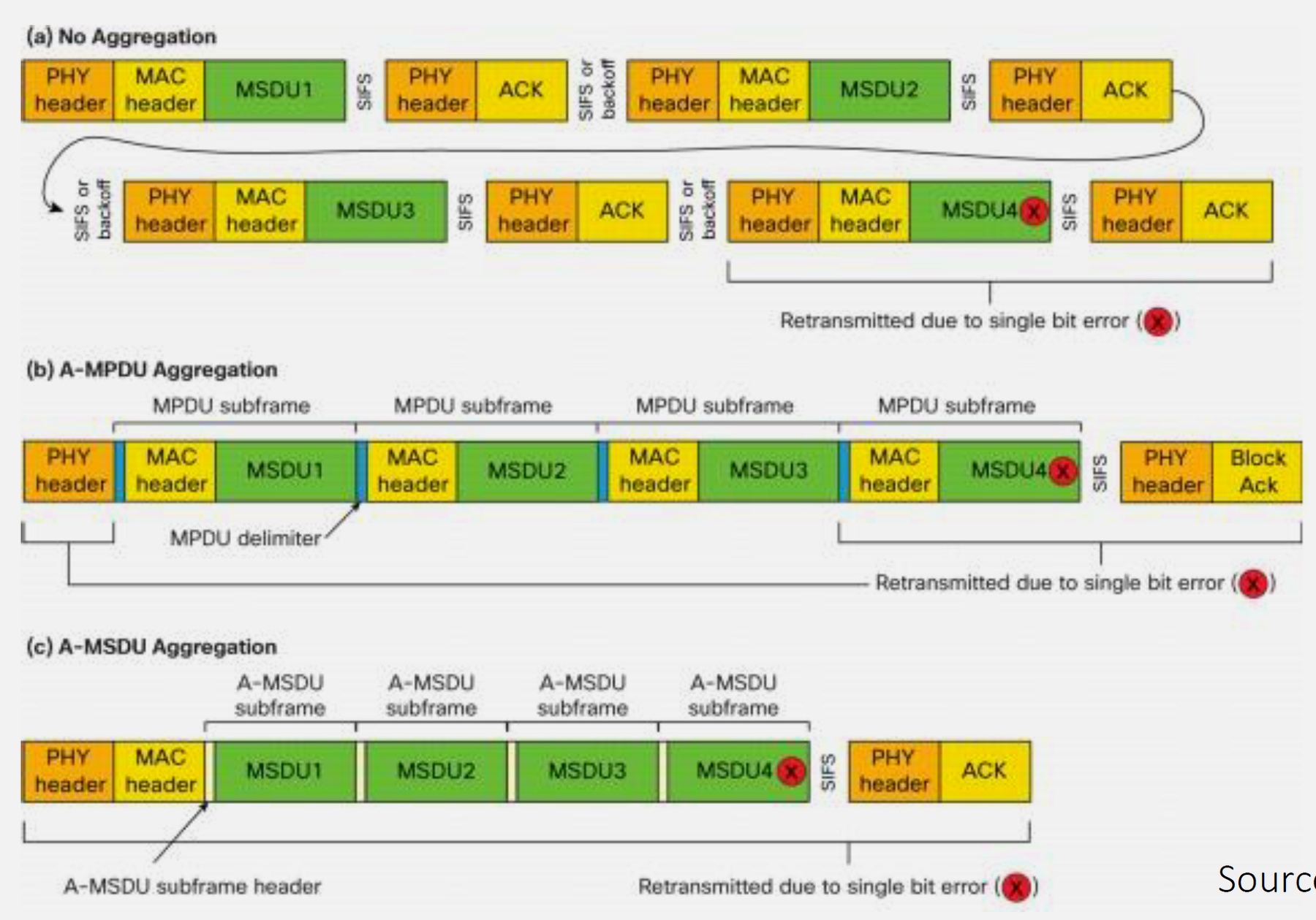
Wi-Fi 4 (802.11n) - 2009: FIRST IoT-READY GENERATION - MIMO (multiple antennas) - better reliability - Frame aggregation - reduced overhead - Dual-band (2.4/5 GHz) - flexibility - Still high power consumption for battery devices
Wi-Fi 5 (802.11ac) - 2013: High-bandwidth IoT (cameras) - MU-MIMO - multiple devices transmit simultaneously - Beamforming - stronger signal to specific device - Up to 3.5 Gbps - 4K video streaming capable - 5 GHz only - shorter range, poor wall penetration - Still no battery-saving features
Wi-Fi 6 (802.11ax) - 2019: GAME-CHANGER FOR IoT - TWT (Target Wake Time) - battery life 10-100x improvement - OFDMA - hundreds of devices share channel efficiently - BSS Coloring - reduced interference in apartments/offices - Works on 2.4 GHz AND 5 GHz - best of both worlds - MU-MIMO bi-directional - uplink and downlink efficiency
Wi-Fi 6E (6 GHz) - 2020: Clean spectrum for dense IoT - No legacy devices - zero 802.11b/g/n interference - 1200 MHz spectrum (vs 400 MHz on 5 GHz) - more channels - Shorter range than 2.4/5 GHz - needs more APs
Wi-Fi 7 (802.11be) - 2024: Future ultra-high performance - 46 Gbps theoretical - 8K video, AR/VR - Multi-link operation - use 2.4 + 5 + 6 GHz simultaneously - 320 MHz channels - massive throughput
842.11 Common Misconception: Wi-Fi 6 Routers Automatically Extend Battery Life
The Myth: “If I upgrade to a Wi-Fi 6 router, all my IoT devices will get 10x better battery life automatically.”
The Reality: Wi-Fi 6’s Target Wake Time (TWT) requires BOTH the router AND the IoT device to support Wi-Fi 6 (802.11ax). Simply upgrading your router does nothing for devices with older Wi-Fi chips.
Practical takeaway: - Upgrading only the router does not change the radio in a Wi-Fi 4 device - Even with Wi-Fi 6 on both ends, TWT benefits depend on firmware support, beacon/DTIM settings, and the device’s duty cycle
ESP32 Examples: - ESP8266, ESP32 (original), ESP32-S2/S3, ESP32-C3: Wi-Fi 4 (802.11n) - no Wi-Fi 6 TWT - ESP32-C6: Wi-Fi 6 (802.11ax) - can support TWT features
Bottom Line: Wi-Fi 6 battery benefits are bidirectional and implementation-dependent - treat them as something to validate, not assume.
842.12 What’s Next
Continue to Wi-Fi Frequency Bands to learn about 2.4 GHz vs 5 GHz vs 6 GHz selection, channel planning strategies, and how to avoid interference in dense IoT deployments.
NoteRelated Chapters
- Wi-Fi Overview - Introduction and basics
- Wi-Fi Frequency Bands - Channel planning
- Wi-Fi Power Consumption - Battery optimization
- Wi-Fi Deployment Planning - Capacity and case studies