Select appropriate Wi-Fi standards for specific IoT applications
Plan for product certification testing
Understand power class and range specifications
Apply coexistence standards for multi-protocol IoT
831.2 Wi-Fi Standards (IEEE 802.11 Family)
831.2.1 Complete Standards Reference
Standard
Marketing Name
Year
Frequency
Max Speed
Key Features
IoT Suitability
802.11b
Wi-Fi 1
1999
2.4 GHz
11 Mbps
DSSS modulation
Obsolete
802.11a
Wi-Fi 2
1999
5 GHz
54 Mbps
OFDM, less interference
Rarely used
802.11g
Wi-Fi 3
2003
2.4 GHz
54 Mbps
OFDM, backward compatible
Legacy only
802.11n
Wi-Fi 4
2009
2.4/5 GHz
600 Mbps
MIMO, 40 MHz channels
Most common for IoT
802.11ac
Wi-Fi 5
2013
5 GHz
3.5 Gbps
MU-MIMO, 160 MHz channels
Cameras, high-bandwidth
802.11ax
Wi-Fi 6
2019
2.4/5 GHz
9.6 Gbps
OFDMA, TWT, BSS coloring
Best for battery IoT
802.11ax
Wi-Fi 6E
2020
6 GHz
9.6 Gbps
Wi-Fi 6 + 6 GHz band
Dense deployments
802.11be
Wi-Fi 7
2024
2.4/5/6 GHz
46 Gbps
320 MHz, multi-link
Emerging
802.11ah
Wi-Fi HaLow
2016
Sub-1 GHz
86.7 Mbps
Long range, low power
IoT sensors
831.3 Wi-Fi Security Standards
Standard
Year
Encryption
Key Management
IoT Recommended
WEP
1999
RC4 (broken)
Static keys
Never use
WPA
2003
TKIP
PSK or 802.1X
Deprecated
WPA2 (802.11i)
2004
AES-CCMP
PSK or 802.1X
Minimum
WPA3
2018
AES-GCMP-256
SAE (Dragonfly)
Preferred
WPA3-Enterprise
2018
192-bit security
802.1X + certificate
Enterprise IoT
Show code
{const container =document.getElementById('kc-cert-1');if (container &&typeof InlineKnowledgeCheck !=='undefined') { container.innerHTML=''; container.appendChild(InlineKnowledgeCheck.create({question:"A hospital deploys 500 Wi-Fi medical devices (infusion pumps, monitors). A consultant recommends WPA3-Enterprise over WPA2-Personal. What is the PRIMARY security benefit?",options: [ {text:"Faster encryption speed reduces latency",correct:false,feedback:"Incorrect. Both WPA2 and WPA3 use AES with similar performance. Speed is not the differentiator."}, {text:"Each device has unique credentials, enabling individual revocation and audit",correct:true,feedback:"Correct! WPA3-Enterprise uses 802.1X with per-device certificates. If one device is compromised, only its certificate needs revocation - not a shared password affecting all 500 devices. This also enables audit trails for HIPAA compliance."}, {text:"WPA3 eliminates the need for network segmentation",correct:false,feedback:"Incorrect. WPA3 improves authentication but doesn't eliminate segmentation needs. Medical devices should still be on isolated VLANs."}, {text:"Stronger encryption prevents all wireless attacks",correct:false,feedback:"Incorrect. No protocol prevents 'all' attacks. WPA3's main benefit is per-device authentication, not just encryption strength."} ],difficulty:"hard",topic:"wifi-security" })); }}
831.4 Wi-Fi Alliance Certifications
831.4.1 Certification Programs
Certification
Purpose
Requirements
Typical Timeline
Wi-Fi CERTIFIED
Basic interoperability
Pass compliance tests
4-8 weeks
Wi-Fi CERTIFIED 6
Wi-Fi 6 (802.11ax) features
OFDMA, TWT, MU-MIMO
6-10 weeks
Wi-Fi CERTIFIED 6E
6 GHz band operation
Wi-Fi 6 + 6 GHz compliance
8-12 weeks
Wi-Fi CERTIFIED WPA3
Security compliance
WPA3 encryption, SAE
4-8 weeks
Wi-Fi Easy Connect
Device onboarding
QR code provisioning
4-6 weeks
Wi-Fi Direct
Peer-to-peer
P2P discovery, connection
4-8 weeks
Wi-Fi Agile Multiband
Seamless roaming
Band steering, fast roaming
6-10 weeks
831.4.2 Certification Process
%%{init: {'theme': 'base', 'themeVariables': { 'primaryColor': '#2C3E50', 'primaryTextColor': '#fff', 'primaryBorderColor': '#16A085', 'lineColor': '#16A085'}}}%%
flowchart LR
    A[Design Device] --> B[Pre-Testing<br/>In-house]
    B --> C[Submit to<br/>Test Lab]
    C --> D[Compliance<br/>Testing]
    D --> E{Pass?}
    E -->|Yes| F[Certification<br/>Granted]
    E -->|No| G[Fix Issues]
    G --> D
    F --> H[Use Wi-Fi<br/>Logo]

    style A fill:#2C3E50,stroke:#16A085,stroke-width:2px,color:#fff
    style F fill:#16A085,stroke:#2C3E50,stroke-width:2px,color:#fff
    style G fill:#E74C3C,stroke:#2C3E50,stroke-width:2px,color:#fff
831.5 Regional Regulatory Compliance
831.5.1 Global Requirements
Region
Standard
Frequency Approval
Max Power
Testing Body
Notes
USA
FCC Part 15.247
2.4 GHz (ISM)
1W EIRP
FCC, TCB
15.407 for 5/6 GHz
EU
RED 2014/53/EU
2.4/5/6 GHz
100 mW EIRP (2.4), 200 mW (5)
Notified Bodies
CE Mark required
UK
SI 2017/1206
2.4/5 GHz
100 mW EIRP
UKCA approved
Post-Brexit rules
China
SRRC
2.4/5 GHz
100 mW EIRP
CTTL, CEPREI
CCC certification
Japan
ARIB STD-T71
2.4/5 GHz
10 mW/MHz
TELEC
Telec certification
Australia
AS/NZS 4268
2.4/5 GHz
1W EIRP
ACMA
RCM mark
831.5.2 Channel Allocations by Region
Region
2.4 GHz Channels
5 GHz Channels
6 GHz Channels
USA
1-11
36-48, 52-64, 100-144, 149-165
1-233 (Wi-Fi 6E)
EU
1-13
36-48, 52-140
1-233 (Wi-Fi 6E)
Japan
1-14 (14 = 802.11b only)
36-48, 52-140
Not yet
China
1-13
36-48, 149-165
Not yet
831.6 Wi-Fi Standards for Specific IoT Applications
Power Consumption: - [ ] Active TX/RX current - [ ] Sleep mode current - [ ] TWT operation (Wi-Fi 6) - [ ] Wake-up time
831.11 Quick Decision Guide
TipWhich Wi-Fi Standard Should I Use?
Choose Wi-Fi 4 (802.11n) if: - Cost is primary concern - Low data rate (<10 Mbps) - Need 2.4 GHz range - Battery not critical (<1 year acceptable)
Choose Wi-Fi 5 (802.11ac) if: - High bandwidth (video streaming) - Mains-powered devices - 5 GHz less congested - Multiple video streams
Choose Wi-Fi 6 (802.11ax) if: - Battery-powered (TWT critical) - Dense deployment (50+ devices) - Need 2+ year battery life - Future-proofing investment
Choose Wi-Fi 6E if: - Industrial/enterprise environment - No legacy interference tolerated - Maximum throughput + low latency - Budget allows premium modules
831.12 Visual Reference Gallery
831.12.1 802.11 Channel Access Mechanism
NoteChannel Access Visualization
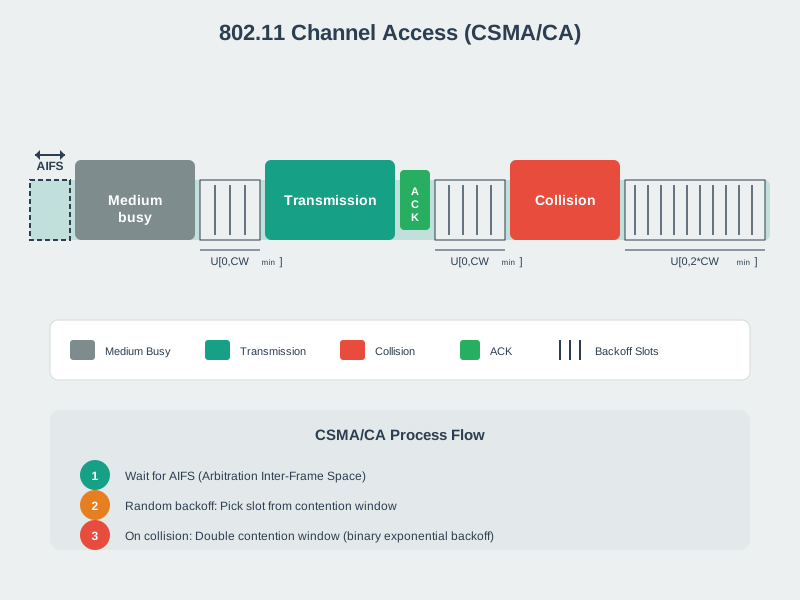
802.11 Channel Access - Geometric Style
802.11 Channel Access - Modern Style
The 802.11 CSMA/CA protocol uses carrier sensing and random backoff to coordinate multiple devices sharing the same channel.
831.12.2 802.11 Frame Structure
NoteFrame Structure Visualization
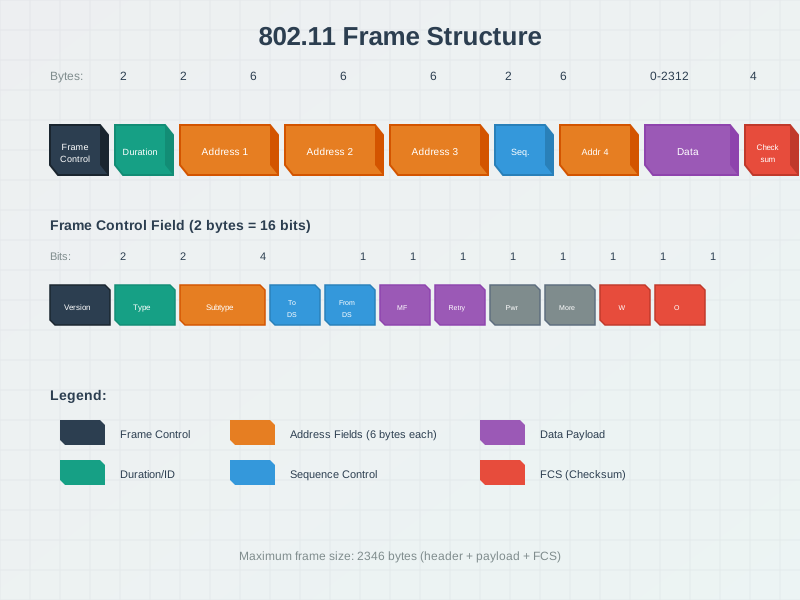
802.11 Frame Structure - Geometric Style
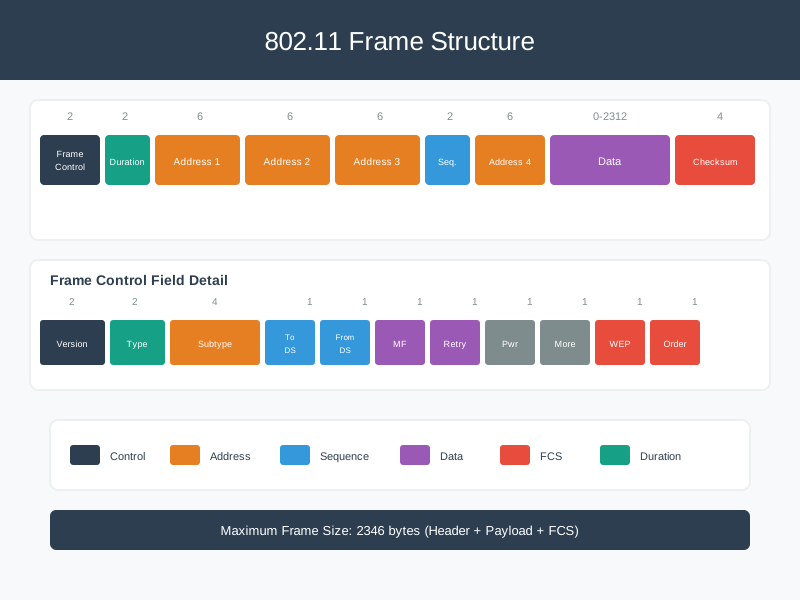
802.11 Frame Structure - Modern Style
Wi-Fi frames contain multiple address fields, control information, and data payload for complex addressing needs.
831.13 Common Pitfalls
WarningCommon Pitfall: Wi-Fi Channel Congestion
The mistake: Deploying IoT devices on the default channel 6 without surveying existing networks, leading to severe interference.
Symptoms: - High packet retransmission rates (>20% vs normal <2%) - Intermittent disconnections during peak hours - Dramatically reduced battery life (3x normal drain) - Inconsistent latency spikes
The fix: 1. Use a Wi-Fi analyzer to survey all channels 2. Select the least congested of channels 1, 6, or 11 3. For high-density IoT, use 5 GHz where range permits 4. Re-survey quarterly in dynamic environments
WarningCommon Pitfall: Wi-Fi Power Save Mode Latency
The mistake: Enabling Wi-Fi power save on devices requiring sub-100ms response times.
The fix: 1. Latency-critical devices: Disable power save entirely 2. Battery devices needing responsiveness: Use WMM-PS with DTIM=1 3. Wi-Fi 6 devices: Use TWT with aligned wake windows 4. Configure AP DTIM interval to 1 for faster delivery