%%{init: {'theme': 'base', 'themeVariables': {'primaryColor': '#2C3E50', 'primaryTextColor': '#fff', 'primaryBorderColor': '#16A085', 'lineColor': '#16A085', 'secondaryColor': '#E67E22', 'tertiaryColor': '#7F8C8D', 'background': '#ffffff', 'mainBkg': '#2C3E50', 'secondBkg': '#16A085', 'tertiaryBkg': '#E67E22'}}}%%
flowchart TD
    App[Application Layer<br/>Matter] --> DTLS[DTLS 1.2<br/>End-to-End Encryption]
    DTLS --> NWK[Network Layer<br/>AES-128-CCM]
    NWK --> MAC[MAC Layer<br/>802.15.4 Security]

    Keys[Key Hierarchy] --> Master[Master Key<br/>Network-Wide]
    Master --> MACKey[MAC Key]
    Master --> MLEKey[MLE Key]
    Master --> KEK[KEK]

    Comm[Commissioning] --> OOB[Out-of-Band Auth<br/>QR/PIN/NFC]
    OOB --> PAKE[PAKE Protocol]
    PAKE --> Creds[Network Credentials]

    style App fill:#E67E22,stroke:#2C3E50,color:#fff
    style DTLS fill:#2C3E50,stroke:#16A085,color:#fff
    style NWK fill:#16A085,stroke:#2C3E50,color:#fff
    style Master fill:#2C3E50,stroke:#16A085,color:#fff
1013 Thread Security and Matter
1013.1 Learning Objectives
By the end of this chapter, you will be able to:
- Understand Thread Security Model: Explain Thread’s mandatory encryption and authentication mechanisms
- Describe Commissioning Process: Trace the secure device onboarding flow from joining to network access
- Analyze Network Keys: Differentiate between Master Key, Network Key, and device-specific credentials
- Explain Matter Integration: Understand how Matter leverages Thread for smart home interoperability
- Evaluate Security Properties: Assess Thread’s protection against replay, eavesdropping, and MITM attacks
- Design Secure Thread Networks: Apply best practices for Thread Border Router and device commissioning
1013.2 Prerequisites
Before diving into this chapter, you should be familiar with:
- Thread Fundamentals and Roles: Understanding Thread’s network architecture, device roles, and Border Router functionality provides necessary context for Thread’s security model and commissioning process
- Thread Operation and Implementation: Knowledge of network formation, Leader election, and device joining procedures is essential before exploring the security mechanisms that protect these operations
- Networking Basics: Familiarity with basic network security concepts, encryption fundamentals, and authentication mechanisms helps you appreciate Thread’s multi-layered security approach
NoteRelated Chapters
Deep Dives: - Thread Fundamentals - Network roles and architecture - Thread Comprehensive Review - Advanced Thread topics and quiz - Zigbee Security - Compare mesh security approaches
Comparisons: - Zigbee vs Thread - Security model comparison - Wi-Fi Security - WPA3 vs Thread S2 - IoT Protocols Review - Security across protocols
Hands-On: - Thread Operation Labs - Commissioning practice - Simulations Hub - Thread network security simulators
Learning: - Quizzes Hub - Test Thread and Matter knowledge - Videos Hub - Matter ecosystem tutorials
NoteKey Takeaway
In one sentence: Thread provides mandatory AES-128 encryption with secure commissioning, while Matter adds cross-vendor interoperability so devices from Apple, Google, and Amazon all work together.
Remember this rule: Choose Thread + Matter for new smart home projects requiring secure, vendor-neutral mesh networking; the combination eliminates IoT’s biggest pain points (security by default, universal compatibility).
TipFor Kids: Meet the Sensor Squad! 🌟
Thread Security and Matter is like having a secret clubhouse with special passwords and a universal translator so all your friends can play together!
1013.2.5 The Sensor Squad Adventure: The Super-Safe Smart Treehouse
The Sensor Squad had the coolest treehouse in the whole neighborhood! But they had a problem - random kids kept sneaking in and pressing buttons they shouldn’t touch. “We need better security!” said Sammy the Temperature Sensor.
Setting Up the Password System (Commissioning): Bella the Button had an idea. “Let’s make a special QR code sticker for the door! Only kids with the secret code from the sticker can join our club.” They created a secret handshake system - when a new friend wanted to join, they had to: 1. Scan the special sticker with a phone (the QR code) 2. Do the secret handshake (the PAKE authentication) 3. Get their own special membership card (network credentials)
“Now nobody can sneak in!” Bella cheered. “Even if someone watches the handshake, they can’t copy it without the original sticker!”
Sending Secret Messages (Encryption): Max the Motion Detector noticed that kids outside were trying to listen to their club plans. “We need to speak in code!” Every message the Squad sent was scrambled with a special secret - like pig latin, but WAY more complicated. Max explained: “It’s called AES-128. Even if a spy catches our message, it just looks like ‘XKCD#@%&’ to them!”
Lila the Light Sensor added another clever trick: “Let’s number every message! Message 1, Message 2, Message 3…” This way, if a spy recorded “Let’s open the cookie jar” and tried to play it back later, the treehouse would say “Wait, I already got message #47. This old message doesn’t count!” No more replay tricks!
The Universal Translator (Matter): The BEST part came when they wanted to invite friends from other treehouses. Some friends spoke “Apple-ish,” others spoke “Google-ese,” and some spoke “Alexa-nese.” But with their new Matter translator, everyone could understand each other! “Turn on the fun lights!” worked the same whether it came from an iPhone, a Google speaker, or an Alexa. The whole neighborhood could play together safely!
1013.2.6 Key Words for Kids
| Word | What It Means |
|---|---|
| Encryption | Scrambling messages so only your friends can read them - like a super-secret code |
| Commissioning | The special process to safely invite new friends into your secure club |
| QR Code | A special square pattern that holds secret information, like a digital treasure map |
| Interoperability | When different brands of gadgets can all talk to each other and be friends |
| Replay Attack | When a sneaky person records your message and tries to play it again later to trick you |
1013.2.7 Try This at Home! 🏠
Create Your Own Secret Message System!
Make a family encryption game to understand how Thread keeps messages safe:
Make a cipher wheel: Cut two circles from cardboard, one smaller than the other. Write the alphabet around the edge of both. Pin them together in the center so the smaller one can spin.
Set your “encryption key”: Decide as a family that A=D (spin the wheel so A lines up with D). This is your secret!
Write encrypted messages: “HELLO” becomes “KHOOR” - each letter shifts by 3 spots.
Add message numbers: Write “#1” on your first message, “#2” on your second. If someone tries to send “#1” again, you know it’s old!
Try to break each other’s codes: One person encrypts, others try to decrypt. See how hard it is without knowing the key position!
This is exactly what Thread does - but with math so complicated that even the fastest computers can’t crack it!
1013.3 Thread Security Model
Thread implements security by default with multiple layers of protection:
ImportantThread Security Features
1. Secure Commissioning: - Out-of-Band Authentication: QR code, PIN, or NFC for initial joining - DTLS 1.2: Secure key exchange during commissioning - ECC P-256: Elliptic curve cryptography for public key operations
2. Network-Level Encryption: - AES-128-CCM: All messages encrypted with AES-128 - Unique Network Key: Shared by all devices in Thread network - Automatic Key Rotation: Periodic key updates for security
3. Message Integrity: - MIC (Message Integrity Code): 32-bit authentication tag - Frame Counter: Prevents replay attacks - Sequence Number: Detects out-of-order messages
4. Device Authentication: - Device Credentials: Each device has unique credentials - Certificate-Based: Optional PKI for enterprise deployments - Revocation: Devices can be removed from network
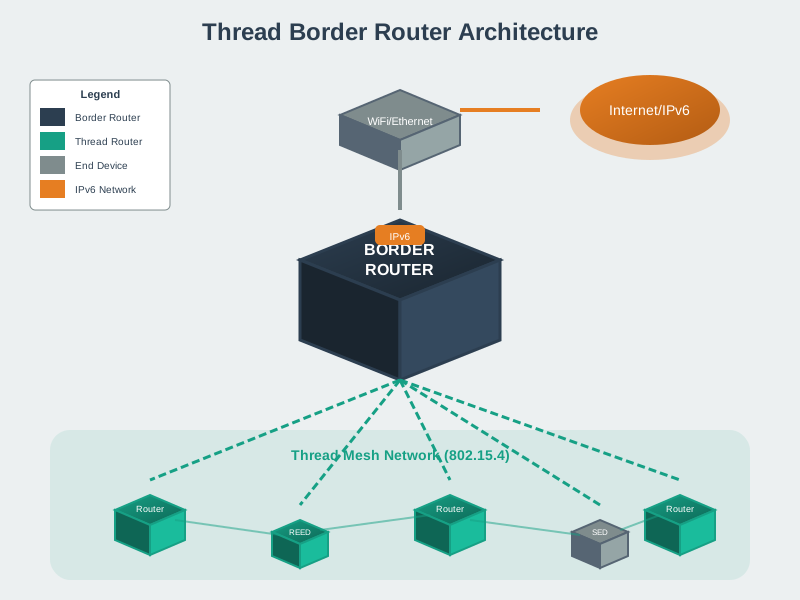
5. Border Router Security: - Firewall: Protects Thread network from external threats - Access Control: Restricts which external IPs can communicate - Secure Updates: Firmware updates over secure channel
1013.3.1 Security Key Hierarchy
%%{init: {'theme': 'base', 'themeVariables': {'primaryColor': '#2C3E50', 'primaryTextColor': '#fff', 'primaryBorderColor': '#16A085', 'lineColor': '#16A085', 'secondaryColor': '#E67E22', 'tertiaryColor': '#7F8C8D', 'background': '#ffffff', 'mainBkg': '#2C3E50', 'secondBkg': '#16A085', 'tertiaryBkg': '#E67E22'}}}%%
flowchart TD
    Master[Master Key<br/>Network Secret<br/>Never Transmitted]

    Master --> MACKey[MAC Key<br/>802.15.4 Frame Encryption]
    Master --> MLEKey[MLE Key<br/>Mesh Link Auth]
    Master --> KEK[Key Encryption Key<br/>Secure Key Distribution]

    MACKey --> Frames[Encrypts All<br/>802.15.4 Frames]
    MLEKey --> Mesh[Authenticates<br/>Mesh Operations]
    KEK --> Distrib[Distributes Keys<br/>to New Devices]

    style Master fill:#2C3E50,stroke:#16A085,color:#fff
    style MACKey fill:#16A085,stroke:#2C3E50,color:#fff
    style MLEKey fill:#16A085,stroke:#2C3E50,color:#fff
    style KEK fill:#E67E22,stroke:#2C3E50,color:#fff
Key Types: 1. Master Key: Network-wide secret, never transmitted 2. MAC Key: Derived from master, encrypts 802.15.4 frames 3. MLE Key: Mesh Link Establishment authentication 4. KEK: Key Encryption Key for secure key distribution
1013.4 Thread and Matter
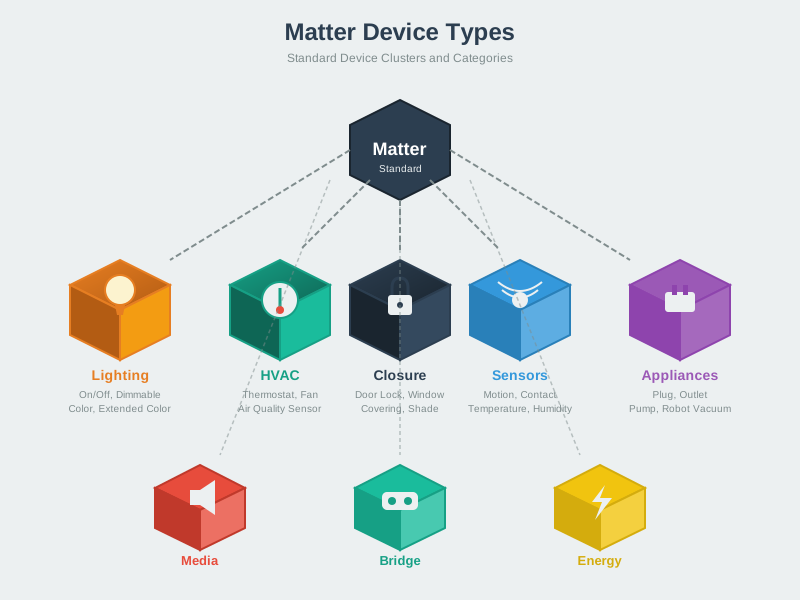
Matter (formerly Project CHIP - Connected Home over IP) is an application-layer standard that runs on top of Thread, Wi-Fi, and Ethernet. Thread is a primary transport for Matter.
%%{init: {'theme': 'base', 'themeVariables': {'primaryColor': '#2C3E50', 'primaryTextColor': '#fff', 'primaryBorderColor': '#16A085', 'lineColor': '#16A085', 'secondaryColor': '#E67E22', 'tertiaryColor': '#7F8C8D', 'background': '#ffffff', 'mainBkg': '#2C3E50', 'secondBkg': '#16A085', 'tertiaryBkg': '#E67E22'}}}%%
flowchart TD
    Ecosystems[Smart Home Ecosystems] --> Apple[Apple Home]
    Ecosystems --> Google[Google Home]
    Ecosystems --> Amazon[Alexa]

    Apple --> Matter[Matter<br/>Application Layer]
    Google --> Matter
    Amazon --> Matter

    Matter --> Thread[Thread<br/>Network Layer]
    Matter --> Wi-Fi[Wi-Fi]
    Matter --> Ethernet[Ethernet]

    Thread --> Device1[Smart Lock]
    Thread --> Device2[Light Bulb]
    Wi-Fi --> Device3[Camera]

    style Matter fill:#E67E22,stroke:#2C3E50,color:#fff
    style Thread fill:#2C3E50,stroke:#16A085,color:#fff
    style Device1 fill:#16A085,stroke:#2C3E50,color:#fff
    style Device2 fill:#16A085,stroke:#2C3E50,color:#fff
1013.5 Knowledge Check
Test your understanding of these networking concepts.
1013.6 Thread + Matter Benefits
Interoperability: - Multi-Vendor: Devices from different manufacturers work together - Multi-Ecosystem: Works with Apple HomeKit, Google Home, Amazon Alexa, Samsung SmartThings
Unified Experience: - One Protocol: Matter provides common application layer - Multiple Transports: Same app layer works over Thread, Wi-Fi, Ethernet
Future-Proof: - Industry Backed: 500+ companies (Apple, Google, Amazon, Samsung) - Open Source: Specification and SDK freely available - Active Development: Continuous improvements
Example: A Matter-certified light bulb using Thread can be controlled by: - iPhone (Apple Home) - Google Nest Hub - Amazon Echo - Samsung SmartThings All using the same Matter commands over Thread transport.
1013.7 Thread Security Threat Model
Understanding potential attacks helps appreciate Thread’s security design:
1013.7.1 Attack Scenario 1: Replay Attack
Attack Description:
1. Attacker captures "unlock door" message in transit
2. Stores encrypted message (can't decrypt due to AES-128)
3. Replays message later when homeowner is away
4. Door unlocks even without knowing the encryption key
Thread’s Defense:
%%{init: {'theme': 'base', 'themeVariables': {'primaryColor': '#2C3E50', 'primaryTextColor': '#fff', 'primaryBorderColor': '#16A085', 'lineColor': '#16A085', 'secondaryColor': '#E67E22', 'tertiaryColor': '#7F8C8D', 'background': '#ffffff', 'mainBkg': '#2C3E50', 'secondBkg': '#16A085', 'tertiaryBkg': '#E67E22', 'actorBkg': '#2C3E50', 'actorTextColor': '#fff', 'actorBorder': '#16A085'}}}%%
sequenceDiagram
    participant A as Attacker
    participant S as Sender Device
    participant R as Receiver Device

    S->>R: Message 1<br/>Frame Counter: 100
    Note over R: Store counter: 100
    A->>A: Captures Message 1
    S->>R: Message 2<br/>Frame Counter: 101
    Note over R: Store counter: 101
    A->>R: Replay Message 1<br/>Frame Counter: 100
    R->>R: Check: 100 <= 101
    R->>A: Rejected - Old Frame Counter
Implementation: - Each device maintains frame counter (32-bit integer) - Counter increments with each message sent - Receiver rejects messages with counter ≤ last seen counter - Result: Old messages rejected even if encrypted correctly
1013.7.2 Attack Scenario 2: Man-in-the-Middle (MitM)
Attack Description:
Attacker positions device between Thread nodes to:
1. Intercept messages
2. Modify messages (e.g., change "turn on" to "turn off")
3. Forward modified message to destination
Thread’s Defense:
%%{init: {'theme': 'base', 'themeVariables': {'primaryColor': '#2C3E50', 'primaryTextColor': '#fff', 'primaryBorderColor': '#16A085', 'lineColor': '#16A085', 'secondaryColor': '#E67E22', 'tertiaryColor': '#7F8C8D', 'background': '#ffffff', 'mainBkg': '#2C3E50', 'secondBkg': '#16A085', 'tertiaryBkg': '#E67E22', 'actorBkg': '#2C3E50', 'actorTextColor': '#fff', 'actorBorder': '#16A085'}}}%%
sequenceDiagram
    participant A as Attacker
    participant S as Sender
    participant R as Receiver

    S->>R: Message + MIC<br/>Turn ON + 0x1A2B3C4D
    Note over R: Verify MIC with<br/>Network Key
    A->>A: Intercepts message
    A->>A: Modify Turn ON to Turn OFF
    A->>R: Modified Message + Old MIC<br/>Turn OFF + 0x1A2B3C4D
    R->>R: Calculate MIC<br/>Expected: 0x9F8E7D6C
    R->>R: Compare MICs - Mismatch
    R->>A: Rejected - MIC Mismatch
How MIC Works: - Input: Message + Network Key → Output: 32-bit MIC - Changing even 1 bit of message invalidates MIC - Attacker can’t recalculate MIC without network key - Result: Tampered messages detected and dropped
1013.7.3 Attack Scenario 3: Rogue Device Injection
Attack Description:
Attacker tries to add malicious device to Thread network without authorizationThread’s Defense - Secure Commissioning:
%%{init: {'theme': 'base', 'themeVariables': {'primaryColor': '#2C3E50', 'primaryTextColor': '#fff', 'primaryBorderColor': '#16A085', 'lineColor': '#16A085', 'secondaryColor': '#E67E22', 'tertiaryColor': '#7F8C8D', 'background': '#ffffff', 'mainBkg': '#2C3E50', 'secondBkg': '#16A085', 'tertiaryBkg': '#E67E22', 'actorBkg': '#16A085', 'actorTextColor': '#fff', 'actorBorder': '#2C3E50'}}}%%
sequenceDiagram
    participant D as New Device
    participant C as Commissioner iPhone

    D->>C: Advertise via BLE<br/>QR Code CH:12345678
    C->>D: PAKE Handshake<br/>Using Setup Code
    Note over D,C: Password-Authenticated<br/>Key Exchange
    D->>C: Device Attestation<br/>Certificate DAC
    C->>C: Verify DAC Signature
    C->>D: Network Credentials<br/>Encrypted
    Note over D: Join Thread Network
    D->>C: Commissioned Successfully
Key Protection Mechanisms: 1. Out-of-Band Authentication: Requires physical access to device 2. PAKE: Password-Authenticated Key Exchange prevents brute force 3. DTLS: Secure channel for credential transfer 4. Device Revocation: Compromised devices can be removed
1013.8 Matter Security Architecture
Matter adds application-layer security on top of Thread’s network security:
%%{init: {'theme': 'base', 'themeVariables': {'primaryColor': '#2C3E50', 'primaryTextColor': '#fff', 'primaryBorderColor': '#16A085', 'lineColor': '#16A085', 'secondaryColor': '#E67E22', 'tertiaryColor': '#7F8C8D', 'background': '#ffffff', 'mainBkg': '#2C3E50', 'secondBkg': '#16A085', 'tertiaryBkg': '#E67E22'}}}%%
flowchart TD
    Device[Matter Device] --> DAC[Device Attestation<br/>Certificate]
    Device --> ACL[Access Control Lists<br/>Per-Device Permissions]

    DAC --> Verify[Certificate Validation<br/>Against Root CA]
    ACL --> Perms[Define Permissions<br/>Read/Write/Control]

    Matter[Matter Layer] --> Clusters[Standard Clusters<br/>OnOff, LevelControl]
    Matter --> Commands[Secure Commands<br/>DTLS Encrypted]

    Commands --> Thread[Thread Transport<br/>AES-128 Network]

    style DAC fill:#2C3E50,stroke:#16A085,color:#fff
    style Matter fill:#E67E22,stroke:#2C3E50,color:#fff
    style Thread fill:#16A085,stroke:#2C3E50,color:#fff
1013.8.1 Device Attestation Certificate (DAC)
Purpose: Proves device is genuinely Matter-certified, not a counterfeit.
How it works: 1. Factory Programming: Each device has unique DAC signed by manufacturer 2. Commissioning: Commissioner verifies DAC signature against trusted root CA 3. Validation: If DAC invalid → device rejected 4. Trust Chain: Manufacturer → Product Attestation Authority (PAA) → Distributed Compliance Ledger (DCL)
Real-world impact: - Prevents counterfeit “Matter-compatible” devices - Ensures compliance with security standards - Enables device recalls (compromised devices can be blocked)
1013.9 Implementation Example: Commissioning Flow
Scenario: Adding a Matter smart lock to Apple Home over Thread
%%{init: {'theme': 'base', 'themeVariables': {'primaryColor': '#2C3E50', 'primaryTextColor': '#fff', 'primaryBorderColor': '#16A085', 'lineColor': '#16A085', 'secondaryColor': '#E67E22', 'tertiaryColor': '#7F8C8D', 'background': '#ffffff', 'mainBkg': '#2C3E50', 'secondBkg': '#16A085', 'tertiaryBkg': '#E67E22', 'actorBkg': '#16A085', 'actorTextColor': '#fff', 'actorBorder': '#2C3E50'}}}%%
sequenceDiagram
    participant L as Smart Lock
    participant P as iPhone Commissioner
    participant B as Border Router

    Note over L: Factory Reset<br/>BLE Advertisement
    P->>L: Scan QR Code
    L->>P: BLE Setup Code
    P->>L: PAKE Authentication
    L->>P: Device Attestation Cert
    P->>P: Validate DAC
    P->>L: Thread Credentials
    Note over L: Join Thread Network
    L->>B: MLE Join Request
    B->>L: Network Accepted
    P->>L: ACL Configuration
    Note over L,P: Commissioning Complete
    P->>L: Unlock Door Command
    L->>P: Door Unlocked
Key Security Steps: 1. BLE used only for commissioning (not operational traffic) 2. PAKE prevents brute-force of setup code 3. DAC validation ensures genuine device 4. Encrypted credential transfer (network key never exposed) 5. ACLs define permissions (who can unlock, who can only query status)
1013.10 Protocol Comparison: Thread vs. Zigbee vs. Z-Wave
TipAlternative View: Security Layer Comparison
%%{init: {'theme': 'base', 'themeVariables': {'primaryColor': '#2C3E50', 'primaryTextColor': '#fff', 'primaryBorderColor': '#16A085', 'lineColor': '#16A085', 'secondaryColor': '#E67E22', 'tertiaryColor': '#7F8C8D'}}}%%
graph TB
    subgraph THREAD["Thread + Matter"]
        T_APP[Matter Application<br/>Device Attestation + ACLs]
        T_DTLS[DTLS 1.2<br/>End-to-End Encryption]
        T_NWK[Network Layer<br/>AES-128-CCM + Frame Counter]
        T_MAC[802.15.4 MAC<br/>Link-Layer Security]
    end

    subgraph ZIGBEE["Zigbee"]
        Z_APP[ZCL Application<br/>Optional Link Keys]
        Z_NWK[Network Layer<br/>AES-128 + Trust Center]
        Z_MAC[802.15.4 MAC<br/>Basic Security]
    end

    subgraph ZWAVE["Z-Wave"]
        ZW_APP[Command Classes<br/>S2 Authentication]
        ZW_NWK[Network Layer<br/>AES-128 Encryption]
        ZW_MAC[Proprietary MAC<br/>908 MHz]
    end

    T_APP --> T_DTLS --> T_NWK --> T_MAC
    Z_APP --> Z_NWK --> Z_MAC
    ZW_APP --> ZW_NWK --> ZW_MAC

    VERDICT[Thread: 4 layers<br/>Zigbee: 3 layers<br/>Z-Wave: 3 layers]

    style THREAD fill:#16A085,stroke:#2C3E50,stroke-width:3px
    style ZIGBEE fill:#E67E22,stroke:#2C3E50,stroke-width:2px
    style ZWAVE fill:#7F8C8D,stroke:#2C3E50,stroke-width:2px
    style T_APP fill:#2C3E50,stroke:#16A085,color:#fff
    style T_DTLS fill:#2C3E50,stroke:#16A085,color:#fff
    style T_NWK fill:#2C3E50,stroke:#16A085,color:#fff
    style T_MAC fill:#2C3E50,stroke:#16A085,color:#fff
| Feature | Thread + Matter | Zigbee (ZHA) | Z-Wave |
|---|---|---|---|
| Network Security | AES-128-CCM | AES-128-CCM | AES-128 |
| Commissioning | QR/PIN + DTLS | Install code / default key | S2 (requires DSK) |
| Application Layer | Matter (open) | ZCL (Zigbee Alliance) | Z-Wave Command Classes |
| Interoperability | ✅ Multi-vendor, multi-ecosystem | ⚠️ Works but ecosystem-dependent | ❌ Proprietary, license fees |
| IPv6 Native | ✅ Yes (6LoWPAN) | ❌ No | ❌ No |
| Open Standard | ✅ Free specification | ⚠️ Requires Zigbee Alliance membership | ❌ Proprietary (Silicon Labs) |
| Replay Protection | Frame counter | Frame counter | Nonce |
| Key Hierarchy | Master → MAC/MLE/KEK | Trust Center Link Key → Network Key | S2 keys (Unauthenticated/Authenticated/Access Control) |
| Multi-Admin | ✅ Native (Matter) | ❌ Single coordinator | ❌ Single controller |
| Border Router | Any Thread-certified device | Zigbee coordinator only | Z-Wave gateway only |
Security Winner: Thread + Matter - Why: Open standard, multi-admin, IPv6 native, backed by major vendors
1013.11 Best Practices for Deployment
1013.11.1 Home Network
Recommended Setup: 1. Border Router Placement: Central location, wired Ethernet to router 2. Network Isolation: Separate Thread network from Wi-Fi (defense in depth) 3. Regular Updates: Enable automatic firmware updates 4. Access Control: Use Matter ACLs to limit permissions (guests can view, not control locks)
Security Checklist: - [ ] Change default admin credentials (if applicable) - [ ] Enable automatic security updates - [ ] Review ACLs quarterly (remove unused permissions) - [ ] Use strong setup codes (not 00000000000) - [ ] Backup Thread network credentials (for disaster recovery)
1013.11.2 Enterprise Deployment
Additional Considerations: 1. Certificate Management: Use enterprise PKI for DAC validation 2. Network Segmentation: Isolate Thread network with VLAN 3. Monitoring: Log commissioning events, failed authentication attempts 4. Incident Response: Procedure to revoke compromised devices
1013.12 Visual Reference Gallery
Explore these AI-generated figures that illustrate Thread security and Matter integration concepts.
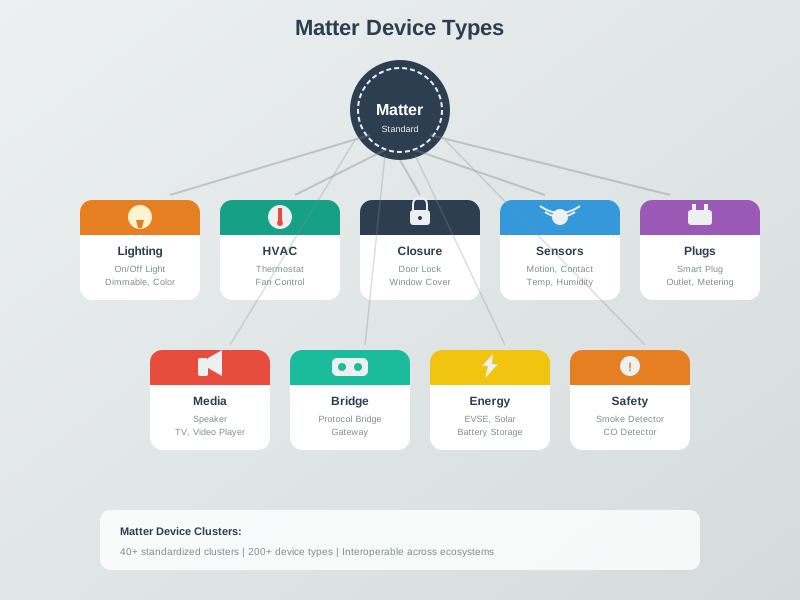
NoteMatter Device Types
NoteThread Border Router Architecture
NoteThread Commissioning Flow
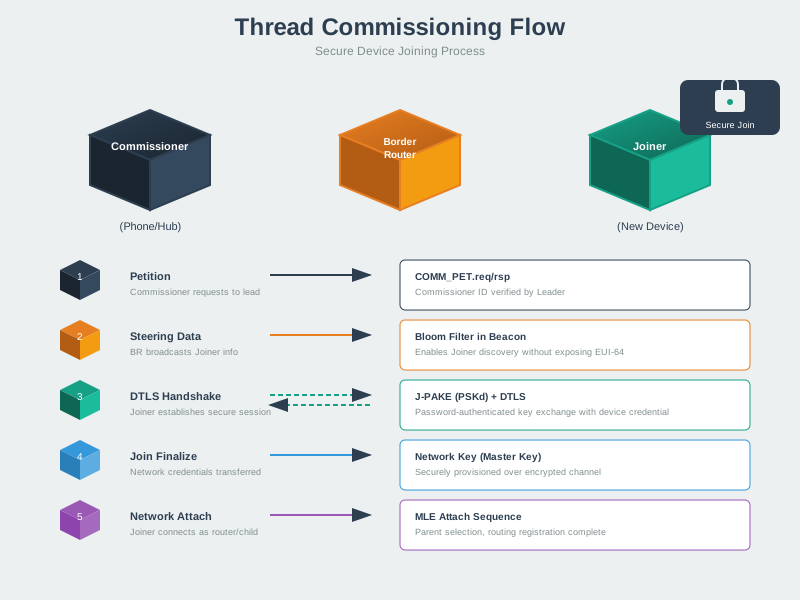
1013.12.1 Thread vs Matter vs Other Protocols
This comparison helps understand the relationship between Thread, Matter, and alternative technologies:
%%{init: {'theme': 'base', 'themeVariables': {'primaryColor':'#2C3E50','primaryTextColor':'#fff','primaryBorderColor':'#16A085','lineColor':'#16A085','secondaryColor':'#E67E22','tertiaryColor':'#7F8C8D'}}}%%
graph TB
    subgraph Stack["Matter + Thread Stack"]
        MATTER[Matter<br/>Application Layer<br/>Device Types & Clusters]
        THREAD[Thread<br/>Mesh Network Layer<br/>IPv6 + 802.15.4]
        PHY[802.15.4 PHY<br/>2.4 GHz Radio]
    end

    subgraph Alt["Alternative Transports"]
        Wi-Fi[Wi-Fi<br/>High Bandwidth]
        ETH[Ethernet<br/>Wired Reliability]
    end

    MATTER --> THREAD
    THREAD --> PHY
    MATTER --> Wi-Fi
    MATTER --> ETH

    subgraph Comp["Comparison"]
        ZB[Zigbee<br/>Transport + App Bundled]
        ZW[Z-Wave<br/>Proprietary Stack]
        BLE[BLE Mesh<br/>Bluetooth Transport]
    end

    NOTE1[Matter separates<br/>app from transport]
    NOTE2[Thread provides<br/>IPv6 mesh]
    NOTE3[Matter enables<br/>multi-vendor interop]

    style MATTER fill:#16A085,stroke:#2C3E50,stroke-width:3px,color:#fff
    style THREAD fill:#2C3E50,stroke:#16A085,stroke-width:3px,color:#fff
    style PHY fill:#7F8C8D,stroke:#2C3E50,stroke-width:2px,color:#fff
    style Wi-Fi fill:#E67E22,stroke:#2C3E50,stroke-width:2px,color:#fff
    style ETH fill:#E67E22,stroke:#2C3E50,stroke-width:2px,color:#fff
    style ZB fill:#7F8C8D,stroke:#2C3E50,stroke-width:2px,color:#fff
    style ZW fill:#7F8C8D,stroke:#2C3E50,stroke-width:2px,color:#fff
    style BLE fill:#7F8C8D,stroke:#2C3E50,stroke-width:2px,color:#fff
1013.12.2 Smart Home Protocol Selection
Use this flowchart to choose the right protocol for your smart home deployment:
%%{init: {'theme': 'base', 'themeVariables': {'primaryColor':'#2C3E50','primaryTextColor':'#fff','primaryBorderColor':'#16A085','lineColor':'#16A085','secondaryColor':'#E67E22','tertiaryColor':'#7F8C8D'}}}%%
flowchart TB
    START([Smart Home<br/>Protocol Selection]) --> Q1{Multi-Vendor<br/>Interop Needed?}

    Q1 -->|Yes| MATTER[Use Matter<br/>Standard]
    Q1 -->|No - Single Vendor| PROP[Vendor Ecosystem<br/>HomeKit/Google/Alexa]

    MATTER --> Q2{Device Power<br/>Source?}

    Q2 -->|Battery| Q3{Mesh<br/>Coverage?}
    Q2 -->|Mains Powered| Q4{High Bandwidth<br/>Needed?}

    Q3 -->|Yes - Whole Home| THREAD[Matter over Thread<br/>802.15.4 Mesh]
    Q3 -->|No - Near Router| BLE[Matter over BLE<br/>Bridged via Hub]

    Q4 -->|Yes - Video/Audio| Wi-Fi[Matter over Wi-Fi<br/>High Throughput]
    Q4 -->|No - Control Only| THREAD

    THREAD --> USE1[Sensors, Locks<br/>Switches, Thermostats]
    Wi-Fi --> USE2[Cameras, Speakers<br/>Displays, Appliances]
    BLE --> USE3[Simple Sensors<br/>Buttons, Tags]

    style START fill:#2C3E50,stroke:#16A085,stroke-width:3px,color:#fff
    style MATTER fill:#16A085,stroke:#2C3E50,stroke-width:3px,color:#fff
    style THREAD fill:#16A085,stroke:#2C3E50,stroke-width:2px,color:#fff
    style Wi-Fi fill:#E67E22,stroke:#2C3E50,stroke-width:2px,color:#fff
    style BLE fill:#7F8C8D,stroke:#2C3E50,stroke-width:2px,color:#fff
    style USE1 fill:#16A085,stroke:#2C3E50,stroke-width:1px,color:#fff
    style USE2 fill:#E67E22,stroke:#2C3E50,stroke-width:1px,color:#fff
    style USE3 fill:#7F8C8D,stroke:#2C3E50,stroke-width:1px,color:#fff
1013.13 Summary
Thread Security: - Default security: No configuration, encrypted by default - Multi-layer protection: Commissioning, network, application layers - Resilient: Frame counter, MIC, key hierarchy prevent attacks
Matter Integration: - Interoperability: Works across Apple, Google, Amazon, Samsung - Device Attestation: Guarantees genuine certified devices - Future-proof: Open standard, continuous development
Deployment: - Home: Simple setup, automatic updates, strong commissioning codes - Enterprise: PKI integration, monitoring, incident response procedures
Thread + Matter represents the future of secure, interoperable IoT.
1013.14 What’s Next?
Having explored Thread’s security architecture and Matter integration, continue to Wi-Fi Fundamentals and Standards to learn about high-bandwidth wireless connectivity for IoT devices, including Wi-Fi 6 optimizations for dense deployments.