%%{init: {'theme': 'base', 'themeVariables': {'primaryColor': '#2C3E50', 'primaryTextColor': '#fff', 'primaryBorderColor': '#16A085', 'lineColor': '#E67E22', 'secondaryColor': '#16A085', 'tertiaryColor': '#7F8C8D'}}}%%
graph TB
    A[Your Phone] --> B[Hue Hub]
    A --> C[SmartThings Hub]
    A --> D[HomeKit Hub]
    B --> E[Philips Lights]
    C --> F[Samsung Sensors]
    D --> G[Eve Devices]

    style A fill:#7F8C8D,stroke:#2C3E50,color:#fff
    style B fill:#c0392b,stroke:#2C3E50,color:#fff
    style C fill:#c0392b,stroke:#2C3E50,color:#fff
    style D fill:#c0392b,stroke:#2C3E50,color:#fff
    style E fill:#2C3E50,stroke:#16A085,color:#fff
    style F fill:#2C3E50,stroke:#16A085,color:#fff
    style G fill:#2C3E50,stroke:#16A085,color:#fff
1008 Thread: Introduction to IPv6 Mesh Networking
1008.1 Thread: IP-Based Mesh Networking
NoteLearning Objectives
By the end of this section, you will be able to:
- Understand Thread as an IPv6-based mesh networking protocol
- Explain why Thread was created and what problems it solves
- Identify Thread’s key value propositions for smart home applications
- Understand the basics of Thread device roles and network structure
- Compare Thread with legacy smart home technologies at a high level
ImportantThe Challenge: Reliable Home Mesh Without Complexity
The Problem: Existing smart home solutions have significant limitations:
- Wi-Fi: Great speed, but no native mesh, high power consumption, drains batteries
- Bluetooth: Low power, but limited range (~10m), no IP addressing, point-to-point only
- Zigbee: Good mesh networking, but proprietary application layer, requires translation gateways
- Z-Wave: Reliable mesh, but proprietary and expensive, limited bandwidth (100 kbps)
Why It’s Hard:
- Home networks need self-healing mesh (devices come and go, walls block signals)
- Devices must work across vendors (no more “works only with Brand X hub”)
- IPv6 connectivity needed for cloud integration without protocol translation
- Battery devices must coexist with always-on powered devices in the same network
What We Need:
- IP-based mesh networking (native IPv6, no gateways required)
- Open standard (not proprietary, royalty-free)
- Low power operation (years on coin cell batteries)
- Secure by default (encrypted commissioning, network-wide encryption)
The Solution: Thread combines the best of all worlds—IPv6 mesh networking over 802.15.4 radio, with bank-grade AES-128 encryption, self-healing topology, and the backing of Apple, Google, Amazon, and 400+ companies through the Connectivity Standards Alliance.
1008.2 Prerequisites
Before diving into Thread, you should be familiar with:
- 6LoWPAN Fundamentals and Architecture: Thread uses 6LoWPAN for IPv6 header compression over IEEE 802.15.4, so understanding 6LoWPAN’s adaptation layer and compression mechanisms is essential
- Networking Basics: Knowledge of IP addressing, network topologies (especially mesh), and routing concepts provides the foundation for understanding Thread’s IPv6-based mesh architecture
- Network Topologies Fundamentals: Thread implements a self-healing mesh topology with automatic routing, so understanding mesh network principles and topology trade-offs is crucial for effective Thread network design
TipCross-Hub Connections
Learning Resources: - Quizzes Hub - Test your Thread protocol knowledge with interactive assessments covering device roles, mesh routing, and commissioning workflows - Simulations Hub - Explore Thread mesh network simulations showing self-healing behavior, leader election, and multi-hop routing dynamics - Videos Hub - Watch demonstrations of Thread commissioning, Border Router setup, and Matter integration with real hardware - Knowledge Gaps Hub - Address common Thread misconceptions including mesh routing vs star topologies, device role confusion, and 250-device network limits - Knowledge Map - Visualize how Thread connects to 6LoWPAN, 802.15.4, IPv6, Matter, and smart home architecture concepts
NoteKey Takeaway
In one sentence: Thread is an IPv6-native mesh protocol for smart homes that enables direct IP addressing of devices without translation gateways, serving as Matter’s primary transport layer.
Remember this rule: Choose Thread over Zigbee when you need direct IP addressing (no hub translation), native cloud connectivity, or Matter compatibility; ensure you have mains-powered devices (smart plugs, bulbs) to act as mesh routers since battery sensors cannot relay traffic.
NoteRelated Chapters
Thread Deep Dives: - Thread Protocol Comparison - Thread vs other IoT protocols - Thread Network Architecture - Device roles and mesh topology - Thread Deployment Guide - Real-world examples and pitfalls - Thread Advanced Reference - Worked examples and reference material - Thread Operation and Implementation - Network formation and device configuration - Thread Security and Matter - Security architecture and Matter integration
Foundation: - Zigbee Fundamentals and Architecture - Alternative mesh protocol - 6LoWPAN Fundamentals and Architecture - IPv6 compression layer - 802.15.4 Fundamentals - Physical layer foundation
1008.3 Getting Started (For Beginners)
1008.3.1 What is Thread? (Simple Explanation)
Thread = IPv6 mesh network that speaks the internet’s language natively
Think of Thread as the “next generation” of home IoT networking:
Key Analogy: Thread is like having a neighborhood where every house can relay messages to others (mesh networking), but instead of walkie-talkies with a special language, everyone speaks the same language as the global internet (IPv6). When you need to talk to someone across the world, you don’t need a translator—you just send the message, and it works.
NoteAlternative View: Interactive Thread Heritage Diagram

1008.3.2 Why Thread Matters for Smart Homes
The Problem with Current Smart Home:
Thread + Matter Solution:
%%{init: {'theme': 'base', 'themeVariables': {'primaryColor': '#2C3E50', 'primaryTextColor': '#fff', 'primaryBorderColor': '#16A085', 'lineColor': '#E67E22', 'secondaryColor': '#16A085', 'tertiaryColor': '#7F8C8D'}}}%%
graph TB
    A[Your Phone<br/>Any App] --> B[Thread Border Router<br/>HomePod / Echo / Nest]
    B <--> C[Thread Mesh Network]
    C <--> D[Matter Light<br/>Any Brand]
    C <--> E[Matter Sensor<br/>Any Brand]
    C <--> F[Matter Lock<br/>Any Brand]

    style A fill:#7F8C8D,stroke:#2C3E50,color:#fff
    style B fill:#E67E22,stroke:#2C3E50,color:#fff
    style C fill:#16A085,stroke:#2C3E50,color:#fff
    style D fill:#27ae60,stroke:#2C3E50,color:#fff
    style E fill:#27ae60,stroke:#2C3E50,color:#fff
    style F fill:#27ae60,stroke:#2C3E50,color:#fff
1008.3.3 Thread Device Roles (Simplified)
Thread networks have different types of devices. Understanding these roles is crucial for designing reliable networks:
Key Terms Table:
| Thread Term | What It Does | Power Source | Example Device |
|---|---|---|---|
| Border Router | Gateway connecting Thread mesh to Wi-Fi/Internet | Mains power | HomePod Mini, Nest Hub, Echo 4 |
| Leader | Network coordinator (elected from routers) | Mains power | Any router (automatic election) |
| Router | Always-on device that relays messages | Mains power | Smart plug, smart light bulb |
| REED | End device that can become router if needed | Mains power | Mains-powered sensor |
| SED | Battery device that sleeps most of the time | Battery (CR2032) | Door sensor, button |
| MED | Battery device that wakes more frequently | Battery (AA/AAA) | Motion sensor |
Why This Matters: - Matter standard uses Thread as its primary mesh networking protocol - Apple HomeKit, Google Home, Amazon Alexa all support Thread via their smart speakers (acting as Border Routers) - Cross-brand compatibility: Buy any Matter-over-Thread device from any manufacturer and it works with your ecosystem - Future-proof: Thread is the long-term replacement for Zigbee in smart homes
%%{init: {'theme': 'base', 'themeVariables': {'primaryColor': '#2C3E50', 'primaryTextColor': '#fff', 'primaryBorderColor': '#16A085', 'lineColor': '#E67E22', 'secondaryColor': '#16A085', 'tertiaryColor': '#7F8C8D'}}}%%
graph TB
    BR[Border Router<br/>Gateway to Internet]
    R1[Router<br/>Always On]
    R2[Router<br/>Always On]
    R3[Router<br/>Always On]
    ED1[End Device<br/>Battery Sensor]
    ED2[End Device<br/>Battery Button]
    ED3[End Device<br/>Battery Sensor]

    BR <--> R1
    BR <--> R2
    R1 <--> R3
    R2 <--> R3
    R1 --> ED1
    R2 --> ED2
    R3 --> ED3

    style BR fill:#E67E22,stroke:#2C3E50,color:#fff
    style R1 fill:#16A085,stroke:#2C3E50,color:#fff
    style R2 fill:#16A085,stroke:#2C3E50,color:#fff
    style R3 fill:#16A085,stroke:#2C3E50,color:#fff
    style ED1 fill:#2C3E50,stroke:#16A085,color:#fff
    style ED2 fill:#2C3E50,stroke:#16A085,color:#fff
    style ED3 fill:#2C3E50,stroke:#16A085,color:#fff
TipAlternative View: Thread Network Self-Healing
This variant shows how Thread automatically recovers when a router fails:
%%{init: {'theme': 'base', 'themeVariables': {'primaryColor': '#2C3E50', 'primaryTextColor': '#fff', 'primaryBorderColor': '#16A085', 'lineColor': '#16A085', 'secondaryColor': '#E67E22', 'tertiaryColor': '#7F8C8D'}}}%%
flowchart LR
    subgraph BEFORE["Before Failure"]
        BR1[Border Router] --> R1[Router 1]
        BR1 --> R2[Router 2]
        R1 --> S1[Sensor A]
        R2 --> S2[Sensor B]
    end

    subgraph AFTER["After Router 2 Fails"]
        BR2[Border Router] --> R1B[Router 1]
        R1B --> S1B[Sensor A]
        R1B --> S2B[Sensor B]
        X[Router 2 X]
    end

    BEFORE -->|"Router 2<br/>fails"| AFTER

    style BR1 fill:#E67E22,stroke:#2C3E50,color:#fff
    style BR2 fill:#E67E22,stroke:#2C3E50,color:#fff
    style R1 fill:#16A085,stroke:#2C3E50,color:#fff
    style R2 fill:#16A085,stroke:#2C3E50,color:#fff
    style R1B fill:#16A085,stroke:#2C3E50,color:#fff
    style X fill:#7F8C8D,stroke:#2C3E50,color:#fff
    style S1 fill:#2C3E50,stroke:#16A085,color:#fff
    style S2 fill:#2C3E50,stroke:#16A085,color:#fff
    style S1B fill:#2C3E50,stroke:#16A085,color:#fff
    style S2B fill:#2C3E50,stroke:#16A085,color:#fff
Thread automatically reroutes traffic when a router fails, keeping all devices connected through alternative paths.
1008.3.4 Thread vs. Zigbee vs. Wi-Fi (Quick Comparison)
| Feature | Thread | Zigbee | Wi-Fi |
|---|---|---|---|
| IP Support | Native IPv6 | Needs gateway | Native |
| Mesh | Self-healing | Self-healing | No mesh* |
| Power | Low | Low | High |
| Hub Required | Border Router | Hub + Gateway | Router only |
| Matter Compatible | Yes | No (needs bridge) | Yes |
*Wi-Fi mesh routers exist but devices don’t mesh with each other.
1008.3.5 Thread Performance Numbers
Understanding the specific capabilities helps you design realistic systems:
Network Capacity: - Devices per network: 250+ (hard limit at 250) - Routers maximum: 32 per network - Recommended routers: 16-24 for optimal performance - Children per router: Up to 511 (parent-child relationships)
Range and Coverage: - Per-hop range: 10-30 meters (typical indoor) - Mesh extends range: Multi-hop routing extends total coverage - Penetration: Better than Wi-Fi through walls (2.4 GHz, lower power) - Typical home coverage: 3-5 routers for 2,000 sq ft
Speed and Latency: - Data rate: 250 kbps (same as 802.15.4) - Typical latency: 50-200ms (multi-hop mesh) - Per-hop delay: 10-50ms - Leader election time: 10-30 seconds (during failure recovery)
Power Consumption: - Router (always-on): 20-40 mA continuous - SED (sleeping): 10-50 µA average - Battery life (SED): 2-10 years on CR2032 (depends on polling interval) - Battery life (MED): 1-2 years on AA batteries
Security: - Encryption: AES-128-CCM (same strength as banking) - Authentication: DTLS 1.2 with PSK - Commissioning: Out-of-band (QR code, NFC)
TipIn Plain English: What is Thread?
Imagine a neighborhood where every house has a walkie-talkie. If you want to send a message to someone on the other side of the neighborhood, you don’t need a direct line—your neighbors can relay the message from house to house until it reaches the destination. Even if one neighbor goes on vacation, the message just takes a different path through other neighbors.
Thread is exactly like this walkie-talkie mesh network, but for your smart home devices:
- Each smart light or plug is like a house with a walkie-talkie → They can relay messages for other devices
- Battery sensors are like neighbors who sleep a lot → They wake up only to send their own messages, then go back to sleep
- Your Thread Border Router is like the neighborhood post office → It connects the local walkie-talkie network to the outside world (Internet)
- If one light bulb stops working → Messages automatically route around it through other bulbs
The genius of Thread is that it speaks the Internet’s native language (IPv6) while still being as power-efficient as Zigbee. It’s like having a walkie-talkie that can also make international phone calls, but still runs on AA batteries for years.
Real-world magic: When you add a new Thread device, it automatically finds the mesh network (like a new neighbor tuning their walkie-talkie to the neighborhood frequency), securely joins, and starts helping relay messages. No manual configuration needed.
1008.4 Introduction to Thread
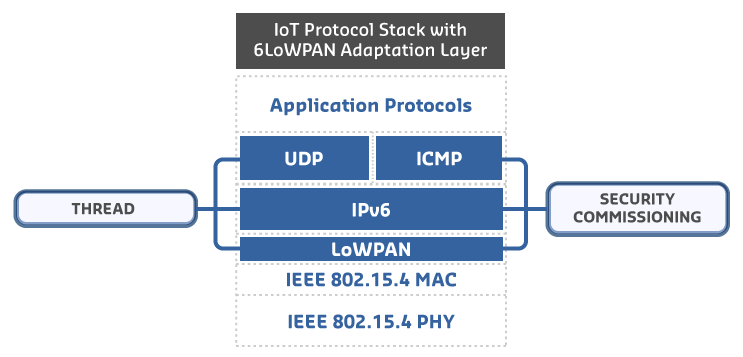
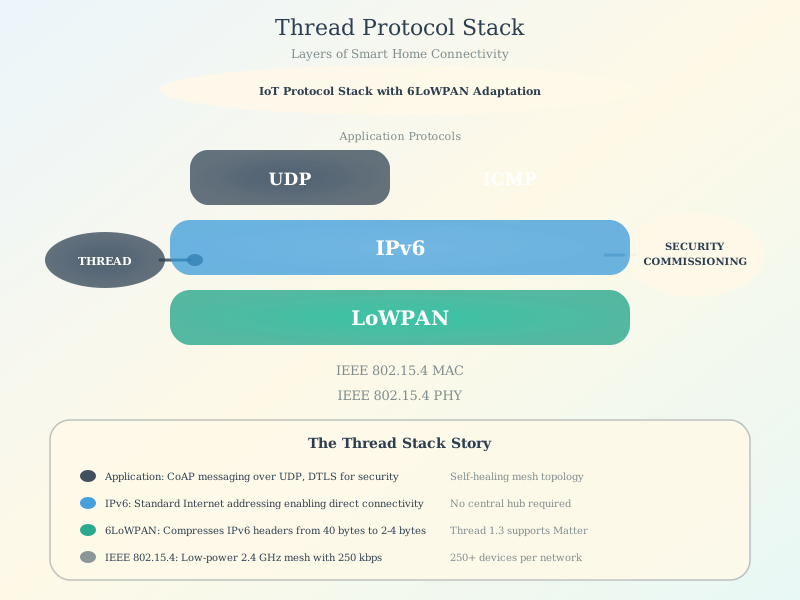
Thread is a low-power, IPv6-based wireless mesh networking protocol designed specifically for smart home and IoT applications. Developed by the Thread Group (founded by Google/Nest, Samsung, ARM, and others), Thread addresses many limitations of existing IoT protocols.
Thread is based on multiple open standards: - IEEE 802.15.4: Physical and MAC layer - IPv6: Network layer addressing - 6LoWPAN: IPv6 compression for constrained networks
Like 6LoWPAN, Thread provides IP-based communications for resource-constrained devices and can support up to 250 nodes in a mesh topology, with robust authentication and encryption. Thread can be enabled on IEEE 802.15.4 devices with a software upgrade.
%%{init: {'theme': 'base', 'themeVariables': {'primaryColor': '#2C3E50', 'primaryTextColor': '#fff', 'primaryBorderColor': '#16A085', 'lineColor': '#E67E22', 'secondaryColor': '#16A085', 'tertiaryColor': '#7F8C8D'}}}%%
graph TB
    subgraph "Application Layer"
        A[Matter / CoAP / Custom Apps]
    end

    subgraph "Transport Layer"
        T[UDP / TCP]
    end

    subgraph "Network Layer"
        N[IPv6 with 6LoWPAN Compression]
    end

    subgraph "MAC/PHY Layer"
        M[IEEE 802.15.4]
    end

    A --> T
    T --> N
    N --> M

    style A fill:#9b59b6,stroke:#2C3E50,color:#fff
    style T fill:#3498db,stroke:#2C3E50,color:#fff
    style N fill:#16A085,stroke:#2C3E50,color:#fff
    style M fill:#2C3E50,stroke:#16A085,color:#fff
1008.4.1 Self-Check: Understanding the Basics
Before continuing to the next chapter, make sure you can answer:
- What makes Thread different from Zigbee? → Thread uses native IPv6, so devices have real internet addresses without needing a translating gateway
- What is a Border Router? → A device that connects the Thread mesh network to your Wi-Fi/Internet
- Why is Thread important for Matter? → Thread is the wireless mesh protocol that Matter devices use to communicate
- What’s the difference between a Router and End Device in Thread? → Routers are always on and relay messages; End Devices are battery-powered and sleep most of the time
1008.5 Summary
This chapter introduced Thread as an IPv6-based mesh networking protocol:
- What Thread is: An open-standard, low-power mesh protocol built on IEEE 802.15.4 and 6LoWPAN
- Why Thread matters: Native IPv6 addressing eliminates translation gateways; Matter compatibility ensures future-proofing
- Key device roles: Border Router (gateway), Router (mesh backbone), End Device (battery sensors)
- Performance basics: 250-device limit, 10-30m range per hop, 2-10 year battery life for SEDs
1008.6 What’s Next
Continue to Thread Protocol Comparison for a detailed analysis of how Thread compares to Zigbee, Z-Wave, Wi-Fi, and Bluetooth LE, including decision frameworks for choosing the right protocol for your application.