Thread 1.3 (latest specification as of 2024) introduces several enhancements for commercial and smart home deployments:
1. Multi-Network Roaming - Devices can seamlessly roam between Thread networks - Use case: Large buildings with multiple Thread partitions (each 250 devices) - Device credentials allow joining any network in the same “domain” - Benefit: User walks from Floor 1 (Network A) to Floor 2 (Network B) with wearable - no disconnection
2. Commercial Extensions - Increased router capacity: Support for larger routing tables - Enhanced QoS: Priority queuing for time-critical traffic (alarms, locks) - Multicast improvements: Efficient group messaging (e.g., “all lights in zone 3, turn off”) - Use case: Industrial monitoring where alarms must preempt sensor data
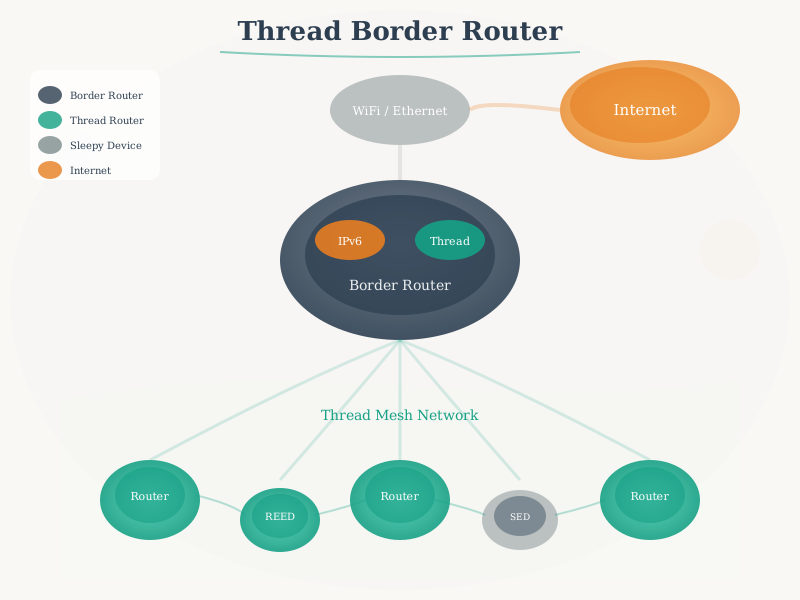
3. Border Router Redundancy - Active-active mode: Multiple Border Routers share load - Automatic failover: <5 second switchover if primary BR fails - Load balancing: Devices distribute traffic across BRs - Benefit: High availability for mission-critical applications
4. Network Diagnostics & Management - MeshDiag protocol: Centralized network health monitoring - Metrics exposed: Link quality, router load, battery levels, hop counts - Remote management: Over-the-air configuration updates - Use case: Building manager monitors 800-device deployment across 4 Thread networks from dashboard
5. Power Optimization Enhancements - Coordinated Sampled Listening (CSL): Even lower power than SED - Devices wake in sync with parent router transmissions (no polling overhead) - Battery life: Up to 15+ years on CR2032 for infrequent sensors - Trade-off: Higher latency (1-5 minutes) for non-urgent messages
6. IPv6 Multicast Enhancements - Multicast Listener Discovery (MLDv2): Efficient group management - Scope-based addressing: Limit multicast to zones (room, floor, building) - Use case: “Turn off all lights on Floor 3” → single multicast instead of 50 unicast messages - Bandwidth savings: 50x reduction in control traffic
Thread 1.3 vs 1.2 Quick Comparison:
| Multi-network roaming |
No |
Yes |
Seamless mobility |
| BR failover time |
~30 seconds |
<5 seconds |
6x faster |
| CSL power mode |
No |
Yes |
15+ year battery |
| Network diagnostics |
Basic |
MeshDiag protocol |
Centralized monitoring |
| QoS priority |
No |
Yes |
Critical message priority |
| Multicast efficiency |
MLDv1 |
MLDv2 |
50% overhead reduction |
When Thread 1.3 Matters: - Large commercial deployments (500+ devices across multiple networks) - High availability requirements (hospitals, data centers) - Ultra-low power needs (10+ year battery life) - Centralized management (fleet of buildings)
For Typical Smart Homes: Thread 1.2 is sufficient (50-100 devices, single network, consumer-grade reliability)