%%{init: {'theme': 'base', 'themeVariables': {'primaryColor': '#2C3E50', 'primaryTextColor': '#fff', 'primaryBorderColor': '#16A085', 'lineColor': '#16A085', 'secondaryColor': '#E67E22', 'tertiaryColor': '#7F8C8D', 'fontSize': '11px'}}}%%
flowchart LR
    subgraph Problem["Problem: Direct Mount"]
        READER1["Reader<br/>Signal"] --> METAL1["Metal<br/>Surface"]
        METAL1 --> REFLECT["Reflected<br/>Wave"]
        REFLECT --> CANCEL["Signal<br/>Cancelled"]
        TAG1["Tag"] --> DEAD["0% Read"]
    end

    subgraph Solution["Solution: Spacer Mount"]
        READER2["Reader<br/>Signal"] --> SPACER["Foam<br/>Spacer"]
        SPACER --> TAG2["Tag"]
        TAG2 --> SUCCESS["95% Read"]
    end

    style Problem fill:#F8E8E8,stroke:#c0392b
    style Solution fill:#E8F8E8,stroke:#27ae60
868 RFID Troubleshooting Guide
868.1 Learning Objectives
By the end of this chapter, you will be able to:
- Diagnose interference issues: Identify when metal, liquids, or density cause read failures
- Apply mitigation strategies: Select appropriate tags and configurations for challenging environments
- Avoid common mistakes: Recognize and prevent typical RFID deployment errors
- Optimize read rates: Improve system performance through antenna placement and power tuning
- Design for reliability: Build RFID systems that achieve 95%+ read rates consistently
868.2 Prerequisites
Before diving into this chapter, you should be familiar with:
- RFID Getting Started Guide - Basic RFID concepts, tag types, and frequency bands
- RFID Real-World Applications - Understanding of deployment scenarios
NoteRelated Chapters
This chapter is part of the RFID series:
- RFID Overview and Introduction - Index and overview
- RFID Getting Started Guide - Beginner introduction
- RFID Real-World Applications - Worked examples and case studies
- RFID Troubleshooting Guide (this chapter)
868.3 Material Interference Scenarios
868.3.1 Scenario 1: Metal Objects Block UHF RFID
What Happens: You deploy UHF RFID tags (915 MHz) on metal toolboxes in a factory. The tags stop working when placed directly on metal surfaces.
Why It Happens: - Radio waves at UHF frequencies reflect off metal like light off a mirror - The reflected wave cancels out the incoming wave (destructive interference) - Tag can’t harvest energy from the reader’s signal - Result: Near 0% read rate (tag appears “dead”)
The Fix: - Use metal-mount RFID tags with foam spacer (separates antenna from metal by 3-5mm) - Foam prevents direct contact, allowing tag to work - Alternative: Switch to LF 125 kHz tags (longer wavelength, but shorter range)
Illustrative Read Rates: - Standard UHF tag on metal: ~0% read rate - Metal-mount UHF tag: ~95% read rate at 2-meter range - LF tag on metal: ~90% read rate at 10 cm range
868.3.2 Scenario 2: Liquids Absorb UHF Radio Waves
What Happens: Beverage company tags bottles of water. UHF tags work great on empty bottles but fail ~80% of the time when bottles are full of water.
Why It Happens: - Water molecules absorb radio frequency energy (same reason microwave ovens work!) - UHF 915 MHz particularly affected (near microwave oven frequency of 2.45 GHz) - Energy meant for tag gets absorbed by water instead - Tag starves for power, can’t respond
The Fix: - Use HF 13.56 MHz tags (longer wavelength, less absorption) - Place tag on bottle cap (away from liquid) instead of bottle body - Use higher-power readers to compensate - Alternative: Active tags with battery (not dependent on reader power)
Illustrative Read Rates: - UHF tag on water bottle body: ~20% read rate (full), ~100% (empty) - HF tag on water bottle: ~85% read rate (full), ~100% (empty) - UHF tag on bottle cap: ~95% read rate (full), ~100% (empty)
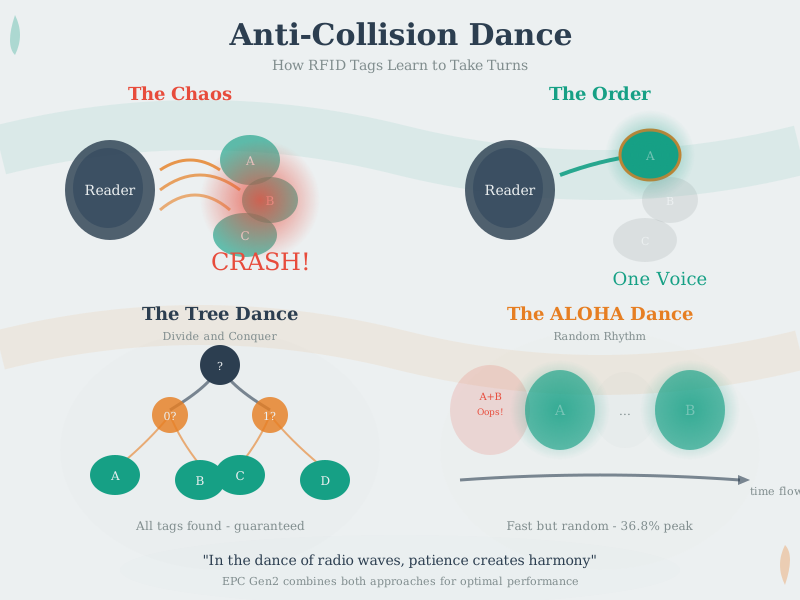
868.3.3 Scenario 3: Dense Tag Environment (Reader Collision)
What Happens: Clothing store has 500 items on one rack, each with UHF RFID tag. When reader scans, it only detects ~320 tags (64% read rate). ~180 items invisible!
Why It Happens: - All tags try to respond simultaneously when reader asks - Radio signals collide (like everyone shouting at once in a room) - Tags further from reader get drowned out by louder nearby tags - Tag shadowing: Front tags block signal to tags behind them
The Fix: - Use anti-collision algorithm (reader asks tags to respond in sequence) - Increase reader power to reach shadowed tags - Use multiple antennas positioned at different angles - Slow down scan speed (give more time for each tag to respond)
Illustrative Read Rates (Without vs With Anti-Collision):
| Tag Count | Without Anti-Collision | With EPC Gen2 Algorithm |
|---|---|---|
| 50 tags | ~95% | ~99.5% in 0.5s |
| 200 tags | ~75% | ~99% in 1.2s |
| 500 tags | ~64% (180 missed!) | ~98% in 3.5s (only ~10 missed) |
868.3.4 Scenario 4: Active Tag Battery Drain in Cold Weather
What Happens: Shipping company tracks containers with active UHF tags (100m range). Tags supposed to last 5 years, but batteries die after ~8 months in winter.
Why It Happens: - Active tags transmit location frequently (uses battery power) - Cold weather (-20C / -4F) reduces battery capacity by ~50% - Battery chemistry slows down in cold (lithium cells particularly affected) - Tags also transmit more often if interrogated by multiple readers
The Fix: - Use temperature-rated batteries (lithium iron disulfide, not alkaline) - Reduce transmission frequency: 30 seconds -> 5 minutes (10x longer battery life) - Use semi-passive tags instead (battery only for sensors, RF powered by reader) - Add temperature sensor to adjust transmission rate (slow down in cold)
Illustrative Battery Life: - Standard lithium battery at 25C: ~5 years (as specified) - Same battery at -20C: ~2.5 years (50% capacity loss) - Transmission every 30s vs every 5 min: ~10x difference in battery life
868.3.5 Scenario 5: Privacy Concerns (Unauthorized Tag Reading)
What Happens: Retail store embeds UHF RFID tags in clothing for inventory. Customer buys jacket and walks home. Tags remain active and can potentially be read by others.
Why It Happens: - UHF tags respond to any reader (no authentication by default) - Tags transmit unique ID that can be tracked across locations - Retailers sometimes link tag ID to customer database - Passive tags have no power to refuse unauthorized reads
The Fix: - Kill command: Disable tag at checkout (becomes permanently silent) - Shielded packaging: Aluminum foil blocks RF (Faraday cage effect) - Short-range tags: Use HF 13.56 MHz (~10cm range) instead of UHF (~10m range) - Privacy legislation: GDPR/CCPA require notification and opt-out
Key Insight: Privacy is a deployment decision, not just a technology choice. Always consider post-sale tag behavior in your design.
868.4 Common RFID Mistakes
868.5 Practitioner Pitfalls
These common mistakes cause real-world RFID deployment failures. Learn from others’ experiences.
CautionPitfall: Expecting 100% Read Rates in Production Environments
The mistake: Designing inventory or tracking systems that assume every tag will be read on every pass, leading to missing items, incorrect counts, and business process failures.
Why it happens: Lab testing with controlled conditions (single tags, optimal orientation, no interference) shows 99%+ read rates. Teams extrapolate this to production where hundreds of tags, random orientations, metal shelving, and RF interference create dramatically different conditions.
The fix: Design for probabilistic reads from the start. Implement multi-pass scanning (3+ passes reduces miss rate exponentially). Use reconciliation workflows that flag discrepancies. Deploy multiple antenna angles to catch different tag orientations. Set realistic expectations: 95-98% single-pass read rates are excellent in challenging environments. Build exception handling for the 2-5% that require manual verification.
CautionPitfall: Selecting Tag Frequency Based on Range Alone
The mistake: Choosing UHF tags because they offer the longest read range (10+ meters), without considering that the deployment environment contains metal, liquids, or requires close-range precision identification.
Why it happens: Range appears to be the most important specification, and UHF’s multi-meter capability seems universally superior. Teams don’t understand that UHF’s shorter wavelength (33cm) reflects off metal and absorbs in liquids, while LF/HF’s magnetic coupling works differently.
The fix: Match frequency to your environment and use case, not range requirements. Use LF (125 kHz) for close-range through tissue (pet microchips) or in extreme metal environments. Use HF (13.56 MHz) for item-level tracking with moderate metal presence and when smartphone interaction (NFC) is needed. Use UHF only in open environments with cardboard, plastic, or paper packaging. Always pilot test with actual materials and tag placements before full deployment.
CautionPitfall: Underestimating RFID Middleware Complexity
The mistake: Focusing solely on tags and readers while treating middleware as a simple pass-through, then discovering that filtering duplicate reads, managing reader networks, and integrating with enterprise systems requires significant development effort.
Why it happens: Hardware (tags, readers, antennas) is tangible and easy to specify. Middleware appears to be “just software” that connects things together. Teams underestimate that a single reader can generate 1,000+ read events per second, requiring deduplication, smoothing, and business event generation.
The fix: Budget 40-60% of project effort for middleware and integration. Select middleware early and ensure it supports your reader models. Plan for edge processing to reduce data volume before sending to enterprise systems. Define clear business events (item entered zone, pallet shipped) rather than passing raw reads to applications. Test throughput under realistic multi-reader, multi-tag scenarios.
868.6 Knowledge Check: Troubleshooting
TipQuiz: Manufacturing Plant Metal Interference
Scenario: A manufacturing plant with significant metal machinery and RF interference deploys UHF RFID for tool tracking. The system experiences 40% read failures despite good reader placement.
Think about: 1. How do metal surfaces affect different RFID frequency bands through reflection and absorption? 2. Why doesn’t increasing reader power from 1W to 4W solve metal interference problems? 3. What physics principle explains why longer wavelengths tolerate metal environments better?
Key Insight: Frequency selection determines RFID performance in metal-rich environments:
LF 125 kHz (recommended): - Coupling: Near-field magnetic induction (less multipath nulling than UHF) - Metal: Still detunes antennas, but often more tolerant than UHF with proper tag/reader design - Read rate in manufacturing: 95%+ success - Trade-off: Very short range (<10 cm)
UHF 915 MHz (current failing system): - Wavelength: 33 cm -> reflects off metal surfaces - Penetration: Poor (creates nulls and dead zones) - Increasing power: Doesn’t solve reflection physics, increases interference - Read rate: 60% success (40% failures)
Why higher power fails: UHF radio waves reflect off metal regardless of signal strength. Increasing from 1W to 4W amplifies both the signal AND the reflected interference, often making the problem worse.
Verify Your Understanding: - Why would switching to microwave 2.45 GHz (12 cm wavelength) make metal interference even worse? - How do active tags with batteries still fail in metal environments despite having power? - What range sacrifice comes with switching from UHF to LF in this scenario?
868.7 Diagnostic Decision Tree
Use this flowchart to diagnose common RFID problems:
%%{init: {'theme': 'base', 'themeVariables': {'primaryColor': '#2C3E50', 'primaryTextColor': '#fff', 'primaryBorderColor': '#16A085', 'lineColor': '#16A085', 'secondaryColor': '#E67E22', 'tertiaryColor': '#7F8C8D', 'fontSize': '10px'}}}%%
flowchart TD
    START["RFID Read<br/>Failures"] --> Q1{"Single tag<br/>or many?"}

    Q1 -->|"Single tag"| Q2{"Same tag<br/>works elsewhere?"}
    Q1 -->|"Many tags"| Q6{"All tags or<br/>random subset?"}

    Q2 -->|"Yes"| PLACEMENT["Tag Placement Issue<br/>- Check orientation<br/>- Check material under tag<br/>- Use spacer if metal"]
    Q2 -->|"No"| DEAD["Dead Tag<br/>- Replace tag<br/>- Check for damage"]

    Q6 -->|"All tags"| Q7{"Reader shows<br/>activity?"}
    Q6 -->|"Random"| COLLISION["Collision Issue<br/>- Enable anti-collision<br/>- Add antennas<br/>- Slow scan speed"]

    Q7 -->|"Yes"| Q8{"Tags near<br/>metal/liquid?"}
    Q7 -->|"No"| READER["Reader Issue<br/>- Check power<br/>- Check antenna<br/>- Check cables"]

    Q8 -->|"Yes"| MATERIAL["Material Interference<br/>- Use metal-mount tags<br/>- Move tags to cap/edge<br/>- Consider HF/LF"]
    Q8 -->|"No"| RANGE["Range Issue<br/>- Increase power<br/>- Add readers<br/>- Check orientation"]

    style START fill:#2C3E50,stroke:#16A085,color:#fff
    style PLACEMENT fill:#E67E22,stroke:#2C3E50,color:#fff
    style DEAD fill:#c0392b,stroke:#2C3E50,color:#fff
    style COLLISION fill:#E67E22,stroke:#2C3E50,color:#fff
    style READER fill:#c0392b,stroke:#2C3E50,color:#fff
    style MATERIAL fill:#E67E22,stroke:#2C3E50,color:#fff
    style RANGE fill:#16A085,stroke:#2C3E50,color:#fff
868.8 Read Rate Optimization Checklist
Use this checklist when read rates are below target:
868.8.1 Hardware Checks
868.8.2 Environment Checks
868.8.3 Configuration Checks
868.8.4 Deployment Checks
868.9 Summary
In this chapter, you learned:
- Metal interference: UHF signals reflect off metal; use metal-mount tags with spacers or switch to LF/HF
- Liquid absorption: Water absorbs UHF energy; place tags on caps or use HF for liquid containers
- Dense environments: Anti-collision algorithms are essential; 500 tags need 3-4 seconds to read reliably
- Battery optimization: Sleep current often dominates; cold weather reduces capacity 50%
- Privacy considerations: Implement kill commands, range limits, or shielding for post-sale privacy
- Common mistakes: Don’t assume 100% reads, don’t select frequency by range alone, budget for middleware
- Diagnostic approach: Systematic troubleshooting using decision trees and checklists
868.10 What’s Next
Continue exploring RFID with:
- RFID Security and Privacy - Authentication protocols and privacy protection
- RFID Hands-On and Applications - Build your own RFID projects
- RFID Fundamentals and Standards - Deep dive into EPC Gen2 and ISO standards