%% fig-alt: "Decision tree flowchart for RFID tag selection based on read range requirements. Branches show: >10m leads to active RFID (battery-powered), 1-10m with metal leads to UHF on-metal tags, 1-10m without metal leads to UHF passive EPC Gen2, 10cm-1m leads to HF RFID ISO 15693, and <10cm leads to LF RFID. Color coding uses navy for HF, teal for UHF, orange for active, and gray for LF bands."
%%{init: {'theme': 'base', 'themeVariables': {'primaryColor': '#2C3E50', 'primaryTextColor': '#fff', 'primaryBorderColor': '#16A085', 'lineColor': '#16A085', 'secondaryColor': '#E67E22', 'tertiaryColor': '#7F8C8D', 'background': '#ffffff', 'mainBkg': '#2C3E50', 'secondBkg': '#16A085', 'tertiaryBkg': '#E67E22'}}}%%
flowchart TD
    Start[Required Read Range?] --> Range10{">10 meters?"}
    Range10 -->|Yes| Active["Active RFID<br/>(battery-powered)"]
    Range10 -->|No| Range1{">1 meter?"}
    Range1 -->|Yes| Metal{Metal<br/>environment?}
    Metal -->|Yes| UHFMetal["UHF On-Metal Tags<br/>(860-960 MHz)"]
    Metal -->|No| UHF["UHF Passive<br/>EPC Gen2"]
    Range1 -->|No| Range01{">10 cm?"}
    Range01 -->|Yes| HF["HF RFID<br/>(13.56 MHz)<br/>ISO 15693"]
    Range01 -->|No| LF["LF RFID<br/>(125 kHz)"]

    style Active fill:#E67E22,stroke:#2C3E50,color:#fff
    style UHFMetal fill:#16A085,stroke:#2C3E50,color:#fff
    style UHF fill:#16A085,stroke:#2C3E50,color:#fff
    style HF fill:#2C3E50,stroke:#16A085,color:#fff
    style LF fill:#7F8C8D,stroke:#333,color:#fff
875 RFID: Comprehensive Review
875.1 Introduction
TipFor Beginners: RFID Review Orientation
This review expects that you already understand from rfid-fundamentals-and-standards.qmd:
- The differences between LF, HF, and UHF.
- Basic tag/reader operation and common applications.
Use this chapter to practise design trade‑offs:
- Choosing tag types and frequencies for real deployments.
- Reasoning about read‑range, interference (especially metal), and security risks.
If the early questions feel opaque, use them as a checklist of topics to revisit in the fundamentals chapter before continuing.
NoteRelated Chapters
Deep Dives: - RFID Fundamentals - Core RFID concepts and frequency bands - RFID Applications - Real-world implementations - NFC Fundamentals - RFID’s HF subset for consumer applications
Comparisons: - NFC Comprehensive Review - High-frequency RFID comparison - Bluetooth Fundamentals - Alternative wireless ID
Architecture: - Sensor Fundamentals - RFID as identification layer
Learning: - Quizzes Hub - Test your RFID knowledge - Videos Hub - Visual learning resources
WarningCommon Misconception: “RFID Tag Range Specifications”
Misconception: “This UHF RFID tag advertises 10-meter range, so I’ll get 10 meters in my deployment.”
Reality: Published ranges are usually measured in controlled setups (clean RF environment, favorable tag orientation, optimized antennas, and maximum legal reader power). In real deployments, range can be significantly lower due to the environment and installation details.
What commonly reduces real-world range
- Materials near the tag: metal detunes/reflects; liquids and the human body absorb RF energy.
- Tag orientation/polarization: mismatch between tag antenna and reader antenna reduces the link budget.
- Placement + hardware losses: antenna placement, mounting, cable/connector losses, and multipath matter.
- Regulatory limits and interference: EIRP limits and local noise constrain usable power.
Best practice
- Treat vendor range as an upper bound, not a guarantee.
- Run a small pilot with real items, real mounting, and realistic motion/orientation.
- Iterate on tag choice (e.g., on-metal designs/spacers), antenna type/placement, and reader settings.
If you want a theoretical upper bound, compute a link budget (e.g., Friis/free-space) and then validate with measurement.
875.2 Learning Objectives
By the end of this review, you will be able to:
- Select RFID Frequencies: Choose LF, HF, or UHF based on range and environmental constraints
- Design for Metal Environments: Apply anti-metal tag techniques for warehouse deployments
- Compare Active and Passive: Evaluate cost, range, and battery trade-offs for different applications
- Calculate Read Ranges: Estimate coverage based on tag type, reader power, and antenna design
- Address Security Concerns: Implement authentication and anti-cloning measures
- Test System Performance: Validate RFID accuracy in real-world deployment conditions
875.3 Prerequisites
Required Chapters: - RFID Fundamentals - Core RFID concepts - RFID Applications - Use cases - NFC Fundamentals - Related technology
Technical Background: - Basic RF concepts - Tag vs reader architecture - Passive vs active systems
RFID Frequency Bands:
| Band | Frequency | Range | Use Case |
|---|---|---|---|
| LF | 125-134 kHz | <10 cm | Access control |
| HF | 13.56 MHz | <1 m | Smart cards, NFC |
| UHF | 860-960 MHz | meter-scale (deployment dependent) | Supply chain |
| Microwave | 2.45 GHz | specialized (often active) | Niche/RTLS-style use cases |
Key Concepts to Review: - Backscatter communication - Anti-collision protocols - EPC standards
Estimated Time: 1.5 hours
875.4 Knowledge Check
Test your understanding of RFID technology with these questions.
875.5 Practice Questions (With Solutions)
Work through these scenarios, then compare with the solutions.
NoteQuestion 1: Tag Type Selection
You’re designing an inventory tracking system for a warehouse. Items are stored on metal shelves and may be scanned from up to 10 meters away. Which RFID configuration is most appropriate?
Answer:
UHF RFID (860-960 MHz) with passive tags, but with careful consideration for metal interference.
Explanation:
- Range requirement: 10 meters requires UHF RFID
- LF: <10 cm
- HF: <1 m
- UHF: 1-12 m ✓
- Metal shelf challenge: UHF is sensitive to metal, but solutions exist:
- Use anti-metal tags with foam spacers
- Position tags perpendicular to metal surfaces
- Use on-metal RFID tags (specially designed with RF-absorbing material)
- Alternative if the environment is very challenging: Active RFID (battery-powered tags)
- Can support longer range and different form factors
- Trade-offs: battery lifecycle/maintenance, higher tag complexity, and different infrastructure
- Why not LF/HF:
- LF (125 kHz) works well with metal BUT range <10 cm
- HF (13.56 MHz) moderate metal tolerance BUT range <1 m
Best practice: Use EPC Gen2 UHF passive tags with appropriate on-metal/anti-metal designs and validate performance with an on-site pilot.
RFID Tag Selection Decision Tree:
NoteAlternative View: RFID System Design Considerations
This diagram shows the key factors to consider when designing an RFID system beyond just frequency selection.
%% fig-alt: Hierarchical diagram showing RFID system design factors including environment, volume, security, and integration considerations
%%{init: {'theme': 'base', 'themeVariables': {'primaryColor': '#2C3E50', 'primaryTextColor': '#fff', 'primaryBorderColor': '#16A085', 'lineColor': '#E67E22'}}}%%
flowchart TB
    subgraph Design["RFID System Design"]
        direction TB
        ROOT[System Requirements] --> ENV[Environment]
        ROOT --> VOL[Volume/Speed]
        ROOT --> SEC[Security]
        ROOT --> INT[Integration]
    end

    ENV --> E1["Metals: Use on-metal tags"]
    ENV --> E2["Liquids: Avoid UHF"]
    ENV --> E3["Outdoor: IP67+ readers"]
    ENV --> E4["Temperature: Industrial tags"]

    VOL --> V1["High speed: UHF + phased array"]
    VOL --> V2["Dense tags: Anti-collision"]
    VOL --> V3["Portal: Tunnel antennas"]
    VOL --> V4["Single item: HF or LF"]

    SEC --> S1["Clone risk: Crypto tags"]
    SEC --> S2["Tamper: Fragile tags"]
    SEC --> S3["Privacy: Kill command"]
    SEC --> S4["Access: EPC passwords"]

    INT --> I1["ERP: Middleware"]
    INT --> I2["Database: EPCIS"]
    INT --> I3["IoT: MQTT bridge"]
    INT --> I4["Cloud: SaaS platform"]

    style Design fill:#2C3E50,color:#fff
    style ENV fill:#16A085,color:#fff
    style VOL fill:#E67E22,color:#fff
    style SEC fill:#9B59B6,color:#fff
    style INT fill:#7F8C8D,color:#fff
For the 10m warehouse scenario with metal shelves: UHF with anti-metal tags is optimal.
NoteQuestion 2: Security Vulnerability
A company uses MIFARE Classic 1K cards for building access control with factory default keys (FFFFFFFFFFFF). What are the security risks, and how should they mitigate them?
Answer:
High-risk configuration. Mitigation should be prioritized.
Risks:
- MIFARE Classic (Crypto1) is legacy security:
- Practical attacks exist; it should not be used for new security-sensitive deployments
- UID-only access control is not secure (UIDs are easy to observe and can be emulated)
- Factory default keys:
- Published online, widely known
- Anyone can read/write protected sectors
- Attackers can extract access credentials
- Attack vectors:
- Credential emulation/cloning against weak credentials
- Relay/replay-style attacks if the system assumes proximity implies trust
- Eavesdropping in poorly designed or misconfigured systems
Mitigation strategies:
Immediate (risk reduction without replacing everything): - Stop using default keys and adopt a documented key-management process (unique keys, protected storage, controlled provisioning). - Avoid UID-only authorization; require cryptographic authentication (when supported) and backend authorization checks. - Add monitoring (access logs, anomaly detection) and incident response procedures. - Assess threat model: what does “unauthorized access” look like in your environment, and what is the impact?
Long-term (upgrade system):
- Upgrade to a modern secure credential:
- Use ISO 14443 technologies that support modern cryptography (e.g., AES-based mutual authentication)
- Use per-credential diversified keys and secure provisioning
- Add multi-factor authentication:
- RFID + PIN code
- RFID + biometric (fingerprint)
- Implement monitoring:
- Log all access attempts
- Alert on repeated failures
- Detect cloned cards (same UID, different access patterns)
Key takeaway: Never use default keys in production, and treat legacy Crypto1-era cards as insufficient for high-security access control. Prefer modern cryptography plus strong key management.
NoteQuestion 3: Anti-Collision Algorithm
In a retail environment, you need to scan 100+ items simultaneously as a cart passes through checkout. How does RFID handle multiple tags responding at once, and what determines throughput?
Answer:
RFID uses anti-collision algorithms (also called singulation) to read many tags in the same field without every tag talking over every other tag. With UHF EPC Gen2, practical inventory rates vary widely based on tag population, RF environment, and reader configuration.
How Anti-Collision Works:
1. Aloha-Based Protocol (EPC Gen2):
%% fig-alt: "Sequence diagram showing EPC Gen2 Aloha-based anti-collision protocol. RFID reader broadcasts queries assigning slots 0-4. Tag 1 responds in slot 0 (success, ACK), Tags 2 and 3 collide in slot 1 (retry), Tag 2 successfully responds in slot 3 (ACK), and Tag 3 successfully responds in slot 4 (ACK). Demonstrates how multiple tags are singulated through random slot selection and collision resolution."
%%{init: {'theme': 'base', 'themeVariables': {'primaryColor': '#2C3E50', 'primaryTextColor': '#fff', 'primaryBorderColor': '#16A085', 'lineColor': '#16A085', 'secondaryColor': '#E67E22', 'tertiaryColor': '#7F8C8D', 'background': '#ffffff', 'mainBkg': '#2C3E50', 'secondBkg': '#16A085', 'tertiaryBkg': '#E67E22'}}}%%
sequenceDiagram
    participant R as RFID Reader
    participant T1 as Tag 1
    participant T2 as Tag 2
    participant T3 as Tag 3

    R->>T1: Query (Slot 0)
    R->>T2: Query (Slot 1)
    R->>T3: Query (Slot 2)

    T1->>R: Response (Slot 0)
    Note over R,T1: Success: ACK
    T2->>R: Response (Slot 1)
    T3->>R: Response (Slot 1)
    Note over R,T2: Collision: Retry

    R->>T2: Query (Slot 3)
    T2->>R: Response (Slot 3)
    Note over R,T2: Success: ACK
    R->>T3: Query (Slot 4)
    T3->>R: Response (Slot 4)
    Note over R,T3: Success: ACK
Algorithm steps:
- Reader broadcasts Query: “All tags, prepare to respond”
- Tags pick random slot: Each tag selects random time slot (0-15 or 0-255)
- Tags respond in their slot:
- If only 1 tag in slot: Success, reader ACKs
- If >1 tag in slot: Collision detected, retry
- Repeat until all tags inventoried
2. Binary Tree Protocol (Alternative):
%% fig-alt: "Binary tree diagram showing tag singulation through bit-by-bit UID narrowing. Root node queries all tags, splits on collision into 0-branch and 1-branch. Left branch further splits into 00 and 01 prefixes, identifying tags 001 and 010. Right branch identifies tags 110 and 111. Green nodes indicate successful single-tag reads. Demonstrates progressive narrowing from collisions to individual tag identification."
%%{init: {'theme': 'base', 'themeVariables': {'primaryColor': '#2C3E50', 'primaryTextColor': '#fff', 'primaryBorderColor': '#16A085', 'lineColor': '#16A085', 'secondaryColor': '#E67E22', 'tertiaryColor': '#7F8C8D', 'background': '#ffffff', 'mainBkg': '#2C3E50', 'secondBkg': '#16A085', 'tertiaryBkg': '#E67E22'}}}%%
graph TD
    Start["Query: All tags<br/>respond"] --> Split1{Collision?}
    Split1 -->|Yes| Q0["Query: Tags<br/>starting with 0"]
    Split1 -->|No| Read1["✓ Single tag<br/>Read UID"]

    Q0 --> Split2{Collision?}
    Split2 -->|Yes| Q00["Query: Tags<br/>starting with 00"]
    Split2 -->|No| Read2["✓ Read Tag"]

    Q00 --> Read3["✓ Read Tag 001"]

    Q0 --> Q01["Query: Tags<br/>starting with 01"]
    Q01 --> Read4["✓ Read Tag 010"]

    Split1 --> Q1["Query: Tags<br/>starting with 1"]
    Q1 --> Read5["✓ Read Tag 110"]
    Q1 --> Read6["✓ Read Tag 111"]

    style Read1 fill:#16A085,stroke:#2C3E50,color:#fff
    style Read2 fill:#16A085,stroke:#2C3E50,color:#fff
    style Read3 fill:#16A085,stroke:#2C3E50,color:#fff
    style Read4 fill:#16A085,stroke:#2C3E50,color:#fff
    style Read5 fill:#16A085,stroke:#2C3E50,color:#fff
    style Read6 fill:#16A085,stroke:#2C3E50,color:#fff
How it works: Reader progressively narrows down tag UIDs bit-by-bit until isolating individual tags. Like a binary search tree traversal.
Performance Characteristics:
| Factor | Impact on Throughput |
|---|---|
| Number of tags | More tags = more collisions = slower |
| Tag density | Tightly packed = more simultaneous responses |
| Q algorithm | Dynamically adjusts slot count based on collision rate |
| Session flags | Prevents re-reading same tag (S0-S3) |
Practical throughput (deployment dependent):
- UHF (EPC Gen2 / RAIN RFID): often inventories large tag populations quickly in favorable conditions; performance depends on tag presentation, density, and RF noise.
- HF (13.56 MHz): typically lower throughput due to shorter range and tighter coupling.
- LF (125/134 kHz): generally lowest throughput; most often used for proximity ID use cases.
Retail checkout / portal tuning tips:
- Optimize antenna placement and polarization for the expected tag orientations.
- Use inventory/session settings to avoid repeatedly re-reading the same tag population.
- Validate with realistic tag density and motion, staying within regulatory power limits.
Key takeaway: Anti-collision makes multi-tag reading possible, but the achievable rate is a system-level outcome (RF environment + tag population + reader settings).
NoteQuestion 4: Read Range Calculation
A passive UHF RFID tag specifies “read range up to 10 meters.” In practice, you’re only achieving a few meters. What factors affect read range, and how can you improve it?
Answer:
Read range is a link-budget problem plus a tag-presentation problem. The biggest levers are reader EIRP (power + antenna gain), tag sensitivity/tuning, orientation/polarization, and nearby materials (metal/liquid).
Useful mental model (upper bound):
The Friis transmission equation gives a free-space upper bound:
\[ r = \frac{\lambda}{4\pi} \sqrt{\frac{P_t G_t G_r \tau}{P_{th}}} \]
Where: - \(r\) = read range - \(\lambda\) = wavelength - \(P_t\) = reader transmit power - \(G_t\) = reader antenna gain (linear) - \(G_r\) = tag antenna gain (linear) - \(\tau\) = tag power transmission coefficient - \(P_{th}\) = tag activation threshold power
What reduces range in real deployments:
- Environment and mounting (metal/liquid nearby can detune or absorb; multipath can create nulls).
- Tag orientation and polarization mismatch (a good tag in a bad orientation reads poorly).
- Hardware and installation losses (cable/connectors, antenna placement, reader sensitivity/noise floor).
- Regulatory limits (you cannot “turn it up” past legal EIRP).
How to improve reliability (in priority order):
- Fix tag choice and placement: use tags designed for the material (e.g., on-metal tags/spacers) and aim for consistent orientation.
- Fix antenna geometry: move antennas closer, choose polarization that matches the tag population, and add antennas for coverage where needed.
- Reduce losses: keep RF paths short, use appropriate cable/connectors, and mount antennas correctly.
- Tune reader settings within legal limits: inventory/session settings, dwell time, and power (as permitted).
- Pilot and measure: validate with real items in the real environment and iterate.
Key takeaway: Vendor range is a best-case upper bound; deployment engineering determines actual performance.
NoteQuestion 5: RFID vs Barcode vs NFC
Your company needs to track 10,000 items across a warehouse. Compare RFID, barcodes, and NFC for this application. Which technology is best and why?
Answer:
For warehouse-scale inventory tracking, UHF RFID is often the best fit because it enables non-line-of-sight, multi-tag inventory and supports automation. That said, barcodes and NFC can be the right choice depending on workflow and constraints.
Technology Comparison:
| Feature | Barcode | NFC (HF RFID) | UHF RFID |
|---|---|---|---|
| Interaction model | Line-of-sight scan | Tap / very close proximity | Portal/sweep / meter-scale field |
| Read many at once | No (one at a time) | Limited | Yes (inventory/singulation) |
| Line-of-sight | Required | No | No |
| Automation | Mostly manual | Mostly manual | Strong automation potential |
| Smartphone-native | Yes (camera) | Yes (NFC) | No (typically needs a UHF reader) |
| Works near metal/liquids | Depends on label/placement | Often better than UHF | Requires careful tag choice/placement (on-metal tags, spacers) |
Decision Matrix:
Choose Barcode if: - Your process tolerates line-of-sight scanning and manual workflow - You need the simplest deployment and lowest operational complexity
Choose NFC if: - You want deliberate, close-proximity interactions (tap-to-pay, tap-to-pair, user experiences) - Smartphone compatibility is important - Short range is a feature (reduces accidental reads)
Choose UHF RFID if: - You need fast cycle counts, portals, or bulk inventory without line-of-sight - You expect dense tag populations and want automated capture - You can invest in site survey + tuning (tag selection, antenna placement, reader settings)
Key takeaway: For warehouse-scale inventory, UHF RFID is typically the best fit for automation and bulk reads, but the right choice depends on workflow, environment, and validation testing.
NoteQuestion 6: EPC Global Network
Explain the EPC (Electronic Product Code) Global Network architecture. How does it enable supply chain tracking from manufacturer to consumer?
Answer:
The EPC Global Network is a standardized architecture for globally tracking items using RFID throughout the supply chain. It’s like “DNS for physical objects.”
Architecture Components:
%% fig-alt: "EPC Global Network architecture flowchart showing data flow from RFID tag through reader to edge middleware, then to EPCIS repository which queries ONS (Object Naming Service). ONS returns cloud database endpoints for supply chain tracking, authentication, and analytics. Navy tag connects via RF to teal reader, which connects to orange EPCIS, then to gray cloud infrastructure. Demonstrates 'DNS for physical objects' concept."
%%{init: {'theme': 'base', 'themeVariables': {'primaryColor': '#2C3E50', 'primaryTextColor': '#fff', 'primaryBorderColor': '#16A085', 'lineColor': '#16A085', 'secondaryColor': '#E67E22', 'tertiaryColor': '#7F8C8D', 'background': '#ffffff', 'mainBkg': '#2C3E50', 'secondBkg': '#16A085', 'tertiaryBkg': '#E67E22'}}}%%
flowchart TD
    Tag[RFID Tag with EPC] -->|RF| Reader[RFID Reader]
    Reader -->|Network| Middleware[Edge Middleware]
    Middleware -->|Filter/Process| EPCIS[EPCIS Repository]
    EPCIS -->|Query| ONS[Object Naming Service]
    ONS -->|Lookup| Cloud[Cloud Database]

    Cloud -->|Track| Supply[Supply Chain]
    Cloud -->|Verify| Auth[Authentication]
    Cloud -->|Analyze| Analytics[Analytics]

    style Tag fill:#2C3E50,stroke:#16A085,color:#fff
    style Reader fill:#16A085,stroke:#2C3E50,color:#fff
    style EPCIS fill:#E67E22,stroke:#2C3E50,color:#fff
    style Cloud fill:#7F8C8D,stroke:#333,color:#fff
1. EPC Structure (EPC-96 Format):
%% fig-alt: "96-bit EPC code structure diagram showing six fields from left to right: Header (8 bits, version), Filter (3 bits, type), Partition (3 bits), Company Prefix (20-40 bits, GS1 assigned manufacturer ID), Item Reference (24 bits, product type), and Serial Number (36 bits, unique item identifier). Navy blocks show header/filter/partition, teal shows company prefix, orange shows item reference, gray shows serial number. Demonstrates hierarchical product identification scheme."
%%{init: {'theme': 'base', 'themeVariables': {'primaryColor': '#2C3E50', 'primaryTextColor': '#fff', 'primaryBorderColor': '#16A085', 'lineColor': '#16A085', 'secondaryColor': '#E67E22', 'tertiaryColor': '#7F8C8D', 'background': '#ffffff', 'mainBkg': '#2C3E50', 'secondBkg': '#16A085', 'tertiaryBkg': '#E67E22'}}}%%
graph LR
    EPC["96-bit EPC Code"] --> H["Header<br/>(8 bits)<br/>Version"]
    EPC --> F["Filter<br/>(3 bits)<br/>Type"]
    EPC --> P["Partition<br/>(3 bits)"]
    EPC --> C["Company Prefix<br/>(20-40 bits)<br/>GS1 Assigned"]
    EPC --> I["Item Reference<br/>(24 bits)<br/>Product Type"]
    EPC --> S["Serial Number<br/>(36 bits)<br/>Unique Item"]

    style H fill:#2C3E50,stroke:#16A085,color:#fff
    style F fill:#2C3E50,stroke:#16A085,color:#fff
    style P fill:#2C3E50,stroke:#16A085,color:#fff
    style C fill:#16A085,stroke:#2C3E50,color:#fff
    style I fill:#E67E22,stroke:#2C3E50,color:#fff
    style S fill:#7F8C8D,stroke:#333,color:#fff
Example EPC Code:
Hex: 3034257BF7194E4000001A85
URI: urn:epc:id:sgtin:614141.812345.6789| Field | Value | Meaning |
|---|---|---|
| Header | 48 | EPC-96 SGTIN-96 |
| Company Prefix | 614141 | Manufacturer ID |
| Item Reference | 812345 | Product model |
| Serial Number | 6789 | Individual item |
2. Supply Chain Flow:
%% fig-alt: "Supply chain event sequence diagram showing product lifecycle tracking through EPC Global Network. Manufacturer tags item with EPC and records manufacturing event to ONS/EPCIS. Distributor receives item and logs warehouse receipt. Retailer logs shelf placement. Consumer purchases item and retailer logs sale. Consumer can verify product authenticity through ONS query. Demonstrates end-to-end supply chain visibility from manufacturing to consumer."
%%{init: {'theme': 'base', 'themeVariables': {'primaryColor': '#2C3E50', 'primaryTextColor': '#fff', 'primaryBorderColor': '#16A085', 'lineColor': '#16A085', 'secondaryColor': '#E67E22', 'tertiaryColor': '#7F8C8D', 'background': '#ffffff', 'mainBkg': '#2C3E50', 'secondBkg': '#16A085', 'tertiaryBkg': '#E67E22'}}}%%
sequenceDiagram
    participant M as Manufacturer
    participant D as Distributor
    participant R as Retailer
    participant C as Consumer
    participant ONS as ONS/EPCIS

    M->>M: Tag item with EPC
    M->>ONS: Record: Item manufactured
    M->>D: Ship item
    D->>ONS: Record: Item received at warehouse
    D->>R: Ship to store
    R->>ONS: Record: Item on shelf
    C->>R: Purchase item
    R->>ONS: Record: Item sold
    ONS->>C: Consumer can verify authenticity
3. ONS (Object Naming Service):
Works like DNS for physical objects:
%% fig-alt: "ONS lookup flowchart showing DNS-like resolution for physical objects. RFID tag with EPC 614141.812345.6789 is scanned by reader, which queries ONS DNS at sgtin.id.onsepc.com domain. ONS returns EPCIS endpoint URLs for manufacturer and retailer databases. Application queries both endpoints to retrieve complete event history for the tagged item. Demonstrates distributed database lookup architecture for supply chain tracking."
%%{init: {'theme': 'base', 'themeVariables': {'primaryColor': '#2C3E50', 'primaryTextColor': '#fff', 'primaryBorderColor': '#16A085', 'lineColor': '#16A085', 'secondaryColor': '#E67E22', 'tertiaryColor': '#7F8C8D', 'background': '#ffffff', 'mainBkg': '#2C3E50', 'secondBkg': '#16A085', 'tertiaryBkg': '#E67E22'}}}%%
flowchart LR
    Tag["RFID Tag<br/>EPC: 614141.812345.6789"] -->|Scan| Reader[Reader]
    Reader -->|Query| ONS["ONS DNS<br/>6789.812345.614141.sgtin.id.onsepc.com"]
    ONS -->|Returns| URLs["EPCIS Endpoints"]
    URLs --> Mfg["https://epcis.manufacturer.com"]
    URLs --> Ret["https://epcis.retailer.com"]
    Mfg -->|Event History| App[Application]
    Ret -->|Event History| App

    style Tag fill:#2C3E50,stroke:#16A085,color:#fff
    style ONS fill:#E67E22,stroke:#2C3E50,color:#fff
    style App fill:#16A085,stroke:#2C3E50,color:#fff
How discovery can work (illustrative): 1. Scan an EPC identifier (e.g., urn:epc:id:sgtin:614141.812345.6789) 2. Resolve the identifier to a backend endpoint (conceptually “DNS for objects”) 3. Query an EPCIS repository (or equivalent service) for event history (manufacture, shipping, storage) 4. Use the events to power tracking, analytics, recalls, and authenticity checks
Benefits:
- End-to-end visibility: Track products from raw materials to consumer
- Anti-counterfeiting: Verify authenticity through event history
- Recall management: Instantly identify affected products and their locations
- Supply chain optimization: Analyze bottlenecks and inefficiencies
Real-world use: - Large retailers and logistics networks often use EPC/RFID to improve inventory visibility and automate event capture at dock doors, conveyors, and portals. - Implementations vary: some use discovery mechanisms like ONS, while many use pre-configured EPCIS endpoints or API gateways.
Key takeaway: EPC Global Network provides a standard, interoperable framework for tracking billions of items across global supply chains using RFID and cloud infrastructure.
NoteQuestion 7: Privacy and Kill Commands
EPC Gen2 UHF tags support a “kill” command that permanently disables the tag. When and why would you use this feature? What are the privacy implications?
Answer:
The kill command permanently disables an RFID tag. It’s one tool (along with lock/access controls and physical removal/shielding) to address privacy concerns when tagged items leave a controlled environment.
What “kill” means - Irreversible: once killed, the tag no longer responds to readers. - Password-protected: the command requires the configured kill password.
When to consider it - Consumer items where the tag has no post-sale value. - Deployments where post-sale scanning could create unwanted tracking risk.
When not to - Reusable assets or products that need returns, repairs, warranty, or lifecycle tracking.
Alternative: Lock + backend authorization - Use tag memory locks/access passwords to prevent unauthorized writes or configuration changes. - Treat the EPC as an identifier and keep personal/sensitive data in secured backend systems. - Apply least-privilege: only collect/store events you actually need.
Privacy implications - Provide clear disclosure where tags are used. - Minimize data collection and retention, and design opt-out paths where appropriate.
Kill Policy Decision Tree:
%% fig-alt: "Decision tree for RFID tag lifecycle/privacy policy. It asks whether an item is consumer-facing and at point-of-sale; if so, consider disabling after purchase. Reusable assets and circular supply-chain items keep tags active for returns and tracking. Illustrates balancing privacy with legitimate lifecycle needs."
%%{init: {'theme': 'base', 'themeVariables': {'primaryColor': '#2C3E50', 'primaryTextColor': '#fff', 'primaryBorderColor': '#16A085', 'lineColor': '#16A085', 'secondaryColor': '#E67E22', 'tertiaryColor': '#7F8C8D', 'background': '#ffffff', 'mainBkg': '#2C3E50', 'secondBkg': '#16A085', 'tertiaryBkg': '#E67E22'}}}%%
flowchart TD
    Start[Item Type?] --> Consumer{Consumer-facing<br/>product?}
    Consumer -->|Yes| POS{At point<br/>of sale?}
    POS -->|Yes| Kill["Consider kill/disable<br/>after purchase"]
    POS -->|No| Wait["Wait for purchase"]

    Consumer -->|No| Asset{Asset<br/>tracking?}
    Asset -->|Yes| NoKill["Keep tag active<br/>(reusable asset)"]
    Asset -->|No| Circular{Circular<br/>supply chain?}
    Circular -->|Yes| NoKill2["Keep tag active<br/>(returns/repairs)"]
    Circular -->|No| KillOK["Consider disable<br/>(one-way to consumer)"]

    style Kill fill:#E67E22,stroke:#2C3E50,color:#fff
    style NoKill fill:#16A085,stroke:#2C3E50,color:#fff
    style NoKill2 fill:#16A085,stroke:#2C3E50,color:#fff
    style KillOK fill:#E67E22,stroke:#2C3E50,color:#fff
Examples: - One-way consumer item → consider disabling after purchase - Library book → keep active for returns/lifecycle - Rental/reusable asset → keep active (or use controlled-reader access policies)
Key takeaway: Use kill/disable and lock controls as part of a privacy-by-design approach, balancing consumer privacy with legitimate lifecycle needs.
875.6 Key Concepts
- RFID Tags: Devices attached to objects containing unique identifiers, powered passively by reader’s RF field
- Readers: Devices that emit RF signals and receive responses to identify and track tags
- Frequency Bands: LF (cm-scale, tolerant near tissue/water), HF (proximity/NFC), UHF (meter-scale inventory), Microwave (specialized, often active systems)
- Passive vs Active: Passive tags are reader-powered (no battery); active tags are battery-powered (longer range but added lifecycle/maintenance)
- Anti-Collision: Protocols allowing readers to identify multiple simultaneous tags
- EPC (Electronic Product Code): Global standard for unique product identification
- Security: Encryption, authentication, and privacy mechanisms to prevent unauthorized tag reading
875.7 Additional Resources
📚 Books: - “RFID Handbook” by Klaus Finkenzeller (definitive reference) - “RFID Applied” by Jerry Landt & Barbara Catlin
🎥 Videos: - See the course-wide Video Gallery: Video Hub
🔧 Tools: - Reader vendor tools/SDKs: configure power, inventory settings, and antenna switching - RFID Explorer: Tag management software - TagInfo (Android): NFC/RFID tag reader app
🌐 Standards: - ISO 14443 - Proximity Cards (HF) - ISO 18000-6C - UHF RFID (EPC Gen2) - ISO 15693 - Vicinity Cards (HF)
🏢 Organizations: - GS1: EPCglobal standards - RAIN RFID Alliance: UHF RFID standards - NFC Forum: NFC specifications
875.8 Visual Reference Gallery
NoteVisual: RFID System Architecture
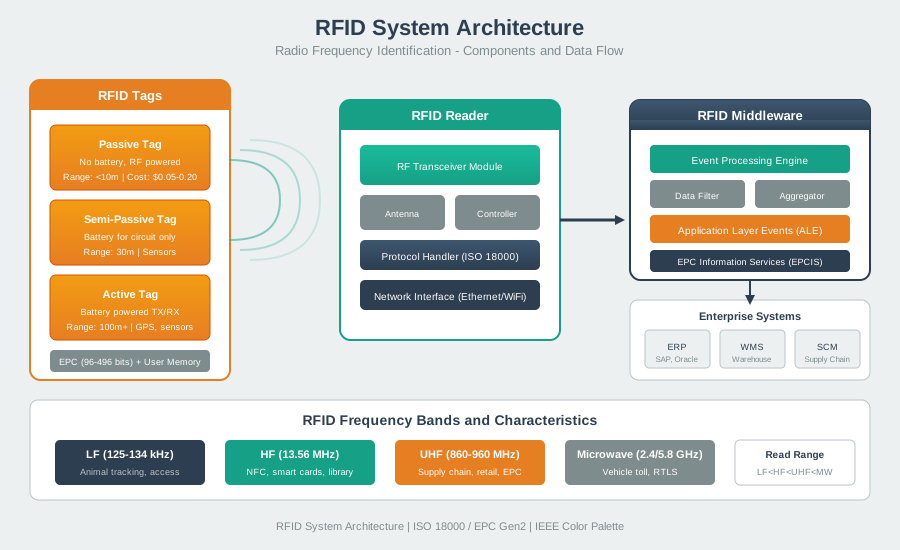
RFID systems consist of readers, tags, and backend infrastructure. The architecture supports various topologies from single-reader access control to distributed warehouse inventory systems.
NoteVisual: RFID Tag Types Comparison
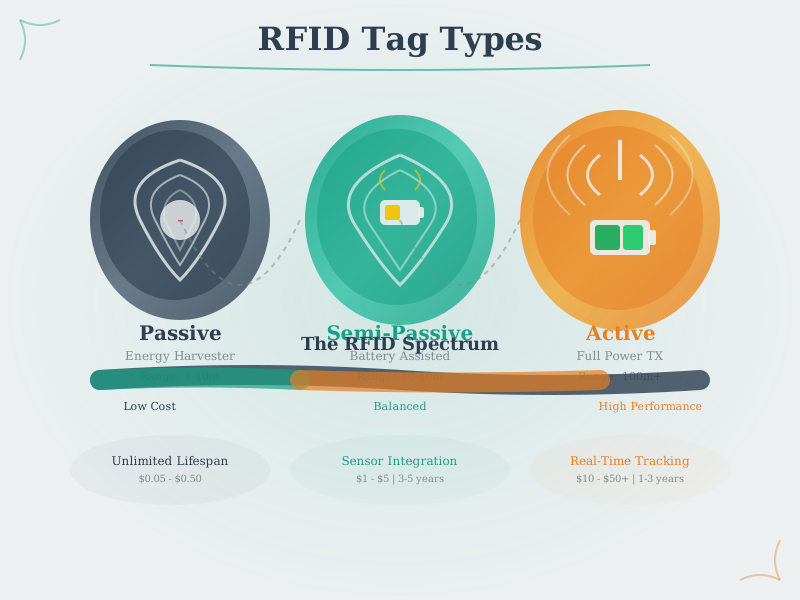
RFID tag selection depends on application requirements. Passive tags offer lowest cost and unlimited lifespan, while active tags provide extended range and semi-passive tags enable sensor integration.
NoteVisual: RFID Reader-Tag Communication
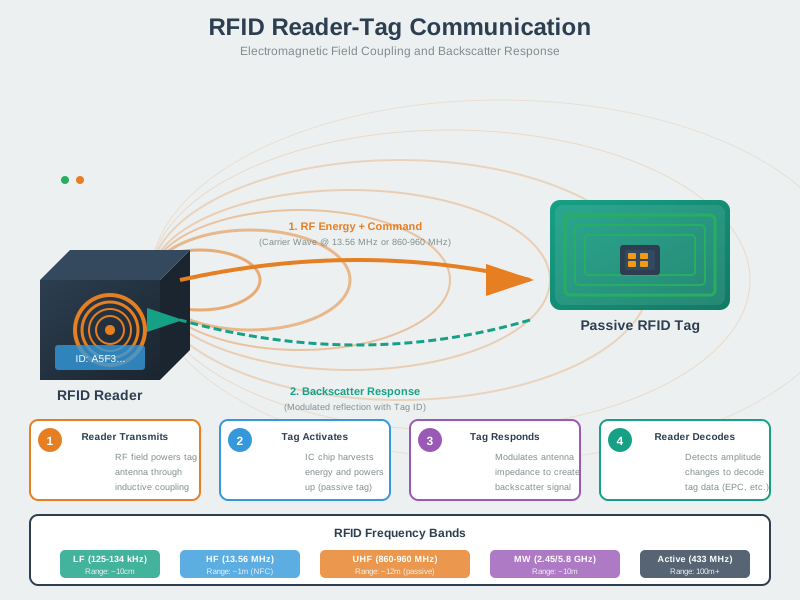
RFID communication uses reader-initiated protocols where the reader powers passive tags and manages anti-collision when multiple tags are present in the field.
NoteVisual: RFID Anti-Collision Mechanism
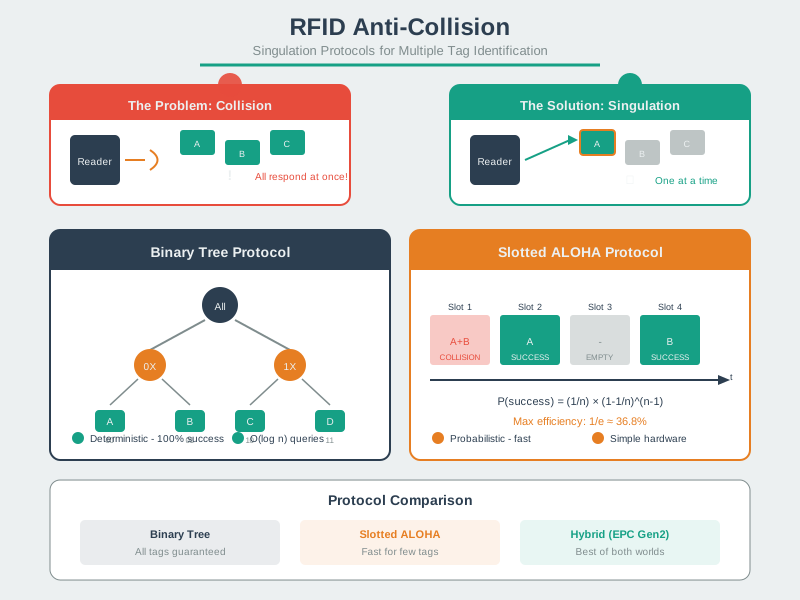
Anti-collision algorithms enable simultaneous reading of multiple tags. EPC Gen2’s Q-algorithm efficiently inventories large tag populations in warehouse and retail applications.
875.9 Summary
This comprehensive review synthesized RFID technology concepts:
- Application-driven selection: LF/HF/UHF differ by coupling, range, and typical deployment patterns (animal ID and some access control, smart cards/NFC, supply chain inventory).
- Tag type trade-offs: Passive vs semi-passive vs active changes lifecycle, range expectations, and maintenance complexity.
- Deployment reality: Range and read rate depend on environment, orientation, and installation details—validate with pilots and site surveys.
- Systems integration: Tags carry identifiers; readers + middleware + EPCIS-style event stores turn reads into trackable business events.
- Security and privacy: Use modern cryptography for access control, manage keys properly, and choose lock/disable (“kill”) policies based on product lifecycle and disclosure.
875.10 What’s Next
Continue to Near Field Communication (NFC) to explore proximity-based wireless identification for consumer applications like mobile payments and device pairing.