872 RFID Hardware Integration and Programming
872.1 Learning Objectives
By the end of this chapter, you will be able to:
- Wire RFID Hardware: Connect RC522 and other RFID modules to Arduino and ESP32 platforms
- Read RFID Tags: Implement code to detect and read UID from RFID cards and key fobs
- Write to RFID Tags: Store custom data on MIFARE and other writable RFID tags
- Configure Reader Parameters: Adjust antenna power, read range, and timing for different applications
- Implement Python Readers: Use Raspberry Pi GPIO and MFRC522 libraries for RFID integration
- Simulate RFID Systems: Create software simulators for testing without physical hardware
What is this chapter? Practical RFID hardware wiring and programming exercises for Arduino, ESP32, and Raspberry Pi platforms.
When to use: - After studying RFID fundamentals - When building your first RFID project - To understand reader-tag communication at code level
Hardware You’ll Need:
| Component | Purpose | Cost |
|---|---|---|
| RC522 Module | 13.56 MHz HF reader | $3-5 |
| MIFARE cards | Test tags | $0.50 each |
| Arduino/ESP32 | Microcontroller | $5-15 |
| Jumper wires | Connections | $2 |
Recommended Path: 1. Complete RFID Fundamentals 2. Work through hardware examples here 3. Build complete systems in RFID Labs
872.2 Prerequisites
Before diving into this chapter, you should be familiar with:
- RFID Fundamentals and Standards: Understanding RFID operating principles, frequency bands (LF, HF, UHF), tag types (passive, active, semi-passive), and ISO standards
- Programming fundamentals: Familiarity with Arduino/C++ or Python programming
- Basic electronics: Understanding GPIO pins, SPI communication, and hardware interfacing
872.3 Arduino RFID Reader Integration
872.3.1 Example 1: RC522 Module (13.56 MHz HF)
Hardware: - Arduino Uno (or compatible Arduino board) - RC522 RFID module - RFID cards/tags (13.56 MHz)
Wiring:
| RC522 Pin | Arduino Pin |
|---|---|
| SDA | Pin 10 |
| SCK | Pin 13 |
| MOSI | Pin 11 |
| MISO | Pin 12 |
| IRQ | Not connected |
| GND | GND |
| RST | Pin 9 |
| 3.3V | 3.3V |
Code:
#include <SPI.h>
#include <MFRC522.h>

#define SS_PIN 10
#define RST_PIN 9

MFRC522 rfid(SS_PIN, RST_PIN);

void setup() {
    Serial.begin(9600);
    SPI.begin();
    rfid.PCD_Init();

    Serial.println("RFID Reader Ready!");
    Serial.println("Scan your card...");
}

void loop() {
    // Look for new cards
    if (!rfid.PICC_IsNewCardPresent())
        return;

    // Select one of the cards
    if (!rfid.PICC_ReadCardSerial())
        return;

    // Print card UID
    Serial.print("Card UID: ");
    for (byte i = 0; i < rfid.uid.size; i++) {
        Serial.print(rfid.uid.uidByte[i] < 0x10 ? " 0" : " ");
        Serial.print(rfid.uid.uidByte[i], HEX);
    }
    Serial.println();

    // Halt PICC
    rfid.PICC_HaltA();

    // Stop encryption on PCD
    rfid.PCD_StopCrypto1();
}MIFARE Classic 1K: - 1KB storage - 16 sectors × 4 blocks - Each block = 16 bytes - Factory default keys (often FF FF FF FF FF FF)
MIFARE Ultralight: - 64 bytes storage - Lower cost - No encryption (read-only use cases)
872.3.2 Example 2: Python RFID Reader
# Python RFID Reader using RC522
import RPi.GPIO as GPIO
from mfrc522 import SimpleMFRC522

# Create reader object
reader = SimpleMFRC522()

try:
    print("RFID Reader Ready!")
    print("Place tag near reader...")

    while True:
        # Read tag
        id, text = reader.read()

        print(f"ID: {id}")
        print(f"Data: {text}")
        print("-" * 40)

except KeyboardInterrupt:
    print("\nStopping...")
    GPIO.cleanup()
Writing to RFID Tags:
import RPi.GPIO as GPIO
from mfrc522 import SimpleMFRC522

reader = SimpleMFRC522()

try:
    print("Place tag to write...")
    text = input("Enter text to write: ")

    reader.write(text)
    print("Written successfully!")

finally:
    GPIO.cleanup()
872.4 Python RFID Simulators
872.4.1 RFID Tag Simulator
Simulates different RFID tag types and their operational characteristics:
Expected Output:
=== RFID Tag Simulator ===

UHF Reader scanning...
  UID: E280116060000209
  Data: Product SKU: 12345
  Distance: 4.23 m
  RSSI: -45.2 dBm

Passive HF Tag Read Test:
  0.1m: ✓ Success (RSSI: -28.4 dBm)
  0.5m: ✓ Success (RSSI: -42.1 dBm)
  1.0m: ✓ Success (RSSI: -48.5 dBm)
  1.5m: ✗ Out of range
  2.0m: ✗ Out of range
872.4.2 RFID Inventory Management System
Complete inventory tracking system with database integration:
Expected Output:
=== RFID Inventory Management System ===

✓ Registered: Arduino Uno R3 (SKU001)
✓ Registered: Raspberry Pi 4 (SKU002)
✓ Registered: ESP32 DevKit (SKU003)
✓ Registered: RFID Reader RC522 (SKU004)

--- Simulating RFID Scans ---
  Scanned: Arduino Uno R3 at Warehouse A (RSSI: -52.3 dBm)
  Scanned: Raspberry Pi 4 at Shipping Dock (RSSI: -48.7 dBm)
  Scanned: ESP32 DevKit at Warehouse A (RSSI: -55.1 dBm)
  Scanned: RFID Reader RC522 at Assembly Line (RSSI: -41.2 dBm)

--- Inventory Report ---
  Total Items: 120 (4 unique)
  Recent Scans (24h): 4

  By Location:
    Warehouse A: 75 items
    Shipping Dock: 15 items
    Assembly Line: 30 items

--- Missing Items Check ---
  ✓ All items accounted for
872.4.3 RFID Security Analyzer
Analyzes RFID security vulnerabilities and attack vectors:
Expected Output:
=== RFID Security Analyzer ===

============================================================
System: MIFARE Classic 1K
============================================================

Security Score: 35.0/100
Security Level: MEDIUM

Vulnerabilities Found: 6
  Critical: 2
  High: 1
  Medium: 3

Top Vulnerabilities:
  • [CRITICAL] Uses factory default keys (e.g., FFFFFFFFFFFF for MIFARE)
  • [CRITICAL] Tag UID and data can be copied to blank tag
  • [HIGH] Uses broken cryptography (e.g., MIFARE Classic Crypto1 - broken in 2008)

Top Recommendations:
  [CRITICAL] Change all keys to strong, random values during deployment
  [CRITICAL] Use anti-cloning features, unique derived keys
  [HIGH] Upgrade to AES-128 or stronger encryption

============================================================
System: MIFARE DESFire EV3
============================================================

Security Score: 95.0/100
Security Level: CRITICAL

Vulnerabilities Found: 1
  Critical: 0
  High: 0
  Medium: 1

Top Vulnerabilities:
  • [MEDIUM] RF signals can be intercepted with high-gain antennas

Top Recommendations:
  [MEDIUM] Use encryption and limit transmission power

============================================================
SECURITY COMPARISON
============================================================

Most Secure: MIFARE DESFire EV3
Least Secure: EPC Gen2 UHF (Basic)
Average Security Score: 58.8/100

Ranking:
  1. MIFARE DESFire EV3: 95.0/100 (CRITICAL)
  2. EPC Gen2 UHF (Secured): 90.0/100 (CRITICAL)
  3. MIFARE Classic 1K: 35.0/100 (MEDIUM)
  4. EPC Gen2 UHF (Basic): 15.0/100 (BASIC)
872.5 Worked Examples
Scenario: A corporate office is deploying RFID access cards using MIFARE Classic 1K tags. Each card must store: employee ID (8 digits), department code (4 digits), access zones (16 zones as bitmap), and last entry timestamp. Security requires sector-level key authentication.
Given:
- MIFARE Classic 1K structure: 16 sectors, 4 blocks per sector, 16 bytes per block
- Total memory: 16 × 4 × 16 = 1,024 bytes
- Sector 0, Block 0: UID and manufacturer data (read-only)
- Each sector has 1 trailer block (last block) for keys and access control
- Usable data per sector: 3 blocks × 16 bytes = 48 bytes
- Key A: Read access, Key B: Write access
Steps:
Calculate data requirements:
- Employee ID (8 digits): Stored as BCD = 4 bytes
- Department code (4 digits): Stored as BCD = 2 bytes
- Access zones (16 zones): Bitmap = 2 bytes
- Last entry timestamp (Unix): 4 bytes
- Checksum/CRC: 2 bytes
- Total required: 14 bytes
Design sector allocation:
Sector 0: UID (read-only) - Skip
Sector 1: Employee data (our application)
  Block 4:  [EmployeeID:4B][DeptCode:2B][Zones:2B][Timestamp:4B][CRC:2B][Reserved:2B]
  Block 5:  Reserved for future expansion (16 bytes)
  Block 6:  Reserved for future expansion (16 bytes)
  Block 7:  Sector trailer (Key A: 6B, Access bits: 4B, Key B: 6B)
Sectors 2-15: Available for other applications (MAD)
Configure access control bits for Sector 1:
- Key A: 0xA0A1A2A3A4A5 (read access for card readers)
- Key B: 0xB0B1B2B3B4B5 (write access for enrollment stations)
- Access bits: C1=0, C2=0, C3=1 (Key A read, Key B write)
- Trailer access: Key B required for key changes
Implement data encoding:
Employee ID: 12345678 → BCD: 0x12 0x34 0x56 0x78 (4 bytes)
Department: 0042 → BCD: 0x00 0x42 (2 bytes)
Zones 1,3,5,7 access → Bitmap: 0b0000000010101010 = 0x00AA (2 bytes)
Timestamp: 1736640000 → 0x67842D00 (4 bytes, big-endian)
CRC16: Calculated over 12 data bytes
Calculate total memory utilization:
- Sector 1 Block 4: 14/16 bytes used (87.5%)
- Total card utilization: 14/752 usable bytes (1.9%)
- Remaining capacity: 738 bytes for additional applications
Result: One sector (Sector 1) stores complete employee access credentials in 14 bytes. The card supports multi-application storage per MIFARE Application Directory (MAD) standard, leaving sectors 2-15 for cafeteria payments, parking, or time attendance.
Key Insight: MIFARE Classic 1K’s sector-based security allows multiple applications on one card with independent keys. Always use the trailer block to enforce access control: Key A for readers (read-only), Key B for enrollment (read-write). Remember that MIFARE Classic uses Crypto1 which has known vulnerabilities; for high-security applications, use MIFARE DESFire EV2/EV3 with AES encryption.
Scenario: A veterinary clinic needs a battery-powered handheld reader to scan pet microchips (ISO 11784/11785 at 134.2 kHz). The reader must operate for a full 8-hour shift without recharging. Design the power budget to select appropriate battery capacity.
Given:
- Microchip standard: ISO 11784/11785 FDX-B at 134.2 kHz (LF RFID)
- Scan operation: 200 ms active read, 2 second average between scans
- Expected scans per shift: ~500 animals
- Reader components:
- LF RFID module (EM4095): 100 mA @ 5V during read
- Microcontroller (STM32L4): 15 mA active, 0.5 mA sleep
- LCD display: 20 mA when on, 1 mA standby
- Buzzer (during read): 30 mA for 100 ms
- Display on time: 3 seconds after each scan
- Battery: Lithium-ion 3.7V nominal
Steps:
Calculate energy per scan cycle:
RFID module read (200ms): 100 mA × 0.2s = 20 mAs = 5.56 μAh
MCU during read (200ms): 15 mA × 0.2s = 3 mAs = 0.83 μAh
Buzzer (100ms): 30 mA × 0.1s = 3 mAs = 0.83 μAh
Display (3s): 20 mA × 3s = 60 mAs = 16.67 μAh
Total per scan: 86 mAs = 23.89 μAh
Calculate standby power between scans:
Average time between scans: (8 hours × 3600) / 500 = 57.6 seconds
Active period: ~3.3 seconds (scan + display)
Sleep period: 57.6 - 3.3 = 54.3 seconds

Sleep current: MCU 0.5 mA + Display 1 mA = 1.5 mA
Sleep energy per cycle: 1.5 mA × 54.3s = 81.45 mAs = 22.63 μAh
Calculate total shift consumption:
Per scan cycle: 23.89 + 22.63 = 46.52 μAh
500 scans: 500 × 46.52 = 23,260 μAh = 23.26 mAh

Plus background (continuous MCU + display standby):
8 hours standby baseline: 1.5 mA × 8 hours = 12 mAh

Total 8-hour consumption: 23.26 + 12 = 35.26 mAh at 5V
Convert to battery capacity at 3.7V:
Power = 35.26 mAh × 5V = 176.3 mWh
At 3.7V battery: 176.3 mWh / 3.7V = 47.6 mAh
Add 20% for boost converter inefficiency: 47.6 × 1.2 = 57.2 mAh
Add 20% safety margin: 57.2 × 1.2 = 68.6 mAh
Select battery:
- Minimum required: 68.6 mAh at 3.7V
- Common options: 100 mAh (tight), 500 mAh (comfortable), 1000 mAh (multi-day)
- Recommendation: 500 mAh LiPo provides 7+ days operation
Result: A 500 mAh 3.7V LiPo battery provides approximately 7 days of operation (500/68.6 = 7.3 days) between charges with 500 scans per day. For single-shift operation, even a 100 mAh battery is sufficient, but 500 mAh provides excellent margin and allows for intensive use days.
Key Insight: LF RFID (125-134 kHz) readers consume significantly more power than HF/NFC readers because they must generate a stronger magnetic field for longer wavelength coupling. The 100 mA read current is typical for LF modules but only 15-30 mA for HF. Sleep current often dominates total energy when duty cycle is low; optimizing sleep modes has more impact than reducing read time.
872.6 Best Practices for RFID Hardware Integration
✅ Choose Right Frequency: Match frequency to environment and range needs ✅ Plan for Interference: Test in actual deployment environment ✅ Implement Security: Encrypt sensitive data, use authentication ✅ Test Multi-Tag Performance: Verify anti-collision in high-density scenarios ✅ Consider Privacy: Label RFID-enabled products, provide opt-out ✅ Standardize: Use ISO/EPC standards for interoperability ✅ Monitor Reader Health: Track read rates, detect reader failures
872.7 Visual Reference Gallery
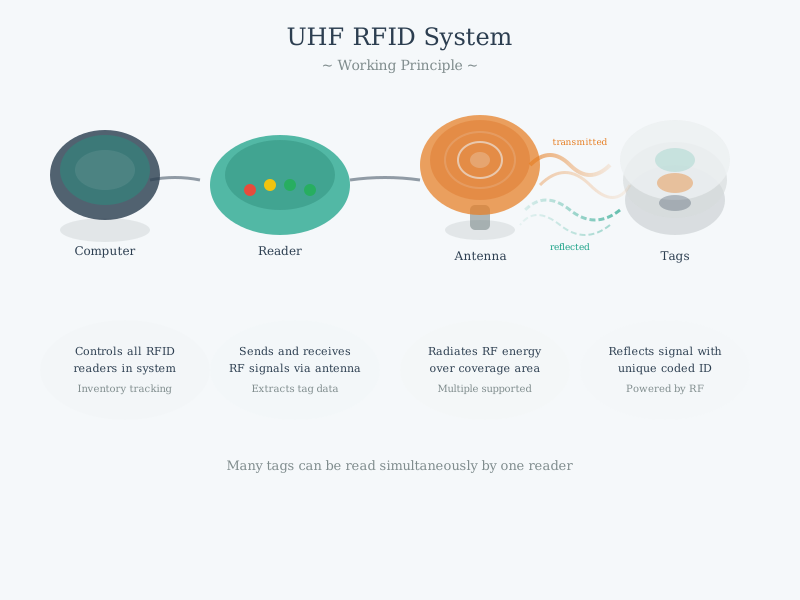
RFID relies on electromagnetic coupling for both power transfer and communication. Passive tags harvest energy from the reader’s field and respond through backscatter modulation.
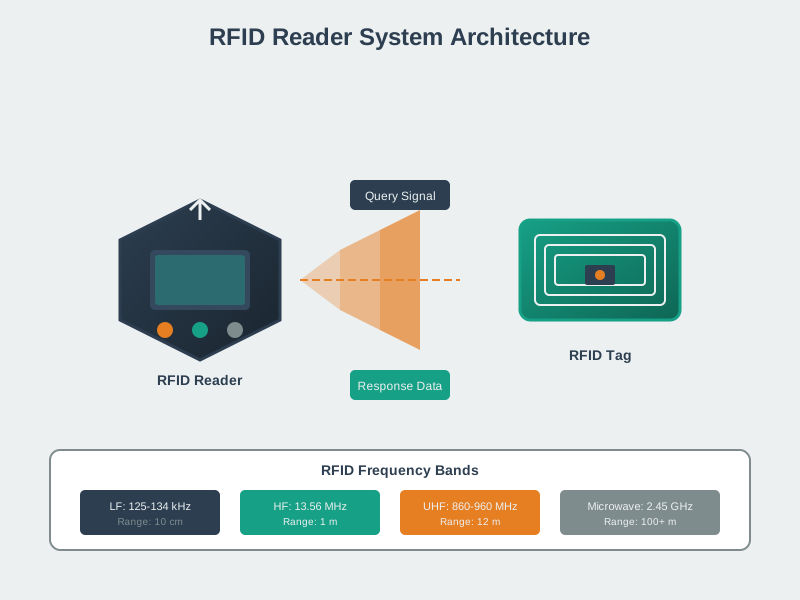
RFID readers combine RF transmission, signal processing, and protocol handling. Understanding reader architecture helps optimize antenna placement and power settings for specific deployments.
Deep Dives: - RFID Fundamentals and Standards - Operating principles and ISO standards - RFID Security and Privacy - Cryptographic authentication and privacy protocols
Next Steps: - RFID Industry Applications - Real-world deployment scenarios - RFID Labs and Assessment - Complete hands-on projects
872.8 Summary
This chapter covered RFID hardware integration and programming:
- Arduino RC522 Integration: SPI wiring and MFRC522 library usage for reading 13.56 MHz HF tags
- Python RFID Programming: Raspberry Pi GPIO integration with SimpleMFRC522 for reading and writing tags
- Tag Types: MIFARE Classic 1K memory structure (16 sectors × 4 blocks) vs MIFARE Ultralight (64 bytes)
- Security Considerations: Crypto1 vulnerabilities in Classic vs AES-128 in DESFire EV3
- Power Budgeting: LF readers draw ~100 mA vs 15-30 mA for HF due to stronger magnetic field requirements
- Simulator Development: Software-based testing before physical hardware deployment
872.9 What’s Next
The next chapter explores RFID Industry Applications, covering real-world deployments in supply chain, retail, healthcare, and IoT integration patterns.