%%{init: {'theme': 'base', 'themeVariables': {'primaryColor':'#2C3E50','primaryTextColor':'#fff','primaryBorderColor':'#16A085','lineColor':'#16A085','secondaryColor':'#E67E22','tertiaryColor':'#7F8C8D'}}}%%
graph TB
subgraph Comp["Short-Range Technology Comparison"]
NFC[NFC<br/>4-10cm | Tap | $0.50/tag<br/>No battery for tags]
QR[QR Code<br/>Visual | Scan | $0.01/code<br/>No electronics]
BLE[BLE Beacon<br/>50m | Auto | $5-20/beacon<br/>Battery required]
RFID[RFID<br/>1-10m | Scan | $0.10/tag<br/>Passive or active]
end
subgraph Use["Best Use Cases"]
NFC --> U1[Payments, Access Control<br/>Device Pairing, Tap Actions]
QR --> U2[Product Info, Links<br/>Low-cost tags, Tickets]
BLE --> U3[Indoor Positioning<br/>Proximity Marketing, IoT]
RFID --> U4[Inventory, Asset Tracking<br/>Supply Chain, Logistics]
end
style NFC fill:#16A085,stroke:#2C3E50,stroke-width:3px,color:#fff
style QR fill:#7F8C8D,stroke:#2C3E50,stroke-width:2px,color:#fff
style BLE fill:#E67E22,stroke:#2C3E50,stroke-width:2px,color:#fff
style RFID fill:#2C3E50,stroke:#16A085,stroke-width:2px,color:#fff
style U1 fill:#16A085,stroke:#2C3E50,stroke-width:1px,color:#fff
style U2 fill:#7F8C8D,stroke:#2C3E50,stroke-width:1px,color:#fff
style U3 fill:#E67E22,stroke:#2C3E50,stroke-width:1px,color:#fff
style U4 fill:#2C3E50,stroke:#16A085,stroke-width:1px,color:#fff
895 NFC Security and Technology Comparisons
895.1 Learning Objectives
By the end of this chapter, you will be able to:
- Explain NFC Payment Security: Describe tokenization, cryptograms, and secure elements
- Analyze Security Architectures: Compare Secure Element (SE) vs Host Card Emulation (HCE)
- Evaluate Technology Tradeoffs: Select between NFC, QR codes, Bluetooth, and RFID
- Debunk Security Myths: Explain why NFC payments are more secure than physical cards
- Design Secure Systems: Apply NFC security principles to IoT applications
TipFor Beginners: Why This Matters
You might have heard that NFC payments can be “hacked” by someone standing nearby. This chapter debunks that myth and explains why:
- Your phone payment is 250-500x more secure than your physical credit card
- Captured NFC data is completely useless to attackers
- The “tap to pay” moment is the most secure part of the transaction
Understanding NFC security helps you design secure IoT systems and make informed technology choices.
NoteRelated Chapters
Prerequisites: - NFC Access Control - ESP32 NFC implementation - NFC Smart Home - Smart home automation
Continue Learning: - RFID Comprehensive Review - Related wireless identification technology - Bluetooth Fundamentals - Alternative short-range protocol
895.2 Prerequisites
Required Knowledge: - Understanding of NFC operating modes (Reader/Writer, P2P, Card Emulation) - Basic cryptography concepts (encryption, hashing, tokens) - Familiarity with mobile payment systems (Apple Pay, Google Pay)
Estimated Time: 40 minutes
895.3 The NFC Payment Security Myth
WarningCommon Misconception: “NFC Payments Are Easy to Hack”
The Myth: Many users believe that because NFC transmits data wirelessly, attackers can easily intercept payments by standing nearby with special equipment.
The Reality: NFC mobile payments are significantly more secure than physical credit cards. Intercepted NFC data is worthless to attackers.
895.3.1 Real-World Fraud Statistics
| Payment Method | Fraud Rate | Loss per $100,000 |
|---|---|---|
| NFC Mobile Pay | 0.002% | $2 |
| Physical Card | 0.5-1% | $500-$1,000 |
NFC payments have 250-500x lower fraud rates than physical cards!
895.3.2 Why NFC Is More Secure
1. Tokenization - Real card number never transmitted
- Real card:
4532 1234 5678 9012 - Token sent:
4012 8888 8888 1881(device-specific, useless elsewhere)
2. Dynamic Cryptograms - One-time-use transaction codes
- Each transaction generates unique cryptogram
- Captured cryptogram invalid if reused (bank detects replay attack)
3. Secure Element - Hardware key storage
- Tamper-resistant chip
- Keys physically isolated from main processor
- Even malware with root access cannot extract keys
4. Biometric Requirement - User presence verification
- Fingerprint or Face ID required before payment
- Stolen phone cannot make payments
895.3.3 Attack Vector Comparison
| Attack Vector | Physical Card | NFC Mobile Pay |
|---|---|---|
| Lost/Stolen | Immediate fraud risk | Biometric blocks use |
| Skimming | Mag stripe easily cloned | No mag stripe to skim |
| Card Number Theft | Full PAN exposed | Token only (useless) |
| Eavesdropping | N/A | Tokenized + cryptogram |
895.3.4 Industry Evidence
- Visa reports NFC payments have 10x lower fraud than card-present transactions
- No documented cases of successful large-scale NFC interception fraud
- Apple Pay/Google Pay fraud primarily from account takeover (stolen passwords), not NFC interception
Bottom Line: Worry more about phishing emails than NFC eavesdropping. The wireless part is the most secure link in the payment chain!
895.4 NFC Payment Security Architecture

895.4.1 Multi-Layer Security
Layer 1: Tokenization
Real card number: 4532 1234 5678 9012
       ↓ (Never leaves bank's secure servers)
Token in phone:   4012 8888 8888 1881
       ↓ (This is what's transmitted via NFC)
Layer 2: Dynamic Cryptogram
Each transaction generates a unique code:
Transaction details:
  Token: 4012 8888 8888 1881
  Amount: $47.82
  Timestamp: 2025-01-15T14:32:18.123456
  Merchant: COFFEE_SHOP_7421
  Secret Key: [Locked in Secure Element]
        ↓ (SHA-256 hash)
Cryptogram: a3f7c2e1d9b4e8f1
Layer 3: Secure Element
Inside the SE chip: - Crypto processor: AES, RSA, ECC hardware acceleration - Secure storage: Keys in one-time-programmable memory - Tamper detection: Physical sensors, self-destruct on tampering - Firewall: Strict access control from main processor - JavaCard OS: Runs payment applets in sandboxes
895.4.2 What Attackers Actually Capture
[Intercepted NFC Data]
─────────────────────────────────
Token: 4012 8888 8888 1881
Cryptogram: A3F7C2E1D9B4
Amount: $47.82
Timestamp: 2025-01-15T14:32:18Z
Merchant ID: COFFEE_SHOP_7421
─────────────────────────────────
Why This Data Is Useless:
- Token - Only valid for this specific device + merchant
- Cryptogram - Only valid for THIS transaction
- Reusing cryptogram - Bank declines (replay attack detected)
- Generating new cryptogram - Impossible without secret key
895.5 Secure Element vs Host Card Emulation

895.5.1 Secure Element (SE) - Hardware-Based
Architecture: - Dedicated chip separate from main processor - Tamper-resistant physical protection - Isolated from main OS - Certified to banking security standards (PCI-DSS, EMVCo)
Implementations: 1. Embedded SE: Soldered into phone (not removable) 2. SIM-based SE: On SIM card (controlled by carrier) 3. microSD SE: On SD card (rare)
Advantages: - Maximum security (keys never leave SE) - Offline transactions (works without network) - Bank/carrier approved (meets certification) - Protected from malware (main OS can’t access)
Disadvantages: - Requires special hardware ($2-5 per device) - Limited to devices with SE chips - Carrier/OEM control - Slower deployment
895.5.2 Host Card Emulation (HCE) - Software-Based

Architecture: - Runs in Android OS (no special hardware) - Card emulation via app - Cloud-connected (relies on tokenization) - Open access (any app can implement)
Advantages: - No special hardware needed - Open to all developers - Faster deployment (software update) - Lower cost
Disadvantages: - Requires network connection - Less secure (runs in main OS) - Screen must be on - Vulnerable to malware
895.5.3 Real-World Implementations
| Implementation | Approach | Notes |
|---|---|---|
| Apple Pay | Secure Element | All iPhones with NFC include SE, works offline |
| Google Pay | HCE option | Works on any Android with NFC, requires network |
| Samsung Pay | Hybrid | Uses SE when available, falls back to HCE |
895.5.4 Security Comparison
SE approach (Apple Pay):
1. User adds card
2. Bank issues device-specific token
3. Token stored in Secure Element (isolated)
4. Payment: SE generates cryptogram → terminal
5. Works offline
6. Main processor NEVER sees token

HCE approach (Google Pay):
1. User adds card
2. Bank issues token
3. Token stored in CLOUD (not on device)
4. Payment: App requests cryptogram from cloud
5. Requires network connection
6. App in main OS processes transaction
895.6 NFC vs Alternative Technologies
895.6.1 Why NFC Dominates Mobile Payments
NFC’s 4-10 cm range isn’t a limitation - it’s a security feature:
- Prevents accidental charges: Can’t be charged from across the room
- User awareness: Clear moment when payment occurs
- Difficult to intercept: Attacker must be within centimeters
- Compatible infrastructure: 80+ million terminals worldwide
895.6.2 Why NOT Bluetooth for Payments
Technical Issues: - Range: 10-100 meters (accidental payments likely) - Pairing: Requires connection setup (slow) - Discovery: “Which terminal?” problem in crowded stores - Power: Higher power consumption
Security Issues: - Eavesdropping possible from across room - No clear payment moment - Easy relay attacks
895.6.3 Why NOT QR Codes (Generally)
QR Code Payment Flow:
1. Terminal displays QR code
2. Customer scans with phone app
3. Customer confirms amount
4. Customer enters PIN
5. Payment processed
Total: 5-10 seconds
NFC Payment Flow:
1. Customer taps phone
2. Payment complete
Total: <2 seconds
QR Disadvantages: - Slow: 5-10 seconds vs <2 seconds for NFC - Requires app unlock: Must open app, scan code - Bright screen needed: QR must be lit - Phishing risk: Fake QR codes - Social engineering: Trick user into scanning malicious QR
895.6.4 Speed Comparison
| Method | Steps | Time |
|---|---|---|
| NFC Contactless | Tap → Authenticate → Done | ~1 second |
| QR Code Merchant-Scan | Unlock → Open app → Generate QR → Scan → Confirm | ~8 seconds |
| Traditional Chip Card | Insert → PIN → Processing → Remove | ~7 seconds |
895.6.5 Technology Selection Matrix
895.6.6 NFC Application Selection Flowchart
%%{init: {'theme': 'base', 'themeVariables': {'primaryColor':'#2C3E50','primaryTextColor':'#fff','primaryBorderColor':'#16A085','lineColor':'#16A085','secondaryColor':'#E67E22','tertiaryColor':'#7F8C8D'}}}%%
flowchart TB
    START([Short-Range<br/>Interaction Needed]) --> Q1{Intentional<br/>Tap Required?}

    Q1 -->|Yes - Explicit Action| Q2{Security<br/>Level?}
    Q1 -->|No - Automatic| Q4{Range<br/>Needed?}

    Q2 -->|High - Payment/Access| NFC_SEC[NFC with<br/>Secure Element]
    Q2 -->|Low - Info Only| Q3{Phone<br/>Available?}

    Q3 -->|Yes| NFC_RW[NFC<br/>Reader/Writer Mode]
    Q3 -->|No - Visual OK| QR[QR Code<br/>Zero Cost Tags]

    Q4 -->|Short: <5m| BLE_PROX[BLE Beacon<br/>Proximity]
    Q4 -->|Long: 1-10m| RFID[RFID<br/>Bulk Scanning]

    NFC_SEC --> USE1[Mobile Payments<br/>Access Control, Transit]
    NFC_RW --> USE2[Smart Posters<br/>Device Pairing, Tags]
    QR --> USE3[Product Info<br/>Tickets, Links]
    BLE_PROX --> USE4[Indoor Navigation<br/>Proximity Marketing]
    RFID --> USE5[Inventory<br/>Asset Tracking]

    style START fill:#2C3E50,stroke:#16A085,stroke-width:3px,color:#fff
    style NFC_SEC fill:#16A085,stroke:#2C3E50,stroke-width:3px,color:#fff
    style NFC_RW fill:#16A085,stroke:#2C3E50,stroke-width:2px,color:#fff
    style QR fill:#7F8C8D,stroke:#2C3E50,stroke-width:2px,color:#fff
    style BLE_PROX fill:#E67E22,stroke:#2C3E50,stroke-width:2px,color:#fff
    style RFID fill:#2C3E50,stroke:#16A085,stroke-width:2px,color:#fff
895.6.7 Feature Comparison Table
| Feature | NFC Tag | QR Code | BLE Beacon | RFID |
|---|---|---|---|---|
| Read time | <100 ms | 1-2 sec | 2-5 sec | <100 ms |
| Cost per unit | $0.20-2.00 | $0 (print) | $5-20 | $0.10-2.00 |
| Hardware req | NFC phone | Camera phone | BLE 4.0+ | Dedicated reader |
| User action | Tap | Aim + scan | Automatic | Scanner aim |
| Storage | 144-888 bytes | Up to 3 KB | Limited | 96-2000 bytes |
| Rewritable | Yes (if unlocked) | No (reprint) | Via BLE | Yes |
| Works in dark | Yes | No | Yes | Yes |
| Unique ID | Yes (UID) | No (copyable) | Yes (MAC) | Yes (EPC) |
| Battery | None (passive) | None | Required | None (passive) |
895.7 NFC vs QR Code: Detailed Analysis
895.7.1 Use NFC When:
- Payments: Speed and security critical
- Access control: Fast, secure building entry
- Premium products: Luxury goods authentication
- Smart packaging: Pharmaceuticals, high-end electronics
- Interactive experiences: Museums, art installations
895.7.2 Use QR Codes When:
- Mass deployment: Thousands/millions of touchpoints
- Budget constrained: $0 per unit matters
- Universal access: Must work on ALL phones
- Permanent installations: No need to update content
- Marketing campaigns: Billboards, print ads
895.7.3 Hybrid Approach (Best of Both)
Many products now include BOTH: - NFC tag for premium experience (instant, seamless) - QR code fallback for phones without NFC
Example: Wine bottle authentication: - NFC tag (NTAG424): Embedded in neck label - Tap to verify authenticity - Links to vineyard info, tasting notes - Tracks ownership transfers - QR code backup: Printed on back label - Same information for non-NFC phones - Not as secure (copyable) - Ensures everyone can access info
895.8 Knowledge Check
895.9 NFC’s Three Operating Modes

895.10 NFC Ecosystem Overview

895.11 Visual Reference Gallery
NoteVisual: NFC Operating Modes
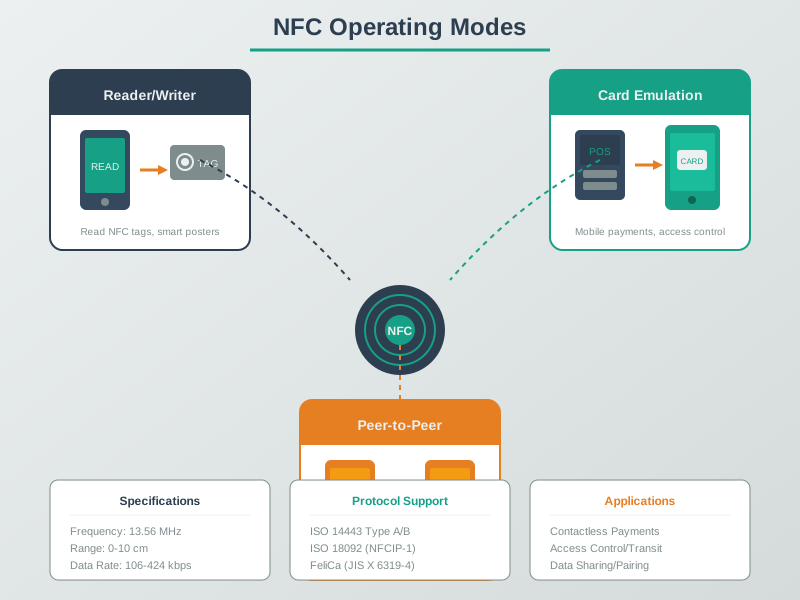
NFC’s versatility comes from its three operating modes. Reader/Writer mode enables tag interactions, Peer-to-Peer enables device pairing, and Card Emulation turns smartphones into contactless payment cards.
NoteVisual: NFC Communication Flow
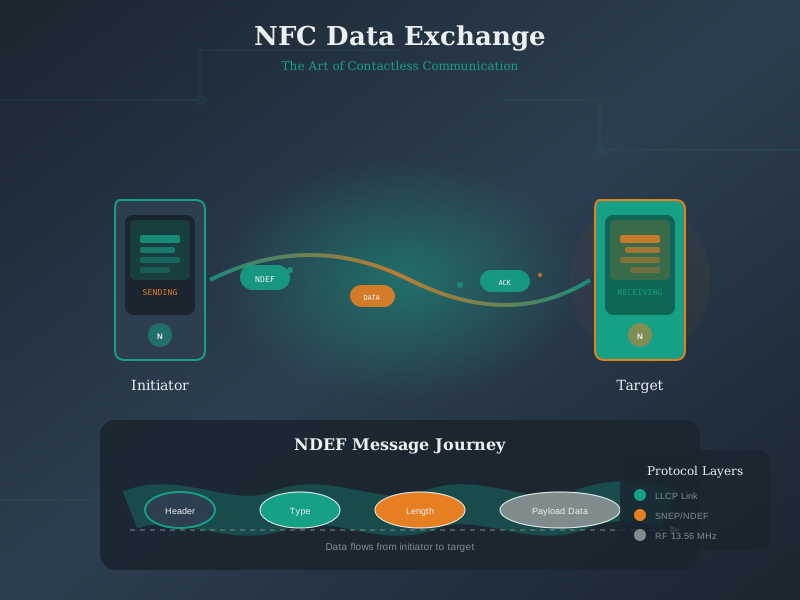
NFC communication occurs through magnetic field coupling at 13.56 MHz. The short 4-10cm range ensures intentional interactions while the NDEF format provides standardized data exchange.
NoteVisual: NFC NDEF Message Structure
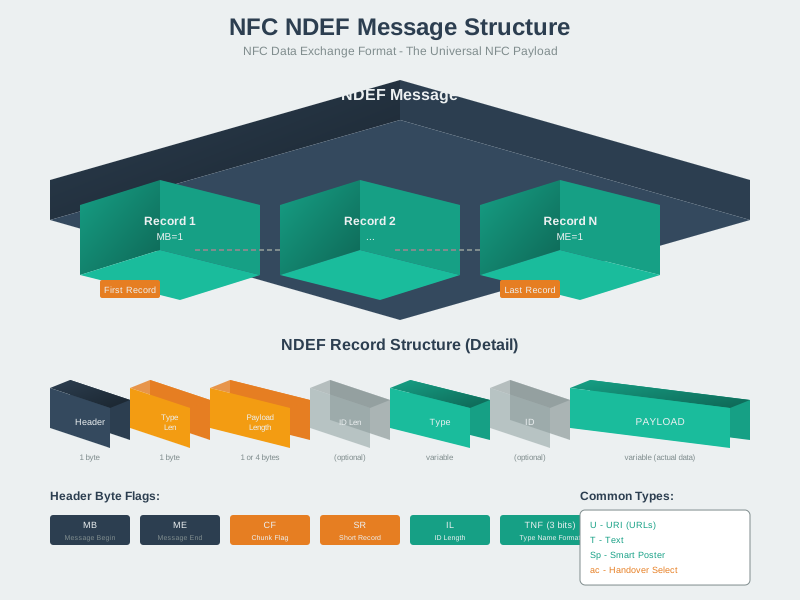
NDEF (NFC Data Exchange Format) provides the standardized way to encode data on NFC tags. Multiple records can be combined for complex interactions like smart posters with URLs and text.
895.12 Summary
This chapter covered NFC security and technology comparisons:
- Payment Security: Tokenization, dynamic cryptograms, and secure elements make NFC payments 250-500x more secure than physical cards
- SE vs HCE: Secure Elements provide hardware-isolated security; Host Card Emulation offers software flexibility without special hardware
- Technology Selection: NFC excels for intentional tap interactions; QR codes for mass deployment; BLE for proximity detection; RFID for inventory
- Security Myths: NFC eavesdropping is ineffective due to tokenization and one-time cryptograms - the wireless part is the most secure link
- Fraud Reality: NFC payment fraud rate is 0.002% vs 0.5-1% for physical cards
895.13 Additional Resources
Books: - “Beginning NFC” by Tom Igoe - “NFC Essentials” by Ali Koudri
Standards: - NFC Forum Specifications - ISO 14443 - Proximity Cards - ISO 18092 - NFC Interface and Protocol (NFCIP-1)
Organizations: - NFC Forum: Industry consortium for NFC standards - EMVCo: Payment card specifications
895.14 What’s Next
Continue to IEEE 802.15.4 to explore the low-power wireless standard that enables mesh networking for IoT devices.