%%{init: {'theme': 'base', 'themeVariables': {'primaryColor': '#2C3E50', 'primaryTextColor': '#fff', 'primaryBorderColor': '#16A085', 'lineColor': '#16A085', 'secondaryColor': '#E67E22', 'tertiaryColor': '#7F8C8D', 'background': '#ffffff', 'mainBkg': '#2C3E50', 'secondBkg': '#16A085', 'tertiaryBkg': '#E67E22'}}}%%
flowchart LR
    Phone[Victim's Phone] -->|NFC Signal| Attacker[Attacker's Reader]

    Attacker -->|Captures| Token[Virtual Card Token<br/>4012 8888 8888 1881]
    Attacker -->|Captures| Crypto[One-Time Cryptogram<br/>a3f7c2e1d9b4e8f1]

    Token -.->|Cannot Use| X1[Real Card Number<br/>Unknown]
    Crypto -.->|Cannot Reuse| X2[Already Used<br/>Bank Rejects]

    style Phone fill:#2C3E50,stroke:#16A085,color:#fff
    style Attacker fill:#E67E22,stroke:#2C3E50,color:#fff
    style Token fill:#7F8C8D,stroke:#333,color:#fff
    style Crypto fill:#7F8C8D,stroke:#333,color:#fff
    style X1 fill:#FF6B6B,stroke:#C92A2A,color:#fff
    style X2 fill:#FF6B6B,stroke:#C92A2A,color:#fff
880 NFC Security and Technology Comparisons
880.1 Learning Objectives
By the end of this chapter, you will be able to:
- Analyze NFC Security: Evaluate tokenization, secure elements, and payment security
- Compare Technologies: Choose between NFC, Bluetooth LE, and QR codes appropriately
- Implement Secure Systems: Apply security best practices for different NFC applications
- Design for Specific Use Cases: Select optimal technology for museum, retail, and payment scenarios
880.2 Prerequisites
Before diving into this chapter, you should be familiar with:
- NFC Communication Fundamentals: Understanding NFC operating modes and NDEF format
- NFC Implementation and Applications: Real-world NFC applications
- IoT Security Overview: Broader security context
NoteRelated Chapters
NFC Deep Dives: - NFC Communication Fundamentals - Operating modes and NDEF - NFC Implementation and Applications - Tag programming - NFC IoT Integration - IoT ecosystems and labs
Security: - IoT Security Overview - Broader security context - Device Security - Securing IoT endpoints
880.3 NFC vs Alternatives
| Feature | NFC | Bluetooth LE | QR Code |
|---|---|---|---|
| Range | 4-10 cm | 10-50 m | Visual (camera) |
| Setup | Instant tap | Pairing required | Scan required |
| Power | Passive tags | Active only | None |
| Security | Good (proximity) | Medium | Low (visible) |
| Data Rate | 424 Kbps | 1-2 Mbps | N/A |
| Use Case | Payments, access | Sensors, audio | Marketing, ticketing |
| Cost | Tags: $0.20-$5 | Modules: $2-$10 | Free |
When to Use NFC:
✅ Need: Secure, instant, proximity-based interaction ✅ Range: Intentional touch-to-connect preferred ✅ Devices: Smartphones or NFC-enabled readers ✅ Use Cases: Payments, pairing, access, smart tags
When NOT to Use NFC:
❌ Long range needed → Use Bluetooth LE or Wi-Fi ❌ Continuous data streaming → Use Bluetooth ❌ Visual/printed medium → Use QR codes (cheaper) ❌ Outdoor asset tracking → Use UHF RFID or GPS
880.4 Quiz Questions
880.4.1 Question 1: NFC Mode Selection for Smart Home
You’re designing a smart home system where users tap their smartphone to NFC tags placed around the house to trigger scenes (e.g., “Goodnight” tag turns off lights, locks doors). Which NFC operating mode is most appropriate, and why?
Options: A) Peer-to-Peer mode - Two phones exchange data B) Read/Write mode - Phone reads passive NFC tags C) Card Emulation mode - Phone acts as contactless card D) All three modes should be used simultaneously
NoteAnswer
B) Read/Write mode - Phone reads passive NFC tags
Explanation:
Read/Write mode is ideal for this scenario because:
- Cost-effective: Passive NFC tags cost $0.20-$2.00 each
- No power required: Tags powered by phone’s RF field
- Simple deployment: Stick tags anywhere (bedside, door, desk)
- Permanent placement: Tags don’t need battery replacement
- Standardized: NDEF records work across iOS and Android
Why not the other modes:
- Peer-to-Peer (A): Requires two active devices. Impractical to have active devices at every location.
- Card Emulation (C): Phone emulates a card for payment terminals/readers. Reversed roles - we need phone as reader, not card.
- All modes (D): Unnecessarily complex and costly.
Cost Analysis:
| Component | Quantity | Unit Cost | Total |
|---|---|---|---|
| NFC tags (Type 2) | 10 | $0.50 | $5.00 |
| PN532 reader | 1 | $8.00 | $8.00 |
| Raspberry Pi Zero | 1 | $15.00 | $15.00 |
| Total | $28.00 |
Compare to active device approach (Peer-to-Peer): - 10 ESP32 modules @ $5 each = $50 - Power supplies = $30 - Total = $80
Read/Write mode saves 65% vs active devices!
880.4.2 Question 2: NFC Payment Security
Explain how NFC mobile payments (Apple Pay, Google Pay) achieve security despite transmitting data wirelessly. What would happen if an attacker captured the NFC communication during a transaction?
NoteAnswer
Attackers capturing NFC payment communication gain nothing useful because of tokenization, dynamic cryptograms, and the secure element.
Multi-Layer Security Architecture:
1. Tokenization (Card number never transmitted) - Real card number: 4532 1234 5678 9012 - Token stored in phone: 4012 8888 8888 1881 - Token is device-specific and merchant-specific - If captured, token is useless on other devices
2. Dynamic Cryptograms (One-time-use transaction codes) - Each transaction generates unique cryptogram - Calculated using: token + amount + timestamp + cryptographic key - Replay attacks impossible (cryptogram invalid if reused)
3. Secure Element (Hardware key storage) - Dedicated tamper-resistant chip - Cryptographic keys never leave secure element - Physical attacks very difficult (requires lab equipment)
4. Biometric Authentication (User presence verification) - Fingerprint or Face ID required before payment - Prevents unauthorized use if phone stolen
What Attacker Captures:
Security Comparison:
| Attack Vector | Magnetic Stripe | Chip (EMV) | NFC Mobile Pay |
|---|---|---|---|
| Skimming | ❌ Vulnerable | ✅ Immune | ✅ Immune |
| Eavesdropping | N/A | ⚠️ Difficult | ✅ Useless (tokenized) |
| Replay Attack | ❌ Possible | ⚠️ Mitigated | ✅ Impossible |
| Cloning | ❌ Easy | ⚠️ Very Hard | ✅ Impossible |
| Lost/Stolen | ❌ Full access | ❌ Full access | ✅ Biometric required |
Key Insight: NFC payments are more secure than physical cards because they add tokenization, dynamic cryptograms, and biometric authentication on top of EMV chip security.
880.4.3 Question 3: NFC vs Bluetooth LE vs QR Codes
You’re building a museum audio guide system. Visitors should tap exhibits to hear information. Compare NFC tags, Bluetooth LE beacons, and QR codes for this application. Which technology is best and why?
NoteAnswer
NFC tags are the best choice for museum audio guides because they offer the perfect balance of cost, user experience, and maintenance.
Detailed Comparison:
Expected Output:
======================================================================
MUSEUM AUDIO GUIDE TECHNOLOGY COMPARISON
======================================================================

Scenario: 150 exhibits, 500k annual visitors, multilingual audio

----------------------------------------------------------------------
REQUIREMENT ANALYSIS
----------------------------------------------------------------------

Requirement               Import.  NFC    BLE    QR
----------------------------------------------------------------------
User Experience           5        5      3      4
Cost per Exhibit          4        5      2      5
Battery Maintenance       5        5      2      5
Accuracy                  5        5      2      4
Durability                4        5      3      2
Aesthetic Impact          3        5      4      3
Multilingual Support      4        5      5      5
Works Offline             4        5      5      5
Accessibility             3        4      5      2

----------------------------------------------------------------------
WEIGHTED SCORES (Higher is Better)
----------------------------------------------------------------------
NFC Tags                   93.0%
BLE Beacons                73.0%
QR Codes                   80.0%

----------------------------------------------------------------------
5-YEAR TOTAL COST OF OWNERSHIP (150 exhibits)
----------------------------------------------------------------------

Technology      Initial      Annual Maint.   5-Year Total    Per Exhibit
----------------------------------------------------------------------
NFC Tags        $     75.00 $         0.00 $        75.00 $      0.50
BLE Beacons     $   2250.00 $       900.00 $      6750.00 $     45.00
QR Codes        $     82.50 $        16.50 $       165.00 $      1.10

======================================================================
RECOMMENDATION
======================================================================

✅ WINNER: NFC Tags
   Score: 93.0%
   5-Year Cost: $75.00

📋 Justification:
   • Best user experience: Intuitive tap gesture
   • Zero maintenance: No batteries to replace
   • Perfect accuracy: Explicit exhibit selection
   • Durable: Waterproof, 10+ year lifespan
   • Discreet: Small 2cm sticker
   • Reasonable cost: $75 initial, $0 maintenance

⚠️  Considerations:
   • Requires NFC-enabled phones (99% of smartphones)
   • Fallback: Provide QR codes for older phones

======================================================================
HYBRID APPROACH (Optional)
======================================================================

💡 For maximum compatibility:
   • Primary: NFC tags for 99% of visitors
   • Fallback: Small QR code printed below NFC sticker
   • Cost: $0.55 per exhibit (NFC $0.50 + QR $0.05)
   • Benefits: Works with ALL smartphones (even non-NFC)
Decision Matrix Summary:
| Factor | Winner | Reason |
|---|---|---|
| User Experience | NFC | Natural tap, no aiming required |
| Cost (Initial) | QR | Cheapest upfront ($82.50) |
| Cost (5-Year) | NFC | Zero maintenance ($75 total) |
| Accuracy | NFC | Must touch specific tag |
| Maintenance | NFC/QR | No batteries |
| Durability | NFC | Waterproof, 10+ years |
| Aesthetics | NFC | Smallest, most discreet |
| Accessibility | BLE | Automatic for visually impaired |
Final Verdict: NFC wins overall (93% score) but hybrid NFC+QR approach recommended for 100% compatibility.
880.5 Key Concepts
- NFC Modes: Three operating modes - Peer-to-peer (P2P), Read/Write, and Card Emulation (CE)
- NDEF (NFC Data Exchange Format): Standard for interoperable data representation on NFC tags
- Touch-to-Connect: Intentional, proximity-based interaction model (4-10 cm)
- Passive Tags: Powered by initiator device’s electromagnetic field
- Mobile Payment: Secure NFC-based contactless payment systems (Apple Pay, Google Pay)
- Device Pairing: Fast, secure connection setup between NFC-enabled devices
- Tokenization: Securing payment data by substituting sensitive information with encrypted tokens
880.6 Chapter Summary
NFC brings the power of touch-to-connect to IoT, enabling secure, intuitive interactions between smartphones, wearables, and smart devices. From mobile payments to smart home control, NFC makes complex technology accessible through simple proximity-based gestures.
Key Takeaways:
✅ NFC is specialized HF RFID (13.56 MHz) with peer-to-peer capability ✅ Three modes: Peer-to-peer, Read/Write, Card Emulation ✅ Built into 2+ billion smartphones worldwide ✅ NDEF standard ensures interoperability ✅ Security requires encryption, authentication, tokenization ✅ Perfect for payments, access control, device pairing, smart marketing ✅ Short range (4-10 cm) provides inherent security and intentionality
Next Steps: Explore IEEE 802.15.4 for low-power wireless standards enabling mesh networking for IoT devices!
880.7 Additional Resources
📚 Books: - “Beginning NFC” by Tom Igoe - “NFC Essentials” by Ali Koudri
🎥 Videos: - See the course-wide Video Gallery: Video Hub
🔧 Tools: - NFC Tools (Android/iOS): Tag reading/writing app - TagWriter (NXP): Program NFC tags - NFC TagInfo: Detailed tag analysis
🌐 Standards: - NFC Forum Specifications - ISO 14443 - Proximity Cards - ISO 18092 - NFC Interface and Protocol (NFCIP-1)
🏢 Organizations: - NFC Forum: Industry consortium for NFC standards - EMVCo: Payment card specifications
880.8 Visual Reference Gallery
Explore alternative visual representations of NFC technology and operating modes.
NoteNFC Operating Modes
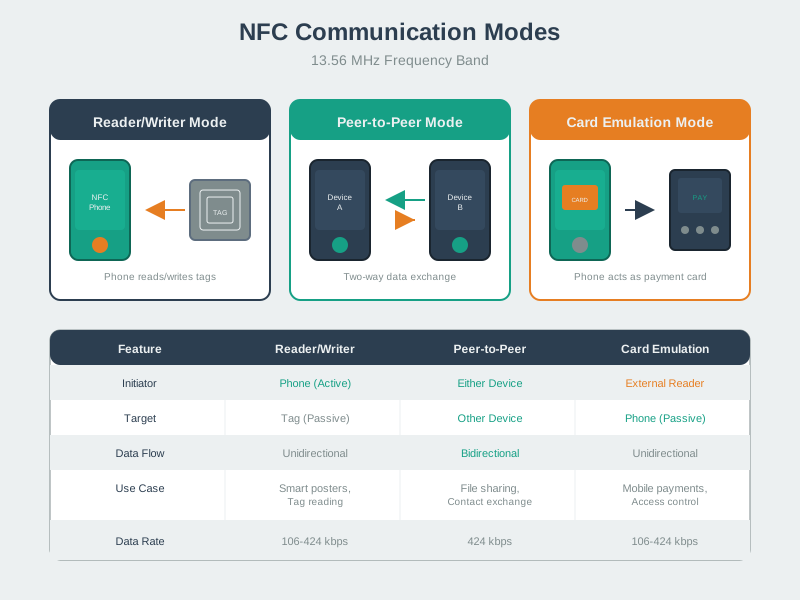
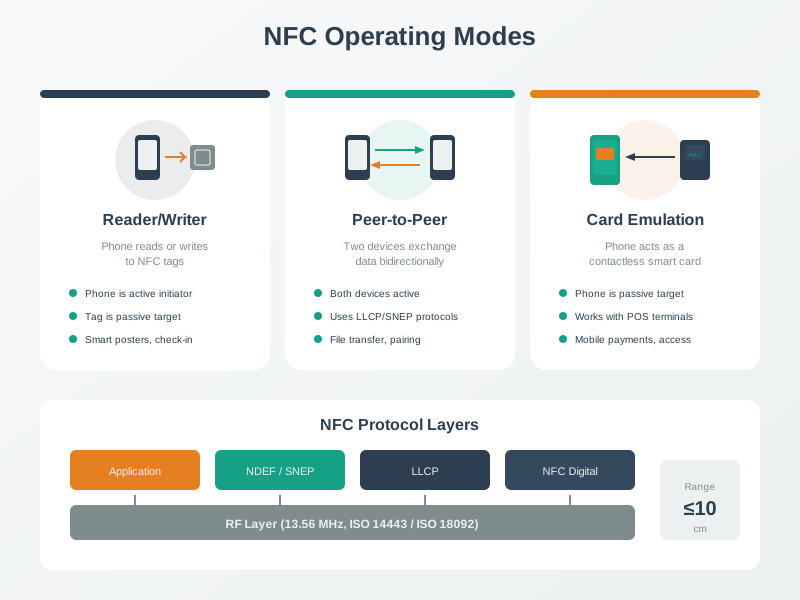
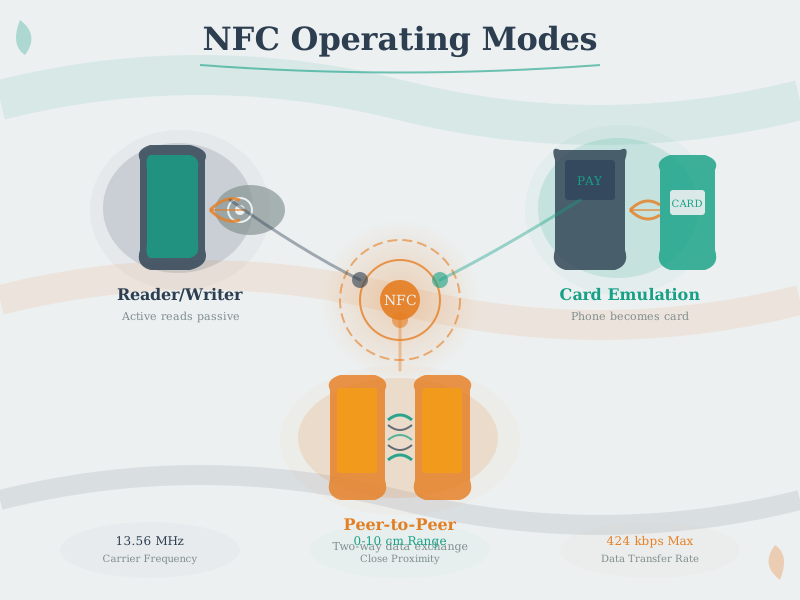
NFC supports three operating modes enabling diverse IoT applications from contactless payments to device pairing and smart poster interactions.
NoteNFC Data Exchange
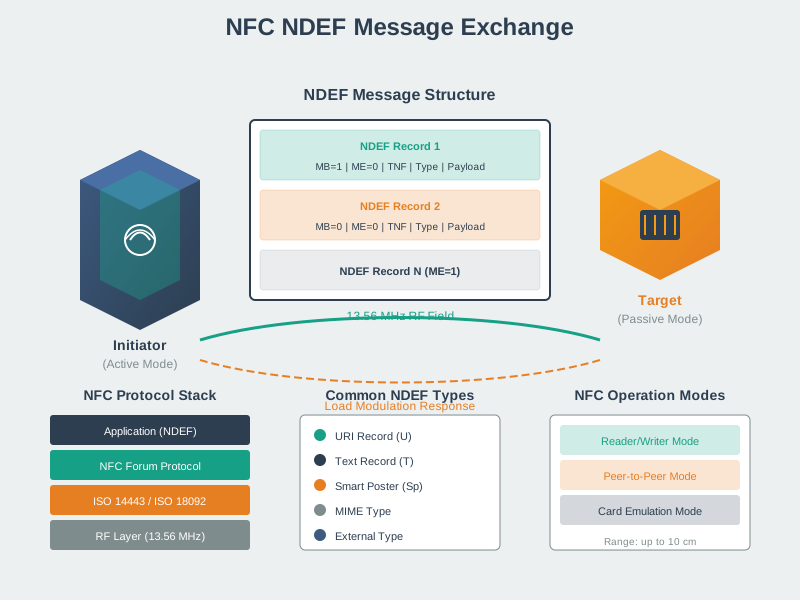
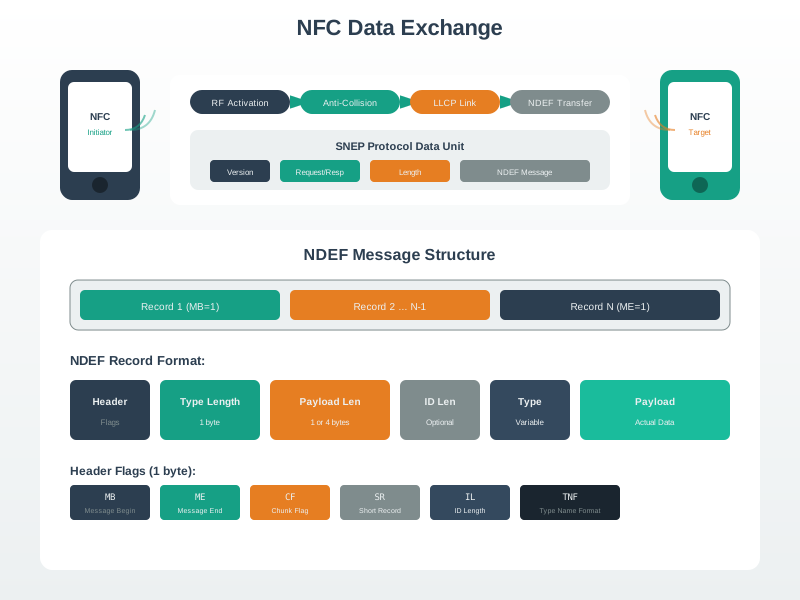
NDEF (NFC Data Exchange Format) provides standardized message structure for interoperable data exchange across NFC devices and applications.
NoteNFC Communication Fundamentals
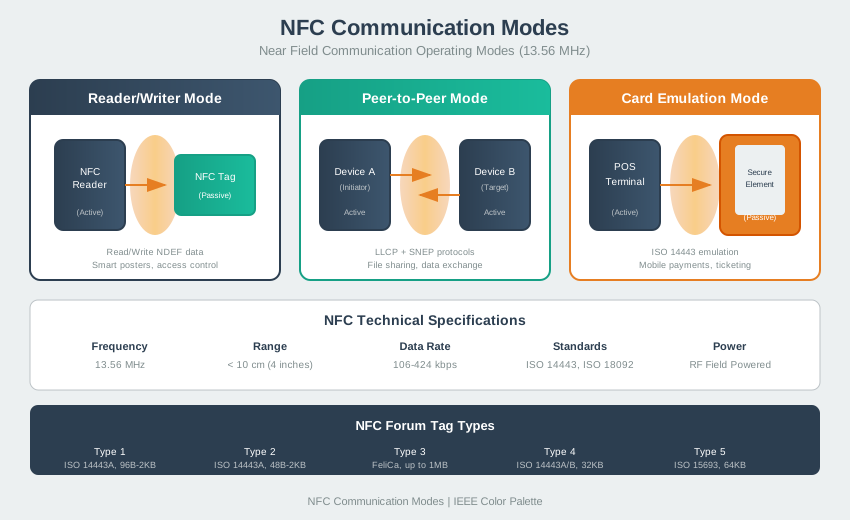
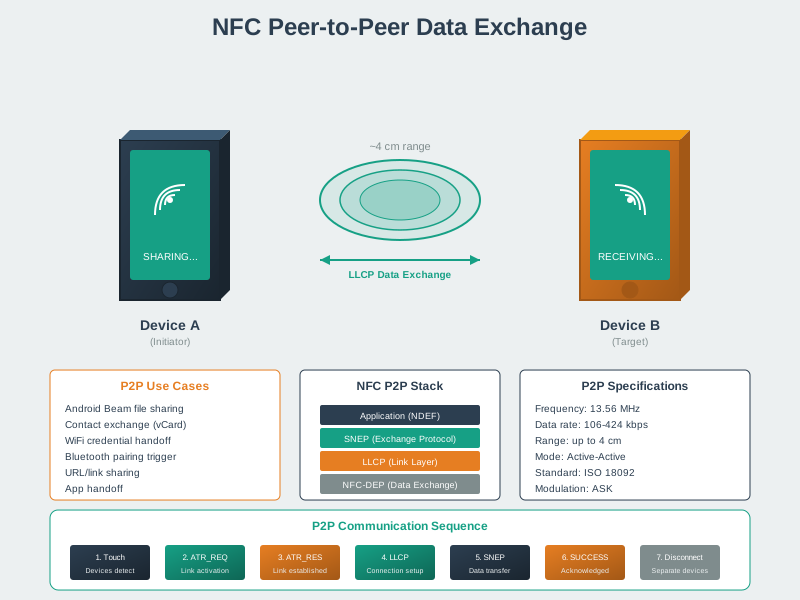
NFC uses 13.56 MHz inductive coupling for short-range (4-10 cm) communication, providing inherent security through proximity requirements.
880.9 Summary
This chapter covered NFC security and technology comparisons:
- Payment Security: Tokenization, EMV standards, and Secure Element protection
- HCE vs SE: Software vs hardware-based card emulation tradeoffs
- Technology Comparison: NFC vs Bluetooth LE vs QR codes decision matrix
- Use Case Selection: Choosing optimal technology for specific applications
880.10 What’s Next
Continue to IEEE 802.15.4 to explore the low-power wireless standard that enables mesh networking for IoT devices.