Recommended Preparation: - Review link budget calculations - Understand frequency band characteristics - Know regulatory differences (EU vs US)
Estimated Time: 45 minutes
TipFor Beginners: Quiz Strategy
How to approach this quiz: 1. Read each question carefully - details matter 2. Eliminate obviously wrong answers first 3. Calculate when formulas are provided 4. Consider real-world implications
What’s being tested: - Understanding of electromagnetic properties - Ability to calculate path loss - Knowledge of spectrum regulations - Technology selection reasoning
823.3 Quiz 1: Comprehensive Review
NoteQuiz 1: Comprehensive Review
Question 1: An IoT device transmits at 868 MHz while another transmits at 2.4 GHz. If both transmit the same power, which statement correctly describes their electromagnetic properties?
Explanation: Using the relationship c = f x lambda, higher frequency results in shorter wavelength. (In quantum terms, E = h f gives energy per photon, but RF link budgets are governed by transmit power, antennas, and path loss - not photon energy.) At 2.4 GHz (2400 MHz), the wavelength is lambda = 3x10^8 m/s / 2.4x10^9 Hz = 0.125 m (12.5 cm). At 868 MHz, the wavelength is lambda = 3x10^8 m/s / 868x10^6 Hz = 0.346 m (34.6 cm). In practice, higher frequency signals typically experience more path loss and are more sensitive to obstacles, so sub-GHz bands often provide better range for the same power/antenna constraints.
Question 2: Calculate the free space path loss (FSPL) for a 2.4 GHz signal traveling 50 meters. Use the formula: FSPL(dB) = 20log10(d_km) + 20log10(f_MHz) + 32.45
Explanation: Using FSPL(dB) = 20log10(d_km) + 20log10(f_MHz) + 32.45 with d = 50m = 0.05 km and f = 2400 MHz: - FSPL = 20log10(0.05) + 20log10(2400) + 32.45 - FSPL = 20(-1.301) + 20(3.380) + 32.45 - FSPL = -26.02 + 67.60 + 32.45 = 74.03 dB
This means the signal strength decreases by 74 dB over 50 meters in free space. In practice, indoor environments add 10-30 dB additional loss due to walls, furniture, and multipath interference. This is why a Wi-Fi router with +20 dBm transmit power might produce a -54 dBm received signal at 50m in an office environment.
Question 3: A smart building deploys sensors throughout a facility with thick concrete walls. Sub-GHz (868 MHz) signals penetrate walls with approximately 5-7 dB loss, while 2.4 GHz experiences 10-15 dB loss. If a sensor 30m away behind 3 concrete walls needs -100 dBm minimum signal, which frequency band requires less transmit power?
Explanation: Let’s calculate the total path loss for each band. First, free space path loss at 30m: - 868 MHz: FSPL = 20log10(0.03) + 20log10(868) + 32.45 = -30.46 + 58.77 + 32.45 = 60.8 dB - 2.4 GHz: FSPL = 20log10(0.03) + 20log10(2400) + 32.45 = -30.46 + 67.60 + 32.45 = 69.6 dB
Then add wall penetration loss (3 walls): - 868 MHz: 60.8 dB + (3 x 6 dB) = 78.8 dB total - 2.4 GHz: 69.6 dB + (3 x 12.5 dB) = 107.1 dB total
Difference: 107.1 - 78.8 = 28.3 dB, meaning 868 MHz can use approximately 680x less transmit power to reach the same received power (all else equal). This can dramatically extend battery life in low-power IoT deployments.
Question 4: In 2.4 GHz Wi-Fi, channels are spaced 5 MHz apart but typical channel widths are approximately 20/22 MHz, so many channel numbers partially overlap. Why is channel overlap problematic for Wi-Fi networks?
Explanation: In 2.4 GHz, channel numbers are close together relative to channel width, so “different channels” can still overlap in frequency. When neighboring APs use overlapping channels (e.g., channels 1 and 3), transmissions interfere more often, increasing contention, retries, and latency.
Performance impacts: - More contention/backoff: more devices compete for airtime - More retries/retransmissions: corrupted frames require resending - Higher latency and lower throughput: especially for many small IoT frames
Best practice for multi-AP deployments: - Use a non-overlapping plan in 2.4 GHz (commonly 1/6/11 for 20 MHz operation) and avoid “in-between” channels - Use 5 GHz/6 GHz where possible for more channel options and less congestion - Validate with measurements (channel utilization and RSSI), not just channel number
Question 5: In the electromagnetic spectrum, why do IoT devices primarily use radio frequencies (3 kHz - 300 GHz) rather than visible light or infrared for wireless communication?
Explanation: Radio frequencies are ideal for IoT because they can penetrate walls, reflect around obstacles, and provide omnidirectional coverage without line-of-sight requirements.
Comparison across spectrum:
Radio (3 kHz - 300 GHz): - Penetrates walls, furniture, vegetation - Reflects/diffracts around obstacles - Works through weather (rain, fog) - Omnidirectional antennas possible - Regulated spectrum requires compliance
Infrared (300 GHz - 430 THz): - Line-of-sight only - Blocked by walls, even thin paper - Used for TV remotes, IrDA (obsolete) - Very short range (1-5 meters)
Visible Light (430-750 THz): - Line-of-sight only - Li-Fi uses LED flicker for data - Blocked by any opacity - Extreme directional requirements
Why B is wrong: Radio waves actually have LESS energy per photon than visible light (E = h x f, so lower frequency = lower energy), but this is irrelevant for communication - what matters is propagation characteristics, not photon energy.
Real-world example: A Wi-Fi router in one room can serve devices throughout a house because 2.4 GHz radio penetrates walls. A Li-Fi system would require line-of-sight to every device and fails if you walk between the transmitter and receiver.
Question 6: A campus-wide LoRaWAN deployment in Europe uses the 868 MHz ISM band with a 1% duty cycle limitation. If a sensor transmits a 50-byte packet at 5 kbps data rate, how many packets can it transmit per hour without violating duty cycle regulations? (Assume payload-only and ignore PHY/MAC overhead.)
Explanation: Duty cycle limits restrict the percentage of time a device can transmit to prevent spectrum congestion. Let’s calculate:
Note: This is a simplified estimate. Real LoRaWAN time-on-air depends on spreading factor, coding rate, preamble, headers, and acknowledgements.
Step 2: Apply 1% duty cycle limit - 1% of 1 hour = 3600 seconds x 0.01 = 36 seconds total transmission time allowed - Packets allowed: 36 seconds / 0.08 seconds/packet = 450 packets
Step 3: Verify timing - 450 packets x 80 ms = 36,000 ms = 36 seconds (exactly 1% of 1 hour)
Practical implications: - Packet interval: 3600 seconds / 450 = 8 seconds minimum between packets - For always-on monitoring: Need to aggregate data or use licensed spectrum - For event-driven sensors: Usually acceptable (e.g., door sensors, alarms)
Regional variations: - Europe (ETSI): 1% duty cycle on 868 MHz (some sub-bands allow 10%) - US: no ETSI-style duty cycle limit, but other constraints (power/channel rules) apply - Asia-Pacific: Varies by country and frequency band
This is why LoRaWAN uses adaptive data rates - slower rates increase time-on-air, reducing how often you can transmit under duty-cycle constraints.
Question 7: Compare licensed cellular spectrum (e.g., NB-IoT) versus unlicensed ISM bands (e.g., LoRaWAN) for a smart city deployment with 10,000 parking sensors operating for 10 years. What are the key trade-offs?
Explanation: Licensed cellular (e.g., NB-IoT/LTE-M) and unlicensed LPWAN (e.g., LoRaWAN) are both used for large IoT fleets, but they shift cost and responsibility differently.
Licensed cellular (NB-IoT): - Pros: Operator-managed network and coverage, interference management, mobility support, and sometimes SLAs - Cons: Recurring subscriptions, dependence on carrier coverage/policies, and less control over the network
Unlicensed LPWAN (LoRaWAN): - Pros: No per-device subscription by default, more control over gateways/data, and flexible private deployments - Cons: You must deploy/maintain gateways and backhaul; operation is in shared spectrum with regulatory constraints (duty cycle/LBT) and interference risk
Decision lens: - Scale economics: recurring subscription vs owning infrastructure/operations - Coverage and mobility: carrier footprint/roaming vs your gateway density and placement - Reliability expectations: managed QoS vs best-effort in shared spectrum (design for retries and redundancy)
Question 8: A Wi-Fi network scan reveals 15 access points on channel 6, 8 on channel 1, and 12 on channel 11. When deploying a new access point for IoT devices, which channel should you select and why?
Explanation: In 2.4 GHz, good channel selection tries to minimize both co-channel contention (many APs on the same channel) and adjacent-channel interference (overlapping channels). Based on the scan counts alone, Channel 1 is the best choice here.
Why Channel 1 is correct: - In many deployments using 20 MHz channels (and especially where channels 1-11 are the practical set), 1/6/11 is the common non-overlapping plan - Channel 1 has only 8 networks (vs 15 on ch6, 12 on ch11) - Fewer APs on the same channel usually means less contention for airtime (lower latency and fewer retries)
Why other options are wrong:
Channel 6 (most congested): - 15 networks means high competition - More contenders generally means more backoff, more overhead, and higher latency
Channel 3 (overlapping): - Overlaps significantly with both channel 1 and channel 6 at 20/22 MHz widths - Creates adjacent-channel interference (bad for you and your neighbors)
Channel 14: - Not available in most regulatory domains and often unsupported by devices - Even where present, it is typically limited (e.g., legacy 802.11b-only use)
Advanced consideration - Signal strength matters too: If channel 1 has 8 strong signals (-40 dBm each) but channel 6 has 15 weak signals (-80 dBm each), channel 6 might actually perform better because strong signals dominate airtime more than numerous weak ones. Use Wi-Fi analyzer tools to measure both count AND strength!
Pro tip: Scan over time. Auto-channel selection and daily usage patterns can change congestion, so validate with a short measurement plan (peak vs off-peak).
Question 9: You measure RSSI values of -45 dBm at 5 meters and -65 dBm at 50 meters from a 2.4 GHz access point. The theoretical free space path loss predicts a 20 dB increase (from 20log10 of the 10x distance increase). Why is the observed loss (20 dB) close to theoretical despite being indoors?
Explanation: This scenario demonstrates the complex nature of indoor RF propagation where multipath effects can sometimes improve signal strength.
Why observed loss matches theoretical:
Free space path loss calculation: - Path loss ratio: 20log10(50/5) = 20log10(10) = 20 dB - Predicted RSSI at 50m: -45 dBm - 20 dB = -65 dBm - Observed RSSI at 50m: -65 dBm (Perfect match!)
But wait - what about walls and obstacles?
Indoor environments create multipath propagation: 1. Direct path: Line-of-sight signal (if available) 2. Reflected paths: Signals bouncing off walls, ceilings, furniture 3. Diffracted paths: Signals bending around obstacles
Constructive interference scenario: - Multiple reflected paths arrive at the receiver - If path lengths differ by integer multiples of wavelength, signals add constructively - Combined signal strength can exceed direct path alone - This can compensate for attenuation through obstacles
Real-world variation: - Move receiver 1 meter and RSSI might drop to -75 dBm (destructive interference) - Indoor propagation creates standing wave patterns with “hot spots” and “dead zones” - This is why walking around with a phone shows fluctuating signal bars
Path loss models for indoor: - Free space: FSPL = 20log10(d) + 20log10(f) + 32.45 (baseline) - Indoor: FSPL_indoor = FSPL + n x wall_loss + floor_loss (typically adds 10-30 dB) - But multipath can reduce actual loss by -10 to +10 dB locally
Practical implications: - Never rely on single-point measurements - Take measurements at multiple locations - Expect +/-10 dB variation due to multipath - Design systems with fade margin to handle variations
Question 10: A Zigbee mesh network operates on 2.4 GHz channel 15 (2.425 GHz center frequency). A nearby Wi-Fi network on channel 3 (2.422 GHz center frequency) is causing interference. Why does this occur when they’re on different channel numbers?
Explanation: This illustrates a critical coexistence challenge in the 2.4 GHz ISM band where different technologies have different channel bandwidths.
Channel bandwidth comparison:
Wi-Fi (802.11b/g/n): - Typical channel widths are 20/22 MHz in 2.4 GHz (and can be wider if configured) - Channel 3 centers at 2.422 GHz - Spans from 2.411 GHz to 2.433 GHz
Zigbee (802.15.4): - 16 channels numbered 11-26 in 2.4 GHz band - Each channel occupies only 2 MHz bandwidth - Channel 15 centers at 2.425 GHz - Spans from 2.424 GHz to 2.426 GHz
Interference mechanism: 1. Wi-Fi occupies a much wider channel and often transmits at higher EIRP than 802.15.4 devices 2. When channels overlap, Wi-Fi energy can raise the noise floor for Zigbee/Thread receivers 3. Zigbee/Thread frames collide or require retries, reducing throughput and increasing latency
Coexistence strategies:
Option 1: Plan channels intentionally - Keep Wi-Fi on a non-overlapping plan (often 1/6/11 in 2.4 GHz) and avoid channels like 3 that overlap both neighbors - If Zigbee must stay on channel 15, prefer Wi-Fi channel 1 or 11 (and reduce AP transmit power where possible) - If Wi-Fi channel is fixed, consider moving Zigbee to channel 25 (or 20) based on an energy scan
Option 2: Migrate to 5 GHz - Move Wi-Fi to 5 GHz band - Leave 2.4 GHz for Zigbee, Bluetooth, Thread - 5 GHz/6 GHz provide many more non-overlapping channels than 2.4 GHz
Option 3: Use channel agility (when supported) - Periodically energy-scan and set the 802.15.4 channel during commissioning/maintenance - In industrial networks, 802.15.4 TSCH and Bluetooth LE use channel hopping to improve resilience in interference
Real-world note: Heavy Wi-Fi traffic on overlapping 2.4 GHz channels can cause significant packet loss and latency for 802.15.4 devices. Moving Wi-Fi to 5 GHz and tightening channel planning usually resolves it.
Question 11: An agricultural IoT system needs to monitor soil moisture across a 2 km^2 farm. Sensors are battery-powered and must last 10 years, transmitting 10 readings per day. Which combination of frequency band and protocol is most suitable?
Explanation: This workload is very low data rate (10 readings/day) but needs multi-kilometer coverage and decade-scale battery life. Among the options, a sub-GHz LPWAN such as LoRaWAN is the best match because it provides high link budget and is designed for infrequent uplinks with long sleep intervals.
Why LoRaWAN fits: - Sub-GHz propagation is generally more forgiving over long distances and through vegetation than 2.4/5 GHz - Long sleep intervals are practical when you only transmit a few times per day - The network architecture is designed for sparse sensors and gateway-based collection
Why other options are weaker here: - 5 GHz Wi-Fi: higher path loss and typically higher power/association overhead; usually assumes powered infrastructure - 2.4 GHz Zigbee mesh: end devices can be low power, but a farm-scale mesh typically needs powered routers and careful planning - BLE long range: can reach farther than “classic” BLE, but it is not a natural fit for wide-area, sparse sensors without significant infrastructure
Note: In some deployments, licensed LPWAN (e.g., NB-IoT) can also be a strong fit if coverage and subscriptions are acceptable; this question’s best answer is LoRaWAN among the listed options.
823.4 Quiz 2: Optional Practice Questions
NoteAuto-Gradable Practice Questions
Question: A smart home system needs to stream video from security cameras while also controlling low-bandwidth sensors. The home has thick concrete walls. Which frequency band strategy is most appropriate?
Explanation: A hybrid plan leverages strengths: 5 GHz provides higher bandwidth for video (often with multiple APs), while 2.4 GHz offers better penetration/range for distributed low-rate sensors (Zigbee/Thread/Wi-Fi IoT).
Question: At 100 meters, approximately how much less free-space path loss does 868 MHz have compared to 2.4 GHz?
Explanation: Using FSPL with d=0.1 km: FSPL_868 is approximately 71.2 dB and FSPL_2400 is approximately 80.0 dB, so the difference is approximately 8.8 dB (approximately 9 dB). This is why sub-GHz often has a sizable link-budget advantage at the same distance.
Question: An IoT startup wants a city-wide environmental sensor network. What’s the key trade-off between LoRaWAN (unlicensed ISM) and NB-IoT (licensed cellular)?
Explanation: Unlicensed spectrum is shared (cheaper per device but interference/duty-cycle constraints), while licensed cellular spectrum is managed by operators (better QoS/coverage but recurring subscriptions and less control).
823.5 Cellular IoT Technologies Comparison
After completing the quiz, review this comparison of cellular IoT options:
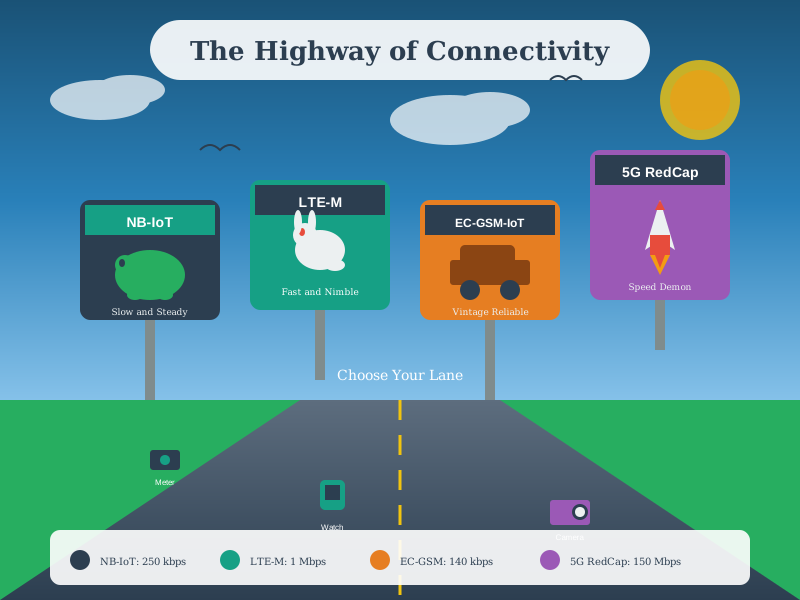
Cellular IoT Technologies: - NB-IoT: Best for stationary sensors with deep indoor penetration needs - LTE-M: Optimal for mobile applications requiring voice support and handover - 5G (NR profiles): Emerging options (e.g., RedCap) and slicing/capacity features; many massive-IoT deployments still use LTE-M/NB-IoT today
823.6 Visual Reference Gallery
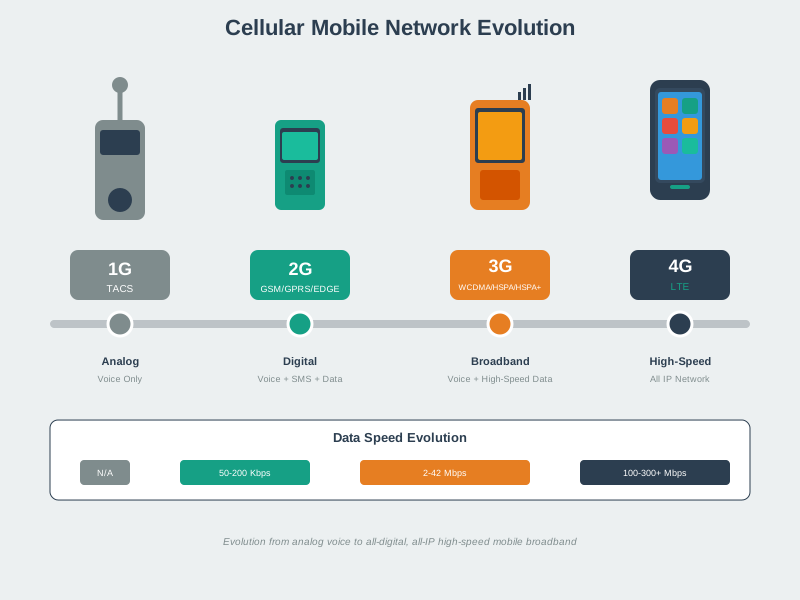
NoteVisual: Cellular Network Architecture
Cellular network architecture with base stations and handoff
Cellular networks divide coverage areas into cells, each served by a base station. As devices move between cells, handoff mechanisms maintain connectivity seamlessly, enabling mobility across wide areas.
NoteVisual: Cellular IoT Technology Comparison
Comparison of cellular IoT technologies
Cellular IoT technologies span a range of capabilities from ultra-low-power NB-IoT for sensors to higher-throughput LTE-M and emerging 5G NR profiles. Selection depends on payload size, mobility needs, power budget, and coverage requirements.
NoteVisual: Cellular Handoff Mechanism
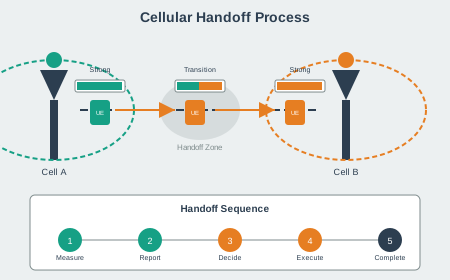
Cellular handoff between base stations
Handoff ensures continuous connectivity as mobile devices move between cells. The network monitors signal strength and triggers handoff to the stronger cell while maintaining the active connection.
823.7 Summary
This comprehensive quiz chapter tested advanced understanding of wireless communication for IoT:
Key Topics Covered: - Electromagnetic properties: Frequency, wavelength, and propagation characteristics - Path loss calculations: FSPL formula and practical indoor/outdoor applications - Spectrum trade-offs: Licensed vs unlicensed, duty cycle constraints, regional regulations - Channel selection: Avoiding overlap, coexistence strategies, interference mitigation - Technology selection: Matching requirements to LoRaWAN, NB-IoT, LTE-M, Wi-Fi, Zigbee
Core Principles: - Smart agriculture deployments often use sub-GHz LPWAN for long battery life and multi-kilometer coverage - 2.4 GHz channel planning must account for Wi-Fi/802.15.4 coexistence - Regional spectrum regulations vary by geography with differing power and duty-cycle constraints - Link budget analysis determines viability by accounting for transmit power, path loss, and fade margins - Practical deployment scenarios require balancing range, data rate, power consumption, cost, and regulatory compliance
823.8 Further Reading
Books: - “Wireless Communications: Principles and Practice” by Theodore S. Rappaport - “RF and Microwave Wireless Systems” by Kai Chang
Standards: - FCC Part 15: Radio Frequency Devices (US regulations) - ETSI EN 300 220: Short Range Devices (European regulations) - ITU Radio Regulations: International spectrum allocation
Online Resources: - RF Wireless World: Frequency band tutorials - Electronics Notes: Comprehensive wireless technology guides - National Instruments: RF fundamentals
823.9 What’s Next
Having completed this comprehensive review, proceed to protocol-specific topics:
Wi-Fi for IoT: IEEE 802.11 standards, Wi-Fi 6/6E features, power save modes
Bluetooth and BLE: Classic Bluetooth vs BLE, connection modes, GATT profiles