%% fig-cap: "Frequency vs range vs bandwidth trade-offs for IoT"
%% fig-alt: "Trade-off diagram showing inverse relationship between frequency, range, and bandwidth for IoT wireless technologies: sub-GHz bands offer longest range (10+ km) but lowest bandwidth (1-50 kbps), 2.4 GHz balances range (100-300m) and bandwidth (250 kbps - 11 Mbps), 5 GHz provides highest bandwidth (54-1200 Mbps) but shortest range (50-100m), with penetration capability decreasing as frequency increases"
%%{init: {'theme': 'base', 'themeVariables': { 'primaryColor': '#2C3E50', 'primaryTextColor': '#2C3E50', 'primaryBorderColor': '#16A085', 'lineColor': '#16A085', 'secondaryColor': '#E67E22', 'tertiaryColor': '#ECF0F1'}}}%%
graph TB
    A["Frequency Band<br/>Selection"] --> B["Sub-GHz<br/>433/868/915 MHz"]
    A --> C["2.4 GHz<br/>ISM Band"]
    A --> D["5 GHz<br/>Wi-Fi Band"]

    B --> B1["Range: 10+ km<br/>Bandwidth: 1-50 kbps<br/>Penetration: Excellent"]
    C --> C1["Range: 100-300m<br/>Bandwidth: 250k-11M<br/>Penetration: Good"]
    D --> D1["Range: 50-100m<br/>Bandwidth: 54M-1.2G<br/>Penetration: Poor"]

    B1 --> E["Use Case:<br/>Rural sensors<br/>Smart agriculture"]
    C1 --> F["Use Case:<br/>Smart home<br/>Building automation"]
    D1 --> G["Use Case:<br/>Video streaming<br/>High-speed data"]

    style A fill:#2C3E50,stroke:#16A085,stroke-width:3px,color:#fff
    style B fill:#16A085,stroke:#2C3E50,stroke-width:2px,color:#fff
    style C fill:#E67E22,stroke:#16A085,stroke-width:2px
    style D fill:#E67E22,stroke:#16A085,stroke-width:2px
815 Wireless Propagation and Design
815.1 Introduction
Understanding wireless propagation is essential for predicting coverage, planning deployments, and troubleshooting connectivity issues. This chapter brings together the physics of path loss with practical design considerations, including interference mitigation and a framework for selecting the optimal frequency band for your IoT application.
NoteLearning Objectives
By the end of this chapter, you will be able to:
- Compute free-space path loss (FSPL) and understand how it changes with distance and frequency
- Identify common interference sources by frequency band
- Apply coexistence strategies (frequency hopping, channel selection, CSMA/CA)
- Use a practical decision framework to select a wireless band for an IoT deployment
- Design IoT wireless solutions considering range, data rate, power, and regulatory constraints
815.2 Prerequisites
Before diving into this chapter, you should be familiar with:
- Electromagnetic Waves and Spectrum Basics: Understanding of EM wave properties
- IoT Frequency Bands and Licensing: 2.4 GHz, 5 GHz, sub-GHz bands
- Cellular Spectrum for IoT: Cellular band trade-offs
NoteRelated Chapters
Series Navigation: - Previous: Cellular Spectrum for IoT
Hands-On: - Mobile Wireless Labs - Spectrum analysis and RF measurements - Mobile Wireless Comprehensive Review - Scenario-based recap
Design Resources: - Network Design and Simulation - Link budget and coverage planning - Protocol Selection Framework - Frequency band selection guide
815.3 Wireless Propagation Characteristics
815.3.1 Frequency vs Range Trade-off
The choice of frequency band involves fundamental trade-offs between range, bandwidth, and penetration:
815.3.2 Free Space Path Loss
Signal strength decreases with distance according to the free space path loss formula:
\[ FSPL(dB) = 20\log_{10}(d) + 20\log_{10}(f) + 32.45 \]
Where: - \(d\) = distance in kilometers - \(f\) = frequency in MHz
Key insight: Path loss increases with both distance AND frequency. A 5 GHz signal experiences about 6 dB more path loss than a 2.4 GHz signal at the same distance (~6.4 dB).
WarningTradeoff: Directional Antenna vs Omnidirectional Antenna
Option A (Directional): Gain 8-24 dBi, beamwidth 15-60 degrees, effective range 2-10x omnidirectional, requires precise alignment. Example: 12 dBi Yagi at 868 MHz achieves 8 km point-to-point link with +14 dBm TX power.
Option B (Omnidirectional): Gain 2-6 dBi, beamwidth 360 degrees horizontal, range 0.5-3 km typical, no alignment needed. Example: 3 dBi dipole at 868 MHz covers 2 km radius with +14 dBm TX power.
Decision Factors: Choose directional for fixed point-to-point backhaul links, rural base stations serving distant sensors, or when interference rejection is critical (narrower beam rejects off-axis interference by 10-20 dB). Choose omnidirectional for mobile assets, star topology with sensors in all directions, urban gateways, or when installation simplicity outweighs range optimization.
TipPractical Example: Path Loss Comparison
For a device 10 meters away:
At 868 MHz (sub-GHz): \[FSPL = 20\log_{10}(0.01) + 20\log_{10}(868) + 32.45 = 51.2 \text{ dB}\]
At 2.4 GHz: \[FSPL = 20\log_{10}(0.01) + 20\log_{10}(2400) + 32.45 = 60.0 \text{ dB}\]
At 5 GHz: \[FSPL = 20\log_{10}(0.01) + 20\log_{10}(5000) + 32.45 = 66.4 \text{ dB}\]
The sub-GHz signal has 8.8 dB less path loss than 2.4 GHz, meaning it requires less transmit power or achieves greater range.
815.4 Interference and Coexistence
815.4.1 Sources of Interference
Understanding potential interference sources helps in selecting the appropriate frequency band:
%% fig-cap: "Common interference sources by frequency band"
%% fig-alt: "Interference source diagram showing 2.4 GHz band impacted by Wi-Fi routers, Bluetooth devices, Zigbee networks, microwave ovens, cordless phones, and baby monitors; 5 GHz band has less interference from Wi-Fi-only and weather radar (DFS); sub-GHz bands have minimal interference from garage doors, simple remotes, and industrial equipment"
%%{init: {'theme': 'base', 'themeVariables': { 'primaryColor': '#2C3E50', 'primaryTextColor': '#2C3E50', 'primaryBorderColor': '#16A085', 'lineColor': '#16A085', 'secondaryColor': '#E67E22', 'tertiaryColor': '#ECF0F1'}}}%%
graph TB
    A["Interference<br/>Sources"] --> B["2.4 GHz Band<br/>⚠ High Congestion"]
    A --> C["5 GHz Band<br/>✓ Lower Congestion"]
    A --> D["Sub-GHz<br/>✓ Minimal Interference"]

    B --> B1["Wi-Fi routers<br/>Bluetooth devices<br/>Zigbee networks"]
    B --> B2["Microwave ovens<br/>Cordless phones<br/>Baby monitors"]

    C --> C1["Wi-Fi 5/6 only<br/>Weather radar DFS<br/>Satellite comms"]

    D --> D1["Garage doors<br/>Simple RF remotes<br/>Industrial equipment"]

    style A fill:#2C3E50,stroke:#16A085,stroke-width:3px,color:#fff
    style B fill:#E67E22,stroke:#16A085,stroke-width:2px
    style C fill:#16A085,stroke:#2C3E50,stroke-width:2px,color:#fff
    style D fill:#16A085,stroke:#2C3E50,stroke-width:2px,color:#fff
815.4.2 Coexistence Strategies
IoT protocols employ various techniques to coexist in crowded spectrum:
- Frequency Hopping (Bluetooth): Rapidly switches between channels
- Channel Selection (Wi-Fi): Chooses less congested channels
- CSMA/CA (Wi-Fi, Zigbee): Listen before transmit
- Spread Spectrum (LoRa): Spreads signal across wide bandwidth
- Time Division (WirelessHART): Allocates specific time slots
815.5 Design Considerations for IoT
815.5.1 Frequency Band Selection Framework
%% fig-cap: "Decision flowchart for IoT frequency band selection"
%% fig-alt: "Flowchart guiding frequency band selection for IoT applications based on range requirements (indoor/outdoor/rural), data rate needs (sensor data/multimedia/video), power constraints (battery life), deployment environment (urban/industrial/residential), and regulatory compliance, leading to recommended band choices: sub-GHz for long-range/low-power, 2.4 GHz for balanced, or 5 GHz for high-bandwidth applications"
%%{init: {'theme': 'base', 'themeVariables': { 'primaryColor': '#2C3E50', 'primaryTextColor': '#2C3E50', 'primaryBorderColor': '#16A085', 'lineColor': '#16A085', 'secondaryColor': '#E67E22', 'tertiaryColor': '#ECF0F1'}}}%%
graph TD
    A["IoT Frequency<br/>Selection"] --> B{Range<br/>Requirement?}

    B -->|Indoor < 100m| C["2.4 or 5 GHz"]
    B -->|Outdoor < 1km| D["2.4 GHz or sub-GHz"]
    B -->|Rural > 1km| E["Sub-GHz LPWAN"]

    C --> F{Data Rate?}
    D --> F
    E --> G["Sub-GHz<br/>LoRa/Sigfox"]

    F -->|High > 1 Mbps| H["5 GHz Wi-Fi"]
    F -->|Medium 100k-1M| I["2.4 GHz Wi-Fi/BLE"]
    F -->|Low < 100k| J["2.4 GHz mesh<br/>or sub-GHz"]

    H --> K{Power Budget?}
    I --> K
    J --> K
    G --> L["✓ Sub-GHz<br/>10+ year battery"]

    K -->|Mains powered| M["Any suitable"]
    K -->|Battery 1-5 yr| N["2.4 GHz BLE/mesh"]
    K -->|Battery > 5 yr| O["Sub-GHz LPWAN"]

    style A fill:#2C3E50,stroke:#16A085,stroke-width:3px,color:#fff
    style E fill:#16A085,stroke:#2C3E50,stroke-width:2px,color:#fff
    style G fill:#16A085,stroke:#2C3E50,stroke-width:2px,color:#fff
    style H fill:#E67E22,stroke:#16A085,stroke-width:2px
    style L fill:#16A085,stroke:#2C3E50,stroke-width:2px,color:#fff
    style O fill:#16A085,stroke:#2C3E50,stroke-width:2px,color:#fff
815.5.2 Key Selection Criteria
When choosing a wireless frequency band for your IoT application, consider:
- Range Requirements
- Indoor: 2.4 GHz or 5 GHz typically sufficient
- Outdoor urban: 2.4 GHz or sub-GHz
- Rural/wide area: Sub-GHz or cellular
- Data Rate Needs
- Video streaming: 5 GHz Wi-Fi
- Sensor data: 2.4 GHz mesh or sub-GHz
- Occasional updates: Sub-GHz LPWAN
- Power Constraints
- Battery-powered, multi-year: Sub-GHz LPWAN
- Mains-powered: Any band suitable
- Coin cell: BLE or LPWAN
- Deployment Environment
- Dense urban: Expect 2.4 GHz congestion
- Industrial: Consider sub-GHz for penetration
- Residential: 2.4 GHz or 5 GHz viable
- Regulatory Compliance
- Check regional spectrum allocation
- Verify power limits
- Confirm duty cycle restrictions
815.6 Visual Reference Gallery
NoteVisual: Mobile Network Infrastructure
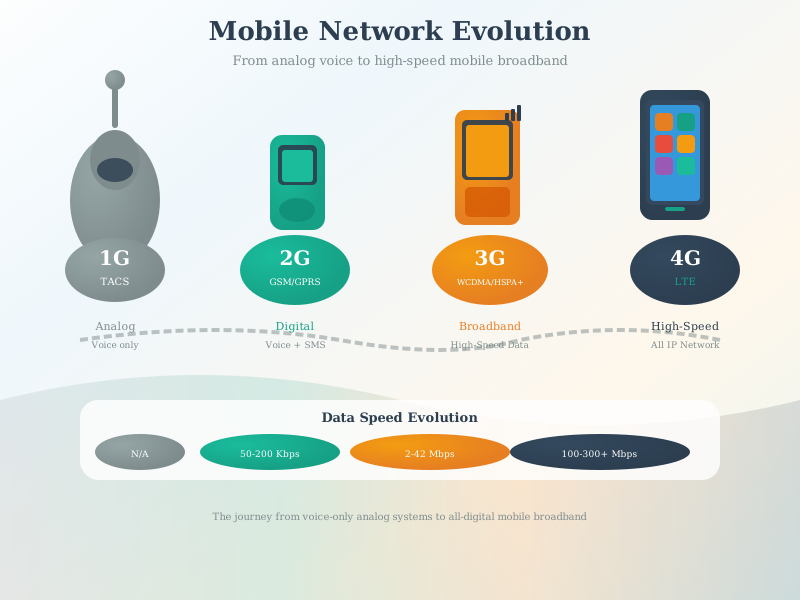
Mobile networks rely on a hierarchical infrastructure from cell towers to core network equipment. Understanding this architecture helps IoT designers optimize device connectivity and power consumption.
NoteVisual: Cellular Modem Integration
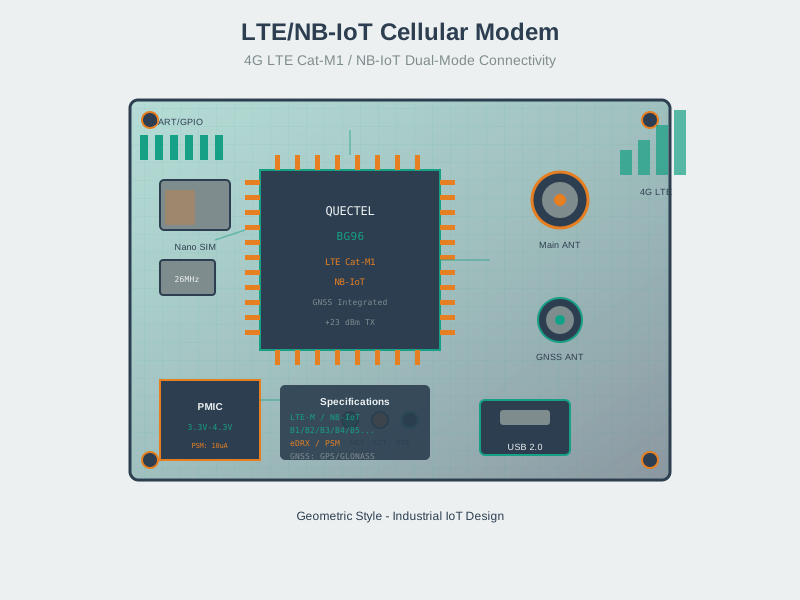
Cellular modems provide turnkey connectivity for IoT devices. Integration requires attention to antenna design, power supply, and AT command interfaces for proper operation.
NoteVisual: Cellular IoT Evolution
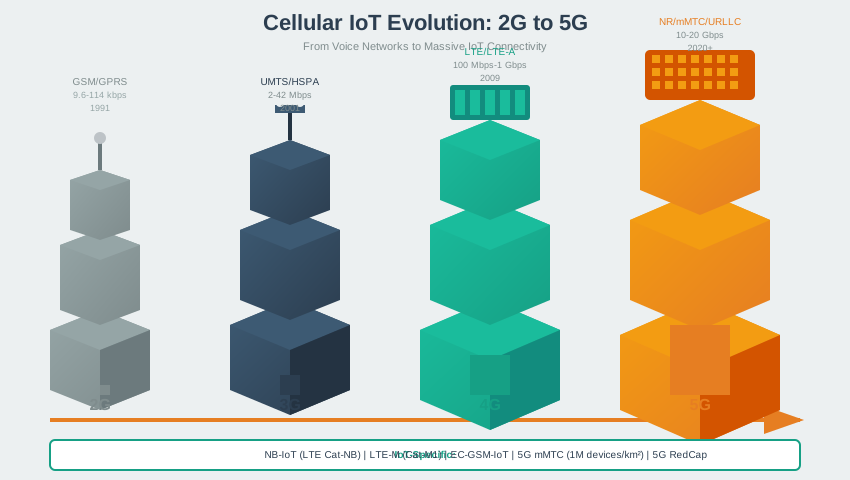
Cellular IoT has evolved from simple 2G M2M to specialized 5G IoT technologies. Each generation brought improvements in power efficiency, coverage, and data rates for connected devices.
NoteVisual: Regional Compliance Certifications
%% fig-cap: "Regional compliance certification requirements for wireless IoT devices"
%% fig-alt: "Diagram showing regional wireless compliance markings: FCC (USA) for RF emissions testing, CE (Europe) for ETSI standards, IC (Canada) for Industry Canada, TELEC (Japan) for ARIB standards, and CCC (China) for SRRC certification, each with frequency restrictions and power limits"
%%{init: {'theme': 'base', 'themeVariables': { 'primaryColor': '#2C3E50', 'primaryTextColor': '#2C3E50', 'primaryBorderColor': '#16A085', 'lineColor': '#16A085', 'secondaryColor': '#E67E22', 'tertiaryColor': '#ECF0F1'}}}%%
graph TB
    A["Global Device<br/>Deployment"] --> B["FCC - USA<br/>915 MHz allowed"]
    A --> C["CE - Europe<br/>868 MHz required"]
    A --> D["IC - Canada<br/>915 MHz allowed"]
    A --> E["TELEC - Japan<br/>920-928 MHz"]
    A --> F["CCC - China<br/>470-510 MHz"]

    B --> B1["Part 15.247<br/>+30 dBm max<br/>No duty cycle"]
    C --> C1["ETSI EN 300 220<br/>+14 dBm max<br/>1% duty cycle"]
    D --> D1["RSS-247<br/>Same as FCC<br/>902-928 MHz"]
    E --> E1["ARIB STD-T108<br/>+13 dBm max<br/>10% duty/LBT"]
    F --> F1["SRRC approval<br/>Regional bands<br/>Variable power"]

    style A fill:#2C3E50,stroke:#16A085,stroke-width:3px,color:#fff
    style B fill:#E67E22,stroke:#16A085,stroke-width:2px
    style C fill:#16A085,stroke:#2C3E50,stroke-width:2px,color:#fff
    style D fill:#E67E22,stroke:#16A085,stroke-width:2px
    style E fill:#E67E22,stroke:#16A085,stroke-width:2px
    style F fill:#E67E22,stroke:#16A085,stroke-width:2px
815.7 Practice Exercises
NoteMini-Project: Band Selection Worksheet
- Pick a target deployment (smart building, agriculture, asset tracking) and write down: range, payload size, message frequency, and battery target.
- Compute wavelengths for 868/915 MHz, 2.4 GHz, and 5 GHz using
λ = c / f. Write one sentence on what that implies for obstacle penetration. - Use FSPL to compare 868 MHz vs 2.4 GHz at the same distance: what is the dB penalty at 1 km? (Hint: FSPL includes a
20·log10(f)term.) - Choose a band and justify it in two bullets: one for physics (path loss/penetration) and one for operations (interference, regulations, deployment complexity).
- If you plan to ship globally, list which regions require different sub‑GHz configs (EU868 vs US915 vs AS923) and how you’d expose that choice (SKU vs firmware).
For hands-on spectrum work, continue with Mobile Wireless Labs and Implementation.
815.8 Summary
This chapter covered wireless propagation characteristics and design considerations:
- Free space path loss increases with both distance and frequency, making sub-GHz bands optimal for long-range applications
- Path loss comparison: Sub-GHz has ~9 dB less loss than 2.4 GHz at the same distance
- Interference varies by band: 2.4 GHz is most congested; sub-GHz typically has minimal interference
- Coexistence strategies include frequency hopping, channel selection, CSMA/CA, and spread spectrum
- Band selection framework: Start with range requirements, then consider data rate and power constraints
- Regulatory compliance varies by region; design firmware to support region-specific configurations
815.9 What’s Next
Building on these wireless fundamentals, explore:
- Mobile Wireless Labs and Implementation: Hands-on experiments with RF spectrum analysis, channel scanning, and link budget calculations
- Mobile Wireless Comprehensive Review: Scenario-based recap of spectrum choices and design trade-offs
- Technology deep dives: Continue into Wi-Fi Fundamentals and Bluetooth Overview
815.10 Knowledge Check
TipUnderstanding Check: Agricultural IoT Across Rolling Terrain
Scenario: You’re deploying 200 soil moisture, temperature, and rainfall sensors across a 10 km² farm with rolling hills (50–100 m elevation changes), scattered barns, dense tree groves, and no existing power/network infrastructure. Sensors transmit ~100‑byte readings every 15 minutes. Requirements: 5+ year battery life on 2× AA lithium cells and a single gateway covering the entire farm.
Think about: 1. How does free-space path loss scale with frequency and distance? 2. Why are lower frequencies often more forgiving with foliage and non-line-of-sight paths (all else equal)? 3. What changes in the link budget matter most here: transmit power, antenna gains, receiver sensitivity, airtime, or topology?
Key Insight: For sparse rural deployments, sub‑GHz LPWANs are often a strong default because they offer high link budgets at low data rates. Range still depends on antenna heights, terrain, foliage, device settings, and local regulatory limits.
FSPL quick comparison (free space):
FSPL(dB) = 32.44 + 20·log₁₀(d_km) + 20·log₁₀(f_MHz)

At d = 10 km:
868 MHz  → ~111 dB
2.4 GHz  → ~120 dB (≈9 dB higher)
5.0 GHz  → ~126 dB (≈15 dB higher)
That ≈9 dB penalty corresponds to roughly 8× more transmit power (or ~9 dB more link margin) to achieve the same received power in free space.
Why sub‑GHz often wins here:
- Coverage: Multi‑kilometer links are feasible when the link budget is high and antenna placement is good.
- Penetration/terrain: Lower frequencies are generally more forgiving with foliage and non-line-of-sight paths.
- Power: Infrequent transmissions plus a high link budget can enable multi‑year batteries.
- Topology: A single gateway is much easier to operate than a dense mesh of powered routers.
Battery-life sanity check (not a guarantee): - Estimate airtime per message (depends on PHY/data rate) and multiply by messages/day. - Compute average current: I_avg ≈ (I_tx·t_tx + I_rx·t_rx + I_sleep·t_sleep) / 24h - Compare to battery capacity (and include temperature, self‑discharge, retries, and battery aging).
Verify Your Understanding: - Compute the FSPL difference between 868 MHz and 2.4 GHz at the same distance. How does that translate into link-budget requirements? - Which two deployment choices (gateway height, antenna choice, payload frequency, etc.) would most improve reliability without increasing transmit power?
TipUnderstanding Check: Global LoRa Product Compliance
Scenario: Your startup develops a LoRa asset tracker for shipping containers traveling globally (US→Europe→Asia). Product spec: a single hardware SKU with firmware-selectable regional settings. Engineering proposes shipping everything with a US915 configuration “to keep it simple.”
Think about: 1. What changes across regions besides the center frequency (channel plan, max EIRP, duty-cycle/LBT, certification requirements)? 2. Why do different regions allocate different unlicensed sub‑GHz bands (and why can rules change over time)? 3. What provisioning workflow prevents misconfiguration (factory programming, installer app, geo-locked config, region SKUs)?
Key Insight: There is no single global sub‑GHz configuration. Regional allocations, power limits, and channel plans differ; using the wrong regional parameters can cause harmful interference and fail regulatory/certification testing.
Illustrative regional differences (always confirm locally):
Region          Common SRD/ISM bands     Typical constraints (examples)
━━━━━━━━━━━━━━━━━━━━━━━━━━━━━━━━━━━━━━━━━━━━━━━━━━━━━━━━━━━━
North America   902–928 MHz              Different channel plan; constraints differ from EU
Europe          863–870 MHz              Lower EIRP; duty-cycle or LBT in many sub-bands
Japan           920–928 MHz              Region-specific LBT and channelization
China           470–510 MHz (or others)  Region-specific allocations and certification
Design pattern: region-aware firmware - Implement region profiles matching your protocol’s official regional parameters (e.g., LoRaWAN EU868, US915, AU915, AS923, CN470, IN865, …). - Store the selected region in non-volatile storage and expose it in a diagnostic screen/log. - Prevent accidental misconfiguration (e.g., “EU device set to US915”) with installer tooling and clear labeling.
// Multi-region firmware configuration
typedef enum {
    REGION_EU868,    // Europe: 863-870 MHz
    REGION_US915,    // North America: 902-928 MHz
    REGION_AU915,    // Australia: 915-928 MHz
    REGION_AS923,    // Asia: 920-923 MHz
    REGION_CN470,    // China: 470-510 MHz
    REGION_IN865     // India: 865-867 MHz
} LoRaRegion_t;

void configureRegion(LoRaRegion_t region) {
    switch(region) {
        case REGION_EU868:
            setFrequencyBand(863000000, 870000000);
            setMaxTxPower(14);  // Example: follow regional parameters
            setDutyCycle(1);    // Example: duty-cycle/LBT policy is region-specific
            break;
        case REGION_US915:
            setFrequencyBand(902000000, 928000000);
            setMaxTxPower(30);  // Example: follow regional parameters
            setDutyCycle(0);    // Example: constraints differ by region (not "no rules")
            break;
        // ... other regions
    }
}
Verify Your Understanding: - Design a firmware architecture that supports region selection without requiring different hardware SKUs - List 2–3 product decisions that reduce misconfiguration risk (labeling, installer workflow, geo-locking, QA checks)