%%{init: {'theme': 'base', 'themeVariables': {'primaryColor': '#2C3E50', 'primaryTextColor': '#fff', 'primaryBorderColor': '#16A085', 'lineColor': '#E67E22', 'secondaryColor': '#16A085', 'tertiaryColor': '#7F8C8D'}}}%%
graph TB
    subgraph App["Application Layer"]
        DM[Data Model<br/>Clusters, Attributes, Commands]
        IM[Interaction Model<br/>Read, Write, Subscribe, Invoke]
    end

    subgraph SecLayer["Security Layer"]
        Sec[Message Layer Security<br/>AES-CCM Encryption]
        CASE[CASE: Certificate-Based Auth]
        PASE[PASE: Passcode-Based Auth]
    end

    subgraph MsgLayer["Message Layer"]
        ML[Message Framing<br/>Headers, Payloads, Acks]
    end

    subgraph TransLayer["Transport Layer"]
        MRP[MRP: Message Reliable Protocol<br/>Retransmission, Deduplication]
        UDP[UDP / TCP]
    end

    subgraph NetLayer["Network Layer"]
        IPv6[IPv6<br/>Addressing, Routing]
    end

    subgraph LinkLayer["Link Layer"]
        Thread[Thread<br/>802.15.4 + 6LoWPAN]
        Wi-Fi[Wi-Fi<br/>802.11]
        Eth[Ethernet<br/>802.3]
    end

    DM --> IM
    IM --> Sec
    Sec --> CASE
    Sec --> PASE
    CASE --> ML
    PASE --> ML
    ML --> MRP
    MRP --> UDP
    UDP --> IPv6
    IPv6 --> Thread
    IPv6 --> Wi-Fi
    IPv6 --> Eth

    style App fill:#16A085,stroke:#2C3E50,color:#fff
    style SecLayer fill:#E67E22,stroke:#2C3E50,color:#fff
    style MsgLayer fill:#2C3E50,stroke:#16A085,color:#fff
    style TransLayer fill:#2C3E50,stroke:#16A085,color:#fff
    style NetLayer fill:#7F8C8D,stroke:#2C3E50,color:#fff
    style LinkLayer fill:#7F8C8D,stroke:#2C3E50,color:#fff
1027 Matter Protocol Stack and Data Model
1027.1 Matter Protocol Stack: Layered Architecture and Data Model
NoteLearning Objectives
By the end of this section, you will be able to:
- Understand Matter’s complete layered protocol architecture
- Explain how each layer contributes to interoperability
- Describe the Matter Data Model (nodes, endpoints, clusters, attributes, commands)
- Design endpoint structures for multi-function devices
- Map physical device capabilities to Matter cluster implementations
1027.2 Prerequisites
Before diving into this chapter, you should be familiar with:
- Matter Protocol Overview: Understanding what Matter is and why it was created
- Matter Architecture Overview: Introduction to Matter’s architectural concepts
- Networking Basics: IP addressing and network fundamentals
- IoT Protocols Overview: Context for Matter’s position in the protocol landscape
NoteRelated Chapters
Architecture Deep Dives: - Matter Interactions and Commissioning - How devices communicate - Matter Fabric and Security - Multi-admin and encryption
Device Implementation: - Matter Device Types and Clusters - Complete cluster library - Matter Implementation - SDKs and development
Transport: - Thread Fundamentals and Roles - Thread mesh networking
1027.3 For Beginners: Matter Architecture Simplified
TipUnderstanding Matter’s Building Blocks
Think of a Matter device like a well-organized office building:
- The Building (Node) = The physical device (a smart light, thermostat)
- Floors (Endpoints) = Different functional areas (main light, nightlight)
- Departments (Clusters) = Groups of related capabilities (On/Off, Level Control, Color)
- Employees (Attributes) = Specific pieces of information (current brightness: 80%)
- Actions (Commands) = Things you can ask departments to do (turn on, set brightness to 50%)
When you ask Alexa to “dim the living room light to 50%,” here’s what happens: 1. Alexa identifies the Node (your smart light) 2. Selects the correct Endpoint (main light, not nightlight) 3. Finds the Level Control Cluster 4. Sends a MoveToLevel Command with value 50% 5. The cluster updates its CurrentLevel Attribute to 50% 6. The light physically dims to 50%
1027.4 Matter Protocol Stack
1027.4.1 Complete Architecture Overview
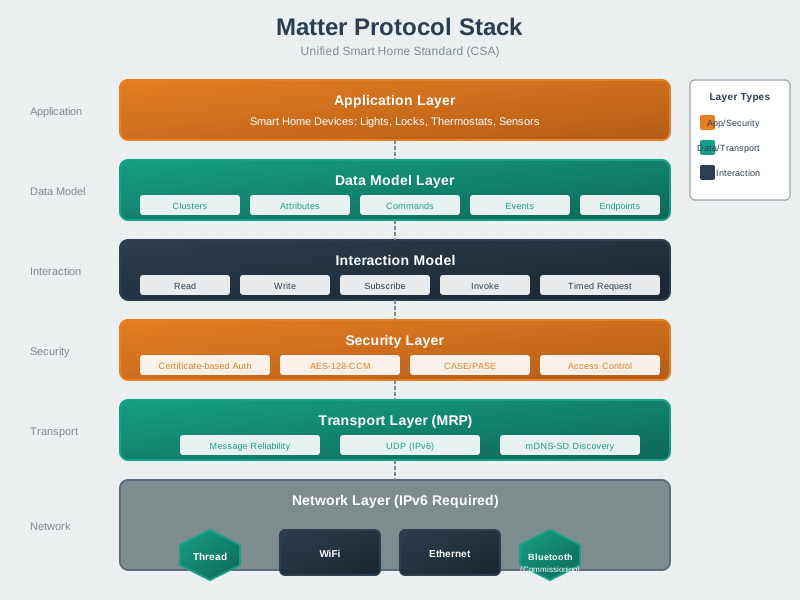
{fig-alt=“Matter protocol stack diagram showing six layers: Application Layer (teal) with Data Model and Interaction Model, Security Layer (orange) with AES-CCM and CASE/PASE authentication, Message Layer (navy) for framing, Transport Layer (navy) with MRP and UDP, Network Layer (gray) with IPv6, and Link Layer (gray) with Thread, Wi-Fi, and Ethernet options.”}
NoteAlternative View: Matter Security Architecture
This diagram focuses on Matter’s security mechanisms and trust model.
%% fig-alt: Matter security architecture showing certificate chain, session establishment, and encryption mechanisms
%%{init: {'theme': 'base', 'themeVariables': {'primaryColor': '#2C3E50', 'primaryTextColor': '#fff', 'primaryBorderColor': '#16A085', 'lineColor': '#E67E22'}}}%%
flowchart TB
    subgraph Trust["Trust Model"]
        PAA[Product Attestation<br/>Authority] --> PAI[Product Attestation<br/>Intermediate]
        PAI --> DAC[Device Attestation<br/>Certificate]
    end

    subgraph Session["Session Security"]
        PASE_S[PASE Session<br/>Passcode-based] --> TEMP[Temporary Keys<br/>Commissioning only]
        CASE_S[CASE Session<br/>Certificate-based] --> PERM[Permanent Keys<br/>Normal operation]
    end

    subgraph Msg["Message Protection"]
        MSG[Message] --> ENC[AES-128-CCM<br/>Encryption]
        ENC --> AUTH[Message Auth<br/>Integrity]
        AUTH --> ANTI[Anti-replay<br/>Counters]
    end

    DAC --> CASE_S
    PERM --> MSG

    style Trust fill:#E67E22,color:#fff
    style Session fill:#16A085,color:#fff
    style Msg fill:#2C3E50,color:#fff
1027.4.2 Layer Responsibilities
| Layer | Component | Responsibility |
|---|---|---|
| Application | Data Model | Define device capabilities (what it can do) |
| Application | Interaction Model | Define how to access capabilities (how to control it) |
| Security | CASE/PASE | Establish secure sessions |
| Security | AES-CCM | Encrypt and authenticate messages |
| Message | Framing | Structure messages with headers and payloads |
| Transport | MRP | Ensure reliable delivery over UDP |
| Network | IPv6 | Route packets between nodes |
| Link | Thread/Wi-Fi/Eth | Physical transmission |
1027.4.3 Transport Layer Details
The Message Reliable Protocol (MRP) provides reliable delivery over UDP:
- Acknowledgments: Every message requiring reliability gets an ACK
- Retransmission: Configurable retry intervals (default 200ms initial, exponential backoff)
- Deduplication: Message counters prevent duplicate processing
- Timeout: Sessions expire after configurable idle periods
Why UDP instead of TCP?
| Consideration | UDP + MRP | TCP |
|---|---|---|
| Latency | Lower (no connection setup) | Higher (3-way handshake) |
| Power | Lower (simpler stack) | Higher (state maintenance) |
| Sleepy devices | Better (stateless) | Problematic (connection timeouts) |
| Multicast | Supported | Not supported |
1027.4.4 Link Layer Options
Matter operates over three transport networks:
| Transport | Standard | Range | Power | Best For |
|---|---|---|---|---|
| Thread | 802.15.4 + 6LoWPAN | 10-30m | Very low | Battery sensors, locks |
| Wi-Fi | 802.11 | 30-50m | High | Cameras, displays |
| Ethernet | 802.3 | Wired | Low | Border routers, hubs |
1027.5 The Matter Data Model
1027.5.1 Core Concepts Hierarchy
The Matter Data Model defines how device capabilities are structured and accessed.
%%{init: {'theme': 'base', 'themeVariables': {'primaryColor': '#2C3E50', 'primaryTextColor': '#fff', 'primaryBorderColor': '#16A085', 'lineColor': '#E67E22', 'secondaryColor': '#16A085', 'tertiaryColor': '#7F8C8D'}}}%%
graph TB
    Node[Node<br/>Physical Device] --> EP0[Endpoint 0<br/>Root/Utility]
    Node --> EP1[Endpoint 1<br/>Main Function]
    Node --> EP2[Endpoint 2<br/>Secondary Function]

    EP0 --> C0A[Basic Information<br/>Cluster]
    EP0 --> C0B[Network Commissioning<br/>Cluster]
    EP0 --> C0C[Administrator<br/>Commissioning Cluster]

    EP1 --> C1A[On/Off<br/>Cluster]
    EP1 --> C1B[Level Control<br/>Cluster]
    EP1 --> C1C[Color Control<br/>Cluster]

    C1A --> A1[OnOff<br/>Attribute: bool]
    C1B --> A2[CurrentLevel<br/>Attribute: uint8]
    C1B --> A3[MaxLevel<br/>Attribute: uint8]
    C1C --> A4[CurrentHue<br/>Attribute: uint8]

    C1A --> CMD1[Toggle<br/>Command]
    C1B --> CMD2[MoveToLevel<br/>Command]
    C1C --> CMD3[MoveToHue<br/>Command]

    style Node fill:#16A085,stroke:#2C3E50,color:#fff
    style EP0 fill:#E67E22,stroke:#2C3E50,color:#fff
    style EP1 fill:#E67E22,stroke:#2C3E50,color:#fff
    style EP2 fill:#E67E22,stroke:#2C3E50,color:#fff
    style C0A fill:#2C3E50,stroke:#16A085,color:#fff
    style C0B fill:#2C3E50,stroke:#16A085,color:#fff
    style C0C fill:#2C3E50,stroke:#16A085,color:#fff
    style C1A fill:#2C3E50,stroke:#16A085,color:#fff
    style C1B fill:#2C3E50,stroke:#16A085,color:#fff
    style C1C fill:#2C3E50,stroke:#16A085,color:#fff
{fig-alt=“Matter Data Model hierarchy showing Node at top containing multiple Endpoints, each Endpoint containing Clusters, and each Cluster containing Attributes and Commands. Example shows a smart light with Endpoint 0 for utility clusters and Endpoint 1 for On/Off, Level Control, and Color Control clusters with their respective attributes and commands.”}
1027.5.2 Nodes
A Node is a uniquely addressable Matter entity—typically a physical device.
Node Properties: - Unique Node ID within a fabric (64-bit) - One or more Endpoints (functional units) - Network address (IPv6) - Cryptographic identity (device certificate)
Node Examples: | Physical Device | Matter Node | |—————–|————-| | Smart light bulb | Single node, 1-2 endpoints | | Smart power strip (4 outlets) | Single node, 4 endpoints | | Thread Border Router | Single node, bridge endpoint |
1027.5.3 Endpoints
An Endpoint is a logical container for related functionality within a node.
Standard Endpoints: | Endpoint | Purpose | Required Clusters | |———-|———|——————-| | Endpoint 0 | Root/Utility | Basic Information, Network Commissioning | | Endpoint 1+ | Application functions | Device-specific clusters |
Example: Smart Light with Nightlight
%%{init: {'theme': 'base', 'themeVariables': {'primaryColor': '#2C3E50', 'primaryTextColor': '#fff', 'primaryBorderColor': '#16A085', 'lineColor': '#16A085', 'secondaryColor': '#E67E22', 'tertiaryColor': '#7F8C8D'}}}%%
graph TB
    Node[Node: Smart Bulb]

    subgraph EP0["Endpoint 0: Root (mandatory)"]
        C0A[Basic Information Cluster]
        C0B[Network Commissioning Cluster]
        C0C[Administrator Commissioning Cluster]
    end

    subgraph EP1["Endpoint 1: Main Light"]
        C1A[On/Off Cluster]
        C1B[Level Control Cluster]
        C1C[Color Control Cluster]
    end

    subgraph EP2["Endpoint 2: Nightlight"]
        C2A[On/Off Cluster]
        C2B[Level Control Cluster<br/>limited range]
    end

    Node --> EP0
    Node --> EP1
    Node --> EP2

    style Node fill:#16A085,stroke:#2C3E50,color:#fff
    style EP0 fill:#E67E22,stroke:#2C3E50,color:#fff
    style EP1 fill:#E67E22,stroke:#2C3E50,color:#fff
    style EP2 fill:#E67E22,stroke:#2C3E50,color:#fff
    style C0A fill:#2C3E50,stroke:#16A085,color:#fff
    style C0B fill:#2C3E50,stroke:#16A085,color:#fff
    style C0C fill:#2C3E50,stroke:#16A085,color:#fff
    style C1A fill:#2C3E50,stroke:#16A085,color:#fff
    style C1B fill:#2C3E50,stroke:#16A085,color:#fff
    style C1C fill:#2C3E50,stroke:#16A085,color:#fff
    style C2A fill:#2C3E50,stroke:#16A085,color:#fff
    style C2B fill:#2C3E50,stroke:#16A085,color:#fff
{fig-alt=“Smart Light endpoint structure diagram showing Node (Smart Bulb) in teal at top connecting to three endpoints in orange: Endpoint 0 (Root) containing Basic Information, Network Commissioning, and Administrator Commissioning clusters in navy; Endpoint 1 (Main Light) containing On/Off, Level Control, and Color Control clusters in navy; Endpoint 2 (Nightlight) containing On/Off and Level Control clusters with limited range in navy.”}
1027.5.4 Clusters
A Cluster is a collection of related attributes and commands representing a specific capability.
Cluster Types:
| Category | Cluster Examples | Purpose |
|---|---|---|
| Utility | Basic Information, Binding | Device management |
| Lighting | On/Off, Level Control, Color Control | Light operations |
| HVAC | Thermostat, Fan Control | Climate control |
| Closure | Door Lock, Window Covering | Access and privacy |
| Sensors | Temperature, Humidity, Occupancy | Environmental data |
Cluster Structure:
%%{init: {'theme': 'base', 'themeVariables': {'primaryColor': '#2C3E50', 'primaryTextColor': '#fff', 'primaryBorderColor': '#16A085', 'lineColor': '#E67E22', 'secondaryColor': '#16A085', 'tertiaryColor': '#7F8C8D'}}}%%
graph LR
    subgraph OnOff["On/Off Cluster (0x0006)"]
        A1[OnOff<br/>Attribute 0x0000<br/>Type: Boolean]
        A2[GlobalSceneControl<br/>Attribute 0x4000<br/>Type: Boolean]
        C1[Off<br/>Command 0x00]
        C2[On<br/>Command 0x01]
        C3[Toggle<br/>Command 0x02]
        E1[StateChange<br/>Event]
    end

    style OnOff fill:#2C3E50,stroke:#16A085,color:#fff
    style A1 fill:#16A085,stroke:#2C3E50,color:#fff
    style A2 fill:#16A085,stroke:#2C3E50,color:#fff
    style C1 fill:#E67E22,stroke:#2C3E50,color:#fff
    style C2 fill:#E67E22,stroke:#2C3E50,color:#fff
    style C3 fill:#E67E22,stroke:#2C3E50,color:#fff
    style E1 fill:#7F8C8D,stroke:#2C3E50,color:#fff
{fig-alt=“On/Off Cluster structure diagram showing cluster ID 0x0006 containing: two attributes in teal (OnOff boolean 0x0000, GlobalSceneControl boolean 0x4000), three commands in orange (Off 0x00, On 0x01, Toggle 0x02), and one event in gray (StateChange). Demonstrates cluster organization with IDs and types.”}
1027.5.5 Attributes
Attributes are named, typed data values within a cluster:
| Property | Description | Example |
|---|---|---|
| ID | Unique within cluster | 0x0000 (OnOff) |
| Type | Data type | Boolean, uint8, string |
| Access | Read/Write permissions | R, RW |
| Quality | Nullable, Reportable, Persistent | Reportable |
Common Attribute Types: - Boolean - true/false (On/Off state) - uint8 - 0-255 (brightness level) - int16 - -32768 to 32767 (temperature x 100) - string - Variable length (device name) - struct - Complex objects (color XY) - list - Arrays (supported features)
1027.5.6 Commands
Commands are actions that can be invoked on a cluster:
| Property | Description |
|---|---|
| ID | Unique command identifier within cluster |
| Direction | Client-to-Server or Server-to-Client |
| Fields | Input parameters |
| Response | Expected response command |
Example: MoveToLevel Command
Command: MoveToLevel (0x00)
Direction: Client -> Server
Fields:
  - Level (uint8): Target brightness 0-254
  - TransitionTime (uint16): Transition time in tenths of seconds
  - OptionsMask (uint8): Override options
  - OptionsOverride (uint8): Override values
Response: None (status only)
1027.6 Worked Example: Matter Device Type Implementation
NoteWorked Example: Designing a Smart Light Endpoint Structure
Scenario: You are designing a Matter-compatible smart light bulb with dimming and color temperature control. Define the endpoint structure, required clusters, and attribute implementation following Matter specification.
Given: - Device: Dimmable Color Temperature Light - Matter device type: 0x010C (Color Temperature Light) - Required features: On/Off, Brightness (0-254), Color Temperature (2700K-6500K) - Transport: Thread (802.15.4) - Target certification: Matter 1.2
Steps:
Define endpoint structure:
Figure 1027.6
   %%{init: {'theme': 'base', 'themeVariables': {'primaryColor': '#2C3E50', 'primaryTextColor': '#fff', 'primaryBorderColor': '#16A085', 'lineColor': '#16A085', 'secondaryColor': '#E67E22', 'tertiaryColor': '#7F8C8D'}}}%%
   graph TB
       Node[Node: Smart Light Bulb]

       subgraph EP0["Endpoint 0: Root (Utility - mandatory)"]
           C0A["Basic Information Cluster (0x0028)"]
           C0B["General Commissioning Cluster (0x0030)"]
           C0C["Network Commissioning Cluster (0x0031)"]
           C0D["Administrator Commissioning Cluster (0x003C)"]
           C0E["Operational Credentials Cluster (0x003E)"]
       end

       subgraph EP1["Endpoint 1: Light (Application)"]
           C1A["Identify Cluster (0x0003)"]
           C1B["Groups Cluster (0x0004)"]
           C1C["On/Off Cluster (0x0006)"]
           C1D["Level Control Cluster (0x0008)"]
           C1E["Color Control Cluster (0x0300)"]
       end

       Node --> EP0
       Node --> EP1

       style Node fill:#16A085,stroke:#2C3E50,color:#fff
       style EP0 fill:#E67E22,stroke:#2C3E50,color:#fff
       style EP1 fill:#E67E22,stroke:#2C3E50,color:#fff
       style C0A fill:#2C3E50,stroke:#16A085,color:#fff
       style C0B fill:#2C3E50,stroke:#16A085,color:#fff
       style C0C fill:#2C3E50,stroke:#16A085,color:#fff
       style C0D fill:#2C3E50,stroke:#16A085,color:#fff
       style C0E fill:#2C3E50,stroke:#16A085,color:#fff
       style C1A fill:#2C3E50,stroke:#16A085,color:#fff
       style C1B fill:#2C3E50,stroke:#16A085,color:#fff
       style C1C fill:#2C3E50,stroke:#16A085,color:#fff
       style C1D fill:#2C3E50,stroke:#16A085,color:#fff
       style C1E fill:#2C3E50,stroke:#16A085,color:#fff
Matter Color Temperature Light device type endpoint structure with cluster IDs
{fig-alt=“Matter Color Temperature Light endpoint structure showing Node (Smart Light Bulb) in teal connecting to two endpoints in orange: Endpoint 0 (Root/Utility) containing five utility clusters with their hex IDs (Basic Information 0x0028, General Commissioning 0x0030, Network Commissioning 0x0031, Administrator Commissioning 0x003C, Operational Credentials 0x003E) in navy; Endpoint 1 (Light Application) containing five application clusters (Identify 0x0003, Groups 0x0004, On/Off 0x0006, Level Control 0x0008, Color Control 0x0300) in navy.”} :::
- Implement On/Off Cluster (0x0006):
- Attributes:
- OnOff (0x0000): Boolean, read-only, reportable
- GlobalSceneControl (0x4000): Boolean
- Commands:
- Off (0x00): Turn light off
- On (0x01): Turn light on
- Toggle (0x02): Toggle current state
- Implementation: GPIO control to LED driver enable pin
- Attributes:
- Implement Level Control Cluster (0x0008):
- Attributes:
- CurrentLevel (0x0000): uint8 (0-254), read-only, reportable
- MinLevel (0x0002): uint8 = 1
- MaxLevel (0x0003): uint8 = 254
- OnLevel (0x0011): uint8 (level when turned on)
- Commands:
- MoveToLevel (0x00): Level, TransitionTime, OptionsMask
- Move (0x01): MoveMode, Rate
- Step (0x02): StepMode, StepSize, TransitionTime
- Implementation: PWM duty cycle control (0.4% to 100%)
- Attributes:
- Implement Color Control Cluster (0x0300) for Color Temperature:
- Attributes:
- ColorMode (0x0008): enum8 = 2 (Color Temperature mode)
- ColorTemperatureMireds (0x0007): uint16, read-only, reportable
- ColorTempPhysicalMinMireds (0x400B): uint16 = 153 (6500K)
- ColorTempPhysicalMaxMireds (0x400C): uint16 = 370 (2700K)
- Commands:
- MoveToColorTemperature (0x0A): ColorTemperature, TransitionTime
- Implementation: Dual-channel LED driver (warm + cool white mixing)
- Conversion: Mireds = 1,000,000 / Kelvin
- Attributes:
Result: Smart light implements Matter device type 0x010C with full dimming (0-254) and color temperature (2700K-6500K) support. Endpoint 0 handles commissioning and network management. Endpoint 1 provides application-level light control through On/Off, Level Control, and Color Control clusters.
Key Insight: Matter’s cluster-based architecture enables interoperability by standardizing behavior. Any Matter controller (Apple, Google, Amazon) can control this light identically because the On/Off, Level Control, and Color Control clusters have standardized attribute types, command formats, and expected behaviors defined in the Matter specification.
1027.7 Knowledge Check
WarningQuick Assessment
1027.8 Key Takeaways
TipSummary
Matter’s protocol stack provides end-to-end interoperability from physical transport through application data models
The Data Model hierarchy is: Node (device) -> Endpoints (functional units) -> Clusters (capabilities) -> Attributes/Commands (data/actions)
Endpoint 0 is mandatory on every device for utility functions (Basic Info, Network Commissioning, Administrator Commissioning)
Clusters are reusable building blocks - the same On/Off cluster works identically on lights, plugs, fans, and any on/off device
MRP (Message Reliable Protocol) provides reliable delivery over UDP with acknowledgments, retransmission, and deduplication
Transport flexibility - Matter works over Thread (low-power mesh), Wi-Fi (high bandwidth), and Ethernet (wired reliability)
1027.9 What’s Next
Continue your Matter architecture deep-dive with:
- Matter Interactions and Commissioning - Learn how controllers read, write, subscribe, and invoke commands
- Matter Fabric and Security - Understand multi-admin, CASE/PASE, and encryption
- Matter Device Types and Clusters - Explore the complete cluster library