%%{init: {'theme': 'base', 'themeVariables': {'primaryColor':'#2C3E50','primaryTextColor':'#fff','primaryBorderColor':'#16A085','lineColor':'#16A085','secondaryColor':'#E67E22','tertiaryColor':'#7F8C8D'}}}%%
flowchart TB
START([Power Optimization]) --> Q1{Data Rate<br/>Requirement?}
Q1 -->|High: Real-time| CI_SHORT[Connection Interval<br/>7.5-15ms<br/>High Power]
Q1 -->|Medium: Periodic| CI_MED[Connection Interval<br/>50-100ms<br/>Moderate Power]
Q1 -->|Low: Infrequent| CI_LONG[Connection Interval<br/>500ms-4s<br/>Low Power]
CI_SHORT --> TX1[TX Power<br/>0 to +8 dBm]
CI_MED --> TX2[TX Power<br/>-12 to 0 dBm]
CI_LONG --> TX3[TX Power<br/>-20 to -4 dBm]
Q1 -->|Broadcast Only| ADV{Advertising<br/>Mode}
ADV -->|Fast Discovery| ADV_FAST[Interval: 20-100ms<br/>Higher Power]
ADV -->|Battery Saving| ADV_SLOW[Interval: 1-10s<br/>Lower Power]
TX1 --> SLEEP1[Active Mode<br/>No Deep Sleep]
TX2 --> SLEEP2[Sniff Mode<br/>Periodic Wake]
TX3 --> SLEEP3[Deep Sleep<br/>Wake on Event]
SLEEP1 --> EST1[Battery Life:<br/>Hours to Days]
SLEEP2 --> EST2[Battery Life:<br/>Weeks to Months]
SLEEP3 --> EST3[Battery Life:<br/>Months to Years]
style START fill:#2C3E50,stroke:#16A085,stroke-width:3px,color:#fff
style CI_SHORT fill:#E67E22,stroke:#2C3E50,stroke-width:2px,color:#fff
style CI_MED fill:#16A085,stroke:#2C3E50,stroke-width:2px,color:#fff
style CI_LONG fill:#16A085,stroke:#2C3E50,stroke-width:2px,color:#fff
style ADV_FAST fill:#E67E22,stroke:#2C3E50,stroke-width:2px,color:#fff
style ADV_SLOW fill:#16A085,stroke:#2C3E50,stroke-width:2px,color:#fff
style EST1 fill:#7F8C8D,stroke:#2C3E50,stroke-width:1px,color:#fff
style EST2 fill:#7F8C8D,stroke:#2C3E50,stroke-width:1px,color:#fff
style EST3 fill:#7F8C8D,stroke:#2C3E50,stroke-width:1px,color:#fff
919 BLE Python Implementations
919.1 Learning Objectives
By the end of this chapter, you will be able to:
- Build Production BLE Scanners: Implement device filtering by RSSI threshold and name patterns
- Explore GATT Services: Connect to devices and enumerate services/characteristics
- Parse Beacon Protocols: Decode iBeacon and Eddystone advertisement packets
- Implement Proximity Detection: Use RSSI smoothing for zone-based presence detection
- Handle Async BLE Operations: Work with Python asyncio for event-driven BLE programming
TipFor Beginners: Python BLE Development
What you’ll learn: Production-ready Python implementations for common BLE tasks using the bleak library.
Prerequisites: - Basic Python with asyncio understanding - BLE concepts from Bluetooth Fundamentals - Code examples from BLE Code Examples
Why Python for BLE? Python’s bleak library provides cross-platform BLE support (Windows, macOS, Linux) with clean async APIs, making it ideal for gateways, data collection, and prototyping.
919.2 Prerequisites
Before working through these implementations:
- BLE Code Examples and Simulators: Basic Python scanner and GATT concepts
- Python Environment: Python 3.7+ with
pip install bleak
919.3 BLE Scanner with Device Filtering
A production scanner with RSSI filtering and statistics:
Example Output:
Scanning for 15.0s (RSSI > -70 dBm)...
Found: ESP32-Sensor (A4:CF:12:34:56:78)
   RSSI: -45 dBm | Distance: ~1.78m
Found: ESP32-Beacon (B8:27:EB:12:34:56)
   RSSI: -62 dBm | Distance: ~6.31m

Scan complete: 2 devices found

ESP32-Sensor (A4:CF:12:34:56:78)
  Samples: 8
  RSSI Range: -48 to -42 dBm
  Mean: -45.3 dBm (+/-1.89)
The implementation filters devices by minimum RSSI threshold, collects multiple samples per device, and calculates statistics for more reliable readings.
919.4 BLE GATT Server Explorer
Connect to a BLE device and enumerate its services and characteristics:
Example Output:
{
  "device_name": "HR-Monitor-001",
  "services": [
    {
      "uuid": "0000180d-0000-1000-8000-00805f9b34fb",
      "characteristics": [
        {
          "uuid": "00002a37-0000-1000-8000-00805f9b34fb",
          "properties": ["READ", "NOTIFY"],
          "value": "0052"
        }
      ]
    },
    {
      "uuid": "0000180f-0000-1000-8000-00805f9b34fb",
      "characteristics": [
        {
          "uuid": "00002a19-0000-1000-8000-00805f9b34fb",
          "properties": ["READ", "NOTIFY"],
          "value": "55"
        }
      ]
    }
  ]
}
Standard service UUIDs: - 0x180D - Heart Rate Service - 0x180F - Battery Service - 0x181A - Environmental Sensing - 0x1816 - Cycling Speed and Cadence
919.5 BLE Beacon Manager
Parse and manage iBeacon and Eddystone beacon advertisements:
Example Output:
{
  "total_beacons": 3,
  "by_type": {
    "iBeacon": 2,
    "Eddystone-URL": 1
  },
  "beacons": [
    {
      "type": "iBeacon",
      "tx_power": -59,
      "uuid": "E2C56DB5-DFFB-48D2-B060-D0F5A71096E0",
      "major": 1,
      "minor": 101
    },
    {
      "type": "iBeacon",
      "tx_power": -59,
      "uuid": "E2C56DB5-DFFB-48D2-B060-D0F5A71096E0",
      "major": 1,
      "minor": 201
    },
    {
      "type": "Eddystone-URL",
      "tx_power": -59,
      "url": "https://mystore.com/offer"
    }
  ]
}
Beacon Protocol Differences:
| Feature | iBeacon | Eddystone |
|---|---|---|
| Developer | Apple | |
| Frame Types | Single | UID, URL, TLM, EID |
| UUID Format | 128-bit + Major/Minor | 10-byte namespace + 6-byte instance |
| URL Support | No | Yes (Eddystone-URL) |
| Telemetry | No | Yes (TLM frame) |
919.6 BLE Proximity Detector
Zone-based proximity detection with RSSI smoothing:
Example Output:
Tracking device approaching...

RSSI: -75 dBm -> Smoothed: -75.0 dBm -> Distance:  7.08m -> Zone: far
FAR proximity: A4:CF:12:34:56:78 at 7.08m
RSSI: -72 dBm -> Smoothed: -73.5 dBm -> Distance:  5.62m -> Zone: far
FAR proximity: A4:CF:12:34:56:78 at 5.62m
RSSI: -68 dBm -> Smoothed: -71.7 dBm -> Distance:  4.47m -> Zone: far
FAR proximity: A4:CF:12:34:56:78 at 4.47m
RSSI: -65 dBm -> Smoothed: -70.0 dBm -> Distance:  3.55m -> Zone: far
FAR proximity: A4:CF:12:34:56:78 at 3.55m
RSSI: -62 dBm -> Smoothed: -68.4 dBm -> Distance:  2.82m -> Zone: near
NEAR proximity: A4:CF:12:34:56:78 at 2.82m
RSSI: -58 dBm -> Smoothed: -66.0 dBm -> Distance:  2.00m -> Zone: near
NEAR proximity: A4:CF:12:34:56:78 at 2.0m
RSSI: -55 dBm -> Smoothed: -63.6 dBm -> Distance:  1.41m -> Zone: near
NEAR proximity: A4:CF:12:34:56:78 at 1.41m
RSSI: -52 dBm -> Smoothed: -61.0 dBm -> Distance:  1.00m -> Zone: near
NEAR proximity: A4:CF:12:34:56:78 at 1.0m
RSSI: -48 dBm -> Smoothed: -58.2 dBm -> Distance:  0.71m -> Zone: near
NEAR proximity: A4:CF:12:34:56:78 at 0.71m
RSSI: -45 dBm -> Smoothed: -55.2 dBm -> Distance:  0.45m -> Zone: immediate
IMMEDIATE proximity: A4:CF:12:34:56:78 at 0.45m
Zone Thresholds:
| Zone | RSSI Range | Typical Distance |
|---|---|---|
| Immediate | > -55 dBm | < 0.5m |
| Near | -55 to -70 dBm | 0.5 - 3m |
| Far | < -70 dBm | > 3m |
RSSI Smoothing Algorithm:
The exponential moving average (EMA) filter reduces RSSI noise:
smoothed_rssi = alpha * new_rssi + (1 - alpha) * prev_smoothed

Where alpha = 0.3 provides good balance between responsiveness and stability
WarningRSSI Limitations
RSSI-based distance estimation has inherent limitations:
- Multipath fading: Reflections cause +/-6 dBm variance
- Body shadowing: Human body attenuates 5-15 dBm
- Antenna orientation: Different orientations vary +/-10 dBm
- Environmental factors: Walls, furniture, humidity affect signal
Recommendation: Use zone-based classification (immediate/near/far) rather than precise distance calculations. For sub-meter accuracy, consider UWB technology instead.
919.7 BLE Power Optimization Decision Flow
When building battery-powered BLE devices, power optimization is critical:
919.8 Visual Reference Gallery
NoteVisual: BLE Module Architecture
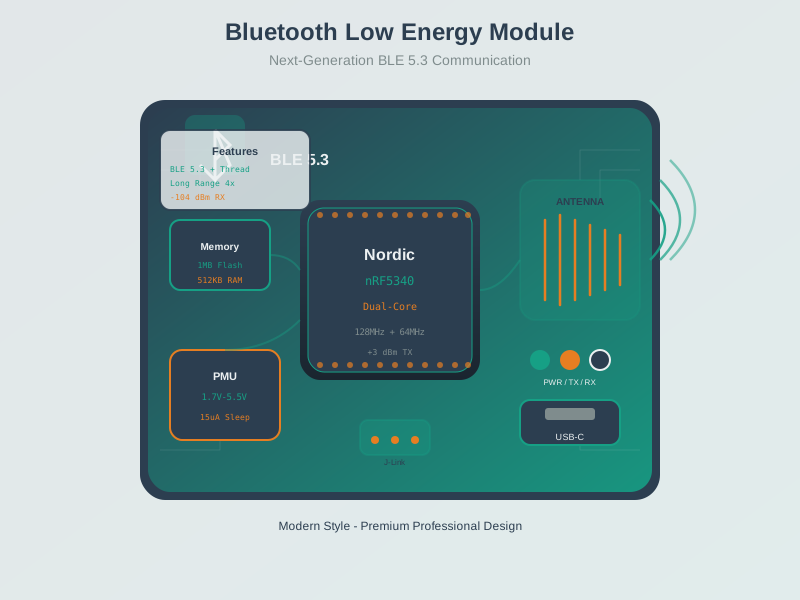
BLE modules integrate radio, processor, and antenna for easy integration into IoT device designs.
NoteVisual: BLE GATT Profile Implementation
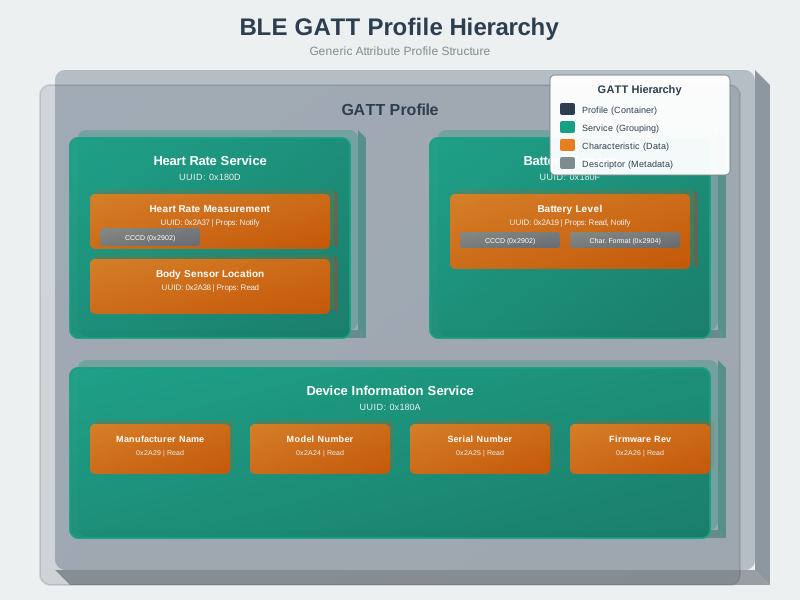
GATT implementation requires defining services and characteristics with appropriate properties for your application’s data model.
NoteVisual: BLE Connection Flow
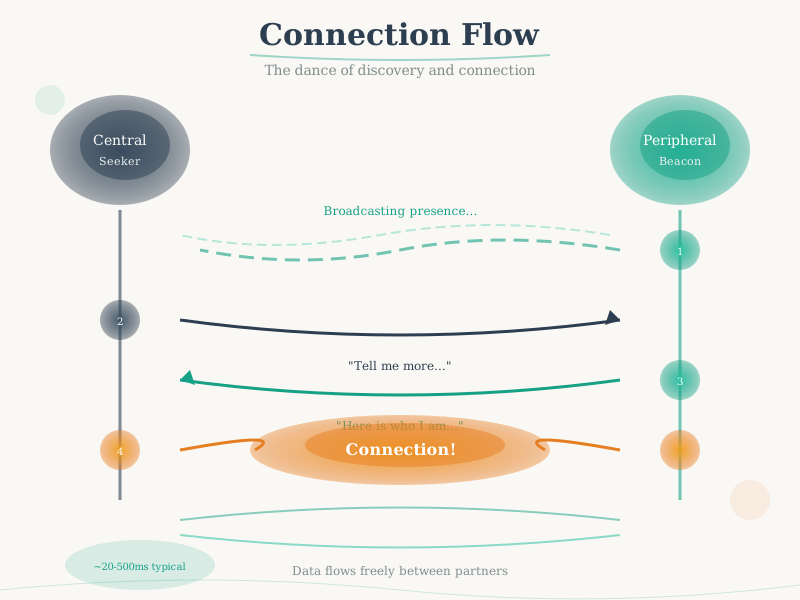
Understanding the connection flow helps optimize connection latency and power consumption in BLE applications.
NoteVisual: BLE Stack Architecture
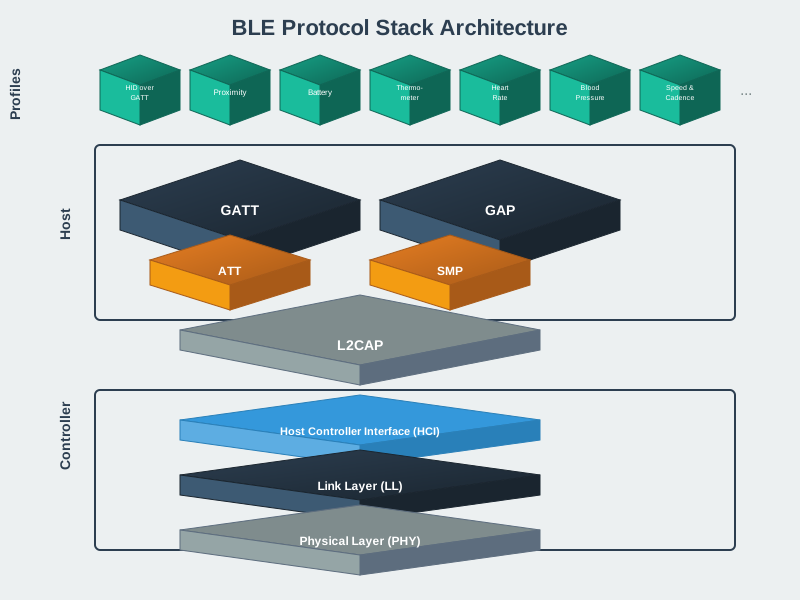
The BLE stack provides standardized interfaces for application developers to build interoperable devices.
NoteVisual: Bluetooth Serial Port Profile
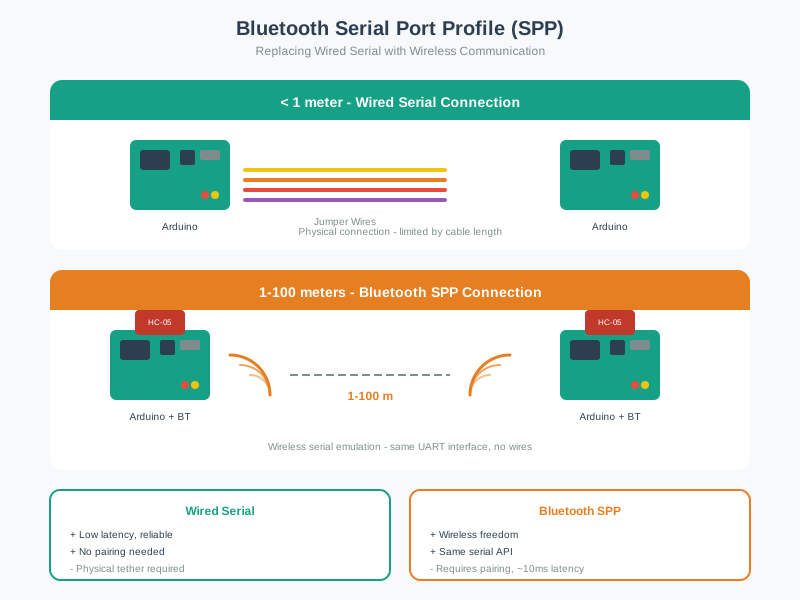
SPP enables legacy serial applications to communicate wirelessly, useful for debugging and configuration interfaces.
919.9 Summary
This chapter covered production Python BLE implementations:
- Scanner with Filtering: RSSI thresholds and name pattern matching for targeted device discovery
- GATT Explorer: Enumerating services and characteristics on connected devices
- Beacon Management: Parsing iBeacon and Eddystone advertisement formats
- Proximity Detection: Zone-based presence detection with exponential smoothing
- Power Optimization: Decision framework for connection intervals and advertising parameters
919.10 What’s Next
Continue to BLE Hands-On Labs for complete project implementations including heart rate monitors, environmental dashboards, indoor positioning systems, and mesh network simulations.