932 IEEE 802.15.4 Operation and Features
932.1 Learning Objectives
By the end of this section, you will be able to:
- Understand the technical specifications of IEEE 802.15.4 (data rates, frequencies, modulation)
- Analyze real-world power consumption and battery life calculations
- Use the interactive capacity calculator to design networks
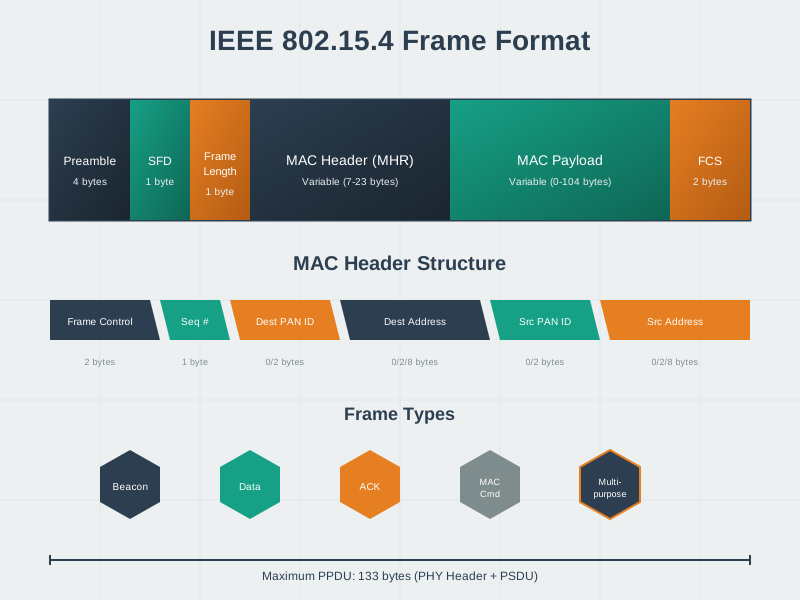
- Understand frame structure and its impact on application payload
932.2 Prerequisites
This chapter builds on IEEE 802.15.4 Overview and Protocol Stack. You should understand:
- The role of 802.15.4 as a PHY/MAC foundation
- The difference between FFD and RFD device types
- How Zigbee, Thread, and 6LoWPAN build on 802.15.4
932.3 Real-World Example: Smart Home Motion Sensor
Key Takeaway: IEEE 802.15.4’s 250 kbps data rate and ultra-low sleep current (5 uA) enable battery-powered sensors to operate for years while transmitting small packets (8-50 bytes) with excellent responsiveness (15 ms latency).
932.4 Features of IEEE 802.15.4
932.4.1 Technical Specifications
IEEE 802.15.4 is optimized for low-power, low-data-rate applications with several key features:
IEEE 802.15.4 Key Features:
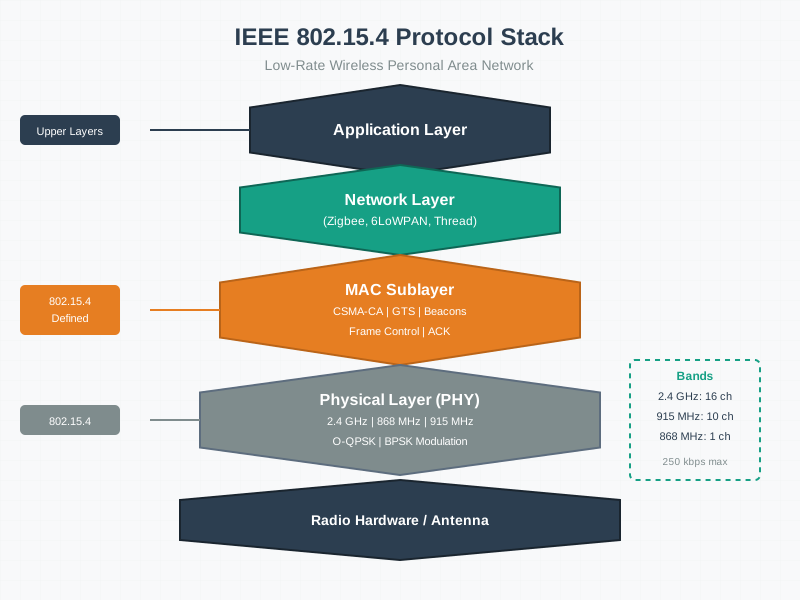
- Frequency Bands: 2.4 GHz (Worldwide), 868 MHz (Europe), 915 MHz (Americas)
- Modulation: DSSS (Direct Sequence Spread Spectrum), BPSK (Low Speed), O-QPSK (High Speed)
- Access Method: CSMA/CA, Collision Avoidance, Channel Sensing
- Power: <1% Duty Cycle, -3 dBm minimum, Years on Battery
- Range: 10-75m Standard, Up to 1000m Best Case
- Topology: Star, Mesh, Cluster Tree
932.4.2 Detailed Feature Analysis
932.5 Interactive: 802.15.4 Data Rate and Capacity Calculator
Use this tool to explore how PHY data rate, frame size, reporting frequency, and number of devices interact on an IEEE 802.15.4 channel. It gives an approximate channel utilization and suggests how many devices you can support before the medium becomes crowded.
NoteHow to Interpret the Results
- This calculator assumes one shared channel with ideal scheduling—it ignores CSMA/CA backoff, retransmissions, and beacons—so treat results as upper bounds.
- As average utilisation climbs above 30-40%, collisions and retries explode, which is why the table shows a conservative “devices supported at ~30% load” estimate.
- Try experimenting with:
- Smaller payloads (e.g., 10 bytes instead of 60) and less frequent reporting.
- Splitting traffic across multiple PANs/channels for very dense deployments.
- Comparing 2.4 GHz 250 kbps vs 20/40 kbps sub-GHz bands for the same application.
TipHands-On: Compare with Other Simulations
- Use this calculator to sanity-check 802.15.4 network designs before running detailed simulations.
- The same tool is available from the Simulation Playground as 802.15.4 Data Rate & Capacity, next to MQTT and LoRaWAN tools.
WarningCommon Misconception: “250 kbps Means I Can Send 250 Kilobits/Second”
The Myth: “IEEE 802.15.4 runs at 250 kbps, so 200 sensors sending 50 bytes/second (80 kbps total) should be fine—I’m only using 32% of capacity!”
Real-World Reality: A warehouse deployed exactly this configuration and saw: - 70% packet loss after 6 months of operation - 500ms+ latency (10x slower than expected) - Battery life dropped from 3 years to 4 months due to retry storms
Why the Math Was Wrong:
The student forgot that 250 kbps is the PHY layer raw data rate, not usable application throughput:
%%{init: {'theme': 'base', 'themeVariables': {'primaryColor': '#2C3E50', 'primaryTextColor': '#fff', 'primaryBorderColor': '#16A085', 'lineColor': '#16A085', 'secondaryColor': '#E67E22', 'tertiaryColor': '#7F8C8D'}}}%%
flowchart TD
    A["Raw PHY Capacity<br/><b>250 kbps</b><br/>(what datasheets advertise)"] -->|"/ 2"| B["After CSMA/CA Overhead<br/><b>125 kbps</b><br/>(listen-before-talk, backoffs, ACKs)"]
    B -->|"/ 2"| C["After Frame Overhead<br/><b>62 kbps</b><br/>(MAC headers, addressing, security)"]
    C -->|"x 30%"| D["Safe Operating Point<br/><b>18 kbps</b><br/>(avoid collision death spiral)"]

    D --> E["Approx 2,250 bytes/second<br/>Usable Application Data"]

    F["Actual Deployment<br/>200 sensors x 50 bytes/s<br/>= 10,000 bytes/s = <b>80 kbps</b>"] --> G["80 kbps > 18 kbps<br/><b>Network oversubscribed by 4.4x!</b>"]

    style A fill:#2C3E50,stroke:#16A085,stroke-width:2px,color:#fff
    style B fill:#16A085,stroke:#2C3E50,stroke-width:2px,color:#fff
    style C fill:#E67E22,stroke:#2C3E50,stroke-width:2px,color:#fff
    style D fill:#27ae60,stroke:#2C3E50,stroke-width:2px,color:#fff
    style E fill:#d4edda,stroke:#27ae60,stroke-width:2px,color:#000
    style F fill:#7F8C8D,stroke:#2C3E50,stroke-width:2px,color:#fff
    style G fill:#e74c3c,stroke:#2C3E50,stroke-width:3px,color:#fff
What Actually Happened: 1. Month 1-3: Network seems fine (low utilization periods) 2. Month 4: Collision rate increases as devices synchronize reporting 3. Month 5: CSMA/CA backoffs exponentially increase (2^4 = 16x longer waits) 4. Month 6: Retry storms—failed packets retry 3x each, consuming 4x more airtime, creating positive feedback loop of collisions
The Real Capacity Rule: - Physical layer: 250 kbps - Effective throughput: 50-75 kbps (with overhead) - Safe operating point: 15-25 kbps (30% channel utilization) - Rule of thumb: Assume 100 kbps effective / 10 = 10 kbps usable for dense networks
How to Fix It: 1. Reduce reporting rate: 50 bytes/s to 10 bytes/s per sensor (5x reduction) 2. Split into multiple PANs: 4 PANs x 50 sensors on different channels 3. Use event-driven reporting: Only transmit when values change >10% 4. Enable beacon mode with GTS: Coordinator allocates guaranteed time slots (eliminates collisions but requires synchronization overhead)
Verify Your Design with the Interactive Calculator: Use the 802.15.4 Data Rate & Capacity Calculator above to test your deployment before ordering hardware. Watch what happens when you: - Increase devices from 50 to 200 at the same reporting rate - Change payload from 20 to 80 bytes - Compare channel utilization at 30% (safe) vs 80% (disaster)
932.6 Knowledge Check
Test your understanding of fundamental concepts.
932.7 Visual Reference Gallery
Explore these AI-generated figures that illustrate IEEE 802.15.4 concepts and protocol architecture.
NoteIEEE 802.15.4 Protocol Stack
Note802.15.4 Frame Format
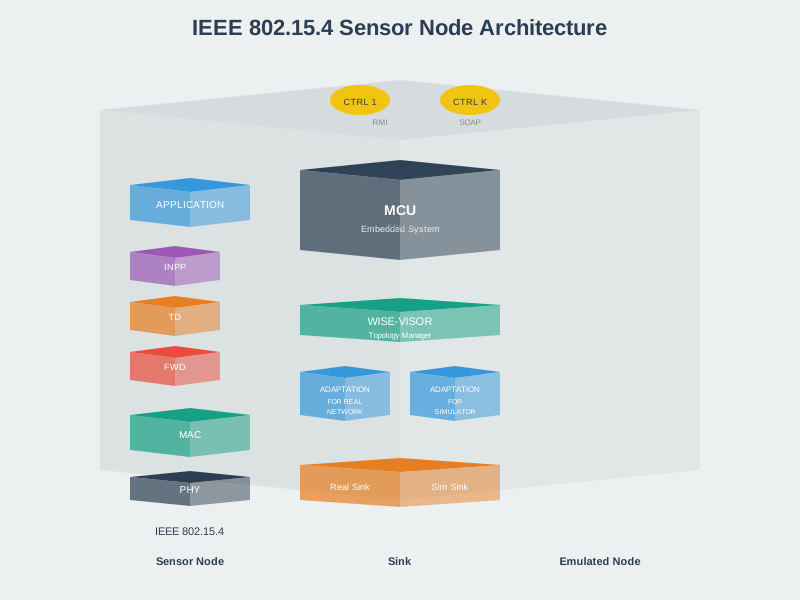
Note802.15.4 Sensor Node Architecture
932.8 What’s Next
Continue to IEEE 802.15.4 Coexistence and Channel Planning to learn about Wi-Fi interference, channel planning strategies, beacon vs non-beacon modes, and how to avoid the most common deployment failures.