1131 NB-IoT Introduction
Understanding Narrowband IoT for Beginners
1131.1 Learning Objectives
By the end of this chapter, you will be able to:
- Explain what NB-IoT is: Understand how Narrowband IoT extends cellular networks for low-power devices
- Identify NB-IoT use cases: Recognize scenarios where NB-IoT is the optimal technology choice
- Compare NB-IoT alternatives: Differentiate NB-IoT from LoRaWAN, Wi-Fi, and other cellular technologies
- Understand key concepts: Grasp narrowband spectrum, licensed spectrum, and power-saving basics
In one sentence: NB-IoT uses licensed cellular spectrum to deliver reliable, deep-indoor coverage with carrier-grade SLAs and 10+ year battery life.
Remember this rule: Choose NB-IoT over LoRaWAN when you need carrier-grade reliability, deep indoor penetration (basements, underground), and existing cellular infrastructure; choose LTE-M instead when your devices need mobility support or voice capability.
1131.2 What is NB-IoT? (Simple Explanation)
Analogy: NB-IoT is like using the regular postal service (cellular network) but for postcards (small IoT messages) instead of large packages (smartphones).
Simple explanation:
- NB-IoT uses existing cell towers (same as your phone)
- But optimized for sensors sending small amounts of data
- Extremely long battery life (10+ years)
- Works deep underground or in basements
- Requires cellular data plan from your carrier (like Verizon, AT&T)
Visual comparison:
Your smartphone (4G LTE):
Phone -> Cell Tower: "Download 100 MB video!"
Speed: 100 Mbps
Battery: 1 day
Cost: $50/month

NB-IoT sensor:
Sensor -> Cell Tower: "Temperature: 24C" (20 bytes)
Speed: 20-60 kbps (1000x slower, but who cares?)
Battery: 10 years
Cost: $1-2/year
1131.3 Real-World Examples
1131.3.1 Example 1: Smart Water Meter
Traditional approach (manual reading):
- Meter reader walks to every house
- Reads meter manually
- Cost: $5-10 per reading
- Frequency: Monthly

NB-IoT approach:
- Water meter has NB-IoT module
- Sends reading automatically daily
- Works from basement (great signal penetration)
- Cost: $2/year cellular plan
- Battery: 15 years (no maintenance)

Utility company ROI:
- 100,000 meters
- Manual: $5 x 100k x 12 months = $6M/year
- NB-IoT: $2 x 100k = $200k/year
Savings: $5.8M/year!
1131.3.2 Example 2: Parking Sensor
City deploys 5,000 parking sensors:

Why NB-IoT over Wi-Fi/LoRaWAN?

Wi-Fi:
- Range: 100m (need Wi-Fi AP every block)
- Infrastructure: $500 x 50 APs = $25,000
- Maintenance: High

LoRaWAN:
- Range: 2-10 km (need gateways)
- Infrastructure: $300 x 3 gateways = $900
- No monthly fees

NB-IoT:
- Uses existing cell towers (no infrastructure)
- Coverage: Citywide (99%+ coverage)
- Reliability: Carrier SLA
- Monthly fee: $1-2/sensor

Cost comparison (5 years):
- Wi-Fi: $25k + maintenance = $40k+
- LoRaWAN: $900 upfront = $900
- NB-IoT: 5,000 x $2 x 5 years = $50,000

Verdict: LoRaWAN cheapest, NB-IoT most reliable
1131.4 NB-IoT vs Other IoT Technologies
Simple comparison:
| Technology | Best Analogy | Best For | Monthly Cost |
|---|---|---|---|
| NB-IoT | Postal service (reliable, everywhere) | City-wide deployments, deep coverage | $1-2/device |
| LoRaWAN | Own delivery trucks (you control) | Private networks, rural areas | $0 (you own infrastructure) |
| Wi-Fi | Home mailbox (short range) | Indoor, near router | $0 (uses your Wi-Fi) |
| Cellular 4G | Express delivery (fast, expensive) | Cars, cameras, real-time | $10-30/device |
When to choose NB-IoT:
Good for:
- City-wide deployments (parking, utilities)
- Deep indoor coverage needed (basements, underground)
- Don’t want to manage infrastructure (gateways)
- Need carrier SLA (guaranteed uptime)
- Infrequent small messages (daily readings)
NOT good for:
- Real-time applications (10s latency typical)
- Large data transfers (cameras, video)
- Cost-sensitive projects with 1000s of devices
- Areas without cellular coverage
- Applications needing free connectivity
NB-IoT is like having a super-reliable mailman who can deliver tiny messages even to the deepest basement!
1131.4.1 The Sensor Squad Adventure: The Underground Water Mystery
Deep beneath the city streets, something exciting was happening! The Sensor Squad had been asked to help monitor the city’s underground water pipes - but there was a BIG problem. The pipes were buried so deep underground that regular wireless signals couldn’t reach them!
“My Wi-Fi signal can’t get through all that dirt and concrete!” worried Sammy the Sensor, who was measuring water flow deep in a tunnel. Lila the LED blinked nervously in the darkness. Max the Microcontroller scratched his circuit board head, thinking hard. “We need a signal that can travel through walls and underground like a superhero!”
That’s when Bella the Battery had a brilliant idea. “I heard about something called NB-IoT! It uses the same cell towers as phones, but it’s specially designed to send tiny messages from places like basements and underground tunnels. The signal is super strong - it can reach us even down here! And the best part? I can sleep most of the day and only wake up to send one small message. That means I can last for 10 whole years without being changed!” The team cheered! Now Sammy could send water readings once a day, and the city workers would know right away if any pipes had leaks - all thanks to NB-IoT’s super-penetrating signal!
1131.4.2 Key Words for Kids
| Word | What It Means |
|---|---|
| NB-IoT | Narrowband Internet of Things - a special way for sensors to send tiny messages using phone towers, even from deep underground |
| Cell Tower | A tall tower with antennas that helps phones (and NB-IoT devices) talk to the internet - like a really tall friend passing notes for you |
| Power Saving Mode | When a sensor takes a long nap between messages to save battery - like sleeping all night and only waking up for breakfast |
| Coverage | How far and how deep a signal can reach - NB-IoT has great coverage, even through thick walls! |
1131.4.3 Try This at Home!
The Signal Strength Challenge: Get a small radio or a phone with a weak signal. Walk around your house and find spots where the signal is strongest and weakest. Try the basement, a closet, or behind thick walls. Notice how signals get weaker when they have to travel through obstacles! NB-IoT was designed to be extra strong so it can still work in those hard-to-reach places. You can even make a “signal map” of your house by marking where reception is good (green) and bad (red). This is exactly what engineers do when planning where to put IoT sensors!
1131.5 Three Key NB-IoT Concepts
1131.5.1 1. Narrowband = Using Only a Tiny Slice of Spectrum
Simple explanation: Instead of using the full cellular highway, NB-IoT uses just one tiny lane.

This diagram shows the three NB-IoT deployment modes: Standalone (dedicated spectrum), In-Band (within LTE carrier), and Guard-Band (using LTE guard bands), each offering different trade-offs between coverage and spectrum efficiency.
1131.5.2 2. Licensed Spectrum = You Pay for Guaranteed Quality
Unlicensed (LoRaWAN, Wi-Fi):
Licensed (NB-IoT):
1131.5.3 3. Power Saving Modes = Sleep for Years
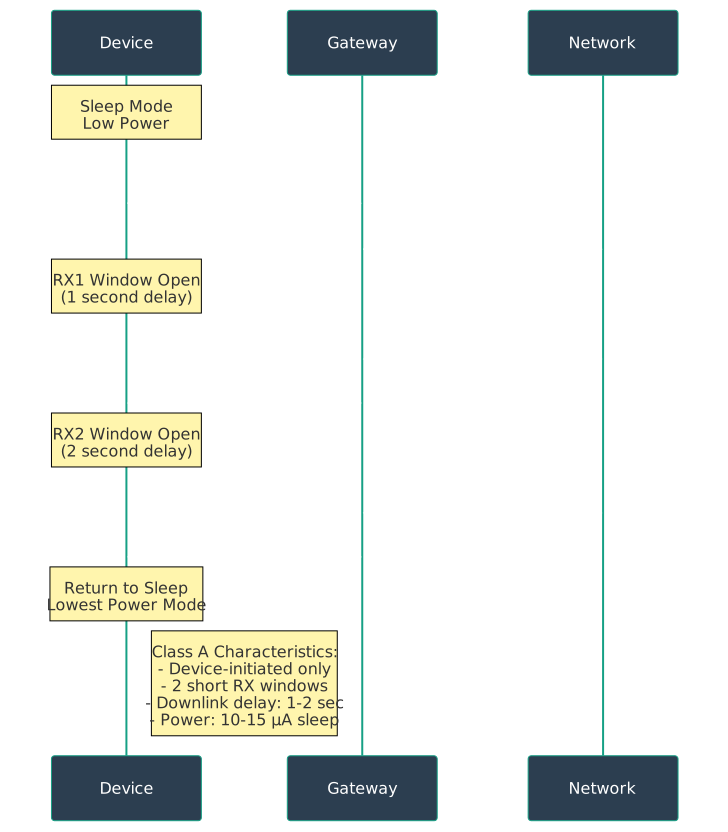
NB-IoT has two special modes to extend battery life:
| Mode | What It Does | Battery Impact | Example |
|---|---|---|---|
| PSM (Power Saving Mode) | Deep sleep, unreachable | 10+ years | Water meter (daily reading) |
| eDRX (Extended DRX) | Sleep but wake periodically | 2-5 years | Smart tracker (hourly check-in) |
| Connected (Always on) | No sleep, always listening | Days/weeks | Real-time monitoring |
Visual explanation:
PSM (Power Saving Mode):
Time: 0s    Send data -> Network says "Sleep for 24 hours"
Time: 1s-24h  DEEP SLEEP (10uA, unreachable)
Time: 24h     Wake up -> Send data -> Sleep again

Battery life: 10-15 years

eDRX (Extended Discontinuous Reception):
Time: 0s     Send data
Time: 1-10min  Sleep but wake every 10 minutes to check for messages
Time: 10min    Wake, check if server has message, go back to sleep

Battery life: 2-5 years (acceptable if need downlink)

Always Connected:
Time: 0s-infinity   Always listening (like your phone)
Battery life: Days to weeks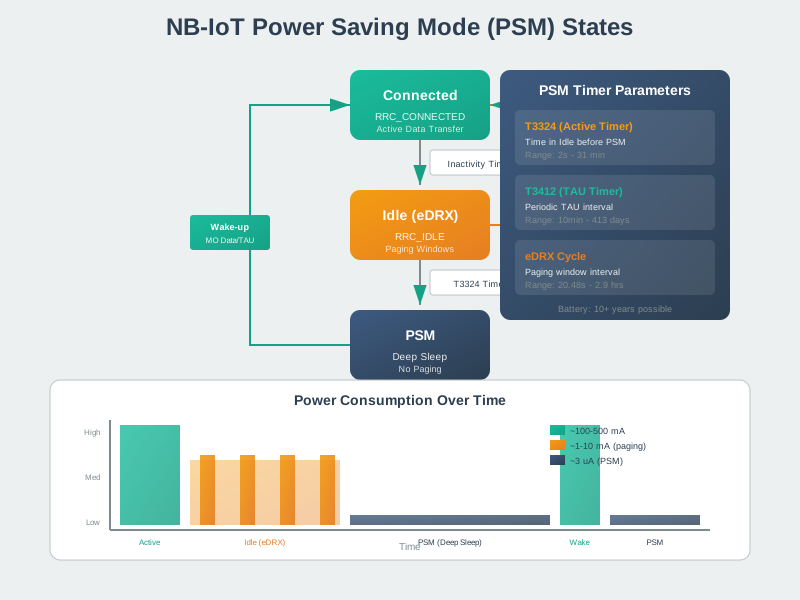

1131.6 Common Beginner Questions
1131.6.1 Q: Do I need to buy a SIM card for NB-IoT?
A: Yes! NB-IoT uses cellular networks, so you need:
- NB-IoT compatible SIM card from carrier (Verizon, AT&T, T-Mobile, etc.)
- Data plan (typically $1-5 per device per month)
- Some carriers offer “IoT SIM” plans with pooled data
Example pricing:
- AT&T IoT plan: $2/device/month for up to 100 KB/month
- Verizon ThingSpace: $1.50/device/month
- 1NCE (EU): 10 EUR for 10 years (one-time payment)
1131.6.2 Q: What’s the difference between NB-IoT and LTE-M?
A: Both are cellular IoT, but different strengths:
| Feature | NB-IoT | LTE-M |
|---|---|---|
| Speed | 20-60 kbps (slower) | 1 Mbps (faster) |
| Coverage | +20 dB (better indoors) | +15 dB (good) |
| Battery | 10+ years | 5-10 years |
| Latency | 10 seconds | 10-100 ms |
| Mobility | Stationary only | Supports mobility (cars) |
| Voice | No | Yes (VoLTE) |
| Best for | Stationary sensors (parking, utilities) | Mobile trackers, wearables |
Simple rule:
- Need best battery/coverage + stationary -> NB-IoT
- Need faster/mobile + okay battery -> LTE-M
1131.6.3 Q: Can NB-IoT work in rural areas?
A: Depends on cellular coverage:
Good news:
- If you have cell phone signal, NB-IoT likely works
- NB-IoT has +20 dB better coverage than regular 4G
- Can work in places where your phone doesn’t
Reality check:
Coverage map check:
- Visit carrier’s website (Verizon, AT&T)
- Search for “NB-IoT coverage map”
- Verify your deployment area has coverage
The Misconception: If you have cellular coverage, NB-IoT will work.
Why It’s Wrong:
- NB-IoT uses different frequencies than voice/data LTE
- Requires carrier deployment (not automatic)
- Coverage maps differ from regular LTE
- In-building penetration is better, but outdoor may have gaps
- Roaming support varies by carrier
Real-World Example:
- Fleet tracking company tests NB-IoT for truck monitoring
- LTE coverage: 98% of routes
- NB-IoT coverage: 65% of routes (carrier only deployed in urban areas)
- Trucks in rural areas: No connectivity
- Solution: Dual-mode LTE-M + NB-IoT module
The Correct Understanding:
- NB-IoT coverage does not equal LTE coverage
- Check carrier’s specific NB-IoT coverage map
- Consider LTE-M for mobile applications (better handoff)
- Dual-mode modules provide best coverage
- Test in actual deployment locations
Always verify NB-IoT coverage specifically, don’t assume from cellular maps.
1131.6.4 Q: How much data can I send with NB-IoT?
A: Designed for small, infrequent messages:
Typical limits:
- Data rate: 20-60 kbps (slow!)
- Latency: 1-10 seconds
- Payload: Best for less than 1 KB per message
Real-world examples:
Good fit:
- Temperature reading: 10 bytes
- Parking sensor status: 5 bytes
- Water meter reading: 20 bytes
- GPS location: 40 bytes

Frequency: Once per hour to once per day
Monthly data: less than 10 KB per device

Bad fit:
- Video stream: Mbps required
- Firmware update: 500 KB (would take 1+ hour!)
- Real-time tracking: Latency too high
- High-frequency data: Cost adds up
1131.7 Self-Check: Are You Ready?
Question: A utility company wants to monitor 50,000 water meters spread across a city. Each meter sends a daily reading of approximately 30 bytes. Should they use NB-IoT, LoRaWAN, or Wi-Fi?
Click to see the answer
Answer: NB-IoT (best choice for this scenario)
Why NB-IoT is ideal:
Coverage analysis:
City area: 100 km squared
Meters located in:
- 30% basements (deep indoor)
- 50% ground floor
- 20% outdoor street locations

Coverage requirements:
- Must work in basements (+20 dB penetration)
- Citywide deployment
- 99.9% reliability (billing-grade data)
NB-IoT Advantages:
- Zero infrastructure deployment (uses existing towers)
- Works in all basements (164 dB MCL)
- Carrier SLA (99.9% uptime)
- Maintenance-free
- Scalable (add 1 meter or 10,000)
LoRaWAN Alternative:
- Would require 10-15 gateways for city coverage
- Basement coverage may have gaps
- Lower cost but requires technical staff
Wi-Fi: Not Viable
- Would need 2,000+ access points
- Poor basement penetration
- Very high maintenance
Recommendation: NB-IoT for utilities requiring billing-grade reliability and basement coverage.
1131.8 Summary
- NB-IoT is cellular IoT technology using licensed spectrum, optimized for small, infrequent messages with 10+ year battery life
- Licensed spectrum provides interference protection and carrier-grade reliability (99.5%+ SLA)
- Power-saving modes (PSM and eDRX) enable ultra-low power consumption during sleep periods
- Deep indoor coverage (+20 dB vs regular LTE) makes NB-IoT ideal for basements, underground, and building interiors
- Best for: Smart metering, parking sensors, asset tracking, and any stationary IoT application requiring reliable, low-maintenance connectivity
1131.9 What’s Next
Continue your NB-IoT learning journey with these related topics:
- NB-IoT Technical Specifications - Deep dive into bandwidth, data rates, deployment modes, and protocol details
- NB-IoT Architecture - Understand the CIoT architecture and how NB-IoT integrates with cellular networks
- NB-IoT Applications and Use Cases - Explore real-world deployments and worked examples
- NB-IoT Power Optimization - Master PSM and eDRX for maximum battery life