%%{init: {'theme': 'base', 'themeVariables': { 'primaryColor': '#2C3E50', 'primaryTextColor': '#fff', 'primaryBorderColor': '#16A085', 'lineColor': '#16A085', 'secondaryColor': '#E67E22', 'tertiaryColor': '#7F8C8D'}}}%%
graph LR
subgraph QoS0["QoS 0: Fire and Forget"]
Q0_1["Publish"] --> Q0_2["Done"]
Q0_N["No ACK, may be lost"]
end
subgraph QoS1["QoS 1: At Least Once"]
Q1_1["Publish"] --> Q1_2["PUBACK"]
Q1_3["Retry until ACK"]
Q1_N["May have duplicates"]
end
subgraph QoS2["QoS 2: Exactly Once"]
Q2_1["Publish"] --> Q2_2["PUBREC"]
Q2_2 --> Q2_3["PUBREL"]
Q2_3 --> Q2_4["PUBCOMP"]
Q2_N["4-way handshake"]
end
style QoS0 fill:#7F8C8D,stroke:#2C3E50
style QoS1 fill:#E67E22,stroke:#2C3E50
style QoS2 fill:#16A085,stroke:#2C3E50
1193 MQTT QoS Fundamentals
1193.1 Learning Objectives
By the end of this chapter, you will be able to:
- Understand QoS Concepts: Explain what Quality of Service means in MQTT messaging
- Differentiate QoS Levels: Distinguish between QoS 0, 1, and 2 using simple analogies
- Grasp Session Basics: Understand the difference between clean and persistent sessions
- Apply Retained Messages: Know when to use retained messages for device status
- Make Initial QoS Choices: Select appropriate QoS levels for common IoT scenarios
NoteRelated Chapters
Deep Dives: - MQTT QoS Levels - Technical QoS handshake details - MQTT Session Management - Session persistence and security - MQTT QoS Worked Examples - Real-world QoS selection
Foundations: - MQTT Fundamentals - Basic MQTT architecture - MQTT Comprehensive Review - Advanced patterns
Hands-On: - MQTT Labs and Implementation - Build MQTT projects
1193.2 What is QoS (Quality of Service)?
Analogy: QoS is like different shipping methods when sending a package.
Three QoS levels = Three shipping methods:
| QoS Level | Shipping Analogy | Real Meaning | When to Use |
|---|---|---|---|
| QoS 0 | Drop in mailbox | Fire and forget (maybe lost) | Temperature readings every 10 sec |
| QoS 1 | Certified mail | At least once (signature required, might get duplicate) | Door sensor “opened” alert |
| QoS 2 | Registered mail | Exactly once (signed tracking, no duplicates) | Smart lock “UNLOCK” command |
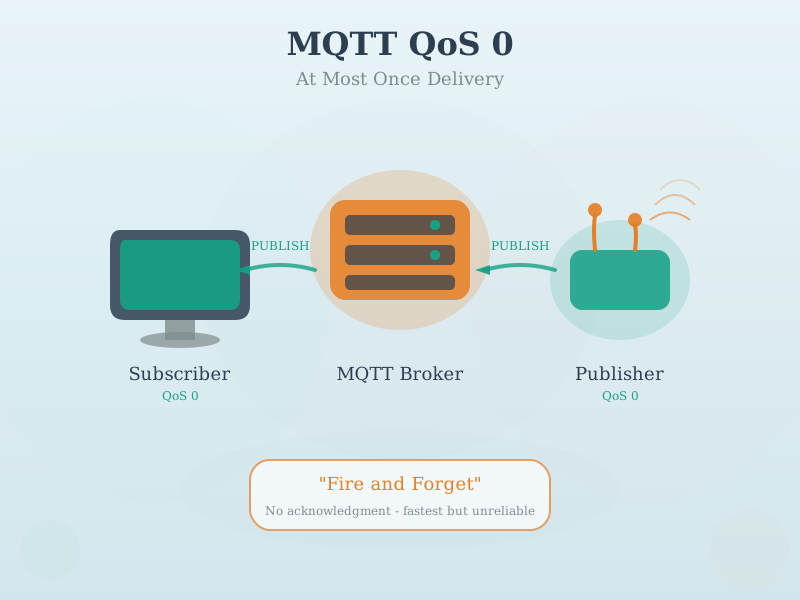
1193.3 QoS 0: Fire and Forget
Simple explanation:
Sensor -> Broker: "Temperature: 24C"
Broker: (receives it... or doesn't, no confirmation)
Sensor: (doesn't care, sends next reading in 10 seconds anyway)- Fastest (no waiting for acknowledgment)
- Lowest battery usage (minimal radio time)
- Might be lost (no delivery guarantee)
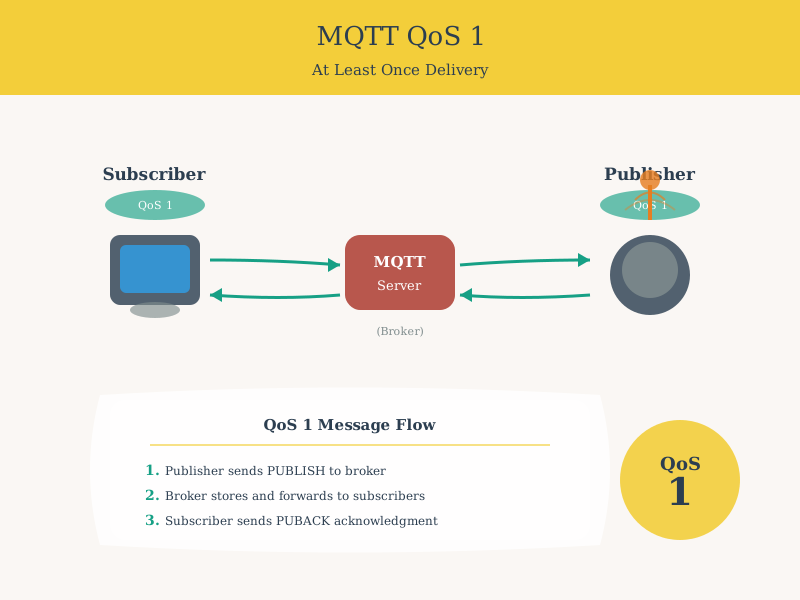
1193.4 QoS 1: At Least Once
Simple explanation:
Sensor -> Broker: "Door opened!"
Broker -> Sensor: "Got it! (PUBACK)"
Sensor: "OK, done"

(If PUBACK is lost, sensor retries)
Sensor -> Broker: "Door opened!" (again)
Broker: "Got it again!" (duplicate received)- Guaranteed delivery (will retry until acknowledged)
- Might get duplicates (if acknowledgment is lost)
- Slower (waits for PUBACK)
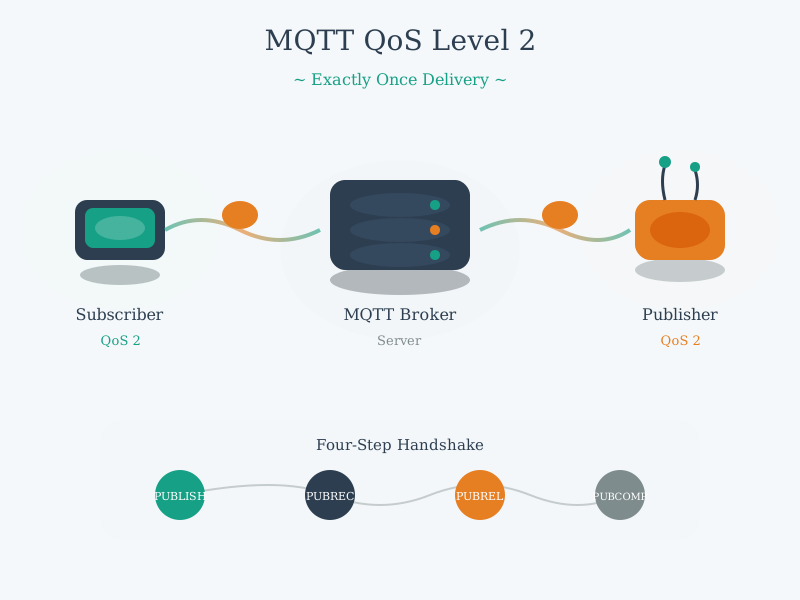
1193.5 QoS 2: Exactly Once
Simple explanation:
Sensor -> Broker: "UNLOCK door!"
Broker -> Sensor: "Received (PUBREC)"
Sensor -> Broker: "Release it (PUBREL)"
Broker -> Sensor: "Complete! (PUBCOMP)"

Four-way handshake ensures exactly one delivery- Guaranteed exactly once (no duplicates, no losses)
- Slowest (4-way handshake)
- Highest battery usage (most radio time)
TipMinimum Viable Understanding: QoS Semantics
Core Concept: QoS 0 delivers at most once (may lose messages), QoS 1 delivers at least once (may duplicate), QoS 2 delivers exactly once (no loss, no duplicates) - each level adds handshake overhead for stronger guarantees. Why It Matters: Choosing the wrong QoS wastes battery life (QoS 2 for temperature readings) or loses critical data (QoS 0 for door unlock commands) - this single decision can determine whether your IoT deployment succeeds or fails. Key Takeaway: Use QoS 0 for high-frequency telemetry where the next reading supersedes any lost one, QoS 1 for important alerts and state changes, and reserve QoS 2 only for critical commands where duplicates would cause harm (like financial transactions or actuator commands).
1193.6 Real-World Examples
Scenario 1: Temperature Sensor (Use QoS 0)
10:00:00 -> Sensor: "Temp: 24.0C" (QoS 0)
10:00:10 -> Sensor: "Temp: 24.1C" (QoS 0)
10:00:20 -> Sensor: "Temp: 24.1C" (QoS 0) <- This one gets lost!
10:00:30 -> Sensor: "Temp: 24.2C" (QoS 0)

Dashboard shows: 24.0, 24.1, 24.2
Missing one reading? No problem! Next one comes in 10 seconds.
Scenario 2: Motion Sensor Alert (Use QoS 1)
Motion detected!
Sensor -> Broker: "Motion detected in garage!" (QoS 1)
Network glitch... PUBACK lost...
Sensor waits 5 seconds, no ACK
Sensor -> Broker: "Motion detected in garage!" (retry, QoS 1)
Broker: "PUBACK" (acknowledges)

Result: Alert delivered (maybe duplicate, but that's OK)
Scenario 3: Smart Lock Command (Use QoS 2)
User presses "Unlock" in app
App -> Broker: "UNLOCK door #1" (QoS 2)
Broker -> Lock: "UNLOCK door #1" (QoS 2)

4-way handshake ensures lock receives exactly once
Lock unlocks (never unlocks twice, never missed)
1193.7 What are Sessions? (Clean vs Persistent)
Analogy: Think of sessions as hotel check-in preferences.
1193.7.1 Clean Session (true)
Guest: "I want a fresh room, no baggage from last visit"
Hotel: "Sure! Starting fresh."

(Guest leaves)
Hotel: "They checked out, throw away their stuff"
MQTT Translation: - Client connects with Clean Session = true - Broker forgets everything when client disconnects - No stored messages, no subscriptions remembered - Like checking into a hotel with no history
When to use: Temporary connections, testing, devices that don’t care about missed messages
1193.7.2 Persistent Session (false)
Guest: "I'm a regular, keep my preferences!"
Hotel: "Welcome back! We saved your room setup, mail, messages"

(Guest leaves for a week)
Hotel: "Keeping their stuff safe..."

(Guest returns)
Hotel: "Here are the 15 letters that arrived while you were gone"
MQTT Translation: - Client connects with Clean Session = false - Broker remembers subscriptions even after disconnect - Broker stores messages sent while client was offline (if QoS 1 or 2) - Client gets “catch-up” messages when reconnecting
When to use: Devices with intermittent connectivity, battery-powered sensors that sleep, critical subscribers that can’t miss messages
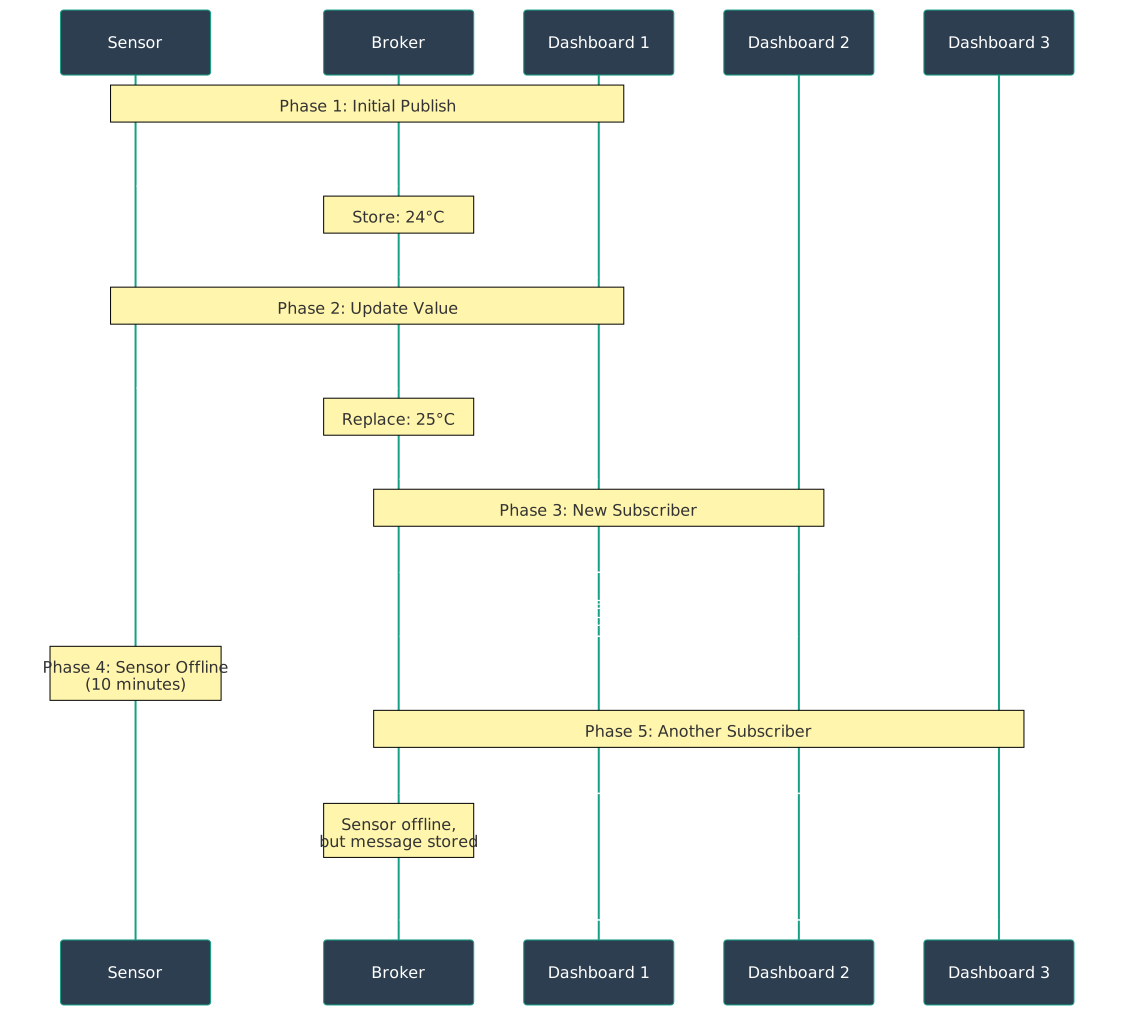
1193.8 Retained Messages: Last-Known State
MQTT retained messages allow the broker to store the most recent message on a topic and deliver it immediately to new subscribers:
NoteAlternative View: QoS Level Comparison
This diagram compares the three MQTT QoS levels: QoS 0 (no acknowledgment), QoS 1 (single ACK with possible duplicates), and QoS 2 (4-way handshake for exactly-once delivery).
1193.9 Clean Session Comparison
| Feature | Clean Session = true | Clean Session = false (Persistent) |
|---|---|---|
| Subscriptions | Lost on disconnect | Saved by broker |
| Offline messages | Not stored | Stored (if QoS 1/2) |
| Client ID | Can be random | Must be unique |
| Battery impact | Lower (less data) | Higher (receives catch-up) |
| Use case | Temperature sensor | Security camera with intermittent Wi-Fi |
TipTradeoff: Persistent Session vs Clean Session
Decision context: When configuring an MQTT client, you must choose whether the broker should remember client state between connections.
| Factor | Persistent Session | Clean Session |
|---|---|---|
| Memory usage | Higher (broker stores state) | Lower (no state stored) |
| Reconnect speed | Faster (subscriptions restored) | Slower (must resubscribe) |
| Offline messages | Queued (QoS 1/2) | Lost |
| Client ID | Must be unique and stable | Can be random/ephemeral |
| Broker scalability | Lower (state per client) | Higher (stateless) |
| Battery impact | Higher (catch-up data on reconnect) | Lower (fresh start) |
Choose Persistent Session when:
- Device has intermittent connectivity (sleep cycles, mobile networks)
- Cannot afford to miss messages during disconnection
- Subscribes to topics and needs subscriptions restored automatically
- Receiving critical commands (e.g., firmware updates, emergency alerts)
Choose Clean Session when:
- Device only publishes (no subscriptions to maintain)
- Frequent sensor readings where missing a few is acceptable
- Testing or development environments
- Battery-powered devices that prioritize power savings over completeness
- High-scale deployments where broker memory is constrained
Default recommendation: Clean Session unless your device subscribes to topics and cannot miss messages during offline periods.
1193.10 Quick Self-Check
Q: You have a battery-powered door sensor that: - Sleeps for 10 minutes to save battery - Wakes up, connects to broker, publishes “status: OK” - Disconnects and goes back to sleep - Someone subscribes to see door sensor status while sensor is asleep
Should you use: - A) QoS 0, Clean Session = true - B) QoS 1, Clean Session = true - C) QoS 0, Clean Session = false - D) QoS 1, Clean Session = false
Click to see the answer
Answer: B) QoS 1, Clean Session = true
Analysis:
QoS Level: - QoS 1 is correct - “status: OK” is important (want delivery confirmation) - If message is lost, subscriber doesn’t know sensor is alive - QoS 1 ensures broker receives it - Possible duplicates are OK (idempotent message)
- QoS 0 is risky
- Message might be lost
- Subscriber never knows if sensor is working
- QoS 2 is overkill
- “status: OK” duplicates are harmless
- Wastes battery with 4-way handshake
Clean Session: - Clean Session = true is correct - Sensor doesn’t subscribe to anything (only publishes) - Sensor doesn’t care about messages from when it was offline - Saves broker memory (doesn’t store session state)
- Clean Session = false is unnecessary
- Sensor isn’t subscribing, so no benefit from saved subscriptions
- Broker wastes memory storing empty session
Power consumption comparison:
QoS 0, Clean=true:  10 mA x 100ms = 1 mAh per wake cycle
QoS 1, Clean=true:  10 mA x 150ms = 1.5 mAh per wake cycle (Best balance)
QoS 1, Clean=false: 10 mA x 200ms = 2 mAh per wake cycle
QoS 2, Clean=false: 10 mA x 400ms = 4 mAh per wake cycle
What about the subscriber getting the status?
Separate concern: Use Retained Messages!
// Door sensor publishes with QoS 1 AND retain flag
mqttClient.publish("door/sensor1/status", "OK", 1, true);
//                   topic                  msg    QoS  retain

// Now when subscriber connects (even if sensor is asleep):
// Broker immediately sends retained message: "status: OK"
Optimal configuration: - Sensor: QoS 1, Clean Session = true, Retain = true - Subscriber: QoS 0, Clean Session = true (just wants current status)
Battery life: - With QoS 0: ~200 days on 1000 mAh battery - With QoS 1: ~133 days on 1000 mAh battery (Acceptable trade-off) - With QoS 2: ~50 days on 1000 mAh battery (Too short)
Pro tip: For battery-powered sensors, use QoS 1 + Retained + Clean Session = true. This ensures reliable delivery without the overhead of persistent sessions.
1193.11 Session Management: Clean vs Persistent
Understanding MQTT session behavior is critical for reliable IoT deployments, especially for devices with intermittent connectivity:

1193.12 Summary
This chapter introduced the fundamentals of MQTT Quality of Service:
- QoS 0 (At Most Once): Fire-and-forget delivery with no acknowledgment, fastest and most battery-efficient but messages may be lost
- QoS 1 (At Least Once): Acknowledged delivery ensuring messages arrive but may create duplicates if acknowledgments are lost
- QoS 2 (Exactly Once): Four-way handshake guaranteeing single delivery, slowest but essential for critical commands
- Clean Sessions: Temporary connections where broker forgets everything on disconnect, ideal for simple publishers
- Persistent Sessions: Broker remembers subscriptions and queues messages for offline clients, essential for command receivers
- Retained Messages: Broker stores last message and delivers to new subscribers immediately, perfect for device status
1193.13 What’s Next
The next chapter, MQTT QoS Levels, explores the technical details of each QoS level including message flow diagrams, handshake sequences, battery impact calculations, and interactive visualizations to help you select the optimal QoS for your specific use cases.